dsh-miniflux-digest
wjloven/dsh-miniflux-digest
在 DeepSeek Harness 里用三栏面板读 Miniflux(订阅源、文章列表、正文),并让助手在同一账号上生成未读速览、按分类写简报、读全文、标已读或收藏。需要你自己的 Miniflux 服务(2.0 及以上,批量收藏需 2.3.2)和 API 令牌,令牌保存在 Harness 的凭据管理器里,也可用环境变量 MINIFLUX_BASE_URL、MINIFLUX_API_TOKEN。
安装
dsh plugin --profile web add github:wjloven/dsh-miniflux-digestREADME
Miniflux Digest
A desktop reader and AI digest plugin for Miniflux inside DeepSeek Harness.
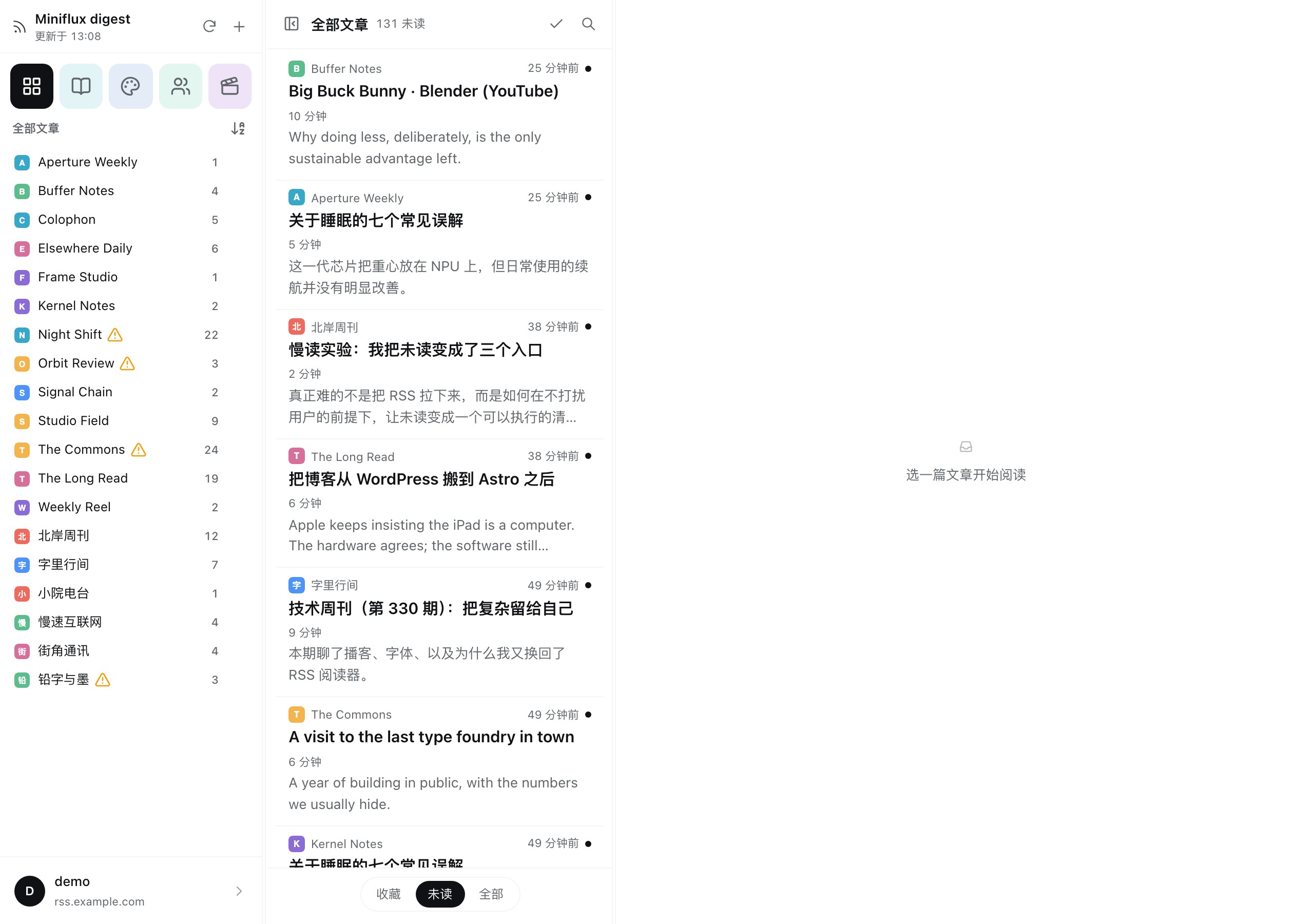
Bring your Miniflux subscriptions directly into DeepSeek Harness. Miniflux Digest provides a dedicated, distraction-free three-column reading workspace—skim incoming feeds, immerse yourself in long-form articles, and let your AI assistant synthesize daily digests, extract insights, or recommend key readings without context switching.
Screenshots
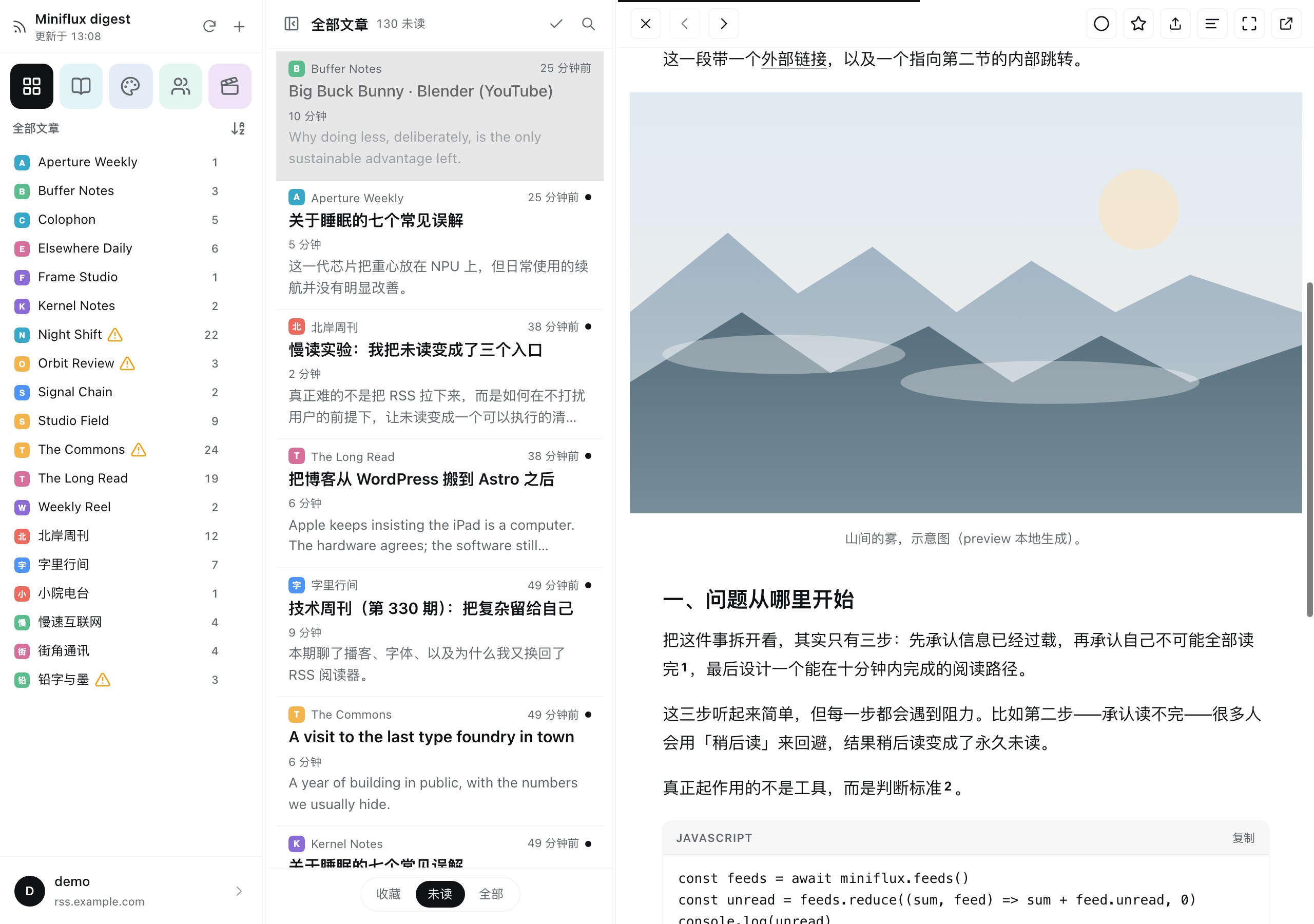
| Reading View | Paper Texture |
|---|---|
 |  |
| Dark Mode | Media & Code |
|---|---|
 |  |
| In-Place Footnotes | Settings & Appearance |
|---|---|
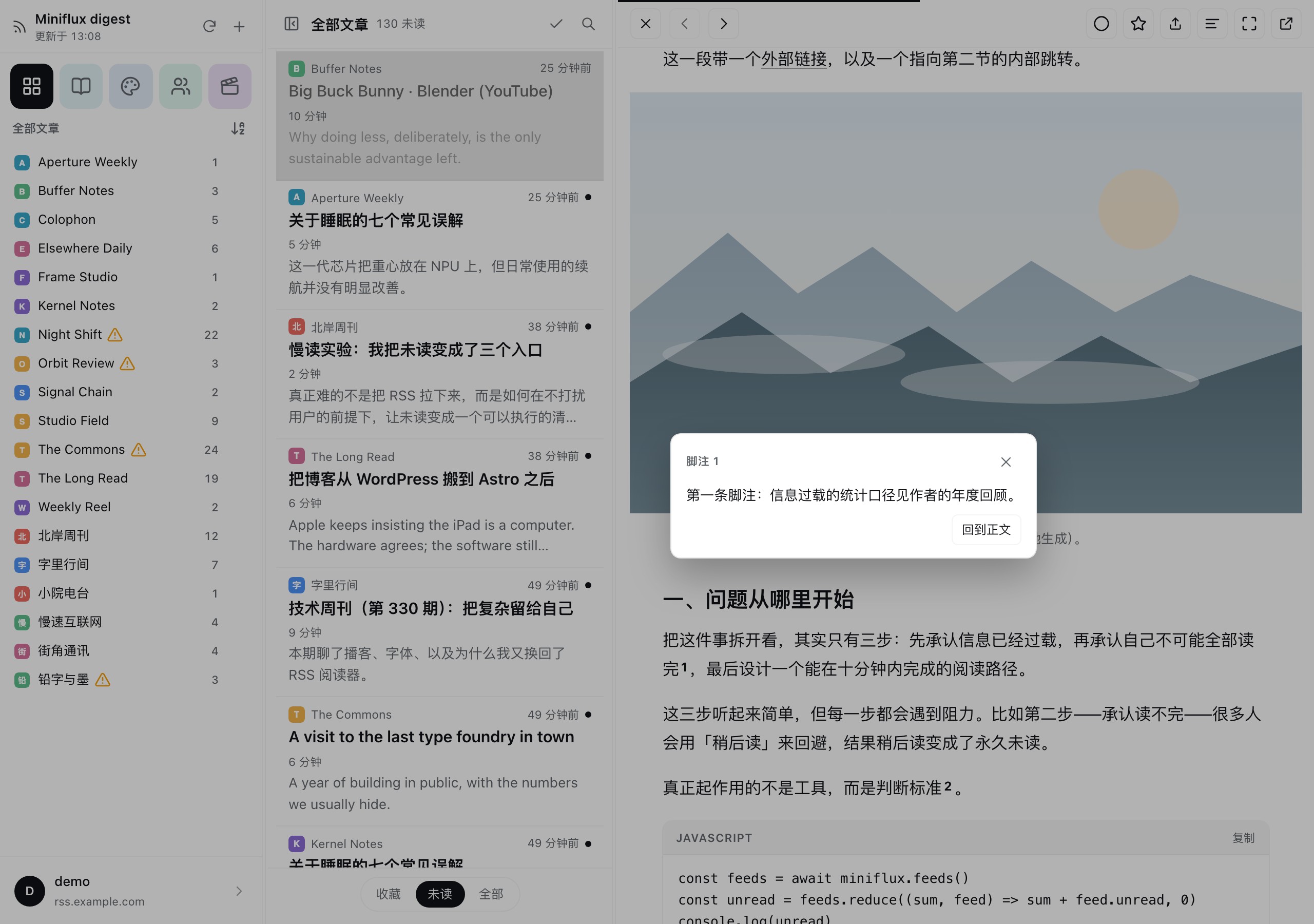 | 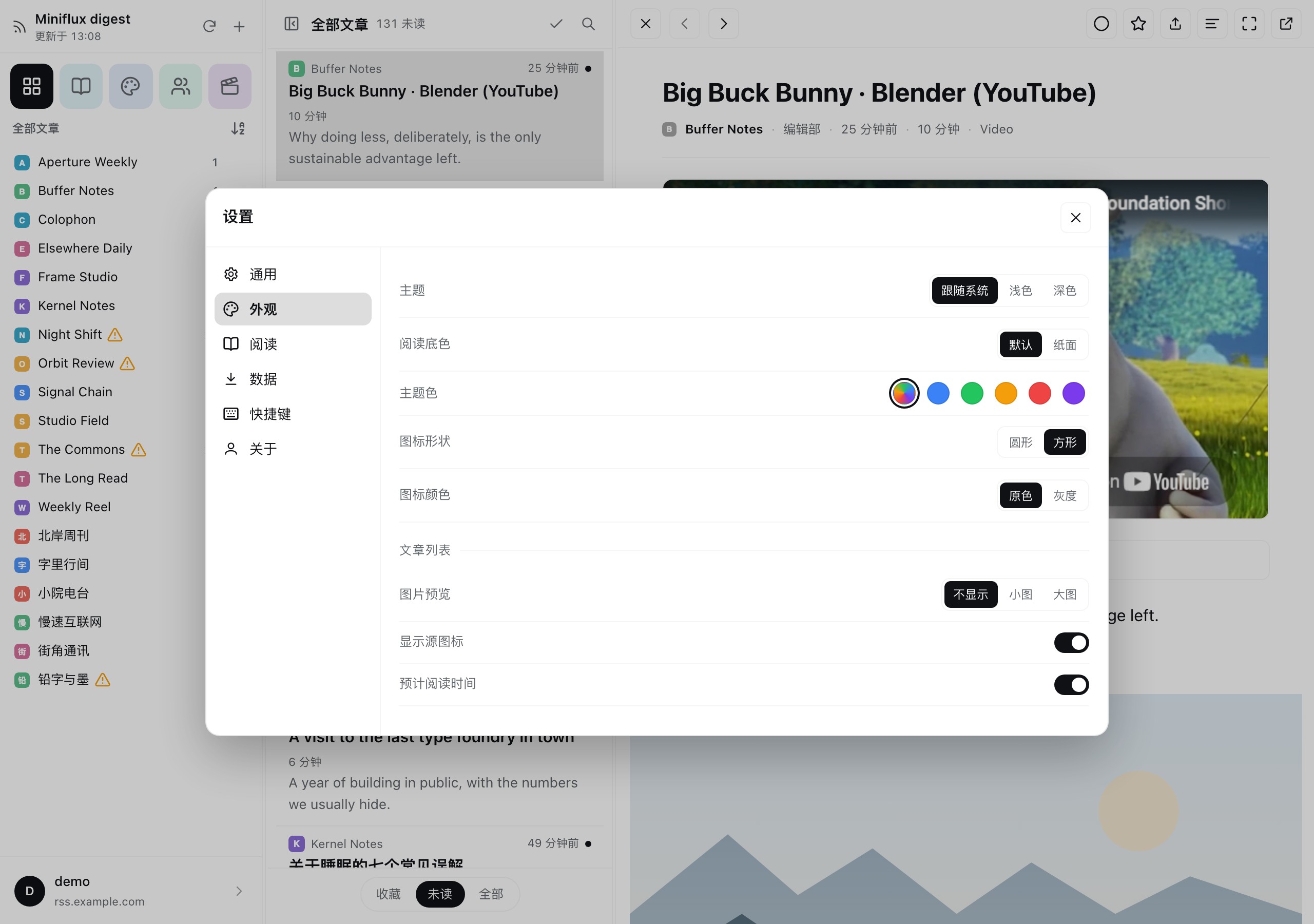 |
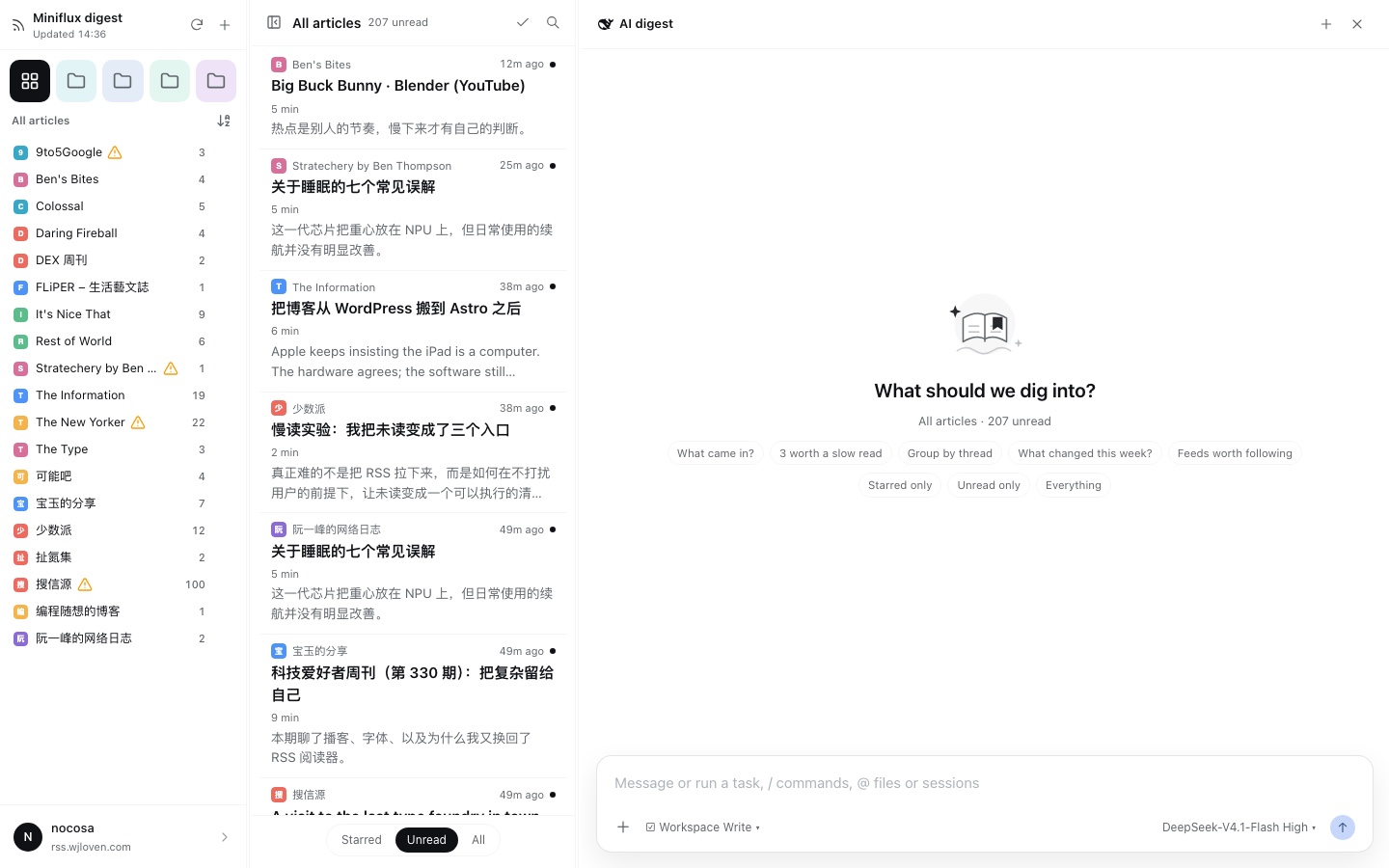
| Empty Page + AI Entry | AI Digest Prompt Builder |
|---|---|
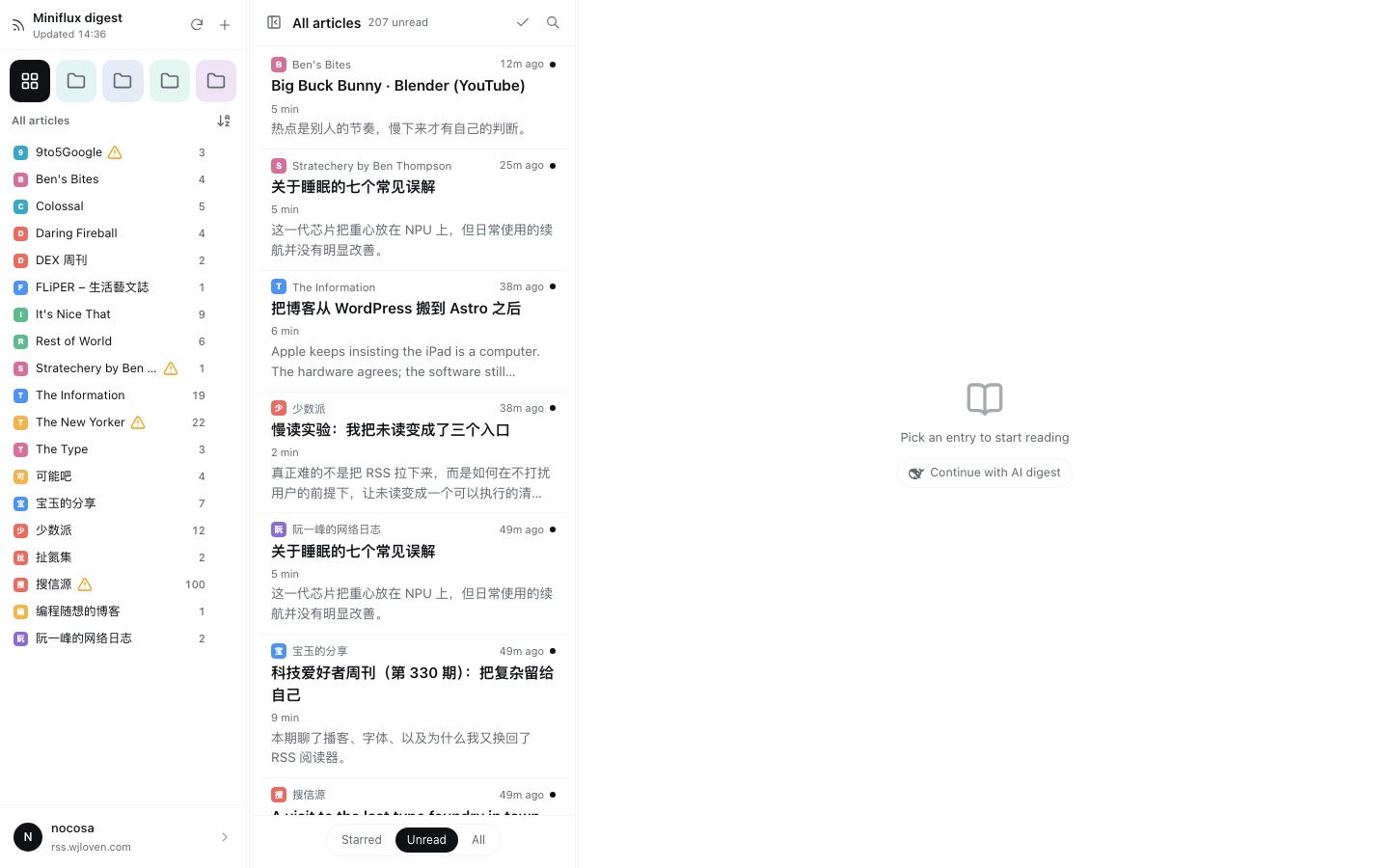 |  |
What's new in 1.9.0
- The reader column now hosts a real DSH conversation, not a custom chat: native messages, composer, model picker, workspace picker and tools.
- Prompt chips build a complete, editable prompt in the composer; the context stays a natural-language scope, never a raw
kind/filter/id. - Live Miniflux tools (
miniflux_timeline, with title resolution and original links) replace the old context file and prefetch. - Files and links in an answer jump to the session's own interface and open there; the digest session and chips are resumed when you return.
Features
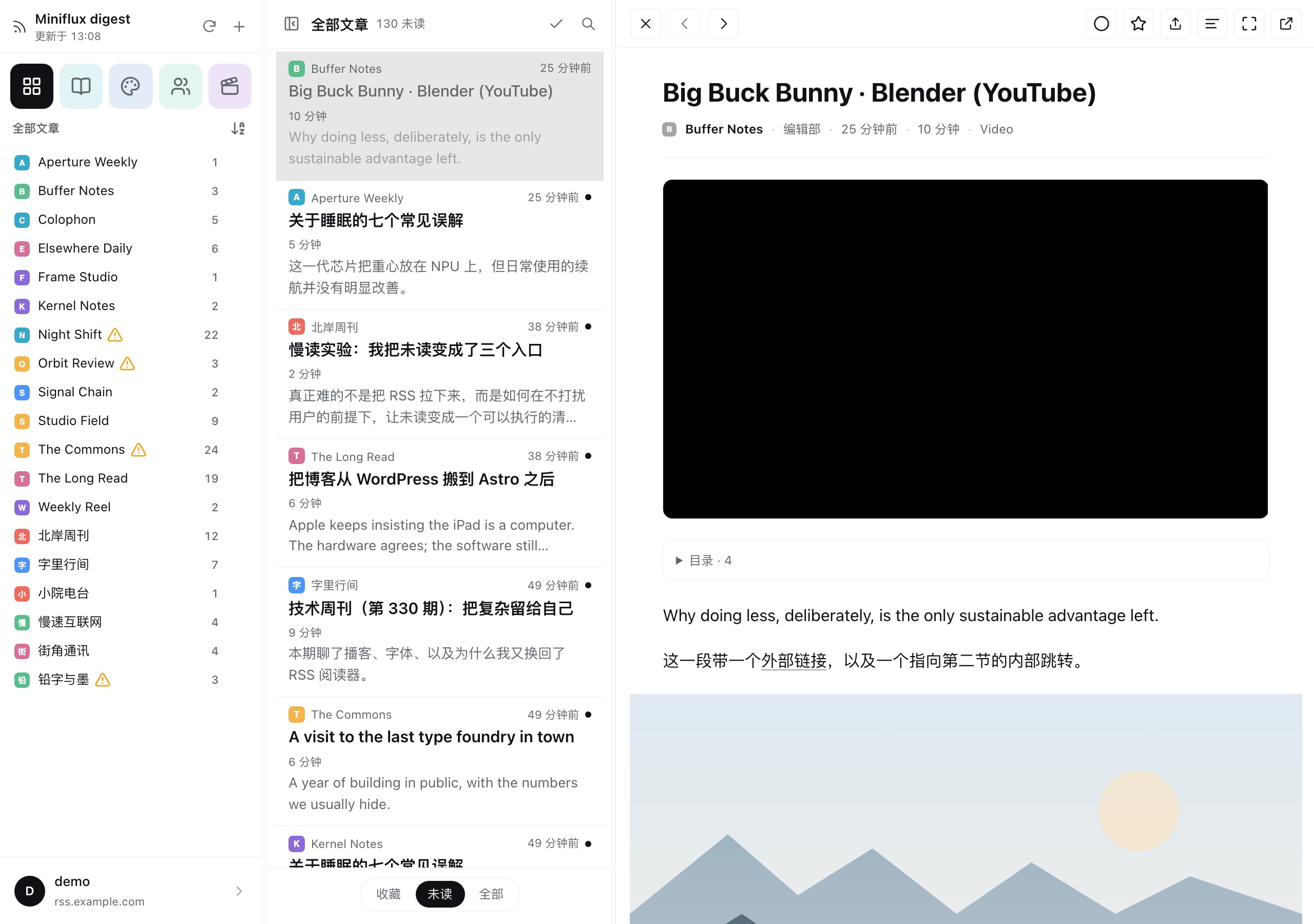
- Three-column reading workspace: Categories and feeds on the left, an article feed in the center, and the full reader on the right. Everything opens in place without spawning external tabs.
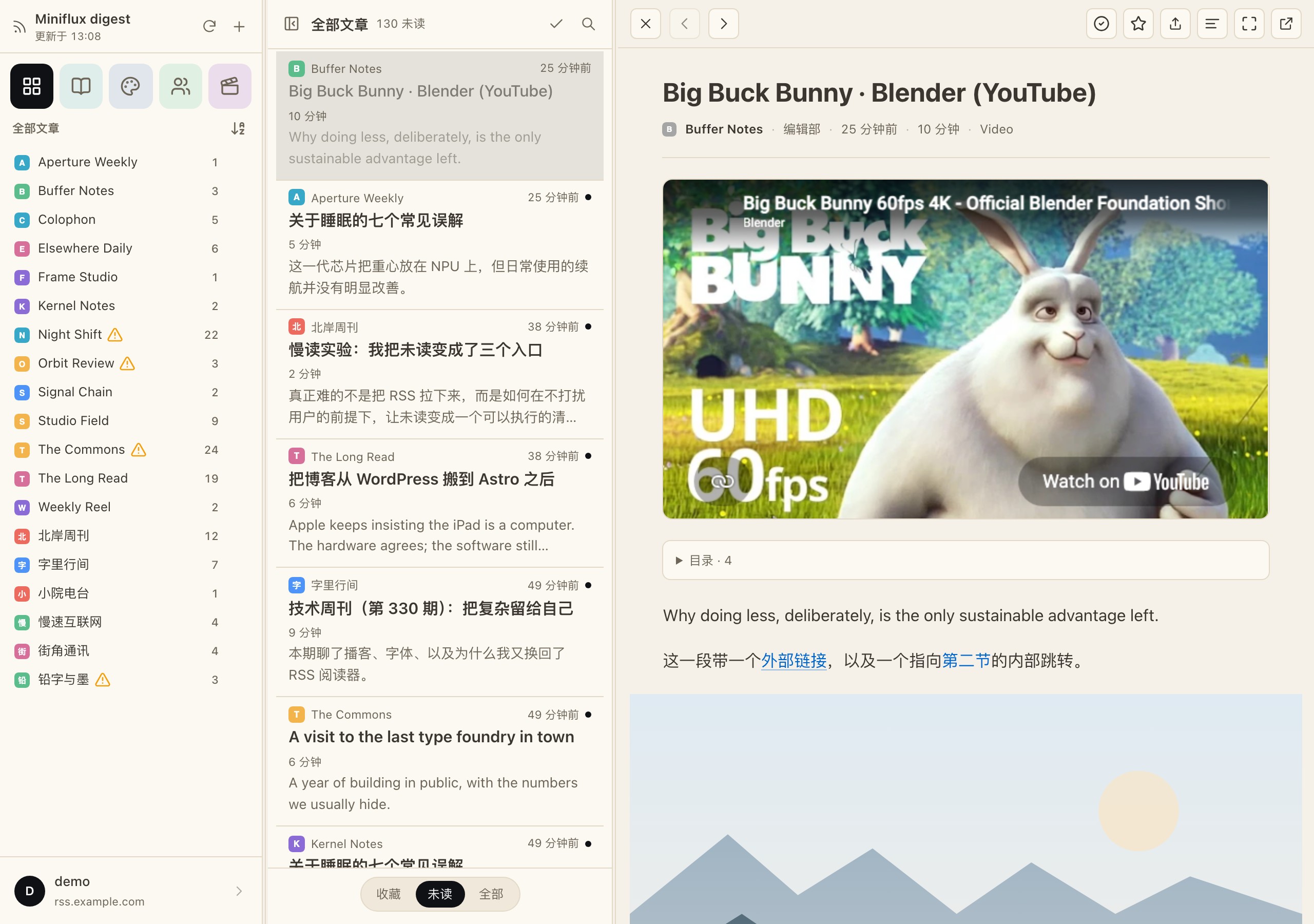
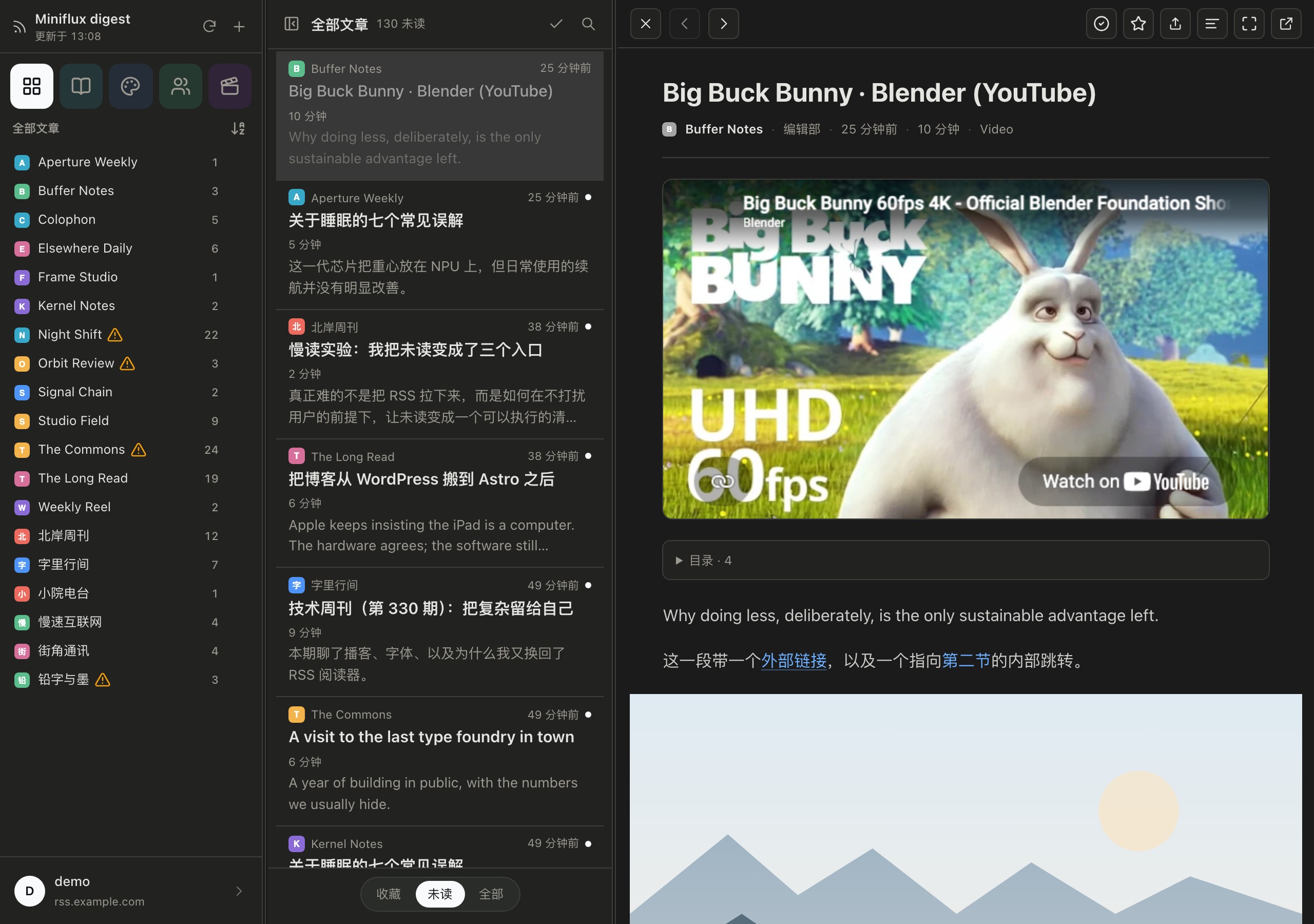
- Crafted for long-form reading: Configurable font sizes, line heights, and reading measures. Includes a soothing paper texture mode, a refined dark theme (with softened text brightness for eye comfort), breakout figures, syntax-highlighted code blocks, and footnotes that expand directly at the anchor point.
- Instant state restoration: Remembers your active feed, article, and exact scroll position. Thanks to local state caching, reopening the panel displays content instantly without layout shifts or cold-start blanks.
- Instant after the first open: Articles you have already read and categories you have already visited come straight from memory. Resting the pointer on a row, or simply reading on with
j/k, puts the next article in flight before you click it. The first open still waits once for Miniflux; after that a click is effectively immediate. - The list follows the selection: moving through articles with
j/k(or opening one) scrolls that row into view, only when it is actually out of sight; a manual scroll is never taken back. - Synchronized triage filters: Switching between Starred, Unread, and All states simultaneously updates both feed badges and the article queue.
- The title is the link: clicking the article title opens the original page in your browser, and the toolbar keeps the same action (also on
v). - Embedded media playback: Plays video embeds from YouTube, Bilibili, and X (Twitter) natively within the reader.
- Keyboard-driven workflow: Navigate articles and manage state effortlessly using standard reader keys (
j/kto move,mto toggle read,sto star,cto copy clean Markdown,vto visit the original web page). - Deep assistant integration: Built-in tools allow your AI agent to query unread statistics, summarize whole categories, or parse article content using the same account and read states.
- An AI digest column with the real conversation inside: the empty article page keeps its copy under a 40px book mark; the "Continue with AI digest" entry carries the DeepSeek whale. It switches the column to AI digest — a DeepSeek whale + "AI digest" header, new chat and close — above the embedded DSH conversation. Sessions are created with
sessionsand wrapped inSessionProvider, so the messages, native composer, model picker, tools and workspace picker are the shell's own. The shell's blank-conversation hero headline ("Into the Unknown") is hidden; the workspace picker stays available before the first message. - A prompt builder, not a context blob: under a small book/sparkle illustration, a greeting ("What should we dig into?"), the current scope line ("All articles · 207 unread") and two rows of natural-language chips (what came in, 3 worth a slow read, group by thread, what changed this week, feeds worth following; starred/unread/all). Clicking composes the whole prompt in the composer — plain-language timeline context, tool instructions, the chosen asks and the answer language. Re-click to remove, Clear to empty. Edit or send it like any native message.
- Live tools, no context file: the agent calls
miniflux_timelinewith kind/title/filter and pages with limit/offset; it resolves category/feed titles to ids and lists candidates when a title is ambiguous. Each title carries its original Markdown link, so recommended entries come back linked. No prefetch, no context file, no raw scope in the composer. - Jump into the session: clicking a file or link in the answer switches to the digest session's own interface (
uiWorkspace.openSession) and opens there — files viaopenResource, external links via the session's right-sidebar browser (openTab('browser')). No system-browser fallback. - Remembered conversations: the digest session id and selected chips are saved per scope; returning to the same category/list (or refreshing) resumes the same native session with its history, without creating a new one.
Xclears it.
Limitations
-
RSSHub suggestions are routes named by the model; the plugin does not verify each one. The public instance can rate-limit or be unreachable, and a failed subscribe is reported by Miniflux in the Add-feed dialog.
-
Requires an active, reachable Miniflux server; offline reading sync is not supported.
-
Optimized for desktop-width displays; very narrow split panels may compress the reading column.
-
Advanced capabilities like original content extraction, automatic feed discovery, and batch starring depend on your server-side Miniflux version.
-
The Starred view indexes the most recent 1,000 starred entries; extremely large archives will display recent subsets.
-
Built-in demo mode uses synthetic mock data for initial UI previews.
For comprehensive implementation notes—including HTML sanitization, code detection, and video player fallbacks—refer to docs/limitations.md.
Documentation
| Document | Contents |
|---|---|
| docs/ui-reference.md | Component-by-component overview of the reader interface |
| docs/design.md | Architectural rationale and comparison against Nextflux |
| docs/limitations.md | Edge cases, formatting rules, and version matrix |
| docs/troubleshooting.md | Credential management, recovery steps, and debugging logs |
| docs/verification.md | Test coverage and verification status |
| docs/development.md | Local preview workflow, screenshot generation, and project layout |
| docs/dsh-webview-referer.md | Why a desktop shell must supply the Referer for YouTube embeds (and the patch) |
| docs/loading-performance.md | First-frame snapshot caching, warm-path caches and prefetching |
| docs/ringo-reading-design.md | Typography and reading surface design choices |
License
MIT, see LICENSE.
All feed names, article headlines, and sample articles in preview/data.mjs and lib/demo.js are fictional. Preview screenshots in preview/shots/ are generated from these sample fixtures. Do not commit actual account credentials, server addresses, or personal subscription lists into this repository.
中文说明
面向 DeepSeek Harness 的 Miniflux RSS 阅读与智能体简报插件。
将你的 Miniflux 订阅无缝接入 DeepSeek Harness 桌面侧栏。Miniflux Digest 提供了专为桌面阅读打造的三栏工作区——无需在浏览器标签页与阅读器之间来回切换,即可在专注的排版中梳理未读流、沉浸阅读长文,并随时让 AI 助手梳理每日资讯、提炼专题简报或推荐精读内容。
功能特性
- 经典三栏布局:左侧分类与订阅源树、中间文章信息流、右侧正文阅读区,所有操作原地完成,告别外跳标签页的碎片体验。
- 专注长文阅读质感:自由调节字号、行高与行宽;预置明亮、暗色以及温润的舒缓纸面(Paper)三种配色(暗色模式下正文亮度轻微柔化,减轻眼部疲劳);支持宽幅图片自适应展示、原地直接展开的交互脚注,以及带语言标签的代码语法高亮。
- 阅读状态秒级恢复:自动记忆上次聚焦的分类、阅读文章与精确滚动位置。基于轻量本地快照机制,再次打开面板立即可见内容,无白屏加载与布局跳动。
- 第二次打开起基本不用等:读过的文章、逛过的分类直接来自内存;鼠标在列表行上停一下、或用
j/k读下去时,下一篇已经在路上。第一次打开仍需等一次 Miniflux。 - 列表跟着选中走:用
j/k或点开任一篇时,列表把那一行滚进视野;只在真的看不见时才滚,手动滚开后也不会被后台刷新拽回去。 - 分类与列表实时联动:星标、未读、全部等筛选维度在左侧源列表与中间文章列表间保持双向同步。
- 点标题就能看原文:正文标题本身是链接,点一下在浏览器打开原页面;工具栏保留同一个动作(
v键等效)。 - 多媒体原生内嵌:文章中引用的 YouTube、Bilibili 及 X(Twitter)视频直接在阅读区原地嵌入播放,无需跳转第三方网站。
- 全键盘快捷键流:遵循经典阅读器习惯,支持
j/k上下移动、m标记已读、s收藏星标、c一键复制整洁 Markdown、v访问原文。 - 智能体深度联动:内置 7 项原子助手工具,与侧栏共用同一账号会话与已读状态,让模型随时为你生成未读速览、专题汇总或抓取全文。
- AI digest 原生对话栏:空文章页保留文案,入口带 DeepSeek 鲸鱼;点开后第三栏变成 AI digest,里面是真正的 DSH 会话(消息、原生输入框、模型、工具、workspace 选择器)。输入框上方是问候语 + 当前范围 + 两行自然语言 chips,点选组合成完整提示词,可改可发;不预取、不落盘、不塞 raw scope。
- 会话跳转与原位恢复:回答里的文件/链接会跳到该 digest 会话自己的界面再打开(外部链接走右侧栏浏览器,不跳系统浏览器);会话 id 和 chips 按范围保存,回到同一分类/刷新会恢复原会话与历史,不新建。
- 双语界面支持:原生适配简体中文与英文,可随时在「设置 → 通用」中自由切换。
系统要求
- DeepSeek Harness >= 0.2
- Miniflux 实例 >= 2.0(批量星标功能需 2.3.2 及以上)
安装方式
dsh plugin --profile desktop add /path/to/dsh-miniflux-digest
安装完成后,在 Harness 插件管理器中开启 rss-miniflux,阅读面板即停靠在侧边栏中。
如需更新,直接拉取仓库最新代码,并在插件管理中重新开关一次插件即可生效。
连接与配置
初次打开面板时,在弹出的配置对话框中填入你的 Miniflux 服务器地址与 API 令牌(在 Miniflux 中打开 设置 → API 密钥 生成),插件将立即校验连通性。
如需免交互配置,可通过插件配置或环境变量预设凭据:
- id: rss-miniflux
  name: 'rss-miniflux-deepread'
  config:
    baseUrl: https://rss.example.com
    timeoutMs: 15000
或在系统环境变量中导出 MINIFLUX_BASE_URL 与 MINIFLUX_API_TOKEN。
生效优先级:插件配置 > 已保存凭据 > 环境变量。
提示:若暂无可用服务器,可直接关闭初始配置弹窗,直接体验内置的虚构演示条目。
助手工具
插件内置 7 项工具,与前端面板共享同一 Miniflux 凭据和未读数据状态:
| 工具 | 功能说明 |
|---|---|
miniflux_overview | 查询当前连接状态,并按分类与订阅源汇总未读文章统计 |
miniflux_digest | 梳理未读条目,生成包含时间范围、来源分布、核心议题与深度阅读建议的速览 |
miniflux_briefing | 针对指定分类在对话中直接生成模型撰写的结构化简报 |
miniflux_timeline | 按当前时间线/分类/订阅源翻页取标题(带原文链接),是 AI digest 的实时上下文 |
miniflux_read | 提取指定文章完整正文,输出为格式规范的 Markdown |
miniflux_search | 按关键词全局检索已订阅条目 |
miniflux_act | 执行操作:标记已读/未读、添加/取消星标、触发单源或分类刷新 |
常用提问示例
帮我按「科技」分类生成一份简报,梳理出出现频次最高的三个核心话题。
快速看一眼我当前的未读列表,挑出三篇最值得慢读的文章并说明推荐理由。
数据安全与隐私
- 凭据本地隔离:API 令牌仅加密保存在本机 Harness 凭据管理器中,绝不会写入仓库代码或明文配置中。
- 纯净直接通信:所有网络请求仅直连你指定的 Miniflux 实例(内嵌 X 视频流仅通过官方
cdn.syndication.twimg.com解析)。 - 即用即清缓存:内存缓存与快照仅用于提升再次打开的响应速度;登出、断开连接或切换账号时会自动清空全部缓存。
- 预取有节制:悬停停留 140 ms 才发请求,同一时刻最多两个,已缓存的跳过;空闲预热走单独一条车道,不会让点击排在预取后面。X 推文是正文出来之后的第二次请求。
使用限制
- 需连接可访问的 Miniflux 实例,暂不支持完全脱机离线同步。
- 专为桌面端窗口宽度优化,分屏或过窄窗口下阅读栏可能会受到挤压。
- 原文抓取、源探测与批量星标等高级特性受服务端 Miniflux 版本影响。
- 星标视图默认索引最近 1,000 条收藏条目,超大规模归档将仅呈现最新批次。
- 演示模式数据均为虚拟生成,仅用于无服务器环境下的界面预览。
有关段落缩进规则、代码块识别逻辑与视频边界处理等详细技术说明,请参阅 docs/limitations.md。
文档索引
| 文档 | 主要内容 |
|---|---|
| docs/ui-reference.md | 面板界面分区与全部交互控件详解 |
| docs/design.md | 架构设计考量及与 Nextflux 的能力对照 |
| docs/limitations.md | 边界场景、排版规则与版本兼容性说明 |
| docs/troubleshooting.md | 凭据管理、故障排查与调试日志指南 |
| docs/verification.md | 功能验证范围与测试状态记录 |
| docs/development.md | 本地预览开发、截图生成与代码目录映射 |
| docs/loading-performance.md | 首帧快照缓存与即时渲染优化机制 |
| docs/ringo-reading-design.md | 阅读界面与排版体系设计决策 |
开源许可
本项目基于 MIT 许可证分发,详见 LICENSE。
preview/data.mjs 与 lib/demo.js 中包含的订阅源名称、文章标题和正文均为虚拟构造,preview/shots/ 目录中的预览截图亦基于虚构数据渲染生成。请勿将真实的账号凭据、私有服务器地址或个人订阅列表提交至本仓库。