dsh-clipboard-history
z-axk/dsh-clipboard-history
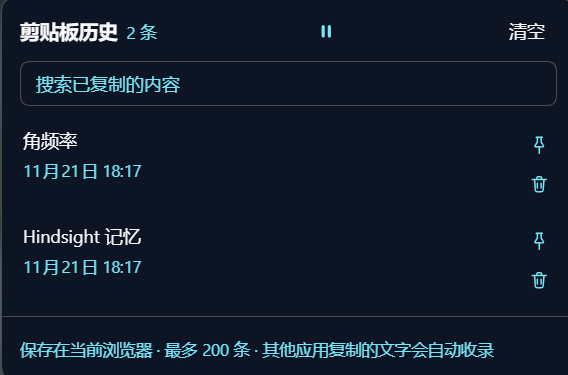
设置旁的剪贴板历史:记录在 DSH 网页中复制的文字,Windows 上还会收录 DSH 运行期间其他应用复制的文本;可搜索、再次复制、固定、删除条目或暂停记录,历史保存在浏览器中(最多 200 条)。它的 HTTP 路由没有 DSH 的访问检查,浏览器里打开的网页可以调用它们。
安装
dsh plugin --profile web add github:z-axk/dsh-clipboard-historyREADME
Clipboard history
A DeepSeek Harness Web plugin that keeps a searchable history of text copied in the DSH Web app and in other applications.
What it does
- Adds a Clipboard history button beside Settings at the sidebar foot (icon only when the sidebar is collapsed).
- Records text copied with the normal copy/cut actions, with in-app copy buttons, and text copied in other applications while DeepSeek Harness is running.
- Opens a panel where you can search the history, click an entry to copy it again, pin an entry, delete a single entry, or clear everything (the clear action asks for confirmation).
- Has a pause button in the panel header for moments when you copy passwords or other secrets; pausing stops both the page and the Host-side clipboard watcher.
- Keeps up to 200 entries and 20 000 characters per entry. Pinning protects an entry from being pushed out while new copies arrive, but the history never holds more than 200 entries. Copying the same text again moves that entry to the top instead of duplicating it.
Data and limits
- History lives only in the Web app's
localStorage, under the keydsh.clipboard-history.v1. It stays on this machine and is never sent to a server. - Entries are kept as plain text until you clear them, so treat the panel like a log: use Clear all to wipe the history (browser site data can be cleared too).
- Copies made in other applications are read from the Windows clipboard by the Host half and merged into the same history. When the Host half is not running, the page falls back to reading the clipboard itself when DSH regains focus, so the most recent outside copy still appears.
- Clearing browser site data for the DSH Web app also clears the history.
Install
Install the package directory as a bundle (for example with the plugin manager's install_bundle action and this directory as the target). The bundle registers one Host row, @local/clipboard-history, from cordis.patch.yml, and the client half loads with the Web app. The Host-side clipboard watcher starts with the Host process, so restart DeepSeek Harness after changing index.js.
Development
index.js— Host half: spawns a PowerShell clipboard watcher and serves new clipboard text overGET /dsh-clipboard-history/latestfor the Web app to poll.client.js— the Web client module: capture, storage, sidebar footer action, overlay panel, and syncing with the Host watcher.locale/en.json,locale/zh.json— display metadata shown in the plugin manager.
The icon at icon.svg is original artwork created for this plugin (clipboard glyph, blue gradient body, light clip and page lines). It is sampled from the same blue as the DSH brand accent.