dsh-postman-desktop
zhounian6688-like/dsh-postman-desktop
长在 Harness Web GUI 里的 Postman 式 HTTP 调试台:集合与环境变量({{变量}} 替换)、请求构建器(方法/参数/请求头/正文/认证)、响应查看器、cURL 导入导出,以及 CDN 源站探测——同一个 URL 抓两次,用来区分「文件真没了」和「边缘缓存骗你」。另提供 http_request_desktop agent 工具,与面板共用同一条发送链路,面板里调通的请求 agent 可以直接复现。零运行时依赖,数据落在 $DSH_HOME/postman-desktop/store.json。
安装
dsh plugin --profile web add github:zhounian6688-like/dsh-postman-desktopREADME
dsh-postman-desktop · 发包工作台
Postman 式的 HTTP 调试面板,直接长在 DeepSeek Harness 的 Web GUI 里。侧边栏「发包台」进入,并且给 agent 一个共用同一条发送链路的 http_request_desktop 工具。


- 宿主:DeepSeek Harness(
dsh)Web profile,engines.dsh >= 0.2.1-rc.1 - 依赖:零运行时依赖,只用
node:内置模块;前端是纯React.createElement,无构建步骤 - 数据:全部落在
$DSH_HOME/postman-desktop/store.json(0600),一个文件即可备份或手改
界面
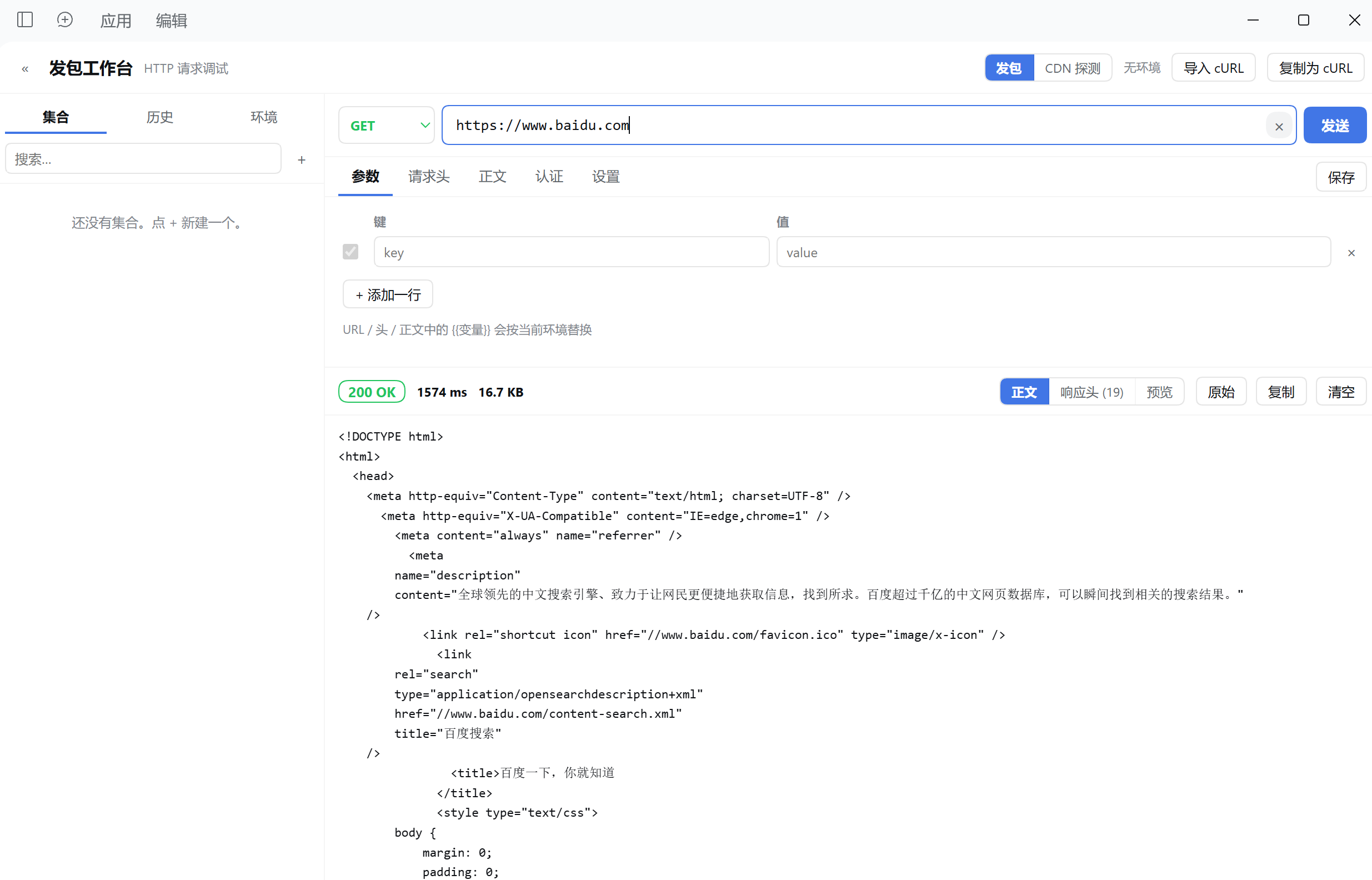
| 历史:每条带状态码,点一下还原整个请求 | CDN 源站探测:判定「已删除」还是「只是边缘缓存」 |
|---|---|
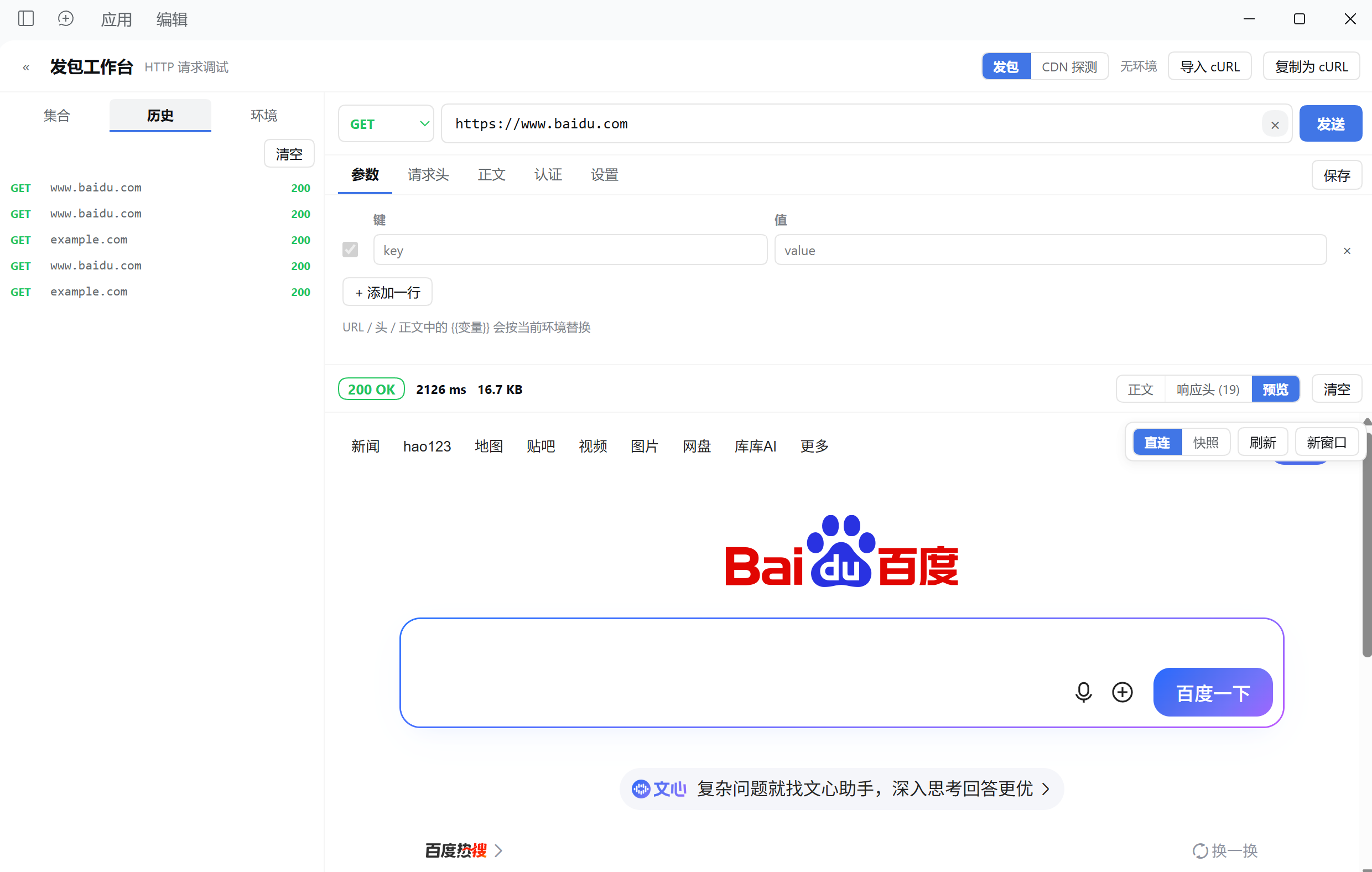 | 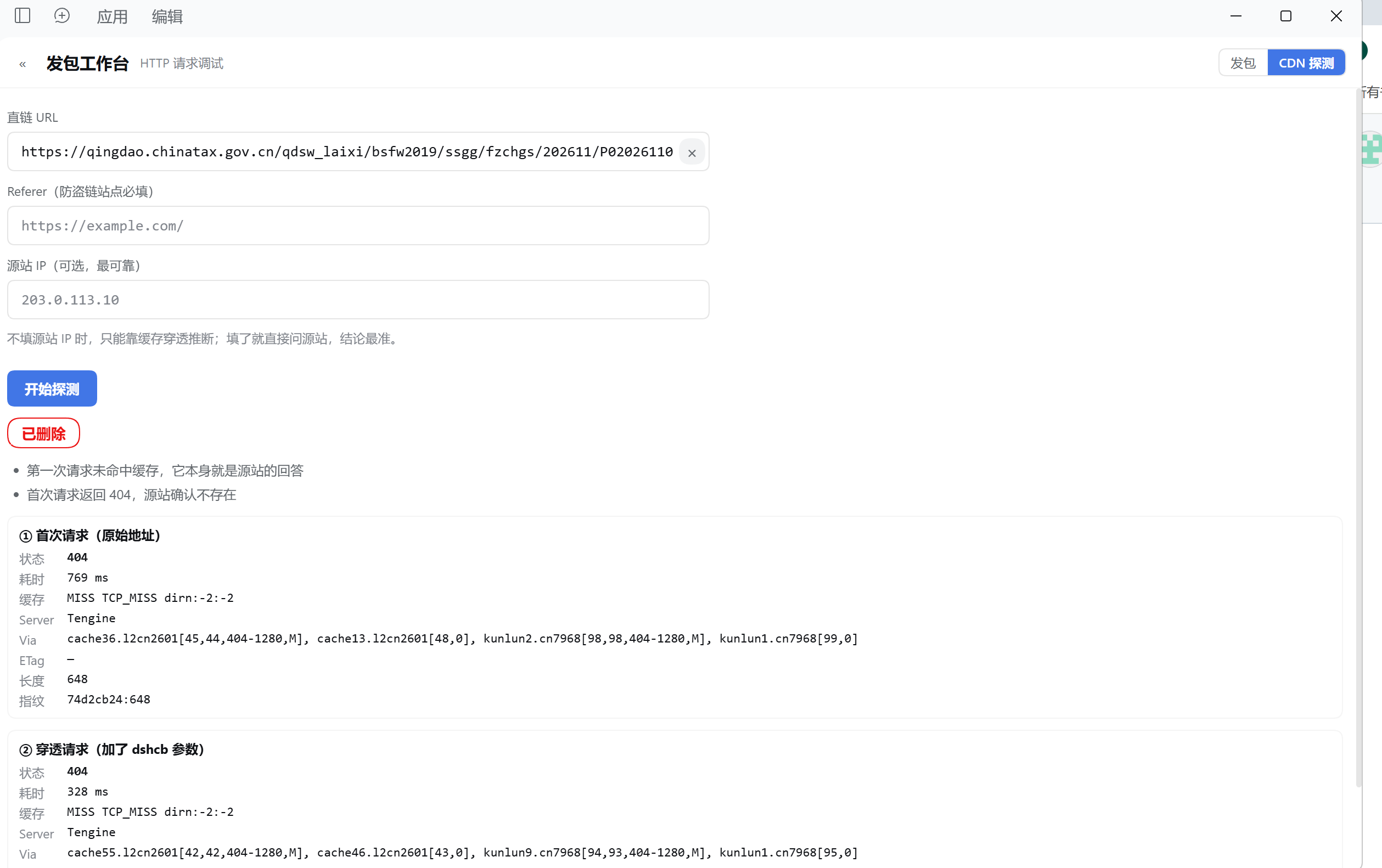 |
真实截图,不是效果图:第一张是发一个 GET 拿到 200 OK 与 HTML 正文,第二张是历史列表加预览页签,第三张对同一个站点连读两次并给出「已删除」的结论。
安装
# 已发 npm 时
dsh plugin --profile web add dsh-postman-desktop

# 或直接用 GitHub Release 的打包文件
dsh plugin --profile web add https://github.com/zhounian6688-like/dsh-postman-desktop/releases/latest/download/dsh-postman-desktop-1.0.1.tgz
装完刷新页面(或重启桌面版)即可看到侧边栏图标。本包同时提供 host 半与 client 半,dsh.bundle 与 dsh.client 都由 cordis.patch.yml 自动挂载,不需要额外的 profile 配置。
面板能力
- 请求构建:方法(GET/POST/PUT/PATCH/DELETE/HEAD/OPTIONS)、URL、Query 参数、请求头(常用头一键补全)、正文(none / raw JSON·Text·XML·HTML·JS / form-urlencoded / form-data / binary)、认证(Bearer / Basic / API Key(header 或 query)/ 自定义 Header)。
- 环境变量:多环境管理,
{{变量}}在 URL、参数、请求头、正文、认证字段里都会被替换,支持嵌套(最多 5 层)。 - 集合:集合 → 文件夹 → 请求三层树,支持新建、重命名、复制、删除、搜索。打开集合里的请求后编辑会自动写回集合。
- 历史:每次发送自动记录方法 / URL / 状态码 / 耗时,点一下把完整请求还原进构建器。最多保留 120 条。
- 响应查看:状态码、耗时、大小、重定向次数;响应头表格;正文支持 JSON/XML 美化、原始视图、图片预览、二进制提示;超过 4MB 截断并提示。
- cURL 互转:粘贴 curl 命令解析成请求(支持
-X -H -d --data-raw --data-urlencode -F -u -b -A -e -I -k -L --url),也能把当前请求复制成 curl。 - CDN 源站探测:同一个 URL 读两次(原样 + 加时间戳破缓存),可选再指定源站 IP 直连并保留原 Host/SNI。用来区分「文件真没了」和「CDN 边缘在骗你」。带签名/过期参数的 URL 会被单独标注。
- 快捷键:URL 框回车直接发送;
Ctrl/Cmd + Enter全局发送。
给 agent 的工具
http_request_desktop —— 与面板共用同一条发送链路(同一套变量解析、认证、正文编码、重定向处理),所以面板里调通的请求,agent 可以直接复现。
http_request_desktop(method="POST", url="https://api.example.com/v1/users",
                     headers={"Content-Type":"application/json"},
                     body='{"name":"a"}', bodyType="json")
| 参数 | 类型 | 说明 |
|---|---|---|
url | string | 必填。完整 URL,可含 {{变量}} |
method | string | HTTP 方法;省略时,有正文用 POST,没有用 GET |
headers | object | 请求头键值对 |
body | string | 原始正文 |
bodyType | string | json / text / xml / html / urlencoded,决定默认 Content-Type(默认 json) |
form | array | 表单字段;给了 form 就按 x-www-form-urlencoded 发送 |
environment | string | 环境名或 id,用于解析 {{变量}};省略则用当前激活环境 |
timeoutMs | integer | 超时毫秒,默认 30000,上限 300000 |
followRedirects | boolean | 是否跟随重定向,默认 true |
verifyTls | boolean | 是否校验 TLS 证书,默认 true |
返回的是纯文本摘要:状态行(如 GET https://… → 200 OK 809ms 577B)、响应头、正文。正文超过 20000 字符会被截断。
数据存放
$DSH_HOME/postman-desktop/store.json(DSH_HOME 未设置时是 ~/.dsh,即 ~/.dsh/postman-desktop/store.json),写入权限 0600。
集合、环境、历史全在这一个文件里。它就是一个普通 JSON,可以直接备份、版本管理或手改。
HTTP 接口
同源、仅供本页面调用:Origin 与 Host 不一致时返回 403。
| 方法 | 路径 | 用途 |
|---|---|---|
| GET | /api/dsh-postman-desktop/store | 读全部数据 |
| PUT / POST | /api/dsh-postman-desktop/store | 整体覆盖写入 |
| POST | /api/dsh-postman-desktop/send | 发送一次请求 |
| POST | /api/dsh-postman-desktop/curl | 解析 curl 命令 |
| GET | /api/dsh-postman-desktop/history | 读历史 |
| DELETE | /api/dsh-postman-desktop/history | 清空历史 |
| POST | /api/dsh-postman-desktop/probe | CDN 源站探测 |
| GET | /api/dsh-postman-desktop/health | 存活与存储路径 |
边界
- 只支持
http:/https:。 - 请求正文上限 16MB,响应读取上限 4MB(超出部分丢弃并标记截断)。
- 默认超时 30s,可调范围 1ms–300000ms;重定向默认最多 10 跳,可调到 20 跳。
binary与form-data里的@路径由 host 侧读取,路径必须是 host 进程可访问的位置(不是浏览器所在设备的任意路径)。- 关闭 TLS 校验(
verifyTls: false)只影响本次请求的rejectUnauthorized。 - 面板和 agent 工具用的是同一套发送引擎,所以两者的边界完全一致。
与 dsh-postman 的关系
本包是桌面 / Web 版(webServer 路由 + dsh.client 面板)。路由前缀是 /api/dsh-postman-desktop,与手机版 dsh-postman 的 /api/dsh-postman 不冲突,两者可以并存,但侧边栏会出现两个入口。
发布前要做的一件事
package.json 里的 author 与 repository / homepage / bugs 还带着占位符。填一次即可:
node scripts/set-owner.mjs <github-owner> "Your Name" you@example.com
开发
npm test # 无需 dsh 运行时:假 ctx 注册工具与路由,断言同源校验拒绝跨站请求
test/smoke.mjs 用 DSH_HOME 指向临时目录,不会碰真实数据。
License
MIT
English
A Postman-style HTTP workbench that lives inside the DeepSeek Harness Web GUI. One sidebar entry, one agent tool, one send path.
Screenshots
| History — every send with its status code, one click to restore | CDN origin probe — "gone" vs "the edge is lying" |
|---|---|
| |
Real screenshots, not mockups: the first sends a GET and shows 200 OK with the HTML body, the second is the history list with the preview tab, the third reads one site twice and concludes the object is gone.
dsh plugin --profile web add dsh-postman-desktop
- Request builder — method, URL, query params, headers, body (none / raw JSON·Text·XML·HTML·JS / form-urlencoded / form-data / binary), auth (Bearer / Basic / API Key / custom header).
- Environments —
{{var}}substitution across URL, params, headers, body and auth, nested up to 5 levels. - Collections — collection → folder → request tree with rename, duplicate, delete and search.
- History — the last 120 sends, one click to restore a full request.
- Response inspector — status, time, size, redirect count, headers table; JSON/XML pretty-print, raw view, image preview, binary notice; truncated past 4MB.
- cURL — parse an arbitrary curl command into a request, or copy the current request as curl.
- CDN origin probe — two reads (plain + cache-busted) plus an optional pinned-origin read that keeps the CDN Host/SNI, so "the file is gone" can be told apart from "the edge is lying".
- Agent tool —
http_request_desktopdrives the same engine;environmentselects an environment, output is truncated at 20000 characters. - Store —
$DSH_HOME/postman-desktop/store.json, mode0600. - Limits — 16MB request body, 4MB response read, 30s default timeout (max 300s), 10 redirects by default (max 20).