dsh-client-ui-aqua-community-fix
zhubai0528/dsh-client-ui-aqua-community-fix
Aqua 玻璃质感主题 · 适配 DeepSeek Harness V0.2.1-rc.3 · glassmorphism theme for DSH: adjustable blur/frost, fluid or wallpaper backdrop, unified corners; toggle off for the stock UI, no source changes
安装
dsh plugin --profile web add github:zhubai0528/dsh-client-ui-aqua-community-fixREADME
Aqua glass theme (community-maintained fork)
English | 中文
Upstream notice: this package continues from WYH66666666's DSH-Transparent-UI-Plugin (published on npm as
dsh-client-ui-aqua) at v1.3.0. The original author states he cannot keep up with new DSH APIs, so this fork fixes and adapts that code. It is not guaranteed to work with future DSH versions — back up your profile before upgrading DSH.
Supported DSH version
| Item | Value |
|---|---|
| DSH desktop / web | V0.2.1-rc.3 |
| Host client packages | @deepseek-ai/dsh-client-* 0.2.1-rc.3 |
| Declared in metadata | package.json → engines.dsh: ">=0.2.1-rc.3 <0.3.0" |
V0.2.1-rc.3 is the version this release is built and verified against — the theme hooks are read from that host build (page-head markup, composer/dock seams, slot names). These are private client surfaces, so a DSH upgrade can break the look or the mount even though nothing changes here. If you are on another DSH build, treat the theme as unsupported and keep a profile backup.
Topics / community listing
Published under the dsh-plugin topic, so it shows up on the dsh-plugin community page alongside other DeepSeek Harness plugins.
dsh-plugin · dsh · deepseek-harness · deepseek-harness-plugin · theme · glassmorphism · aqua
Credits
| Item | Value |
|---|---|
| Original author | WYH66666666 — repository |
| Upstream npm package | dsh-client-ui-aqua (latest 1.3.1) |
| Base of this fork | upstream v1.3.0 sources |
| Maintained by | ZHUBAI0528 — repository |
| This package | @zhubai0528/dsh-client-ui-aqua-community-fix |
| Version | 2.0.0 |
| DSH support | V0.2.1-rc.3 |
| License | AGPL-3.0 (inherited from upstream LICENSE; original copyright and licence notice retained verbatim) |
Aqua is a highly customizable glassmorphism theme for the DeepSeek Harness web UI and desktop app. The floating header, composer and stats line, and the trajectory view become panes of frosted glass, while the main column can sit on the living fluid board or on your own wallpaper (image or video); the sidebar keeps its stock look. Switch it off and the stock UI comes back exactly, with no source changes to DSH itself.
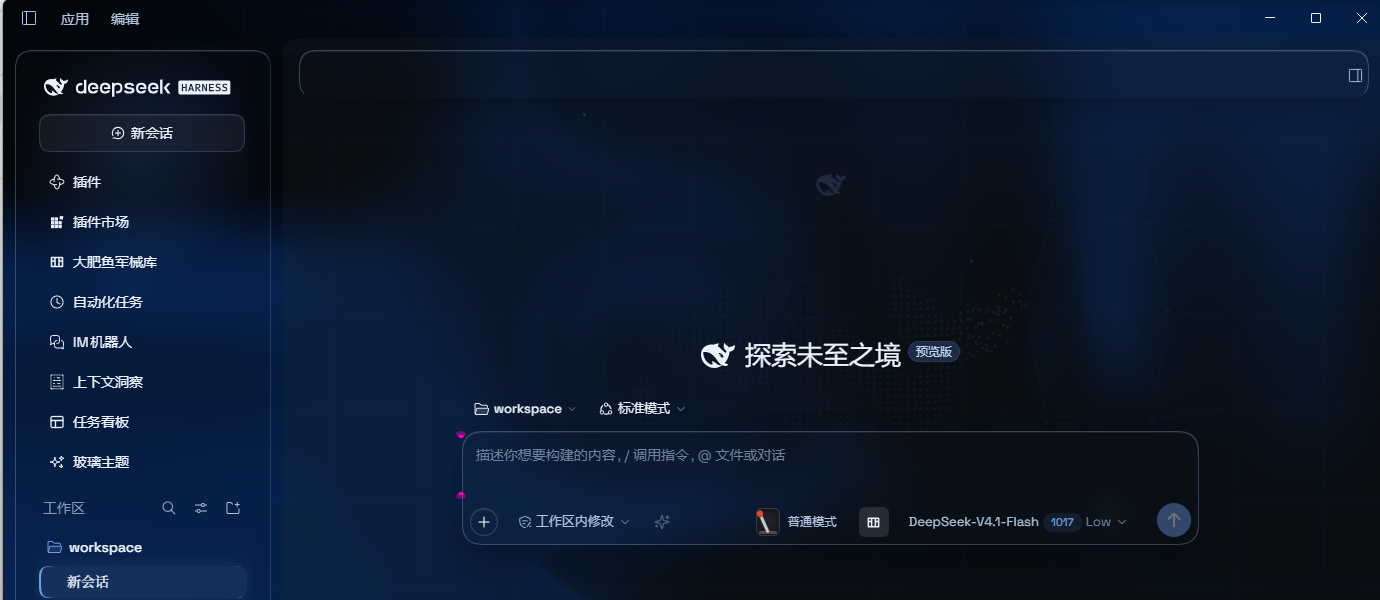
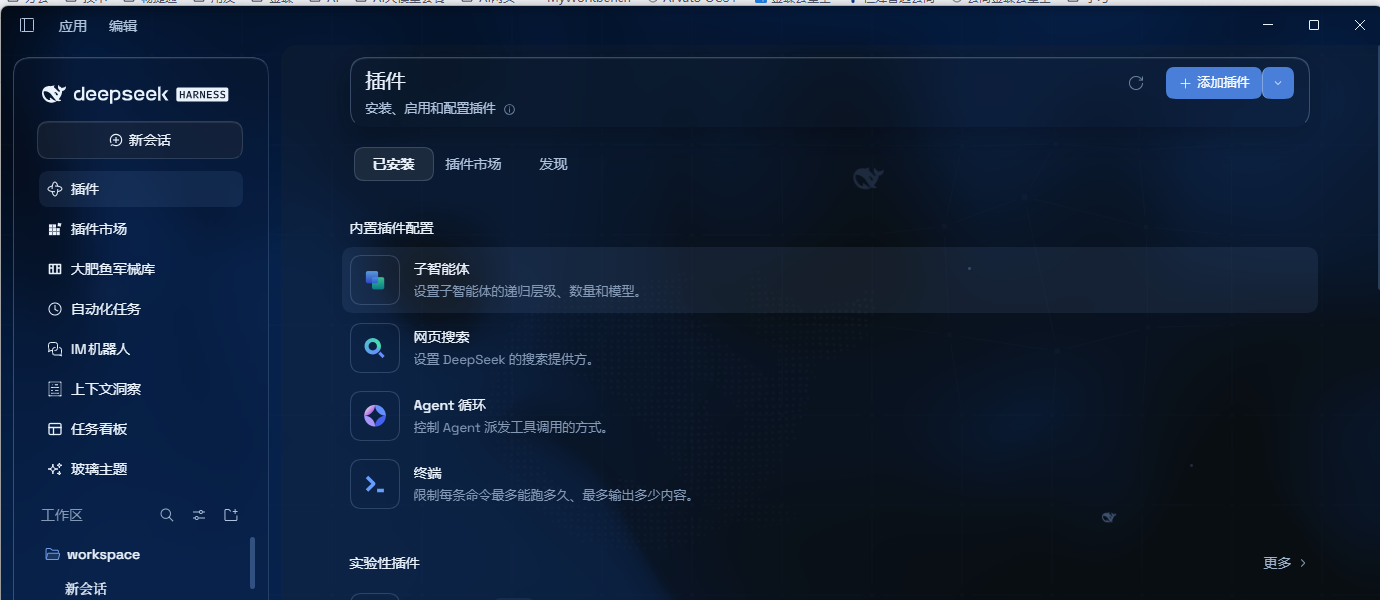
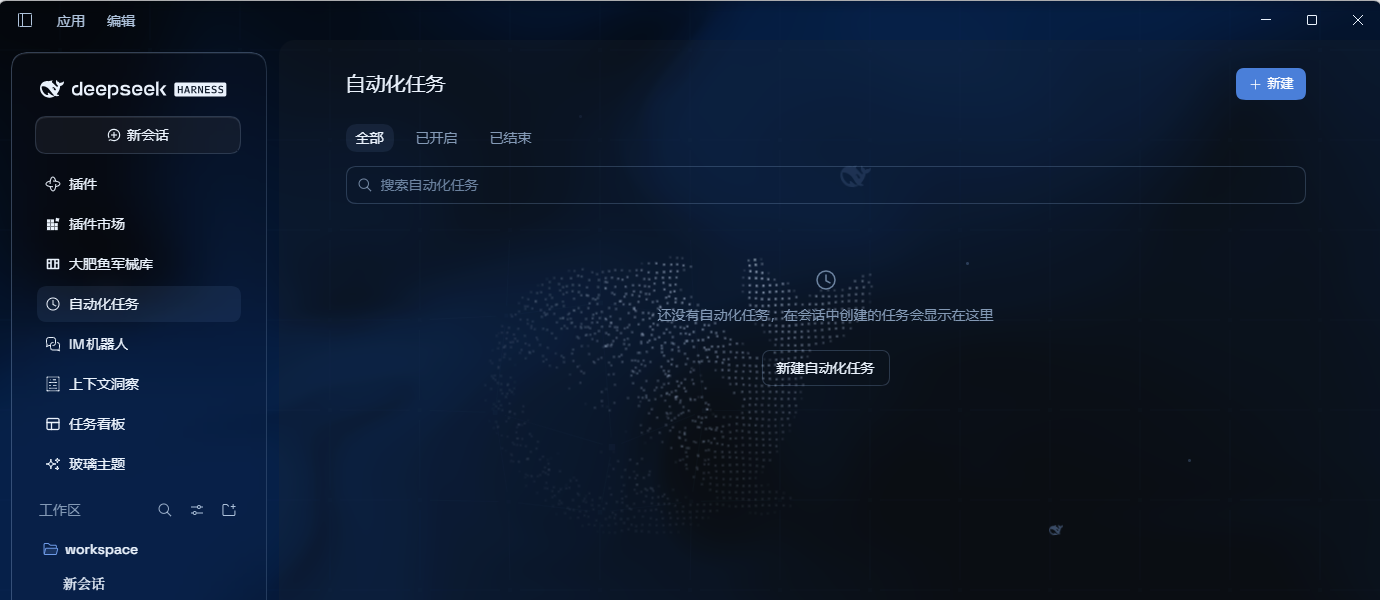
Differences from upstream v1.3.0
| Item | Upstream v1.3.0 | This package v2.0.0 |
|---|---|---|
| Layout modes | Mica + Compatibility, switchable | Mica only — compatibility mode and its selector are removed (tokens and styles too) |
| Edge blur bands | 5px gradient blur bands at the top/bottom (an upstream feature) | Removed — they read as an extra gradient wash over the page edges; readability is carried by the column veil instead (the 13px edge fade stays) |
| Submenu opacity | not available | New setting, default 96%, in the same group as "Chat surface opacity" |
| Submenu click | opens on hover, then a click closes it | New "click keeps it open": a hover-opened submenu survives the click and closes on the next one; works at any depth via ARIA, keyboard Enter unaffected |
| Popup material | 62% × frost fill (≈8.7% by default), text behind was legible through it | 96% fill + blur + 4px, panels no longer show the text behind |
| Composer and stats line | two panes with a 6px gap | one continuous piece of glass (single radius, hairline divider) |
| Light-mode conversation area | if the host or a skin plugin wrote the column background, the veil lost and the area went all-white; the opacity knob did nothing | Fixed: the veil is !important and also matches [class*='centerCol'], so it no longer depends on stamp timing |
| Scheme switching | switching to dark left the backdrop light until a knob was touched | Fixed: the layer watches body[data-ds-dark-theme] and recomputes the fluid palette, glow tone and brightness direction |
| Cold-start fluid | a GPU that was not ready permanently disabled the canvas (all-white in light mode) | Fixed: retried with backoff (up to 8 attempts, ~12s) |
| Published tarball | files omitted cordis.patch.yml, so installs never loaded | Fixed: the tarball ships cordis.patch.yml and lib/* |
| Dependency range | peer ^0.1.0-rc.5 (mismatched a 0.2.x host) | >=0.2.1-rc.3 <0.3.0, pinned to the host line the theme is built against |
| Licence statement | repo LICENSE is AGPL-3.0 while package.json said MIT | Aligned: both now declare AGPL-3.0 |
Features (current)
- Mica layout: floating glass header, composer, stats line and trajectory view, with adjustable blur and frost
- Theme control panel: one page collects every knob — colours, wallpaper, opacity, blur and decor
- No 3D tilt on the composer: the 3D effect is gone — it interfered with text rendering
- Free backdrop: the living fluid board (hue and depth adjustable) or your own wallpaper — images and video both supported; wallpapers have their own blur and frost, video adds a brightness knob
- Desktop scheme following: tracks the desktop app's light/dark switch and re-tunes the palette, glow and brightness direction on its own
- Background brightness: follows the resolved scheme — dark 0–50 darkens, light 50–100 brightens, 50 is unchanged
- Chat surface opacity: 0 lets the wallpaper/fluid show untouched, 100 is an opaque slab
- Submenu opacity: fill strength for popups (menus, dropdowns, quick-invoke panels), independent of the cards
- Submenu display: popups get a 96% fill plus extra blur, so multi-level menus stay legible above the transcript
- Submenu interaction → click keeps it open: a hover-opened submenu stays open when clicked, and closes on the next click
- Ambient decor: particle whale (the deepseek.com/harness centerpiece), fish, and the interactive mesh — each toggleable
- Hover effects → cursor glow: a highlight that follows the pointer
- Glossy "Harness" badge: dark mode swaps the sidebar wordmark for the official nameplate pill
- Edge fade: a 13px fade so content melts into the viewport edges
- One switch: off restores the stock UI exactly and removes every effect
Installation
Upstream
dsh-client-ui-aquaand this fork@zhubai0528/dsh-client-ui-aqua-community-fixmust not be installed together — the profile would end up with twoui-aquaentries.
Option 1: desktop app — install from the in-app plugins page (recommended)
Open DeepSeek Harness 0.2.1-rc.3 and click Plugins in the left sidebar.
Click Add plugin, then enter the following in the "package name or address" field:
github:zhubai0528/dsh-client-ui-aqua-community-fix
No npm and no terminal needed — the plugin is pulled from that GitHub repository's latest release. Reload the UI and it is on.
Option 2: one-shot script (Windows)
The script installs from npm by default, so it is Option 3 with the typing done for you — plus it clears any stale junction left behind by an earlier link install.
powershell -ExecutionPolicy Bypass -Command "Invoke-WebRequest 'https://github.com/ZHUBAI0528/dsh-client-ui-aqua-community-fix/raw/main/install.ps1' -OutFile install.ps1; .\install.ps1"
Options:
| Flag | Meaning |
|---|---|
-Profile desktop | target profile (default web) |
-Version v2.0.1 | pin a version (default: npm's latest; the script reads the dist-tag and pins it, because pnpm's minimumReleaseAge otherwise resolves to an older release) |
-DshHome <path> | DSH home (default %USERPROFILE%\.dsh) |
-Link | development only, see below |
Flow: locate the dsh CLI, remove stale junctions in both known locations, then dsh plugin --profile <name> add <pkg[@version]>.
-Link is for development only: it downloads the source, verifies lib/client.js against SHA256SUMS.txt, creates a junction in that profile's node_modules pointing at the clone, and registers cordis.patch.yml.
⚠️ Do not use
-Linkfor a normal install. A junction puts the app's file operations inside the source tree — uninstalling or rolling back the "installed package" deletes files in the real clone, which is how this repo lost.git/HEAD,.git/configand.git/index. It also blocks any later npm install:[ERR_PNPM_EPERM] [importPackage ...] rename ... EPERM: operation not permittedpnpm renames the freshly unpacked directory over the target, and NTFS refuses to replace a reparse point whose data lives on another volume. To go back to npm, just run the script again without
-Link— it deletes the link itself and never the source.Removing it by hand is fine too, but never with a recursive delete (older tooling follows into the target and would destroy the clone):
cmd /c rmdir "%USERPROFILE%\.dsh\profiles\desktop\node_modules\@zhubai0528\dsh-client-ui-aqua-community-fix"
Option 3: npm
dsh plugin --profile web add @zhubai0528/dsh-client-ui-aqua-community-fix
Installs the latest version from npm and registers it as a profile plugin layer (dsh.bundle patch) on every platform. Reload the UI and it is on.
npm page: https://www.npmjs.com/package/@zhubai0528/dsh-client-ui-aqua-community-fix
Requires Node.js and npm locally. If the official registry is slow from your network, a mirror can be used; note that mirror sync lags behind, so a just-published version may not be there yet.
Option 4: manual (macOS / Linux)
git clone --depth 1 https://github.com/ZHUBAI0528/dsh-client-ui-aqua-community-fix.git
ln -s "$PWD/dsh-client-ui-aqua-community-fix" "$DSH_HOME/profiles/web/node_modules/@zhubai0528/dsh-client-ui-aqua-community-fix"
then append to $DSH_HOME/profiles/web/cordis.patch.yml:
- insert:
    - id: ui-aqua
      name: '@zhubai0528/dsh-client-ui-aqua-community-fix'
Usage
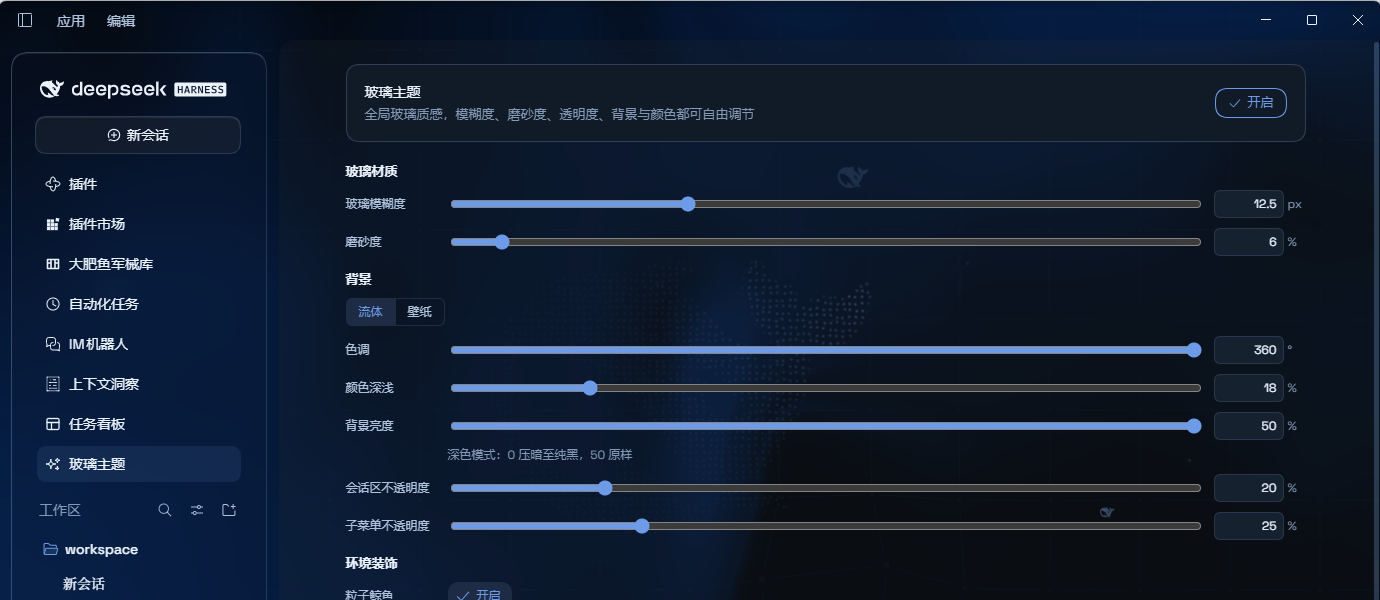
Reload the UI. Aqua is on by default; the master switch sits at the top of the Glass theme page in the left sidebar (it is its own page, not a tab inside Plugins/Settings). Panel groups, top to bottom:
Glass material (glass blur, frost) → Backdrop (fluid/wallpaper, hue, colour depth, background brightness, chat surface opacity, submenu opacity) → Ambient (particle whale, fish, interactive mesh) → Submenu interaction (click keeps it open) → Hover effects (cursor glow)
The upstream Mode group (Mica / Compatibility) was removed entirely in 2.0.0.
Backdrop and visual controls
The backdrop comes from one of two sources, switched with a segmented control at the top of the settings panel. The default is fluid. Every numeric control pairs a slider with a number box: dragging applies live, typing sets an exact value, and out-of-range input clamps to the nearest bound. Settings persist locally across reloads.
Fluid (default) is a live gradient board driven by two knobs — Hue over 0–360° (default 320°, a magenta-leaning tone) and Colour depth over 0–100% (default 25%).
Image and video wallpapers are added with Choose image and Choose video. Picking either file switches the backdrop source to wallpaper automatically, so the segmented control does not need touching. Images accept any format the browser can decode (PNG, JPG, WebP and so on); video accepts MP4, WebM, Ogg and QuickTime. Once a wallpaper is loaded, a Delete wallpaper button appears and clears it back to pure fluid.
The two wallpaper types expose different knobs: images get Wallpaper blur and Wallpaper frost, while video gets Video blur and Video brightness — a video has no separate frost layer, so brightness works with the automatic dimming to keep text readable.
Controls at a glance
| Control | Applies to | Range | Step | Default |
|---|---|---|---|---|
| Backdrop source | all | Fluid / Wallpaper | — | Fluid |
| Hue | fluid | 0–360° | 1° | 320° |
| Colour depth | fluid | 0–100% | 1% | 25% |
| Wallpaper blur | image | 0–40 px | 0.5 px | 0 |
| Wallpaper frost | image | 0–100% | 1% | 0 |
| Video blur | video | 0–40 px | 0.5 px | 6 px |
| Video brightness | video | 0–100% | 1% | 45% |
| Glass blur | all | 0–40 px | 0.5 px | 20 px |
| Frost | all | 0–100% | 1% | 7% |
| Background brightness | all | dark 0–50 / light 50–100 | 1% | 50 |
| Chat surface opacity | all | 0–100% | 1% | 25% |
| Submenu opacity | all | 0–100% | 1% | 96% |
Background brightness narrows its range with the active scheme: dark mode offers 0–50 (0 fades to pure black, 50 unchanged) and light mode offers 50–100 (50 unchanged, 100 brightens to pure white). The other half is unreachable, so a value picked in one scheme stays inert in the other.
Chat surface opacity at 0 lets the backdrop show through untouched; at 100 the chat slab is fully opaque. Submenu opacity is a separate knob because popovers float above body and composer text and need a denser fill than the cards.
Things to know
- Video is dimmed automatically. To keep foreground text readable, video wallpapers carry a dimming layer that cannot be turned off; use Video brightness and Video blur to adjust on top of it.
- A video may not auto-play after a reload. Browsers limit replay of local files; clicking Choose video once restores it, with no need to pick the file again.
- Match the wallpaper to the scheme. Light wallpapers suit light mode and dark wallpapers suit dark mode, otherwise text contrast drops — the panel says so inline.
Upgrading from upstream 1.x
dsh.ui-aqua.modeis no longer read: users who picked Compatibility land on the mica layout (the stored value is left untouched, not destroyed)- Every other setting keeps its key (blur, frost, hue, depth, brightness, chat-surface opacity …) and carries over untouched
- The package name differs — uninstall the old package first so two
ui-aquaentries never coexist
Local development
npm install
npm run bundle      # build lib/ (tsdown → inlined CSS → ESM→CJS shim)
npm run watch       # watch build
Before publishing, inspect the tarball with powershell -ExecutionPolicy Bypass -File .\publish.ps1 -DryRun; drop -DryRun to publish for real.
Licence
AGPL-3.0, inherited from upstream. The original author's copyright and licence notice are retained verbatim.