attention-plugins
zjbc2000/attention-plugins
面向 DSH 的任务分级会话通知:主线任务完成或失败时立即提醒,支线可汇总为一声,提问与权限请求出现即提醒;支持同时标记多个主线,以及未标记主线时把所有会话视为主线的均衡模式。
安装
dsh plugin --profile web add github:zjbc2000/attention-pluginsREADME
attention-plugins
DSH 任务通知,按「主线 / 支线」分级。
只让主线任务打断你,其余任务攒到全部结束再提醒。
Task-priority notifications for DeepSeek Harness — only the tasks you care about interrupt you.




截图 / Screenshots
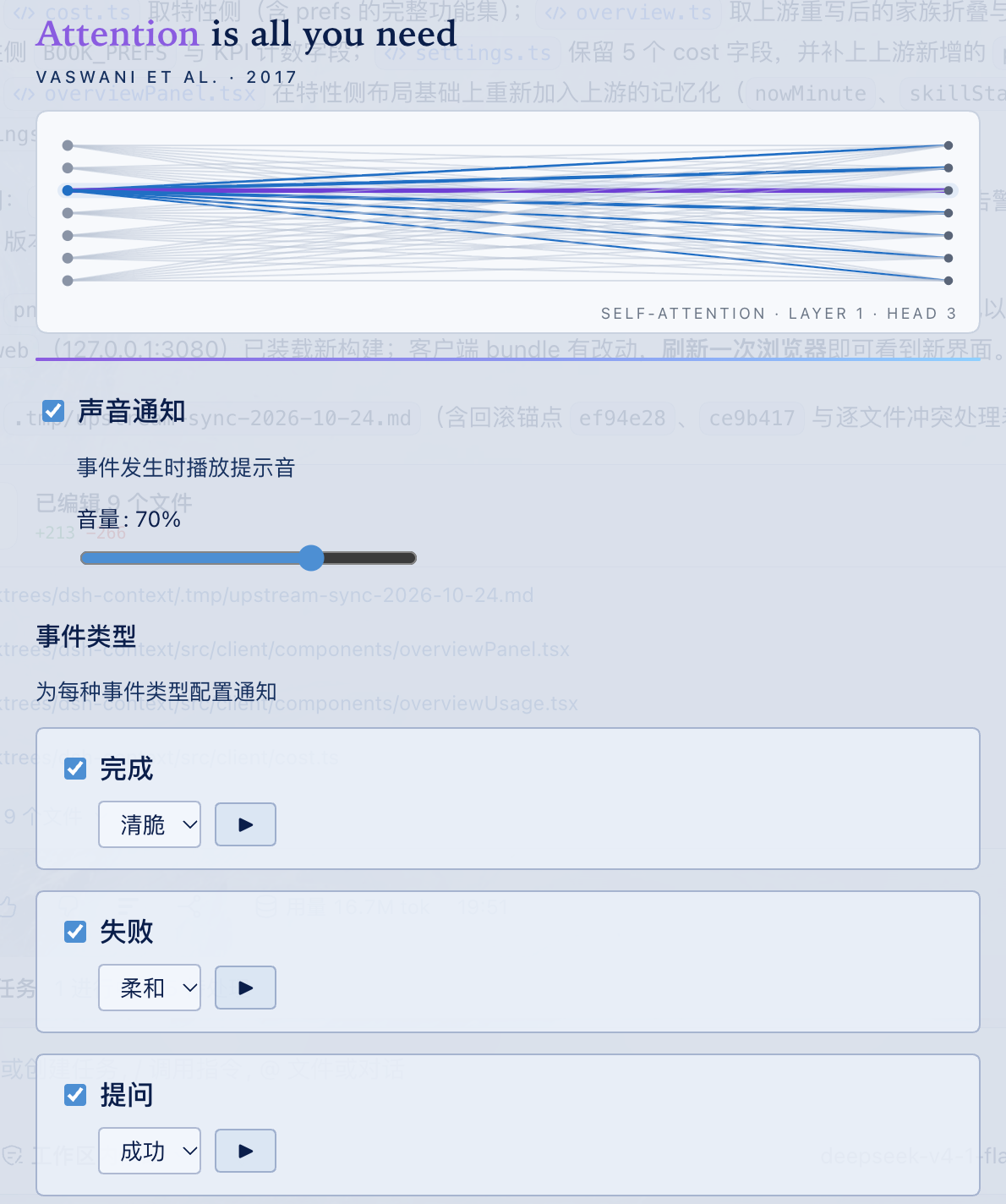
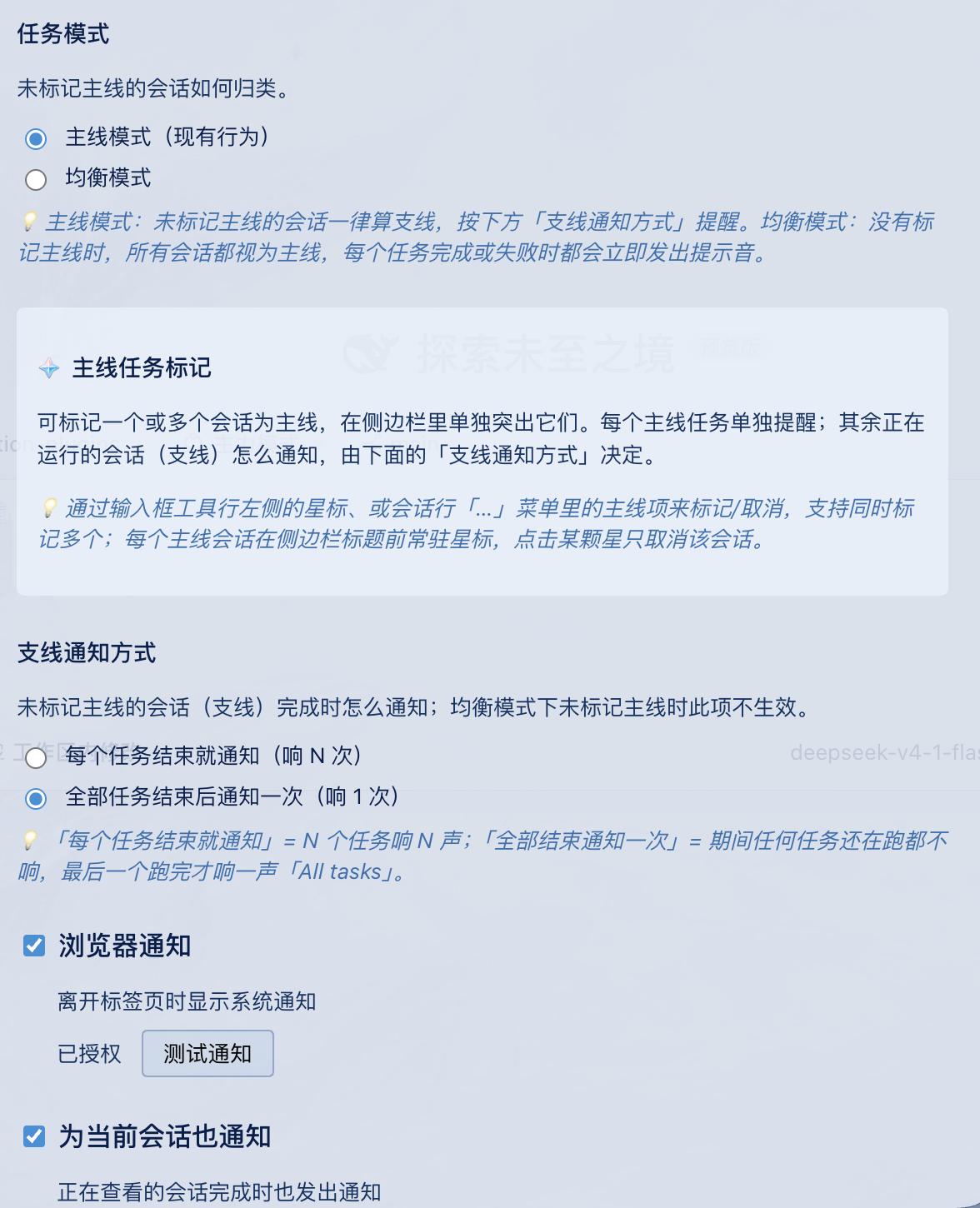
Settings → Attention:声音与事件类型 · 任务模式与支线通知
Settings → Attention: sounds & event types · task mode & side-line alerts
中文
为什么做这个插件
在 DSH 里同时开五个会话是常态。默认「每个任务完成都提醒」会让你在五个任务之间被五次打断——而你真正在等的往往只有一个。
attention-plugins 让任务有主次:
会话 A  ★ 主线 ──完成──▶ 🔔 立即提醒
会话 B    支线 ──完成──▶ 🔔(每个任务都提醒)/ 静默(汇总模式)
会话 C    支线 ──完成──▶ 🔔(每个任务都提醒)/ 静默(汇总模式)
                              └── batch:全部空闲 ──▶ 🔔 All tasks
- 主线:你正在等的任务,完成或失败立即提醒。
- 支线:后台跑的任务,可以逐个提醒,也可以等全部结束只响一声。
- 提问 / 权限请求:无论主次立即提醒——它们会阻塞任务,漏掉的代价最大。
功能
- 🎯 任务模式:
主线模式(默认)与均衡模式可切换。均衡模式下,只要你一个主线都没标,所有会话都按主线处理,每个任务完成/失败都立即提醒——适合「所有任务都重要」的场景。 - ⭐ 多主线:输入框工具行、会话行「…」菜单都能标记,可同时标记多个;侧栏会给已标记的会话加常驻星标。
- 🔔 支线通知方式:
每个任务结束就提醒(默认)或全部结束提醒一次。 - ✅ 4 类事件:完成、失败、提问、权限请求,每类独立开关、独立音效。
- 🔊 3 种内置音效:Chime / Success / Subtle,Web Audio 实时合成,不含音频文件;音量 0–100%。
- 🖥 浏览器通知:切到其他标签页时弹系统通知;可额外开启「为当前会话也通知」。
- 🌗 中英双语设置面板,遵循
prefers-reduced-motion。
安装
要求:DeepSeek Harness 0.1.7+(开发与验证环境为 0.2.1-rc.2)。更早版本的会话 store API 已不适用。
推荐:npm(一条命令,无需本地构建):
dsh plugin --profile web add attention-plugins
dsh web
包内已带 lib/,安装后即可使用。访问不了 npm 时,可改用 GitHub Release 预构建包:
dsh plugin --profile web add "https://github.com/zjbc2000/attention-plugins/releases/download/v0.2.0/attention-plugins-0.2.0.tgz"。
从源码安装:
git clone https://github.com/zjbc2000/attention-plugins.git
cd attention-plugins
pnpm install
pnpm run build
dsh plugin --profile web add link:"$(pwd)"
dsh web
用
link:安装时 DSH 直接引用源码目录:以后git pull && pnpm run build再刷新浏览器即可。用file:会复制一份到node_modules,每次更新都要重新add。
更新:
# npm:重新安装即可拿到 latest
dsh plugin --profile web add attention-plugins

# 源码 / link: 安装:
git pull && pnpm install && pnpm run build

# 只改了客户端 bundle:刷新浏览器即可
# 改了 src/index.ts 等服务端文件时,让 DSH 重新加载:
printf '\n# reload %s\n' "$(date +%s)" >> ~/.dsh/profiles/web/cordis.patch.yml
30 秒上手
- 打开 Settings → Attention。
- 在任意会话的输入框左侧点 ☆,或会话行「…」→「设为主线任务」;可以同时标多个。
- 默认的主线模式就够用:主线即时提醒,支线按「支线通知方式」处理。
- 如果没标主线、又希望每个任务都提醒:把任务模式切成「均衡模式」。
- 点事件卡片上的 ▶ 试听音效,顺便确认音量。
通知规则
| 情况 | 主线模式(默认) | 均衡模式 |
|---|---|---|
| 标了至少一个主线 | 标记的会话完成/失败立即提醒;未标记的按「支线通知方式」。 | 与主线模式完全相同(有标记时按标记走)。 |
| 没有任何标记 | 所有会话都算支线,按「支线通知方式」。 | 所有会话都算主线,完成/失败逐个立即提醒,不产生汇总提醒。 |
| 提问 / 权限请求 | 始终立即提醒(仍受事件开关和「当前会话」设置影响)。 | 同左。 |
支线通知方式:
- 每个任务结束就提醒:N 个任务响 N 声,不做汇总。
- 全部结束提醒一次:支线完成时保持安静,等所有运行中的会话都空闲,汇总一声「All tasks」;如果最后结束的是主线,不会再补一次汇总(避免重复)。注意:batch 模式下支线的失败也会进入汇总,不会单独提醒。
设置项
Settings → Attention:
| 设置 | 说明 | 默认 |
|---|---|---|
| 🔊 声音通知 | 声音总开关 | 开 |
| 🔉 音量 | 0–100% | 70% |
| 🎵 事件类型 | 完成 / 失败 / 提问 / 权限,逐项开关与音效 | 全开 |
| 🎯 任务模式 | 主线模式 / 均衡模式 | 主线模式 |
| 🔔 支线通知方式 | 每个任务结束就提醒 / 全部结束提醒一次 | 每个任务结束就提醒 |
| 🖥 浏览器通知 | 系统通知,需授权 | 关 |
| 👁 为当前会话也通知 | 正在查看的会话也响 | 关 |
| ⭐ 侧栏主线星标 | 在侧栏为已标记会话加星 | 开 |
事件默认音效:完成 Chime、失败 Subtle、提问 Success、权限 Success。
标记主线的三个入口
- 输入框工具行:左侧的 ☆/⭐ 小图标,新会话发出第一条消息之前就能用。
- 会话行「…」菜单:「设为主线任务」/「取消主线标记」。
- 侧栏星标:已标记会话的标题前会显示 ⭐;点某颗星只取消该会话的标记。
常见问题
为什么没有声音?
浏览器要求先有一次用户手势才允许播放音频。点任意事件卡片上的 ▶ 试听一次即可解锁;同时检查系统音量、静音状态和输出设备。切换蓝牙设备后插件会重建 AudioContext,避免第一声被吞。
浏览器通知不出现? 需要先在设置里授权;系统通知只在页面切到后台时弹出;macOS 还需在系统设置中允许浏览器发送通知。
主线和支线会重复响吗?
不会。per-session 模式不产生汇总提醒;batch 模式下主线即时提醒、支线汇总提醒,且主线刚完成时会抑制汇总。
标记和设置存在哪里?
浏览器 localStorage 的 attention-plugins:config,不跨浏览器或设备同步。
为什么设置面板在 Settings → Attention?
插件通过 settings.section 注册了自己的设置页签。
实现要点
- 会话运行状态来自
api-session/status远程事件;提问/权限来自uiSession.sessionStatus.pendingInteraction。 - 完成判定为
running: true → false,经过 settle 窗口后,按本轮新增错误区分「完成」与「失败」。 - 提问/权限没有对应的远程事件,首帧只记录基线,避免打开页面时补发一堆通知。
- 通知门控顺序:事件开关 → 当前会话 / 页面可见性 → 浏览器通知权限。
- 音效由 Web Audio 实时合成;设备变化后重建上下文。
- 注入点:
conversation.input.left、sidebar.workspaces.session.menu.item;侧栏星标通过 DOM 注入实现。
开发
pnpm install      # 安装依赖
pnpm run build    # tsc + 打包客户端 bundle
pnpm run watch    # 监听编译
pnpm test         # 单元测试
pnpm run clean    # 清理 lib/
测试:6 个文件 / 92 个用例。
✓ tests/engine.test.ts                     (27)
✓ tests/mainline-sideline-advanced.test.ts (21)
✓ tests/sound-params.test.ts               (15)
✓ tests/mainline-mode.test.ts              (13)
✓ tests/pending.test.ts                    (10)
✓ tests/settings-normalize.test.ts          (6)
路线图
- 4 类事件(完成 / 失败 / 提问 / 权限)
- 主线 / 支线分级与多主线标记
- 任务模式(主线模式 / 均衡模式)
- 支线通知方式(per-session / batch)
- 3 种内置音效、音量、浏览器通知
- 中英双语设置面板
- npm 发布(
attention-plugins@0.2.0) - 社区目录收录(PR 待合并)
- 更多音效 / 自定义音频
- 每个会话单独静音
- 通知历史
致谢
基于 @dingyi222666/dsh-session-notification 的架构(MIT License)重写,扩展了主线/支线分级与任务模式。
如果这个插件帮你少被打断几次,点个 ⭐ 就是最好的支持。
许可证
MIT License — 详见 LICENSE。
English
Why
Five parallel DSH sessions is normal. "Notify me when anything finishes" interrupts you five times, while you are usually waiting for exactly one of them.
attention-plugins gives tasks a priority:
- Main-line tasks alert immediately when they complete or fail.
- Side-line tasks can alert one by one, or stay quiet until every running task finishes and then ring once.
- Questions / permission requests always alert — they block the task, and missing them is expensive.
Features
- 🎯 Task mode:
mainline(default) orbalanced. In balanced mode, as long as nothing is marked, every session counts as main-line and alerts on its own completion — useful when all tasks matter. - ⭐ Multiple main-line markers: mark any number of sessions from the composer tool row or a session row's "…" menu; marked sessions keep a star in the sidebar.
- 🔔 Side-line alerts: per finished task (default) or a single aggregate alert when all tasks finish.
- ✅ 4 event types: completed, failed, question, permission — each with its own switch and sound.
- 🔊 3 built-in sounds: Chime / Success / Subtle, synthesized with Web Audio (no audio assets); volume 0–100%.
- 🖥 Browser notifications when the tab is in the background; optional alerts for the current session too.
- 🌗 Bilingual settings panel (English / Chinese), respects
prefers-reduced-motion.
Install
Requires DeepSeek Harness 0.1.7+ (developed and verified against 0.2.1-rc.2).
Recommended: npm (one command, no local build):
dsh plugin --profile web add attention-plugins
dsh web
The package ships lib/, so it works right after install. If you cannot reach npm, use the prebuilt GitHub Release tarball instead:
dsh plugin --profile web add "https://github.com/zjbc2000/attention-plugins/releases/download/v0.2.0/attention-plugins-0.2.0.tgz".
Install from source:
git clone https://github.com/zjbc2000/attention-plugins.git
cd attention-plugins
pnpm install
pnpm run build
dsh plugin --profile web add link:"$(pwd)"
dsh web
Update a source install with git pull && pnpm install && pnpm run build, then refresh the browser. If a server-side file changed, touch ~/.dsh/profiles/web/cordis.patch.yml to reload the plugin.
Quick start
- Open Settings → Attention.
- Click ☆ at the left of a session's composer, or use the session row's "…" menu, to mark it as main-line. Mark as many as you like.
- Keep the default
mainlinetask mode: main-line alerts immediately, side-line follows the side-line alert mode. - Prefer every task to alert while nothing is marked? Switch to
balanced.
Notification rules
| Situation | Mainline mode (default) | Balanced mode |
|---|---|---|
| At least one marker set | Marked sessions alert immediately; unmarked sessions follow the side-line mode. | Same as mainline mode (markers win). |
| Nothing marked | Every session is side-line and follows the side-line mode. | Every session is main-line and alerts individually; no aggregate alert. |
| Question / permission | Always alerts (still subject to event switches and the current-session setting). | Same. |
Side-line mode:
- Per finished task: N tasks ring N times, no aggregate.
- Once, when all finish: side-line completions stay silent; when every running session is idle, one "All tasks" alert fires. If the last completion was main-line, the aggregate is suppressed to avoid a duplicate. Note: in batch mode a side-line failure is also folded into the aggregate instead of alerting on its own.
Settings
| Setting | Description | Default |
|---|---|---|
| 🔊 Sound notifications | Master switch for sounds | On |
| 🔉 Volume | 0–100% | 70% |
| 🎵 Event types | Per-event switch and sound for completed / failed / question / permission | All on |
| 🎯 Task mode | Mainline / balanced | Mainline |
| 🔔 Side-line alerts | Per finished task / once when all finish | Per finished task |
| 🖥 Browser notifications | System notifications (permission required) | Off |
| 👁 Alert for current session | Also alert for the session you are viewing | Off |
| ⭐ Sidebar star | Show a star for marked sessions in the sidebar | On |
FAQ
No sound? Browsers require a user gesture first — press ▶ on any event card once. Also check system volume, mute, and output device; the plugin recreates its AudioContext after device changes.
No browser notifications? Grant permission in settings; they only appear while the tab is in the background; on macOS the browser also needs notification permission in System Settings.
Duplicate alerts? No. per-session mode never emits the aggregate; batch mode alerts main-line sessions immediately and suppresses the aggregate when the last completion was main-line.
Where is state stored? localStorage key attention-plugins:config; it is not synced across browsers or devices.
Development
pnpm install
pnpm run build
pnpm run watch
pnpm test
pnpm run clean
6 test files / 92 tests.
Credits
Based on the architecture of @dingyi222666/dsh-session-notification (MIT), rewritten with main-line / side-line prioritization.
License
MIT License — see LICENSE.