dsh-npm-script
zouzhipeng/dsh-npm-script
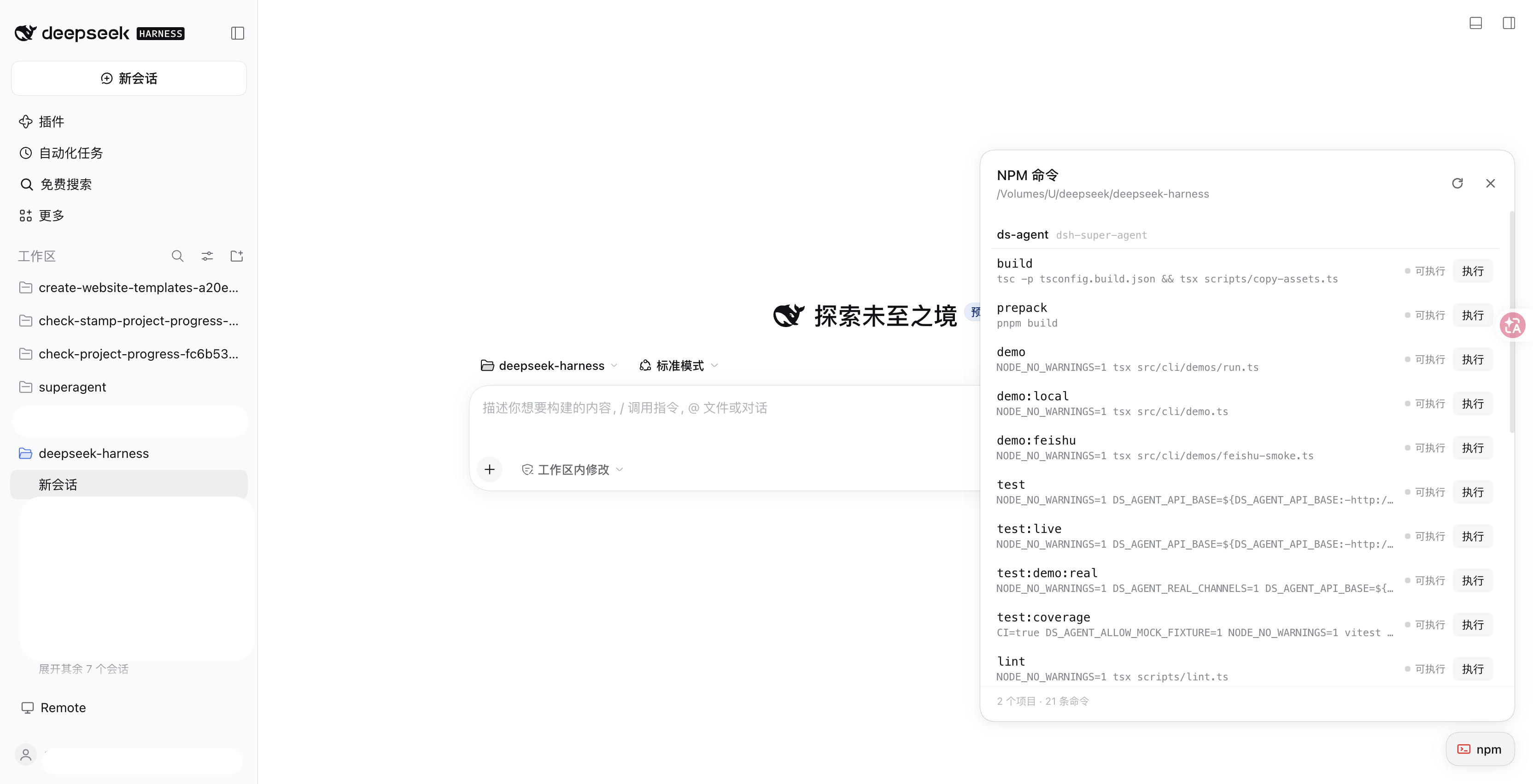
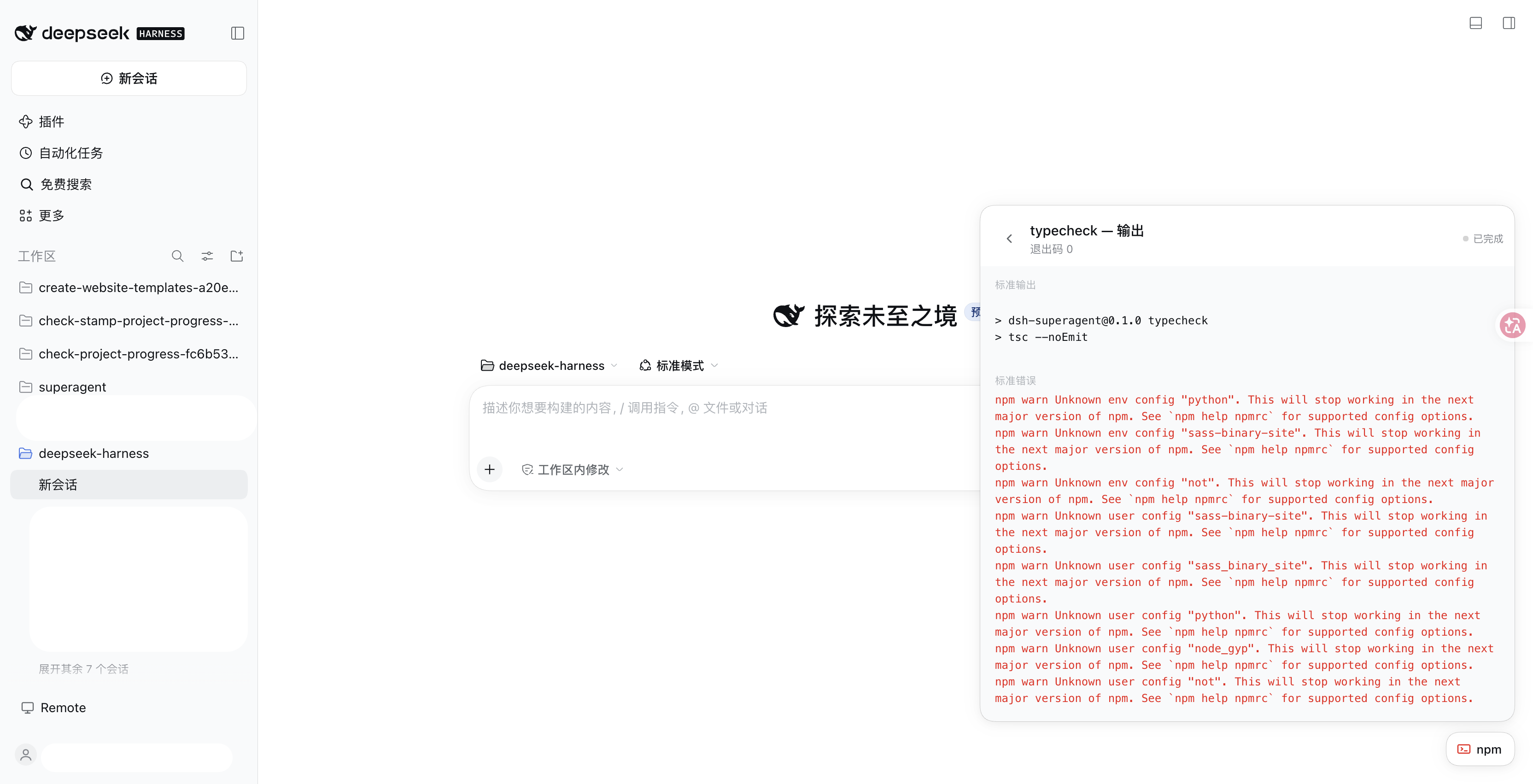
Web 界面的悬浮按钮,按项目分组列出工作区里所有 package.json 脚本,并显示每个命令的执行中/已停止状态;常驻命令(如 dev server)可随时停止。运行后可查看捕获的 stdout 与 stderr;输出中的 http(s) 地址可点击并在新标签页打开,同时在日志上方汇总成一行快捷入口。它的 HTTP 路由没有 DSH 的访问检查,浏览器里打开的网页可以调用它们。
安装
dsh plugin --profile web add github:zouzhipeng/dsh-npm-scriptREADME
dsh-npm-script


English · 简体中文
A floating button for the DeepSeek Harness Web UI. One click lists every npm script in your workspace, grouped by project, and lets you run them, stop the long-lived ones, and read their captured output. Any http(s) address printed by a script becomes a clickable link that opens in a new tab, so a dev server's debug URL is always one click away.
Features
- Floating launcher — a small button pinned to the bottom-right corner; nothing is added to your panels.
- Grouped by project — scans the whole workspace, so a monorepo or several subprojects each get their own section of scripts.
- Live status per command — running / runnable / stopped is shown next to every script. Long-lived commands such as
npm run devkeep a running state until you stop them. - Captured output — stdout and stderr are collected while a script runs and stay readable after it exits.
- Clickable URLs —
http://andhttps://addresses in the output are rendered as links (new tab) and collected into a shortcuts row above the log. Dev servers that print their debug address work out of the box. - Bilingual UI — follows the Harness interface language (English / 简体中文).
Install
Requires a running DeepSeek Harness. Either path works.
Web UI
-
Open the Harness Web UI and go to Plugins in the sidebar.
-
Paste this spec into the install field:
github:zouzhipeng/dsh-npm-script -
Confirm, make sure the bundle is enabled, then refresh the page.
CLI
dsh plugin --profile web add github:zouzhipeng/dsh-npm-script
The bundle is selected automatically. Refresh the Web UI afterwards.
The package is also published on npm as @zouzhipeng/dsh-npm-script; publishing there only adds download statistics, installation still resolves from GitHub.
Update
Re-run the install command to pull the latest version:
dsh plugin --profile web add github:zouzhipeng/dsh-npm-script
Uninstall
Remove it from the Plugins page, or run:
dsh plugin --profile web remove @zouzhipeng/dsh-npm-script
Usage
- Click the floating button at the bottom-right to open the panel.
- Scripts from every
package.jsonare listed, grouped by project. - Click a command to run it; running commands show a stop button.
- Open Output to read stdout and stderr. URLs in the output are clickable.
Press Esc to close the panel. While viewing output, the first Esc returns to the command list.
Configuration
Optional settings can be overridden through config in the profile's cordis.yml:
| Field | Default | Meaning |
|---|---|---|
scanDepth | 3 | Maximum directory depth to scan for package.json. |
maxOutputBytes | 262144 | Bytes of each output stream kept in memory (tail). |
maxSpillBytes | 8388608 | Maximum bytes spilled to disk. |
graceMs | 5000 | Grace period before force-terminating a stopped command. |
historyLimit | 20 | Number of past runs retained. |
scanCacheMs | 5000 | Cache lifetime for the project scan. |
How it works
The plugin has two halves:
- Host (
index.js) resolves the current workspace through Harness'sworkspaceRegistry, scans it forpackage.json, and launches scripts through thesubprocessservice. All HTTP routes are restricted to loopback. - Client (
client.js) renders the floating button and panel in theshell.overlayslot and talks to the Host over same-origin JSON routes.
Scripts are spawned with NO_COLOR=1, TERM=dumb, PAGER=cat and GIT_PAGER=cat so tools emit plain text and printed addresses stay intact. The client strips ANSI escapes as a fallback.
Requirements
- DeepSeek Harness with the
webprofile. - Any platform supported by Harness (macOS / Linux / Windows).
- Commands come only from the
scriptsfield ofpackage.json.
Known limitations
- Only
http://andhttps://addresses become links (ws://is excluded — a browser cannot open it directly). - The command list comes from
package.jsonscripts; arbitrary npm subcommands are not included. - Host-side code changes need a
dsh webrestart (node-side hot reload is off by default); Client changes apply on refresh.
License
简体中文
为 DeepSeek Harness Web 界面添加一个悬浮按钮:点击后按项目分组列出工作区里所有 package.json 脚本,可直接运行、停止常驻命令(如 npm run dev)、查看捕获的 stdout / stderr。输出里的 http(s) 地址会变成可点击链接并在新标签页打开,同时在日志上方汇总成一行快捷入口。
安装
Web 界面 Plugins 页填入 github:zouzhipeng/dsh-npm-script,或执行:
dsh plugin --profile web add github:zouzhipeng/dsh-npm-script
装完启用 bundle 并刷新页面。也可从 npm 安装以显示下载量。
使用
点击右下角悬浮按钮打开面板;按项目分组列出脚本;点命令执行,执行中的命令显示停止按钮;点「输出」查看日志,日志里的网址可直接点击。按 Esc 关闭面板,查看输出时第一次 Esc 先返回列表。
配置
在 profile 的 cordis.yml 中通过 config 覆盖,可选项:scanDepth(3)、maxOutputBytes(262144)、maxSpillBytes(8388608)、graceMs(5000)、historyLimit(20)、scanCacheMs(5000)。
限制
- 仅
http:///https://地址识别为链接,ws://不识别。 - 命令只来自
package.json的scripts,不含任意 npm 子命令。 - Host 半代码改动需重启
dsh web,Client 半刷新页面即可。