dsh-theme-shelter
ifer47/dsh-theme-shelter
Immersive weather theme for DeepSeek Harness: physical rain with splashes and ripples, snow in two crystal habits, a hearth, lightning with distance-coded thunder, a night mode, and a compact control panel.
Installation
dsh plugin --profile web add github:ifer47/dsh-theme-shelterREADME

Shelter




Immersive weather for DeepSeek Harness — rain, snow and hearth, with real recordings and a night mode.
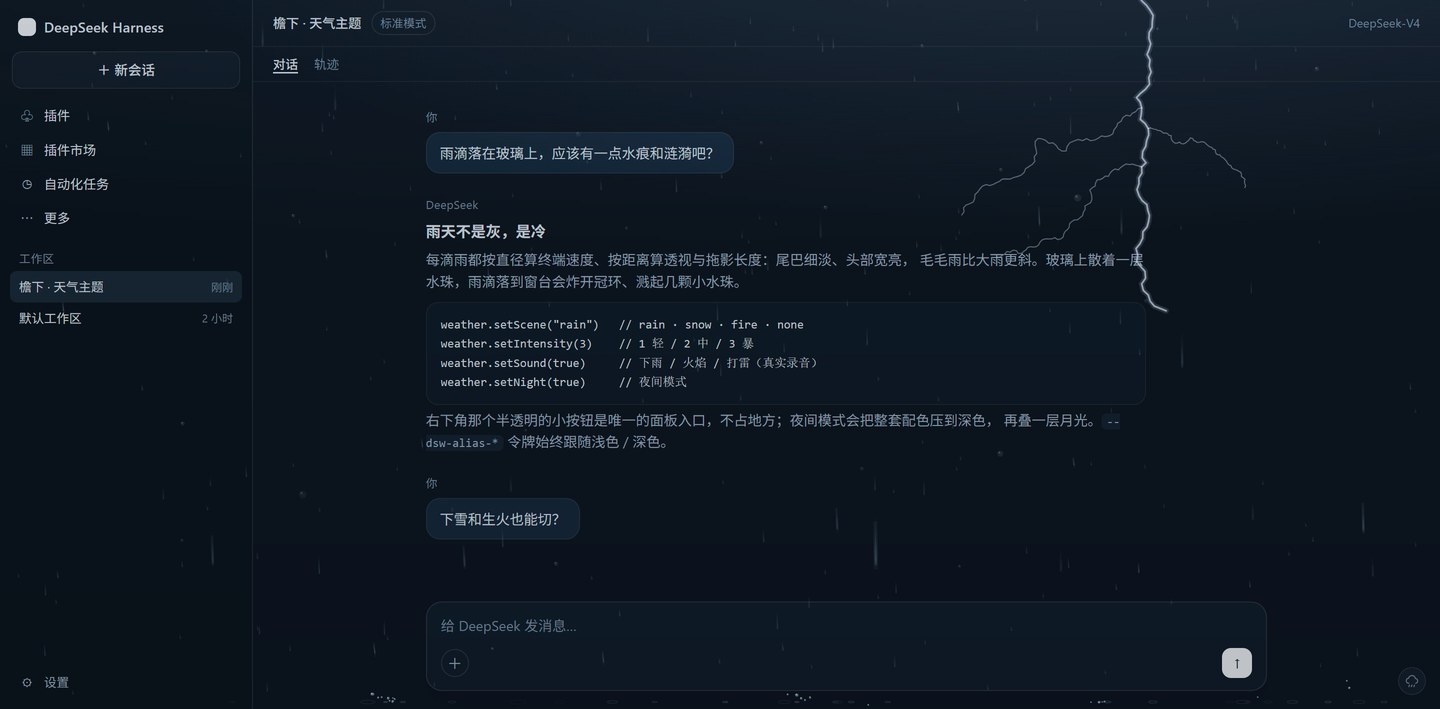
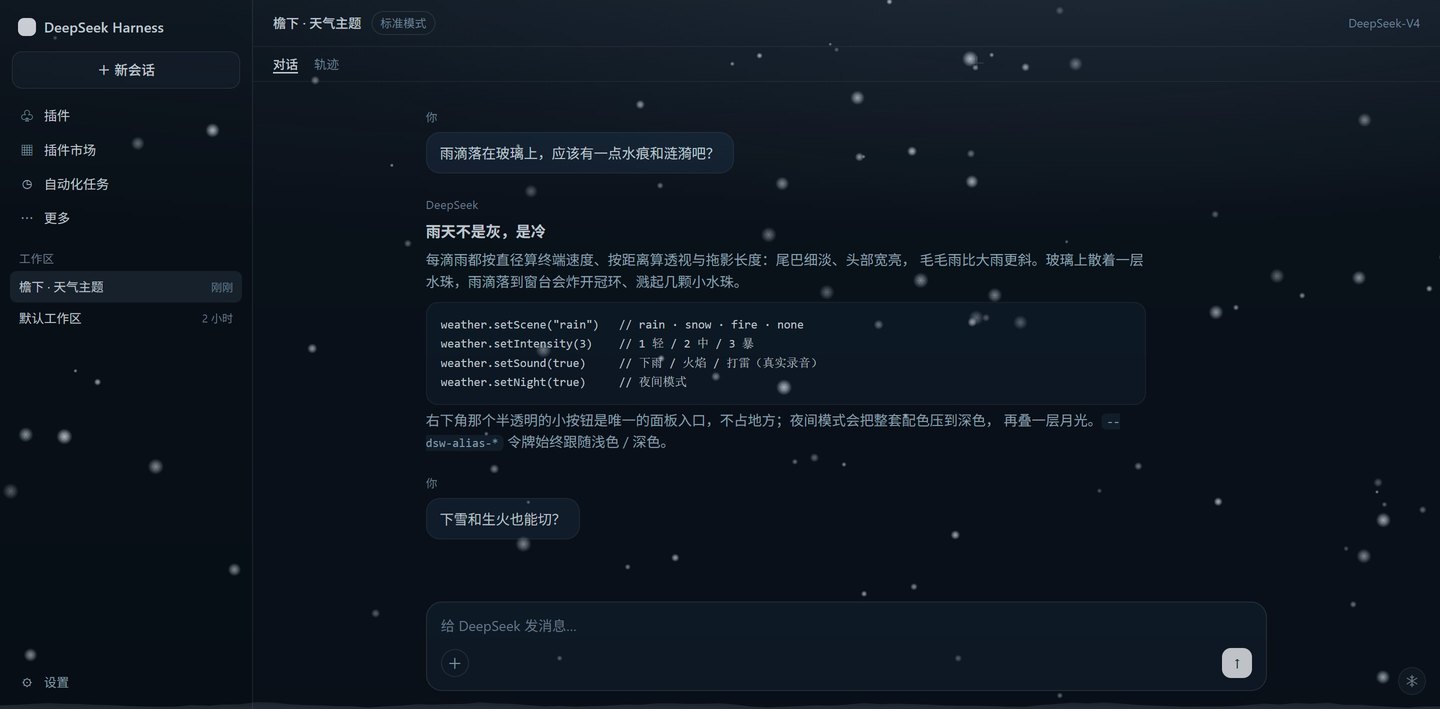
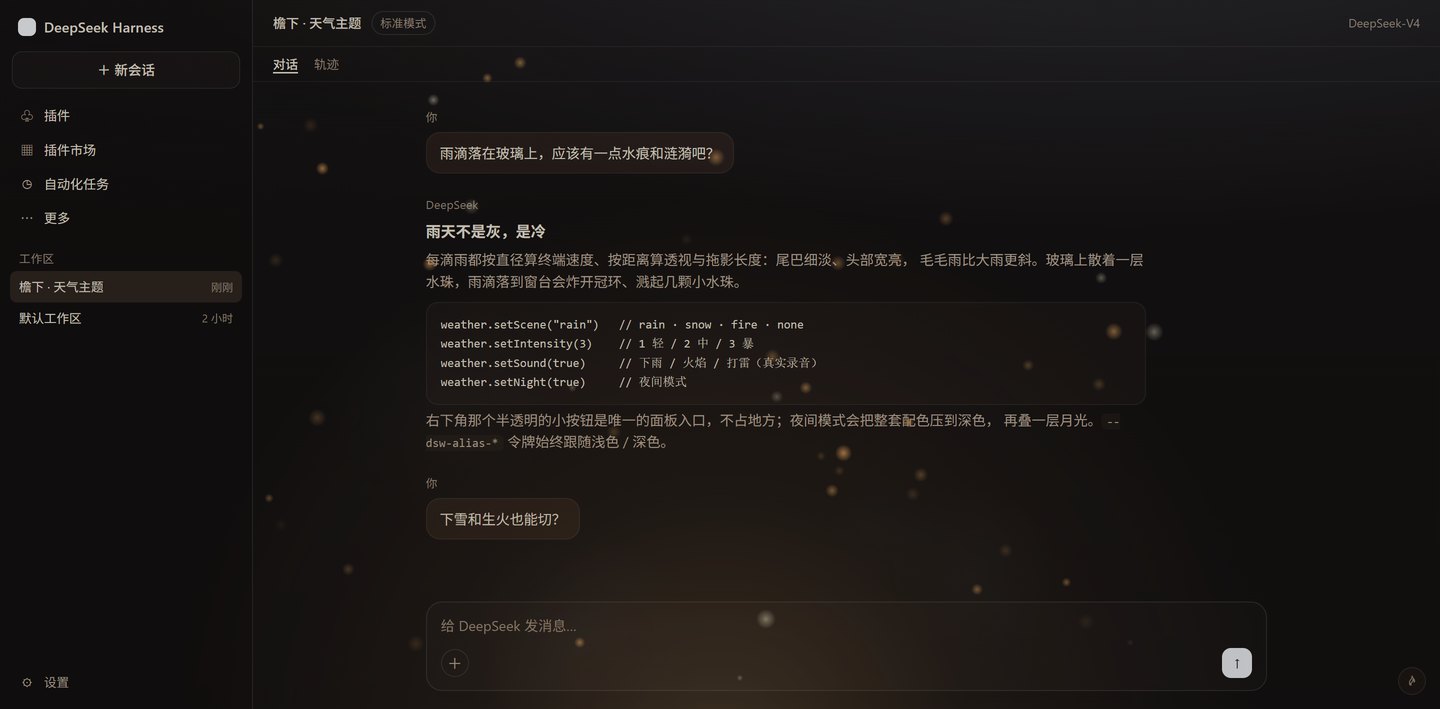
Contents: Scenes · Install · Usage · Audio · How it works · Development · Release · Credits
What it is
Shelter is a thin layer of weather over the DeepSeek Harness web GUI. Rain leaves beads on the glass; snow drifts slowly outside; a fire glows under the composer.
It changes nothing about how DSH works — only the air you sit in while working. The entry point is a 28 px button in the bottom-right corner; the rest of the time it just rains, quietly.
Scenes
| Scene | What you see | Palette |
|---|---|---|
| Rain | Streaks that each fall at their own speed, slant with the wind, and splash where they land | Cool blue-grey, deep navy shadows |
| Snow | Two kinds of crystal drifting through one wind field, over a bank that grows as it snows | Colder and whiter, icy-blue accents |
| Fire | A warm pulse from below, rising embers, sparks, slow smoke | Warm neutrals, amber accents |
Semantic colors (error red, success green, warning amber) are untouched in every scene.
Install
Requires DeepSeek Harness (desktop or web).
cd "$env:USERPROFILE\.dsh\profiles\desktop"
pnpm add "C:\path\to\dsh-theme-shelter"
Then append dsh-theme-shelter to dsh.profile.bundles in the profile package.json, and reload the window (Ctrl+R) or restart DSH.
It is also on npm as dsh-theme-shelter: npm i dsh-theme-shelter installs the same bundle, and the plugin market installs it from there.
On npm 12+ a tarball or git URL is refused by default (install-time security defaults) — add --allow-remote for a remote tarball, or --allow-git for a git dependency. This package ships no install scripts, so nothing else is affected.
Manual alternative — add to ~/.dsh/profiles/desktop/cordis.patch.yml:
- insert:
    - id: theme-shelter
      name: dsh-theme-shelter
Usage
Click the small button in the bottom-right corner:
| Control | Effect |
|---|---|
| Scene | rain / snow / fire / off |
| Intensity | light / medium / heavy |
| Palette | theme colors on or off — the animation runs either way |
| Lightning | rain only: bolt, flash, thunder |
| Sound | rain and fire recorded, snow wind generated |
| Night | dark palette plus a moonlight wash |
Lightning. A strike draws a branched bolt across the sky, flashes the pane, then bangs. The delay encodes distance — 0.3–0.9 s when close, 1.5–2.8 s when far — and a close strike leaves a cracked pane for 5–9 s. Strikes land every 2–9 s, denser at intensity 3.
Sound. Browsers refuse audio until the page has seen a click or a keypress, so the first sound arrives after your first interaction.
Settings live in localStorage["dsh-theme-shelter/v2"] and survive reloads.
First run. On a fresh install a small bubble appears above that button — “点这里切换天气”. It never takes a click itself: any click or keypress anywhere dismisses it, and so does twelve seconds passing. If you miss it, the button is always in the bottom-right corner: 28 px, with a cloud, umbrella, snowflake or flame depending on the scene.
Console API:
__dshWeather.setScene("fire")     // rain · snow · fire · none
__dshWeather.setIntensity(2)      // 1 light / 2 medium / 3 heavy
__dshWeather.setPalette(false)    // animation only, default colors
__dshWeather.setSound(true)
__dshWeather.setNight(false)
__dshWeather.reset()
Audio
Rain and fire are recordings (about 6.7 MB). The host half serves them read-only at /dsh-theme-shelter/audio/* with Range (206), HEAD, a one-year immutable cache, and a 403 for cross-origin Origin.
Snow has no recording, because real snowfall is nearly silent: it is a looped brown-noise bed through a lowpass that breathes over roughly fifteen seconds, held at a whisper (0.04 / 0.07 / 0.11 against rain’s 0.18 / 0.30 / 0.42). It needs no asset and starts before any file has loaded.
How it works
- Colors —
ctx.theme.overrideTokens()overrides 47--dsw-alias-*tokens: surfaces, text, borders, code blocks, scrollbars. Button fills, brand colors, links and focus rings are deliberately left alone. - Rain — every drop carries a diameter and a distance. Terminal velocity is
v = 9.2·√(d/3)(0.5 mm ≈ 2.2 m/s, 3 mm ≈ 8.5 m/s); screen speed and width scale by1/z; the streak isspeed × 6 ms exposure, clamped to 7–70 px; the angle isatan(wind / speed), so drizzle leans further than heavy rain, over a slow gust envelope. Streaks taper from a thin tail to a bright head and are baked into sprites (5 width × 4 length buckets) so each drop costs onedrawImage. - Splashes — a landing drop throws 5–9 droplets at 16% of its impact speed (scaled by distance) under 900 px/s² of gravity, plus a crown ring, plus a near-vertical Worthington jet for close, fat drops. Each droplet is an oblate ellipse flattened along its own velocity — and it oscillates while flying, so the flattening breathes; sub-0.5 mm droplets stay round.
- Snow — crystals with habits. Two thirds are dendrite aggregates (2.5–7.5 mm, falling at 0.55–1.0 m/s, slow spin, twinkling in the dark) and the rest graupel (1.2–3.5 mm, 1.1–1.7 m/s). Each flake has a depth
z; screen size issize × 1800 / z. They ride a position-coherent wind field (a slow base drift plus turbulence sampled from x, y and time) instead of each flake swaying on its own, and landings deposit mass into an accumulation ridge that grows while it snows instead of appearing pre-formed. - Lightning — a recursive bolt with 1–3 branches, drawn additively over the canvas; the flash and the thunder are scheduled separately so a distant strike flickers first and rumbles seconds later.
- Audio — a host-only read route plus
<audio>on the client for rain and fire, fading out and releasing between scenes, and a Web Audio graph for the snow wind. - Cost — particle counts scale with viewport area and are capped (rain 520, snow 340, fire 64); DPR is capped at 2; rendering pauses in a hidden window;
prefers-reduced-motiondraws a single static frame.
Development
preview/preview.html is a standalone harness: it fakes the module loader and ctx.theme, so you can open it directly to see all three scenes, night mode and the panel.
The profile links this package with link:, so editing client/client.js only needs a DSH restart.
Release
Three things have to agree: the git tag, package.json, and npm. The market reads the GitHub entry and maps it to the npm package by its repository field — when the tag and the npm version drift apart, users are told an update exists and then install the old code.
- Bump the version in two places —
versioninpackage.jsonandconst VERSIONinclient/client.js(the panel footer shows that one). Changing only one leaves the panel reporting the previous release. - Commit, tag, push:
git commit -am "chore: release 0.3.1" git tag -a v0.3.1 -m "0.3.1" git push --follow-tags - Publish to npm.
publishConfigalready points at the origin registry, so no--registryis needed even when the machine-level.npmrcuses a China mirror:npm publish
Nothing else to upload by hand: the tarball: in the market entry points at a GitHub Release asset and only covers installs that cannot reach npm.
Known limitations
- Night mode does not write your appearance preference, so Settings still shows the light/dark you picked;
- The overlay sits above the whole window, so dialogs and menus collect rain too (at very low opacity);
- Product icons are not replaceable — that needs a registered theme;
- The rain and fire recordings come from Pixabay (see Credits); the snow wind is generated, so there is nothing to credit there.
Credits
The ambience recordings come from Pixabay and are used under the Pixabay Content License: free for commercial and non-commercial use, no attribution required, but the files may not be redistributed as standalone assets. They are bundled here as part of a larger work.
| File | Use |
|---|---|
audio/rain.mp3 | rain loop |
audio/fire.mp3 | hearth loop |
audio/thunder.mp3 | one-shot thunder after a flash |
Drop a replacement with the same filename into audio/ to swap a sound.
License
MIT © ifer47
Ähnliche Plugins
dsh-wallpaper-engine
elysia395/dsh-wallpaper-engine
dsh-deep-whale (maid-atelier)
small-tailqwq/dsh-deep-whale
dsh-deep-whale
small-tailqwq/dsh-deep-whale
dsh-claude-style
nwflower/dsh-claude-style