dsh-mcp-apps
katticot/dsh-mcp-apps
Universal MCP Apps Host & UI Plugin for DeepSeek Harness (DSH)
Installation
dsh plugin --profile web add github:katticot/dsh-mcp-appsREADME
dsh-mcp-apps





Renders MCP Apps as sandboxed interactive iframes in DeepSeek Harness (DSH) web chat.
What is this?
MCP servers can return more than text: the MCP Apps extension (SEP-1865) lets a tool result carry a ui:// resource — a small, self-contained web app such as a dashboard, a map, or a form. By default, DSH doesn't know what to do with these and just shows the raw tool result. dsh-mcp-apps is a Cordis 4 plugin for DSH that recognizes these ui:// resources and renders them as live, interactive apps directly inside the chat turn, in a sandboxed iframe. The app can also call back into the host to run more tools (e.g. a "Refresh" button), gated behind an explicit, per-server approval policy.
Features
- Renders MCP Apps (
ui://resources) as interactive dashboards, charts, maps, and forms right inside DSH chat. - Every app runs sandboxed in an iframe with an auto-generated Content Security Policy — no
allow-same-origin, no ambient access to the host page. - Connects to any MCP server over stdio, SSE, or Streamable HTTP, with automatic reconnect.
- Apps can call back into host tools (e.g. a "Refresh Data" button), off by default and configurable per server (
deny/approve/allow). - Rendered apps carry an
Interactive Appbadge and resist DSH's auto-collapse behavior, so they don't fold away when the model finishes streaming. - Handles secrets safely:
${VAR}expansion for env vars and headers blocks DSH-internal and secret-shaped variable names unless you explicitly allow them. - Registers host-side MCP tools (without the iframe UI) on headless DSH hosts too: the plugin's
injectlist (tools,connection) has no hardwebServerrequirement, so tool calls still work even where there's no browser to render into.
Requirements
- Node.js >= 22
- DSH (DeepSeek Harness)
>= 0.1.7-rc.2with Cordis~4.0.4 - The web profile, for the iframe UI. The plugin's client bundle is injected only when
dsh.client.platformisweb(seepackage.json), so its UI does not render in other profiles (e.g.tui,headless) even if the plugin is installed there — but the plugin's host-side tools still register on those profiles (see Features).
The packed plugin has been installed and exercised in a clean DSH 0.1.7-rc.2 web profile, including iframe rendering and delivery of the fixture tool input/result. Other DSH/Cordis combinations remain unverified; see the compatibility record.
Compatibility
DSH checks a plugin's @deepseek-ai/dsh-* peer ranges against its own runtime version (evaluatePluginCompatibility) and refuses to load an incompatible plugin. Match your DSH version to a plugin release:
dsh-mcp-apps | Requires DSH |
|---|---|
0.2.2 and later | >= 0.1.7-rc.2 |
0.2.1 and earlier | 0.1.5-rc.x |
See docs/dsh-compatibility.md for how the check works and why an exact-pinned peer (no range operator) fails against a later prerelease.
Install
Via the DSH Harness UI
-
Open DSH Harness and click Plugins in the sidebar.

-
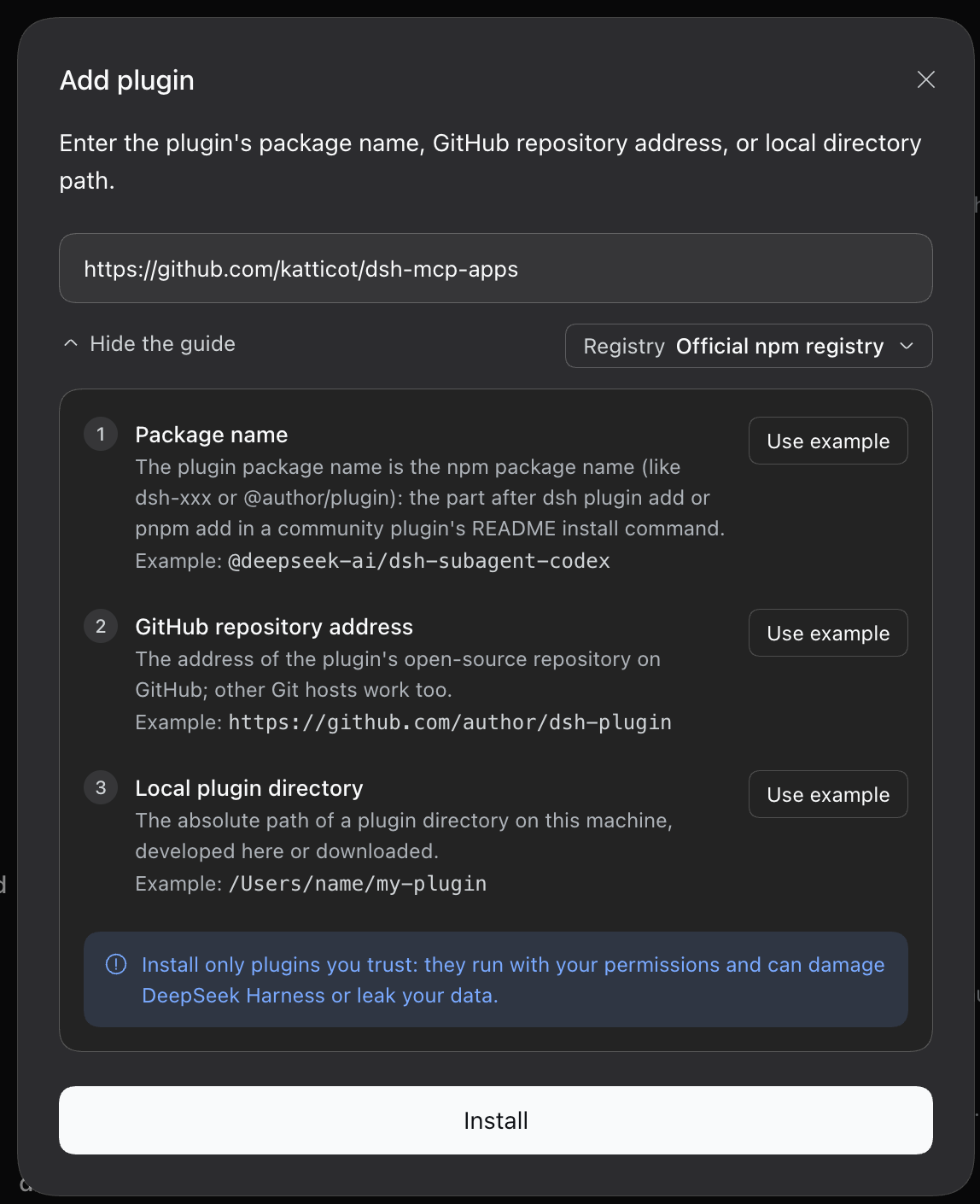
Click + Add plugin, then enter one of the following and click Install:
- GitHub repository address:
https://github.com/katticot/dsh-mcp-apps - Package name:
dsh-mcp-apps(Official npm registry) - Local plugin directory: absolute path to your clone
- GitHub repository address:
Via the CLI
pnpm dlx @deepseek-ai/dsh@0.1.7-rc.2 plugin --profile web add dsh-mcp-apps
This forwards to pnpm inside your DSH profile directory ($DSH_HOME/profiles/web), not your current project — it adds dsh-mcp-apps to that profile's own package.json. Don't run a plain pnpm add dsh-mcp-apps in an unrelated project and expect it to do anything for DSH.
dsh-mcp-apps ships as a DSH bundle (package.json#dsh.bundle): installing it also activates it, whether you install it through the UI or the CLI above. The package's own dsh/cordis.patch.yml inserts a single id: mcp-apps row with an empty server map, so the plugin is loaded (with no servers configured yet) as soon as it's installed — you don't hand-write that insert: yourself, and you shouldn't (see Configure below).
Configure
The plugin is already loaded with an empty servers: {} by the bundle patch above. To add servers, patch that same row from your own profile's patch file (e.g. ~/.dsh/profiles/web/cordis.patch.yml) — a top-level entry (no insert:) that targets the existing id: mcp-apps:
- id: mcp-apps
  config:
    servers:
      # A remote server speaking Streamable HTTP or SSE
      my-server:
        transport: streamable-http
        url: 'https://your-mcp-server.example.com/mcp'

      # An OAuth-protected remote server, proxied through mcp-remote
      my-oauth-server:
        transport: stdio
        command: npx
        args: [-y, mcp-remote@0.1.37, 'https://your-mcp-server.example.com/mcp']
A patch replaces the targeted row's whole config — it doesn't merge — so restate every key you want (including defaultTimeoutMs and every server, not just the one you're adding or changing).
Do not wrap this in insert:. insert: creates a new row; since the bundle already inserted one id: mcp-apps row for you, inserting a second one gives you two plugin instances both registering the same /api/mcp-apps/* RPC routes, which throws (connection: exact Fetch route "..." is already registered) — see Migrating from 0.2.x if you have an older insert:-based entry lying around.
A fuller example, showing environment expansion, headers, and reverse tool-calls:
- id: mcp-apps
  config:
    defaultTimeoutMs: 30000
    servers:
      # Local stdio subprocess (env values support ${VAR} / ${VAR:-default} expansion)
      local-tool:
        transport: stdio
        command: go
        args: ['run', 'main.go']
        cwd: '/path/to/mcp-server'
        env:
          DATABASE_URL: '${DATABASE_URL}'
        toolCallTimeoutMs: 45000
        allowAppToolCalls: approve

      # Remote SSE server with an auth header
      remote-analytics:
        transport: sse
        url: 'https://mcp.example.com/sse'
        headers:
          Authorization: 'Bearer ${MCP_TOKEN}'
        allowedVars: [MCP_TOKEN]   # secret-shaped vars are blocked unless listed
        reconnectOptions:
          maxRetries: 10
Migrating from 0.2.x
Before 0.2.3, this package wasn't a bundle — you activated it yourself with an - insert: - id: <anything> \n name: dsh-mcp-apps entry in your profile's cordis.patch.yml. Since installing now activates the plugin automatically (via the package's own bundle patch), that old insert: entry is a second, duplicate instance and must be removed:
- Delete your old
- insert:block that nameddsh-mcp-apps(whateveridyou gave it) from your profile'scordis.patch.yml. - Replace it with a bare patch entry targeting
id: mcp-apps(noinsert:), restating yourserversconfig as shown above. - Run
npx @deepseek-ai/dsh --profile web --dump-configand confirm exactly one row withname: dsh-mcp-appsappears. Two rows means duplicate servers and a crash on load (see above) — remove whicheverinsert:you added.
Run & verify
After saving cordis.patch.yml, restart the web profile so the loader applies the plugin entry:
pnpm dlx @deepseek-ai/dsh@0.1.7-rc.2 web
Call a tool on a configured server that returns a ui:// resource. Its tool input and result render in a sandboxed iframe with an Interactive App badge. App callbacks follow that server's allowAppToolCalls policy.
Reverse Tool-Call Security Model
Rendered apps can call back into host tools (e.g. a "Refresh Data" button). That path is locked down by default:
- Session tokens: every
tools/callrequest from an app must carry a validAppSessionStoresession token, scoped to the tool names and server it was issued for. A missing, expired, or mismatched-server token is rejected before the tool ever runs (src/index.ts). allowAppToolCalls(per server, defaultfalse/'deny'): a'deny' | 'approve' | 'allow'setting (a plainbooleanis also accepted as legacy shorthand forfalse/'allow').'deny'(default): no tools are exposed for reverse calls from that server's apps.'allow'/true: reverse calls are permitted without approval.'approve': each reverse call is routed throughctx.approval(@deepseek-ai/dsh-user-approval) and requires the originating agent to have an open turn (agent.status === 'running'); outside of that window, or if the approval/agent services aren't available, the call fails withunavailablerather than silently allowing or hanging.
- App-only / model-only visibility: tools marked app-only (
isToolVisibilityAppOnly) are never registered with the LLM's tool list, and tools marked model-only (isToolVisibilityModelOnly) are excluded from the set an app is allowed to call back into — each direction is a one-way gate.
Configuration Reference
| Option | Type | Default | Description |
|---|---|---|---|
servers | Record<string, ServerConfig> | {} | Map of server identifiers to transport configs. Names cannot contain __ or end with _. |
defaultTimeoutMs | number | 30000 | Fallback timeout in ms for tool calls (must be >= 1). |
servers.<id>.transport | 'stdio' | 'sse' | 'streamable-http' | (Required) | Transport mechanism. Only transports defined by the MCP specification are supported: stdio, streamable-http, and sse (deprecated upstream, kept for older servers). |
servers.<id>.command | string | — | Executable binary path (for stdio). |
servers.<id>.args | string[] | [] | Command arguments (for stdio). |
servers.<id>.cwd | string | — | Working directory (for stdio). |
servers.<id>.env | Record<string, string> | {} | Environment variables, with ${VAR} / ${VAR:-default} expansion (for stdio). |
servers.<id>.url | string | — | Remote endpoint URL (for sse, streamable-http); must match http(s)://. Plain http:// is only allowed to a loopback host (localhost, 127.0.0.1, ::1) — anything else is rejected at connect time. |
servers.<id>.headers | Record<string, string> | {} | Custom HTTP headers, with the same ${VAR} expansion as env (for sse, streamable-http). |
servers.<id>.toolCallTimeoutMs | number | 30000 | Per-server tool call timeout in ms (must be >= 1). |
servers.<id>.reconnectOptions | { maxRetries?, initialDelayMs?, maxDelayMs?, backoffFactor? } | {5, 1000, 30000, 1.5} | Exponential-backoff reconnect tuning, applied on stdio and remote (sse, streamable-http) transports. |
servers.<id>.allowAppToolCalls | 'deny' | 'approve' | 'allow' | boolean | false ('deny') | Reverse tool-call policy — see Reverse Tool-Call Security Model. |
servers.<id>.allowedPermissions | string[] | [] | Allowlist for camera, microphone, and geolocation iframe permissions requested by a resource's UI metadata; all three are denied unless explicitly listed here. Other permission keys pass through unfiltered into the iframe's allow attribute. |
servers.<id>.allowedVars | string[] | [] | Env var names this server may read via ${VAR} expansion (in env or headers) despite being DSH_*-prefixed, secret-shaped (KEY/PASSWORD/SECRET/TOKEN), or an agent socket (SSH_AUTH_SOCK, GPG_AGENT_INFO), which are blocked by default. E.g. allowedVars: ['API_TOKEN'] lets headers: { Authorization: 'Bearer ${API_TOKEN}' } resolve (for stdio, sse, streamable-http). |
servers.<id>.maxMessageBytes | number | 16777216 (16MB) | Maximum size in bytes of a single incoming message (for stdio, sse, streamable-http; must be >= 1). For stdio this is the bytes buffered since the last newline (one JSON-RPC line); for remote transports it caps each individual SSE event or response body (not the total stream lifetime) via a byte-counting wrapper around fetch. Protects against a malicious or misbehaving MCP server exhausting host memory. |
${VAR} / ${VAR:-default} expansion only applies to env and headers values — not to url, args, or cwd. $$ is an escaped literal $. A default value cannot itself contain a nested ${...} expansion (e.g. ${MISSING:-${PORT}} is taken literally, not expanded recursively).
Troubleshooting
- Tools show up twice: running
@deepseek-ai/dsh-mcp-clientagainst the same MCP server alongside this plugin registers that server's tools through both plugins, duplicating them. Use one or the other for a given server. ${VAR}isn't expanding:DSH_*-prefixed and secret-shaped (KEY/PASSWORD/SECRET/TOKEN) variable names, plusSSH_AUTH_SOCK/GPG_AGENT_INFO, are blocked by default — add the name to that server'sallowedVars.- The app's button does nothing:
allowAppToolCallsdefaults todeny. Set it toapproveorallow. Underapprove, the call also needs an open, running agent turn to prompt for approval — it fails withunavailableoutside of that window. - Remote connection rejected: plain
http://is only allowed to a loopback host (localhost,127.0.0.1,::1); anything else must behttps://. - Nothing renders: the client UI only loads under the web profile (
dsh.client.platform: "web"). It won't render intui,headless, or other profiles. - Plugin doesn't seem to load / two
dsh-mcp-appsrows: the plugin activates itself on install (it's a bundle) with anid: mcp-appsrow — your own profile patch should target that same id with a bare top-level entry (noinsert:, see Configure). Aninsert:there creates a second row, which crashes on load (duplicate/api/mcp-apps/*RPC route registration); see Migrating from 0.2.x. Runnpx @deepseek-ai/dsh --profile web --patch <file> --dump-configto print the composed config and confirm exactly onename: dsh-mcp-appsrow appears. Plugin dsh-mcp-apps@X.Y.Z is incompatible with dsh <version>: peerDependencies {...}: your DSH runtime version doesn't satisfy this plugin's@deepseek-ai/dsh-*peer ranges. Check the compatibility table —dsh-mcp-apps@0.2.2+requires DSH>= 0.1.7-rc.2; upgrade DSH, or install an older plugin version matched to your DSH release.
How it works
The plugin bridges a sandboxed iframe and the DSH host over postMessage-based JSON-RPC, manages a pool of MCP server connections, and normalizes tool names/visibility for the LLM. For the full internals — CSP synthesis, the postMessage handshake, tool fingerprinting, the anti-collapse behavior, and the resize circuit breaker — see docs/how-it-works.md.
Development & Testing
# Install dependencies
pnpm install

# Type-check
pnpm typecheck

# Build host and client bundles (tsdown)
pnpm build

# Run Vitest test suite
pnpm test
./client (the browser-side bundle loaded by DSH's window.__ModuleLoader__) is loader-only: it has no types entry in package.json#exports and cannot be imported directly from Node or a bundler — only the . (host) entry ships type declarations.
See CONTRIBUTING.md for the release process.
License
MIT © katticot
Ähnliche Plugins
reactive-resume
amruthpillai/reactive-resume
cloudbase-ai-toolkit
tencentcloudbase/cloudbase-ai-toolkit
sandbase-harness
sandbaseai/sandbase-harness
deja-vu
vshulcz/deja-vu