dsh-live-pixel
maxwelltoo/dsh-live-pixel
Four animated pixel-art scenes rendered with WebGL, with a theme picker and readability controls for DeepSeek Harness.
Installation
dsh plugin --profile web add github:maxwelltoo/dsh-live-pixelREADME
Pixel themes
Four animated pixel-art backgrounds for DeepSeek Harness, with a scene picker and readability controls. When WebGL is unavailable, the selected theme keeps its interface colors and uses a solid background.
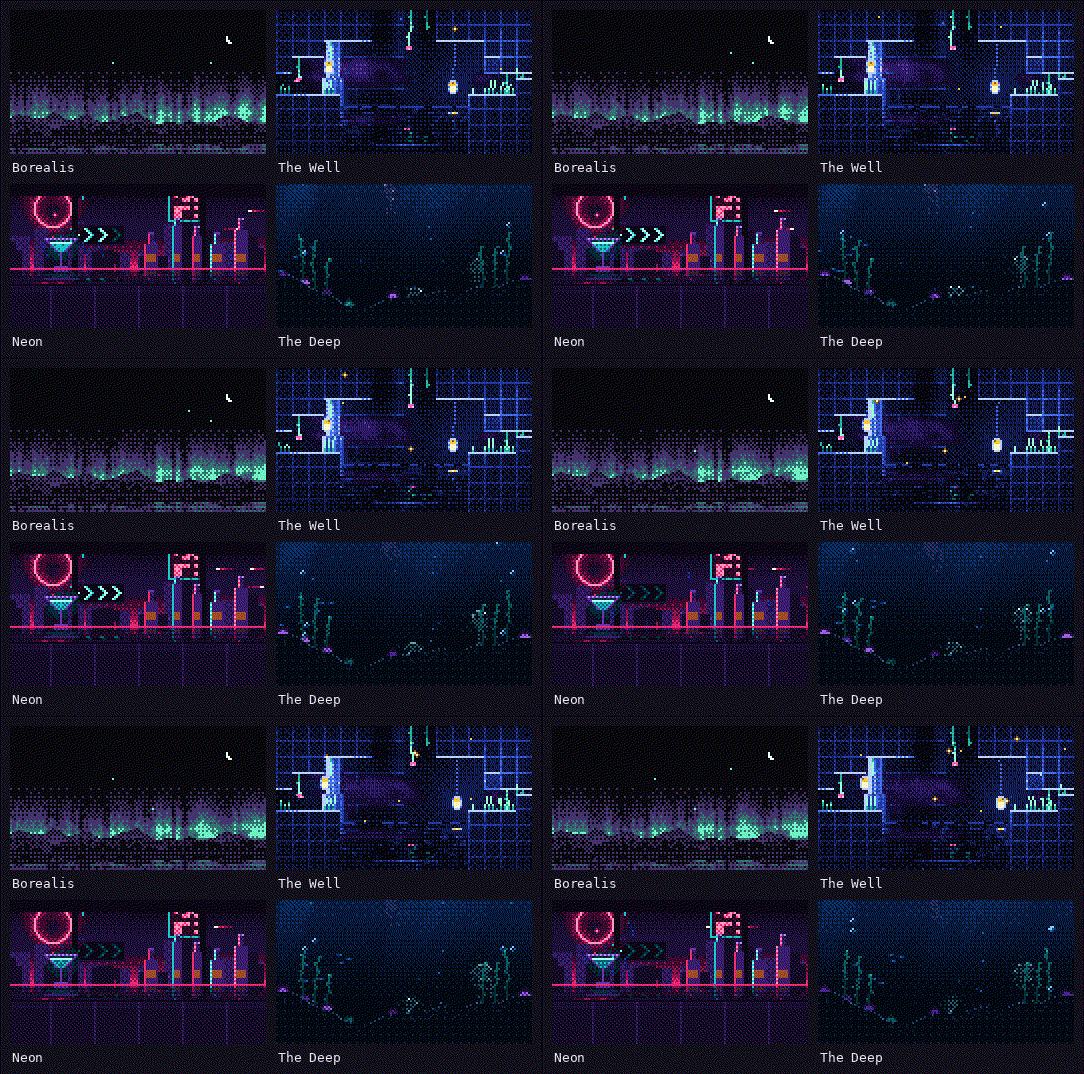
See all four scenes in the DSH chat UI.
Install and use
- Open Plugins → Add plugin, enter
dsh-live-pixel, and confirm the installation. Select Enable now and follow any restart prompt. - Open Settings → Pixel themes and choose a scene. If the scene makes text hard to read, lower Scene strength or raise Surface paper.
For a downloaded release tarball, enter its absolute path on the DSH host in Add plugin. To remove the plugin, open its entry in Plugins and select Uninstall.
Scenes
| Theme | Scene | Light and dark modes |
|---|---|---|
| Borealis | Aurora, mountains and a lake under passing meteors. Light mode shows a two-ink risograph dawn. | Separate palettes |
| The Well | Hanging lamps, vines, a reflecting pool and falling stones at the bottom of a well. | One night palette |
| Neon | A bar window on a rainy night, with neon signs, rain streaks and bottles. | One night palette |
| The Deep | Shafts of light, a passing blue whale, jellyfish and kelp. | One night palette |
Animation pauses while the page is hidden. With reduced motion enabled, the scene holds a still frame.
Readability settings
| Control | Default | Effect |
|---|---|---|
| Scene strength | 100% | How much of the scene shows through the window |
| Surface paper | 93% | Opacity of cards, the composer, message bubbles and code blocks |
| Side columns | 90% | Opacity of the session list and the right panel |
| Bottom scrim | 60% | Strength of the fade above the composer |
Settings are saved locally for each theme. Restore defaults resets the current theme.
Compatibility
- DSH Desktop 0.2.2-rc.3 was tested for switching themes, changing settings, and restoring the window after minimizing it.
- DSH Web 0.2.2-rc.1 was tested for installation, theme and appearance changes, preference persistence, disabling, and uninstalling Live Pixel 2.1.0 in an isolated profile.
Development
Copy the Borealis theme module to themes/<id>.js and give it a unique kebab-case ID starting with a letter. Supply Chinese and English labels, light and dark shader colors (colors, both with uPaper), the interface colors (palette), and a fragment shader (fragment). The description and slider defaults are optional. The engine provides uRes, uTime, uPointer, and uNight.
Run these commands from the project root. The build discovers and validates theme modules automatically.
node scripts/build.mjs           # regenerate client.js
node scripts/build.mjs --check   # check that the bundle is up to date
node tests/smoke.mjs             # test with stub DOM, React and WebGL
node tests/render.real.mjs       # mount settings with React 18 and jsdom
The settings test skips if React 18, react-dom, or jsdom is unavailable. To check real WebGL rendering, generate the diagnostic pages and serve the project root. Open the shader check, engine check, or scene gallery.
node scripts/shader-check.mjs
python3 -m http.server 8400
License and credits
The project is MIT-licensed. The Borealis shader adapts the scene structure and palettes from Adolanium's hermes-borealis. MIT license · Third-party notices · hermes-borealis
Ähnliche Plugins
dsh-wallpaper-engine
elysia395/dsh-wallpaper-engine
dsh-deep-whale (maid-atelier)
small-tailqwq/dsh-deep-whale
dsh-claude-style
nwflower/dsh-claude-style
dsh-deep-whale
small-tailqwq/dsh-deep-whale