dsh-wallpaper-bg
nishuoyang/dsh-wallpaper-bg
Eigenständiger Hintergrund für DSH-Weboberfläche und Desktop-App: integrierte Motive, lokale Bild-/Video-Uploads in IndexedDB und eine schreibgeschützte lokale Wallpaper-Engine-Bibliothek, bereitgestellt über den im Repository enthaltenen wallpaper-engine-api-Dienst. Zeigt Bilder, Videos und Workshop-Szenenvorschauen; mit hellem Nebel/dunkler Überlagerung, Unschärfe, Helligkeit und sicherem Zoom. Auch der Desktop-Hintergrund-Folgemodus ist nur lesend.
Installation
dsh plugin --profile web add github:nishuoyang/dsh-wallpaper-bgREADME
dsh-wallpaper-bg
v0.5.13 · MIT License





English | 中文
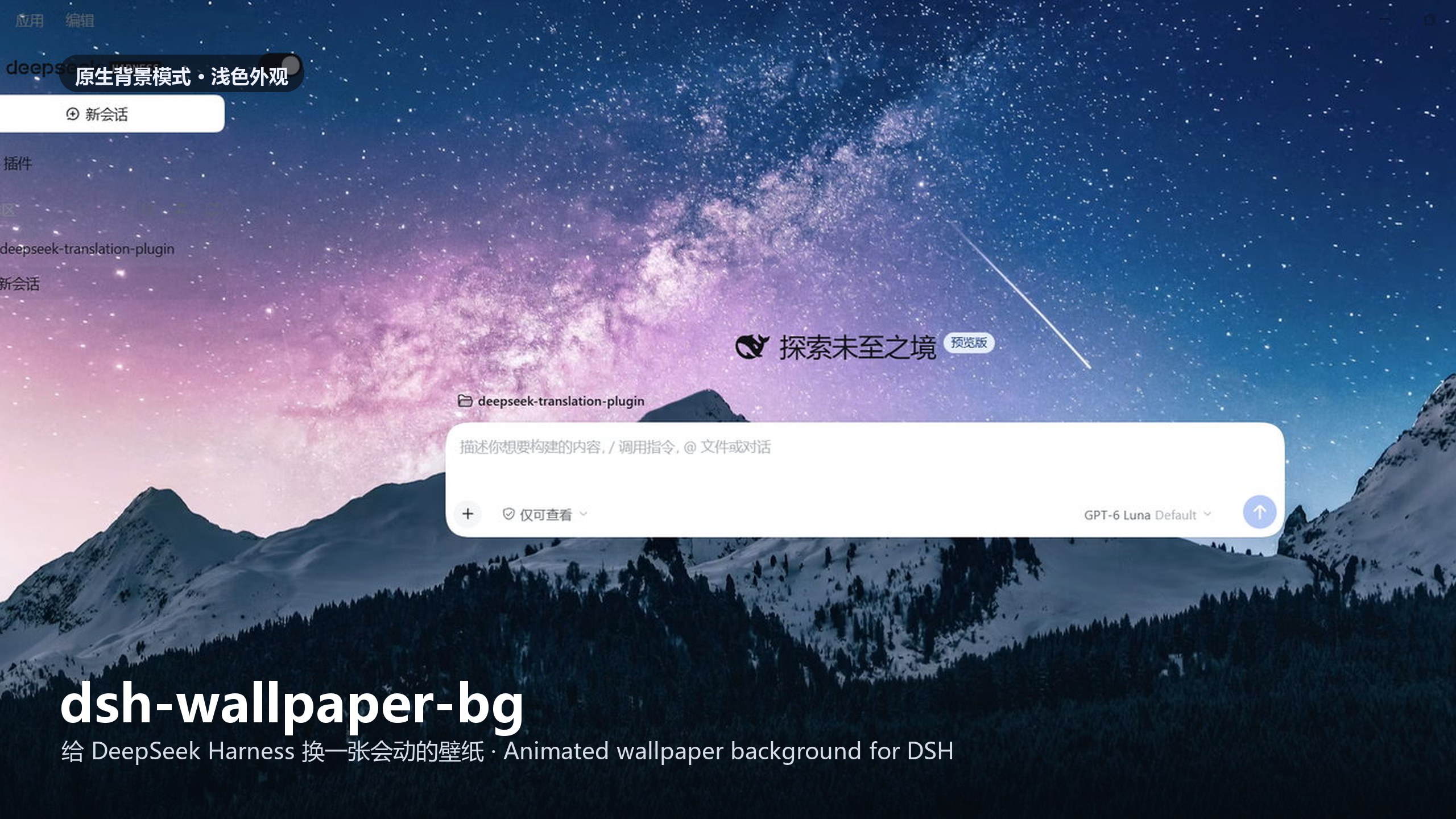
A static two-half plugin that puts an independent animated wallpaper layer under the DeepSeek Harness (DSH) interface — both the browser UI (dsh web) and the 0.2 desktop app. Install it with one command (or just the package name in the desktop app's plugin page) and the whole interface sits on a moving wallpaper. The background layer is fully independent from the desktop Wallpaper Engine: changing wallpapers inside DSH never touches your desktop wallpaper, and vice versa.
Features
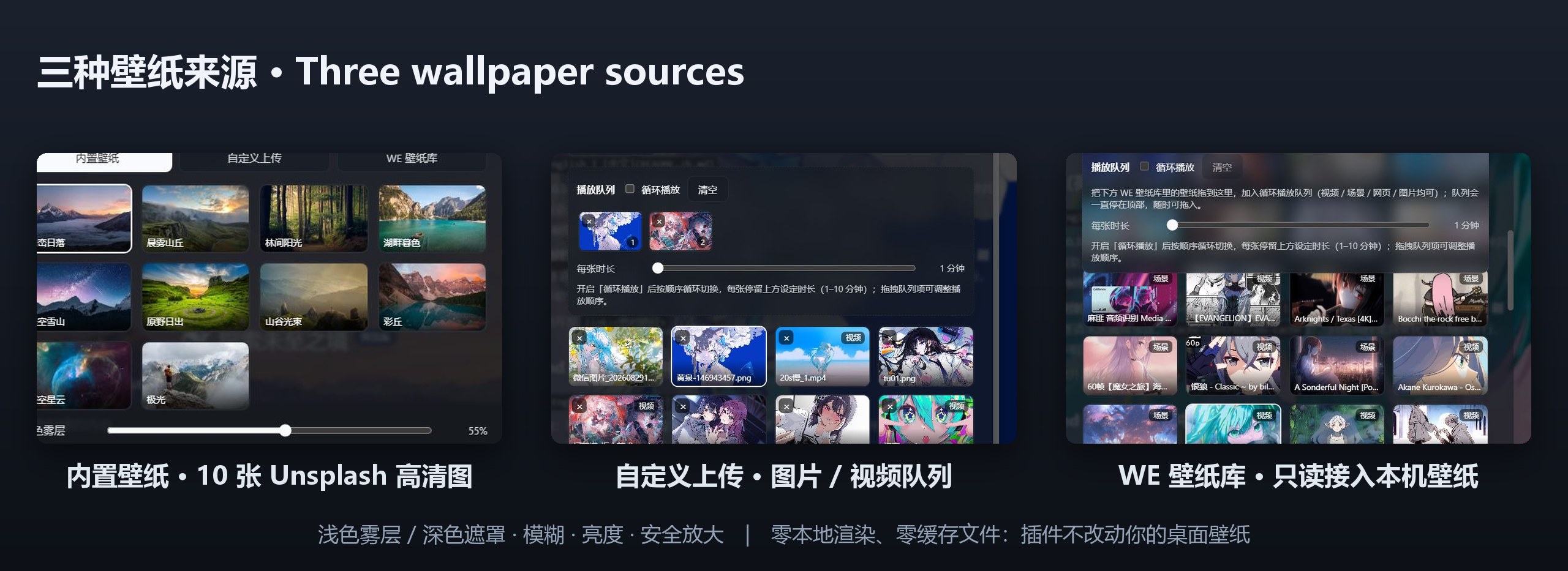
- Three wallpaper sources: 10 built-in high-res Unsplash images; custom uploads (images / videos, stored in IndexedDB); and read-only access to your locally installed Wallpaper Engine library (default
http://127.0.0.1:8088), filtered by the real Steam subscription list. - Playback queue per source: drag wallpapers into the queue and loop-play them at 1–10 minutes per item, with drag-to-reorder, click-to-jump and localStorage persistence. The queue is sticky at the top of its tab.
- Four render modes: static images (cover-fit), videos (
<video object-fit: cover>, GPU compositing), scene wallpapers (WE's own workshop previewpreview.gif/preview.jpg), and web wallpapers (native iframe rendering ofindex.html). - Four adjustments: light fog / dark overlay (auto-switching with the DSH theme), background blur (0–20px), background brightness (50–150%), safe zoom (0–10% to crop edge letterboxing).
- Native background switch on the main conversation page: clears the fog / overlay and the translucent page surfaces in one click, while the composer and dialogs keep their readable surfaces.
- Sync desktop wallpaper: read-only follow of the current desktop wallpaper (30 s polling, immediate on tab focus), rendered by type, with automatic multi-monitor resolution and a monitor picker. It never changes your desktop wallpaper and never samples the screen.
- Black-flash-free switching with next-item warm-up: wallpaper changes cross-fade two stacked layers over ~0.42 s, and the next queue item is preloaded while the current one plays.
- Zero local rendering, zero cache files: no
scene.pkgparsing, no frame files, no MP4s, no screen sampling, no~/.dsh-wallpaper-bgfolder.
Full option-by-option reference: Configuration.
Installation
Prerequisites
- DeepSeek Harness desktop app (0.2 preview or later) — the app bundles its own Node.js / pnpm runtime, so nothing else is needed;
- or a CLI install (
dsh web) with Node.js ≥ 20 (node -v) and a working DeepSeek Harness; - the optional WE library source adds its own requirements (Windows, a local Wallpaper Engine install and Node.js on PATH) — see WE library service.
Desktop app (no command line)
- Open Settings → Plugins (设置 → 插件) and type
dsh-wallpaper-bginto the install box; - Confirm, and restart the app (or reload the window) when it asks;
- Open Settings → Wallpaper (设置 → 壁纸) and pick a wallpaper.
With the app's optional dsh command on PATH, the equivalent is:
dsh plugin --profile desktop add dsh-wallpaper-bg
CLI / browser (dsh web)
dsh plugin --profile web add dsh-wallpaper-bg
From a checkout, link the repo instead: dsh plugin --profile web add link:<absolute-path-to-repo> (or --profile desktop).
Upgrading
dsh plugin … add forwards to pnpm add, which keeps the range already recorded in the manifest — re-running the install command on an existing install changes nothing. Ask for a version explicitly:
dsh plugin --profile web add dsh-wallpaper-bg@latest    # move to the newest release
dsh plugin --profile web add dsh-wallpaper-bg@0.5.13     # or pin an exact version
pnpm 11 installs a release only after it is a day old (24 h
minimumReleaseAge), so a just-published version resolves to the previous one for roughly a day. Name the exact version to take it immediately.
Install, upgrade, local development and profile details: Installation guide.
Quick start
# 1. install into a profile
dsh plugin --profile web add dsh-wallpaper-bg

# 2. start DSH (desktop app: just open it)
dsh web
- Open Settings → Wallpaper (设置 → 壁纸).
- Pick a source tab — 内置壁纸 / 自定义上传 / WE 壁纸库 — and click a wallpaper to apply it; the background only changes on an explicit selection.
- Drag wallpapers into the queue to loop-play them, and use the sliders for fog / overlay, blur (0–20px), brightness (50–150%) and safe zoom (0–10%).
- (Optional) Toggle 同步桌面壁纸 to read-only follow the desktop wallpaper, or flip Native background in the main conversation header to reveal the wallpaper completely.
Verify the host half is mounted at <DSH address>/dsh-wallpaper-bg/health:
http://127.0.0.1:3080/dsh-wallpaper-bg/health     # dsh web (default port 3080)
http://127.0.0.1:19387/dsh-wallpaper-bg/health    # desktop app (fixed port 19387)
The plugin also ships a
dsh-wallpaper-bgCLI (install/status/uninstall) for one-command setup on a CLI install; it skips thedesktopprofile, which the Electron app owns.
Documentation
| Topic | Document |
|---|---|
| Install, upgrade, local development | docs/installation.md |
| Every setting, queue and filter | docs/configuration.md |
| Optional Wallpaper Engine library service | docs/we-library-service.md |
| Symptom → cause → fix | docs/troubleshooting.md |
| How the two halves work | docs/architecture.md |
Releasing (scripts/release.ps1) and CI workflows | docs/releasing.md |
How it works, in one line: a DSH static two-half plugin — lib/host.js registers same-origin routes (/dsh-wallpaper-bg/asset, /dsh-wallpaper-bg/we, /dsh-wallpaper-bg/health), lib/client.js is a hand-written single-file browser bundle that injects the background layer and the 壁纸 settings tab, and cordis.patch.yml inserts the plugin row into the profile composition's host plane. Detail: Architecture.
License
MIT License, see LICENSE. Issues / PRs welcome.
Ähnliche Plugins
dsh-deep-whale (maid-atelier)
small-tailqwq/dsh-deep-whale
dsh-wallpaper-engine
elysia395/dsh-wallpaper-engine
dsh-deep-whale
small-tailqwq/dsh-deep-whale
open-sea-skin
d-dev0101/open-sea-skin