dsh-workbuddy-expert
pbwheel/dsh-workbuddy-expert
Brings WorkBuddy desktop-app experts into DSH: a settings-page market scans the local WorkBuddy expert directory (experts land there after you summon them in WorkBuddy) read-only for browsing, search and category filtering, with one-click install (exported to ~/.dsh/experts/ as role prompt + skills + avatar), update and uninstall; a picker capsule next to the input box switches the current session's expert — swapping role prompt, skills and an optional tool whitelist wholesale while keeping full session history, applied at the next model-request boundary.
Installation
dsh plugin --profile web add github:pbwheel/dsh-workbuddy-expertREADME



DSH WorkBuddy Expert 是社区维护的 DeepSeek Harness(DSH)插件,并非 DeepSeek AI 官方产品。
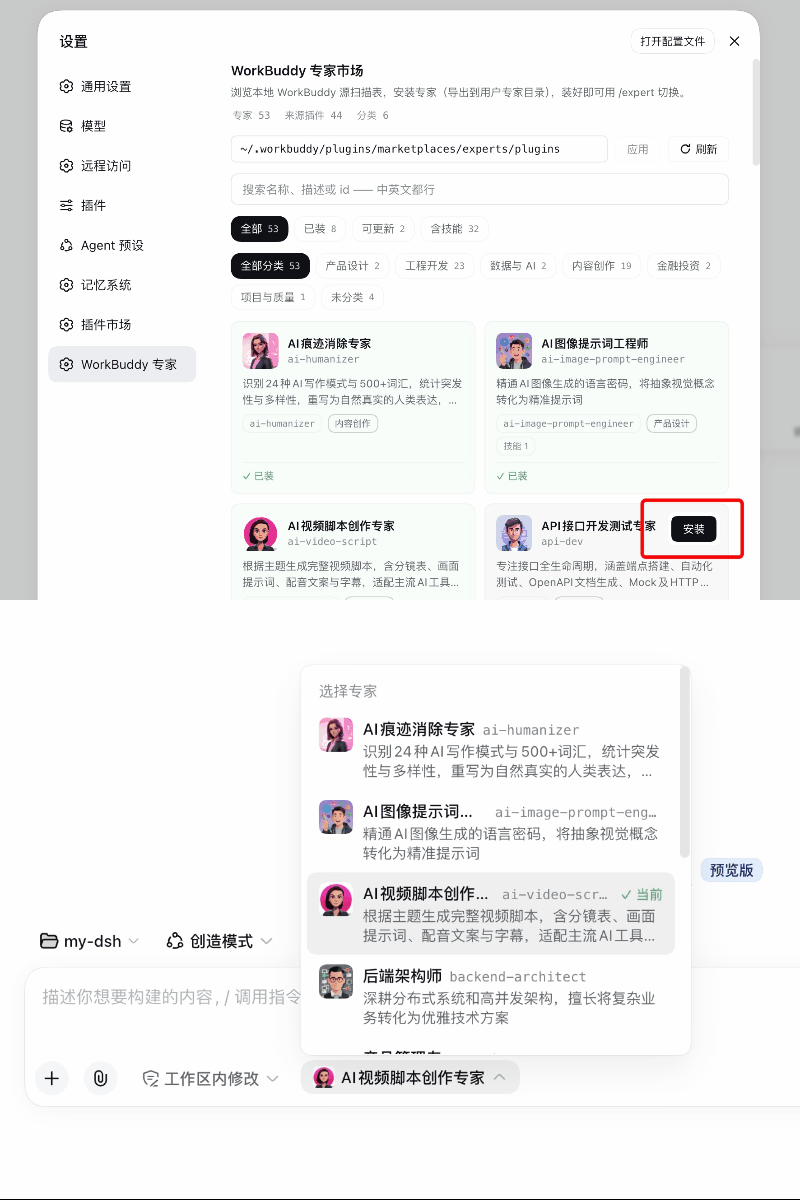
它是什么
一个 DSH Web 插件,让你把 WorkBuddy 专家中心的专家带进 DSH 工作流:
- 专家市场(设置 → WorkBuddy 专家)——只读扫描本地 WorkBuddy 专家目录,卡片浏览/搜索/分类,一键安装 / 更新 / 卸载,导出成标准专家文件夹;
- 会话选择器——输入框旁的专家胶囊,随时切换当前会话的专家:整组替换角色描述与 skills,保留全部会话历史,在下一个模型请求边界生效,不打断进行中的轮次;
- 完整专家体验——安装的专家自带角色描述、专属 skills 与头像,选择器列表即选即用。
专家来源
插件不联网下载专家——市场页读取的是 WorkBuddy 桌面端落盘的本地专家目录(默认 ~/.workbuddy/plugins/marketplaces/experts/plugins)。专家必须先在 WorkBuddy 的专家中心点击召唤,WorkBuddy 才会把该专家下载落盘到这个目录,之后本插件才能扫描到它:
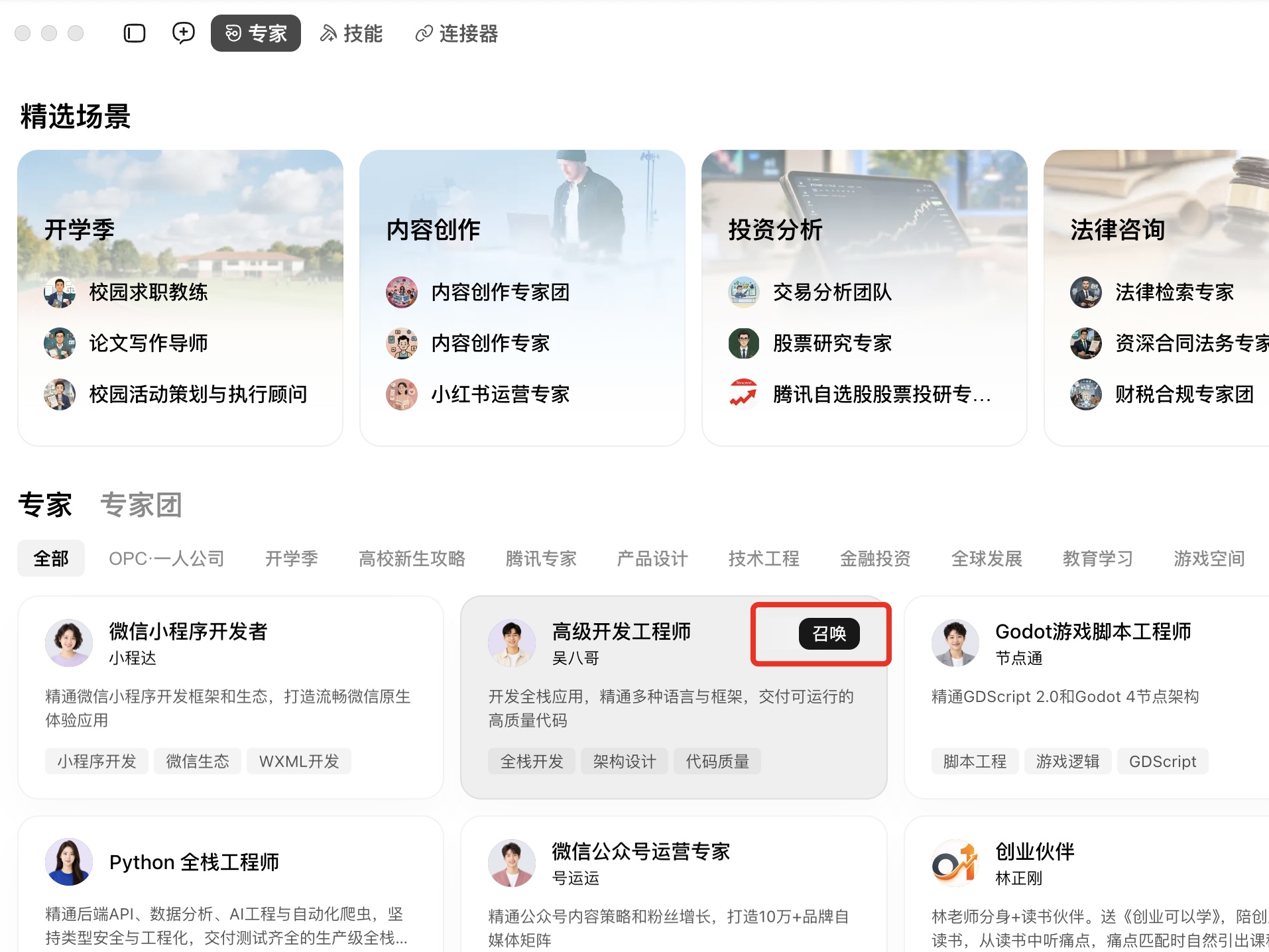
一个专家都没召唤过的话,本地目录为空,本插件的市场页相应是空列表——回 WorkBuddy 专家中心召唤几个,目录就位后市场页会自动出现卡片。
功能
1. WorkBuddy 专家市场(设置 → WorkBuddy 专家)
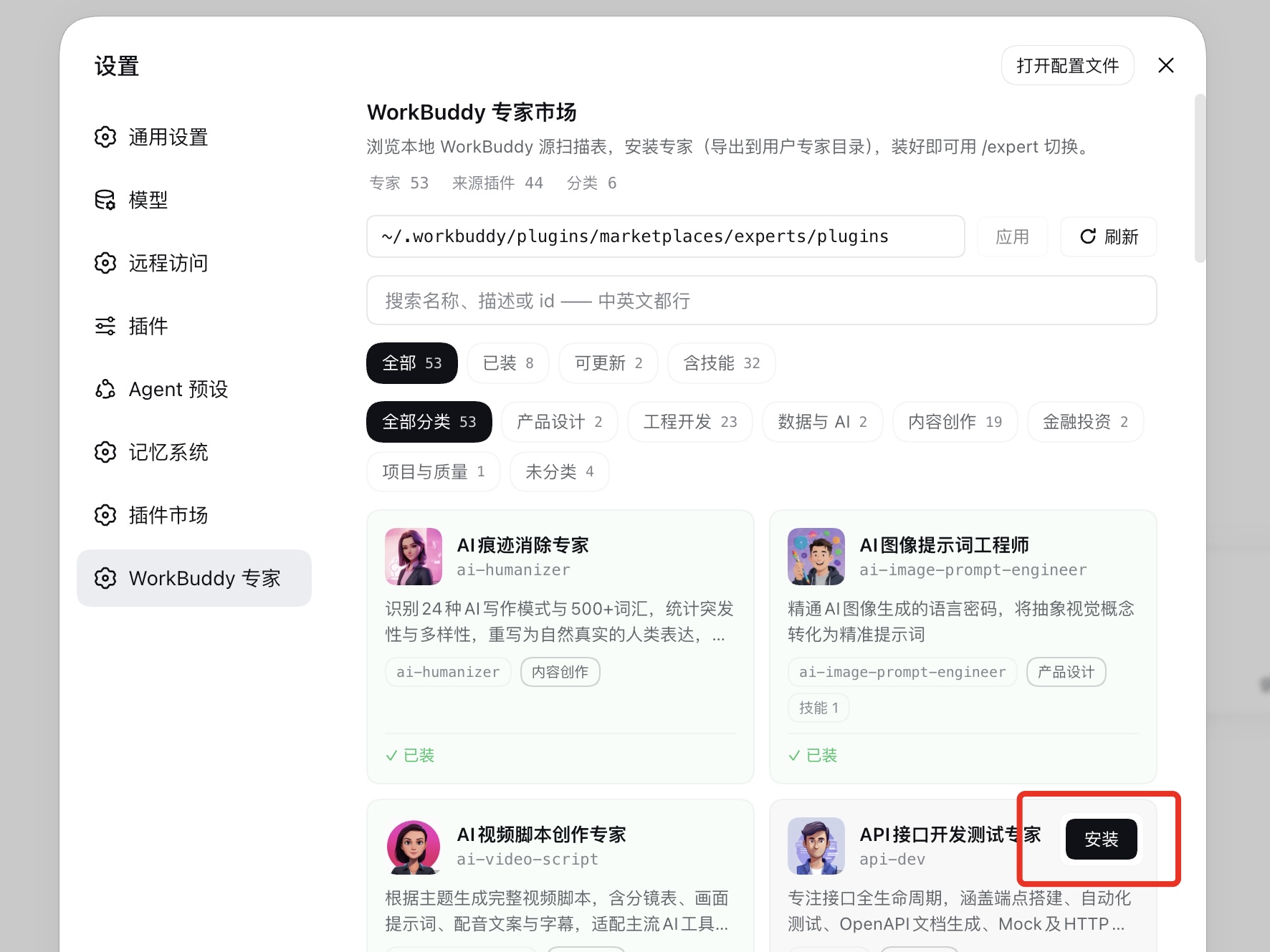
- 只读扫描本地 WorkBuddy 专家目录(默认
~/.workbuddy/plugins/marketplaces/experts/plugins),绝不写它,零数据外发; - 卡片浏览/搜索/分类;操作按钮收在卡片右上角,hover/聚焦卡片时浮现(未装 → 安装,已装 → 卸载/更新);
- 安装 = 导出成标准专家文件夹到
~/.dsh/experts/<id>/(expert.yml + 清洗后 role.md + skills 整树 + 源卡有 PNG 时avatar.png),指纹清单落.expert-source.json; - 更新:源有变时卡片亮 updatable,更新 = 就地重导;卸载 = 删整个专家文件夹;
2. 会话选择器
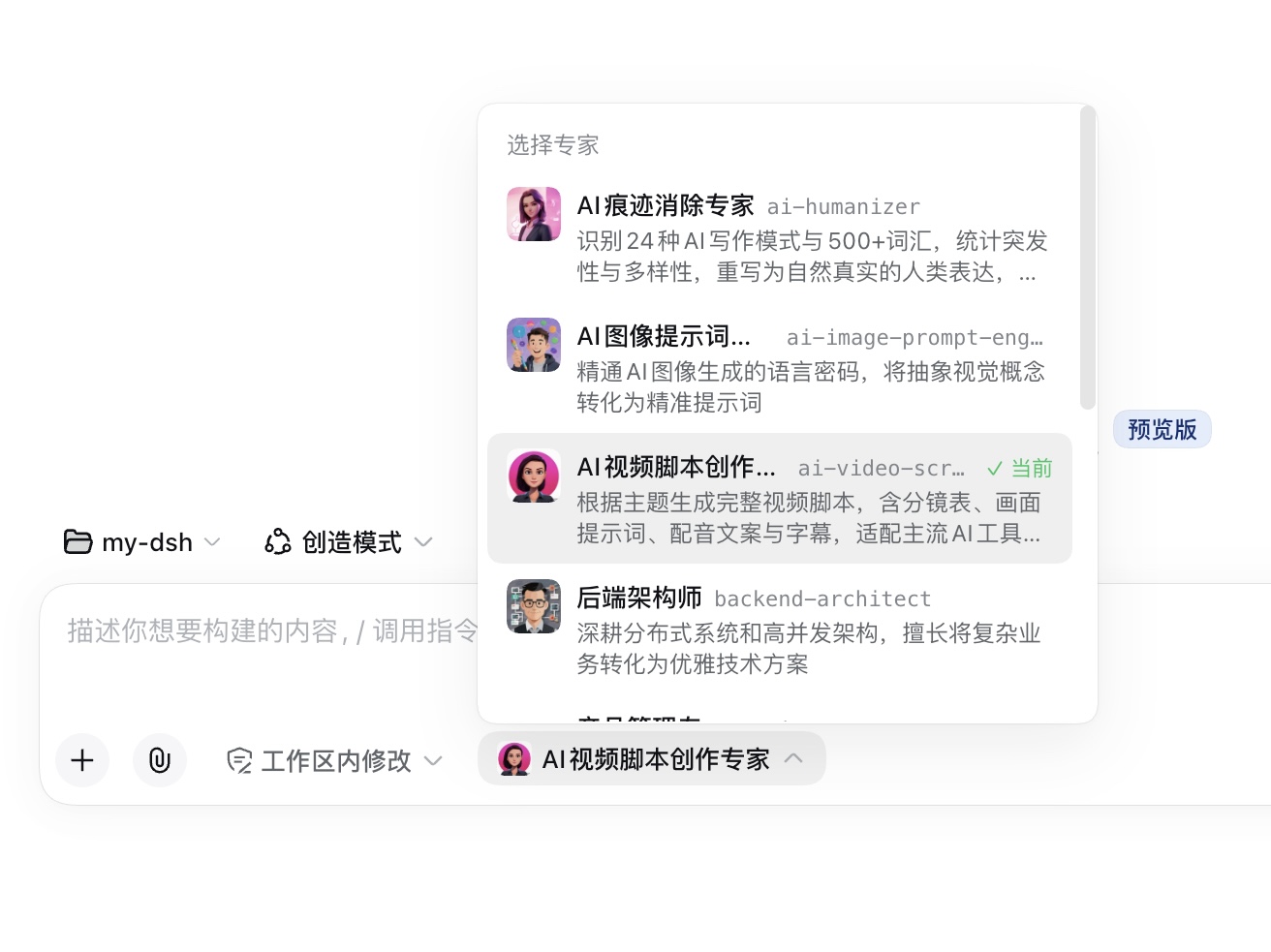
- 输入框旁的专家胶囊展开带头像的专家列表,选中即切换当前会话的专家;
- 切换保留全部会话历史:角色描述与 skills 整组替换,在下一个模型请求边界生效;轮次进行中则排队到边界后应用,不打断流式输出;
- 切换事务串行化:同一会话同时只允许一次切换;
- 一切注册落在 agent scope 层:只影响当前会话,会话结束自动清理;
- 创建新会话时也可先选专家,创建即生效——冷会话不存在"已选未生效"状态;
- 新增/删除专家无需重启——发现根有 watcher,选择器(输入框区域 + 创建会话入口)自动刷新。
3. 专家能力随会话生效
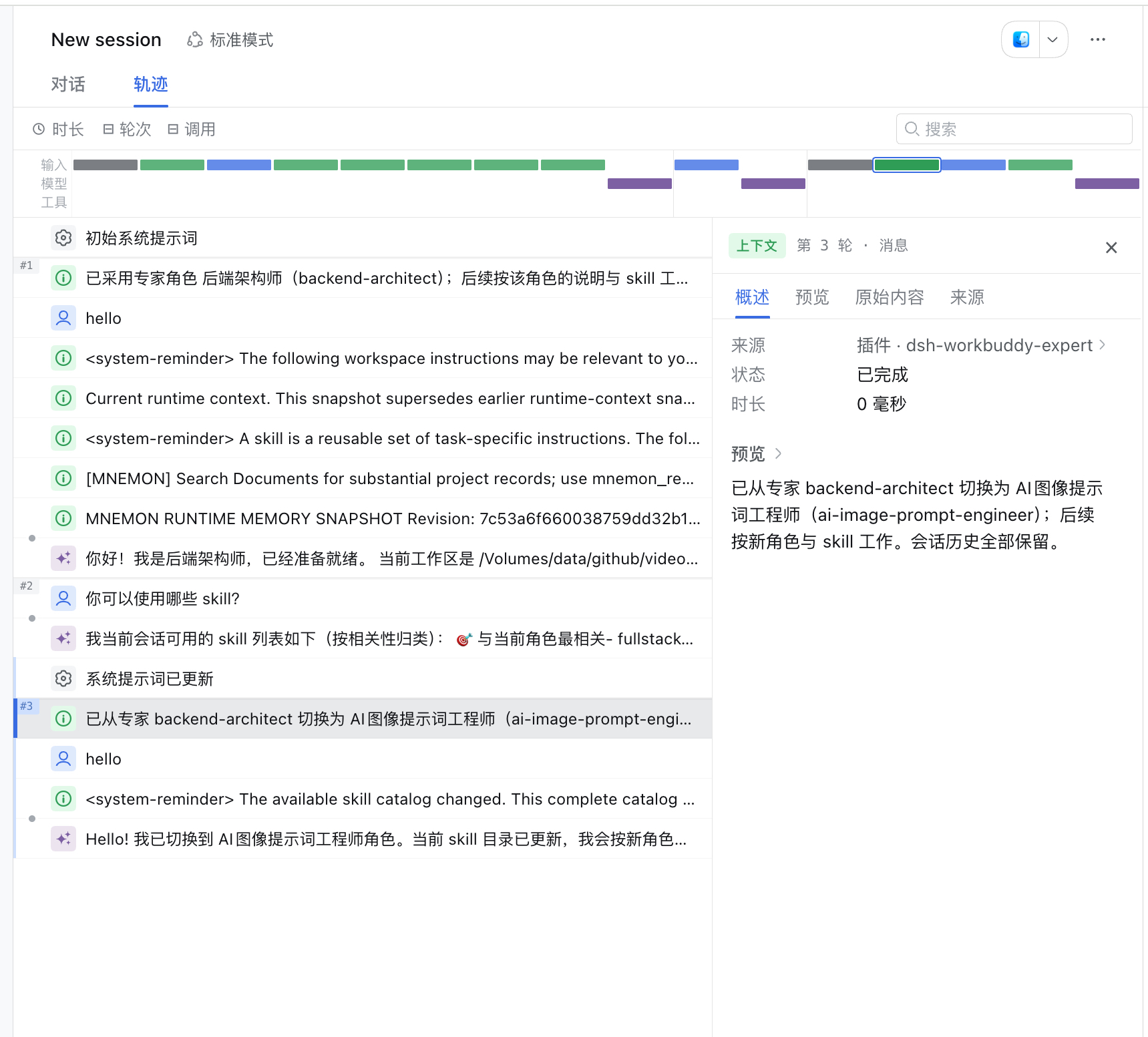
选中专家后,其能力即挂载到当前会话:
- 角色描述(role.md)作为 system prompt 角色段注入;
- 专属 skills(skills/ 整树)随专家注册/注销;
- 工具白名单(expert.yml
tools.allow,可选)挂载作用域工具限制,切换时自动解除; - 清单损坏的专家在选择器中列为 broken 并给出原因,不静默隐藏。
快速开始
前置条件:
- 已可正常运行 DeepSeek Harness Web,且终端可用
dsh。示例使用webprofile,请替换为实际目标 profile; - 本机已安装 WorkBuddy 桌面端。插件读取的是本地专家目录——专家必须先在 WorkBuddy 的专家中心点击召唤,才会下载落盘到
~/.workbuddy/plugins/marketplaces/experts/plugins。一个都没召唤过的话,市场页会是空列表。
安装插件
git clone --depth 1 --branch v0.1.0 https://github.com/pbwheel/dsh-workbuddy-expert.git
cd dsh-workbuddy-expert
dsh plugin --profile web add .
dsh --profile web --dump-config
配置输出应出现 dsh-workbuddy-expert。然后重启 dsh web(bundles 列表只在启动时读)并强刷浏览器。零构建、零运行时依赖。
让 Agent 帮你安装
把下面这段话发给任意能够执行本机终端命令的 Agent:
请将 DSH 插件 dsh-workbuddy-expert 从本仓库安装到 web profile:git clone --depth 1 --branch v0.1.0 https://github.com/pbwheel/dsh-workbuddy-expert.git 后执行 dsh plugin --profile web add <目录>。安装后执行 dsh --profile web --dump-config,确认配置包含 dsh-workbuddy-expert,并告诉我如何重启 DSH Web 和开始使用。
三步用上 WorkBuddy 专家
- 打开设置 → WorkBuddy 专家,确认源路径指向本地 WorkBuddy 专家目录(默认
~/.workbuddy/plugins/marketplaces/experts/plugins,可在顶栏修改)。列表为空? 说明 WorkBuddy 里还没召唤过专家——回 WorkBuddy 专家中心点几个召唤,本地目录就位后市场页会自动出现卡片; - 在卡片上点安装——专家即导出到
~/.dsh/experts/; - 回到会话,点输入框旁的专家胶囊,选择刚安装的专家,开始对话。
命令行也可以:/expert 列出全部专家,/expert <name> 切换。
配置
| 配置项 | 默认值 | 作用 |
|---|---|---|
sourcePath | ~/.workbuddy/plugins/marketplaces/experts/plugins | WorkBuddy 源目录;市场页顶栏或 settings(ns workbuddy-expert)可改,~ 原串存储使用时展开;允许保存不存在路径(页面黄条提示,路径就绪自动恢复) |
roots | — | 可选追加发现根,必须显式 trust: user |
dshHome | $DSH_HOME 或 ~/.dsh | 覆盖 DSH home 解析 |
追加根示例:
- name: 'dsh-workbuddy-expert'
  config:
    roots:
      - path: ~/company-experts
        trust: user
平时靠逐文件指纹自动重扫,「刷新」按钮强制重扫。
开发
node scripts/smoke.mjs            # 契约/清洗/注册表/切换冒烟,零依赖
node scripts/smoke-client.mjs     # client 侧
node scripts/smoke-importer.mjs   # importer/市场路由
node scripts/smoke-install.mjs    # 安装=导出链路
改完 host(src/)或 package.json 需重启 dsh web;只改 client/client.js 刷新页面即可。
| 模块 | 职责 |
|---|---|
src/registry.js | 专家文件夹扫描、校验、清洗、watcher |
src/compose.js | 会话组装:角色段 + skills + 工具白名单 |
src/switch.js | 切换事务 |
src/importer/ | WorkBuddy scanner/指纹/导出/市场路由 |
client/client.js | 选择器 + 市场页 UI |
设计与决策记录见 docs/design.md。
许可证
MIT © 2026 dsh-workbuddy-expert contributors
Ähnliche Plugins
dsh-web (dsh-ssh)
zhu1090093659/dsh-web
dsh-web (dsh-remote-web-ui)
zhu1090093659/dsh-web
dsh-web-ui (dsh-ssh)
zhu1090093659/dsh-web-ui
dsh-web-ui (dsh-remote-web-ui)
zhu1090093659/dsh-web-ui