dsh-where-did-my-tokens-go
revxzxcx/dsh-where-did-my-tokens-go
Realtime token counter beside the deep-thinking indicator in chat, with merged or split input/output display, per-step operation counts, and auto-scaling K/M/G/T units.
Installation
dsh plugin --profile web add github:revxzxcx/dsh-where-did-my-tokens-goREADME

Where Did My Tokens Go?
Realtime token badges beside the deep-thinking indicator — merged or split in/out, auto K/M/G/T units, per-step operation counts




Where Did My Tokens Go? is a community-maintained DeepSeek Harness (DSH) plugin, not an official DeepSeek AI product.
This README describes 1.7.0.
Features
Put "where did this turn's tokens go" directly in the transcript: a live counter rides the deep-thinking indicator, and every finished operation row is tagged with the cost of its own step. The plugin is global — once installed, every conversation gets it.
- Live in / out badge: after the blue 「深度思考 / 深度求索」 ("deep-thinking") indicator, a shimmer-swept badge counts tokens while the model is thinking and streaming. The sweep reuses the platform's own TextShimmer geometry, so the badge reads as part of the same sentence.
in N= input tokens,out N= output tokens, reasoning text included.- The input figure is the harness's own prompt-size projection (
contextPressure), so it is live during the input phase without waiting for providerusage; once the provider reportsinputTokens, that authoritative value takes precedence; before either exists, the last known input is reused. Output counts are estimated client-side while streaming (CJK glyph ≈ 1 token, latin ≈ 4 chars/token) and snap to the authoritative value when the stream settles — reasoning text counts toward the sameouttotal, so nothing is double-counted and no separate thinking figure is printed.
- Auto units (default): numbers scale into K (1e3) / M (1e6) / G (1e9) / T (1e12) —
1866 → 1.9K,2 500 000 → 2.5M; below 1000 the raw number shows; a rounding that would print1000Kpromotes to1Minstead. A gear menu can also lock one unit for a site, which then always scales by it. - Merged / split display (configurable): merged swaps a single label — only
in …during the input phase, thenout …while the model is reasoning and generating; split showsin … · out …together for the whole turn. - Three independent switches (configurable): show/hide the in, out and per-operation labels separately (all on by default). Each switch carries a gear button that drops open a per-site editor: font size (0/empty = follow the interface text), color (native picker plus a "follow theme" reset) and unit (auto / K / M / G / T).
- Per-operation
use N token: every completed operation row (「已完成思考」, 「已完成命令」, …) gets ause N tokenlabel styled like that row, showing its own step's tokens (input + output, or the provider'stotalTokenswhen it reports one) — never the whole reply's total. - Visual settings UI: a light white/grey, adaptive two-pane layout. Merged and split each get a preview card that recreates the real transcript scene (a finished-operation row and the shimmering deep-thinking badge, all with fake data): hovering animates the numbers, clicking switches the display mode, and toggling any switch updates both cards live — unsaved gear choices included, so you see the effect before saving.
Screenshots
The live badge beside the deep-thinking indicator (split mode):

Each finished operation row tagged with its own step cost:

The settings page with preview cards and switches:
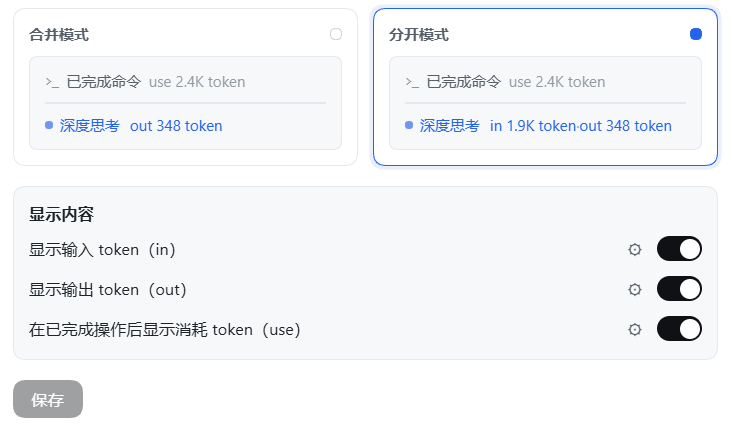
Screenshots are taken from the 1.6.0 release running on DeepSeek Harness 0.2.0-rc.2; UI crops keep only the relevant panels, saved as lossless WebP.
Installation
Requires a working DeepSeek Harness installation. The commands below use the desktop profile; replace it with yours if needed.
Ask an agent to install it
Send this to an agent that can operate your terminal:
Install the dsh-where-did-my-tokens-go plugin from npm into my DSH profile, verify it is served after the install, and tell me how to reload.
From npm (recommended)
dsh plugin --profile desktop add dsh-where-did-my-tokens-go
From GitHub
dsh plugin --profile desktop add github:RevxZxCx/dsh-where-did-my-tokens-go
From source
# 1. pack the plugin
cd packages/dsh-where-did-my-tokens-go
pnpm pack

# 2. install into the desktop profile
dsh plugin --profile desktop add ./dsh-where-did-my-tokens-go-<version>.tgz
# (or manually: add the tarball to the profile's package.json dependencies and
#  append "dsh-where-did-my-tokens-go" to dsh.profile.bundles, then `pnpm install`)

# 3. restart DSH
After installing, restart DSH and open any conversation — the badge appears once you send a message. Re-run the install command to update.
1.7.0is tested running on DeepSeek Harness0.2.0-rc.2(desktop profile, Windows).
Usage
| What you want | How |
|---|---|
| Watch this turn's in / out tokens | Send a message and read the badge after the 「深度思考」 indicator; it counts in real time. |
| Switch merged / split | Open Settings → Token 计数器 and click the matching preview card. |
| Keep only in or only out | Toggle the other switch off — both preview cards drop the segment immediately. |
| See what each finished operation cost | Keep the use switch on; every 「已完成…」 row gets its own number. |
| Make big numbers readable | Leave units on auto, or lock K / M / G / T for a site in its gear menu. |
| Restyle one site | Gear → font size / color / unit. 0 and "follow theme" mean no override. |
| Check before saving | Gear edits reflect in the preview cards right away; the chat badge only changes when you press save. |
- Three configuration entries: 设置 → Token 计数器 (an own entry in the Settings navigation), the configuration section on this bundle's page in the 插件 / Plugins panel, and the "Token 计数器" card in that panel's 官方 / Official group. All three open the same form.
- Unsaved drafts never leak: preview and gear edits are staged inside the form; the live badge renders only saved configuration; "save" writes the host config, "discard" reverts everything at once.
- Fixed units still promote stepwise: locking
Kon an extreme number never prints1000K; it keeps promoting upward (capped at1000T). - Reasoning text is not a separate figure: it is part of the provider's
outputTokens(the platform validatesreasoningTokens <= outputTokens), so it simply counts towardoutwhile streaming. Adding a separatethinkterm on top ofoutwould double-count, which is why the badge prints no thinking breakdown any more. - Reduced motion: with the system "reduce motion" preference, the sweep decoration is dropped and the numbers stay visible.
- Color inside the sweep: while the highlight band passes over the badge it shows the row's shimmer tint (same behavior as the official indicator); font size and unit always apply.
How it works
- The browser half subscribes to the DSH client
sessionsservice and the active (main-view) session'sbinding.eventSource. - It counts
text-delta/reasoning-deltastream chunks as they arrive (both feed the one output total), reads the live input count from the harness'scontextPressureprojection, and records authoritativeusageper step from theusagechunk /assistant/messageevent (keyed by turn + step), ignoring itsreasoningTokensfield. - It injects a DOM badge into the running indicator (there is no slot around it), rebuilt as two counter-moving layers mirroring the platform TextShimmer so the glyphs stay still while the highlight travels. Each completed operation row is one step, so rows walked in document order claim the next settled step of their turn.
- The host half declares the options schema with schemastery (13 fields); the settings form reads and writes the same namespace through
configForms.
Package layout
lib/index.js— host half: schemasteryConfig+apply.lib/client.js— browser half viawindow.__ModuleLoader__.load.cordis.patch.yml— registers the plugin profile entry.package.json—dsh.bundle+dsh.client = { platform: "web", inject: [...] }.
Development
node test/run-tests.mjs    # mocked-browser unit tests (~480 assertions, covers every feature)
node test/probe-served.mjs # checks the running DSH serves the current on-disk client build
Feedback & contribution
Issues and suggestions are welcome on GitHub Issues — please include your DSH and plugin versions and steps to reproduce; full screenshots help for UI problems. If the settings form reports "This plugin is not loaded, so it cannot be configured right now", the host half is not mounted — run dsh --profile desktop --dump-config (or check the profile's cordis.patch.yml) before filing an issue.
License
Ähnliche Plugins
DeepSeek-Balance-Whale-Widget
meteornox/deepseek-balance-whale-widget
dsh-context
bowenliang123/dsh-context
dsh-cost-meter
han-1413141/dsh-cost-meter
dsh-damage-pulse
wssfk12138/dsh-damage-pulse