dsh-theme-studio
ruohan0713/dsh-theme-studio
Zwanzig eigens gestaltete literarische Themes für die DSH-Weboberfläche. Jedes bietet helle und dunkle Farbpaletten, 116 Design-Tokens und ein animiertes Hintergrundbild. Die HTTP-Routen prüfen den DSH-Zugriff nicht, daher könnte eine im Browser geöffnete Webseite sie aufrufen.
Installation
dsh plugin --profile web add github:ruohan0713/dsh-theme-studioREADME
DSH Theme Studio · 主题工作室




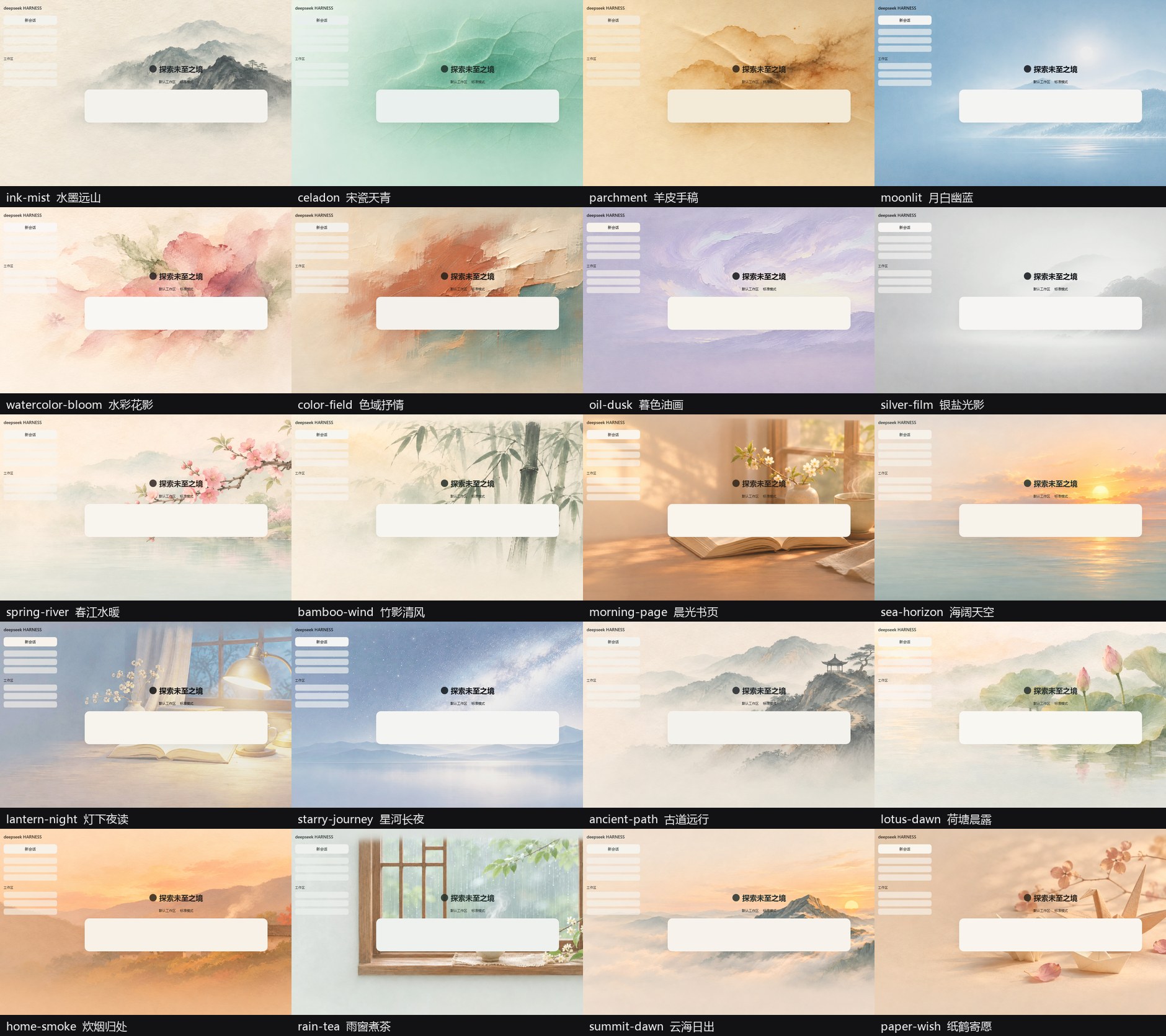
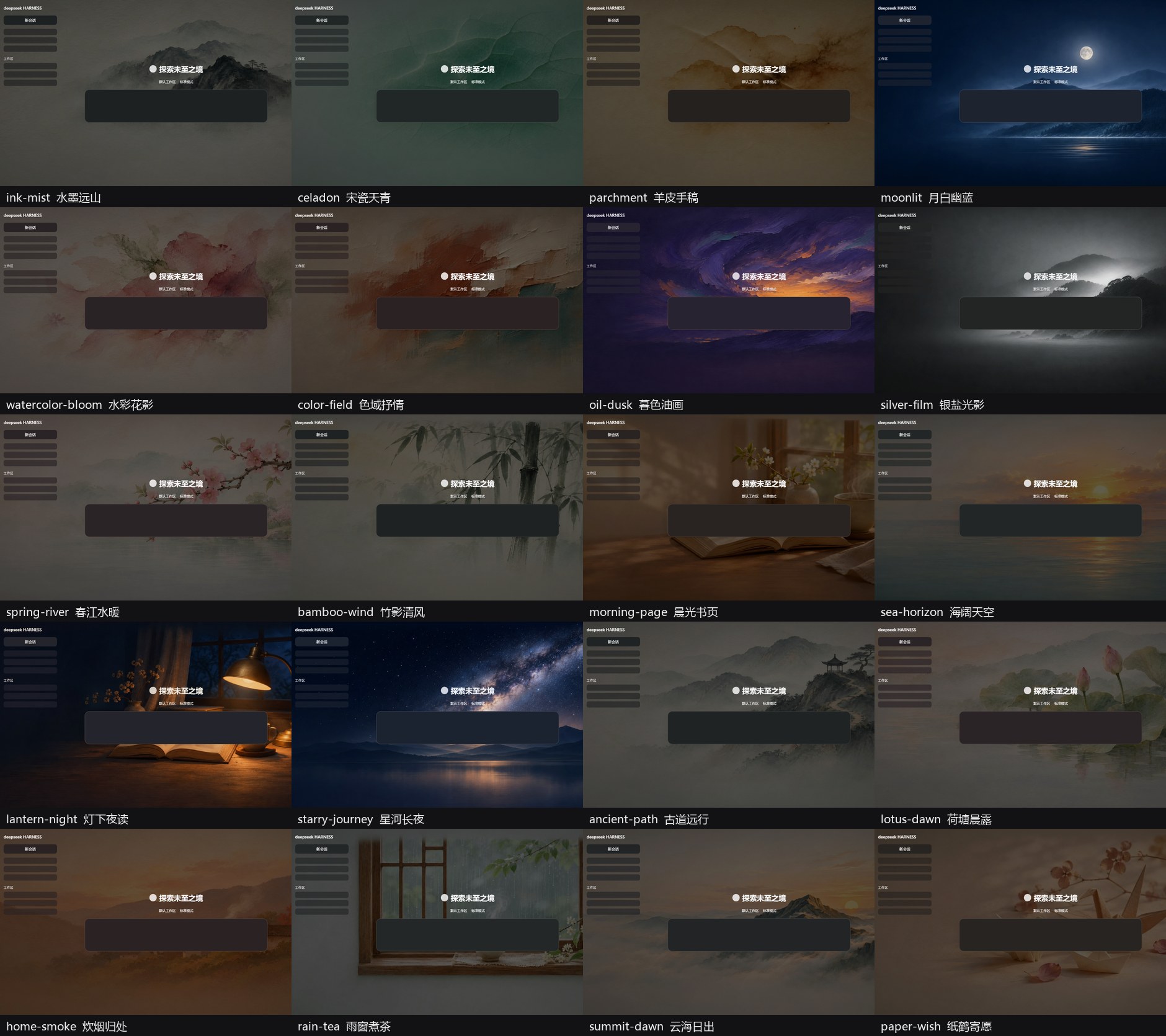
20 套原创主题 for DeepSeek Harness(DSH)——水墨、宋瓷、羊皮手稿、月白幽蓝、水彩、色域、暮色油画、银盐光影,以及第二批的春江水暖、竹影清风、晨光书页、海阔天空、灯下夜读、星河长夜、古道远行、荷塘晨露、炊烟归处、雨窗煮茶、云海日出、纸鹤寄愿。
Twenty original literary & artistic themes for DeepSeek Harness. Every theme ships a full light/dark token pair and an animated wallpaper layer.
🔗 在线预览 / Live demo:https://ruohan0713.github.io/dsh-theme-studio/(不用安装即可点选 20 套主题、切换浅/深与清晰度)
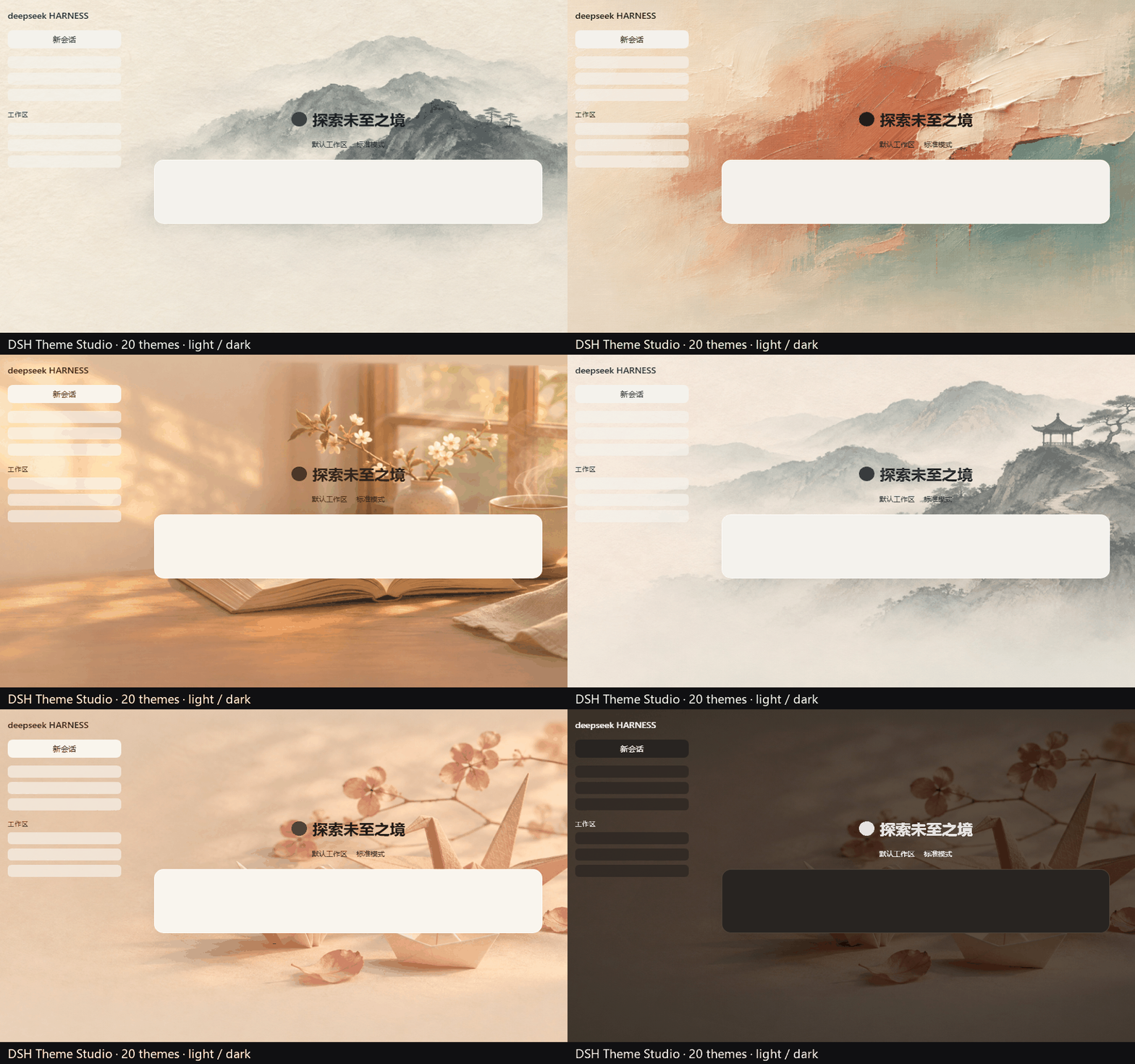
English
DSH Theme Studio brings 20 original literary / artistic themes to DeepSeek Harness: ink wash, celadon, parchment, moonlit, watercolour, colour field, oil dusk, silver film, spring river, bamboo wind, morning page, sea horizon, lantern night, starry journey, ancient path, lotus dawn, home smoke, rain tea, summit dawn and paper wish.
- 20 themes, each a complete 116-token light/dark palette with a matched animated wallpaper
- Free theme selection, fixed mode, and a 2-day carousel (manual choice resets the timer)
- Three background-clarity levels, light / dark / system appearance, animated-wallpaper toggle
- Opaque dialogs, composer, tool cards and code blocks (fixes text bleeding through)
- Windows title-bar integration; four entry points (top-right button, session header, sidebar footer, Settings)
Try the live demo, download the latest .tgz from Releases, and follow the install section below.
20 套主题 · 浅色一览
20 套主题 · 深色一览
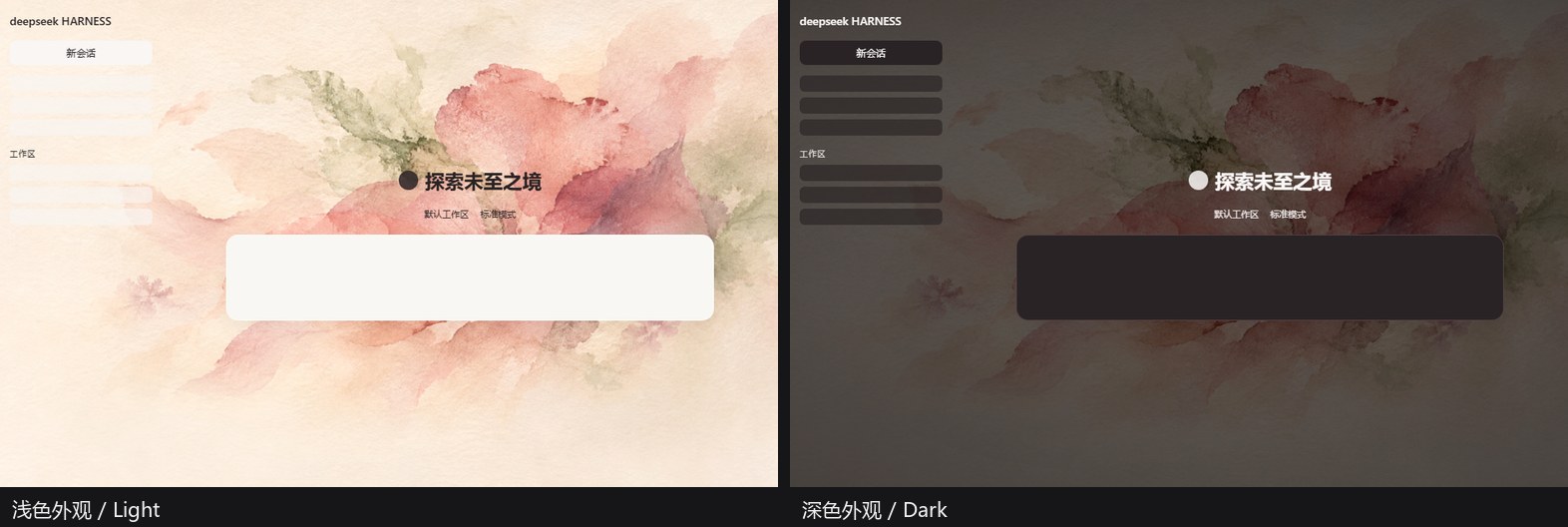
同一主题的浅色 / 深色
功能 Features
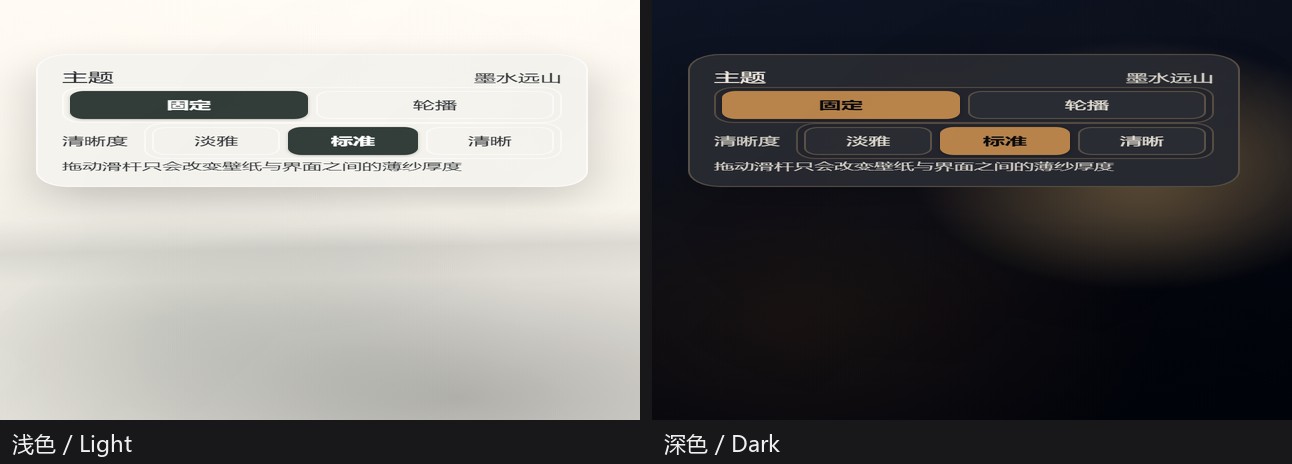
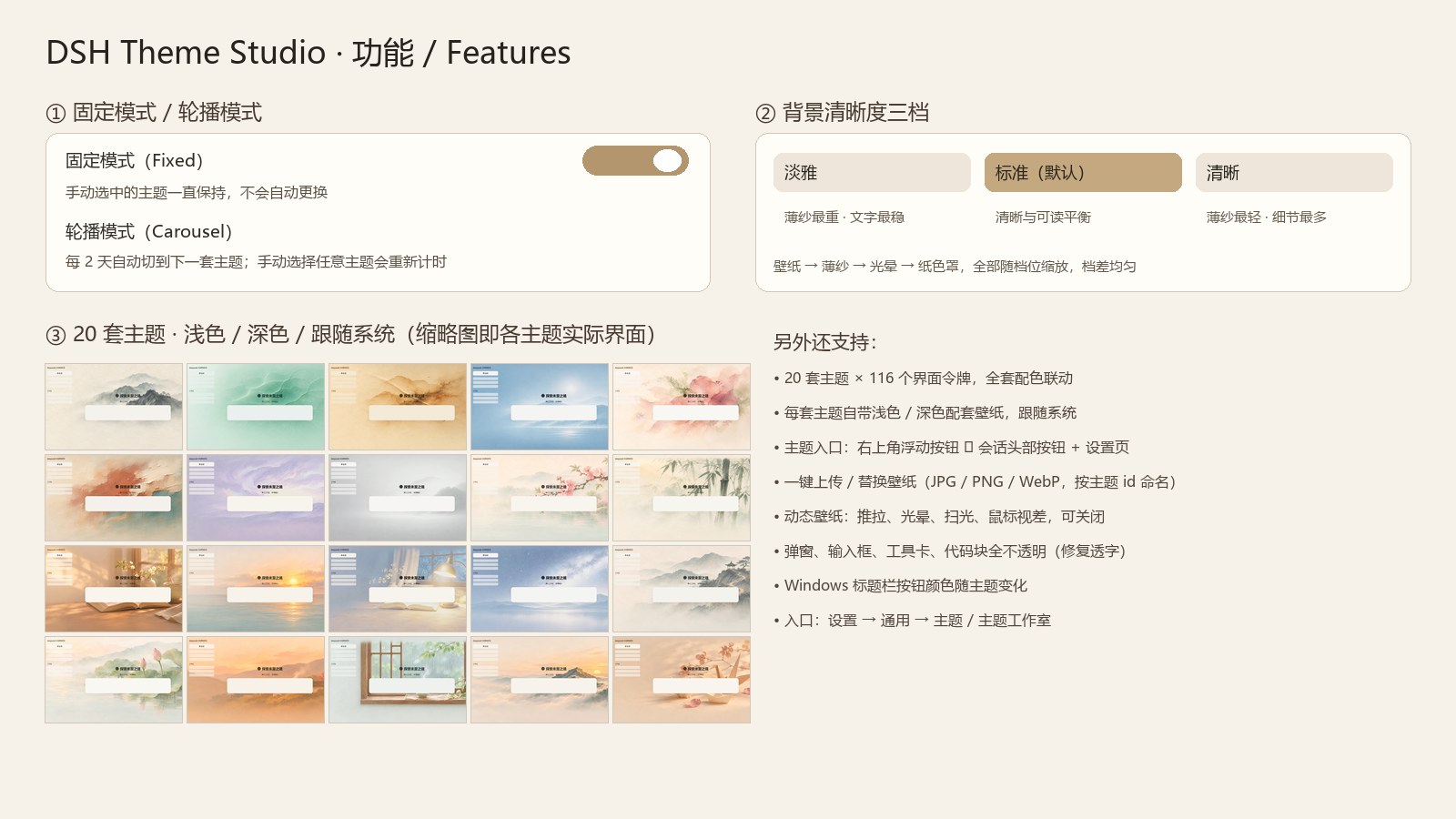
- 自由选择主题:20 套主题任意切换,点击即时生效并记住选择;入口只保留右上角一套——首页浮动「主题」按钮 / 会话头部「主题」按钮(二者互斥显示),设置 → 通用 → 主题 与 主题工作室也保留入口。
- 固定模式(Fixed):手动选中的主题一直保持,不会自动更换。
- 轮播模式(Carousel):每 2 天自动切换到下一套主题;任何时候手动选择主题都会重新计时,不会和手动选择打架。
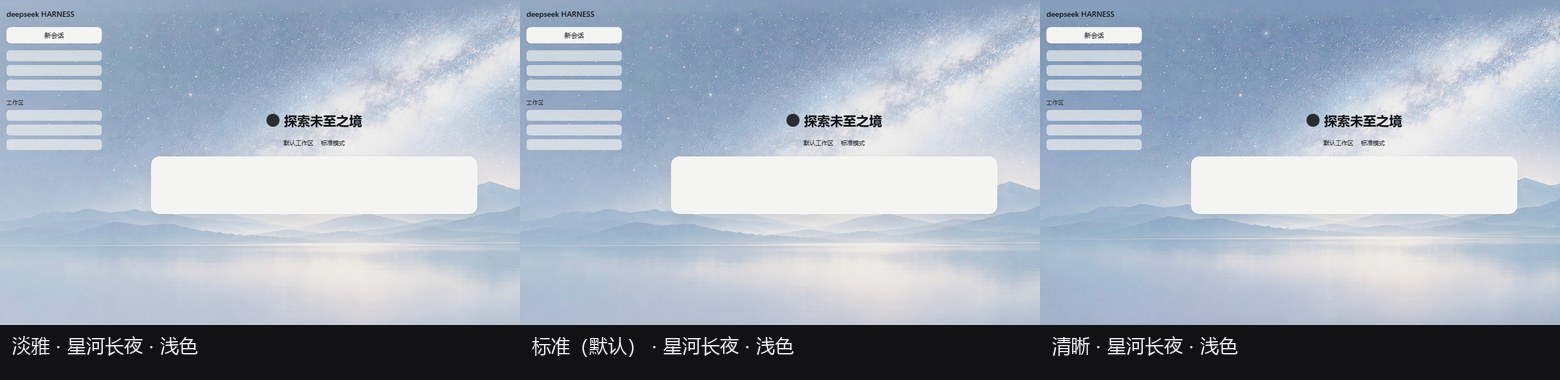
- 背景清晰度三档:淡雅 / 标准 / 清晰,一键调整壁纸与界面之间的薄纱厚度;三档整体可调、档差均匀,清晰档接近原图细节。
- 浅色 / 深色 / 跟随系统:每套主题都有完整的浅色与深色配色,并各自配有对应壁纸;跟随 DSH 原生的外观开关自动切换。
- 动态壁纸:缓慢推拉(Ken Burns)、光晕呼吸、扫光/纸纹漂移、鼠标视差;尊重系统"减少动态效果",也可以一键关闭动态。
- 壁纸开关与自定义:可以关闭壁纸只留 CSS 艺术层,也可以把
wallpapers/里的图片换成自己的图。 - 每套 116 个界面令牌:背景、侧栏、卡片、输入框、代码块、弹窗、滚动条、状态色一整套联动,不是"只换一张壁纸"。
- 可读性优先的界面层:弹窗、输入框、工具/交付卡、diff、代码块均为不透明纸色,不会透出背后聊天内容(见
assets/screenshots/surface-bleed-*.png)。 - Windows 标题栏一体化:原生窗口按钮区透明化,符号色跟随主题文字色,与主题标题栏无缝衔接。
- 自定义壁纸:内置 20 套主题壁纸;可在主题工作室一键上传/替换成你自己的图片(JPG / PNG / WebP / AVIF,按主题 id 命名),支持
<id>-dark/<id>-light配套图,随时刷新或恢复默认。 - 壁纸检测与上传:主题工作室会扫描壁纸目录并显示检测到的数量;点「刷新壁纸」重新扫描,点「上传 / 替换壁纸」直接替换对应主题背景。
背景清晰度对比
安装 Install
方式 A:GitHub Release 预构建包(当前推荐)
npm 包还在审核/发布流程中,现在请直接用 Release 里的预构建包:
- 下载:https://github.com/ruohan0713/dsh-theme-studio/releases/latest/download/dsh-theme-studio-art.tgz
- 解压到任意目录,例如
~/dsh-plugins/dsh-theme-studio-art。 - 按下面「方式 B」把该目录 link 进 DSH profile,重启 DSH。
社区目录(awesome-dsh-plugin / dshmarket 的 Themes 标签页)已提交收录 PR;合并后也可以直接在 DSH 插件市场里一键安装,不需要 npm。
方式 B:手动 link(开发 / 内网)
- 把本仓库(或 Release 解压目录)放到任意目录,例如
~/dsh-plugins/dsh-theme-studio-art。 - 在 DSH profile 的
package.json依赖中加入:
{
  "dependencies": {
    "dsh-theme-studio-art": "link:C:/path/to/dsh-theme-studio-art"
  }
}
- 在 profile 的
cordis.patch.yml里加入插件行(或直接让插件管理器刷新):
- id: dsh-theme-studio-art
  name: dsh-theme-studio-art
- 重启 DSH。
注意:DSH 只加载 profile 内已安装/已链接的客户端插件;直接把文件夹拷到
node_modules而不登记依赖不会被加载。
方式 C:npm(暂未上架)
npm 包名计划为 dsh-theme-studio-art;上架后可直接用插件管理器安装:
npx @deepseek-ai/dsh plugin --profile desktop add dsh-theme-studio-art
上架前请不要用这条命令(会 404),用方式 A/B。
使用 Usage
- 首页右上角 / 会话头部「主题」按钮:点击打开主题气泡(20 套缩略图、固定/轮播、背景清晰度)。
- 侧栏底部「主题」行:任何页面都能打开同一个面板。
- 设置 → 通用 → 主题:20 个快捷卡片。
- 设置 → 主题工作室:完整画廊 + 动态壁纸开关 + 背景清晰度 + 壁纸目录说明。
背景清晰度
| 档位 | 浅色薄纱 / 内容栏罩 | 深色薄纱 / 内容栏罩 |
|---|---|---|
| 淡雅 | 0.66 / 0.288 | 0.64 / 0.252 |
| 标准(默认) | 0.44 / 0.192 | 0.46 / 0.168 |
| 清晰 | 0.20 / 0.072 | 0.30 / 0.063 |
三档整体上提且档差均匀;越清晰壁纸细节越多,文字对比度相应降低。日常阅读建议「标准」,需要最强可读性用「淡雅」。
壁纸 Wallpapers
wallpapers/ 已包含完整 40 张图:
- 浅色主题:
<id>.jpg+<id>-dark.jpg - 深色主题:
<id>.jpg+<id>-light.jpg
想换成自己的图:替换 <id>.jpg 后重新生成配套变体,或直接同时提供 -dark / -light 配套图。同名 .jpg 与 .png 同时存在时 PNG 会优先,换图时先移走旧格式。
主题 id 与中文名:
| id | 名称 | 模式 |
|---|---|---|
ink-mist | 水墨远山 | 浅色 |
celadon | 宋瓷天青 | 浅色 |
parchment | 羊皮手稿 | 浅色 |
moonlit | 月白幽蓝 | 深色 |
watercolor-bloom | 水彩花影 | 浅色 |
color-field | 色域抒情 | 浅色 |
oil-dusk | 暮色油画 | 深色 |
silver-film | 银盐光影 | 深色 |
spring-river | 春江水暖 | 浅色 |
bamboo-wind | 竹影清风 | 浅色 |
morning-page | 晨光书页 | 浅色 |
sea-horizon | 海阔天空 | 浅色 |
lantern-night | 灯下夜读 | 深色 |
starry-journey | 星河长夜 | 深色 |
ancient-path | 古道远行 | 浅色 |
lotus-dawn | 荷塘晨露 | 浅色 |
home-smoke | 炊烟归处 | 浅色 |
rain-tea | 雨窗煮茶 | 浅色 |
summit-dawn | 云海日出 | 浅色 |
paper-wish | 纸鹤寄愿 | 浅色 |
兼容性 Compatibility
- DSH 客户端插件 API:
ctx.theme.overrideTokens+ctx.slots(settings.section/settings.general.item/conversation.session.header.utilities/sidebar.footer.action/shell.overlay/conversation.hero.options)。 - 已在 DSH 0.2.x 桌面端(Windows)验证;macOS / Linux 的窗口按钮为系统绘制,本插件的标题栏规则会自动跳过。
- 主题只覆盖颜色/材质令牌与 CSS 层,不修改 DSH 功能逻辑,也不会注入第三方脚本。
开发 Development
node --check client.js
node --check index.js
client.js 是浏览器端插件包(window.__ModuleLoader__.load),index.js 是宿主端路由(壁纸清单 + 诊断)。发布前请确认 package.json 中的 dsh.bundle / dsh.client 字段完整。
许可 License
- 插件代码、主题定义、配色、CSS 艺术层:MIT(见
LICENSE)。 wallpapers/内的图片由作者使用 AI 图像服务生成;使用/再分发前请遵守所使用图像服务的条款,MIT 仅覆盖代码。- 主题名称与配色为原创,不含任何第三方品牌/系统素材。
如果这个主题让 DSH 更舒服一点,欢迎在 GitHub 点个 ⭐,或把截图/建议发到 Issues。
Ähnliche Plugins
dsh-wallpaper-engine
elysia395/dsh-wallpaper-engine
dsh-deep-whale (maid-atelier)
small-tailqwq/dsh-deep-whale
dsh-deep-whale
small-tailqwq/dsh-deep-whale
dsh-claude-style
nwflower/dsh-claude-style