dsh-theme-splat-ui
shirolin/dsh-theme-splat-ui
Splatoon 2 inspired theme with tri-band ink canvas, 118 ThemeRuntime tokens, Special Gauge boot loader, and day/night palettes.
Installation
dsh plugin --profile web add github:shirolin/dsh-theme-splat-uiREADME










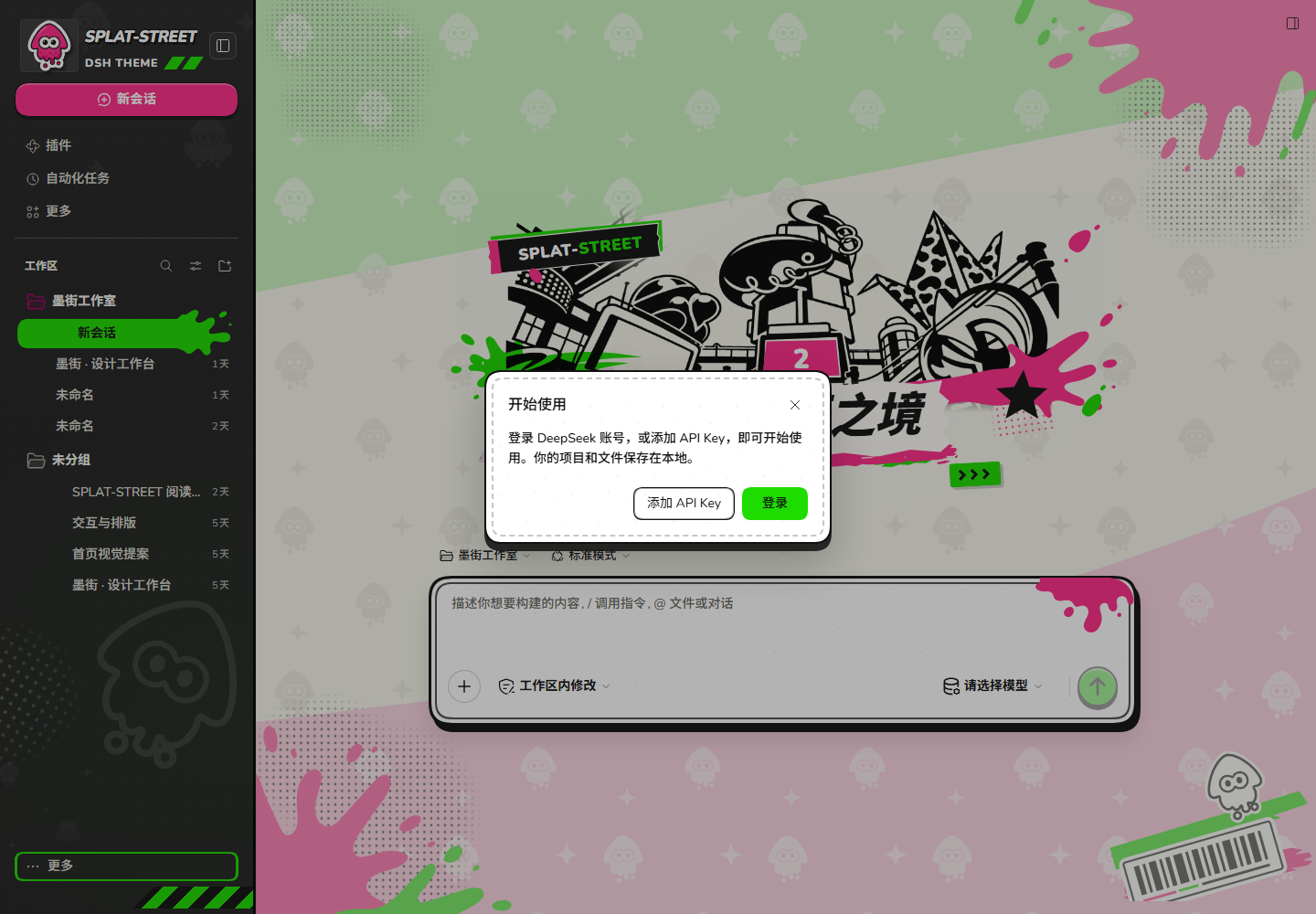
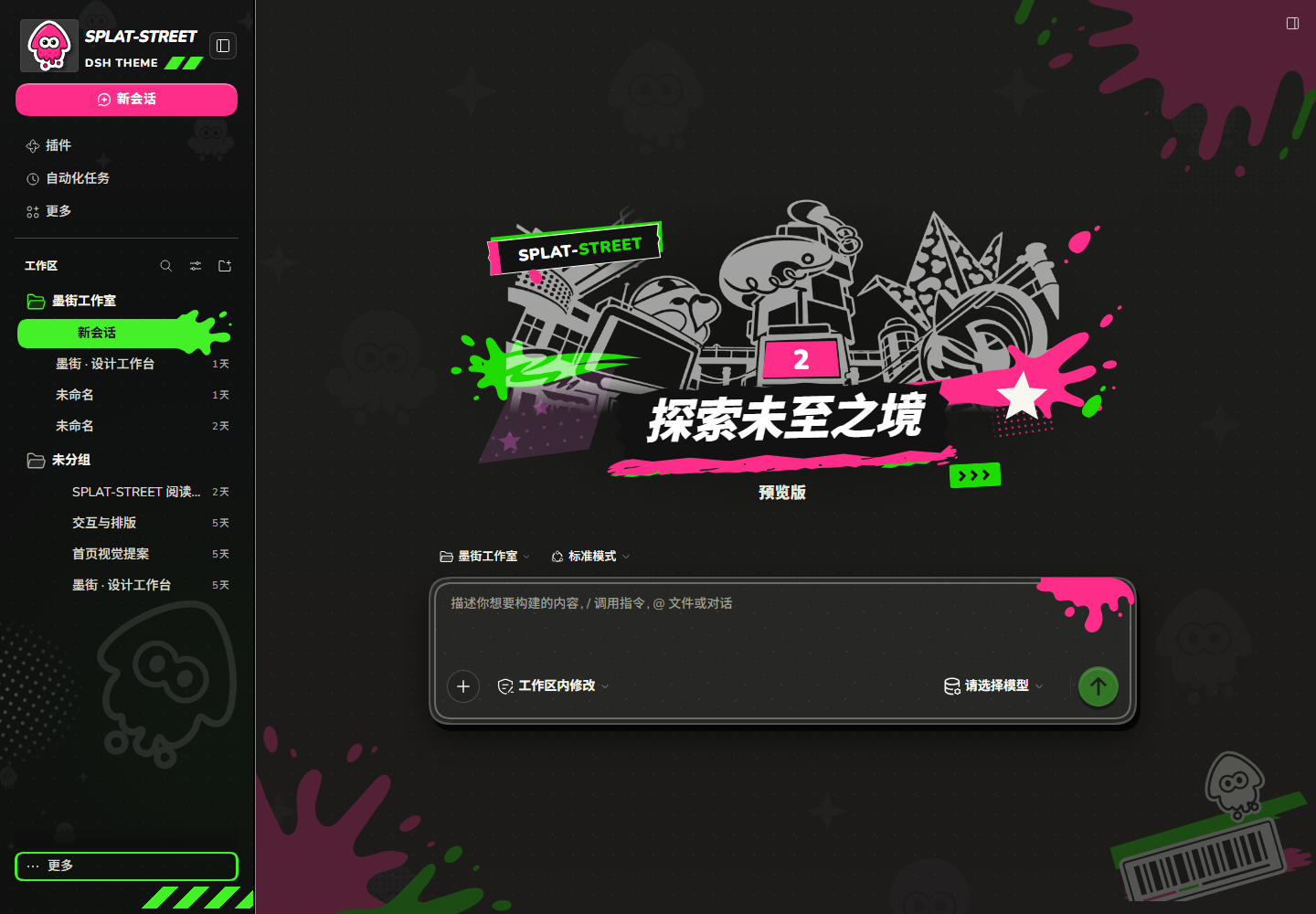
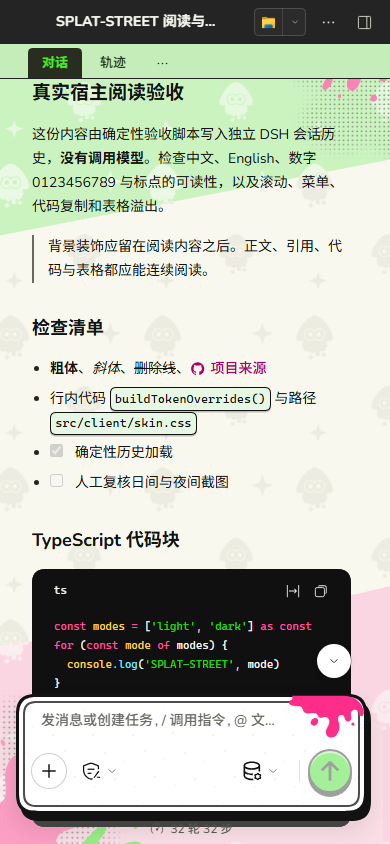
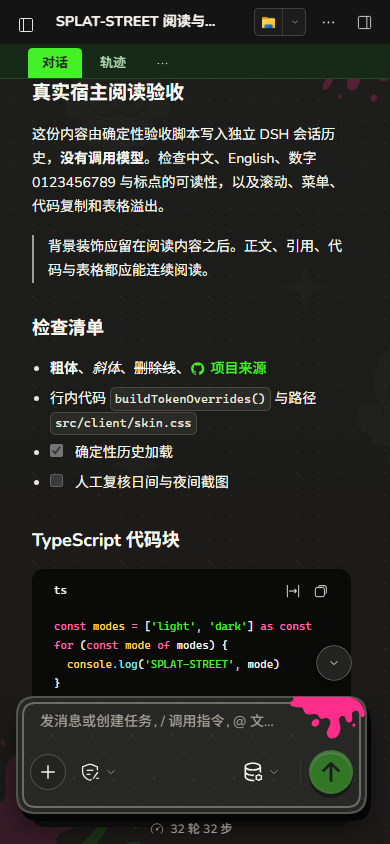
SPLAT-STREET is a DeepSeek Harness (Web) theme plugin built on Splatoon 2's turf-war language: a near-black sidebar with a transparent masthead and a magenta new-session pill, a tri-band lime/cream/pink canvas with white squid stamps, magenta/lime splashes and halftone, a free-floating ink-battle scene for the empty-session hero, a Special Weapon Gauge boot loader, and a black-rimmed composer with a magenta ink drip. Night mode keeps the same neon ink on a charcoal plaza.
Live showcase & promo site: https://shirolin.github.io/dsh-theme-splat-ui/
[!NOTE] Unofficial fan theme, not affiliated with or endorsed by Nintendo or DeepSeek. The theme uses original project vector squid/octopus artwork, a monochrome plaza illustration generated using an Inkopolis Square game screenshot as a reference, and SVG decorations. See THIRD_PARTY_NOTICES.md for asset sources, license boundaries, and third-party notices. The plugin consumes DSH's public ThemeRuntime tokens and slots and falls back safely across upstream updates.
Preview
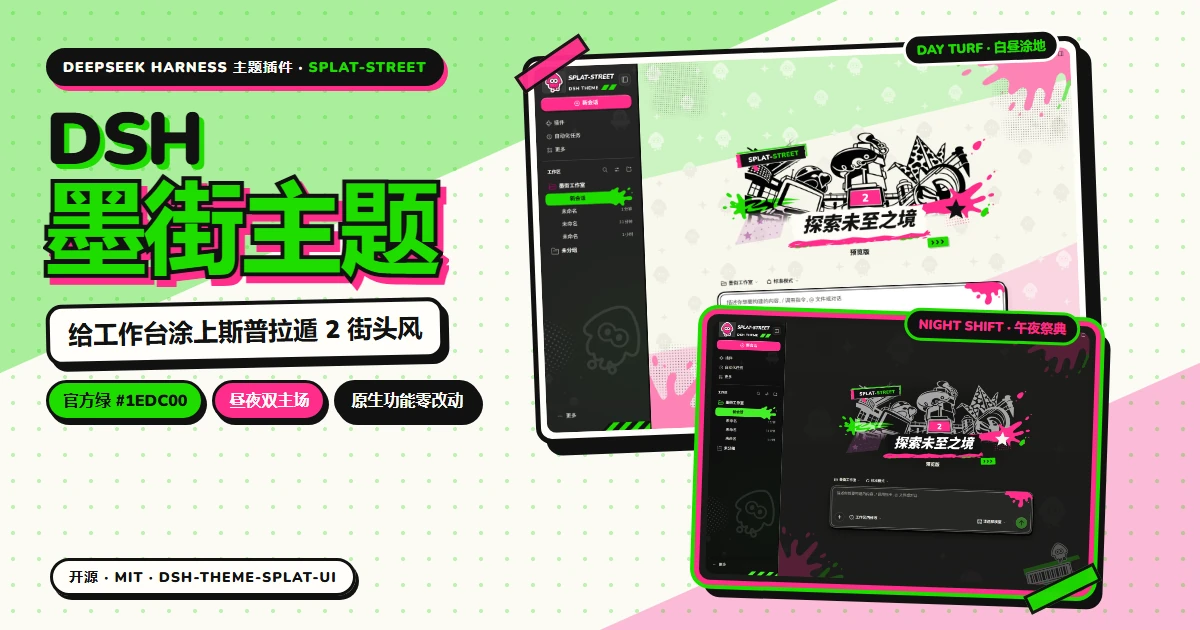
Revalidated and captured on November 20, 2026 in real DSH
0.2.2-rc.1Web after installing the local tarball into an isolated profile. The first release is validated for Web. The conversation is deterministic acceptance history; no model was called. See acceptance scope and evidence.
Expand: Light / Dark workspace, settings, reading, and 390px mobile screenshots (real DSH DOM)
| Light Mode | Dark Mode |
|---|---|
 |  |
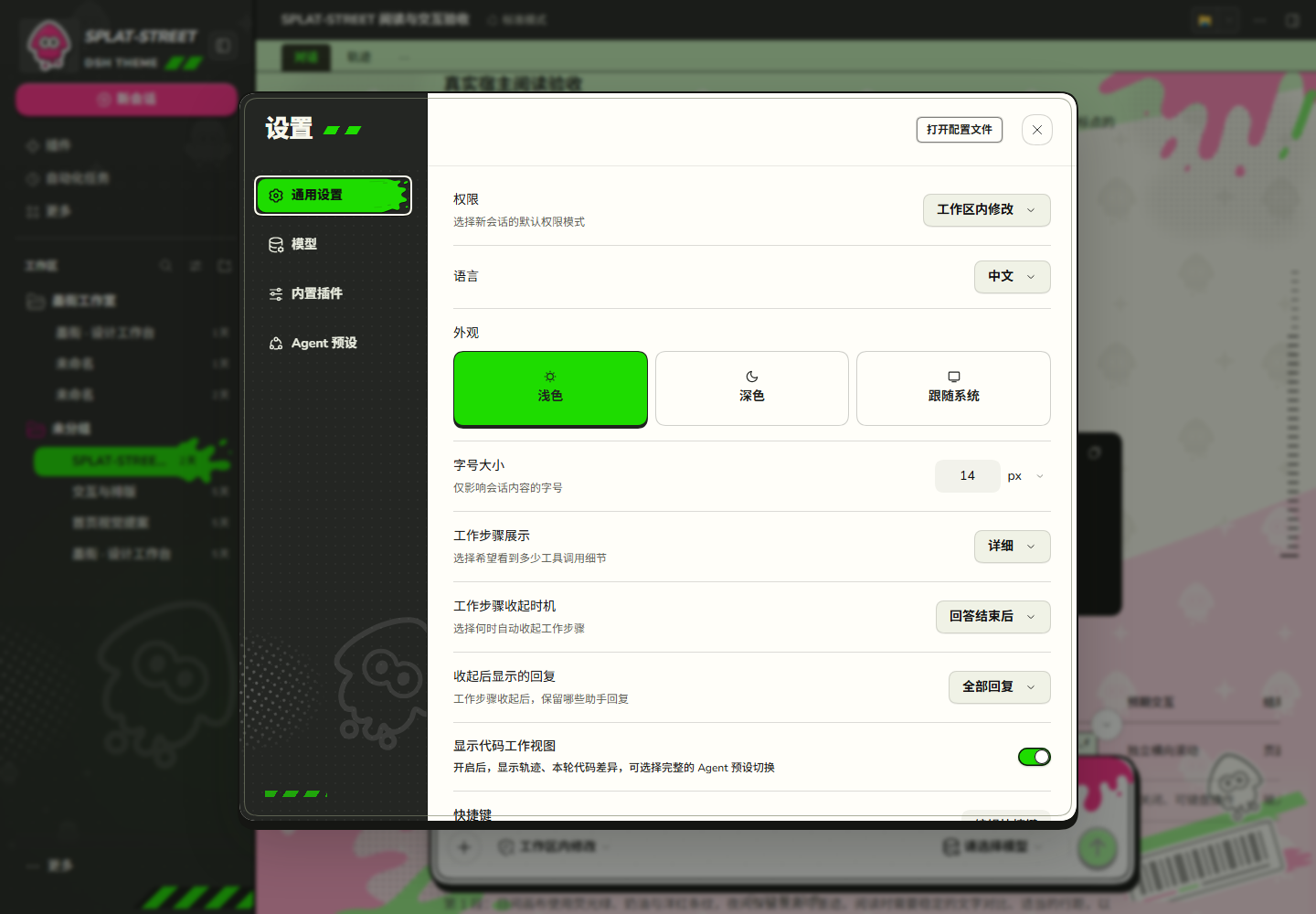 | 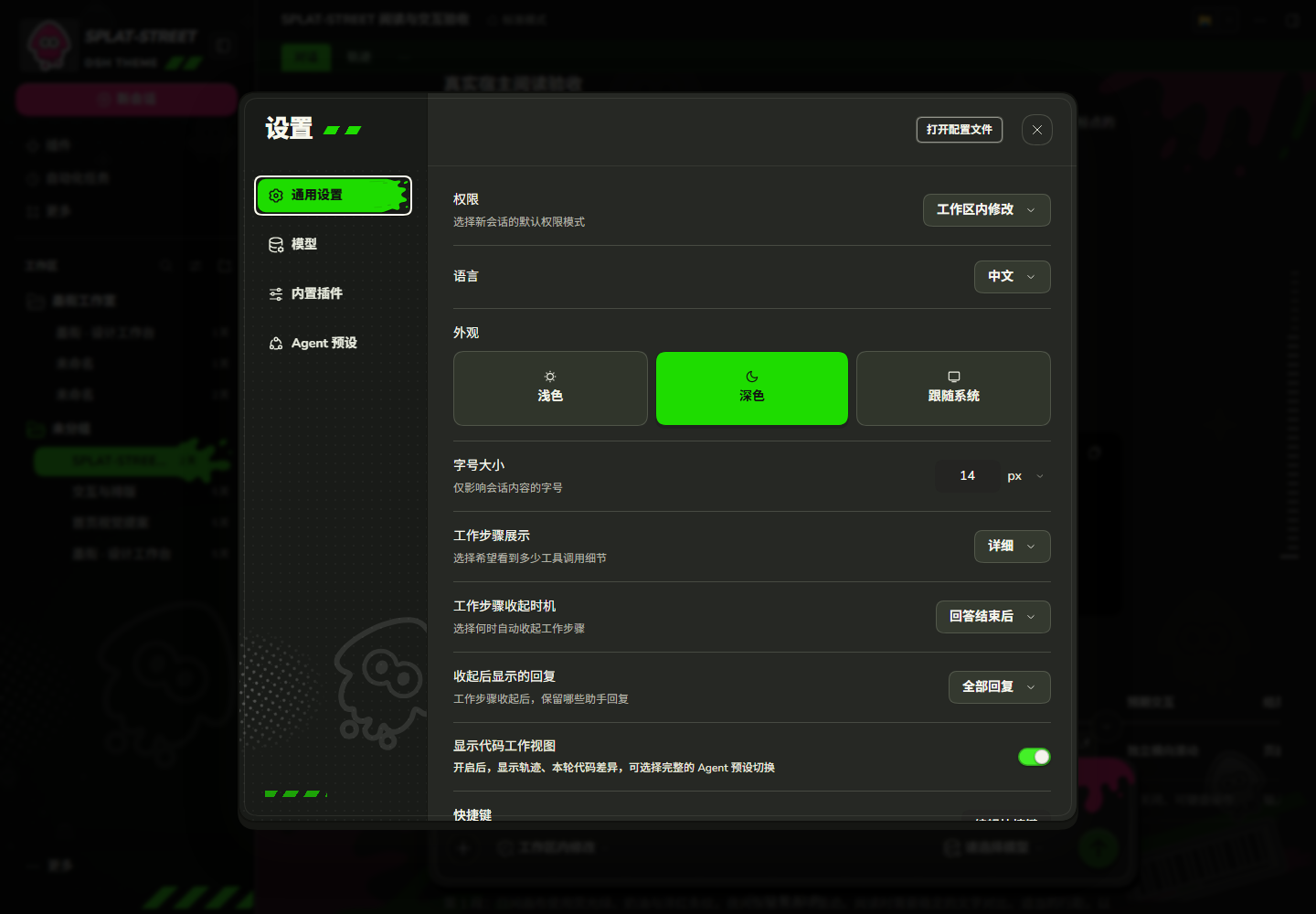 |
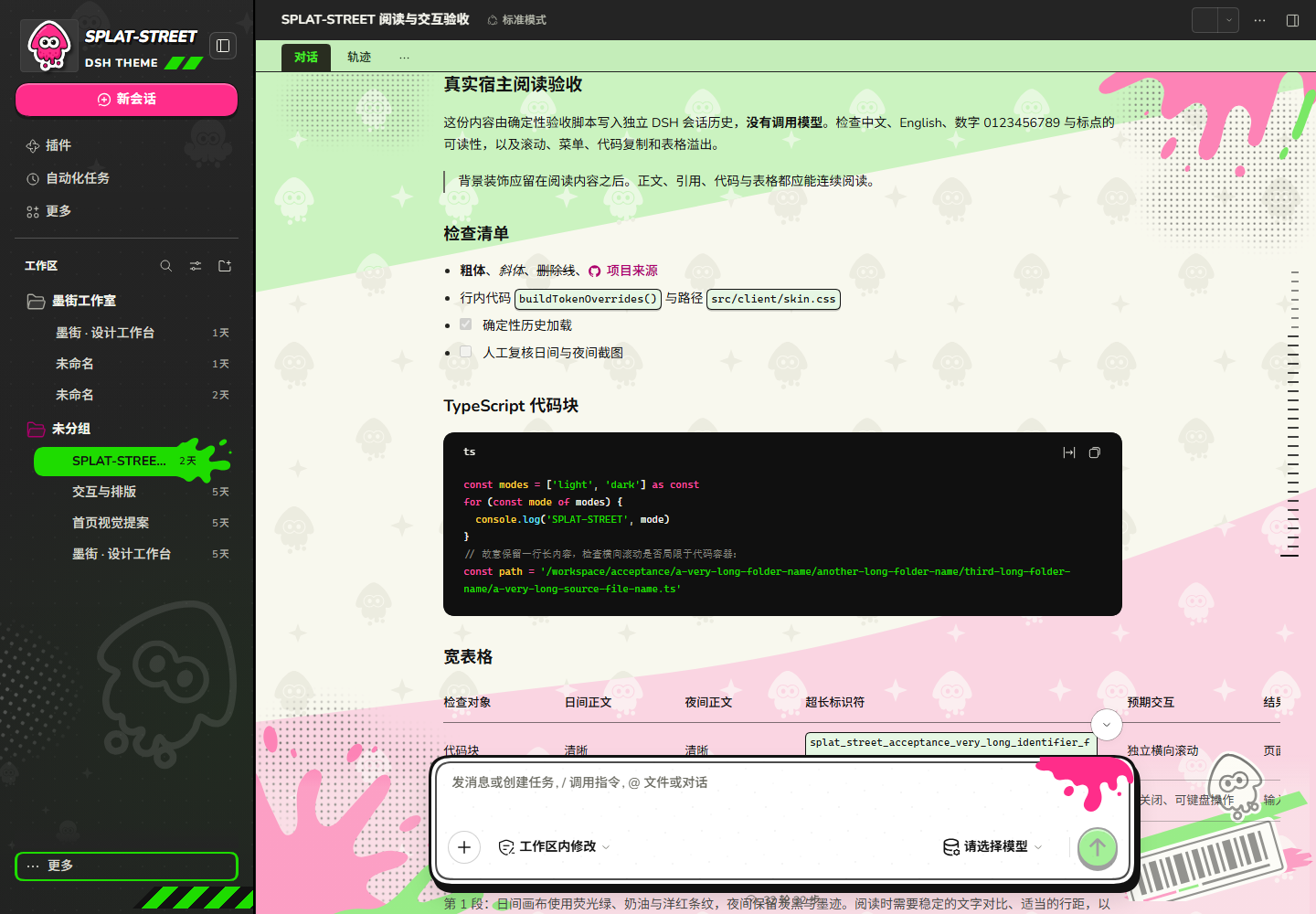 | 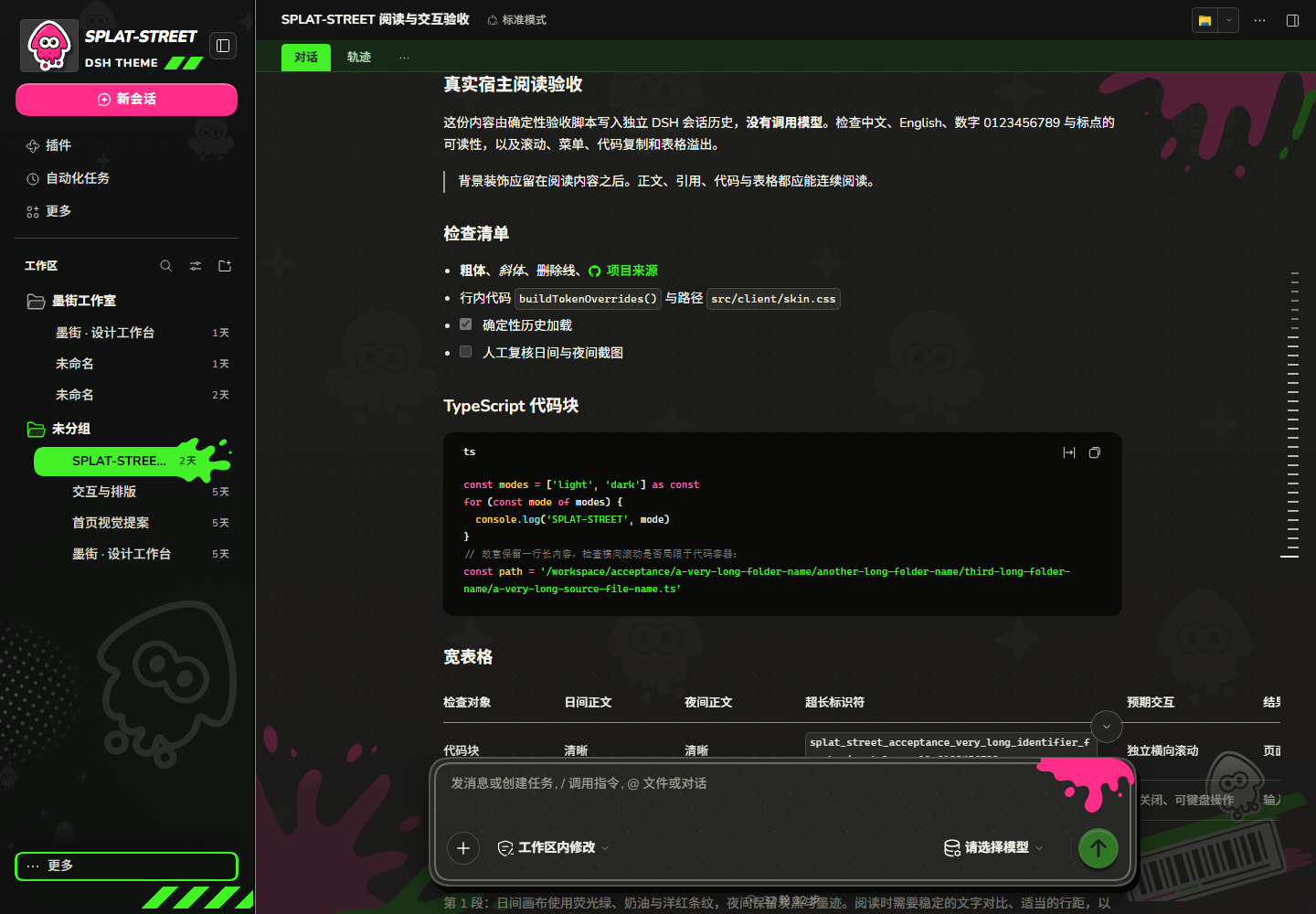 |
 |  |
The static component catalogue (site/showcase/index.html, live at https://shirolin.github.io/dsh-theme-splat-ui/showcase/) is built from version-pinned DOM fixtures and real DSH CSS. Boot screens (with the Special Weapon Gauge loader) and edge cases can be inspected there interactively.
Design & Architecture
- Two battlefields: a tri-band lime/cream/pink field with white squid stamps, magenta/lime splashes, halftone and a bottom-right squid-barcode sticker by day; a charcoal canvas with the same splashes and squids dimmed at night.
- Sidebar as home turf: near-black surface, transparent brand masthead (magenta squid + white
SPLAT-STREET+ lime diagonal stripes), a separate magenta new-session pill, lime selected row with a splat tail and black type for contrast, a bottom hazard stripe, and hard offset shadows. - Hero & Special Gauge boot loader: an SVG Hero composition embedding a compressed transparent PNG plaza illustration derived from an Inkopolis Square screenshot reference, layered with a
2sign,SPLAT-STREETtape, and ink decorations (flanking squids at night), paired with a white outlined headline and>>>speed block; the boot card keeps the top squid seal and styles the live progress ring as a 24-segment Splatoon Special Weapon Gauge. - Composer: 2.5px black rim with an inner hairline, halftone, hard shadow, magenta drip; a paper attach disc and a lime send disc with a magenta ripple.
- Appearance tab:
Settings → Plugins → Ink Street appearancewith Paper 20% / Balanced 50% / Turf 100% presets, a0%–100%positive canvas ink-intensity slider (mapped to--splat-canvas-veil), three ink green presets (default Official#1edc00/ Neon#9ae528/ Lime#d3f510), diff syntax (neon/native), décor, grain and font toggles, and reset. Preferences are stored in the client'slocalStorage. - Build-time assets: Nunito Latin WOFF2 (400–900) and the theme's SVG and PNG assets are embedded in
lib/client.js, requiring no external network downloads at runtime.
Install
Keep only one theme plugin enabled per profile.
Via DSH CLI / npm (recommended)
dsh plugin add dsh-theme-splat-ui
Or install directly inside your DSH profile directory (validated against DSH Web 0.2.2-rc.1 and Windows Desktop 0.2.2-rc.5):
cd <DSH_Profile_dir>
pnpm add dsh-theme-splat-ui
Restart the DSH service completely (or restart DeepSeek Harness Desktop) and reload the page.
From GitHub Release / Offline .tgz
Download dsh-theme-splat-ui-<version>.tgz from GitHub Releases (or build locally via pnpm run release 0.1.0):
cd <DSH_Profile_dir>
pnpm add file:<download-dir>/dsh-theme-splat-ui-<version>.tgz
From this repository
pnpm install
pnpm run build
cd <DSH_Profile_dir>
pnpm add file:<absolute-path-to-this-repo>
cordis.patch.yml mounts the package into the profile's plugin list; dsh.client.inject in package.json declares dependency ordering for Theme / Renderer / Sidebar / Conversation.
Development
Requires Node.js ≥ 22.13.0 and pnpm 11.1.2 (toolchain pinned in package.json: TypeScript 5.8.2, esbuild 0.25.6, Biome 2.6.4, lightningcss 1.29.2).
pnpm install --frozen-lockfile
pnpm run check          # site check + typecheck + build + tests + DSH compat check
pnpm run format:check   # Biome formatting check
pnpm run lint           # Biome static lint
pnpm run check:fixtures -- --expect-dsh 0.2.2-rc.1
pnpm run showcase       # Rebuild site/showcase/generated/
pnpm run audit          # Coverage diagnostics
pnpm run release 0.1.0
pnpm run install:local -- --dry-run
pnpm run demo writes design demos to artifacts/demo/ without overwriting real-host screenshots.
Subpath exports:
import { SPLAT_UI_PALETTES } from 'dsh-theme-splat-ui/palette'
import { buildTokenOverrides, contrastRatio } from 'dsh-theme-splat-ui/tokens'
Documentation
- Design Language & Palette Boundaries (docs/design.md): Layering, ink green presets, contrast gates, and component anatomy
- DSH Compatibility Contract (docs/compatibility.md): Public slots,
data-*/ ARIA seams, and fallback matrix - Acceptance Scope & Evidence (docs/acceptance.md): Real DSH
0.2.2-rc.1Web validation results and screenshot scope - Changelog (CHANGELOG.md): Release and iteration notes
- Third-Party Notices (THIRD_PARTY_NOTICES.md): Original vector asset provenance and non-MIT boundaries
Contributing & Security
- Read CONTRIBUTING.md before opening a pull request for seam registration rules, fixture commands, and release verification workflows.
- Please report bugs or regressions via GitHub Issues.
License & Attribution
Project source code and original vector artwork are licensed under the MIT License. Bundled Nunito fonts are licensed under the SIL Open Font License 1.1. See THIRD_PARTY_NOTICES.md for non-MIT boundaries and asset attribution.
Support & Related Projects
If this theme brightens up your coding sessions, consider starring the repository or supporting maintenance:
- Afdian (爱发电): https://ifdian.net/a/shirolin
- Ko-fi: https://ko-fi.com/shirolin
- More from the author:
- Animal Island UI — An Animal Crossing–inspired stationery theme plugin for DeepSeek Harness.
- PostPress(印推) — A browser extension that formats X (Twitter) posts and threads into clean paper-styled cards.
Ähnliche Plugins
dsh-wallpaper-engine
elysia395/dsh-wallpaper-engine
dsh-deep-whale (maid-atelier)
small-tailqwq/dsh-deep-whale
dsh-claude-style
nwflower/dsh-claude-style
dsh-deep-whale
small-tailqwq/dsh-deep-whale