dsh-replay-lab
tbxy09/dsh-replay-lab
Reproduce turnos reales de DeepSeek Harness contra candidatos Standard, Minimal, Anchored o de plugins con evidencia congelada de la superficie de la petición
Instalar
dsh plugin --profile web add github:tbxy09/dsh-replay-labREADME
English | 简体中文
DSH Replay Lab (ReplayLab)
Replay the request surface, not just the prompt.
dsh-replay-lab is a DeepSeek Harness plugin for replaying completed agent
turns against different presets or plugins and comparing their request surfaces,
trajectories, costs, errors, and outcomes.
Use it to reproduce and debug long agent trajectories, repeated tool-call loops, no-progress turns, and preset- or plugin-dependent regressions.
Freeze a completed DeepSeek Harness turn, approve one isolated candidate, and compare outcome, trajectory, errors, cost, and the request surface that produced them.
Install · Verify · Security · DeepSeek Harness


Why Replay Lab exists
Q: What was the original problem?
V4 Pro can exhibit materially different reasoning and execution trajectories under different harness request surfaces.
In some observed runs, the reasoning follows a reactive, exploratory pattern:
Let me check...
Let me try...
Let me inspect another file...
In others, it follows a more joint-planning pattern:
We need to locate...
We should verify...
We can test this assumption...
These phrases are useful descriptions of an observed trajectory. They are not
ability scores. we does not prove that a run is more intelligent, and let me does not prove that a model is degraded.
The important observation is narrower: a model carrying the same product label can take materially different paths when the surrounding harness constructs a different request.
Q: Do we know which variable causes the difference?
No. The available observations do not isolate one universal cause.
A harness can change several variables together:
- the system prompt and persona;
- which tool schemas the model can see;
- how verbose those schemas are;
- skills, repository instructions, and runtime context;
- conversation and tool-call history;
- reasoning configuration and output-token budget;
- the way the provider request is assembled.
Persona may matter. Tool exposure may matter. Their interaction may matter. Token budget or injected skills may also alter the trajectory. Different tasks, languages, model variants, and sample sizes add further uncertainty.
The useful working hypothesis is therefore not simply “the prompt changed” or “the model changed.” It is:
Observed agent behavior is produced by the Model × Harness combination.
Replay Lab is designed to investigate that combination without pretending that one comparison has already established the causal mechanism.
Q: What did xiaobright/modeltest find?
xiaobright/modeltest compared V4 Pro under different harness configurations and reported task-specific differences in trajectory style and results. That work helped turn an informal complaint about model behavior into a testable harness question.
It also exposed a practical DSH tradeoff:
| Approach | Request-surface strategy | Tradeoff |
|---|---|---|
| Minimal | Begin with a small persona and tool surface | Reduces the first-request surface but omits broader DSH capabilities |
| Standard | Expose the broader DSH surface immediately | Preserves the full capability set, but some observed runs were longer or more exploratory |
| Anchored Standard | Begin with a Minimal-like surface, then restore broader capabilities | Preserves a phased-exposure hypothesis, but introduces promotion timing and additional implementation variables |
The resulting Anchored Standard preset is a two-stage community workaround: it uses a narrow bootstrap request and later promotes the agent to a broader capability surface.
Anchored Standard is motivating evidence and a useful Replay Lab candidate. It is not proof that phased exposure always improves V4 Pro, that Standard is universally worse, or that one particular tool or persona caused the reported difference.
The comparisons retain important confounders, including maxTokens, skill
directory injection, persona, schema verbosity, task selection, small sample
sizes, and V4 Flash results that did not show the same outcome pattern.
Q: What is a Request Surface?
Step back from tools and presets for a moment and ask the simplest question:
What actually determines the model's behavior?
It is tempting to imagine an agent request like this:
user prompt → model → output
The actual request is closer to this:
user prompt
+ system prompt and persona
+ visible tool schemas
+ conversation and tool-call history
+ reasoning configuration
+ token budget
+ skills and runtime context injected by presets or plugins
───────────────────────────────────────────────────────────
= Request Surface
        ↓
      model
        ↓
  trajectory and output
Request Surface is everything the model actually receives before it starts generating.
The user prompt is one part of that surface, not the whole surface.
Q: How do presets, plugins, and configuration affect it?
A preset assembles an agent configuration, such as its persona, tools, and runtime behavior. A plugin can add tools, context, or request hooks. Configuration selects and parameterizes those components, including model settings and budgets.
Changing a preset or plugin can therefore produce a chain like this:
change preset or plugin
  → persona, tools, context, history, or budget may change
  → the effective Request Surface changes
  → the model may follow a different execution trajectory
  → checking only the user prompt may lead to an incomplete diagnosis
This is why a preset name such as Minimal, Standard, or Anchored Standard
is not sufficient experimental evidence. The name describes an intended
configuration; the effective request evidence describes what reached the
provider-bound request.
Q: Why are ordinary before-and-after comparisons difficult?
Two independently created sessions may differ in more than the preset being tested. The prompt may have changed slightly, the workspace may have moved on, the injected context may be different, or the provider settings and token budget may no longer match.
Without a shared case and provenance boundary, the comparison often becomes:
change preset
  → behavior changes
  → inspect two loosely related sessions
  → guess which difference mattered
That can generate a useful hypothesis, but it is a weak basis for causal claims.
Q: What does Replay Lab actually replay?
Replay Lab starts from one real, completed DSH turn. That completed source turn becomes the observed baseline; Replay Lab does not execute the baseline again.
For one approved experiment, it:
selects one completed DSH turn
  → freezes its replay case and provenance
  → selects one preset or agent-scoped plugin candidate
  → requires explicit approval
  → creates one isolated candidate session
  → reruns the completed turn's prompt in an isolated workspace copy
  → records effective candidate request evidence and execution metrics
  → compares the candidate with the observed baseline
This is a new candidate execution of the same completed task/turn, not playback of previously recorded text.
Q: What does “freeze” mean here?
Freeze does not mean that Replay Lab stores and resends a byte-for-byte copy of the old provider request.
It means Replay Lab creates a stable replay case containing the selected turn's
identity, prompt and prompt hash, provider, model, reasoning setting,
maxTokens, observed preset label, system and tool-schema fingerprints,
baseline evidence, source workspace path, and freeze-time workspace hash.
At candidate-run time, Replay Lab copies the current source workspace into an isolated location. If its current hash differs from the freeze-time hash, Replay Lab records workspace drift and marks the result as not being a strict controlled comparison.
This wording matters: Replay Lab freezes the case and provenance, then records and compares observed request-surface evidence. It does not claim to freeze the entire old Request Surface as a reusable payload.
Q: Why require explicit approval and an isolated workspace?
Planning a candidate is read-only. Explicit approval is the boundary that authorizes one selected candidate experiment to call the model and execute its available tools.
The candidate runs in a validated workspace copy rather than rewriting the source session or working directly in the source workspace. Path-containment guards keep structured candidate and subagent file operations inside that copy.
Several experiments can be retained for the same source turn, but each approval authorizes one candidate run.
Q: What evidence does Replay Lab compare?
Replay Lab preserves the completed source turn as independently observed
baseline evidence. For the candidate, it recovers provider-bound request
evidence from durable request/header events, including:
- provider, model, reasoning setting, and
maxTokenswhen present; - request phase;
- system-prompt fingerprint;
- tool-schema fingerprint;
- visible tool names;
- workspace source, execution, and drift provenance.
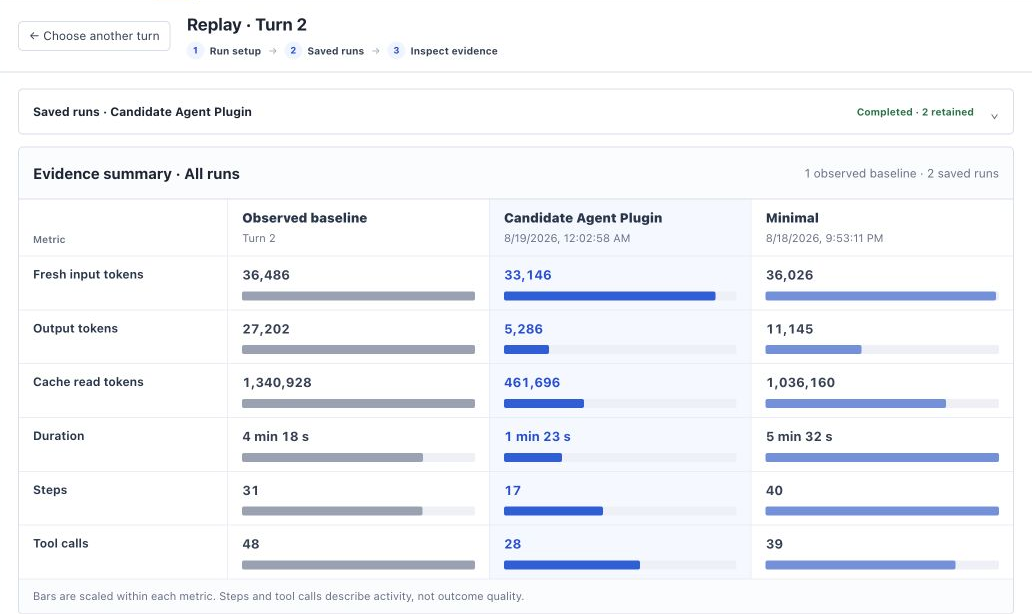
When both baseline and candidate contain complete, independent run evidence, Replay Lab produces a baseline/candidate/delta scorecard for:
- fresh input tokens;
- output tokens;
- cache-read tokens;
- duration;
- step count;
- tool-call count.
The scorecard measures recorded execution characteristics. It is not an intelligence score, a correctness evaluator, or currently a monetary-cost calculation.
Q: What can Replay Lab conclude?
Replay Lab can show:
- which completed turn served as the baseline;
- which candidate preset or plugin ran;
- whether the source workspace drifted;
- which effective candidate request evidence was recorded;
- how the independently recorded execution metrics differed;
- whether evidence was incomplete rather than silently filling gaps.
Replay Lab cannot prove from one rerun:
- which individual request-surface variable caused the difference;
- that wording such as
weorlet memeasures ability; - that V4 Pro is universally degraded under Standard;
- that Minimal or Anchored Standard universally improves intelligence;
- that one task generalizes across models, languages, providers, or harnesses;
- how the model's private internal routing or training mechanism works.
The goal is not to turn one workaround into a universal theory. The goal is to make Model × Harness comparisons narrower, repeatable, provenance-aware, and honest about what the available evidence can establish.
What it does
Completed DSH turn
  → freeze recorded request surface + workspace fixture
  → choose Standard / Minimal / Anchored / plugin candidate
  → explicit human approval
  → one isolated candidate session
  → compare outcome, steps, tool calls, tokens, errors, and surface diff
- Adds one per-session Replay tab next to Conversation and Trajectory.
- Builds rows from durable session projections rather than paginated chat nodes.
- Freezes prompt, workspace hash, model, reasoning, max tokens, preset/plugin surface, system hash, and tool-schema hash.
- Keeps the observed source turn fixed; only the candidate executes.
- Runs candidates in validated workspace copies with path-containment guards.
- If the source workspace changed after freezing, runs from an isolated copy of the current state and records both hashes as workspace-drift provenance.
- Produces a scorecard only from independently recorded evidence.
- Rejects unsupported host-plane changes and incomplete variants.
Replay evidence
The run-detail screenshot above compares the observed baseline with every saved replay run. Each metric has its own scale and keeps the exact recorded value visible; steps and tool calls describe activity, not outcome quality. The following screenshots show language signals where they occur in the session chat's thinking rows, not as recreated count labels.
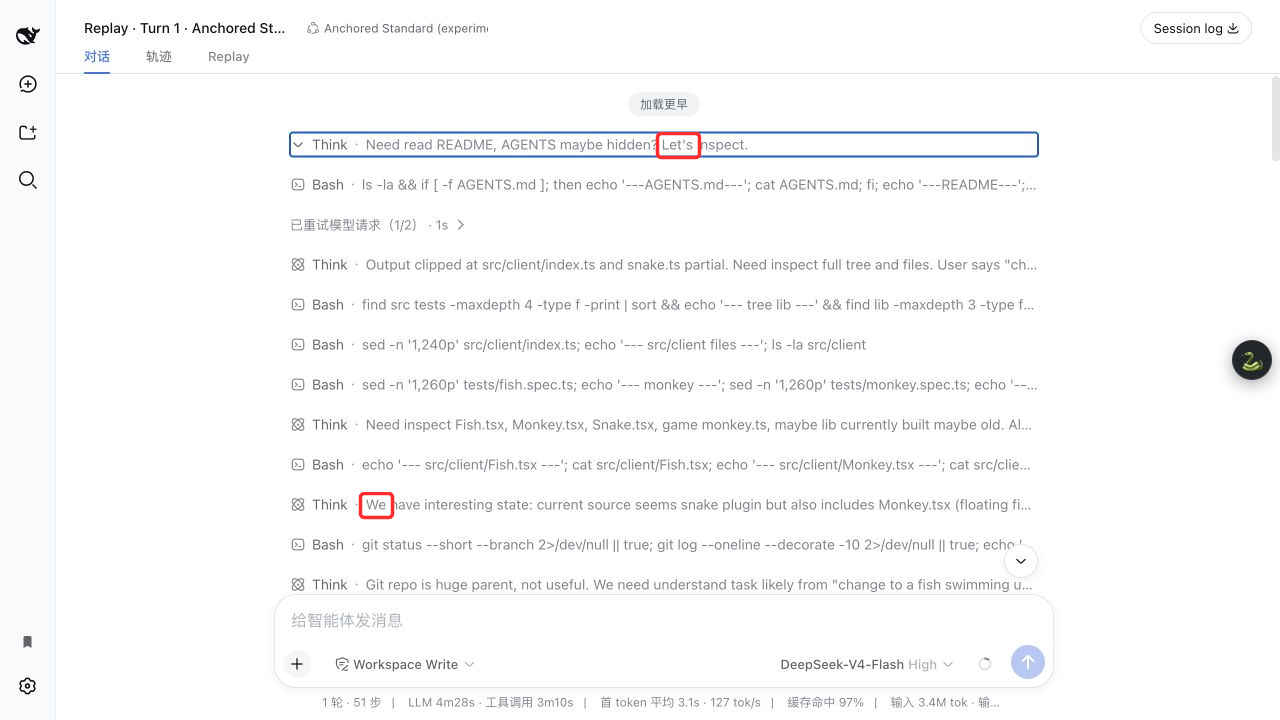
Anchored Standard: actual let's and we occurrences.
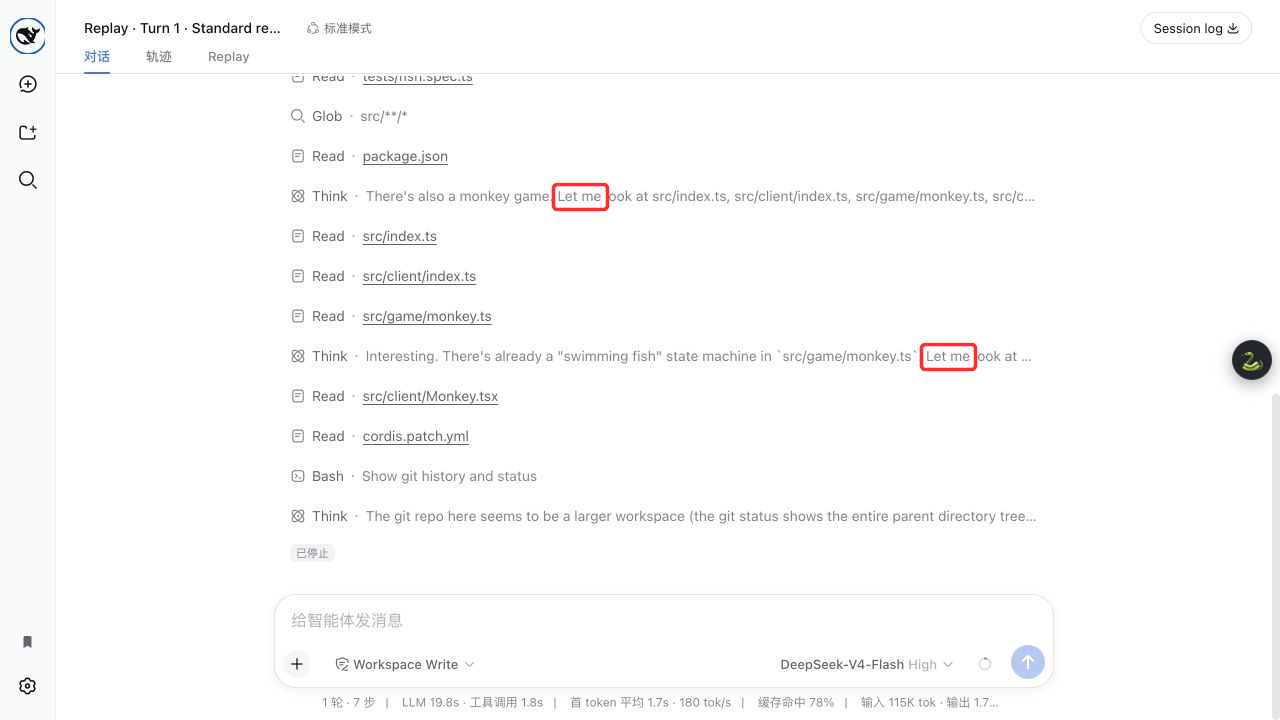
Standard replay: actual let me occurrences.
These phrases are trajectory descriptors, not ability measurements.
Install
Requires DeepSeek Harness 0.1.0-rc.6, Node.js 22.19+ or 24+, and pnpm.
Install the pinned v0.1.3 organization package from npm:
dsh plugin --profile web add @webwalkerhq/dsh-replay-lab@0.1.3
The matching immutable GitHub source tag is also available:
dsh plugin --profile web add github:tbxy09/dsh-replay-lab#v0.1.3
Restart the Web profile after installation:
dsh web
The bundle mounts @webwalkerhq/dsh-replay-lab at /replay-lab-dsh and injects
its client module into the Web profile.
Enable Anchored Standard
Anchored Standard is a
DSH preset, not a plugin package. Copy it under the same DSH_HOME used by
Replay Lab; do not install it with dsh plugin add.
git clone --depth 1 https://github.com/xiaobright/dsh-anchored-standard.git
dsh_home="${DSH_HOME:-$HOME/.dsh}"
mkdir -p "$dsh_home/.agent-presets"
test ! -e "$dsh_home/.agent-presets/anchored-standard"
cp -R dsh-anchored-standard/preset "$dsh_home/.agent-presets/anchored-standard"
Fully restart DSH, create a new blank session, and select
Anchored Standard (experimental). Do not switch an existing active session
from another preset. Replay Lab marks the Anchored candidate unavailable when
anchored-standard cannot be resolved.
Configuration
The installed bundle includes this baseline:
- insert:
    - id: replay-lab-dsh
      name: '@webwalkerhq/dsh-replay-lab'
      config:
        routeBase: /replay-lab-dsh
        historyFixture: ./node_modules/@webwalkerhq/dsh-replay-lab/fixtures/history-turns.json
        workspaceFixture: ./node_modules/@webwalkerhq/dsh-replay-lab/fixtures/workspace
        stateFile: ./.tmp/state.json
        artifactDirectory: ./.tmp/artifacts
        provider: replay-lab-fake
        fakeAdapter: false
Keep routeBase at /replay-lab-dsh for 0.1.x. Set fakeAdapter: true only
for deterministic offline verification; normal runs use the profile's provider.
License
Plugins relacionados
deepseek-harness
deepseek-ai/deepseek-harness
dsh-web (dsh-plugin-manager)
zhu1090093659/dsh-web
dsh-web
zhu1090093659/dsh-web
dsh-web-ui (dsh-plugin-manager)
zhu1090093659/dsh-web-ui