tongflow (dsh-tongflow)
tong-io/tongflow/packages/dsh-tongflow
Estudio de equipo de rodaje TongFlow para producción de imagen, voz, música y vídeo: el agente escribe archivos de flujo de trabajo TongFlow por recurso (.tongflow.json) que se ejecutan mediante complementos de TongFlow, con un lienzo de flujo integrado, una estructura de proyecto por plano/personaje/toma y una plantilla de manga-drama; las sesiones que comienzan con @tongflow abren la vista de estudio.
Instalar
dsh plugin --profile web add github:tong-io/tongflowEste plugin se encuentra en el subdirectorio packages/dsh-tongflow del repositorio.
README







Different modalities. One workflow.
Text, images, audio, video and 3D are your materials. Decide how they transform and combine, then choose the model behind each step. Every result is material you can use again.
Open-source core · Your models · Self-hostable · tongflow.com · Open the canvas
Sponsors

|
MiniMax H3 video generation API — Metaso (秘塔科技) Metaso runs MiniMax H3 video generation at ¥0.09/second for 768P and ¥0.15/second for 2K. Native 2K, synced audio and picture, an OpenAI-compatible API, and ComfyUI support — no GPU to deploy yourself. 🎁 Sign up through the TongFlow link to claim bonus credits and a partner discount. |

|
One key for the whole canvas — Infistar (无限星河AI) An OpenAI-compatible gateway: one key and one balance cover the canvas's text, image, video and transcription nodes — GPT-6, Claude Opus 5, Gemini 3 Pro, Grok and DeepSeek alongside the broadest Chinese lineup (Qwen, GLM, Doubao, MiniMax, Kimi, StepFun), plus GPT Image 2.5, Seedream 5 and Qwen-Image for stills and Wan / Seedance for video. Images from ¥0.06 each. Use it through the tongflow-router-infistar plugin. 🎁 Sign up through the TongFlow link for $5 of trial credit. |
Demo Examples
| Workflow | Result |
|---|---|
Basic — Type text (Add), generate images (Transform), then blend them into one (Combine).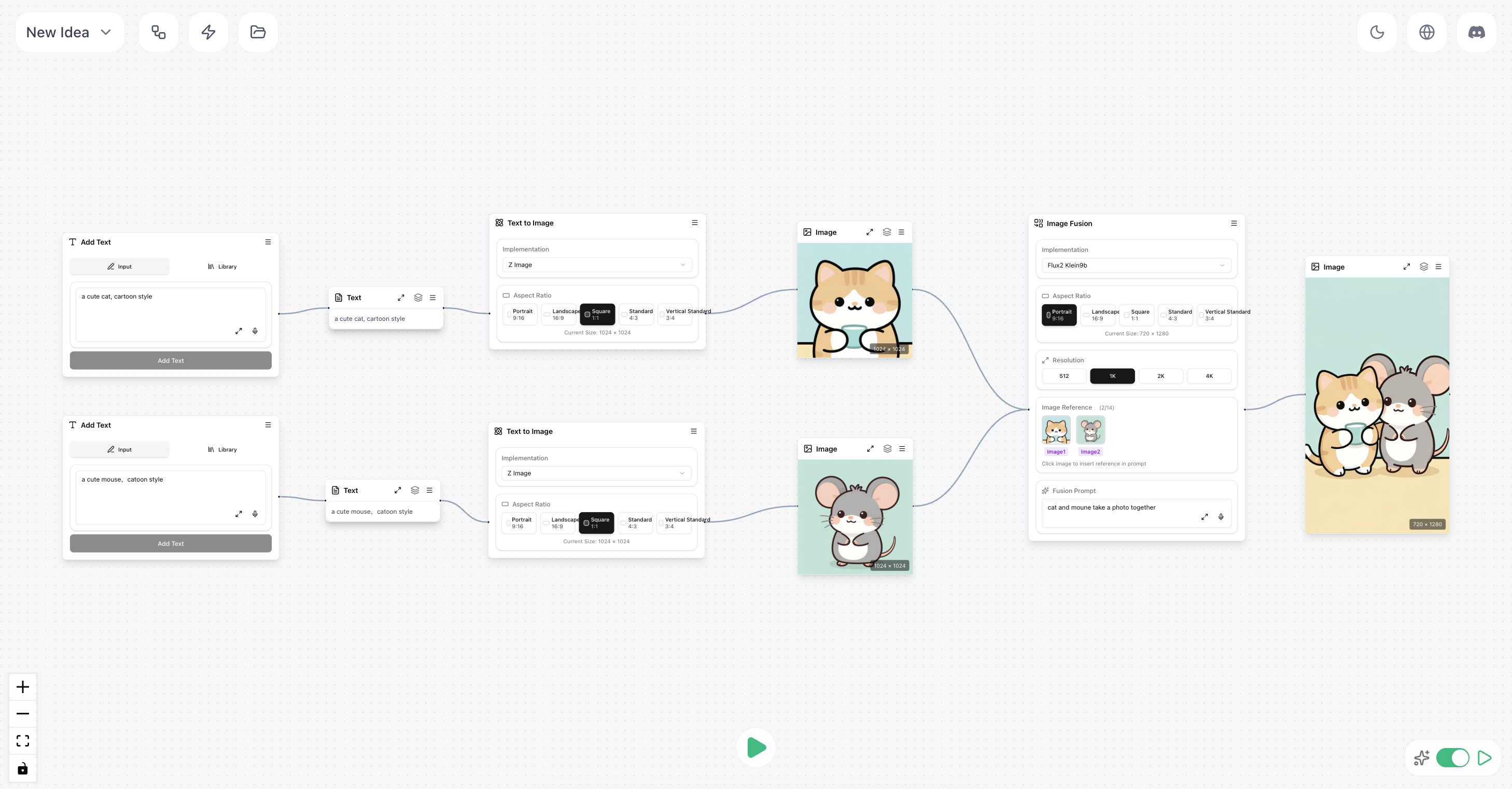 |  |
Intermediate — (Add topic → write script → generate speech) + (character description → generate image) → lip-synced video = talking-head avatar.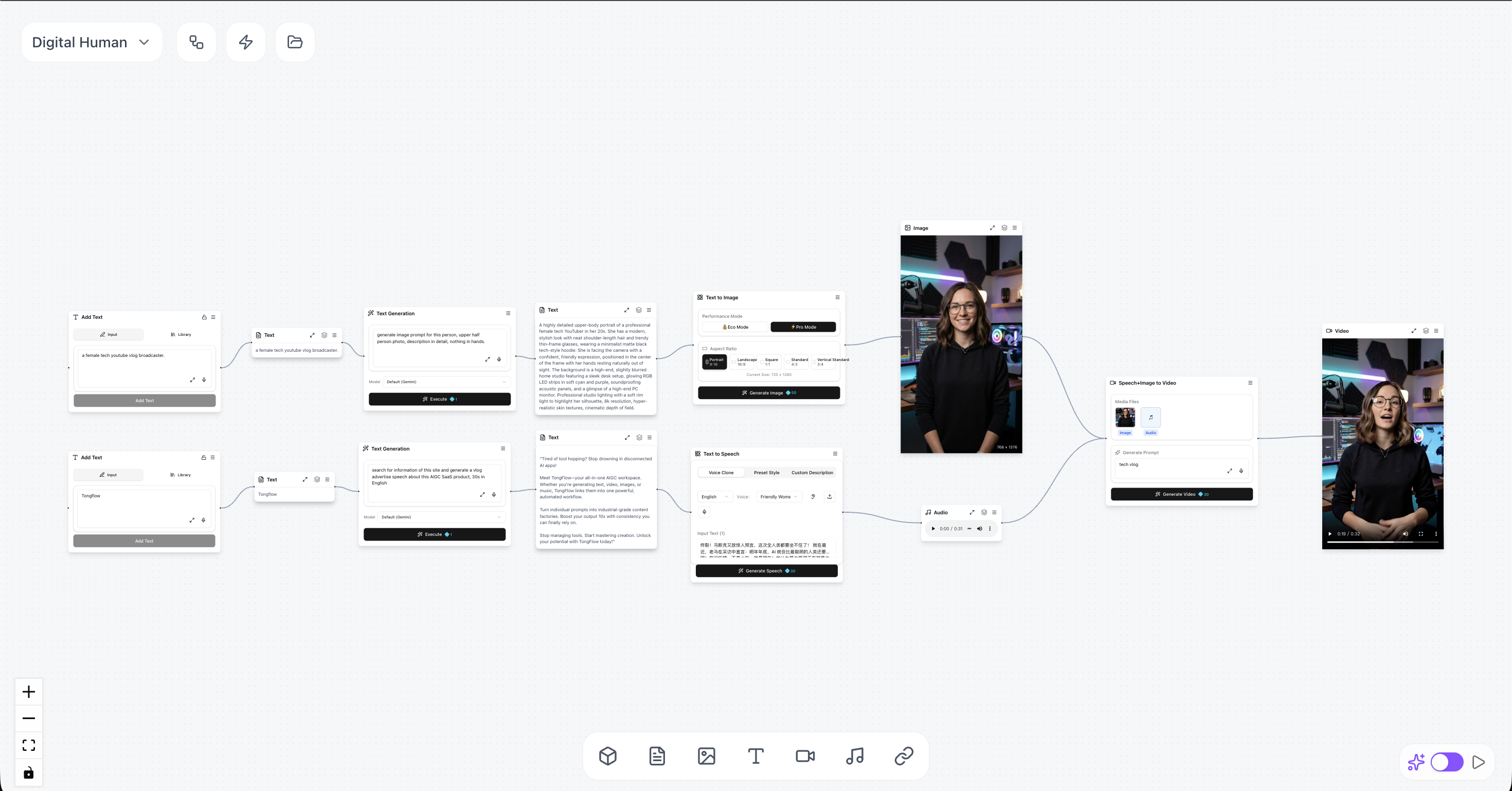 | |
Advanced — Generate lyrics + song + characters + scenes + storyboard → produce a music video.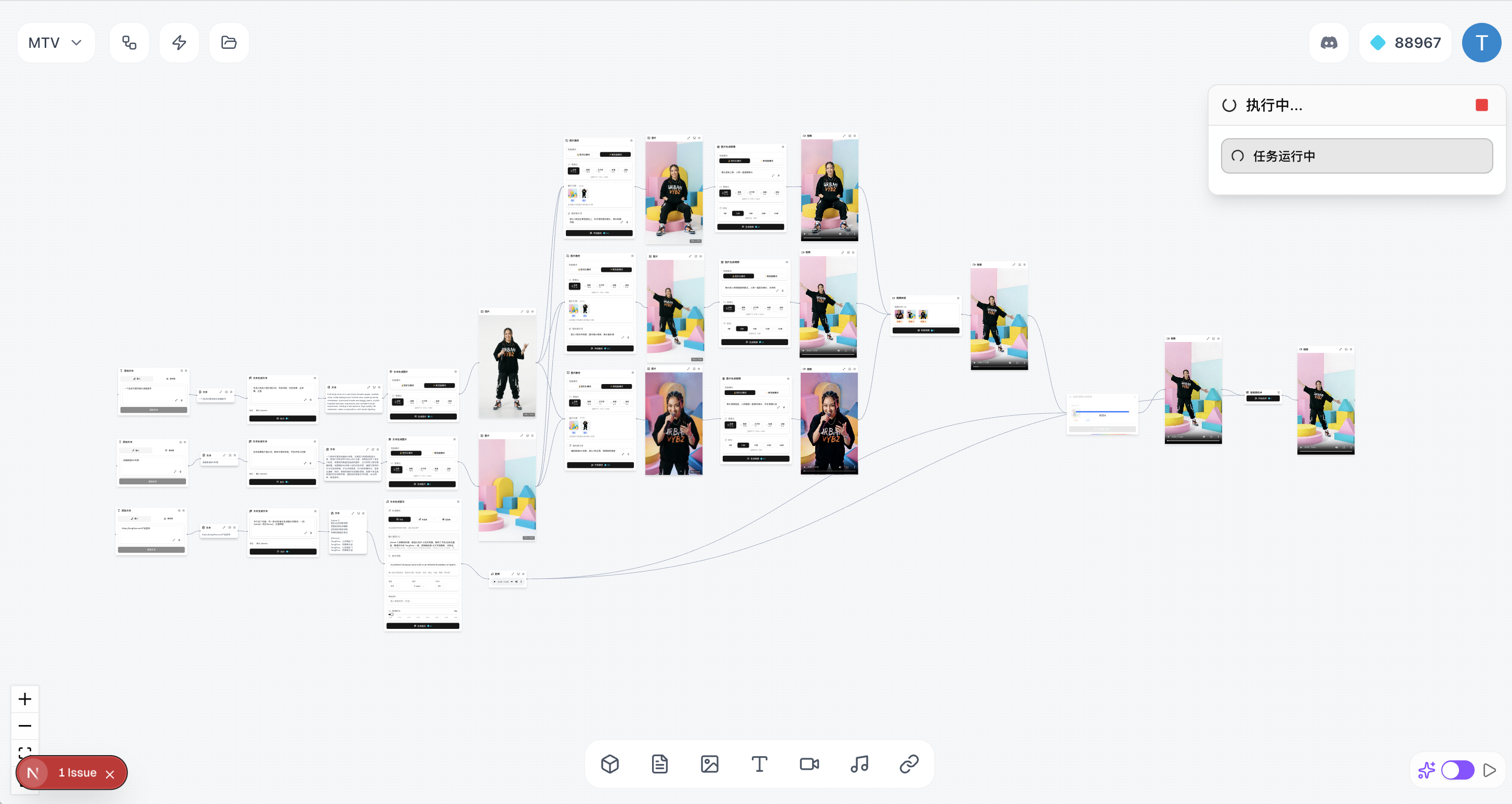 |
Every output stays on the canvas as a material: branch from a generated image, feed a transcript into the next step, or swap the model behind one node and keep the rest of the workflow.
How To Start
There are three ways to use TongFlow, all sharing the same open-source core: TongFlow Cloud (the desktop app or app.tongflow.com in a browser), self-host (from source or with Docker), or build with an agent (the tongflow npm package or TongFlow inside Claude Code, any MCP client or dsh).
The TongFlow desktop app is a lightweight (~10 MB) shell around the cloud studio at app.tongflow.com — install it, sign in, and start creating. The cloud studio also runs in any modern browser.
Step 1 — Install the desktop app
Download the installer for your platform, install it, and open it.
- macOS (Universal — Apple Silicon & Intel): TongFlow-mac-universal.dmg
- Windows: TongFlow-win-x64.msi
All builds are on the Releases page.
macOS: the builds are not yet notarized with Apple, so Gatekeeper will block the first launch ("TongFlow is damaged and can't be opened"). After moving the app to Applications, clear the quarantine flag once and it opens normally:
xattr -cr /Applications/TongFlow.appDownload from this page directly — installers passed through chat apps (e.g. WeChat) may be renamed or re-flagged.
Step 2 — Sign in and create
Sign in with Google or WeChat and start creating — the cloud studio manages plugins and execution for you.
Prefer a fully local, account-free TongFlow? That's what self-hosting is for — see Run from source or Run with Docker, then follow Self-host setup. (The desktop app up to v0.1.13 bundled this local runtime; those installers remain on the Releases page.)
Modality-First
A modality is a form of information: text, image, audio, video, 3D, document, URL. TongFlow makes these the building blocks of a workflow. Decide what you want to do with them, then choose the model for the job. Every step is three separate decisions:
| Question | Examples | |
|---|---|---|
| Material | What do you have? | A document, a photo, a recording, an idea. |
| Capability | What could it become? | Understand, generate, transform, combine or split. |
| Implementation | What should run it? | A compatible plugin and the model it provides. |
- Every result is a new beginning. Materials have their own nodes. An uploaded image and a generated image can both feed the next compatible operation. Branch out from a result instead of starting over.
- Choose a capability, then a model. A workflow records what a step does separately from the plugin that runs it. Switch compatible implementations while keeping the surrounding structure.
- Four operations. Add, transform, combine, split & batch. Understanding, generating and processing fit into the same system; generation is one kind of operation.
- A shared structure for people and agents. The canvas, exporter and agent tools use the same node registry. Build visually or through the
tongflowpackage; inside Claude Code, an MCP client or dsh, an agent creates workflows you can open, edit and run again. - Open ecosystem. The ABI defines each capability's input/output contract independent of who implements it. Any platform can publish plugins the same way, and the official plugins below cover nearly every node in the matrix.
Read more: Why TongFlow starts with modalities.
Capabilities
Every node below is a capability from the ABI, grouped by the four operations. Materials (text, image, audio, video, 3D, document, URL) are the nodes that connect them.
✅ = available out of the box with an official plugin · ⬜ = node exists in the canvas but has no official plugin yet (planned).
Add
- ✅ Text input: type text and add a text node.
- ✅ Add image: pick a local file and add an image node.
- ✅ Add photo: capture with the device camera and add an image node.
- ✅ Add sketch: draw on the canvas and add an image node.
- ✅ Add audio: pick a local audio file and add an audio node.
- ✅ Record audio: record with the mic and add an audio node.
- ✅ Add video: pick a local video file and add a video node.
- ✅ Record video: record with the camera and add a video node.
- ✅ Add document: pick a local file and add a document node.
- ✅ Add URL: fetch a page from a link and add text, image, audio, or video nodes.
- ✅ Add 3D model: choose a local model file and add a 3D model node.
Transform
Text
- ✅ Generate / rewrite: create or edit copy from a prompt.
Image
- ✅ Image generation: images from text.
- ✅ Image editing: inpaint, edit, or redraw with instructions.
- ✅ Image understanding: captions, Q&A, or descriptions from an image.
- ✅ Image upscaling: enlarge for sharper detail.
- ✅ Pose detection: 308-keypoint whole-body skeleton overlay (body, hands, face).
- ✅ Body-part segmentation: 29-class human parsing overlay.
- ✅ Surface normals: per-pixel normal map — human-centric or full scene.
- ✅ Matting: cut the human or salient foreground out as a transparent PNG.
Video
- ✅ Video generation: video from text.
- ✅ Image-to-video: animate a still into motion.
- ✅ First/last-frame video: two key images to interpolate a clip.
- ✅ Images → video: multi-image reference fusion — several reference images plus text into a new video.
- ✅ Omni-reference video: mix image, video, and audio references (plus text) into one video with native stereo audio.
- ✅ Video understanding: summaries or descriptions from video.
- ✅ Video upscaling: higher-resolution output.
- ✅ Extract first / last frame: grab a frame as an image.
- ✅ Video editing: edit a video from a text instruction.
- ✅ Subtitle removal: clean subtitles from a video.
- ✅ Watermark removal: remove watermarks from a video.
Audio
- ✅ Music generation: music from text, with optional reference-audio conditioning.
- ✅ Audio generation: one prompt → speech, sound effects, and ambience in a single pass, with optional reference voices.
- ✅ Audio understanding: describe a clip (music, speech, or ambient sound) in text.
- ✅ Music repaint: regenerate a chosen time range of a song.
- ✅ Music cover: restyle a song via a caption and/or a reference track.
- ✅ Add track / complete arrangement: generate one new stem over a mix, or fill in missing tracks.
- ✅ Music brief: one-sentence idea → lyrics, style tags, BPM, key, and duration.
- ✅ Speech synthesis: text-to-speech — preset style, voice clone (reference audio), or instruction-driven.
- ✅ Speech recognition: transcribe speech from audio or video.
- ✅ Noise reduction: denoise audio.
- ✅ Speaker diarization: separate audio by speaker.
- ✅ Voice / timbre replacement: re-voice speech or singing in the timbre of a reference clip.
- ✅ Multi-track / vocal-accompaniment separation: isolate vocals, drums, bass, guitar, and 8 more stems.
- ✅ Open-vocabulary sound separation: describe any sound in words ("dog barking") and split the audio into that sound and everything else.
3D, documents & links
- ✅ Image → 3D: single-view 3D model from an image.
- ✅ Video → motion capture: monocular video to skeletal animation (body + fingers + face channels, GLB).
- ✅ Document → text: extract plain text from documents.
- ✅ Link → text: turn page content into text.
Combine
- ✅ Image fusion: blend or edit multiple references into one image.
- ✅ Lip sync: audio + video → video (lip-sync); also audio + image → video and audio + text → video variants.
- ✅ Emotive speech: text + voice reference → speech in that voice, with emotion control.
- ✅ Character swap: video + reference (scene blend / character replacement).
- ✅ Motion transfer: character image + driving video, end-to-end (no pose extraction).
- ✅ Combine text: merge multiple text nodes into one.
- ✅ Concatenate clips: join multiple videos end to end.
- ✅ Mux audio + video: merge into one file.
Split & batch
- ✅ Split by shots: cut a long video into segments by scene.
- ✅ Split video & audio: demux a video into separate video and audio tracks.
- ✅ Extract audio track: pull audio into its own asset.
- ✅ Split long text: break a long passage into chunks.
- ✅ Merge / tidy text blocks: combine segments (use the auto-merge option).
- ✅ Filter or drop clips: drop unwanted clips by rule or selection.
- ✅ Arrange & batch groups: group and arrange text/clip batches for downstream processing.
Official plugins
The official GPU/CPU plugins currently run on Modal — up to $30/month of free GPU compute (H100/A100, etc.). See Self-host setup for the
MODAL_TOKEN_*setup. Any other platform can publish its own plugins the same way.
API plugins
First-party providers (a lab's own models):
- tongflow-api-gemini — Google Gemini with a per-node model picker: text, vision, image (Nano Banana / Imagen 4), Veo video, TTS and transcription
- tongflow-api-openai — OpenAI with a per-node model picker:
gen_text, image gen/edit/fusion (gpt-image-2), vision, document OCR, Whisper transcription and TTS - tongflow-api-deepseek — DeepSeek with a per-node model picker (V4.1 Flash / V4 Pro, streaming thinking bubble):
gen_text/ text tools, plus image understanding on Flash - tongflow-api-bytedance — ByteDance Volcengine Ark with a per-node model picker: Doubao text & vision, Seedream image gen/edit/fusion, Seedance text/image/audio → video
- tongflow-api-xai — xAI Grok with a per-node model picker:
gen_text(Grok 4.x), image understanding, and Grok Imagine text-to-image - tongflow-api-runway — Runway Dev unified API with a per-node model picker: video (Gen-4.5, Gen-4 Turbo, Aleph edit, Act-Two, Seedance, Veo), image (GPT Image 2, Seedream 5, Gemini image 3) and ElevenLabs TTS
- tongflow-api-metaso — MiniMax H3 video generation hosted by Metaso: text / image → video at ¥0.09/s (768P) or ¥0.15/s (2K), through an OpenAI-compatible Videos API
- tongflow-api-qwen-audio — Alibaba Qwen-Audio-3.1 on Model Studio: TTS-Next renders speech + sound effects + ambience in one pass (also powers voice clone, voice-from-description and emotive speech), TTS-Flash preset voices, and ASR-Flash transcription with timestamps and speaker labels
Router plugins
Aggregators — one key, many third-party models across labs:
- tongflow-router-openrouter — OpenRouter with a per-node model picker:
gen_text(free by default, plus GPT-5.5 / Claude / Gemini / Grok / DeepSeek), vision / audio understanding, image gen/edit and transcription - tongflow-router-cometapi — CometAPI gateway with a per-node model picker that also lists CometAPI's live catalog:
gen_text/ text tools (GPT-5.5, Claude, Gemini, DeepSeek, Grok, Qwen, Kimi), image / video / audio understanding, image gen/edit/fusion (GPT Image 2, Seedream), text / image(s) → video (Sora 2, Veo 3.1, Seedance, Wan, MiniMax, HappyHorse, Vidu), video edit (Omni), TTS and Whisper transcription - tongflow-router-toapis — ToAPIs gateway with a per-node model picker:
gen_text/ text tools (GPT-5.6, Claude, Gemini, DeepSeek, Qwen, GLM, Kimi, MiniMax), image understanding, image gen/edit/fusion (GPT Image 2, Seedream 5, Gemini Image, Flux 2, Grok), text / image(s) / first-last-frame / multimodal refs → video (Sora 2, Veo 3.1, Seedance 2, Kling, MiniMax H3, Wan, HappyHorse, Vidu), video edit (HappyHorse); the picker also lists the live per-key model list - tongflow-router-apimart — APIMart gateway with a per-node model picker: image gen/edit (Z-Image, Seedream, Nano Banana, GPT-Image), text/image → video (Kling, VEO3, Sora2, Seedance),
gen_text(GPT-5, Claude, Gemini), Whisper transcription and TTS - tongflow-router-replicate — Replicate with a per-node model picker across the catalog: text, vision, image gen/edit/fusion/upscale/matting, text/image → video, transcription, TTS / voice clone, music, and image → 3D (FLUX, Seedream, Veo, Kling, Whisper, Hunyuan3D…)
- tongflow-router-fal — fal.ai with a per-node model picker: image (gen/edit/fusion/upscale/matting/pose/normal/seg), video (text/image → video, first-last frame, talking-head, lip-sync, upscale), audio (transcription, TTS, voice clone, music, source separation) and image → 3D
- tongflow-router-infistar — Infistar (无限星河AI) gateway with a per-node model picker that also lists the key's own model list:
gen_text/ text tools (GPT-5.6, Claude, Gemini, Qwen, DeepSeek, GLM, Kimi, Doubao, MiniMax, Grok), image understanding, image gen/edit/fusion (GPT Image 2, Qwen-Image, Seedream, Wan), text / image → video (Wan 3.0, Seedance, MiniMax H3) and transcription
GPU/CPU plugins
- tongflow-modal-ffmpeg — transcoding, muxing, media pipelines
- tongflow-modal-pyscenedetect — shot-boundary detection for splitting clips
- tongflow-modal-z-image — Z-Image text-to-image
- tongflow-modal-ernie-image — ERNIE Image text-to-image (alternative)
- tongflow-modal-krea2 — Krea 2 Turbo text-to-image (open-weights 12B, 8-step, up to 2K)
- tongflow-modal-flux2-klein9b — FLUX.2 Klein 9B multi-reference fusion / image editing
- tongflow-modal-qwen-image-edit — Qwen-Image 2.1: text-to-image, instruction editing, multi-image fusion (up to 10 references) and transparent background removal (headless ComfyUI, int8; weights Qwen Research Licence, non-commercial)
- tongflow-modal-boogu — Boogu-Image-0.1 (fp8) text-to-image (dense bilingual text) & single-reference image editing
- tongflow-modal-infinitetalk — InfiniteTalk audio-driven lip-sync (audio + image / video → talking-head video)
- tongflow-modal-wan-animate — Wan-Animate-2 end-to-end character animation (character image + driving video, no pose extraction)
- tongflow-modal-scail2 — SCAIL-2 controlled character animation (image + driving video), and character swap
- tongflow-modal-minimax-h3 — MiniMax-H3 33B video generation with native stereo audio (text / first- & last-frame / multi-image / omni-reference)
- tongflow-modal-bernini — Bernini-R 1.3B unified video renderer (text/image → image/video, video editing, subtitle / watermark removal)
- tongflow-modal-sam3 — SAM 3 / SAM 3.1 text-guided matting: cut every instance of a described concept out of an image (transparent PNG) or track it through a video (green-screen matte)
- tongflow-modal-triposplat — TripoSplat single image → 3D Gaussian splat
- tongflow-modal-sam-3d-objects — SAM 3D Objects single image → 3D Gaussian splat of the foreground object (auto mask, robust to occlusion/clutter; alternative)
- tongflow-modal-sam-3d-body — SAM 3D Body single image → full-body 3D human mesh GLB (multi-person, MHR rig; alternative), and video motion capture (per-frame MHR regression → animated character GLB; alternative)
- tongflow-modal-sapiens2 — Sapiens2 (Meta) human suite: pose detection, body-part segmentation, surface normals, human matting, image → 3D point cloud, and video motion capture (geometric engine: keypoints + pointmap → animated MHR character GLB)
- tongflow-modal-sensenova-vision — SenseNova-Vision (SenseTime) unified vision model: image understanding / visual QA, detection & OCR structured text, full-scene surface normals, salient-object matting, and human pose overlay (alternative)
- tongflow-modal-seedvr2 — SeedVR2 image / video super-resolution
- tongflow-modal-gemma4 — Gemma-4 multimodal text (image / video understanding)
- tongflow-modal-qwen38 — Qwen3.8-27B multimodal text (text generation, image / video understanding; alternative)
- tongflow-modal-qwen3asr — Qwen3 speech recognition
- tongflow-modal-qwen3tts — Qwen3 text-to-speech
- tongflow-modal-indextts2 — IndexTTS-2.5 emotive text-to-speech: zero-shot voice cloning (alternative) and emotion-controlled speech from a voice reference
- tongflow-modal-seed-vc — Seed-VC zero-shot voice conversion: re-voice speech or singing in the timbre of a short reference clip (GPL-3.0)
- tongflow-modal-whisper — Whisper speech recognition with timestamps (alternative)
- tongflow-modal-moss-transcribe-diarize — MOSS-Transcribe-Diarize 0.9B: long-form multi-speaker transcription with timestamps and speaker labels in one pass, plus per-speaker audio tracks (50+ languages, up to ~90 min)
- tongflow-modal-ace-step — ACE-Step 1.5 music suite: text-to-music (sft / base / turbo selectable), repaint, cover, stem extraction, add-track, arrangement completion, music brief, and music understanding
- tongflow-modal-levo — LeVo 2 / SongGeneration text-to-music (multilingual, commercial-grade)
- tongflow-modal-minimax-music3 — MiniMax-Music3 11B song generation: lyrics + description → complete song with vocals (up to ~5 min, 32 kHz stereo)
- tongflow-modal-yue2 — YuE2 song generation: style + lyrics → editable score → full song with vocals (48 kHz stereo), plus covers via SheetSage2 transcription (weights CC BY-NC 4.0, non-commercial)
- tongflow-modal-sam-audio — SAM-Audio text-prompted sound separation: noise reduction, vocal isolation, and free-text stem extraction ("the piano in the background")
- tongflow-modal-docling — Docling document → text
- tongflow-modal-paddle — PaddleOCR document → text
- tongflow-modal-unlimited-ocr — Unlimited-OCR long-horizon document / PDF → text
- tongflow-modal-crawl4ai — Crawl4AI URL / link → text
- tongflow-modal-scrapling — Scrapling stealth-browser URL / link → text
Run from source
pnpm install
pnpm plugins:install   # clone official plugins into plugins/
pnpm start:prod        # builds once, then serves at http://localhost:3000
Requires Node (with pnpm) and a Python 3.10+ interpreter on your PATH (set PYTHON to point at a specific one). Plugins run as local Python processes; TongFlow provisions an isolated venv for them automatically and installs each plugin's requirements.txt on first use — no manual Python setup.
Open http://localhost:3000 and the canvas is live. Then follow Self-host setup (credentials go in the in-app Settings dialog, or a project .env).
Run with Docker
A self-host image is published to GHCR — no Node/Python/pnpm setup required:
docker run -d -p 3000:3000 \
  -v tongflow-data:/data -v tongflow-plugins:/plugins \
  ghcr.io/tong-io/tongflow:latest
Then open http://localhost:3000. Or with Compose (clones this repo's docker-compose.yml):
docker compose up -d
To build the image yourself instead of pulling: docker build -t tongflow .
Data & credentials. Everything writable lives in the /data volume (SQLite db, uploads, settings). API keys are optional — set them in the in-app Settings dialog, or pass them at launch (-e OPENROUTER_API_KEY=…); supported keys: OPENROUTER_API_KEY, GEMINI_API_KEY, OPENAI_API_KEY, MODAL_TOKEN_ID / MODAL_TOKEN_SECRET.
Plugins. The image ships no plugins — install them from the in-app plugin manager (first install needs network access to GitHub). On first run, a plugin provisions a shared Python venv under /data/.tongflow/plugin-venv (installs the SDK + the plugin's requirements.txt from PyPI), so the first run is slower and needs network. Modal-backed plugins additionally need a Modal token.
Self-host setup (plugins & credentials)
A self-hosted TongFlow ships with no plugins pre-installed, and the canvas is preloaded with an example workflow. Three steps get it running:
1 — Install plugins
Open the plugin manager (the blocks icon, top-right) and install what you need. Newly installed plugins are usable immediately, no restart.
To run the preloaded example workflow (text → image → fusion → video), install these three plugins:
- tongflow-modal-z-image — text-to-image
- tongflow-modal-qwen-image-edit — image fusion / blending
- tongflow-modal-minimax-h3 — image-to-video
These run on Modal (up to $30/month of free GPU compute). Add MODAL_TOKEN_ID / MODAL_TOKEN_SECRET in Settings; create a token at modal.com/settings/tokens. Any other platform can publish its own plugins the same way.
Browse the full catalog — the official API plugins (OpenAI / Gemini / OpenRouter) and other GPU/CPU plugins — in the plugin manager.
2 — Configure credentials
Open Settings (the gear icon, top-right) and add the environment variables your plugins need — e.g. OPENAI_API_KEY for the API plugins, or the credentials your GPU/CPU plugins require.
Plugin credentials live in Settings. TongFlow is platform-agnostic and hardcodes no provider: the Settings dialog is a generic key/value editor for environment variables passed to plugins. Each plugin's README documents the keys it needs. Values are stored locally and take effect without a restart.
3 — Run the example workflow
Run the preloaded example node by node, or switch to Execute Mode and hit the run button to run the whole thing in one click.
Use it inside an agent
TongFlow also runs inside your own agent — no desktop app, no server of your own.
The split is the point: the agent designs the project and writes the plan, briefs and prompts as ordinary files; TongFlow generates, and every generated asset comes from a saved .tongflow.json workflow sitting next to its outputs — so you can open it on the canvas, change it and run it again. There is no "generate an image" tool and no project template.
Claude Code
/plugin marketplace add tong-io/tongflow
/plugin install tongflow@tongflow
Then ask for what you want to make. The plugin gives Claude TongFlow's tools and its working method. Say "open the studio" and Claude hands you a local web page with the project's folder tree, previews, the canvas, the runs and your plugin keys. Claude asks you before any run that costs money.
Any MCP client
{ "mcpServers": { "tongflow": { "command": "npx", "args": ["-y", "tongflow-studio", "mcp"] } } }
The same tools and the same Studio page, for any agent that speaks MCP.
DeepSeek Harness (dsh)
npx @deepseek-ai/dsh@next plugin --profile web add dsh-tongflow
npx @deepseek-ai/dsh@next web
Then start a session whose first message begins with @tongflow. That session turns into the Studio — chat, the project's folder tree, preview / editor / the canvas, and a runs drawer — and the agent gets TongFlow's tools. Any other session stays plain dsh.
Each of them provisions its own Python venv and clones the official plugins on first use, so the canvas offers the same catalog as the hosted app. Requirements and configuration: packages/tongflow-studio/README.md (Claude Code, MCP) and packages/dsh-tongflow/README.md (dsh).
Custom plugins
Every runnable node is a capability backed by a contract — the ABI (packages/tongflow/abi/tongflow.abi.json) — that defines what capabilities exist and what each one's input/output looks like, independent of who implements it. A plugin is the implementation: a small Python package that picks one or more ABI slots and supplies the how, annotated against the ABI-generated types via the tongflow Python SDK. Swapping the plugin behind a node leaves the workflow around it unchanged.
The full development flow — the ABI, the @node_slot decorator, the SDK, directory layout, and how to publish — lives in docs/plugins.md.
Community
Join the community on Discord or scan the WeChat group QR code below.
Business
For business inquiries, please contact business@tongflow.com.
- Open-source model owners: I can integrate your models so users can try them out smoothly.
- Enterprise: I can help you deploy on your local GPU, build custom nodes and plugins, and more.
- Platform / router: I can integrate your APIs.
- VCs: I’m interested in partnering on TongFlow Cloud, the hosted workspace.
Open-Source
If you like this project, a Star on GitHub helps a lot. Thank you.
License
TongFlow is dual-licensed:
- AGPL-3.0 — free for individuals, research, open-source projects, and anyone willing to comply with the AGPL (including its Section 13 network/source-disclosure obligation).
- Commercial License — for organizations that want to use TongFlow in closed-source or SaaS products without AGPL's source-disclosure obligation, or that need warranties and platform support. Contact business@tongflow.com.
This covers the entire repository, including the sdk/ directory (the tongflow
PyPI package). Contributions are covered by our CLA.
Plugins relacionados
webnovel-writer
lingfengqaq/webnovel-writer
ouroboros (dsh-plugin)
q00/ouroboros
loopx (dsh-loopx-plugin)
loopx-project/loopx
loopx (dsh-loopx-plugin)
huangruiteng/loopx