dsh-baize-session
bvcvb/dsh-baize-session
Moves selected messages from one conversation into another, and manages a workspace's conversations with archive, restore, delete and move between workspaces.
Installer
dsh plugin --profile web add github:bvcvb/dsh-baize-sessionREADME
dsh-baize-session
English | 简体中文 — Chinese documentation: README.zh.md.


dsh-baize-session (Baize) is a dsh plugin that does two things with conversations:
- Moves context between them — pick messages out of the conversation you are in, then carry them into another one: an existing conversation, or a brand-new one in a different workspace.
- Manages the conversations of one workspace — list them all (archived ones included), archive, restore, delete for real, and relocate to another workspace, from one tab.
The name comes from Baize (白泽) — a mythical beast said to understand all things. Where dsh-baize-rules injects requirements, this plugin relocates context.
- The picked messages are rewritten as text into a single
user/messagecarryingsource.kind='plugin',plugin='baize-session'— not replayed as events. An arbitrary selection cannot be replayed: the session store validates that a seed is contiguous from seq 0, so a partial history is not a valid prefix. - The injected block ends with
当前工作区是 <path>。请在此基础上继续。— the model is told that the quoted history came from other directories, with no path rewriting anywhere. - No selection → nothing is written. The plugin refuses an empty basket instead of injecting an empty frame.
- Everything destructive is gated: a conversation must be archived before it can be deleted, and an archived conversation cannot be moved at all.
Features
| Feature | Description |
|---|---|
| Pick from the conversation you are in | The Tidy pane lists this conversation's messages as a checkbox table. Click a row to read it whole; tick the checkbox to select it |
| Collect from anywhere | A + button sits next to every assistant reply, so material can be grabbed without leaving the chat flow. The basket is keyed per conversation |
| Two destinations | New conversation in a chosen workspace (created with the content as its seed), or append to a conversation that is currently open |
| Cross-workspace by construction | A new conversation is created with the target workspace as its cwd, so it lands in that project's session directory — moving context between projects needs no path rewriting |
| Named conversations, not ids | Pickers show each conversation's own logged title (session/title), falling back to its opening line. The raw id lives in the row's detail pane |
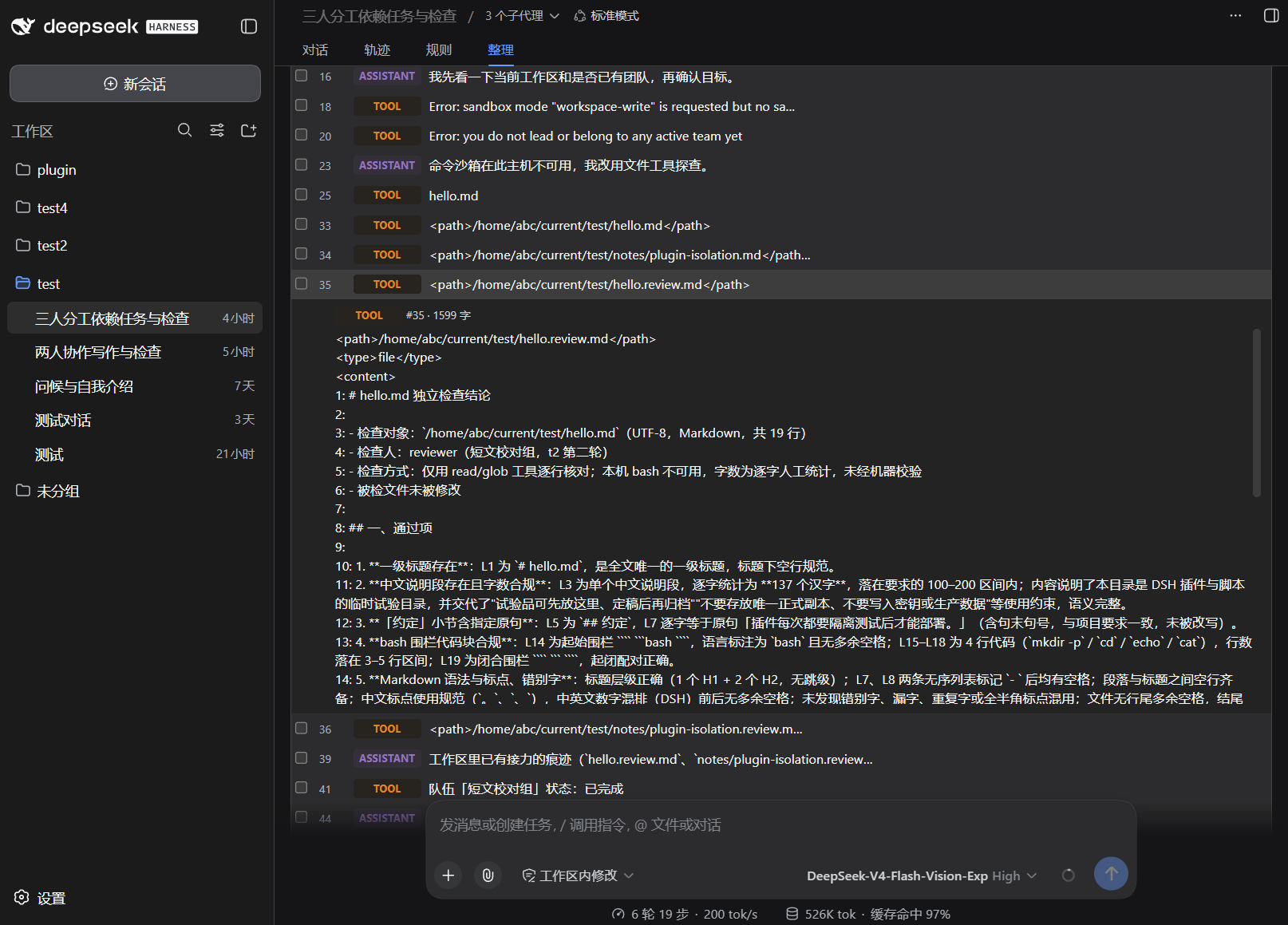
| Rows labelled by author | user / assistant / context / tool, with the colours of the official Trajectory view's kind tags. context matters: dsh logs human prompts and harness injections under the same user/message event type |
| Token budget | The rendered block is estimated before writing; a selection above maxInjectTokens is refused with the measured number instead of silently truncating |
| Workspace management | The Workspace pane lists every conversation of the current workspace — archived ones included — with archive / restore / move / delete per row, plus multi-select for batch actions |
| Conversations move while open | Relocating a conversation that is still in memory works: the plugin flushes it, rewrites its artifact under the coordinator's per-id lock, and retargets the persisted write path so later messages land in the new location |
| Only real conversations are offered as targets | Blank and archived conversations are filtered out of the Tidy pane's destination picker — the same rule the official sidebar uses (sessionVisible) |
| One runtime, two surfaces | The panel and the /baize-session command drive the same runtimes, so they can never disagree |
| No data files of its own | The plugin keeps no state on disk of its own; what it changes (session artifacts, the workspace registry) belongs to dsh |
Installation
dsh plugins are distributed from npm and installed into a profile via
dsh plugin.
# Install from npm into the web profile (use the actual published version)
dsh plugin --profile web add dsh-baize-session@0.1.2
pm2 restart dsh          # Reload when dsh is managed by pm2
dsh --profile web
Peer dependencies (@deepseek-ai/*) are provided by the dsh profile; if any are missing, pnpm resolves them against peerDependencies in the profile directory. The plugin declares dsh.bundle (mounts itself through cordis.patch.yml) and dsh.client (its browser half), which is what makes both halves load.
Uninstall
dsh plugin --profile web remove dsh-baize-session
pm2 restart dsh          # Reload when dsh is managed by pm2
If the entry lingers in the profile's dsh.profile.bundles, delete that line from
$DSH_HOME/profiles/web/package.json and restart dsh again. Nothing else is left behind: this plugin
writes no data of its own (see Data location).
Try it without touching your running setup
Install into a separate profile so your currently running dsh stays unchanged:
dsh plugin --profile smoke add dsh-baize-session@0.1.2
dsh --profile smoke --dump-config   # compose the config only — does not boot dsh
Local development (link)
// $DSH_HOME/profiles/web/package.json
"dependencies": {
  "dsh-baize-session": "link:/home/abc/work/plugin/dsh-baize-session"
}
Then run pnpm install in the profile directory and add dsh-baize-session to dsh.profile.bundles.
Quick Start
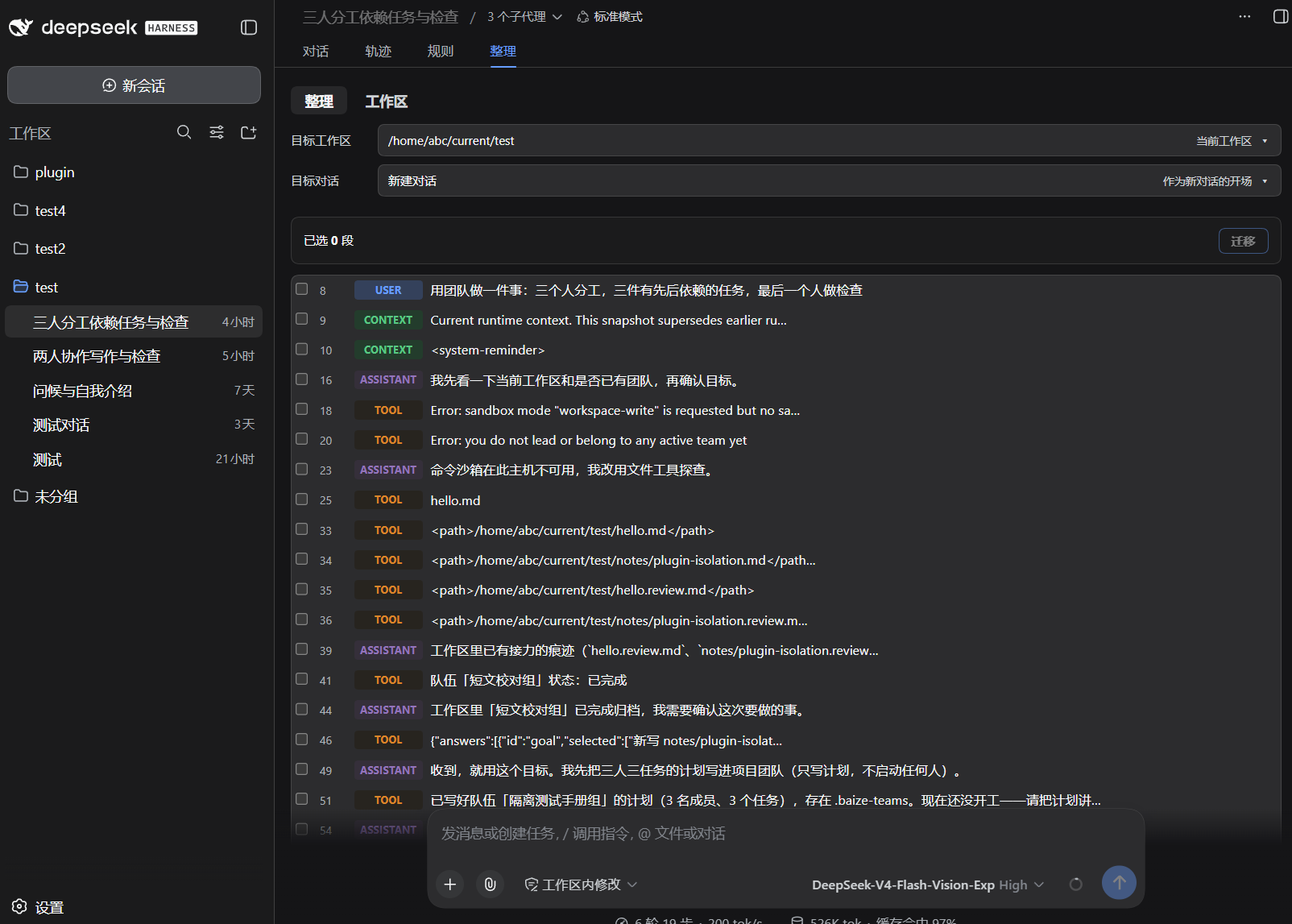
Open any conversation and click the Tidy tab next to the chat view. That one tab holds two panes, switched by the tabs in its title row:
[Chat] [Trajectory] [Rules] [Tidy]   ← the top tab strip (this plugin owns Tidy only)
──────────────────────────────────
 Tidy | Workspace                    ← the two panes
Tidy — move messages into another conversation
① target workspace   [ /home/abc/work/plugin        ▾ ]
② target conversation[ New conversation             ▾ ]
─────────────────────────────────────────────────────────────
   Selected 0 items                        [ Clear ] [ Relocate ]
─────────────────────────────────────────────────────────────
   12  USER         the first line of the message…            ← click to read
   13  CONTEXT      Current runtime context. This snapshot…
   14  ASSISTANT    the first line of the reply…
- Pick the workspace (the current one is preselected and listed first; the last entry lets you type an absolute path).
- Pick the conversation —
New conversation, or any real conversation in that workspace. - Tick the messages to carry over. Clicking a row shows its full text and does not select it.
- Press Relocate.
Workspace — manage this workspace's conversations
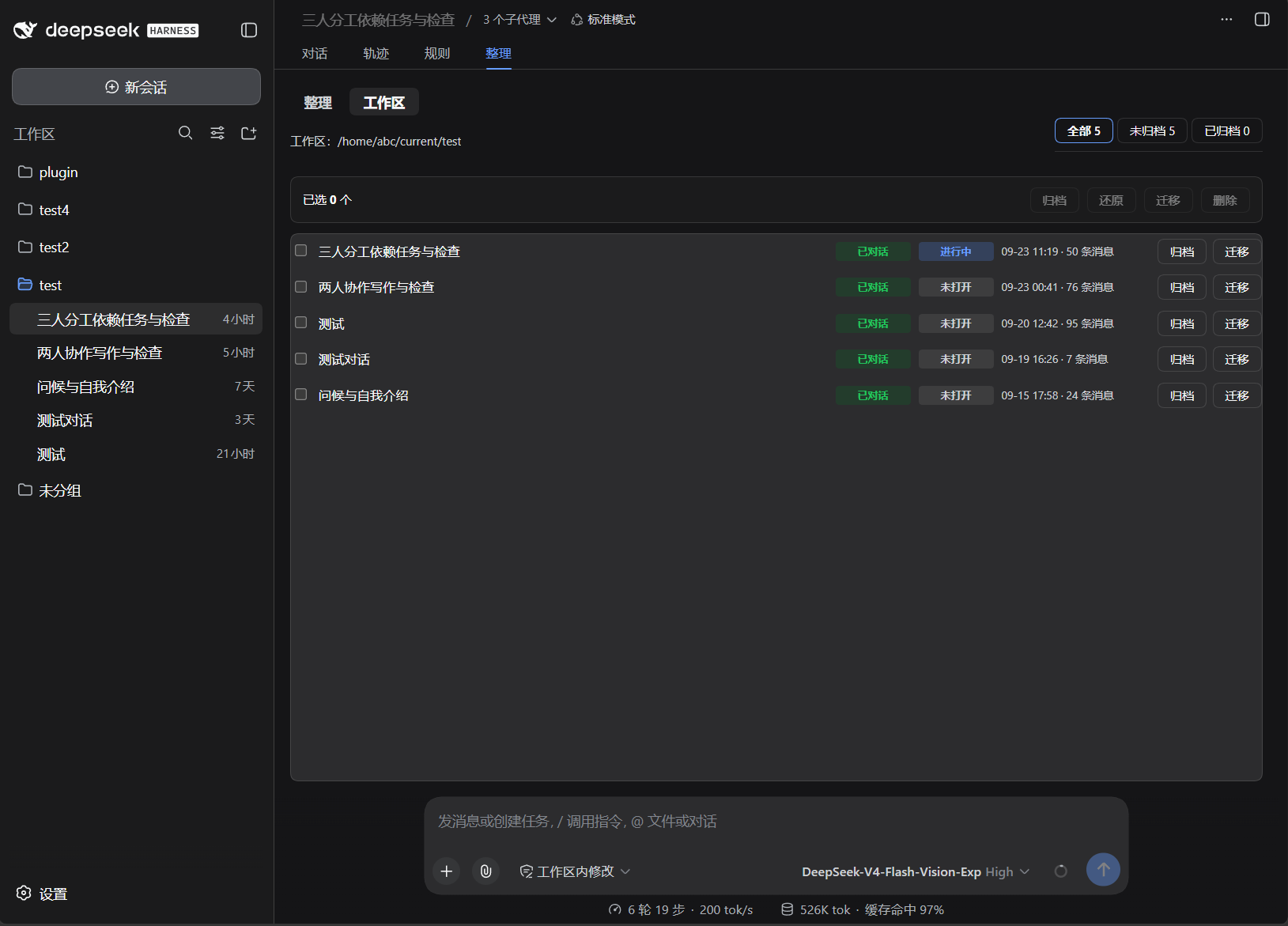
Workspace: /home/abc/current/test        [ All 7 ] [ Active 6 ] [ Archived 1 ]
─────────────────────────────────────────────────────────────────────────────
Selected 0 items                         [ Archive ] [ Restore ] [ Move ] [ Delete ]
─────────────────────────────────────────────────────────────────────────────
☑ Greeting               chatted  not open  09-15 17:58 · 24 messages   [ Archive ] [ Move ]
☑ Test                   chatted  running   09-20 12:42 · 31 messages   [ Archive ] [ Move ]
☐ Archived conversation  chatted  archived  09-20 12:42 · 6 messages    [ Restore ] [ Delete ]
| Action | Where | Rule |
|---|---|---|
| Archive | row button, or batch bar | any conversation, open or closed |
| Restore | row button, or batch bar | archived conversations only |
| Move to another workspace | row button, or batch bar | not archived; works for open conversations too |
| Delete (removes the stored log) | row button, or batch bar | archived only, and needs a second click to confirm |
Clicking a row (anywhere except a button or a checkbox) expands its detail line: the full session id, creation time, message count, workspace path and whether it is currently open.
The same operations are reachable from the keyboard:
/baize-session                     # Same as info: this conversation's id, workspace, message counts
/baize-session take 12 14          # Collect messages by seq (from this conversation)
/baize-session list                # Every real conversation, grouped by workspace
/baize-session to /home/abc/work/led   # Create a new conversation there, carrying the basket
/baize-session add session-1a2b…   # Or append into an open conversation
/baize-session drop                # Empty the basket
Commands
| Subcommand | Syntax | Purpose |
|---|---|---|
| info | /baize-session [info|status] | Show this conversation's id, workspace, message/basket counts, and the most recent listLimit messages with their seqs |
| take | /baize-session take <seq…> | Collect messages by seq out of the current conversation |
| list | /baize-session list | List the real conversations (blank and archived ones are counted in a trailing note, not listed), grouped by workspace, with names and ids |
| drop | /baize-session [drop|clear] | Empty the basket |
| to | /baize-session [to|move] <absolute path> | Create a new conversation in that workspace and write the basket into it as its opening context |
| add | /baize-session [add|append] <session id> | Append the basket into an existing conversation — it must be open (in memory) |
Conversation kind and state
Every row in the Workspace pane carries two independent badges, because they answer different questions:
| Column | Values | Question it answers | Rule |
|---|---|---|---|
| kind | empty / chatted / subagent | is there a conversation in it yet? | blank — no turn/start has ever been logged |
| state | running / open / not open / archived | where does it live right now? | an agent is attached / held in memory / stored on disk / in the archive set |
They are not alternatives. An empty conversation can be in progress — an agent is attached the moment a conversation is created, before its first prompt — and a conversation with content can be closed. Folding the two into one badge said one thing at the cost of the other.
archived outranks the rest of the state column (it is what the sidebar hides on), and subagent outranks kind (a subagent child cannot be moved).
The panel
Both panes live inside the one conversation.view tab this plugin owns (id baize-session-tidy, order 40) — purely additive: no official component is replaced. The + button is registered on conversation.chat.assistant-actions (id baize-session-collect, order 20).
Shared behaviour:
| Interaction | Result |
|---|---|
| Click a row | Expand/collapse that row's full text (Tidy) or its detail line (Workspace). Neither selects it |
| Click a checkbox | Select/deselect; the detail stays as it is |
| The action bar | Always present, the same .baize-bar in both panes. Its buttons are disabled, not hidden, while nothing is selected |
| Dropdowns | Self-drawn popovers (a native <select> does not match the dsh theme); click outside or press Escape to close |
Tidy pane specifics: the content list is always the current conversation; the message table grows and shrinks with the window (no fixed height).
Workspace pane specifics: the title/filter row and the tab row are both 32px so nothing sits lower than its neighbour; the kind and state columns are a fixed 76px each and the time column a fixed 150px, so they line up down the table instead of drifting with the label lengths.
Message rows are labelled by author:
| Badge | Meaning | Colour source (official Trajectory view) |
|---|---|---|
USER | A human prompt (source.kind === 'user') | .user — state-business-primary / state-business-tertiary |
ASSISTANT | A model reply | .assistantVioletBright |
CONTEXT | Injected by a plugin or the harness — runtime snapshots, <system-reminder>, memory injections, and this plugin's own relocation blocks | .contextGreen |
TOOL | A tool result (tool/result events) | .toolAmber |
user/message is not a synonym for "the user said this": dsh stores human prompts and injected context under that one event type, separated only by data.source.kind. In a sampled real session the split was {user: 4, plugin: 10} — most of that conversation was never typed by anyone, which is exactly why the two are badged differently.
What gets injected
The header and the trailing line inside this block are Chinese: the host side has no translation layer, so every dsh injects the same text regardless of the UI language.
One user/message per relocation, built with createUserMessage() and published with the surface marker { surfaceOp: 'append' } that surface-eligible events require:
以下是本会话开始前,我(用户)从其它会话整理过来的上下文,供你参考:

【来自会话 06094031 / 工作区 /home/abc/work/plugin】
user: where is the token budget enforced?
assistant: in relocate.ts, before the write — it throws instead of truncating.

---
当前工作区是 /home/abc/work/led。请在此基础上继续。
- Messages keep their author label (
user:/assistant:/context:/tool:) so the receiving model can tell a question from an injection. - Material is grouped by source conversation, preserving collection order.
- When the destination is an existing conversation, the block is appended as a normal message; when it is a new conversation, the very same message becomes the seed of that session. A seed is used because dsh persists on checkpoints: a brand-new session nobody has talked to never reaches disk through
append. - The new session is then attached to its workspace (
workspace.attachSession), which is what makes it appear in the sidebar.
Which conversations are listed
The two panes filter differently, on purpose:
| Tidy — destination picker | Workspace — the table | |
|---|---|---|
| Blank (no turn ever ran) | hidden | listed, kind empty |
| Archived | hidden | listed, state archived (until you filter them out) |
| Subagent children | hidden | listed, kind subagent |
| Everything else | listed, by name | listed, by name |
The Tidy picker exists to answer "where can this go", so it offers only destinations that make sense; the Workspace table exists to answer "what is in here", so it shows everything and lets you act on it. Both come from the same session listing, so they can never contradict each other.
Rules the operations enforce
| Operation | Refused when | Message |
|---|---|---|
| Relocate into an existing conversation | the target is not open (not in memory) | 目标会话不在内存中,无法追加(先在侧边栏打开它)。 |
| Relocate | the basket is empty, or the estimate exceeds maxInjectTokens | the refusal names the measured size |
| Relocate | the target path is relative | 目标路径必须是绝对路径:… |
| Archive / Restore | the live registry exposes no write path (very old dsh) | 当前 dsh 版本未暴露…接口 |
| Delete | the conversation is not archived | 只能删除已归档的对话:请先归档,再删除。 |
| Delete | the request lacks confirm: true | 删除需要显式确认(confirm: true)。 |
| Move | the conversation is archived | 已归档的对话不能迁移:请先还原它。 |
| Move | the conversation is a subagent child | 子代理会话不支持跨工作区迁移。 |
| Move | the persisted artifact cannot be located | 当前持久化后端不支持定位会话工件,无法跨工作区迁移。 |
| Move | nothing is known that would point later writes at the new artifact | 当前运行时既不暴露 live 写入器、也不暴露持久化写入状态… |
Every message in the last column is Chinese, and that is what users actually see — the host side has no translation layer, so refusals are not localised even with an English UI.
How a move actually works, in order — a conversation belongs to a workspace through its cwd, and the registry refuses to attach a session whose stored cwd disagrees with the workspace path, so the artifact is rewritten first and the ledger second:
- If the conversation is open, flush its buffered events to the current artifact first.
- Under the persistence coordinator's per-id lock (when the backend offers one), read the artifact, rewrite only the header line's
cwd(keepingversion), and write it to the path that cwd implies — through a temp file and atomic renames, with the original parked so a failure can put the bytes back. - Move the in-memory pointers with it: the live write state (
meta.cwd), the in-memory session header, and the registry's header/path indexes — all restored together if the ledger swap fails. - Detach from the old workspace, attach to the new one, then drop the emptied old directory.
- If anything fails, the original bytes go back to their original path. This matters more than it sounds: dsh validates at startup that a session's location matches its header
cwd, and a mismatched pair makes it refuse to boot the whole plugin tree.
Configuration (Config)
| Field | Type | Default | Meaning |
|---|---|---|---|
maxInjectTokens | number, required | 8000, set by this package's cordis.patch.yml | Refuse to write a block estimated above this many tokens. The refusal names the measured size, so a too-large selection is visible rather than silently trimmed |
listLimit | number, optional | 15, in-code (the patch does not set it) | How many recent messages /baize-session info lists |
The shipped patch is exactly this — add listLimit to the same config block to override it:
# cordis.patch.yml
- insert:
    - id: baize-session
      name: 'dsh-baize-session'
      config:
        maxInjectTokens: 8000
HTTP API
The browser half has no way to read a session, create one, or touch the workspace registry, so the panel talks to /baize-session.api on the host web server. It delegates to the same runtimes the command uses.
| Request | Body / query | Returns |
|---|---|---|
GET /baize-session.api | ?sessionId=<id> (required); &source=<id> lists another conversation's messages; &view=workspace returns the workspace pane instead | PanelState { sessionId, cwd, messages, basket, projects, sessions, maxInjectTokens } — or, with view=workspace, WorkspacePanel { workspace?, workspaces, sessions } |
POST /baize-session.api | { sessionId, op: 'take', seqs?, messageIds?, sourceId? } | { ok, added, missing, state } |
{ sessionId, op: 'untake', seq?, messageId?, sourceId? } | { ok, removed, state } | |
{ sessionId, op: 'drop' } | { ok, state } | |
{ sessionId, op: 'estimate', target } | { ok, tokens } | |
{ sessionId, op: 'relocate', target } | { ok, sessionId, mode, tokens, sources, state } | |
{ sessionId, op: 'archive' | 'restore', targetId | targetIds } | { ok, results, panel } | |
{ sessionId, op: 'deleteSession', targetIds, confirm: true } | { ok, results, panel } | |
{ sessionId, op: 'moveSession', targetIds, toWorkspaceId } | { ok, results, panel } |
targetis{ kind: 'new', cwd }or{ kind: 'existing', sessionId }.targetId(one row) andtargetIds(multi-select) are interchangeable on the workspace ops.- Batch results are reported per id (
results: [{ id, ok, error? }]), so one refusal does not abort the rest;ok: falseon the envelope means every id failed. Every workspace op answers with the refreshed panel, so the UI needs one round trip per action. - Refusals a user can act on (relative path, empty basket, cold append target, over budget, not archived, missing confirm, archived move) come back as
400with a message meant to be shown verbatim; everything else is a500.
Data location
This plugin keeps no state of its own — no config file, no cache, no index. The basket lives in memory for the lifetime of the process, so it is empty after a restart; that is the intended scope of "selected for this move".
What it changes belongs to dsh:
| Path | Read | Written |
|---|---|---|
$DSH_HOME/sessions/<escaped-cwd>/<session-id>/session.jsonl.zstd | conversation logs — closed ones are read back with inspect, which neither commits recovery nor publishes | only by move (header cwd rewritten, file relocated) and delete (removed) |
$DSH_HOME/storages/workspace.json | workspace records, the registry-global archived-session set | only by archive / restore / move |
Nothing else is touched, and an uninstall leaves nothing behind.
Module structure
src/core.ts        Pure logic: event reading + author classification, message listing, renderInjection, session naming, artifact encode/rewrite helpers
src/relocate.ts    The relocation runtime: baskets, panel state, take/untake/drop/estimate/relocate, workspace + persistence access
src/workspace.ts   The workspace runtime: conversation listing, archive/restore, delete (agent teardown, live-store detach, artifact removal), cross-workspace move (header rewrite, atomic rename, ledger swap)
src/api.ts         Host HTTP API: GET state (both panes) + POST op dispatch on /baize-session.api
src/index.ts       apply: both runtimes + /baize-session command + API mount (inject: commands/sessions/tokenMeter/webServer/sessionPersistence)
lib/client.js      Browser half, HAND-AUTHORED: the Tidy view with its two panes + the + seat, window.__ModuleLoader__.load({ id, factory })
test/core.spec.ts        Unit tests for the pure helpers (real logged event shapes as fixtures)
test/workspace.spec.ts   Unit tests for the artifact codec a move relies on (zstd frame layout, header rewrite, round-trip)
test/client.smoke.mjs    Renders the real client bundle with react-test-renderer and asserts its behaviour
cordis.patch.yml   Mount metadata (inserts the baize-session plugin line + default config)
Public entry points (see package.json exports): . (index), ./client, ./src/*, ./package.json.
Development & instant feedback
pnpm test            # vitest unit tests, then the client smoke test
pnpm test:client     # Just the client smoke test (node test/client.smoke.mjs)
pnpm test:watch      # Re-run unit tests on save
pnpm build           # tsc -p tsconfig.build.json → lib/
pnpm typecheck       # tsc --noEmit
| Half | Where | To see a change |
|---|---|---|
Host (src/*.ts) | lib/*.js via pnpm build | Build, then restart dsh (the host loads lib/) |
Browser (lib/client.js) | Hand-written, no build step | Just reload the page — the bundle is served from disk with a content-hash revision |
lib/client.js is hand-authored: the official clientBundle tsdown preset is not published, so a plugin
outside the dsh repository writes the window.__ModuleLoader__.load({ id, factory }) shell itself and
keeps only the seed modules external (react, the ui-primitives). Nothing type-checks or bundles it, so
test/client.smoke.mjs loads the real bundle against react-test-renderer with a stubbed host API and
asserts the panes' layout, their interaction order, the badges and their CSS rules.
Testing the destructive paths. Delete and move rewrite durable state, so they are exercised against purpose-built test conversations in an isolated dsh instance — never against a conversation anyone cares about. A move is validated by continuing to write to the moved conversation afterwards and confirming the message lands at the new path.
Publishing
# 1. Bump the version in package.json and the install example in both READMEs
# 2. Verify locally
pnpm build && pnpm typecheck && pnpm test
# 3. Commit, tag, push
git add -A && git commit -m "release: vX.Y.Z"
git tag -a vX.Y.Z -m "vX.Y.Z" && git push origin main && git push origin vX.Y.Z
# 4. Publish — the step that actually ships
npm publish --access public
Credentials.
npm publishauthenticates with your own npm credentials (~/.npmrcor environment variables). Never commit a token, and never paste one into a README or a CI log.
License
Plugins associés
dsh-web-ui (dsh-chat-recovery)
zhu1090093659/dsh-web-ui
dsh-synapse
liangmianya/dsh-synapse
billion-context
ranxianglei/billion-context
dsh-chat-import
nwflower/dsh-chat-import