dsh-paste-code-block
cjm-m/dsh-paste-code-block
Collage de style Cherry Studio : le texte ou le code multiligne/indenté/délimité collé dans le compositeur DSH Web se replie en une carte bordée, pliable, étiquetée par langage, et est restauré en bloc de code délimité lors de l'envoi.
Installer
dsh plugin --profile web add github:cjm-m/dsh-paste-code-blockREADME
dsh-paste-code-block
Cherry Studio‑style text/code block pasting for DeepSeek Harness Web
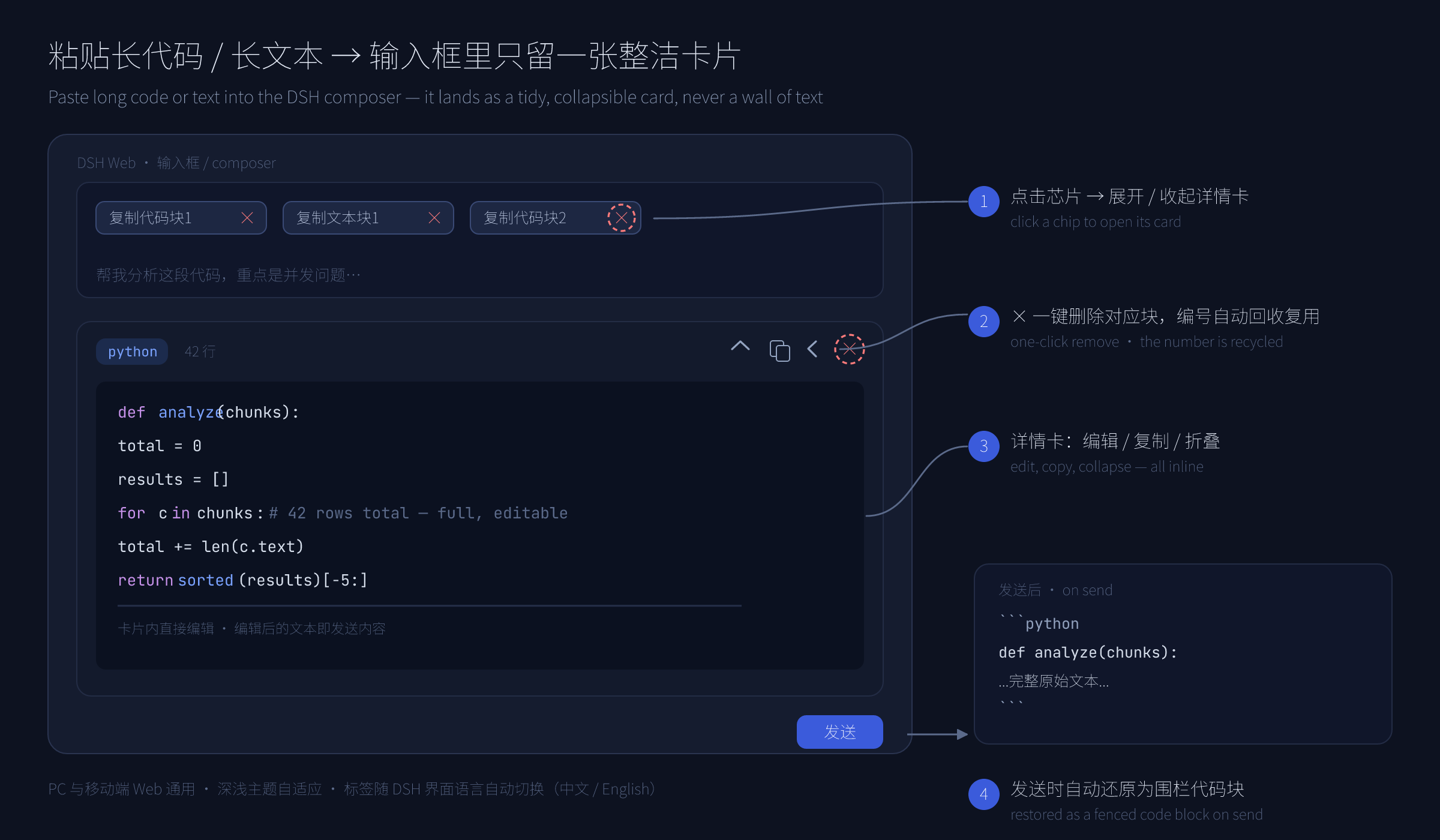
Paste long code or text into the DSH Web composer → it lands as a bordered, collapsible, language‑tagged card instead of a wall of text. Names follow the DSH interface language (中文 / English). On send, the original content is restored as a fenced code block — and in the conversation it stays folded into click‑to‑expand cards, so your bubbles never become text walls again.



English | 简体中文
Why
Copying a 200‑line stack trace, an API response, or a long log into a chat input turns the composer into an unreadable blob. This plugin folds any qualifying paste into a chip (built on DSH's own hidden‑reference mechanism, the same one file uploads use) plus an editing detail card — the draft stays clean, and the content stays fully editable and restorable.
Features
- 🧩 Auto block detection — pasted text with ``` fences, newlines, heavy indentation, or length ≥ 96 becomes a card; ordinary short prose pastes through untouched.
- 🏷️ Language tags — auto-detects Python / JS / JSON / YAML / SQL / bash / HTML·XML / C++ / Go / Ruby (incl. shebangs); plain-text blocks are tagged
text. - ✏️ In-card editing — edit the content right in the detail card; the edited text is exactly what gets sent. Plus copy, collapse/expand, and hide.
- 🈯 Localized names — chips are named in the current DSH language:
代码块 1/Code #1,文本块 N/Text #N. A leading glyph and tint tells the two apart at a glance —</>blue for code,Aagray for text. Switching Settings → Language live-retitles every chip. - × One-click remove — every chip carries its own
×delete button (the detail card has one too); a removed number is recycled immediately. - 📤 Fenced restore on send — each card expands back into a
```lang … ```block when you send; a failed send automatically refills the input. - 📦 Folded after send — sent blocks keep folding in the transcript: every fenced block inside your own messages renders as a collapsed card (
python · 128 行/python · 128 lines). Click the header to expand, again to collapse; the card's copy button grabs the original fenced text verbatim. Bare```fences fold as code (only an explicit```textfolds as a text block). - 💾 Mid-draft safe — DSH persists a composer draft as plain text, so pasted blocks are automatically re-attached when the composer is rebuilt (workspace switch on the new-session page, page reload); hand-deleted blocks are never "resurrected".
- 🔢 Smart numbering — code and text count apart; the smallest free number is always reused.
- 📱 Every surface — pure client plugin; works on desktop & mobile web, follows light/dark themes.
How it works
Localization
Chip labels, tooltips, line counts, and the send-time error notice all render through the official DSH locale service: the plugin registers a paste-code-block dictionary namespace with complete zh / en key sets, and its composer dock declares that namespace, so everything re-renders on every language switch.
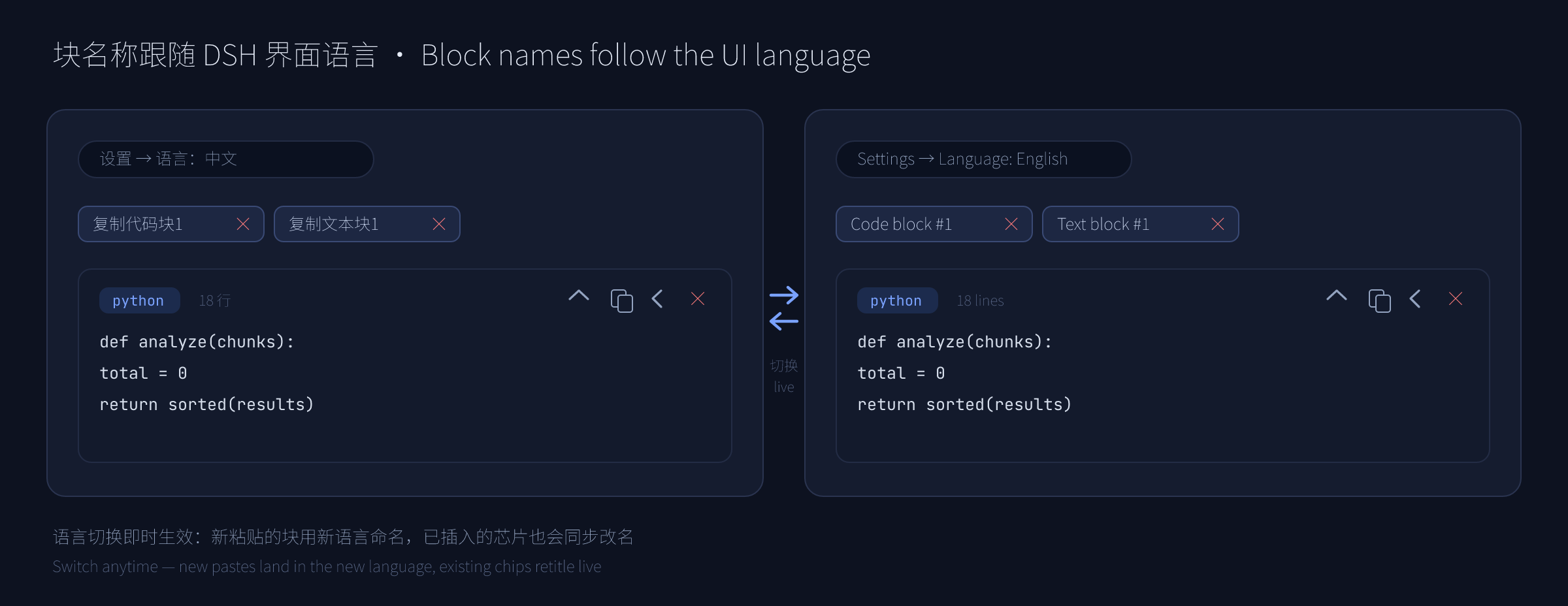
- New pastes are named in whatever language is active at paste time.
- Existing chips are re-titled live when you flip 设置 → 语言 / Settings → Language — no reload needed.
- Clicks and deletes match chips across languages: a
代码块 2chip still resolves to its block after switching to English (where it now readsCode #2), and vice versa.
Install
Requires DSH 0.1.x (developer preview — APIs may change). Published on npm — install by name:
dsh plugin --profile web add dsh-paste-code-block
Or from this repository / a local checkout:
dsh plugin --profile web add github:cjm-m/dsh-paste-code-block   # from GitHub
dsh plugin --profile web add file:/path/to/dsh-paste-code-block  # from a local folder
Restart dsh web after installing.
Usage
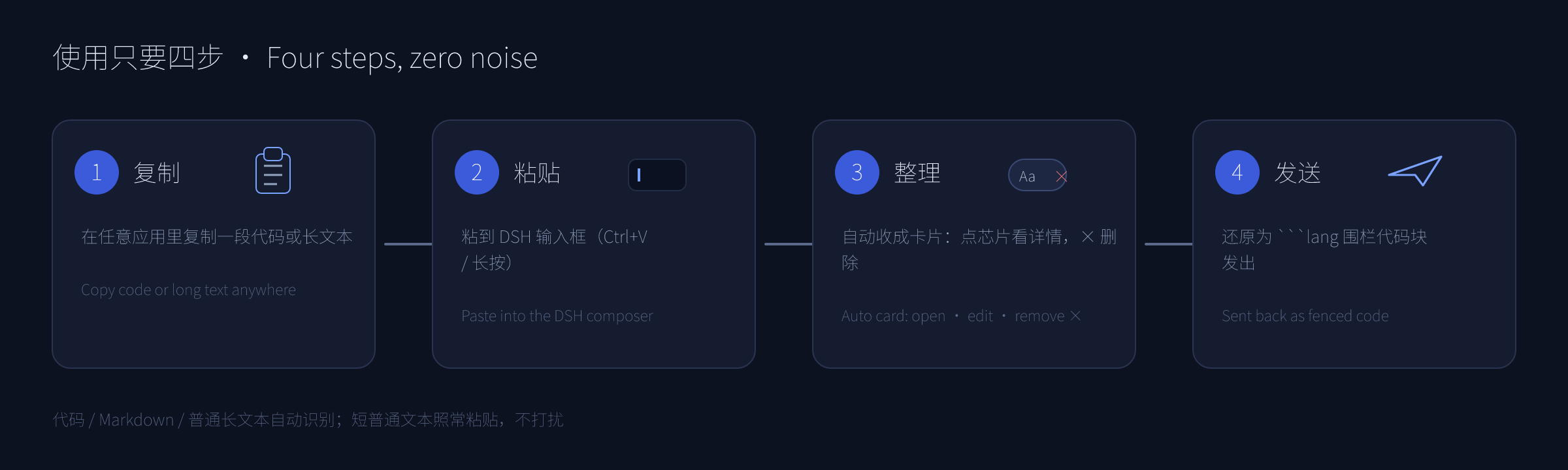
- Copy any code or multi-line text from anywhere.
- Paste into the DSH input → it collapses into a chip such as
代码块 1/Code #1. - Click the chip to open the card: read, edit inline, copy, collapse. Click the chip's (or the card's)
×to delete that block. - Send — the full original text goes out as a proper fenced code block.
- In the conversation it stays folded: each block sits in the bubble as a collapsed card — click the header to expand and read, click again to collapse.
Detection threshold: contains a newline / ≥ 2 lines / length ≥ 96 / indented & brace-dense / fenced — any one turns the paste into a block.
Notes & boundaries
- Blocks are appended at the end of the draft (reusing DSH's hidden-reference semantics), which keeps cursor/undo stable.
- Plain-text blocks are sent wrapped in
```text ```so they never smear into one line. - Removing a chip any other way (e.g.
Backspace) also frees its number — plugin state is reconciled against the editor continuously. - Deleting one block never touches the others, and removal is an ordinary editor edit —
Ctrl+Zbrings it back. - Creating a block leaves no stray space: DSH appends a separating space after a freshly inserted chip, and the plugin removes exactly that one character, so text typed after a block does not start with a space and pasting several blocks never piles spaces into the message. Spaces you typed yourself are never touched by pasting or deleting.
- Post-send folding is display-only: it restyles your own message bubbles (and steering rows / the send echo) in the DOM. Stored messages are never modified, the bubble's own copy / edit / delete bar keeps working on the original text, and assistant messages are left alone.
- Draft-rebuild recovery keeps a small localStorage mirror (block payloads plus a draft fingerprint; written while you edit, cleared when you send, expired after two weeks). If the browser blocks local storage (private mode), blocks still survive a same-tab workspace switch from memory — just not a full page reload.
Project layout
dsh-paste-code-block/
├── src/
│   ├── client.js       # Web (browser) half — paste capture, chips, detail card, × delete, sent-message fold, draft-rebuild recovery
│   ├── index.js        # Host (node) half — intentionally empty (pure UI plugin)
│   ├── parse.js        # Pure block-detection + fence-splitting logic (canonical, unit-tested)
│   └── i18n.js         # Locale dictionaries, label & fold-title builders (canonical, unit-tested)
├── tests/
│   ├── parse.test.js     # node:test unit tests for src/parse.js
│   ├── i18n.test.js      # node:test unit tests for src/i18n.js
│   └── fold-smoke.test.js # end-to-end fold scan against a DOM shim (runs the real client bundle)
├── docs/
│   ├── design.md       # Design rationale (numbering, anchors, codec, i18n, chip ×, sent-message fold, draft-rebuild recovery)
│   └── images/         # README mockups (PNG + editable SVG sources)
├── cordis.patch.yml    # DSH bundle patch declaring the host plugin
├── package.json        # Package + DSH plugin manifest
├── README.md           # English
└── README.zh-CN.md     # 简体中文
Development
npm run check   # syntax-check the JS halves
npm test        # run unit tests (node:test, 61 tests)
License
MIT — see LICENSE.
Plugins associés
dsh-web (dsh-task-board)
zhu1090093659/dsh-web
dsh-web (dsh-web-all)
zhu1090093659/dsh-web
dsh-TUI
ccch1mneyyy/dsh-tui
dsh-web-ui (dsh-task-board)
zhu1090093659/dsh-web-ui