dsh-filesnap
extracurricular-ai/dsh-filesnap
Rembobine une conversation DeepSeek Harness et son espace de travail ensemble, sans toucher à Git : chaque rembobinage est un fork, /redo l’inverse, et un moteur Rust crée des instantanés en quelques millisecondes.
Installer
dsh plugin --profile web add github:extracurricular-ai/dsh-filesnapREADME
DSH Rewind & Redo — by FileSnap



English | 中文
Join the discussion · Report a bug
dsh-filesnap brings rewind and redo directly into the
DeepSeek Harness (DSH) chat UI.
Click beside an assistant turn to restore the conversation and tracked files together.
The original conversation stays available. Picked the wrong point? /redo reverses the rewind.
No Git repository is required.

Watch the complete walkthrough · 2:29 · 中文演示 · 2:24
dsh-filesnap vs dsh-rewind-plugin
Compared with SiriLee's dsh-rewind-plugin 0.9.1, dsh-filesnap 0.2.2
with filesnap 0.4.0 offers broader file-content deduplication and a
built-in way to reverse a rewind with /redo. Reviewed 2026-09-10.
Legend: ✅ Meets this need · ⚠️ Limits or extra cost · ❌ Not currently provided · ☠️ No built-in reversal of the history change. Full comparison and risk markers.
| What you need | dsh-filesnap | dsh-rewind-plugin |
|---|---|---|
| Reverse a mistaken rewind | ✅ /redo | ❌ /undo only starts rewind |
| A → B → A, one file | ✅ 2 payload copies | ⚠️ 3 payload copies |
| Same bytes at two paths | ✅ 1 shared copy | ⚠️ 2 copies |
| Restore conversation and files | ✅ Supported | ✅ Supported |
| Keep the complete original conversation accessible | ✅ Original session retained | ☠️ Later history hidden; no built-in reversal¹ |
¹ SiriLee retains the raw log and documents manual recovery; the risk is losing the full pre-rewind conversation view without a built-in way back, not deleting logged history. Both plugins provide Web UI rewind and conversation/file restore.
Conversation-only mode and cleanup UI are planned in the roadmap; SiriLee already provides these features.
The counts above come from storage-component exercises, not a total disk-size or speed benchmark. Both retain metadata; content must still exist to be reused. See the seven-case experiment, exact versions and source evidence and workflow comparison.
Across coding assistants
The project builds on rewind and recovery experience across Codex, DSH and Pi. Explore the projects and their relationship.
Quick start
Requirements
- DeepSeek Harness with a
weborheadlessprofile - Node.js
^22.19or>=24 - Linux, macOS or Windows on x64 or arm64
The package includes the required components; no separate toolchain installation is needed.
[!IMPORTANT] Uninstalling does not delete conversation logs or workspace files. Reinstall the plugin to reopen conversations containing its records. Use a built or npm-installed DSH CLI; source-checkout startup issues are covered in troubleshooting.
1. Install
$ dsh plugin --profile web add dsh-filesnap
That is the whole install: the package declares a dsh.bundle, so the launcher
mounts it into the profile itself. For headless use, replace web with
headless.
[!WARNING] Upgrading from 0.2.1 or earlier? Those versions asked you to add an
id: filesnaprow to~/.dsh/profiles/<profile>/cordis.patch.ymlby hand. Delete that row before you start dsh on 0.2.2. The bundle now supplies the same row, the loader refuses two entries with one id, and dsh will not boot:plugin tree failed to load: … duplicate loader entry id: filesnap.
2. Verify and use
$ dsh --profile web --dump-config | grep -A 1 filesnap
- id: filesnap
  name: dsh-filesnap
Restart the profile, run one agent turn, then enter /rewind. If the plugin is
not listed in the composed profile or the browser control is missing, follow the
troubleshooting guide.
Your first rewind, step by step
Captured from a real session on 0.2.2 in the web profile.
1. Run a turn that changes a file, then hover the reply. The rewind control appears on every completed assistant turn. Its tooltip names the turn it returns to and what the snapshot covered.
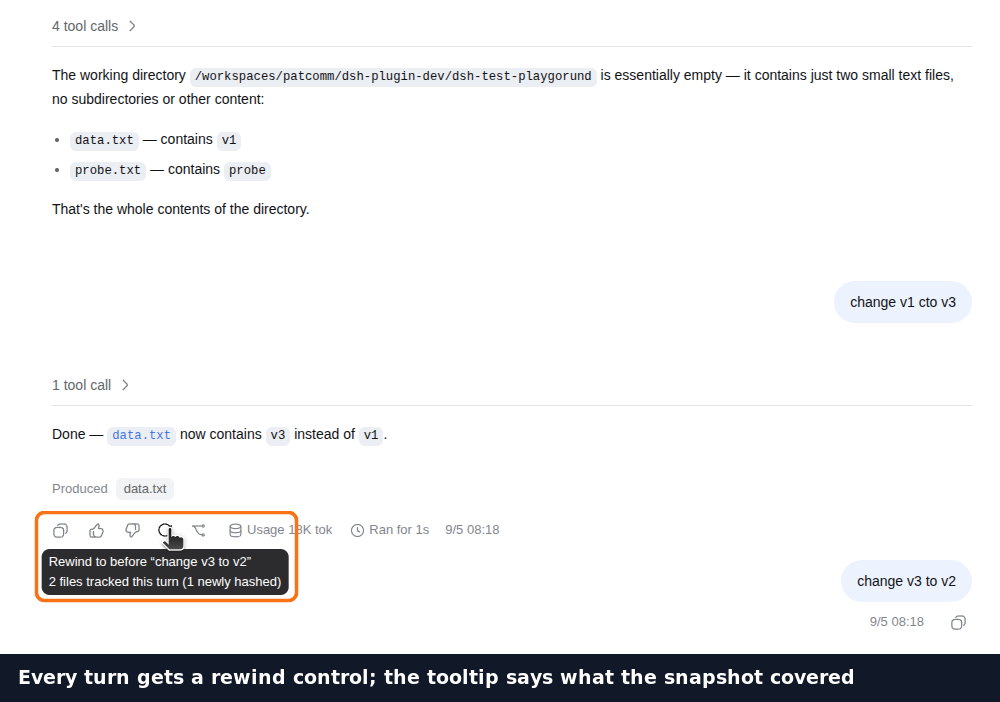
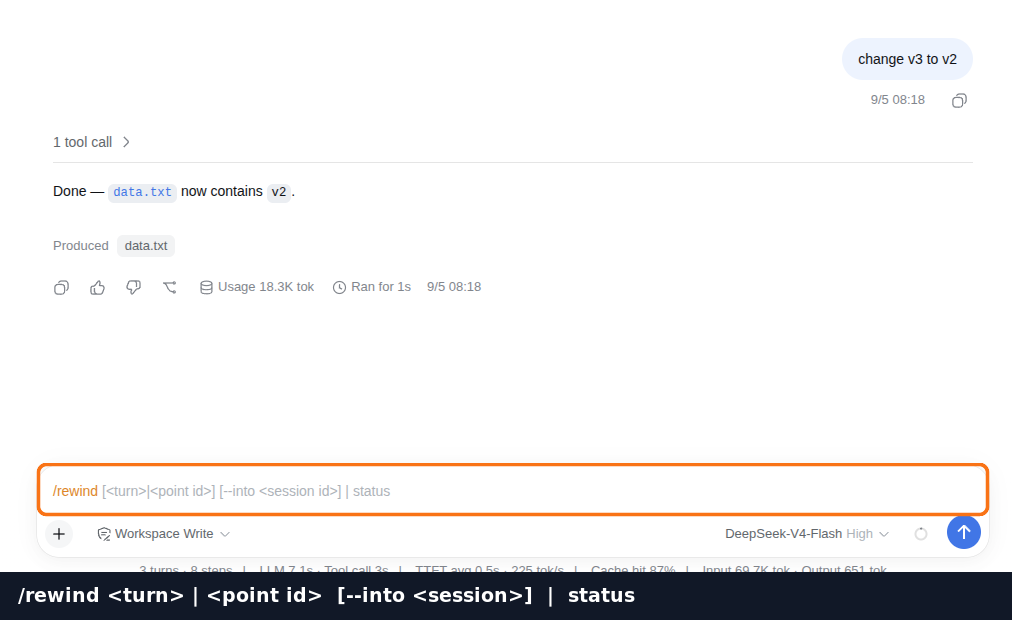
2. Or type /rewind. Select a displayed turn number or recovery point.
The number identifies the state before that turn, not a number of turns to go back.
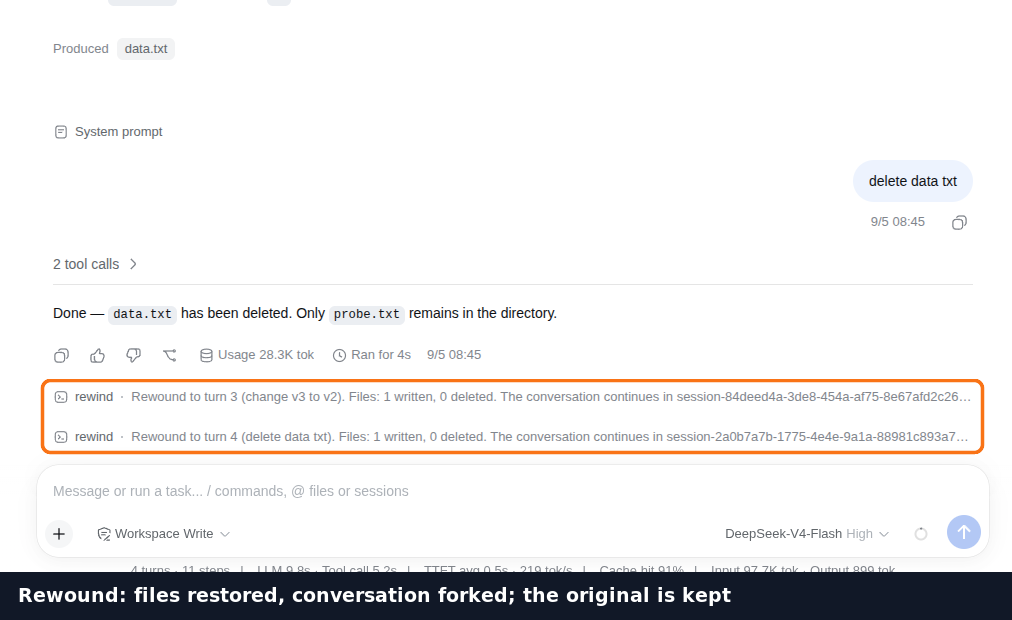
3. Pick a turn. The conversation and files return to the selected state. The button opens the conversation to continue in; the original stays available.
4. Find the original conversation. An arrow marks the conversation you left, so it is easy to identify later.
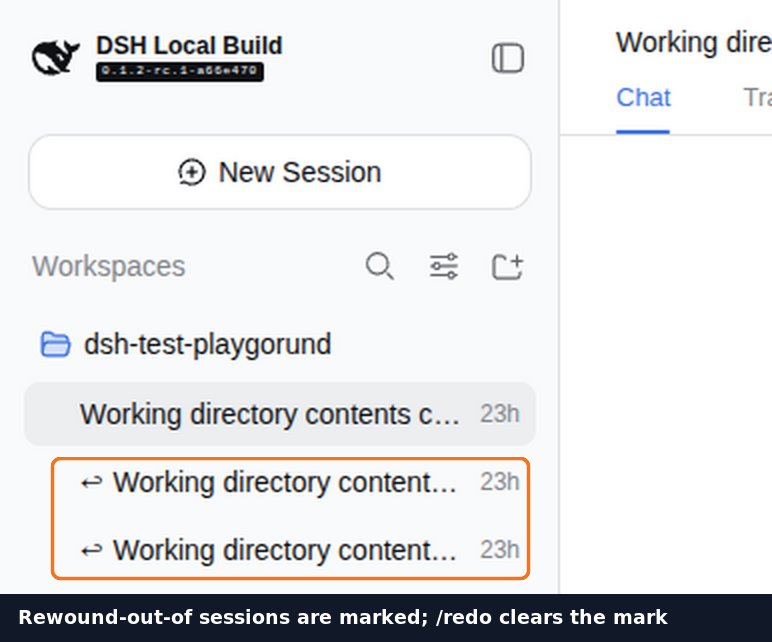
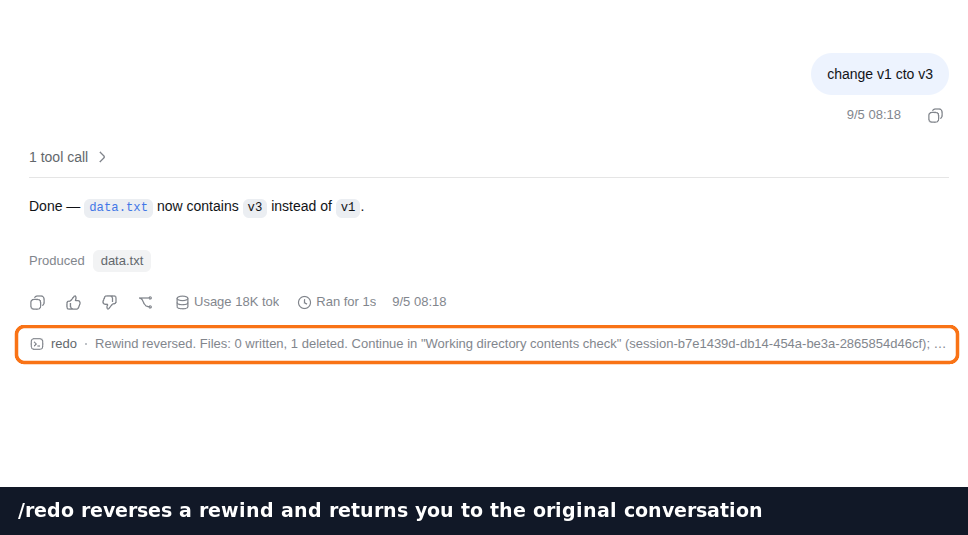
5. Changed your mind? Run /redo in the conversation opened by rewind. It hands
you back to the original conversation, and the mark disappears.
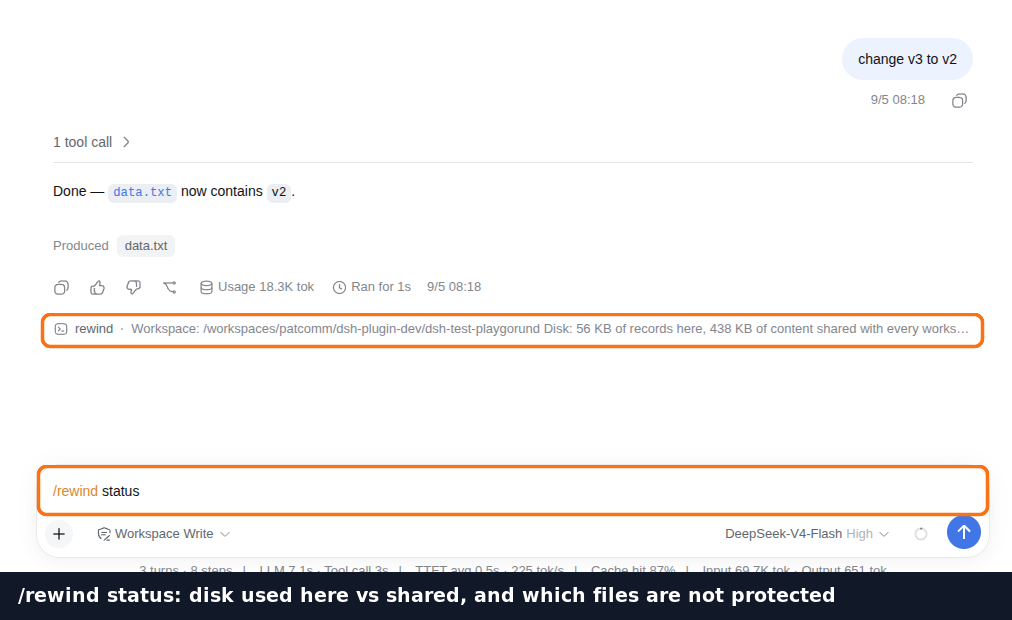
6. /rewind status at any time. Disk used by this workspace's records versus
the shared content store, and which files here are not protected, and why.
Why dsh-filesnap
| What it means | |
|---|---|
| Conversation + files | Restore both to the selected point from the chat UI. |
| Git-independent | Works in repositories and ordinary directories. Commits, branches, stash and worktree state are never changed. |
| Undoable rewind | A rescue point is captured before restore writes begin; /redo reverses the rewind. |
| Broad file coverage | Handles binary files, ignored files and edits made through ctx.fs outside the project root. |
| UI controls | Rewind beside messages; redo and status actions in the conversation header. |
| Inspectable | /rewind status reports storage use and files that are not protected, with the reason for each exclusion. |
The design does not treat version control as a snapshot store. For a version-stamped, source-audited comparison with other dsh rewind plugins, see Comparison.
Commands
| Command | Result |
|---|---|
/rewind | List the workspace state captured before each turn. |
/rewind <turn> | Restore the conversation and tracked files to before the selected turn. |
/redo | Reverse the rewind that landed in the current session. |
/rewind status | Report stored data and files that are currently unprotected. |
/rewind accepts the displayed turn number or a point id. Relative addressing
such as “go back three” is deliberately not supported: a restore overwrites
files, so the target must be explicit.
Both commands dispatch without a model turn. Rewinding is something you do to a conversation, not a request that should pass through the conversation being rewound.
What gets protected
Recovery requires a prior capture. FileSnap covers tracked files and observed edits, plus a limited scan of recent workspace changes. Ignore rules, size limits and capture timing still apply; it is not a backup of every file on your machine.
Run /rewind status to inspect coverage. Restoring changes the current workspace;
opening an older conversation does not switch to an independent copy of its files.
Coverage and recovery details.
Performance
The engine runs once before a model request that normally takes seconds. The current preliminary measurements, taken with a warm page cache, are:
| Workspace | Files captured | First capture | Repeat capture |
|---|---|---|---|
| this repository | 84 | 20 ms | 8 ms |
| DeepSeek Harness monorepo | 7,995 of 70,918 on disk | 1.75 s | 268 ms |
These numbers describe their original machine, not a universal promise. The tracked set is bounded instead of walking all 70,918 files every turn, and the repeat capture reuses unchanged content. See Benchmarks for the method, missing metadata and a reproducible command sequence.
Configuration
Defaults are intended to work on an ordinary local deployment.
| Field | Default | Purpose |
|---|---|---|
command | resolved automatically | Use another engine build, or a bare command resolved by a remote subprocess provider. |
dataDir | platform data directory | Store location; never inside the project. |
timeoutMs | 120000 | Wall-clock limit for one engine invocation. |
graceMs | 2000 | SIGTERM-to-SIGKILL grace period after cancellation or timeout. |
maxOutputBytes | 1048576 | In-memory limit for each collected output stream. |
declareEdits | true | Record file pre-images immediately before edits. |
Unknown keys and unusable values fail at plugin load rather than silently removing a later rewind point.
Current limits
- Uninstalling does not delete conversation logs or workspace files; reinstall the plugin to reopen conversations containing its records.
- The browser button opens the recovered conversation. Typed
/rewindcommands report a destination to open; they do not automatically navigate there. - Recovery is limited to captured content; inspect coverage before relying on it.
- Conversation-only mode, cleanup UI and per-file recovery remain on the roadmap.
Operational troubleshooting · How it works
Documentation
| Document | What it answers |
|---|---|
| How it works | Implementation details, conversation preservation and recovery ordering. |
| UI & integration FAQ | Interface capabilities, integration evidence and compatibility scope. |
| Roadmap | Planned cleanup, recovery preview and workflow improvements; not shipped features. |
| Comparison | How the available dsh rewind designs differ, with dated package versions. |
| Benchmarks | What the published timings mean and how to reproduce them. |
| Troubleshooting | Installation, profile, client bundle and storage diagnostics. |
| Contributing | Local development, builds and the four test tiers. |
Contributing
Issues, discussions and pull requests are welcome in English or Chinese:
- Discussions for questions, ideas and examples;
- Issues for bugs and concrete changes;
- Pull requests for proposed fixes.
Read CONTRIBUTING.md before changing the host/engine boundary. Report security problems through SECURITY.md, not a public issue.
Licence
Apache-2.0. See LICENSE. The filesnap engine uses the same licence.
Plugins associés
dsh-web-ui (dsh-chat-recovery)
zhu1090093659/dsh-web-ui
billion-context
ranxianglei/billion-context
dsh-synapse
liangmianya/dsh-synapse
dsh-archive-manager
michengai/dsh-archive-manager