dsh-native (dsh-rust-exec)
keer1024/dsh-native/packages/dsh-rust-exec
Sidecar Rust résident pour Windows qui regroupe les appels d’outils lourds en shell dans un worker chaud : 11 outils (10 rust_* et native_help ; 5 résidents, 6 activés à la demande) pour exécuter des commandes, lire/écrire des fichiers protégés par SHA-256, indexer et rechercher le code, projeter les journaux de session et échantillonner les ressources. Servi par un pool avec limites souples RSS/CPU sur 8 routes HTTP.
Installer
dsh plugin --profile web add github:keer1024/dsh-nativeCe plugin se trouve dans le sous-répertoire packages/dsh-rust-exec du dépôt.
README


a resident Rust sidecar for DeepSeek Harness





把 DSH 里「真正动手」的那部分交给一个常驻的 Rust worker:命令执行、带 sha256 校验的文件读写、代码索引与检索、会话日志投影、资源采样都在 Rust 侧完成;DSH 宿主只做 JSON-RPC 管道、lane 调度与路由注册,浏览器侧只做叠加式展示。
- 11 个工具:10 个
rust_*加native_help(5 个常驻、6 个按需激活) - 8 条 HTTP 路由:
/api/dsh-rust-exec/* - 三处界面:固定头部的会话投影视图、Grafana 风格监控器、输入框下沿的
dsh-native资源状态条
为什么值得装:
- 每次工具调用都新起进程太贵。 DSH 每调一次
pwsh要付一次 PowerShell 冷启动(本机 2.4–4.4 s,低完整性沙箱下更慢)。这里改成常驻 worker + 常驻 shell server,同一 lane 上后续命令是毫秒级。 - 大输出、大文件、大日志把上下文吃光。 读文件按行区间、搜索按字节预算裁剪、会话日志先解码当前页——同召回下返回体积约降 80%。
- 看不见运行状态。 worker 重启次数、队列堵没堵、RSS 涨到哪、哪个会话在跑,全部进
/metrics、rust_health和监控器。
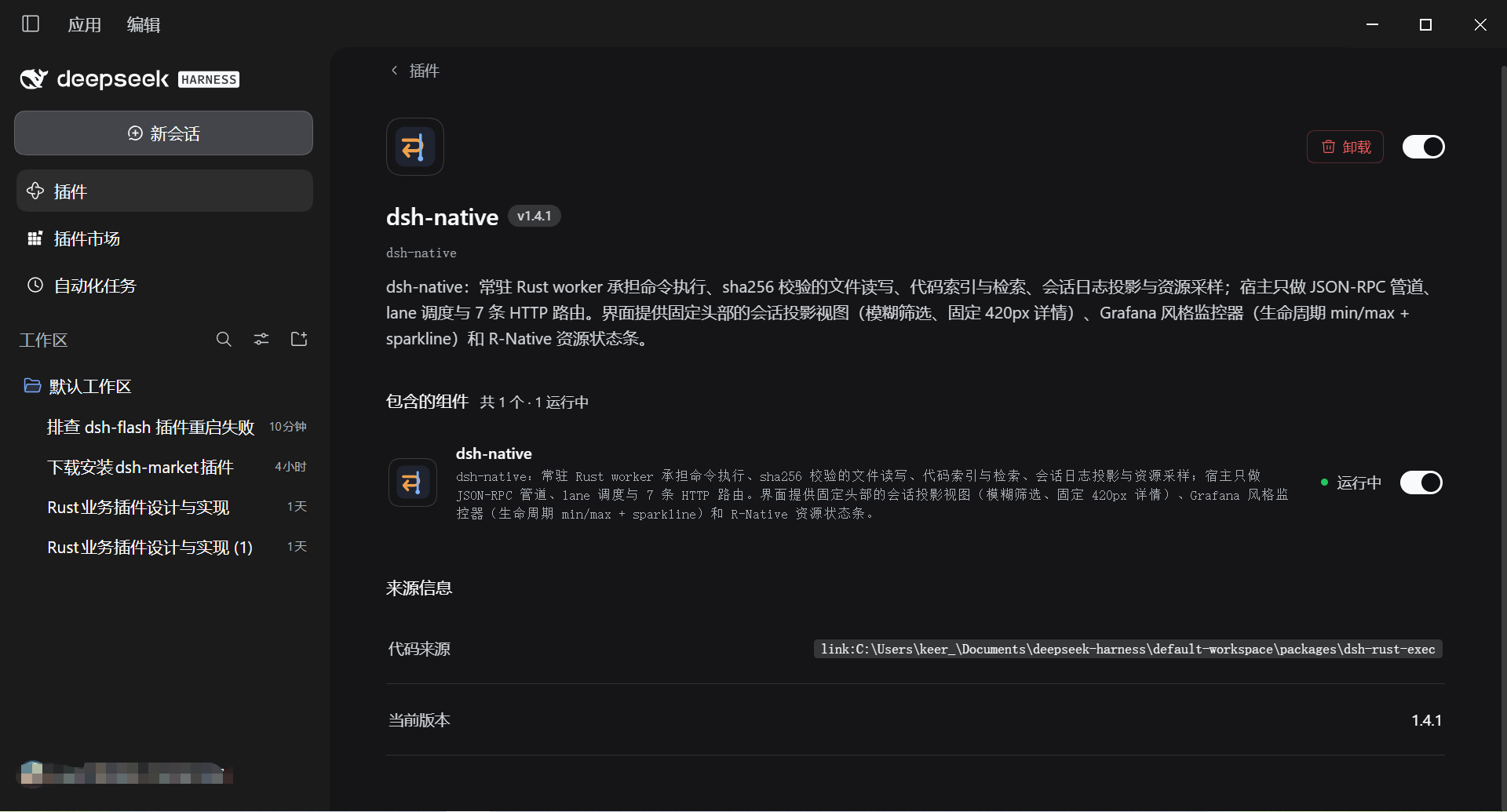
① 介绍 — 设置页里的插件条目、版本与资源监控入口
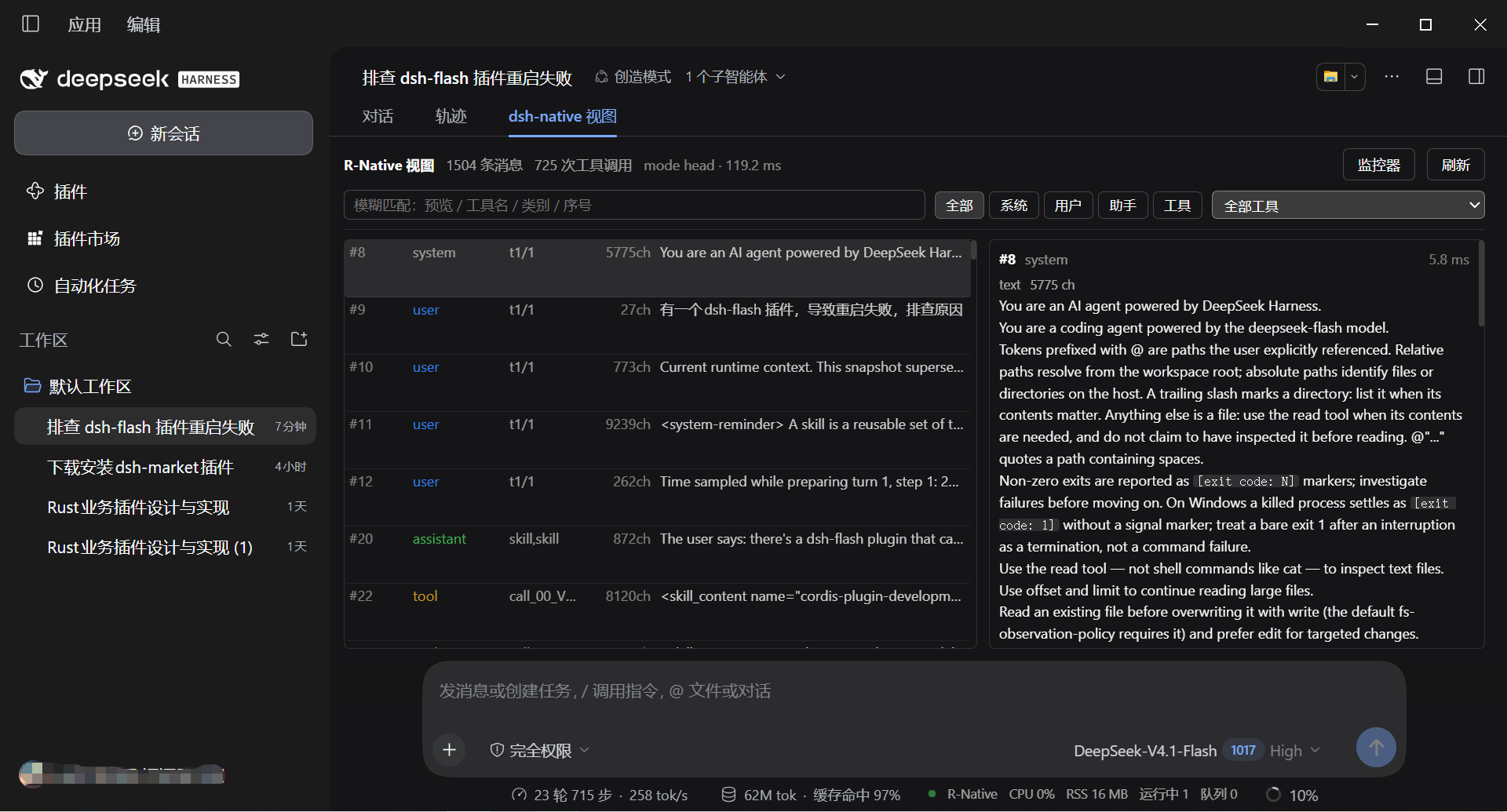
② 视图页 — 固定头部(计数、模糊筛选、类别下拉、监控器/刷新)+ 左侧消息列表 + 固定 420 px 详情
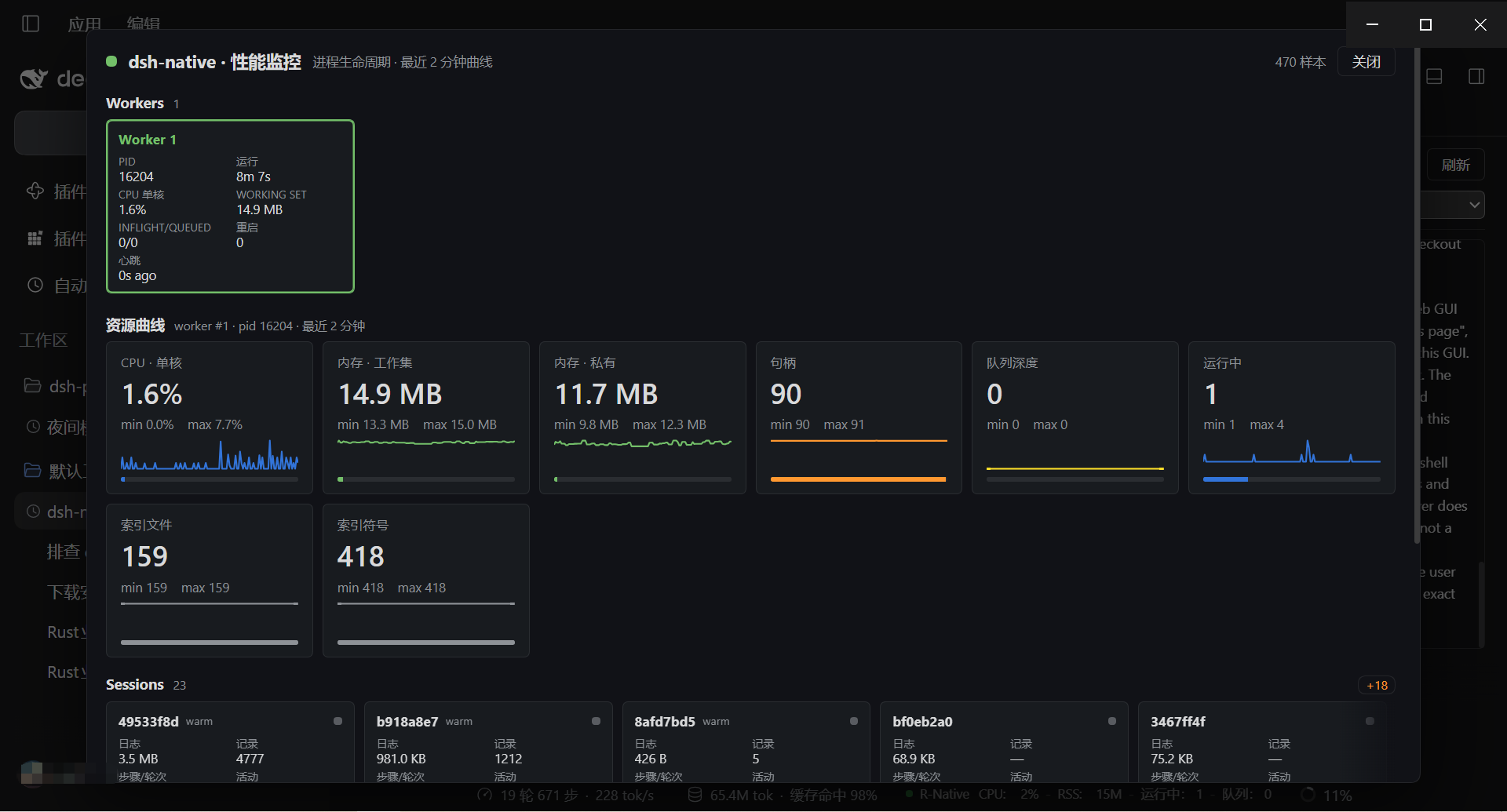
③ 监控页 — 三行卡片(Workers / Sessions / Cache)+ 跟随选中 worker 的曲线组 + 节省报表
安装
从 npm(推荐)
# 1) 装进 DSH profile
pnpm add dsh-native     # 或 npm i dsh-native

# 2) 挂载 bundle —— 编辑 <DSH_HOME>\profiles\<profile>\package.json
#    "dsh": { "profile": { "bundles": [
#        "@deepseek-ai/dsh-base", "@deepseek-ai/dsh-web-app", "dsh-native" ] } }

# 3) 重启 DSH,然后验收
curl http://127.0.0.1:<port>/api/dsh-rust-exec/health
ok: true、worker pid、routes: 8 都在,就算装好了。随后设置页 → 插件 → dsh-native 会出现「监控器」按钮,对话页顶部会多出 dsh-native 页签。
1.7.0 起包名是无 scope 的
dsh-native。从@keer1024/dsh-native升级时,dependencies的键与dsh.profile.bundles里的旧名要一起改,再pnpm install+ 重启;细节见 PACKAGE_RENAME_1.7.0.md。
从 tarball(离线 / 内网)
仓库根目录的 bin/ 里始终放着当前版本的安装包(随仓库提交,带 .sha256):
# 先校验(可选但推荐)
Get-FileHash .\bin\dsh-native-1.7.5.tgz -Algorithm SHA256
# 与 bin\dsh-native-1.7.5.tgz.sha256 里的摘要比对

npm i .\bin\dsh-native-1.7.5.tgz
目标机要求、profile 两处改动、SmartScreen 与常见失败见 分发与跨机安装。
从 GitHub 源码(不发 npm 时的备选)
dsh plugin --profile web add github:keer1024/dsh-native#path:/packages/dsh-rust-exec
子包没有构建脚本,也不需要 allowBuilds 授权;代价是首次要拉整个仓库,比 npm / tarball 慢。
升级与卸载
- 升级:
pnpm add dsh-native@latest→ 重启 DSH。 - 卸载:在 DSH 插件管理里移除,或从
dsh.profile.bundles删掉该条目 → 重启 DSH;投影缓存可整体删除,不残留状态。
装好后 host 侧(工具、路由)热生效;客户端叠加物需要刷新一次页面。
工具(11 个)
| 工具 | 作用 | 主要参数 |
|---|---|---|
rust_exec | 在常驻 PowerShell lane 上执行命令;返回 exitCode/stdout/stderr/ms/shellMs/queueMs/lane/reused | command(必填)、cwd(持久化到后续调用)、timeoutMs、queueTimeoutMs(默认 30000) |
rust_read | 读文件,按行区间取,返回 sha256 与总行数;同一文件同一区间的重复读会去重 | path、offset(1 起)、limit、refresh |
rust_write | 原子写(临时文件 + rename),可选版本守卫 | path、content、expectedHash(sha256 或 absent) |
rust_edit | 精确文本替换,锚点有歧义时失败且不改文件 | path、oldString、newString、replaceAll |
rust_stat | 原生 stat:大小、时间、类型;paths 形态一次往返探测多个路径 | path 或 paths: string[](≤256) |
rust_ls | 目录列举,可限条数;sizes:false 省掉逐条 metadata | path、limit、sizes |
rust_search | 常驻索引上的文本/正则检索,按字节预算与相关度裁剪 | query、glob、regex、symbolsOnly、contextLines(0–2)、maxHits(默认 24)、maxBytes(默认 6000)、refresh |
rust_symbols | 符号检索(fn/class/struct/trait…),返回定义位置 | query、path、kind、limit(默认 40)、maxBytes、refresh |
rust_session_open | 直接解 session.v*.jsonl.zstd,游标分页,首屏只解码当前页 | path、limit(1–500,默认 50)、cursor、refresh |
rust_health | worker 存活、心跳间隙 p50/p99、重启次数、最后退出码、索引规模、路由挂载 | 无 |
native_help | 渐进披露入口:列出尚未激活的工具,并在同一会话内激活它们 | tools?: string[] |
默认只常驻 rust_exec / rust_read / rust_search / rust_health / native_help 五个,其余 6 个由 native_help 按需激活(progressiveDisclosure: false 可恢复 11 个全常驻)。
统一截断契约:被裁剪的结果在 footer 带 truncated by lines|bytes · omitted N · complete=false,完整结果显示 complete,便于模型判断要不要续读。
HTTP 路由(8 条)
前缀 /api/dsh-rust-exec,挂载失败会退避重试,挂载结果见 /health 的 routes.registered。
| 路由 | 返回 |
|---|---|
GET /metrics | 采样(1 s 一点)、pool、sessions、config、readiness、workers[]、cache、savings、extremes |
GET /cache | 读缓存与索引视图(entries/hits/bytes/ttl、files/symbols/buildMs) |
GET /health | hostPid、worker pid/版本/协议、重启次数、routes.registered、锁文件路径 |
GET /events | 近期事件环形缓冲(重启、软限、路由重挂等) |
GET /sessions | 可投影的会话列表(≤50,按 mtime 倒序) |
GET /session?id=&limit=&cursor= | 单个会话的分页投影(mode=append/warm/head、耗时分解) |
GET /session/body?id=&seqs=&maxChars= | 指定 seq 的消息正文(最多 40 个 seq,缺 seqs → 400) |
POST /config | 热改配置:workers、每会话并发、空闲回收、RSS/CPU 软限等 |
浏览器带会话凭据,Node 侧直接 fetch 会拿到 401。
配置
Loader 行的 config 由 Config['~standard'].validate 校验,非法值直接拒绝挂载;POST /config 可热改一部分。
| 键 | 范围 / 默认 | 说明 |
|---|---|---|
workerPath | 默认包内 bin/dsh-rust-worker.exe | 跨机部署路径不同时必须显式配 |
defaultTimeoutMs | >0,默认 60000 | 单次调用默认超时 |
lanes | 1–16,默认 min(4, cores/2) | 每个 worker 的并行 shell 数 |
maxQueueDepth | 1–4096,默认 64 | 队列闸门;满了返回可重试的拒绝 |
metricsIntervalMs | ≥250,默认 1000 | 采样周期 |
maxWorkers | 1–8,默认 1 | 多进程是隔离手段,不是吞吐手段 |
maxShells | 1–64,默认 8 | worker 侧 shell 硬上限 |
maxInFlightPerSession | 1–64,默认 = lanes | 同会话并发闸门 |
idleReapMs | ≥10000,默认 300000 | 空闲回收 |
rssSoftLimitMb | 64–65536,默认 512 | 软限:超限先丢索引,不杀进程 |
cpuSoftLimitPct | 10–100,默认 70 | 持续超限时暂停派发 |
deferStart | 布尔,默认 true | 异步启动:挂载后等 startDelayMs 再拉起 worker |
startDelayMs | 0–30000,默认 1200 | 延迟启动时长;工具先被调用会立刻结束等待 |
prewarmIndex | 布尔,默认 true | worker 启动时预热索引与 lane |
progressiveDisclosure | 布尔,默认 true | 5 常驻 + 6 按需;false 恢复 11 个全常驻 |
compactReads | 布尔,默认 false | rust_read 默认压缩(去注释、折叠缩进,行号仍有效) |
环境变量:DSH_HOME、DSH_PROFILE、DSH_RUST_WORKER_CWD、DSH_RUST_DEBUG、DSH_RUST_PREWARM、DSH_VERSION。
锁文件 <DSH_HOME>/run/dsh-rust-worker-<profile>.lock 由宿主写,回收前核对进程镜像名,不按 pid 盲杀。
诊断日志:%LOCALAPPDATA%\dsh-native\logs\rust-exec-<宿主 pid>.log(JSONL,2 MB 轮转)。
排障
| 症状 | 原因 | 处理 |
|---|---|---|
重启后报 web boot: 1 entry did not activate / duplicate factory registration | package.json 的 name、client.js 注册 id、cordis.patch.yml 不一致 | node tools\check_client_identity.mjs 定位;三处必须同名 |
工具列表里没有 rust_* | profile 的 dsh.profile.bundles 缺 dsh-native | 补 bundles + pnpm install + 重启 |
| 面板 401 / 404 | 浏览器没带凭据,或路由没挂上 | 看 /health 的 routes.registered |
写 %TEMP% / ~/.dsh 报 拒绝访问 (os error 5) | worker 以低完整性运行 | 1.6.1 起镜像已搬到 %LOCALAPPDATA%\dsh-native\bin 再启动;仍失败看 rust_health.logPath |
首次 exec 3–20 s | 该 lane 的 PowerShell 冷启动 | 正常;后续同 lane 毫秒级 |
| 监控器一直显示「启动中…」 | readiness.phase 停在 pending/starting,或 worker 拉起失败 | 看 /health 的 phase 与 readiness.error |
强杀 worker 后残留 powershell.exe | Windows 不杀进程树 | kill() 用 taskkill /T,新 worker 启动时再扫一遍 |
兼容性与限制
- 平台:仅 Windows 10/11 x64。macOS/Linux 需要另出二进制。
- DSH:实测 0.2.1-rc.2 / Electron 44 / Node 24;DSH 仍在 rc,插件契约可能变。
- Node:host 插件只用
node:内置模块,≥22 即可。 - 只读投影:真相源仍是 DSH 会话日志,插件不写回;投影可丢弃可重建。
- 分发状态:包名
dsh-native;npm 上裸名目前仍是占位(0.0.0-stage),1.7.5 尚未发布,此前的安装一律走根目录bin/的 tarball、GitHub 源码或目录 link,步骤见 DISTRIBUTION.md。
维护者
node tools\build_plugin.mjs                 # 全量:cargo 编译 + 换装 + npm pack + 分发
node tools\build_plugin.mjs --skip-rust     # 跳过 cargo 与换装,用现有二进制直接打包
node tools\build_plugin.mjs --no-archive    # 只更新 bin/,不碰 dist/
约定:版本号唯一事实源是 packages/dsh-rust-exec/package.json;脚本不碰 git(不 commit、不打 tag);产物只留当前版本——bin/ 与 dist/ 各一份,旧 worker 镜像在构建后自动清理,规则见 DISTRIBUTION.md §6。
发版门禁:node tools\release_check.mjs(任务单、CHANGELOG、README 版本号、安装包 sha256、工作区与 tag 共 11 项)。
文档与许可
- 分发与跨机安装:DISTRIBUTION.md
- 发布到 npm / 插件市场:PUBLISHING.md
- 与 dsh-ops 的能力对比:DSH_OPS_COMPARISON.md
- 变更记录:CHANGELOG.md
- 历史设计与实测:docs/rust-exec-plugin
- 许可证:MIT
English
dsh-native is a resident Rust sidecar for DeepSeek Harness. Command execution, sha256-guarded file IO, code indexing/search, session-log projection and resource sampling all run in a long-lived Rust worker; the host stays a thin JSON-RPC / lane-scheduling / route layer.
- 11 tools — 10
rust_*tools plusnative_help(5 resident, 6 activated on demand) - 8 routes —
/api/dsh-rust-exec/{metrics,cache,health,events,sessions,session,session/body,config} - UI — pinned-header projection view, Grafana-style monitor,
dsh-nativeresource strip - Async start — DSH boots first; the worker starts 1.2 s later and the UI back-fills data the moment
readinessturnsready - Install —
pnpm add dsh-native, adddsh-nativetodsh.profile.bundles, restart DSH; ornpm i ./bin/dsh-native-1.7.5.tgz - Source install —
dsh plugin --profile web add github:keer1024/dsh-native#path:/packages/dsh-rust-exec - Requires — Windows 10/11 x64 · DSH desktop · PowerShell 5.1 (no Node.js on the target machine)
See the Chinese sections above for the full manual, or read CHANGELOG.md.
Plugins associés
archify (deepseek-harness)
tt-a1i/archify
next-ai-draw-io (dsh-plugin)
dayuanjiang/next-ai-draw-io
WeKnora (dsh-weknora)
tencent/weknora
weknora
tencent/weknora