dsh-plugin-agent-collaboration
leo-sail/dsh-plugin-agent-collaboration
Agent Community UI — Bot list, room list, chat panel, run status
Installer
dsh plugin --profile web add github:leo-sail/dsh-plugin-agent-collaborationREADME
Agent Community — Bots for DeepSeek Harness
Persistent Bots, group rooms and a durable run ledger, inside DSH.
简体中文 · Design notes · MIT



A community-maintained DeepSeek Harness plugin, not an official DeepSeek product.
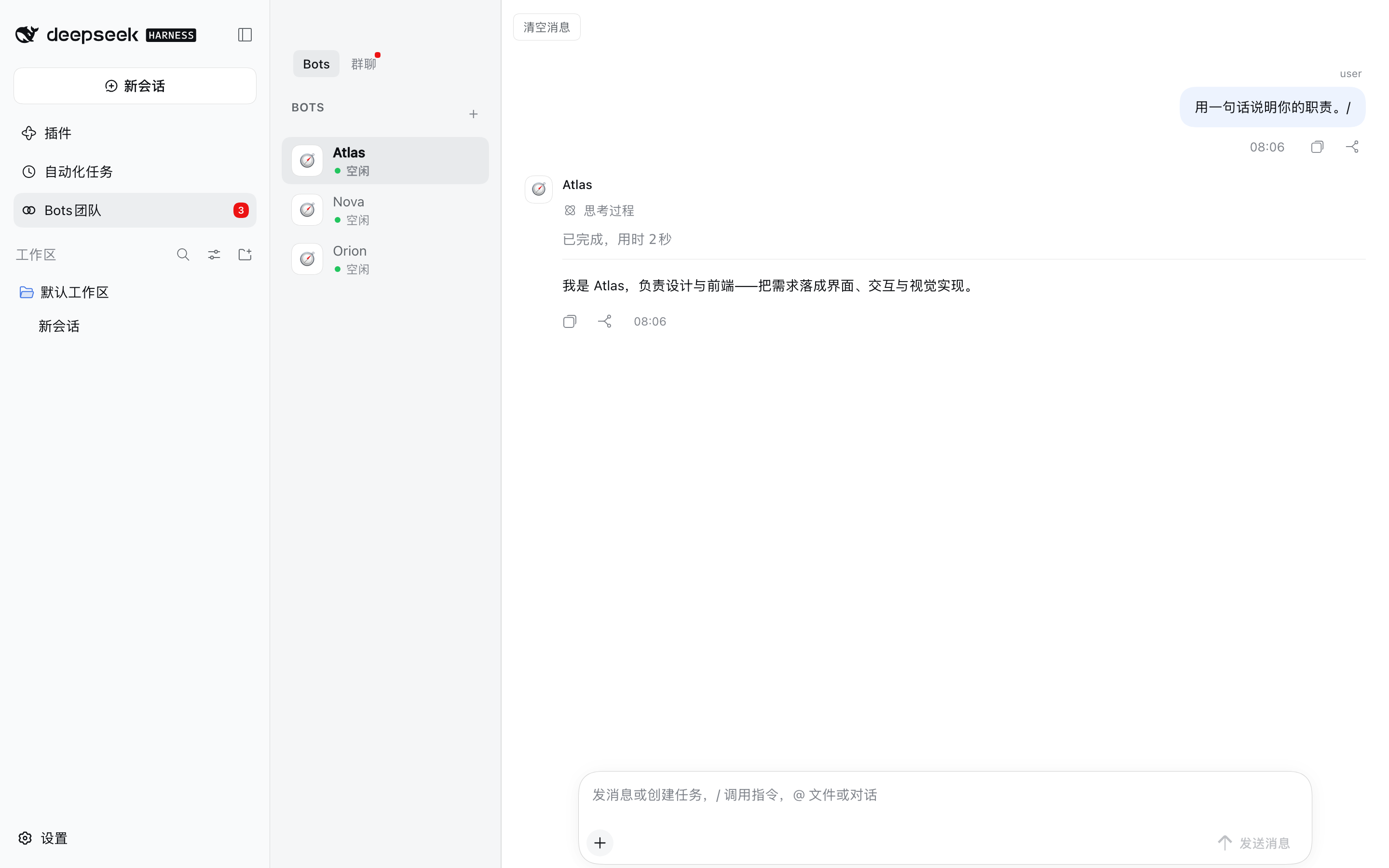
A Bot here is not a temporary subagent: it has an identity, its own model and permission preset, its own workspace, and its own session that survives a restart. Put several of them in a room and they answer together. Every run is recorded, so a conversation can be read back later even after the session that produced it is gone.
Features
- Bots that persist. Each Bot keeps a name, a model, a permission preset and a workspace on disk. It is listed in the panel and answers in any room it belongs to, before and after a restart.
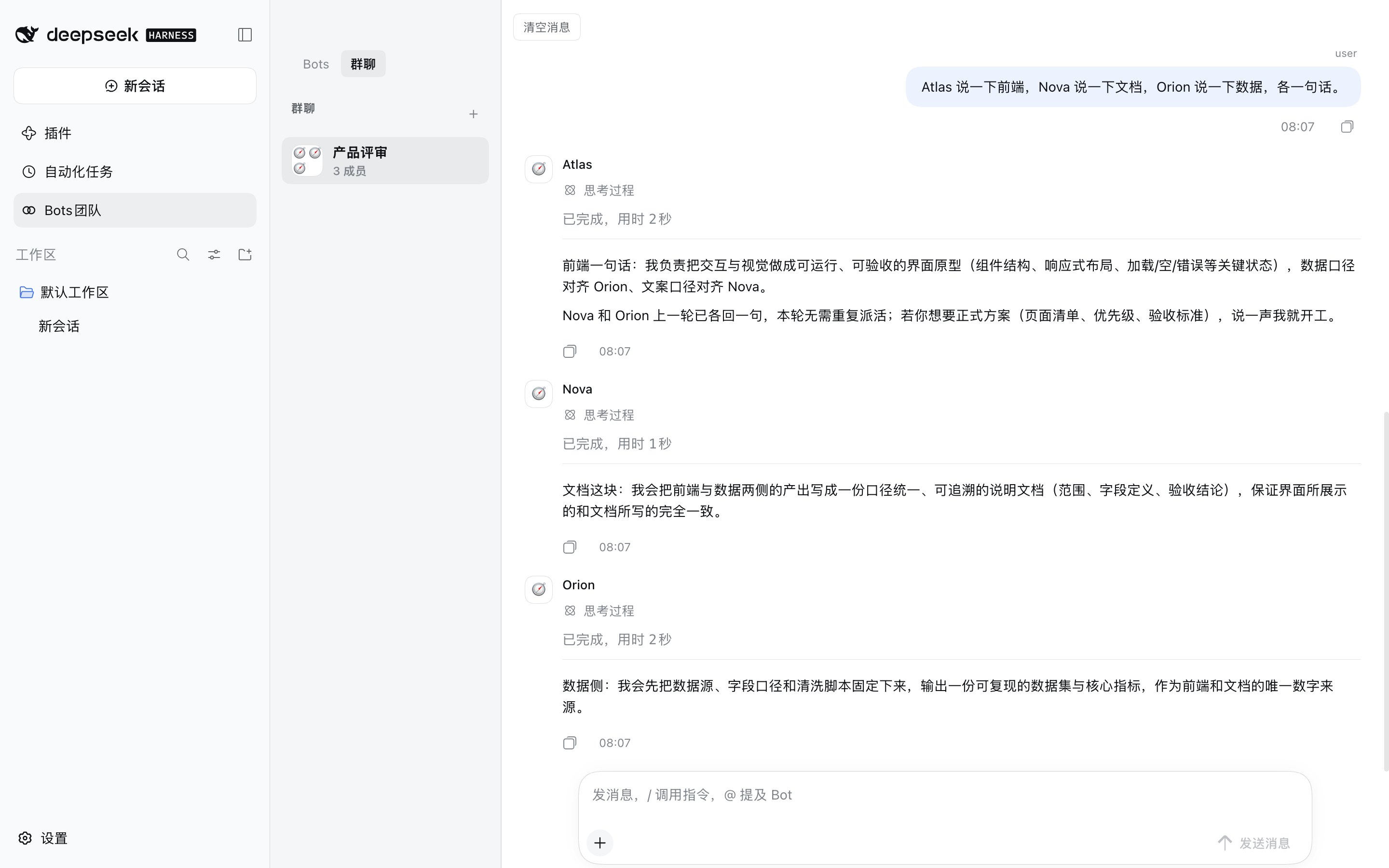
- One-to-one and group conversations. A room is a list of members. A message addressed to one Bot routes to that Bot; a message addressed to nobody in particular is answered by every member, because a greeting is addressed to the room.
- Runs are queued, leased and recoverable. Each answer is a run with a lease and a heartbeat. A run whose runtime dies is reclaimed instead of blocking the room, and a room keeps working while you do something else.
- A durable transcript. The panel draws from a ledger written as the run happens (messages, tool calls and their results, approvals, errors), not from the session log. Compacted-away history is replaced by a summary rather than silently dropped.
- 15 model-facing tools, so a Bot can create rooms, hand work to another Bot, decompose a request
into tasks and report on them:
agent_community_create_bot,agent_community_update_bot,agent_community_list_bots,agent_community_create_room,agent_community_send_message,agent_community_list_runs,agent_community_get_context,agent_community_post_message,agent_community_task_decompose,agent_community_task_assign,agent_community_task_status,agent_community_task_report,agent_community_submit_final,agent_community_remember,agent_community_deliver. - Models come from DSH Settings. The Bot form and the composer's model menu read the deployment's live catalog — every provider, every model, its display name and its reasoning levels. Nothing about a vendor or a model is hard-coded; a provider added or renamed in Settings appears without restarting.
- File cards for what a Bot delivered. A Bot declares the files it produced with
agent_community_deliver; the turn then shows file cards below its reply — preview in the panel, open with the OS application association, or reveal in Finder. Files may live inside the Bot's workspace or at any absolute path. - A preview dock with real viewers. Clicking a card opens the split preview dock: PDF through a
bundled PDF.js (page navigation, zoom, fit width),
.docxthrough docx-preview (paginated pages, selectable text, fit width),.xlsx/.csvthrough SheetJS (sheet tabs, frozen header, virtual scrolling). PowerPoint and legacy.doc/.xlsgo through the host's Office→PDF conversion into the same PDF viewer. All viewers are bundled into the plugin's single browser artifact (3.3 MB, ~0.9 MB gzipped) — the panel never fetches a viewer from the network. See THIRD_PARTY_NOTICES.md for their licenses. - Attachments. Files and images can be added to a message. They are stored inside the receiving Bot's own workspace and appended to what the model sees; the bubble still shows exactly what you typed.
- Compaction that you can trigger.
/compactsummarises the older part of a room with the room's own Bot model, keeps the newest messages verbatim, and retires the session that was carrying the old history — so the next answer continues from the summary instead of replaying the transcript. - Unread state that follows what you actually see. A read water mark records when you read, not just which message, so a room that has been compacted can still tell you what is new. The room on screen counts as read — its badge clears as soon as it is displayed, and a reply that lands while you are looking at it clears immediately. Only messages that arrive while the DSH window is hidden stay unread, so the count is right when you come back. The badge counts unread replies — each bot run is one (so several scheduled runs are several unread, not one) — and a bot's extra post in the same turn does not double-count.
Requirements
| DeepSeek Harness | 0.2.1-rc.2 (built and verified against it; no DSH version is pinned) |
| Node.js | ^22.19.0 or >=24 |
| pnpm | 11.7.0 (for building from source) |
@deepseek-ai/* packages are not published to the public npm registry, so this repo cannot install
them and pnpm install alone fails — expected. The plugin deliberately does not pin a DSH version:
every peer range is * and a missing host package degrades at load instead of failing the install. That
is also why the plugin is meant to be installed into a DSH profile, where the running harness supplies
those packages.
Installation
dsh plugin --profile <your-profile> add dsh-plugin-agent-collaboration
The published package carries all three packages prebuilt, so nothing is compiled on your machine. Restart DSH and refresh the page — Bots团队 appears in the sidebar.
Installing the release tarball instead
The archive attached to each release is the same build that is published to npm — use it when you would rather not install through a registry. The line below points at the latest public release; see CHANGELOG.md for what a newer version changes.
dsh plugin --profile <your-profile> add \
  https://github.com/Leo-sail/dsh-plugin-agent-collaboration/releases/download/v0.3.5/dsh-plugin-agent-collaboration-0.3.5.tgz
Installing from a checkout instead
dsh plugin --profile <your-profile> add "file:/path/to/this/repo/packages/bundle/agent-collaboration"
Keep the file: prefix. pnpm records a bare absolute path as a link: symlink and then installs none of
the bundle's own file: dependencies; the profile ends up with the bundle and no @dsh-plugin-agent-community/* rows,
and every row fails to import. The same applies to DSH's own plugin manager, which passes an absolute
path through unchanged.
Verify the install — all three must be real directories, not symlinks:
ls -ld ~/.dsh/profiles/<your-profile>/node_modules/@dsh-plugin-agent-community/*
Ask an agent to do it
Install the DSH plugin at
https://github.com/Leo-sail/dsh-plugin-agent-collaboration/releases/download/v0.3.5/dsh-plugin-agent-collaboration-0.3.5.tgz
into my DSH profile, restart DSH, and confirm the "Bots团队" entry appears in the sidebar.
Usage
| What you want | How |
|---|---|
| Create a Bot | Open Bots团队 → + → fill in name, model, permission and workspace. The Bot is created immediately and appears in the roster. |
| Talk to one Bot | Select it in the Bots tab (one-to-one room) and send a message. |
| Create a group | + in the 群聊 tab, pick the members. |
| Address one member of a group | Type @ and pick a Bot from the menu, or use its name in the text. Only that Bot is queued. |
| Address the whole room | Send a message that names nobody. Every member answers. |
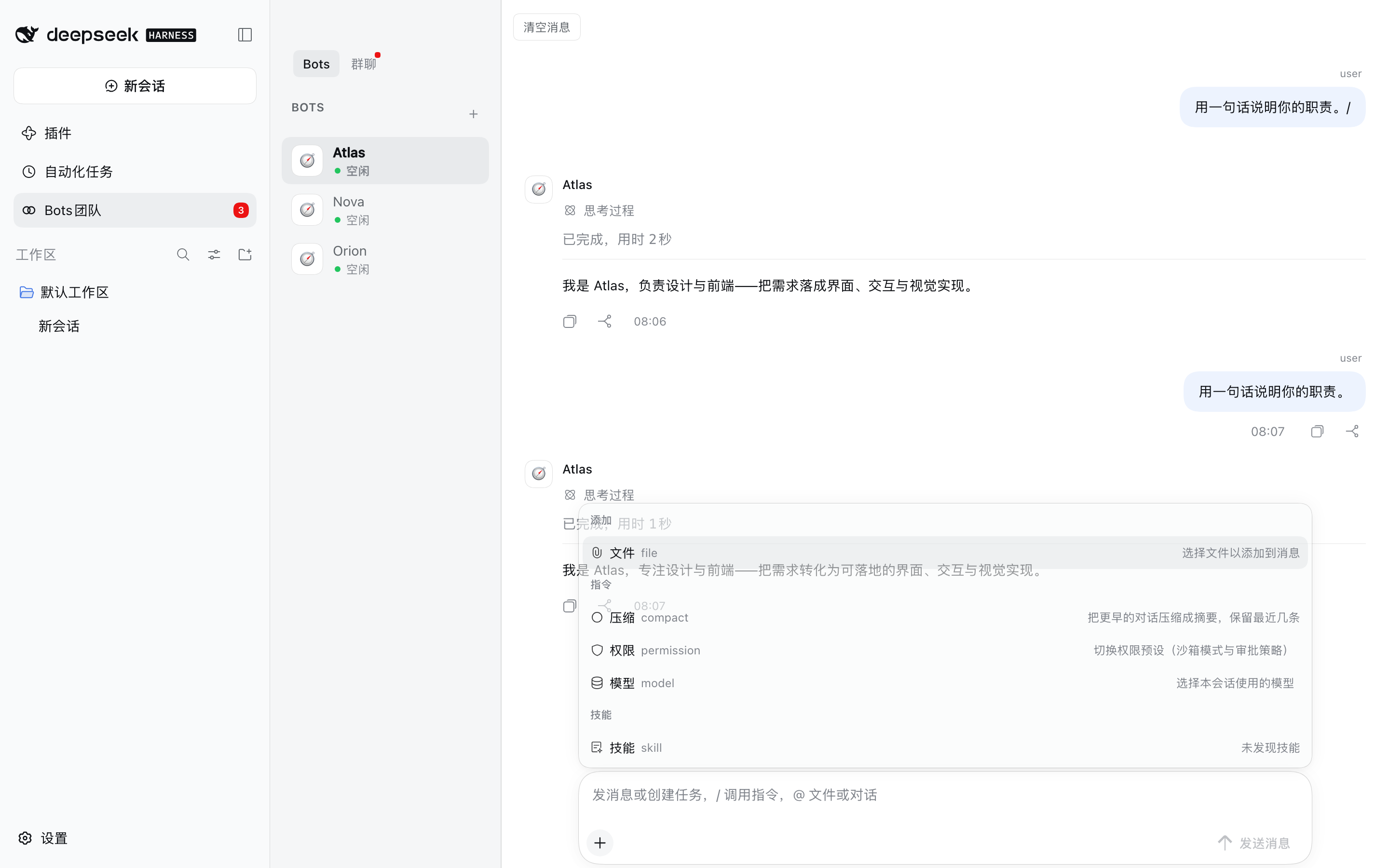
| Add a file or image | + → 文件, or paste/drop it onto the composer. |
| Change the model for one room | + → 模型. Affects the next run, not one already in flight. |
| Change a Bot's permission preset | + → 权限: 仅可查看 / 工作区内修改 / 完全权限. |
| Compress a long room | + → 压缩. Shows a summary row and keeps the newest messages. |
| Stop a run | 停止 in the title bar cancels the room's active runs. |
| Read an older part | Scroll up — the transcript pages in earlier entries. |
| Clear a room | 清空消息 in the room header. |
Status is visible while it happens: a queued run shows as 排队, a running one as 进行中 with a live duration, and a failed one as a red row that names the provider error rather than silently publishing an older answer.
Configuration
Every key is optional and is set on the bundle's row in the profile's cordis.patch.yml.
| Key | Default | What it does |
|---|---|---|
maxBots | 32 | Bots that may exist |
maxRooms | 64 | Rooms that may exist |
maxMessages | 10000 | Messages kept before the oldest are pruned |
maxRuns | 1000 | Run records kept |
maxConcurrentRuns | 8 | Bots that may answer at the same time, across all rooms |
runTimeoutMs | 600000 | A run is failed after this long |
runLeaseMs | 60000 | How long a run's lease lasts without a heartbeat |
historyMessagesInPrompt | 10 | Messages of context handed to each answer |
a2aMinIntervalMs | 3000 | Minimum gap between Bot-to-Bot messages |
groupProposalTimeoutMs | 120000 | How long a group proposal waits for an answer |
idleLimit | 12 | Live Bot sessions kept before the least recently used is disposed — disposing one is what releases its session write lease |
hardLimit | 24 | Hard ceiling on live Bot sessions |
botReasoningEffort | max | Reasoning effort for Bot turns: off low high max, or '' to take the provider default. A Bot can override it |
botAgentPreset | standard | Agent preset handed to each Bot session |
botDeniedTools | plugin_manager, ask_user_question, skill | Tools a Bot must never see |
homeDir | $DSH_HOME, else ~/.dsh | Where the board is stored |
sessionsDir | <homeDir>/sessions | Where Bot session logs are written |
maxConcurrentRuns is global, not per room. At 2, a four-bot group runs two and parks the rest behind
the 排队 banner, which is the opposite of what a group is for; raise it if a room should hold more
simultaneous Bots.
Where your data lives
$DSH_HOME/agent-community/state.json        the board: Bots, rooms, messages, runs, read marks
$DSH_HOME/agent-community/workspaces/<bot>  each Bot's workspace, including its attachments
$DSH_HOME defaults to ~/.dsh. Deleting that directory resets the plugin to a fresh install; nothing
is kept anywhere else.
Coexistence with DSH's built-in Agent Teams
This repo ships the Community half only. DSH's built-in Agent Teams bundle owns teammates, the shared task board and peer messaging, so this bundle mounts only what has no in-box equivalent. The two can run side by side without either disabling the other.
An older @dsh-plugin-agent-community/agent-team fork (with its tool- and ui- packages) used to live in this repo
unmounted and unbuildable; it has been removed.
Screenshots
A group room where three Bots answered one message, each attributed to its own Bot:
The roster and the room list, with the sidebar entry carrying an unread count:
The composer's menu — 文件 / 压缩 / 权限 / 模型, then the skills group:
These are declared in screenshots.json — beside
the bundle's package.json, because this plugin is listed as a monorepo subpackage and that is where
storefronts read it from. See
screenshots/README.md for how they were taken.
Development
pnpm install      # fails by design: @deepseek-ai/* are not on the public registry
pnpm typecheck    # typecheck every package against the real DSH types, when they resolve
pnpm bundle       # build all packages and run the build-shape checks
Browser bundle dependencies. The panel's three viewers (PDF.js / docx-preview / SheetJS) are bundled into
ui-agent-community/lib/client.jsat build time: the DSH client module system serves exactly one script per plugin and re-reads no sibling assets, so the PDF worker and the viewers can not ship as separate files. They are workspace devDependencies (rootpackage.json), installed once for the build; the artifact is 3.3 MB (~0.9 MB gzipped). Licenses: THIRD_PARTY_NOTICES.md.
pnpm bundle runs scripts/check-build.mjs — every assertion in it maps to a
bug this repo actually shipped (a bare-ESM client bundle, a package whose files omitted its own types, a
stale lib/, dangling exports targets, duplicate CSS selectors). Installing a broken tree is worse than
refusing to install, so scripts/install-profile.sh runs the same checks before copying anything.
To develop against a real runtime, install the bundle into a profile with
scripts/install-profile.sh <profile> and restart DSH.
Architecture
packages/
  core/agent-community         the service: Bots, rooms, runs, sessions, the ledger
                               AgentCommunityService (ctx.agentCommunity), persists state.json
  tools/tool-agent-community   the 15 model-facing tools (ctx.tools.register)
  ui/ui-agent-community        the browser panel: sidebar entry, transcript, composer,
                               right-hand preview dock and the PDF/DOCX/spreadsheet viewers
  bundle/agent-collaboration   the installable entry (cordis.patch.yml)
The bundle mounts all three; each package is also installable on its own — core/agent-community ships
its own cordis.patch.yml and dsh.bundle, which is the right shape for a headless deployment.
See DESIGN.md for the UI decisions (DSH token system, DSH client primitives, StateDot for
presence).
License
Third-party libraries bundled into the browser artifact (PDF.js, docx-preview, JSZip, SheetJS) are distributed under their own licenses — see THIRD_PARTY_NOTICES.md.
Plugins associés
dsh-web (dsh-task-board)
zhu1090093659/dsh-web
dsh-web (dsh-web-all)
zhu1090093659/dsh-web
dsh-web-ui (dsh-task-board)
zhu1090093659/dsh-web-ui
dsh-web-ui (dsh-web-ui-all)
zhu1090093659/dsh-web-ui