dsh-request-image-cap
lucagiftzek/dsh-request-image-cap
Caps every image sent to a model at a per-side pixel limit (default 2000 px) by wrapping attachments.readImageRequest, which fixes Anthropic many-image request errors without touching stored images.
Installer
dsh plugin --profile web add github:lucagiftzek/dsh-request-image-capREADME
dsh-request-image-cap

Clamps every image sent to the model to a pixel cap, so many-image requests stop failing.
dsh plugin --profile web add @lucagiftzek/dsh-request-image-cap
# or from GitHub: dsh plugin --profile web add github:lucagiftzek/dsh-request-image-cap
# then restart dsh web
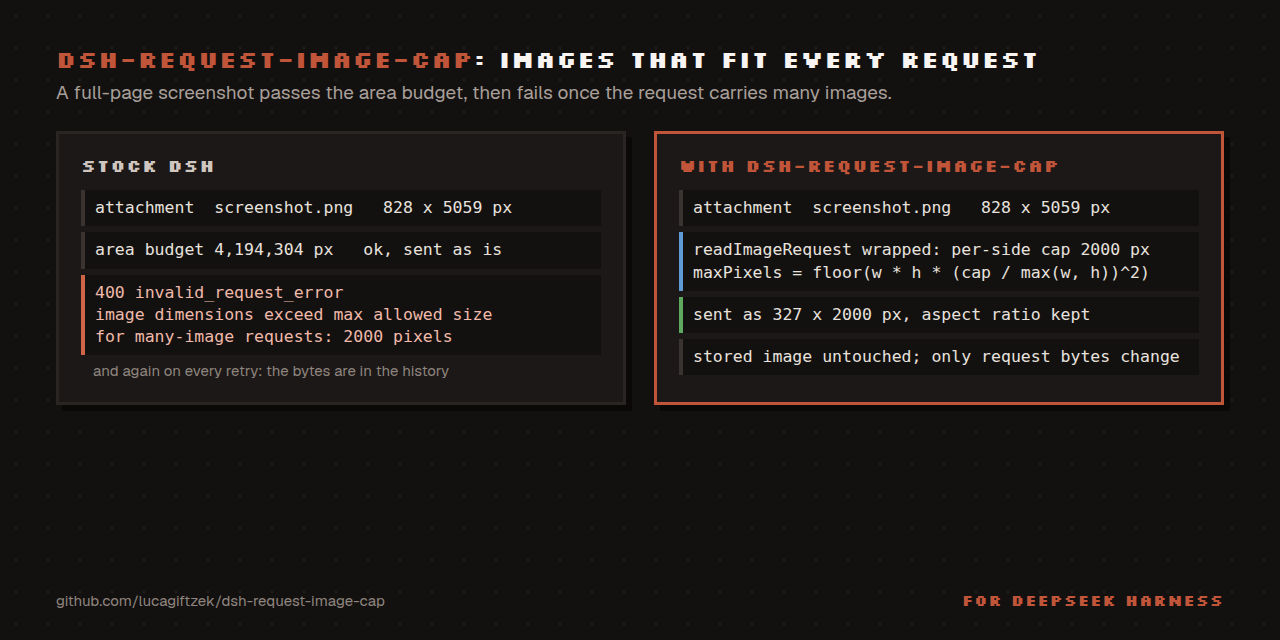
Keep every image DSH transmits inside the provider's per-side pixel limit.
Why
The Anthropic Messages API accepts 8000 px per side for an ordinary request but only 2000 px per side once the request carries many images:
400 invalid_request_error
messages.10.content.5.image.source.base64.data: At least one of the image
dimensions exceed max allowed size for many-image requests: 2000 pixels
Both DSH image gates are area gates:
| stage | knob | default |
|---|---|---|
ingest (dsh-attachment-local) | normalizedImageMaxPixels / normalizedImageMaxDimension | 4 194 304 px² / 8192 px |
request projection (requestImageDimensions) | llm-pi-ai.requestImagePixelBudget | 4 194 304 px² |
A full-page screenshot therefore lands in the store as e.g. 828x5059 (inside
the area budget, far outside the per-side rule) and is transmitted verbatim.
The failure is latent: the same image is fine in a short request and only kills
a long session later, then on every retry, because the bytes are already in the
history.
What it does
Wraps ctx.attachments.readImageRequest(ref, policy, signal) (the single seam
every LLM adapter uses to materialise request bytes) and converts a per-side
cap into the area budget that produces it:
maxPixels' = floor(w * h * (cap / max(w, h))^2)
requestImageDimensions scales by sqrt(maxPixels/(w*h)) and floors, so the
long edge lands at or under cap, aspect ratio preserved.
- retroactive: acts at request time, so histories that already contain oversized images become sendable again;
- non-destructive: stored bytes are untouched, only the model copy shrinks;
- never widens a route policy that is already tighter;
- fails safe: if a core upgrade renames the seam it logs a warning and stays inert rather than throwing at boot;
- free: Anthropic resizes anything above ~1.15 MP server-side anyway.
Config
- id: request-image-cap
  config:
    enabled: true
    maxDimension: 2000   # 64..8192
    verbose: false       # log every clamp
Install
Install from npm: dsh plugin --profile web add @lucagiftzek/dsh-request-image-cap, or from GitHub: dsh plugin --profile web add github:lucagiftzek/dsh-request-image-cap.
dsh plugin --profile web add @lucagiftzek/dsh-request-image-cap
# or from GitHub: dsh plugin --profile web add github:lucagiftzek/dsh-request-image-cap
The package declares dsh.bundle, so it joins dsh.profile.bundles and its own patch
inserts the entry. Override values with a - id: request-image-cap row (config: only, no
second insert) in your profile's cordis.patch.yml. It mounts at boot: restart dsh web
after installing; the log then shows request-image-cap: active, 2000px per side.
A local checkout works too: dsh plugin --profile web add link:/absolute/path/to/dsh-request-image-cap.
Requires Node 22.18 or newer; used on DSH 0.1.5 and 0.2.1 (the seam is ctx.attachments.readImageRequest).
Test
npm test # node --test test/*.test.js
The tests call the real requestImageDimensions of your installed DSH. They find it under
DSH_GLOBAL_PREFIX or the global prefix of the running node; set DSH_GLOBAL_PREFIX if
DSH lives elsewhere.
Proof on the worst object found in a real attachment store:
828x5059 (388 KB) → 327x1998 (79 KB).
Upstream
The real fix belongs in requestImageDimensions: a route-owned
maxDimension beside maxPixels. This plugin is the local stand-in.
When something goes wrong
- Ask your agent to load the
image-cap-doctorskill (copyskills/image-cap-doctorinto~/.dsh/skills/once, how). - Symptom-first guide: docs/TROUBLESHOOTING.md.
- Messages and log lines: docs/ERRORS.md.
More plugins by the same author
All of them are open source and run on DeepSeek Harness 0.2.x (several on 0.1.5 too).
| Plugin | What it does |
|---|---|
| dsh-artifacts | An Artifacts tab that lists the files an agent produced and previews them in place, plus a template library agents can use and extend |
| dsh-mail | Mail client and agent mail tools: IMAP, POP3, SMTP and OAuth2 accounts, scheduled and bulk sends with unsubscribe handling |
| dsh-note-keeper | Obsidian-compatible Markdown notes in the sidebar with search, graph, audio notes and transcription, OCR and client-side encryption |
| dsh-phone | SMS and calls (Twilio, SIP via Asterisk) with call audio through your own server, live voicemail and Telegram |
| dsh-voice | Read-aloud, dictation and language-aware speech with 23 TTS and STT providers, per-language routing and word highlighting |
| dsh-orchestrator | Agent swarm and task orchestration: an Orchestrate tab, orch_* tools, runners, provider cards and a machine API |
| dsh-workspace-rail | A workspace-first sidebar rail: pinned chats, projects as folders, live Recents, search and unread markers |
| DSH-Idle-Watchdog | Idle-chat nudges and an authenticated HTTP API that posts a prompt into any chat |
| dsh-plugin-updates | Update checker that only offers releases your running DSH core can load |
| dsh-subagent-tiering | Subagents default to a cheaper sibling of the parent model unless the agent names a route |
| dsh-fs-reobserve | Ends self-inflicted stale-file errors after an agent's own shell commands |
| dsh-request-image-cap (this one) | Clamps every image sent to the model to a pixel cap, fixing many-image request errors |
| dsh-seal | An encrypted channel in front of DSH: a Go reverse proxy plus a service worker that seal all DSH browser traffic |
Built by Luca Tzekos, who also makes Job Opportunities API: employer-direct job data with per-field provenance you can verify yourself, free to read and available as an API. If this plugin is useful to you, a star on this repo or a look at jobopportunitiesapi.org is the best thanks.
Plugins associés
dsh-our-free-model
ebony-vinyl/dsh-our-free-model
dsh-routing-suite
yjh051108/dsh-routing-suite
dsh-workbuddy-connect
corrinehu/dsh-workbuddy-connect
dsh-connect-workbuddy
dingminhua/dsh-connect-workbuddy