AgentSideCar (plugin)
shendeguize/agentsidecar/plugin
Tableau de suivi inter-agents pour les sessions d’agents IA locales (cursor-ide, claude, codex, copilot, kimi et dsh lui-même) avec chronologies de session, et injection de messages derrière une porte de confirmation en deux phases désactivée par défaut.
Installer
dsh plugin --profile web add github:shendeguize/agentsidecarCe plugin se trouve dans le sous-répertoire plugin du dépôt.
README
Agent Sidecar





Agent Sidecar is a local-first CLI for observing AI-agent sessions. It
discovers persisted session metadata, infers lifecycle state, follows
normalized events, and presents the result as text, JSON, or a terminal
dashboard. It can also aggregate read-only list and status snapshots over
SSH, concurrently follow local and remote events, and, when explicitly
authorized, start an experimental local headless resume to send a message. An
optional HTTP panel and API expose read-only daemon data on local IPv4 loopback.
The observation commands do not edit agent transcripts, configuration, or
hooks. send is a separate mutating boundary: the resumed native agent may
contact its provider, run tools, and modify agent-owned state. The daemon writes
its own socket and PID file, bounded ephemeral private temporary snapshots, and
rotating private diagnostics. Only when HTTP is explicitly enabled does it also
retain a private http.token and own a transient http.port record while
running. Send-audit files are written by the mutating CLI send path, not by
daemon observation. Those daemon and audit bookkeeping files do not themselves
edit transcripts or agent configuration; a resumed native agent can do so as
described above. The release installer writes only the selected executable and
optional skill bundle; the checkout installer creates integration symlinks.
Local installation and tooling for version 0.11.4 require Python 3.9+ and have
no runtime Python dependencies. The remote observation payload accepts Python
3.8+ on SSH targets. DSH event watching additionally requires an external
zstd executable.
Version 0.11.4
Version 0.11.4 provides concurrent local/remote watch --all --remote, durable
private send auditing and request-ID idempotency, and the opt-in
numeric-loopback HTTP panel. It also includes a deterministic executable
zipapp, package metadata suitable for pipx, an explicit macOS user
LaunchAgent, a current-user Linux systemd unit, bounded private daemon
diagnostics with log rotation, immutable private status snapshots, remote
observation on Python 3.8+ SSH targets with an explicit fail-closed interpreter
pin, and recoverable serialized release installation.
New in 0.11.4, cluster applies its recency window whichever source answers.
It handed the window to the remote half but grouped the local half from the
daemon's whole index, so --all was a no-op and the same command answered
differently depending on whether the daemon happened to be answering: 155
groups against 11 on the same machine. The DSH plugin also stopped accepting
settings edits it ignores — daemon.*, sidecar.* and stream.* are read
once, while it assembles the client and supervisor, so it now names those keys
and points at the profile's cordis patch instead of taking an edit that does
nothing, not even after a reload. Since 0.11.3 service install no longer
removes the service it just installed when the daemon is still indexing: it
waits up to 45 seconds for the first ping, like daemon start, instead of
booting the job out after five and leaving the machine with no service. Since
0.11.2 a daemon that is still
building its first index is no longer read as a dead one. It answers nothing
until that scan ends — up to 22 seconds on a 1,950-session machine — so
daemon start waits out a live owner and adopts it instead of blaming a child
that lost the ownership lock, daemon status, daemon stop, and service status name that owner rather than declaring absence, and the plugin stops
killing the daemon it just spawned for taking too long to index. Since 0.11.1 an analysis digest carries the newest 24
timeline entries within a 6000-char bound instead of fetching 120 and letting a
character cap silently decide which survived, and it states when the log
continues past the window it shows. Since 0.11.0 the daemon reports drift against its own
installed code — the version in its source tree plus a content fingerprint of
that tree, since between releases the version cannot move at all — so
daemon status and the DSH plugin both say when a long-lived daemon is still
serving code that was replaced on disk. The plugin also stopped overstating
what it knows: a session absent from a timeline source no longer reads as a
broken source, a history that came only from the in-memory ring says so
instead of claiming to reach the start of the timeline, and an analysis
timeout keeps the text the model had already produced.
Support matrix
| Environment | Support boundary |
|---|---|
| macOS | Primary platform and full quality-gate target. Local observation, remote monitoring, the daemon and HTTP panel, deterministic zipapps, experimental local send, and the user LaunchAgent are supported. |
| Linux | Portable observation, remote monitoring, daemon/HTTP, TUI, packaging paths, and the current-user systemd service are exercised in CI. Experimental send fails closed before execution because its required Darwin kqueue descendant containment is unavailable. Linux support is best-effort where agent-owned persistence formats or desktop integrations differ. |
| Windows | Unsupported. The current runtime and security contracts require POSIX permissions, file locking, process groups, Unix sockets, and related primitives. |
| Python | Local installation and tooling require Python 3.9 or newer; the remote observation payload accepts Python 3.8 or newer on SSH targets. CI exercises the local product on Python 3.9 and 3.13; Agent Sidecar has zero runtime Python dependencies. |
Support for an operating system does not imply support for every observed
agent on that system. The source-specific boundaries below and the mutating
send restrictions remain authoritative.
Supported local sources
The agent names below are also the exact values accepted by list --agent:
cursor-ide: Cursor IDE JSONL transcripts and associated terminal metadata. Session discovery, inferred status, event watching, and known subagent relationships are supported.cursor-cli: Cursor CLIstore.dband its WAL are normally copied into bounded private temporary snapshots before decoding. The private snapshot is normalized before its read-only open, so a cleanly exited WAL store remains readable without changing the source database. A metadata fallback may instead open the live main database with SQLitemode=ro&immutable=1; that fallback does not read the WAL or take SQLite locks. Discovery, inferred status, history replay, and new normalized events are supported.claude: Claude Code project JSONL transcripts, including known sidechain and subagent relationships.codex: Codex CLI rollout JSONL plus read-only native status SQLite when available.copilot: GitHub Copilot CLIworkspace.yamlmetadata and authenticated--resume --interactivesend support. It has no event source in v0.11.4 and is reported asidle.dsh: DeepSeek DSH projection-cache metadata for listing and status, with bounded durable-session discovery as a fallback for cache-missing headless runs, plus compressed transcript events for watching.DSH_HOMEselects an independent absolute DSH storage root. Cache-backed listing and status work withoutzstd; durable fallback discovery and watching require it. Durable fallback binds regular transcript files before decoding, requires canonical top-level metadata with a nonempty absolutecwd, and fails closed on an incomplete 4,096-entry scan or duplicate session identity. It decodes at most 256 candidates, rejects compressed inputs over 64 MiB, and enforces a 3.5-second per-candidate hard limit inside one five-second whole-scan deadline. Itszstdcommand is resolved and bound once per adapter instance, then reused across scans: Linux launches through the fixed no-follow descriptor, while macOS launches a private descriptor-sourced snapshot. Replacing the resolved path therefore cannot change the program that runs. The binding is explicitly closeable and has finalizer cleanup; failure to create it leaves projection-cache discovery available. A bounded device/inode/size/mtime/ctime header cache stores only successful or deterministic-invalid decodes; transient failures are retried.kimi: Kimi Code session index, state, and wire JSONL, including discovered subagents.KIMI_CODE_HOMEis honored; otherwise~/.kimi-codeis used.
All support is best-effort against local, tool-owned persistence formats. Adapter failures are isolated so one unreadable source does not prevent other agents from being listed.
Installation
Choose one CLI installation method. Agent Sidecar is not documented as
published on PyPI, so do not assume that pipx install agent-sidecar resolves
to this project.
The recommended release channel is the root installer. Download it from the
protected main branch, inspect the complete file, and only then run the local
copy:
installer="$(mktemp)"
curl --fail --location --proto '=https' --tlsv1.2 --output "$installer" \
  https://raw.githubusercontent.com/shendeguize/AgentSideCar/main/install.sh
${PAGER:-less} "$installer"
sh "$installer" --version v0.11.4
rm "$installer"
Omit --version v0.11.4 to resolve the latest stable GitHub Release. The script
parses release metadata with Python, requires the exact versioned zipapp and
SHA256SUMS assets, verifies the checksum with shasum -a 256 on macOS or
sha256sum on Linux, and only then atomically replaces
~/.local/bin/agent-sidecar. Use --prefix <path> for another prefix and
--with-skill to install both agent skill files. It never reads or sends
credentials.
For convenience only, the compact form below downloads the same installer and executes it immediately:
curl -fsSL --proto '=https' --tlsv1.2 \
  https://raw.githubusercontent.com/shendeguize/AgentSideCar/main/install.sh | sh
This one-liner trusts the current protected main content over TLS without
giving you a local review step. Prefer download-inspect-run above. The release
artifact is still checksum-verified by the script; that checksum does not
authenticate the installer bytes themselves.
Install with pipx
Install the console command from an existing Git checkout:
pipx install .
Or install directly from Git:
pipx install 'git+https://github.com/shendeguize/AgentSideCar.git'
For a released, immutable revision, append its tag, for example @v0.11.4, to
the Git URL after that tag is available. Both forms create an isolated
environment and install agent-sidecar; the package has no runtime Python
dependencies.
Install a GitHub Release zipapp
For manual installation, GitHub Releases publish the executable zipapp and its checksum file. For version 0.11.4:
version=0.11.4
curl -fLO "https://github.com/shendeguize/AgentSideCar/releases/download/v${version}/agent-sidecar-${version}.pyz"
curl -fLO "https://github.com/shendeguize/AgentSideCar/releases/download/v${version}/SHA256SUMS"
shasum -a 256 -c SHA256SUMS
chmod +x "agent-sidecar-${version}.pyz"
./agent-sidecar-${version}.pyz --version
Use the matching checksum file from the same release. To expose the verified
artifact as agent-sidecar without a package installation:
mkdir -p "$HOME/.local/bin"
install -m 0755 "agent-sidecar-${version}.pyz" "$HOME/.local/bin/agent-sidecar"
agent-sidecar --version
Ensure ~/.local/bin is on PATH. The release workflow verifies the zipapp on
macOS before publication and attaches build provenance. Release artifacts do
not represent a PyPI publication.
Build the deterministic zipapp
Build through the active Agent Sidecar command:
agent-sidecar package build --output dist/agent-sidecar.pyz
From a checkout, ./agent-sidecar package build --output dist/agent-sidecar.pyz is equivalent.
The command atomically creates a mode-0755 executable and prints its path,
SHA-256 digest, and size. It packages the active installed sidecar package:
checkout sources when run through that checkout, installed site-packages when
run through pipx or a wheel environment, and the embedded package when run from
an existing zipapp. It does not implicitly package the shell's current working
directory. Repeated builds from identical active package content are
deterministic. Run it directly or through isolated Python:
./dist/agent-sidecar.pyz --version
python3 -I dist/agent-sidecar.pyz --version
If an artifact lost its executable bit during transfer, restore it with
chmod +x agent-sidecar.pyz before using it to start a background daemon or
install a service.
Use a repository checkout
From the repository root:
sh scripts/install-skill.sh
The installer creates symlinks at:
~/.local/bin/agent-sidecar~/.cursor/skills/agent-sidecar~/.claude/skills/agent-sidecar~/.dsh/skills/agent-sidecar
Ensure ~/.local/bin is on PATH. The links point into this checkout, so keep
the repository in place or rerun the installer after moving it. Reinstalling is
idempotent for links into this repository; the script refuses to overwrite
unrelated files, directories, or symlinks. See Uninstall to
remove only links owned by this checkout.
This checkout installer is retained for users who want the CLI and the agent
skill links to follow a working tree. It is an alternative to a pipx CLI
install because both normally use ~/.local/bin/agent-sidecar.
Installation is optional. Run directly from the repository instead:
./agent-sidecar --version
./agent-sidecar status
Every example below also works by replacing agent-sidecar with
./agent-sidecar.
daemon start resolves the active pipx console script, executable .pyz, or
checkout shim to a stable absolute command before detaching. The daemon
therefore starts independently of the shell's current working directory. Keep
a checkout or zipapp at the resolved location while it is in use; follow the
service update procedure below before moving or removing it.
Deploy the pod-local E2E topology
For an explicitly operator-controlled E2E pod, run the deployment script from the AgentSideCar checkout:
cd /path/to/AgentSideCar
scripts/deploy-to-pod.sh <ssh-alias>
The script requires ssh, rsync, and the configured pod-init-sync scan
helpers. It performs a fresh SSH scan, builds the deterministic zipapp and DSH
plugin bundles, copies them to /home/caros/workspace/dsh_debug by default,
installs the plugin into the remote web profile, and restarts the remote
Sidecar daemon until it is ready. Use --remote-dir <absolute-path> to choose
another remote workspace, --dry-run to inspect the planned writes, or
--without-plugin / --without-daemon to omit those respective steps.
This is a development/operator workflow, not the release installer. It does
not install dsh, configure agent credentials, or copy credential contents.
When the remote user already has copilot-byok.env, the generated wrapper
references that protected file only inside the remote child process. The
optional DSH plugin then observes and, when explicitly enabled and confirmed,
performs injection locally on the pod; the script itself never forwards a
message through the local workstation.
Uninstall
Use only the steps that match how Agent Sidecar was installed. Stop persistent processes before removing the executable they use:
agent-sidecar service uninstall
agent-sidecar daemon stop
service uninstall applies only to the macOS LaunchAgent. It retains the
private runtime directory, diagnostics, HTTP token, and any send-audit files.
For a zipapp installed by the root release installer, rerun the inspected
script with the same prefix:
sh /path/to/inspected/install.sh --uninstall
It removes only a regular zipapp with the Agent Sidecar package signature and
valid embedded version metadata, and refuses an unrelated file or symlink. Add
--with-skill to remove only recognized copied skill bundles or checkout
skill links. For a pipx installation:
pipx uninstall agent-sidecar
For links created by the checkout installer, run this from that checkout:
sh scripts/install-skill.sh --uninstall
For a release zipapp copied manually to the exact path shown above, remove that file only after verifying it is the Agent Sidecar artifact you installed:
rm "$HOME/.local/bin/agent-sidecar"
Deleting ~/.agent_sidecar is not part of normal uninstall. It can destroy
diagnostics, the HTTP token, send-audit records, and request-ID idempotency
history. Do not use audit reset as an uninstall command.
Commands
Version and session discovery:
agent-sidecar --version
agent-sidecar list
agent-sidecar list --all
agent-sidecar list --agent cursor-ide --agent claude
agent-sidecar list --all --json
agent-sidecar list --remote
agent-sidecar list --remote --host <host-alias> --json
agent-sidecar list --remote --remote-python /usr/bin/python3.11 --json
list shows sessions updated in the last 48 hours by default. --all removes
that age filter. --agent NAME is repeatable, exact, and case-insensitive.
--json emits a JSON array.
Process and active-status views:
agent-sidecar ps
agent-sidecar ps --json
agent-sidecar status
agent-sidecar status --json
agent-sidecar status --remote
agent-sidecar status --remote --host <host-alias> --json
agent-sidecar status --remote --remote-python /usr/bin/python3.11 --json
ps reports supported local agent executables; process presence is supporting
evidence and is not reliably attributable to one session. status includes
only working and waiting sessions.
Archive idle sessions
Archiving hides a session from every listing without touching it. Nothing is
edited and nothing is stopped: the vendor transcript stays byte-for-byte as it
was, no process is signalled, and the only state written is Agent Sidecar's own
registry at archive.json in the runtime directory. A session that becomes
active again is released automatically, so archiving cannot lose work.
agent-sidecar archive --idle-longer-than 2h
agent-sidecar archive --idle-longer-than 2h --dry-run
agent-sidecar archive --idle-longer-than 24h --yes
agent-sidecar archive --idle-longer-than 2h --status dead --yes
agent-sidecar archive list
agent-sidecar list --archived
agent-sidecar unarchive <session-prefix>
agent-sidecar unarchive --all
archive selects sessions with no activity for at least --idle-longer-than
(30m, 2h, 24h, 7d, or bare seconds; default 2h) in an archivable
status (--status, default idle,dead; working and waiting are refused).
Without --yes it only prints what it would do. The daemon can also archive on
a timer: daemon start --auto-archive [--auto-archive-after 24h], off by
default, archive-only, and never a dispose.
Archiving is per host, always. There is no fleet-wide archive: the registry
lives beside the sessions it describes, so a pod's archive is managed on the
pod. archive and unarchive therefore refuse --remote/--host and print
the invocation that works instead:
ssh <host> agent-sidecar archive --idle-longer-than 24h --yes
ssh <host> agent-sidecar archive list
ssh <host> agent-sidecar unarchive --all
Because every host applies its own registry before answering, a merged
list --remote view is the union of per-host visible sets — archived rows are
absent from both halves. When this machine has archived sessions, remote
snapshots print one stderr note with the local count and the ssh form above, so
a hidden row is never mistaken for a lost session or an unreachable host.
Remote list and status
list --remote and status --remote merge the local snapshot with eligible
hosts from DSH Center inventory. --host <host-alias> is repeatable,
case-insensitive, and valid only with --remote; it limits the remote targets
but never removes local rows. --remote-python <absolute-path> is also valid
only with --remote and pins one interpreter path across every selected host
for that invocation. This is a fleet-wide option; there is no per-host remote
interpreter configuration.
Remote human output adds a HOST column. Remote JSON adds host to every row:
local marks local provenance, while each remote row carries its
inventory-provided host alias. Local commands without --remote retain the
original session schema and do not add host.
Inventory is obtained from dshc ls --json when available, with the DSH Center
config/state files under DSHC_HOME or ~/.dsh_center as a strict fallback.
Only enabled, nonlocal, non-orphaned hosts in an eligible phase are queried.
Remote list uses the same 48-hour default as local list; --all requests
the full available history from both.
The DSH Center inventory boundary is intentionally narrow and is shared as the
C1–C4 cross-repository contract. C1 accepts a bare HostView array or a
{"hosts": [...]} container. Sidecar consumes only name, config.enabled,
config.local, local, orphaned, and phase; extra HostView fields are
ignored. A host is eligible only when it is enabled, non-local, non-orphaned,
and in the ready, no_dsh, running, or degraded phase. Map-form host containers are supported
for the C4 config/state-file fallback, but are not part of the C1 producer
shape. See the DSH Center handbook
for the producer-side contract. C5 tunneled plugin-page shape remains tracked
through the cross-repository integration issue template.
The sidecar builds a bounded zipapp from its active installed sidecar package
and streams it over noninteractive SSH. That source is the checkout when run
there, installed site-packages under pipx or a wheel, or the embedded package
under a zipapp. No remote installation or third-party Python package is
required. Before transfer, the target is probed in this exact bounded order:
python3, python3.14, python3.13, python3.12, python3.11,
python3.10, python3.9, and python3.8. The first available candidate
running Python 3.8 or newer is used. Candidate names are resolved with the
PATH visible to the remote noninteractive SSH shell, which may differ from
an interactive login's PATH.
Interpreter selection has strict precedence: --remote-python, then
AGENT_SIDECAR_REMOTE_PYTHON, then the bounded default candidates. The
environment variable has the same fleet-wide scope and is read only by
remote-enabled list, status, and watch; non-remote calls ignore it. An
explicit value must be a nonempty absolute path no longer than 1024 characters,
use only [A-Za-z0-9._+/-], and contain no .. path segment. Invalid CLI or
environment values exit 2 locally before any SSH connection is attempted.
SSH requires an already trusted host key and working noninteractive
authentication. It does not enroll host keys or fall back to an interactive
prompt. The probe uses sh -c to fix the inner candidate loop to POSIX syntax,
but the outer command string is still parsed by the remote login shell. The
existing multiline bootstrap already establishes this shell boundary; remote
execution is not shell-independent. For bounded default discovery, the
validated executable path returned by the qualifying interpreter is reused
only for the bootstrap within that same host session. Every invocation probes
afresh, with no local or remote cache or persistence. The transient zipapp is
executed with that interpreter and removed after the snapshot. If the bounded
candidate list is exhausted, the host retains the stable python_too_old
failure code; no new error code is introduced.
An explicit interpreter is passed as one argv token to the same fixed probe
script; user data is never inserted into the script text. The explicit path is
the probe's one-element candidate list and the bootstrap uses that same
operator token verbatim. All probe response fields remain validated, but a
differing returned executable cannot replace the explicit pin. If that path is
missing, non-executable, or older than Python 3.8 on a host, that host reports
python_too_old and the command fails closed for it without trying the default
candidates or python3. After the per-host failures, one local aggregate hint
distinguishes an unsatisfied explicit pin from exhaustion of the bounded
defaults and points to --remote-python and
AGENT_SIDECAR_REMOTE_PYTHON when appropriate.
Remote failures are isolated by host and reported on stderr with stable codes,
including resource_limit for bounded-data violations. Rows from local and
successful remote hosts are still printed. A partial fleet success exits 0.
An empty eligible fleet also exits 0 with a notice that only local sessions
are shown. Invalid inventory or setup exits 2 with local rows when available.
An explicitly selected unknown or ineligible host exits 2 and emits no rows.
Exit 3 applies only when a nonempty requested fleet has zero successful hosts. These
snapshot commands do not provide remote message delivery.
Follow one session by a unique ID prefix, or follow all watchable sessions:
agent-sidecar watch <session-prefix>
agent-sidecar watch <session-prefix> --from-start --json
agent-sidecar watch --all
agent-sidecar watch --all --from-start --json
agent-sidecar watch --all --remote
agent-sidecar watch --all --remote --host <host-alias>
agent-sidecar watch --all --remote --from-start --json
agent-sidecar watch --all --remote --remote-python /usr/bin/python3.11 --json
A session prefix and --all are mutually exclusive. Without --from-start,
only newly observed events are emitted. --from-start replays available
history before following. --json emits one normalized event object per line.
Direct --all fallback skips metadata-only sessions and reports the skipped
count on stderr.
Remote watch
watch --all --remote follows local sessions and all eligible remote hosts
concurrently, then fairly merges their events into one stream. --host <host-alias> is repeatable, case-insensitive, and limits only the remote side;
local sessions remain included. --from-start applies to both local and remote
sources. Remote mode requires --all: watching a remote session by ID prefix
is unsupported. --remote-python <absolute-path> uses the same fleet-wide
option, environment precedence, local validation, and fail-closed behavior as
remote list and status; no per-host interpreter override is available.
Every event has host provenance in remote mode. JSON output adds host to each
event (local for local events and the inventory alias for remote events);
human output prepends a fixed-width host column. Local watch commands without
--remote keep the original event schema and presentation.
Remote watch uses the same DSH Center inventory and eligibility rules as remote
snapshots: hosts must be enabled, nonlocal, non-orphaned, and in the ready or
no_dsh phase. Each host uses the same bounded Python candidate order as
remote snapshots (python3, then python3.14 down through python3.8) and
selects the first available Python 3.8+ interpreter. Resolution uses the
noninteractive SSH shell's PATH, which may differ from an interactive
login's. sh -c fixes only the inner POSIX probe syntax; the outer command is
still parsed by the remote login shell, as is the existing multiline
bootstrap. Under bounded default discovery, the selected executable path is
reused only by the bootstrap in that host session; explicit pins retain the
exact operator token as described above. Every invocation probes afresh and
creates no local or remote cache. Exhaustion remains python_too_old. The
sidecar then streams a bounded zipapp built deterministically from the active
installed sidecar package over strict, noninteractive SSH. The zipapp is
written to a private
temporary file on the host, preflighted, run in isolated Python mode, and
removed during cleanup; no remote Agent Sidecar installation or third-party
Python package is required.
Local, remote, and per-host queues are bounded. Producers apply backpressure rather than dropping queued events, and fair draining prevents a busy host from starving its peers. After the remote version preflight, readiness means the watch child produced a valid event or remained alive for a one-second grace period. Because the child has no internal ready signal, a silent initialization failure after that grace can still be reported after readiness.
There is no automatic reconnect or retry. A terminal host failure is printed
on stderr with a stable code and an explicit events may be missed warning;
local and successful peer streams continue. If the local daemon subscription
drops, the existing local fallback warning likewise calls out the possible
transition gap. Do not hide either warning. Ctrl-C cancels both sides, closes
SSH process groups, joins watch workers within bounded cleanup deadlines,
removes remote temporary files, and exits 130.
Remote-watch exit codes are:
0: normal completion or partial remote failure when a usable local source or successful remote stream remains.1: no usable local source and an empty eligible remote fleet, or another local/output runtime failure.2: invalid usage, inventory, setup, or host selection.3: a nonempty remote fleet had all hosts fail and no usable local source remained.130: interrupted by the user.
An empty eligible fleet prints remote: no eligible hosts; showing local sessions only and continues local watching when possible; without a usable
local source it exits 1. Remote message delivery remains unsupported.
Experimental local send
send is not an observation command. It performs an initial direct local scan
and resolves an exact session ID or unique prefix:
agent-sidecar send <session-prefix> "Please review the latest test failure." --allow-write
agent-sidecar send <session-prefix> "Summarize your result." --allow-write --timeout 120 --json
agent-sidecar send <session-prefix> "Retry-safe request." --allow-write --request-id <stable-unique-id> --json
agent-sidecar send <session-prefix> --allow-write -- "-message beginning with a hyphen"
agent-sidecar send <full-session-id> "Use this exact target." --agent claude --exact-session --allow-write
printf '%s' "Keep this out of the agent-sidecar argv." | agent-sidecar send <session-prefix> --message-stdin --allow-write
printf '%s' '<exact-message>' | agent-sidecar send '<full-kimi-session-id>' --agent kimi --exact-session --message-stdin --allow-write --request-id '<stable-unique-id>' --json
Use it only when the user explicitly requests that message or action.
--allow-write is mandatory because the native agent can contact its provider,
run tools, and modify session or workspace state.
--agent NAME limits resolution to an exact, case-insensitive agent name.
--exact-session requires the complete session ID and disables prefix
matching. Each option is independently optional; together they provide an
exact composite agent/session binding for callers that already hold both
identity fields. The DSH plugin always uses both for external-agent injection.
--message-stdin reads the message from standard input instead of the
positional argument, so the message does not appear in the agent-sidecar
argv, shell history, or process listings. The two message sources are mutually
exclusive: provide exactly one. Standard input is read as bytes with the same
byte limit and then must decode as strict UTF-8; the message passes the same
validation, injection pipeline, audit identity, receipts, and exit codes as a
positional message. Standard input must be piped or redirected: an interactive
terminal is refused with a usage error (exit 2) instead of silently waiting
for typed input, and interrupting the read exits 130 before any delivery is
attempted. Input bytes are used exactly as provided, so a trailing newline
(for example from echo) is preserved, counts toward the byte limit, and
changes the audit fingerprint; the example above uses printf '%s' to avoid
one.
--request-id is optional. When omitted, Sidecar creates a cryptographically
random opaque ID, but callers that may need retry safety should supply and
retain their own stable, unique ID. Reusing one retained ID with the same local
target, project, and exact message returns the retained receipt with
replayed: true and does not spawn another native process. Reusing it with a
changed target, project, or message fails with request_conflict. A retained
pending reservation, including one left by a crash, replays as
request_pending with delivery unknown and must never be retried
automatically. Both human and JSON output report request_id and replayed.
Before presenting a result, send verifies that the receipt's agent, full
session ID, and request ID match the selected request; an identity mismatch
fails closed as delivery-unknown executor_error.
Every new send is fail-closed behind a persistent audit reservation. Before
spawning, Sidecar writes and synchronizes a pending record to private
audit.jsonl mode 0600 in the private runtime directory. After the native
process returns, it writes a terminal receipt. The current log and one
audit.jsonl.1 rotation are each bounded; the private audit.key is mode
0600. Records contain the opaque request ID, keyed request/target HMACs, and
receipt metadata. They do not store the message, response or other content,
unkeyed content or identity hashes, filesystem paths, native stdout, or native
stderr. Request-ID idempotency lasts only while the relevant records remain in
the current or rotated log.
The audit store binds each canonical runtime namespace and HMAC key to a
private anchor under the effective account's configured home, independently of
the mutable HOME environment value. Runtime and anchor directories must be
owned and private, and path traversal, symlink, inode, ownership, mode, or key
changes fail closed. Send therefore requires POSIX descriptor-relative,
no-follow, and file-lock support; it is unsupported and fails closed when
those primitives are unavailable.
That binding is persistent security state. Do not delete, move, recreate, or
replace AGENT_SIDECAR_RUNTIME_DIR, its audit files, or its home-anchor marker
to work around unsafe_lock. That error means retained history or namespace
identity cannot be proved; removing the marker does not make a retry safe. The
default is to fail closed and preserve the evidence. If the operator explicitly
starts a genuinely new request lineage, it may use a new owner-private runtime
path and a new request ID, then must retain that namespace and its audit history
as the new lineage. It is not a recovery or retry of the old request.
Before spawning, send also acquires a nonblocking, hashed per-session POSIX
lock under that retained runtime namespace, repeats the direct scan under the
lock, and revalidates the target's identity, eligibility, and source freshness.
It rejects a concurrent Sidecar send or a target that changed or disappeared,
and holds the lock until the native process exits. An audit write failure
before spawn rejects the send without running the native process. If the
terminal audit write fails after spawn, the result is audit_error with
delivery unknown.
Mutating send also requires deterministic descendant containment. On Darwin,
Sidecar starts a gated supervisor, installs a kqueue monitor for root-process
fork and exit activity, revalidates the target, and only then releases the
native target to execute. A clean no-fork completion can be reported as
delivered. Any observed fork keeps
error_code: "cleanup_incomplete" with delivery unknown. If the native root
exits zero and a response was captured, the outcome is completed; otherwise
it is failed. Never retry that result automatically. Kimi retains the fork
diagnostic but has the stricter durable-proof result rule described below; it is
never reported delivered.
If the required containment primitives are unsupported, send reports
containment_unsupported with delivery unknown before the native target
executes. There are no whole-process scans or unverified descendant kills;
cleanup is limited to the owned root/process group. These constraints are why
any fork remains delivery unknown rather than being treated as proven cleanup.
send does not use the daemon or remote inventory, and it does not signal an
existing native process. It starts another native process that resumes the
persisted session. The lock coordinates only Agent Sidecar sends; a separately
launched native interactive agent does not honor it and can still race with the
resume or write concurrent history. Status is inferred and can lag, so do not
send to a session that may still be open or active even when it is reported as
waiting.
Eligible targets are local, top-level claude, codex, cursor-cli, kimi,
or copilot sessions in waiting or idle. working, dead, child,
sidechain, and remote sessions are rejected, as are cursor-ide and dsh.
Claude and Codex receive the native prompt on stdin. Cursor CLI necessarily
receives it in the child process argv. Kimi uses the protected ACP path below.
Copilot uses its authenticated --resume --interactive path; the message is
isolated from Sidecar's own argv by stdin, but the Copilot child receives it
in argv as required by its upstream CLI contract. Claude, Codex, and Cursor
retain their existing resume and result semantics.
Direct CLI send still does not support DSH sessions; DSH injection exists only
inside the DSH plugin.
send resolves only against its direct local scan. A row obtained from
list --remote is not a send target; if its ID is absent from that scan, the
command fails closed with exit 2 and JSON code target_not_found. The
remote_session rejection applies when a locally scanned row carries remote
provenance.
Kimi Code 0.38.0 / 0.39.1 protected resume.
Kimi support is deliberately exact-version and manual: only Kimi Code
0.38.0 or 0.39.1 is accepted, and one command starts one separate kimi acp process
to resume the persisted root session. This is not a live inbox, does not
attach to the existing terminal, and cannot queue or steer an in-progress
turn. A Kimi session observed as working is therefore rejected.
Before the prompt can be written, Sidecar binds the native root identity across
the selected session, Kimi home, index row, state document, session directory,
project sources, main-agent home, and root wire.jsonl. IDs and project
filesystem identities must agree; required directories and files must be
owner-safe and descriptor-anchored. The send plan also binds the Kimi package
assets and, for the Node distribution, the Node executable and non-system
dylib closure. Those verified bytes are copied into a private, plan-bound
snapshot, the version and ACP initialization are reprobed from that snapshot,
and an owner-process guard rejects another Kimi or matching Node owner in the
same project. The bounded guard parses canonical Node file-bearing arguments,
including supported preload/import/loader forms and later script arguments; it
does not classify every long ordinary Node command as Kimi. Under the required
owner-safe single-link executable binding, an ordinary relative Node command
whose cwd has disappeared is skipped. Kimi argv hints, a direct executable
identity match, malformed or over-budget input that carries such evidence, and
an unsafe or changed executable identity still fail closed. These checks are
race and ownership guards, not a claim of cryptographic request-to-turn
binding.
The bounded ACP sequence initializes with empty client capabilities, lists and
matches the exact session/project, resumes with mcpServers: [], and selects
Kimi's default mode before sending exactly one text prompt. Sidecar advertises
no MCP, filesystem, or terminal capability. Permission reverse requests receive
cancelled; any question/approval path is cancelled by failing closed, and an
unsupported reverse method ends the run. The message is carried only in the
ACP session/prompt NDJSON frame, never in the Sidecar or native Kimi argv.
Kimi has a stricter public result boundary than Claude, Codex, and Cursor. A
Darwin fork can remain diagnostically cleanup_incomplete. If ACP nevertheless
returns rc 0, settles at end_turn, and strict durable root-wire plus state
evidence proves exactly the matching completed turn, the public result is
outcome: "completed" with delivery: "unknown" and CLI exit 1, never
delivered. Without that proof the result remains failed (or its bounded
timeout/overflow outcome) with delivery unknown. Do not retry the content
automatically or manually under a fresh request ID. Reusing the same retained
request ID may only replay the audit result with replayed: true; it never
spawns another Kimi ACP process.
The message must be nonblank UTF-8 without NUL and at most 16 KiB. Timeout is
1–900 seconds and defaults to 300. Execution is bounded and Agent Sidecar
attempts one resume. Timeout, native failure, or output overflow means delivery
is unknown; never retry an unknown delivery because the agent may already have
received or acted on the message. Overflow receipts also include the bounded
overflow kind and its applicable overflow_limit when one is known.
On success, human output is the final native response, or a delivery receipt
when no response is available. --json emits one result object. For Claude,
Codex, and Cursor, exit 0 means the native resume completed successfully and
delivery is reported as delivered. Exit 1 covers runtime failure, timeout,
overflow, and every Kimi completed-but-delivery-unknown result; exit 2 is a
preflight or usage rejection before a valid resume result; interruption exits
130 and delivery is unknown.
A positional message is present in the agent-sidecar command argv and may be
stored in shell history or visible in process listings; --message-stdin
keeps the message out of the Sidecar command line. For Cursor CLI the prompt
is still present in the native child argv whichever source is used, because
that upstream resume contract requires argv transport. Do not use this command
for secrets.
For a moved namespace whose marker, key fingerprint, and retained logs remain strictly verifiable, repair the inode binding without losing request-ID history:
agent-sidecar audit rebind --allow-write --confirm REBIND-SEND-AUDIT
When rebind is not provable, reset is the supported fallback. By default reset
archives the active audit key, marker, and retained logs under
audit-archive/ before starting a new lineage; it refuses once eight archives
exist and never silently deletes one:
agent-sidecar audit reset --allow-write --confirm CLEAR-SEND-AUDIT
Reset refuses to run while a send is using the audit namespace. To irreversibly delete the active state and all archives, use the stronger confirmation:
agent-sidecar audit reset --purge --allow-write --confirm PURGE-SEND-AUDIT
These commands are explicit recovery operations, never automatic error
handling. A namespace_moved detail on audit_corrupt means rebind may be
available; all other corruption remains fail-closed and should be archived
with reset rather than manually altered.
Open the live terminal dashboard, or render one ANSI-free snapshot:
agent-sidecar tui
agent-sidecar tui --once
Press q to leave the interactive dashboard.
Manage the optional per-user daemon:
agent-sidecar daemon start
agent-sidecar daemon start --http
agent-sidecar daemon start --http --http-port 43123
agent-sidecar daemon status
agent-sidecar daemon stop
agent-sidecar daemon run
agent-sidecar daemon run --http
start launches a detached daemon and is idempotent. run runs the same
daemon in the foreground, which is useful under a process supervisor. HTTP is
off by default and is enabled only by --http; --http-port requires
--http and accepts 0 through 65535. Omitting it or selecting 0 chooses
an ephemeral port.
Background start waits until the daemon and requested HTTP listener report
ready. start and daemon status report the numeric-loopback URL and private
token-file path, never the token. Starting with HTTP flags that do not match an
already running daemon fails instead of silently changing its configuration.
Persistent user service
Explicitly install the daemon as a service owned by the current user:
agent-sidecar service install [--http [--http-port PORT]] [--force]
agent-sidecar service install
agent-sidecar service install --http
agent-sidecar service install --http --http-port 43123
agent-sidecar service status
agent-sidecar service uninstall
Service installation is never automatic. On macOS it writes the validated user
plist at ~/Library/LaunchAgents/com.agent-sidecar.daemon.plist, loads label
com.agent-sidecar.daemon in the gui/<uid> domain, and configures both
RunAtLoad and KeepAlive. On Linux it writes
~/.config/systemd/user/agent-sidecar.service and uses only
systemctl --user; it never writes /etc, invokes sudo, or changes user
lingering. The Linux unit runs daemon run in the foreground with
Restart=on-failure, KillMode=control-group, NoNewPrivileges, a read-only
system/home policy with an explicit writable runtime directory, and journald
output. The existing private daemon.jsonl size-bounded rotation remains the
application log guarantee; journald retention follows host policy.
The stored runtime command is cwd-independent for pipx, executable zipapps,
and the checkout shim. Service control is unsupported on other systems and
fails without changing service state.
An identical install is idempotent. Changing a validated definition, including
HTTP mode, port, or runtime directory, is refused unless --force is supplied:
agent-sidecar service install --http --http-port 43123 --force
--force deliberately unloads and replaces the definition, causing an
interruption; rollback is attempted on failure but can itself be incomplete.
Use it only for an intentional configuration replacement. Do not use it to
replace a foreign unit or plist. Linux service installation requires a running
user systemd manager; it does not enable lingering automatically. For a version
update, use the old command to uninstall first, update or replace the pipx
environment, zipapp, or checkout in place, and then reinstall with the desired
HTTP flags. Uninstall before changing the runtime command's path. service uninstall removes the validated LaunchAgent or systemd user unit and stops its
daemon, but retains the private runtime directory and its diagnostic and
HTTP-token data. Any
send-audit files there are retained too, but are owned by the CLI send
workflow rather than daemon observation.
Status semantics
working: fresh persisted evidence indicates an active turn, unresolved tool call, running command, or adapter-native in-progress state.waiting: recent evidence indicates the turn completed and the session appears ready for user input or review.idle: no sufficiently recent activity was observed, or the source reports an inactive terminal state.dead: a required local session source is missing or no longer readable.
These are inferred observations, not agent control-plane guarantees. Some tools
flush metadata or transcripts lazily; Cursor IDE in particular can continue to
appear working for several minutes before a completed turn becomes
waiting.
Daemon, fallback, and local protocol
The daemon keeps a session snapshot, scans adaptively, and fans out normalized events. By default it uses:
- runtime directory:
~/.agent_sidecar(override withAGENT_SIDECAR_RUNTIME_DIR); - Unix socket:
~/.agent_sidecar/daemon.sock; - PID file:
~/.agent_sidecar/daemon.pid.
Separately, AGENT_SIDECAR_REMOTE_PYTHON supplies the fleet-wide absolute
remote interpreter path when --remote-python is absent. It is read only for
remote-enabled list, status, and watch; precedence is CLI option,
environment variable, then bounded default candidates.
The default daemon has no network listener. Its runtime directory is created
with user-only permissions where supported, and the socket and PID file are
mode 0600. The daemon refuses to replace unsafe non-socket/non-regular paths,
and daemon stop signals a process only after the socket PID and PID file
agree.
The socket uses bounded newline-delimited JSON requests and responses. Its
operations are ping, status, subscribe, and replay: status returns
the current session snapshot plus scan and tailer diagnostics, while
subscribe acknowledges the request and then streams normalized event
objects. A subscribe request may carry an optional nonempty agents array
so the daemon streams only events from those agent names; omitting the field
keeps the existing full stream, and filtered-out events never consume the
subscriber's bounded queue.
replay returns one bounded page of a session's historical events whose
seq cursor is greater than after_seq (default 0, meaning from the start),
reading at most limit records per page (1024 maximum) and reporting a
last_seq cursor plus a truncated flag for paging. truncated is true
whenever more retained events may remain after the returned cursor — the page
reached limit, or the adapter's own bounded decode stopped the page early
on its byte or time budget — so paging consumers keep fetching until a page
reports truncated: false at the true end of the retained transcript. Its
data source is the
session adapter's own bounded local-transcript replay — currently only dsh
sessions provide one — so it returns only events that are still retained in
that transcript and carry a seq cursor. It cannot recover events the source
never persisted or that exceed the bounded decode; sessions of other agents
report replay_unsupported, and a session absent from the current snapshot
reports unknown_session. Events dropped from a slow subscriber's bounded
live queue can be backfilled through replay only while they remain in the
retained transcript. User-facing daemon consumers report bounded, sanitized
tailer diagnostics on stderr.
The daemon also writes structured diagnostics to private daemon.jsonl in the
mode-0700 runtime directory. The current mode-0600 file is bounded to 2 MiB
and rotates through two mode-0600 backups, daemon.jsonl.1 and
daemon.jsonl.2. Records use an allowlisted schema of timestamps, component
and event names, stable error codes, bounded counts, and similar operational
metadata. They do not contain transcript or message content, responses,
filesystem paths, tokens, cookies, environment values, stdout, or stderr;
session identifiers are represented by short hashes.
Startup, readiness, shutdown, and bounded scan/tailer failures are logged.
Error and critical records, including tail errors, are synchronized durably.
An unsafe log, unsupported locking primitive, or later write failure disables
logging rather than stopping the daemon. A path-free stable code is emitted to
foreground stderr where available and included as a daemon_log log_error
entry in daemon status protocol/API diagnostics.
These daemon observation writes are distinct from audit.jsonl, audit.key,
send locks, and their namespace anchor, which are created and managed by CLI
send/audit rebind/audit reset operations. Merely starting or observing through the
daemon does not create send-audit state.
The daemon is optional. list, status, and tui prefer its snapshot and
fall back to direct read-only scans when it is unavailable. watch --all
prefers a daemon subscription for new events and falls back to direct
multi-session following. If an established daemon subscription is lost, the
CLI warns before switching to direct tailing because events during the
transition may be missed. A one-session watch is direct, and any --from-start
watch uses direct sources so it can replay existing records.
Opt-in loopback HTTP
daemon start --http and daemon run --http add a read-only HTTP listener to
the normal Unix daemon. It binds only numeric 127.0.0.1 using IPv4: never
localhost, IPv6, a wildcard address, a LAN interface, or a remote host. One
daemon owns the runtime and one process owns the selected port. This is a local
convenience boundary, not a remote access or control plane.
HTTP remains default-off. When it is explicitly enabled, the mode-0700
runtime contains private mode-0600 http.token and http.port files. The
token is retained for later HTTP starts; the instance-owned port record exists
only while that HTTP daemon is running and is removed on clean stop. Unsafe
runtime, token, or port paths, ownership, modes, links, or contents fail HTTP
startup. Stopping the daemon closes active clients and event streams, releases
the listener and runtime ownership, and removes only its own port record.
The token is never printed or logged and is never placed in a URL, cookie,
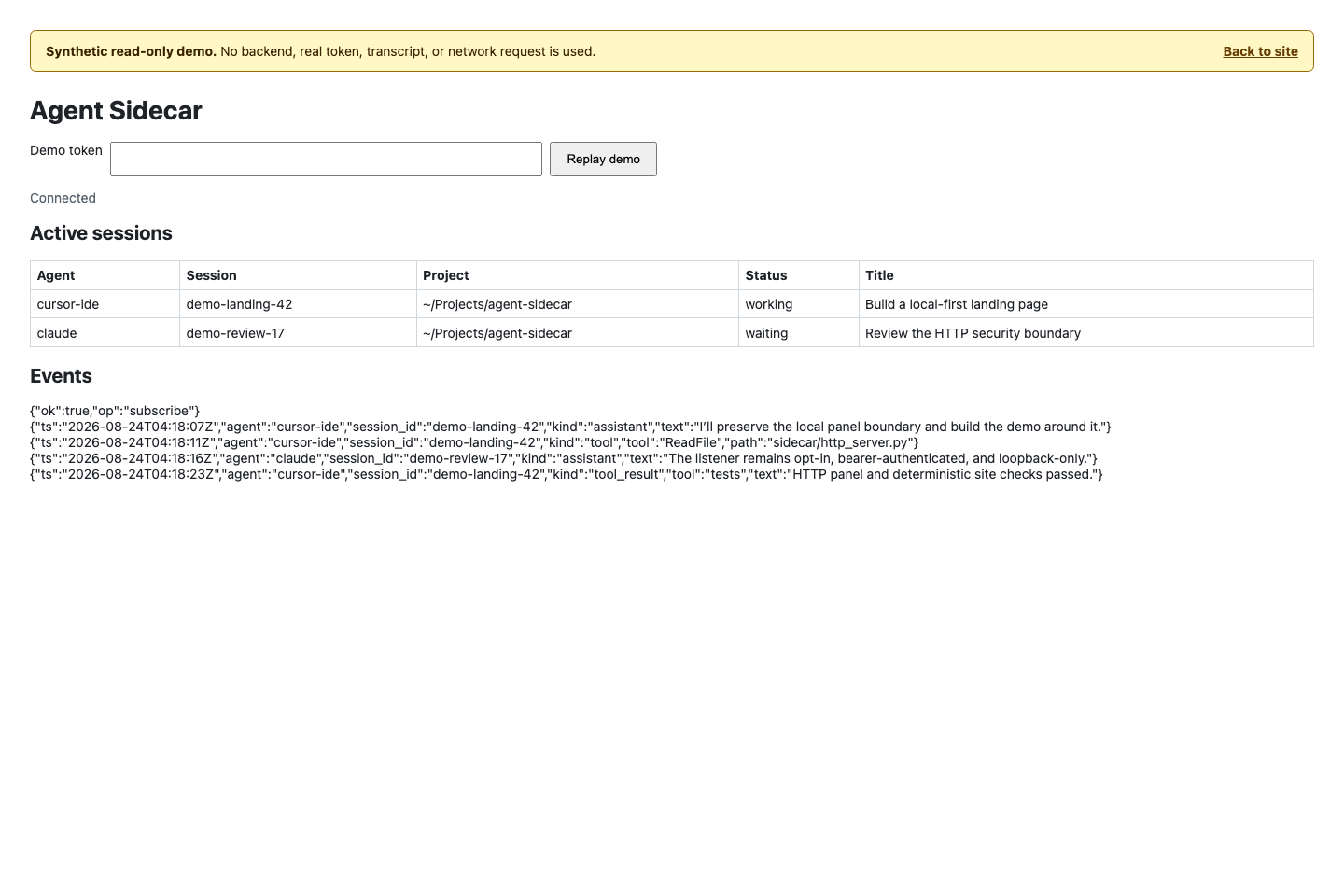
localStorage, or other browser storage. Open the URL reported by daemon start or daemon status, then paste the token from the reported private file
into the panel. The panel keeps it only in page memory, clears the form field,
does not persist it, and retains at most 200 displayed events. Do not put the
token in command arguments or examples where shell history or process listings
could expose it.
The unauthenticated surface is the panel shell at / and the minimal
GET /api/v1/health response. GET /api/v1/status and the newline-delimited
JSON stream at GET /api/v1/events require the token as a bearer authorization
header. The adapter has no send, audit-reset, daemon-control, or other mutation
endpoint and sends no CORS allow headers. Every request requires the exact
numeric-loopback Host; a supplied Origin must match that same origin.
Request sizes and deadlines are bounded, with at most 16 HTTP clients and four
event streams.
Agent skill integration
The installed Cursor, Claude, and dsh skill links expose the same
skills/agent-sidecar bundle. The skill instructs agents to query
agent-sidecar status --json first for local observation, use remote monitoring
only on request, never hide remote watch failures or gap warnings, never
auto-retry a remote watch, and start or stop the daemon only when requested.
It may read service status when useful, but may install, force-replace, or
uninstall the LaunchAgent only in response to an explicit user request.
HTTP is started only on an explicit HTTP request; the skill reports its URL and
token-file path but never reads, echoes, or sends the token into chat. Existing
observation commands continue to use the Unix daemon by default. The skill may
run send only for an explicit same-turn request containing the exact message
or action; that request supplies the permission represented by --allow-write,
so no second confirmation is required. It never infers send consent from
monitoring, never retries an unknown delivery or pending request, and never
invokes audit reset automatically.
DSH plugin
The plugin/ directory ships @shendeguize/dsh-agent-sidecar, a native DSH
plugin that brings Agent Sidecar into the dsh web interface: a cross-agent
monitoring board, session-detail timelines with dsh lineage and search, opt-in
message injection into observed sessions, opt-in AI bypass analysis, and an
embedded agent-sidecar skill provider. The plugin consumes the sidecar daemon
over its Unix socket and manages the daemon lifecycle with a
probe-adopt-else-host strategy; it never installs the sidecar CLI itself.
Its first-class Agent Center uses DSH's official shell.overlay registry and
host Modal. The main-sidebar entry, footer widget, and /sidecar Agent Center
action share an observable navigation store, so the large center opens from
blank conversations and narrow layouts as well; the conversation Sidecar
tab remains a second entry. This wiring is implemented and covered by
automated tests. Real dsh_web browser acceptance also passed for light, dark,
and responsive layouts; the shared shell overlay from the sidebar and footer;
nested focus trapping and restoration; accessible contrast; lower-dialog
inert plus aria-hidden isolation with exact host-attribute restoration;
and clean operation without console or network errors. Modal isolation owns
only the attributes it wrote, drains queued lifecycle records during HMR
handoff, and handles a nested remove-then-reinsert race without restoring a
stale opener; closing the reinserted layer restores its exact current opener.
The session board adds an agent-type selector to the existing status,
time-window, and dead-session filters. Before its first snapshot it shows
localized loading copy and exposes aria-busy; an initial failure ends that
busy state and remains retryable, while failures after a successful snapshot
keep the stale cards visible with honest degraded or refresh-failure feedback.
Opening detail from either the board or project view moves focus into the detail controls and remembers the source by its agent/session pair. Back navigation restores that view's clamped scroll offset and focuses the exact source card or row; if it disappeared or was filtered out, focus falls back to the source heading. A detail-internal jump to another session intentionally uses the same heading fallback on return instead of focusing the original session.
Timeline pages use one canonical merge contract across live DSH events,
late-bound sessionQuery, sidecar replay, and the bounded event buffer.
Sequence-bearing entries deduplicate by sequence, kind, and text so multiple
blocks from one native sequence remain visible; sequence-less entries use
timestamp, kind, and text. Same-sequence sibling groups are never split across
a page boundary, and overlapping pages converge without duplicating an entry
that later gains normalized text. The response reports each source through
content-free sourceOutcomes plus degraded and reason. A partial source
failure keeps available entries visible with a warning; when all usable
sources fail, the UI says that no new events were loaded and offers refresh
instead of presenting an empty result as authoritative.
Detail metadata, pagination, newest-window refreshes, and listen refetches use separate request generations. A newer refresh supersedes older timeline work, late responses cannot roll back metadata, events, health, or cursors, and a listen update does not reset the older-history cursor. Optional DSH query services are resolved again on each use, so a service mounted after the plugin can become available without remounting the browser surface.
Injection has two independent gates: the global inject.enabled switch and a
host-derived verdict for the selected session. Unsupported agents are disabled
with an accessible localized reason. External delivery is limited to local,
top-level claude, codex, cursor-cli, and kimi sessions in waiting or
idle; external working sessions, child/sidechain sessions, and all remote,
dead, or malformed targets are rejected. Kimi uses the protected one-shot ACP
resume described above, not DSH queue/steer, and its completed result remains
delivery unknown. Local DSH working sessions support the in-process steer
path, while DSH waiting/idle sessions proceed through DSH live/cold
preflight. Turning on the global switch never overrides an ineligible
per-session verdict.
DSH injection has distinct live and cold paths. An already-loaded Agent keeps
its existing route and preset and receives the in-process queue/steer message
without cold-resume checks. If the session is not loaded, the plugin resumes it
with the host's current default provider and model. Persisted waiting,
idle, or cold/no-status sessions need no session preset, but the host must
resolve a complete current provider/model pair. Otherwise inject.prepare
returns HTTP 409
dsh_model_unconfigured without issuing a confirm token.
The current safety policy does not support preset-bearing cold resume. A
persisted effective preset, or an available host agentPresets service that
would apply an implicit default, makes inject.prepare return HTTP 409
dsh_preset_unsupported without a confirm token. If a stale board row names a
session that authoritative persistence now proves missing, prepare returns
HTTP 404 target_not_found. If the cold services are absent, fail, reload, or
cannot prove either state, prepare returns HTTP 502 executor_error. Timeouts
and host-service/HMR generation changes also fail closed; route and preset
values are not exposed in responses or logs. These cold restrictions do not
affect injection into an already-live Agent.
For in-process DSH injection, delivered means only that the synchronous DSH
inbox accepted or queued the message. It does not prove that the model turn
started or succeeded; observe the target timeline or terminal turn for the
actual result.
The plugin is the only DSH injection surface: direct agent-sidecar send does
not support a dsh target. A preset-bearing DSH cold target remains a 409
conflict, while an inbox-accepted result still requires timeline observation.
Kimi has no live inbox or steer exception in the plugin; its protected resume
uses the external send path and never returns a delivered receipt.
The final real acceptance record is intentionally content-free: Kimi protected resume PASS, and DSH live steer plus nested-modal/UI behavior PASS. No private path, session identifier, transcript, prompt, or hash is recorded.
The plugin route guard runs on the current cleartext loopback carrier. It
requires one valid loopback Host; any valid port remains accepted. If an
Origin is supplied, there must be exactly one and it must be the matching
HTTP host/port tuple. HTTPS origins and duplicate Host or Origin fields
fail closed, including duplicates whose values are identical.
The local owner-facing UI may show a full project path because it is useful for distinguishing local workspaces. That path is sensitive evidence, not a public identifier: redact it, along with session IDs and content, before sharing screenshots, copied JSON, logs, or support artifacts.
Install it into a dsh profile; the command delegates package resolution to pnpm:
dsh plugin --profile web add @shendeguize/dsh-agent-sidecar
Every configuration key has a default, so a bare plugin row mounts with zero
configuration. To override defaults, add a config: block to the plugin's row
in the profile's cordis.patch.yml:
- id: agent-sidecar
  config:
    daemon:
      policy: adopt-only
Key configuration, summarized:
daemon.policy(defaultadopt-or-host) selects daemon lifecycle management: probe and adopt an existing daemon, otherwise host one.adopt-onlynever spawns, andoffleaves the lifecycle alone.inject.enabled(default off) is the master write gate. While off, injection affordances are hidden and write actions are refused server-side. Do not enable it on multi-user hosts; see the Security Policy.analysis.enabled(default off) gates AI bypass analysis, which consumes model tokens.analysis.providerandanalysis.modelform a pair: both blank reuse the host default, and both nonblank select an explicit route. The Settings card reports the resolved route and blocks saving a partial pair.skill.provide(default on) embeds the agent-sidecar skill through the dsh skill registry; a filesystem-installed skill of the same name automatically takes precedence.
The Settings card exposes the live inject, analysis, and UI groups for staged
editing. Daemon lifecycle, sidecar invocation, and stream cadence are
read-only there: change those values in the profile plugin row's
cordis.patch config block and restart DSH.
The browser UI follows the host's DSH --dsw-* tokens and Skin Center by
default. Skins and plugins can customize it through stable
data-dsh-plugin="agent-sidecar" / data-dsh-part anchors and the documented
--agsc-* variables; generated class names are internal implementation
details. See the plugin manual's theming contract
for the public parts, variables, defaults, and a minimal override.
The full configuration table, daemon supervision semantics, guard details, and development workflow live in the plugin manual.
Development
Install the development-only tools and run the canonical local quality gate from the repository root:
python3 -m pip install -e '.[dev]'
ruff check .
python3 -m unittest tests.test_governance -v
python3 scripts/check.py
scripts/check.py runs Ruff, the complete standard-library test suite,
coverage policy, deterministic package smoke tests, CLI checks, and skill
checks in the same stable order used by CI. See Contributing
for branch, pull-request, review, changelog, and release governance.
Release and version checklist
- Set the intended version in
sidecar/__init__.pyand update documentation references that describe the current release; retain explicitly historical references. - Run
python3 scripts/check.pyand all release-specific checks. - Build
dist/agent-sidecar.pyztwice from the same source and verify the reported SHA-256 values match. - Smoke-test both executable and
python3 -Izipapp invocation from a directory outside the checkout, and verify a wheel exposes theagent-sidecarconsole script with noRequires-Distmetadata. - Follow the authoritative
release procedure: release from a
CI-green
maincommit, fast-forward thereleasebranch for a final release, create one immutablev<version>tag, and let the guarded GitHub workflow verify and publish the zipapp, checksums, and provenance. PyPI publication is not currently claimed by this documentation.
Security and reporting
Read the Security Policy for supported security versions, trust boundaries, safe diagnostic handling, and the private vulnerability-reporting channel. Do not disclose suspected vulnerabilities in a public issue.
For non-security defects and feature requests, use the repository's issue forms. Before sharing logs, JSON output, screenshots, transcripts, databases, or runtime files, follow the sanitization requirements in the Security Policy.
Current scope and deferred work
Version 0.11.4 provides local observation for the supported sources, Cursor CLI
event watching, remote list/status snapshots, concurrent local and remote
watch --all --remote, and experimental local send for Claude, Codex, Cursor
CLI, Copilot, and exact Kimi Code 0.38.0/0.39.1 protected ACP paths. It packages the CLI for
pipx and deterministic zipapp use, and adds explicit macOS LaunchAgent and
Linux systemd user-service management plus private rotating daemon diagnostics.
scripts/copilot_compat.py provides a no-credential compatibility smoke for the
Copilot resume flags. Remote prefix watch and
remote send remain unsupported. send does not support dsh sessions, whose
injection is available only through the dsh plugin; Cursor IDE send remains
unsupported. The opt-in HTTP panel and read-only API remain
numeric-IPv4-loopback-only and do not extend remote monitoring or provide a
control plane.
FAQ
Is Agent Sidecar published on PyPI?
No publication is claimed. Use pipx with a checkout or Git URL, or download a
verified executable zipapp from the
GitHub Releases page.
Do not assume that an unqualified package from PyPI is this project.
Can I use Agent Sidecar on Linux or Windows?
Linux supports the portable, read-oriented paths described in the
support matrix, with CI coverage and explicit exclusions
for the macOS LaunchAgent and experimental send. Windows is currently
unsupported because required POSIX security and daemon primitives are absent.
Why can a completed session still appear working?
Status is inferred from persisted evidence rather than a native control-plane
signal. Some tools flush state lazily, so a completed turn—especially in Cursor
IDE—can remain working for several minutes before becoming waiting.
Can Agent Sidecar control remote sessions?
No. Remote list, status, and watch --all --remote are observation-only.
Remote prefix watch and remote message delivery are unsupported. Experimental
send is local-only, limited to eligible sources, explicitly gated by
--allow-write, and available only where its containment contract is
supported. Archiving is per host as well: run
archive/unarchive over ssh on the host that owns
the sessions.
Where does Agent Sidecar store its own state?
The default runtime directory is ~/.agent_sidecar. It can contain the Unix
socket, PID file, bounded diagnostics, HTTP token and transient port record,
the archive.json registry of archived sessions,
and, only after mutating send operations, private audit state. See
Uninstall before removing anything; normal uninstall deliberately
retains security-relevant history.
License
Agent Sidecar is released under the MIT License.
Plugins associés
dsh-web-ui (dsh-chat-recovery)
zhu1090093659/dsh-web-ui
billion-context
ranxianglei/billion-context
dsh-synapse
liangmianya/dsh-synapse
dsh-chat-import
nwflower/dsh-chat-import