eventmem (dsh)
wackyju2-beep/eventmem/adapters/dsh
Local-first event memory for DSH: recall injection, seven memory tools and a native console. Install the eventmem daemon separately; SSH sharing is opt-in and no private host is a default.
Installer
dsh plugin --profile web add github:wackyju2-beep/eventmemCe plugin se trouve dans le sous-répertoire adapters/dsh du dépôt.
README
eventmem


English · 中文
Memory that remembers what changed.
A persistent, change-aware memory layer shared across AI agents. With the included DeepSeek Harness (DSH) and Hermes adapters, one agent can record a project's decisions and results for another to recall—without sharing their conversation histories. Both must be configured to use the same eventmem database.
- Share work across agents: record a result in DSH and retrieve it in Hermes, or the other way around.
- Track changing facts: keep earlier events and record when a newer event changes or negates them.
- Inspect and correct: explore events and relations in a graph, inspect decisions and make manual corrections.
Why eventmem?
A fact changes. Instead of leaving two competing chunks for an agent to interpret, eventmem can link a newer event to an older one:
[11-05] decision  The mini PC uses a 256 GB SSD as its system disk.
 [11-06] change    The mini PC switched to a 2 TB NVMe system disk. → changes the decision above
When recall finds the old event and the relation exists, it can mark that event as superseded and surface the newer one. Relations may be missed or wrong; see Limitations.
Work moves between agents. For example, DSH records a deployment result in the shared project; later, a Hermes session searching for that project can retrieve it. This is shared memory, not shared conversation context. Recall depends on what was actually recorded and on the query; it does not guarantee that every relevant event will be returned.
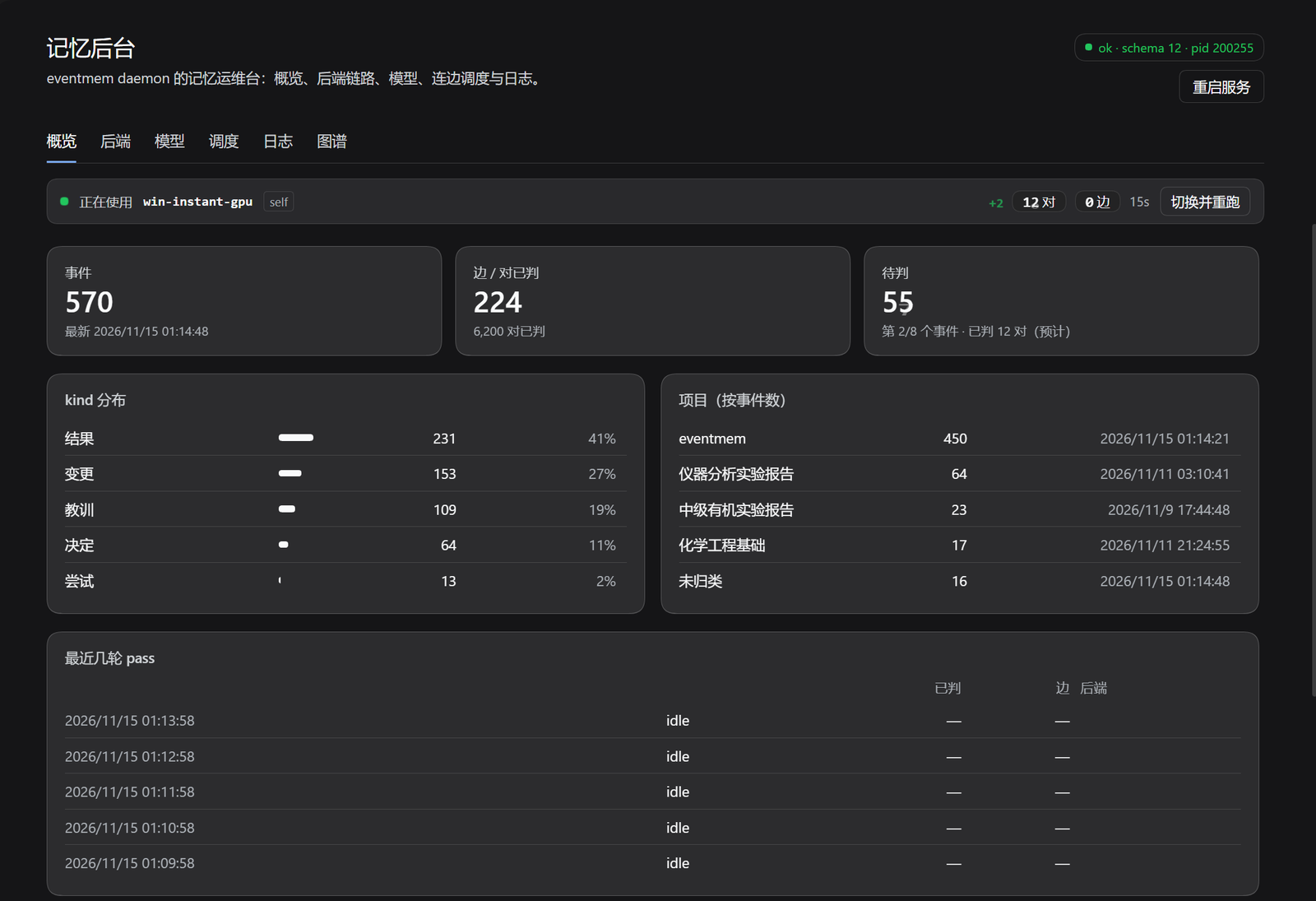
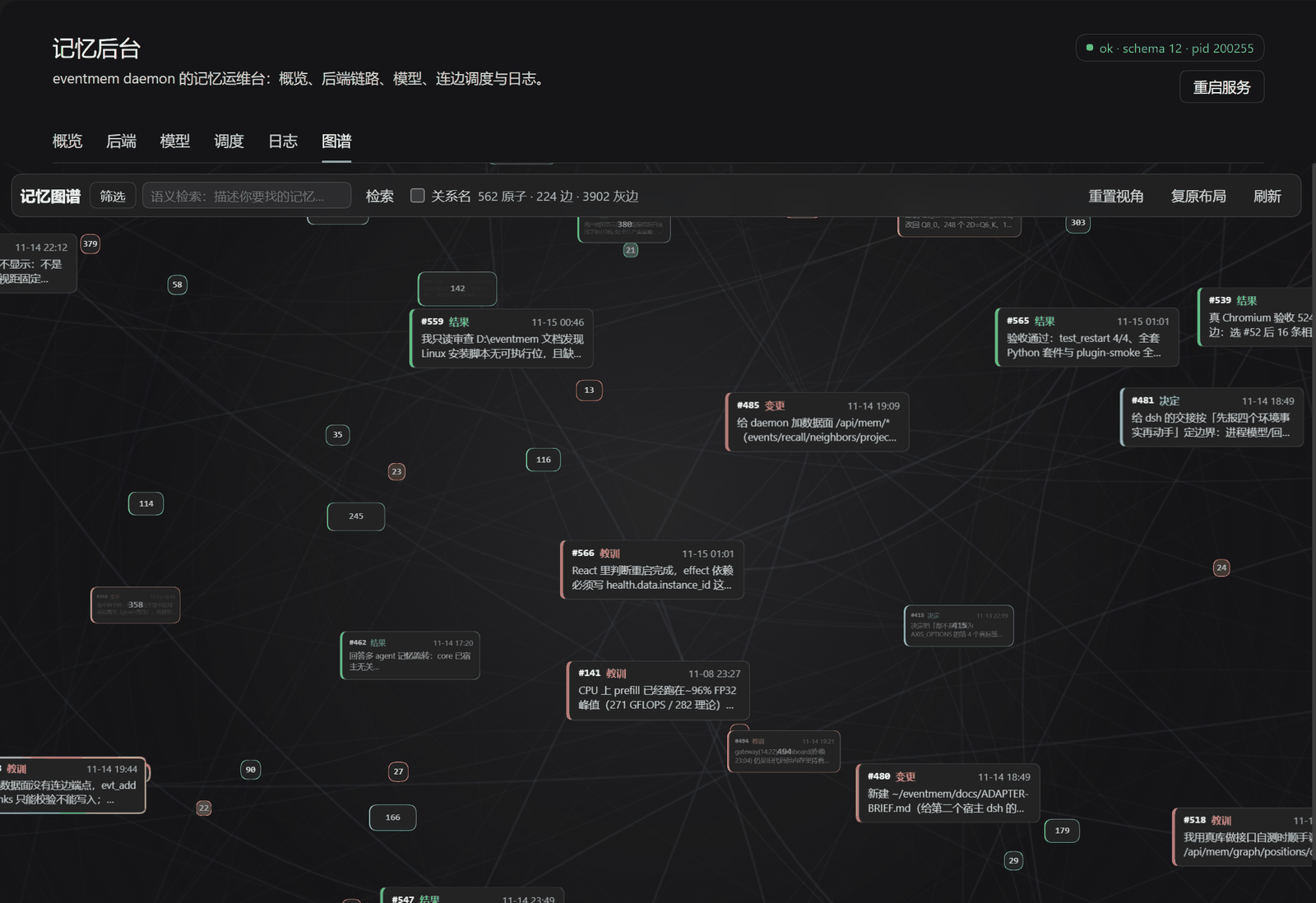
The examples above illustrate intended behavior, not a recorded end-to-end demo. The two screenshots below come from the same local database: the memory console overview, and the graph view of that data. The figures are only a snapshot.
Quick start
What is required?
| Capability | Requirements |
| Event storage and literal recall | Python 3.11+, SQLite with FTS5 and its trigram tokenizer, and an adapter; no relation judge required |
| Semantic recall | Optional vector dependencies and an embedding model |
| Automatic relations | A running daemon and a configured decision backend; a local CPU backend is possible |
| Shared memory and graph | Adapters configured for the same database, plus the daemon/console; cross-machine access uses its HTTP API over SSH |
The host model may be local or remote and is used by the adapter for turn-end extraction. A remote decision backend may also need credentials. Neither GPU nor a judge is required for basic storage and literal recall.
Windows + DSH
git clone https://github.com/wackyju2-beep/eventmem.git D:\eventmem
cd D:\eventmem
.\install.cmd
The installer creates a virtual environment, installs core and the optional vector runtime, starts a local daemon and sets up login autostart. If Python is missing it may install Python 3.12 using winget. Use -NoPythonInstall, -NoVector, or -NoAutostart with install.cmd to opt out of those steps. Data defaults to %USERPROFILE%\.hermes\eventmem (or %HERMES_HOME%\eventmem).
In DSH, open Plugins → Add plugin and select D:\eventmem\adapters\dsh. The adapter can use the local daemon at http://127.0.0.1:9123; its guide covers remote SSH and configuration. Open the memory console to configure an optional relation backend or download a model. For semantic recall, put the Qwen3-Embedding-0.6B ONNX files tokenizer.json and model_int8.onnx in <HERMES_HOME>\eventmem\models\ (default %USERPROFILE%\.hermes\eventmem\models\); installing the vector runtime alone is not enough.
Self-check from the repository directory:
~\.hermes\eventmem\venv\Scripts\python.exe tools\selfcheck.py
Adjust the path if HERMES_HOME is set.
Linux + Hermes
With Hermes installed, clone the repository and link the adapter:
git clone https://github.com/wackyju2-beep/eventmem.git ~/eventmem
cd ~/eventmem && bash ./install.sh
In Hermes' ~/.hermes/config.yaml, select the provider:
memory:
  provider: 'eventmem'
plugins:
  entries:
    eventmem:
      settings: {}
Restart the relevant Hermes host processes and start a new session. install.sh only creates symlinks; it does not start a daemon. To run the daemon in the foreground for the default database, using the Python environment in which Hermes is installed:
~/.hermes/hermes-agent/.venv/bin/python ~/eventmem/adapters/hermes/run.py daemon --db "$HOME/.hermes/eventmem/events.db"
Adjust the Python and database paths for your installation and HERMES_HOME. In another terminal check curl http://127.0.0.1:9123/api/health. For the Hermes graph/console, enable both eventmem-graph and eventmem-gui under plugins.enabled; install.sh prints further setup steps. Run the daemon under a service manager if you need it to survive logout. The optional judge and embedding setup are described in backends and settings.
To share with DSH on another machine, start the daemon on the Hermes machine with the same database Hermes uses. In DSH open 记忆后台 → 连接, choose 远程记忆, and set the SSH alias there (or configure mode: remote and tunnelHost through the adapter guide); use a working passwordless SSH alias for that machine. The default DSH configuration is local and will not open a tunnel. If the Windows installer already started a local daemon on port 9123, the default local mode adopts it; the adapter also verifies the daemon's service id, API version, and (when configured) database id, so a different service on the port is rejected. You can carefully inspect matching processes and autostart entries before running .\install.cmd -Uninstall from the repository. That command force-stops Python processes whose command lines contain run.py, daemon and the configured database path, including other same-database services; it removes the fixed eventmem-daemon scheduled task and startup shortcut but keeps the database. Alternatively choose an unused local port and set both baseUrl (for example http://127.0.0.1:9124) and tunnelLocalPort (9124), leaving tunnelRemotePort at the remote daemon's port. See the DSH guide for the connection settings. Do not put SQLite/WAL on a network share.
Try the handoff: ask DSH to record a distinctive result under a project, then ask a new Hermes session to recall that result. Use expand on the returned event to check its source and project. Try the reverse direction too. These are suggested verification steps, not a claim that this walkthrough was recorded or tested in your setup; recall depends on what was written and the query.
How it works
- Record: the agent writes an event, or the adapter asks the host's auxiliary model to extract events at turn end. Commands, logs and other long material can be stored as artifacts.
- Relate: an optional background worker selects candidate pairs and asks a configured decision backend; accepted relations are stored for later inspection.
- Recall: literal search, and semantic search if configured, find relevant events. Stored correction relations and nearby context can be included in the result.
Events have five kinds: decision, attempt, result, change and lesson. Relations describe change, negate, repeat, because and refine. Stored kind and relation names are Chinese. Projects group memories;mem_recall,mem_neighborsandexpandhelp an agent retrieve events, follow their history and inspect artifacts. Events and relations can also be corrected in the graph.
Architecture
 Hermes adapter ──────┐
                       ├── eventmem Core ── Shared SQLite memory
  DSH adapter ─ daemon ┘    storage · recall   events · projects · relations
                            relation judging
The Hermes adapter calls core locally; the DSH adapter talks to the daemon's HTTP data plane. The adapters integrate with their hosts and call the host model for extraction—core is not a general-purpose extraction model. Agent/session labels preserve the source of new writes. Other hosts need their own adapter or API integration; they are not supported automatically.
Use one daemon per database. The API and management console default to loopback and can require a bearer token (--token or --token-file); when a token is set, every route except the minimal health probe needs it, and a non-loopback bind without a token is refused at startup. A POST that carries a foreign Origin is rejected, so a page on another site cannot write to the daemon, while the console and host proxies — server-to-server, no origin — are unaffected. Without a token, any local process that can reach the port is trusted, so enable one on shared machines and do not expose the daemon to an untrusted network. See architecture and data-plane API.
Documentation
- Architecture and data flow · Relations and edge building
- Decision backends and model setup · Settings · API
- DSH adapter, console and SSH · Backend examples
Limitations and design choices - eventmem focuses on changing facts, project history and explicit event relationships. For a static document collection, ordinary RAG may be simpler.
- Automatic judgments are fallible. The conservative policy prefers omitting an uncertain edge to permanently recording an unsupported relation; fewer edges alone do not prove higher accuracy. Human-labelled evaluation is needed to measure both false positives and missed relations. Ordinary search can still find events without an edge, but may not identify their relationship.
- Existing chunks from another memory system are not automatically migrated. The agent can choose the wrong existing project; inspect and correct important entries.
- DSH's
evt_addvalidates supplied links but currently skips writing them; automatic linking happens separately and may not recreate them. See the adapter guide. - This is a personal project, not a hosted service. Schema and interfaces may change; graph labels and stored event/relation names are Chinese.
Motivation
I built eventmem for my own agent on a mini PC without a GPU. Chunked recall kept returning paragraphs in which some facts had already been replaced, without saying which ones. The agent had to guess, and sometimes repeated an old number as current. I wanted the change itself to be data: a relation that could be traced and corrected, rather than rediscovered on every recall.
Development and license
The CI workflow runs the Python scripts undertests/test_*.pywith Python 3.11 and 3.12, the DSH adapter's Node contract/host tests on Ubuntu and Windows, and the installer contract on Windows;python benchmarks/run.pyis the reproducible ruler for literal recall ranking plus a lexical relation baseline (not a model-accuracy claim — see benchmarks/README.md). See the workflow for dependencies and the current commands. Test results and model timings depend on the revision and environment.
MIT; see LICENSE. Third-party model weights are not distributed here and have their own licenses.