dsh-programming-mode
ziduup/dsh-programming-mode
Ensemble prédéfini d'agent en mode de programmation : l'agent de codage standard avec son personnage exigeant la discipline des super pouvoirs (compétences d'abord, brainstorming avant la construction, plans avant le code, TDD, débogage systématique, vérification avant l'achèvement) plus une discipline de volume de code Ponytail toujours active (échelle de code minimale à 7 échelons, complète par défaut) ; expédie les vingt compétences regroupées (14 super pouvoirs + 6 queues de cheval) et injecte mécaniquement la compétence complète d'utilisation des super pouvoirs dans la première demande de chaque nouvelle session.
Installer
dsh plugin --profile web add github:ziduup/dsh-programming-modeREADME
dsh-programming-mode



English · 中文
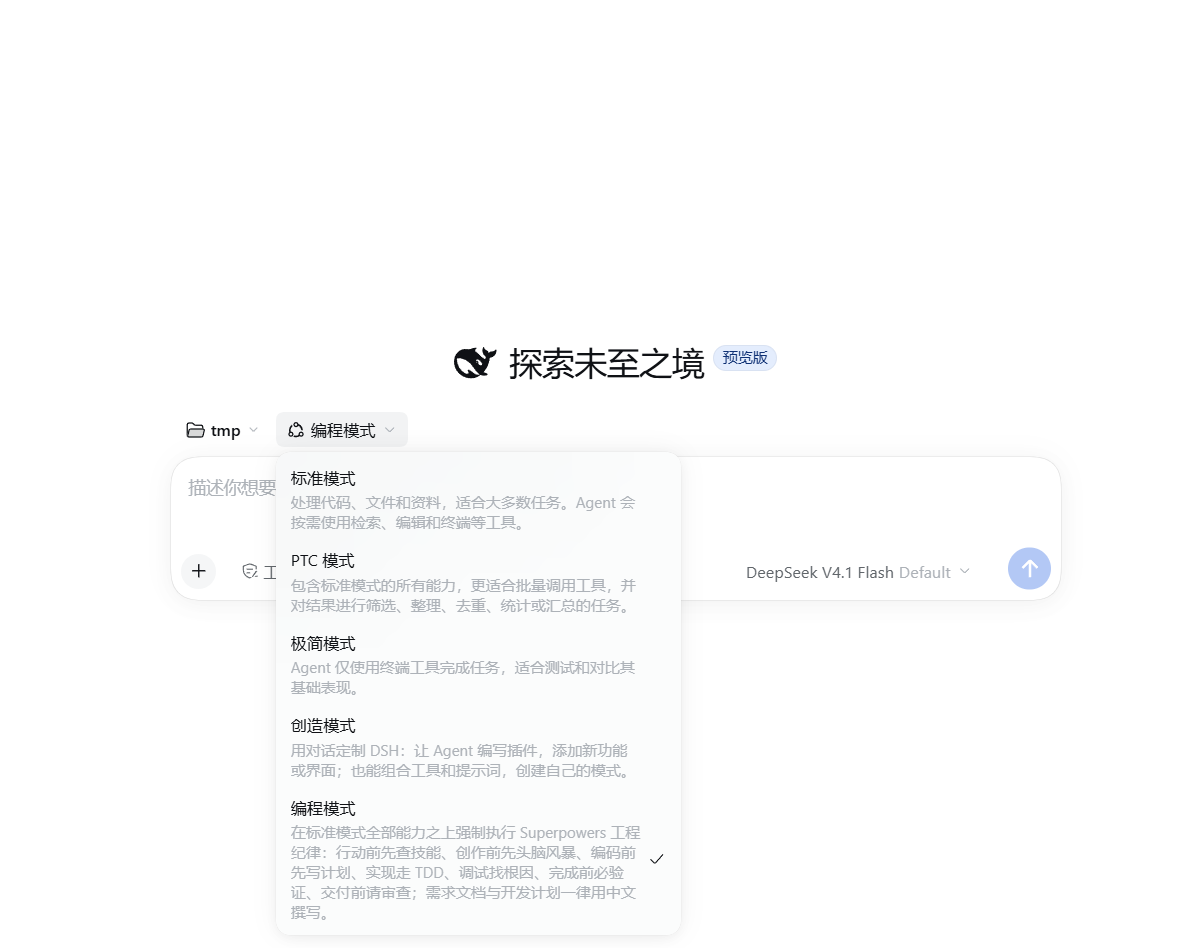
编程模式:一个 DeepSeek Harness 组合包(bundle),在标准模式的全部能力之上强制执行 Superpowers 工程纪律。一条命令即可安装。
0.4.0 起支持 dsh 0.2.0 桌面版(0.3.8 及更早只支持 0.1.x CLI / web profile);同一个包、同一份组合,安装器按宿主模型自动选通道。
目录
这是什么
编程模式 = 部署自带 standard 模式的全部能力 + 强制 Superpowers 工程纪律的人设:
- 行动前先查技能(using-superpowers)
- 创作前先头脑风暴(brainstorming),设计批准后才实现
- 多步任务先写计划(writing-plans → executing-plans)
- 实现走 TDD 红绿重构(test-driven-development)
- 调试先找根因(systematic-debugging)
- 完成前必须跑验证(verification-before-completion)
- 重要工作请求代码审查(requesting / receiving-code-review)
- 需求文档与开发计划一律用中文撰写
- 首条消息强制注入 using-superpowers:新会话的第一条请求前自动注入技能全文,纪律从第一句就生效
- 代码量纪律(Ponytail)常驻:默认 full 强度,7 级阶梯(YAGNI → 复用 → stdlib → 原生 → 已有依赖 → 一行 → 最少可用)始终生效;只管实现代码量,不触碰上面的流程规则(测试 / 计划 / 验证 / 审查归 Superpowers),用户可说 "ponytail lite/ultra" 或 "停止 ponytail" 调整
本包捆绑了全部 21 个所需技能,安装即用、无需自备技能。
技能归属:捆绑的 21 个技能中,15 个源自 Superpowers 方法论(MIT),6 个源自 Ponytail(MIT),署名声明见
preset/programming/skills/SKILLS-LICENSE.md。
安装
安装命令只有一种形态:dsh plugin --profile <profile> add <来源>。dsh 在这里是 pnpm 的转发层——它初始化 profile、在 profile 目录里跑 pnpm,再把声明了 dsh.bundle 的依赖并入 dsh.profile.bundles 层栈。没有单独的 npm install 步骤:所谓「npm 渠道」指的是包从 npm registry 解析,和 GitHub、本地 tarball 只是来源不同。包页:npmjs.com/package/@ziduup/dsh-programming-mode。
# 来源 1:npm registry(推荐,registry 通道更稳)
dsh plugin --profile web add @ziduup/dsh-programming-mode

# 来源 2:GitHub(git 直装)
dsh plugin --profile web add github:ziduup/dsh-programming-mode

# 来源 3:本地目录 / tarball
dsh plugin --profile web add ./dsh-programming-mode
dsh plugin --profile web add ./dsh-programming-mode-<版本>.tgz
dsh 0.2.0 桌面版(0.4.0 起支持):在应用内的插件市场搜索 dsh-programming-mode 安装。桌面 profile 由桌面版独占管理,CLI 会拒绝:profile "desktop" is managed exclusively by the Electron application。
手工装的话注意只做了一半:
cd ~/.dsh/profiles/web && pnpm add @ziduup/dsh-programming-mode会把包装进node_modules,但不会更新dsh.profile.bundles,模式因此不会出现——这一步调和只有dsh plugin add会做。
安装后重启该 profile,模式选择器里即出现 编程模式。dsh 0.2.0 桌面版可能需要重启两次:第一次启动只是把 preset 写成一条声明行,模式选择器要等下一次启动才读得到。
重启后仍看不到时,先分清「没登记」和「登记了但被判 broken」:0.2.0 的选择器不列激活失败的 preset,而激活失败最常见的原因是组合里的某一行解析到了 0.1.x 的旧包、被宿主按 peer 不兼容禁用——它本该提供的服务就永远缺席(例如引擎行缺失会让工作流工具一直等待下去)。0.4.0 起,声明行里的行漂移已按同版本内核的 dsh-web-app/presets/standard.patch.yml 校正(workflow-ptc、tool-ralph 禁用、tool-plugin-manager);自定义组合时请以该文件为准做同样对照。
模式能选、但一选中就报 本轮运行失败:format v4 message requires a producer-owned source kind,那是 0.3.8 及更早版本的首步注入 source 与 0.2.0 的日志格式 v4 冲突:v4 只承认「生产者自有」的 kind,而 kind: 'plugin' 这一退役形状在写入和读取两条路径上都会被硬拒。0.4.0 起改用宿主自己的 skill-invocation 形状(与 skill 工具注入 <skill_content> 时同款),v0–v4 各代校验器都放行;升到 0.4.0 后新开的会话即可正常运行,已有的旧日志不受影响。
升级行为
安装后在 profile 启动时,本包按宿主模型二选一落地 preset:
| 宿主 | 发现方式 | 落地内容 |
|---|---|---|
| dsh 0.1.x | 扫 preset 目录 | 把捆绑 preset 植入 roster 第一个用户根(默认 $DSH_HOME/.agent-presets/) |
| dsh 0.2.0+ | 读 profile patch 里的声明行 | 植入同一个目录,并在所在 profile 的 cordis.patch.yml 里写一条标记块包住的 - insert: 声明行 |
0.2.0 起宿主不再读 preset 目录(dsh-agent-preset-registry 只认 AgentPresets.register() 登记的条目),所以目录植入对桌面版不够用——这是「装完看不到编程模式」的原因。两条通道共用同一份 agent.cordis.yml(声明行的 plugins 就是它整块右移 10 空格),不存两份副本。
按宿主判断写入策略(目标目录那一侧按版本戳):
| 目标目录状态 | 行为 |
|---|---|
| 不存在 | 全新植入,写入版本戳 |
| 版本戳 == 本包版本 | 无操作(保留你的本地修改) |
| 版本戳 != 本包版本 | 覆盖文件并刷新版本戳(升级) |
| 存在但无版本戳 | 拒绝触碰(不是我们植入的,可能是你手写的同名 preset) |
声明行那一侧同样是「没有块才追加 / 同版本不动 / 不同版本只换块」,你的其他 patch 行一个字都不会被改写。声明行不引用本包名,只引用宿主自带包和我们植入的文件(file:///… 绝对定位)——这是卸载后它还能继续激活的前提。
植入副本是自包含的:本包对 preset 的唯一注入点 force-superpowers 行挂载 preset 目录内的相对模块 ./force-superpowers.mjs,不依赖本包名(也不会 import 本包),不会出现"悬空引用导致会话无法 resume"。
卸载
# dsh CLI / 0.1.x 宿主
dsh plugin --profile web remove @ziduup/dsh-programming-mode

# dsh 0.2.0 桌面版:在应用内的插件市场点卸载(桌面 profile 由桌面版独占,CLI 不能代卸)
卸载分两段,各有一个已知边界:
第一段(dsh 侧):卸载后 bundles 列表可能悬空。 dsh plugin remove(CLI 路径,0.3.8 实测)会把依赖、node_modules、lockfile 和 dsh.profile.bundles 一起清干净,启动正常;但部分卸载路径不保证清 bundles——本机实测出现过一次卸载后 bundles 条目悬空(依赖已清、列表未清),下一次启动直接报错 cannot resolve profile bundle "@ziduup/dsh-programming-mode" 且整个 profile 拒绝启动。遇到该报错,手动删掉 profile package.json 里 dsh.profile.bundles 数组的那一行即可(只删这一行)。
第二段(本插件):卸载后的自动结算。 pnpm 不执行被卸载包的任何生命周期钩子,市场也没有卸载事件,因此清理由植入的 preset 自己完成——你点卸载就够了,不需要任何手动收尾。触发时机按宿主持久化通道而不同:
- dsh 0.2.0+:声明行在 profile patch 里,随每次启动激活,所以「卸载 → 重启 → 结算完成」,不需要再开会话。
- dsh 0.1.x:preset 是按会话懒挂载的,只有模式选择器被打开、或 resume 旧会话时才会激活,并不是每次启动都触发。
结算分两半,各自判断:
- 声明行按 profile 判:哪个 profile 不再装本包,就清哪个 profile 的行,与别的 profile 无关(0.3.8 及更早只看全局,导致「从 A 卸载了,但 B 还装着,于是 A 里的模式照样完整可用」)。
- 植入目录按全局判:目录是同一个
$DSH_HOME下所有 profile 共享的,只有没有任何 profile 再装本包时才动它。
清成什么样,由会话历史决定:会话会永久记录它运行时所属的 preset(日志里的 agentPreset),而 host 对「preset 不存在」的会话 resume 直接报错、无回退。所以卸载结算会扫一遍 <DSH_HOME>/sessions 下的会话日志(流式解压、命中即停):
- 没有任何会话用过编程模式 → 行和目录一起删除,选择器里彻底消失,不留墓碑;
- 有会话用过 → 保留墓碑:0.2.0 上的声明行换成宿主自带标准模式的组合、0.1.x 上的植入目录同样替换为 standard 组合,元数据改名为「编程模式(已卸载)」。那些历史会话照常可打开(以标准模式行为运行),选择器里多一个诚实标注的条目(dsh 的 preset 元数据目前没有「从选择器隐藏」的字段,该条目无法不显示)。
重装本包后,installer 检测到墓碑标记会自动重种完整模式。若想立刻结算、不等下一次启动(脚本会删目录并摘掉各 profile 里的声明行,只摘我们的标记块,你的其他 patch 行不动):
node ~/.dsh/.agent-presets/programming/uninstall.mjs            # 自动扫每个 profile 的 patch
node ~/.dsh/.agent-presets/programming/uninstall.mjs --patch C:/Users/<你>/.dsh/profiles/desktop/cordis.patch.yml
只在单一 profile 里卸载(其他 profile 还装着)时,不会动共享目录,也不会碰其他 profile——它们还在用完整模式。0.2.0 桌面 profile 被某个会话占用时,dsh plugin remove 可能被 bundle-in-use 挡下,先关掉用编程模式的会话再卸。
安全与信任
- agent preset 与 shell 访问权限同级:安装本 preset 即表示信任它引用的全部插件行。
- 若从 GitHub 安装,pnpm 会要求你在
pnpm-workspace.yaml中allowBuilds授权构建脚本——这等于允许包代码在安装时于本机执行;建议锁定 commit(github:ziduup/dsh-programming-mode#<sha>)。从 npm 或 tarball 安装的是预构建产物,无此门槛。
自行构建
pnpm pack # 产出 tarball,可用 dsh plugin add ./dsh-programming-mode-<版本>.tgz 安装
作者与许可
子都(ziduup)· 仓库:ziduup/dsh-programming-mode · MIT
Plugins associés
webnovel-writer
lingfengqaq/webnovel-writer
loopx (dsh-loopx-plugin)
loopx-project/loopx
ouroboros (dsh-plugin)
q00/ouroboros
loopx (dsh-loopx-plugin)
huangruiteng/loopx