dsh-depth-tool-gate
ddl095/dsh-depth-tool-gate
Tool-surface governance for DeepSeek Harness: six scope-separated deny lists cut each agent's tool visibility through the host tools.restrict() API, unseen tool names wait in a pending gate, and dispatch_composed assembles a minimal surface from capability tags — a tasks array runs subagents in parallel, and a continued subagent keeps its original surface. Every decision goes to an append-only ledger that rotates into dated archives without ever losing history.
Installazione
dsh plugin --profile web add github:ddl095/dsh-depth-tool-gateREADME
🚧 dsh-depth-tool-gate
Tool-surface governance for DeepSeek Harness — cut every subagent's tools down to what its job needs, and its prompt down to what it must read.


English · 中文说明
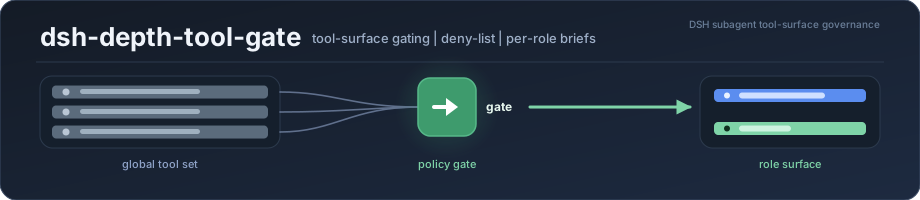
dsh-depth-tool-gate is a governance plugin for DeepSeek Harness (DSH). It controls which tools each agent can see and how much instruction text each agent carries — at the host level, where it cannot be talked out of.
A DSH subagent inherits the main session's entire tool catalog and the full global instruction set, whether it needs them or not. A "read these three papers" worker ends up holding image-generation, plugin-management, system-restart and scheduling tools it will never use — each one carrying a schema that is re-sent on every turn. dsh-depth-tool-gate cuts that down by policy, records what it did, and lets you audit the result.
Quick start — DSH ≥ 0.2.2-rc.1, Node ≥ 24.9.0. In your DSH profile directory (
~/.dsh/profiles/web):npm i dsh-depth-tool-gate, then append"dsh-depth-tool-gate"to thedsh.profile.bundlesarray in that profile'spackage.json, restart DSH, and open Settings → Subagent Tool Surface. Full steps and prerequisites: Install.
Current version v0.13.2 · 中文说明见 README.zh.md · 中文文档 docs/*.md
The problem, concretely
| Without a gate | With dsh-depth-tool-gate | |
|---|---|---|
| Tool catalog | Every subagent inherits the host's full global tool set — measured at 90 tools ≈ 33k tokens of schemas, re-sent every turn (measured on DSH 0.2.2-rc.1) | Each agent sees only what its role needs — the reader capability tag resolves to 8 tools, i.e. ≈29k tokens less per turn |
| New tools appearing | A DSH upgrade or a newly installed plugin silently widens every subagent's surface | New tool names are held in a pending gate and blocked until you rule on them |
| Prompt budget | Subagents inherit the full global instruction file (tens of KB) plus injected sections about tools they do not have | Per-role briefs replace the bulk of it (1.8–3.4 KB in the shipped presets), and sections about absent tools are masked out (≈4.4 KB of dead sections dropped, measured with provenance_audit) |
| Wasted capability | A subagent holds "restart the whole system" or "install software" next to "read a file" | Dangerous and irrelevant tools are denied by name, per role |
| Auditability | Whatever the tool surface is, it is invisible | Every decision is written to an append-only JSONL ledger, with a panel that replays it |
| On-demand minimalism | A task needs one narrow tool set, so it gets all of them | dispatch_composed assembles a temporary minimal surface from capability tags |
How it works
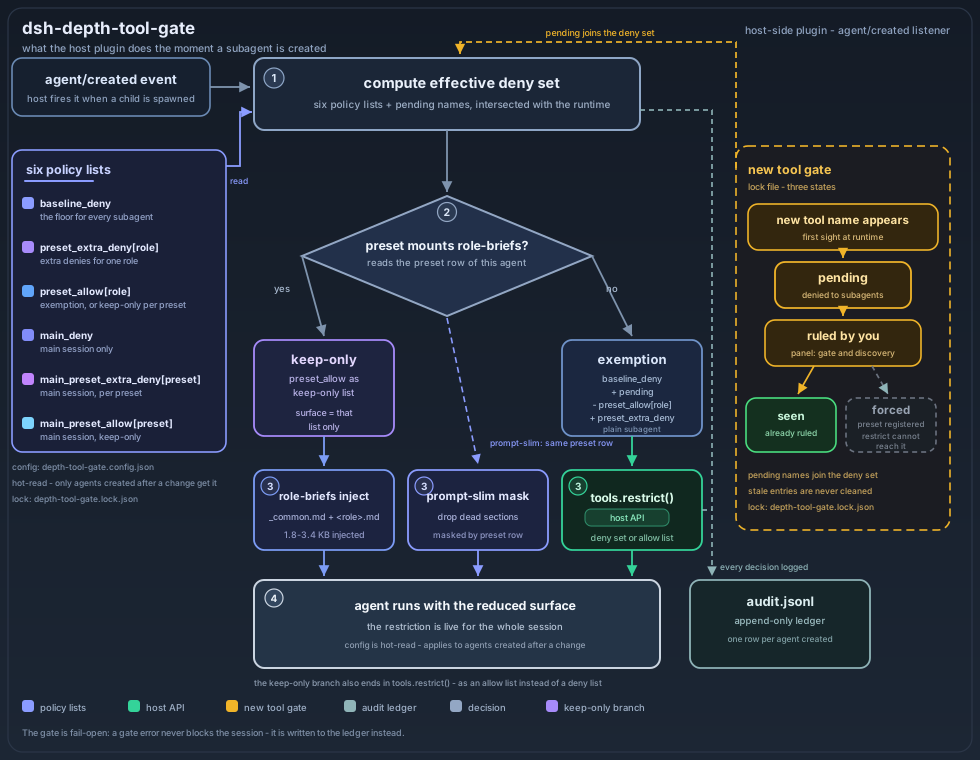
Everything happens on agent/created — the moment the host finishes creating an agent, before it starts working:
- Compute the effective deny set for that agent from the six policy lists below.
- Branch on whether the agent runs under a preset that mounts
role-briefs— that decides whetherpreset_allowbehaves as an exemption or as a keep-only list. - Apply the result through the host's
tools.restrict()API, and inject the per-role brief and the prompt masking. - Log the decision to the append-only ledger, whether or not anything was cut.
What it actually does
1. Deny-list gating (the core)
On agent/created, the plugin computes the effective deny list for that agent and applies it through the host's tools.restrict() API.
Six lists, each with its own scope. The subtle one is preset_allow, because its effect depends on which preset the agent runs under:
| List | Applies to | Meaning |
|---|---|---|
baseline_deny | all subagents (depth > 0) | the floor — tools no worker should have |
preset_extra_deny[preset] | one role | additional denies for that role |
preset_allow[preset] | one role | for a plain subagent: an exemption list — these names are removed from the deny floor, everything else still gets denied. For a preset that mounts the role-briefs module (all three bundled presets do): a keep-only list — the agent ends up with exactly these tools |
main_deny | the main session (depth 0) | tools you don't want in your own session either |
main_preset_extra_deny[preset] | a main session opened with that preset | role-specific denies layered on top of main_deny |
main_preset_allow[preset] | a main session opened with that preset | keep-only for that main session: only the listed tools stay visible |
Order of application for a plain subagent: baseline_deny ∪ pending → minus preset_allow[preset] → plus preset_extra_deny[preset].
For an agent running under a preset that mounts role-briefs, the module applies preset_allow[brief] as a keep-only restriction on top of that — so for those presets the list behaves as keep-only rather than as an exemption. This dual behaviour is deliberate (it is how a hand-opened session ends up with the same surface as a delegated one) but it means the same key means different things depending on the preset.
For a main session: if an allow-list applies it becomes keep-only (and main_deny is not layered on); otherwise main_deny ∪ main_preset_extra_deny[preset] is denied. Note that main_preset_allow falls back to the shared preset_allow[preset] key when the former is not set — and the shared key is keep-only on the main-session path too. The plugin logs a warning when that fallback happens, so you can spot it in the host log.
A PROTECTED_MAIN set (18 core tools: file access, planning, the user-interaction tools…) is not a trimming gate: naming one of them still trims it, and the plugin only warns about the consequence (a crippled session) and records it in the audit trail as blockedProtected. Tool-surface governance executes the user's choice faithfully and reports the outcome; it does not make "slip protection" decisions on the user's behalf (the user explicitly requires that every tool stay disable-able per preset). The keep-only path (main_preset_allow) trims them just the same.
Timing: configuration is hot-read, but a change applies only to agents created or resumed after it — running sessions keep the surface they were born with.
First run: the gate seeds itself from the tools already present at install time and marks them seen, so the new-tool gate does not block anything on day one (your configured deny lists still apply, of course). Only tools that appear later (a DSH upgrade, a newly installed plugin) enter pending. If the pending list is empty right after installation, that is the expected state, not a broken gate.
2. The new-tool gate (lock)
Any tool name the runtime has never seen before is recorded as pending. With autoDenyNew on (the default), pending names are denied to subagents until you rule on them.
pending  →  denied to subagents, waiting for a ruling
seen     →  already ruled (allowed or denied), stays as-is
forced   →  registered by a preset, so restrict() cannot reach it — shown greyed out
Stale entries are never cleaned up: if a plugin you disabled comes back, the gate remembers and it takes effect again.
3. Preset access control
You can forbid a preset from being used as a subagent. The child is still spawned (the block happens after creation, so a slot is briefly consumed), then restricted to a minimal reporting surface (note_search, send_message); the event is recorded in the ledger as preset-denied. This fails closed: if the restriction cannot be applied, the child gets no tools rather than all of them.
Known limitations: the block happens after the child is created, so the spawn still consumes a slot (entry-point validation is a planned improvement); and hiding is limited to the
list_agent_presetstool — the host's own preset list in the UI still shows the preset.
Note the name collision:
preset_denyis about presets, whilepreset_allow/preset_extra_denyare about tools. Putting a preset id into a tool list does not disable the preset.
4. On-demand minimal surfaces (dispatch_composed)
Instead of picking a preset, you can assemble a surface from capability tags:
dispatch_composed({
  prompt: "Extract the key findings from these papers and write them to findings.md",
  capabilities: ["literature"],       // union of tag allow-lists
  tools: ["write"],                     // extra names, merged in
  description: "literature digest ×1"
})
The child is born with only the union's tools — everything else, including tools that appear later, is invisible to it. Tag definitions live in capabilities in the config and are fully overridable. A tag whose allow-list contains dispatch_composed additionally lets the child spawn one more generation; the built-in reader-lead and literature-lead tags do. There is no -lead suffix parser — "lead" is simply a property of the tag's tool list.
Parallel dispatch. Pass tasks[] to spawn several independent children at once — each with its own prompt and its own surface, none waiting on the others:
dispatch_composed({
  tasks: [
    { prompt: "Read paper A and summarise its findings", capabilities: ["reader"], description: "paper A" },
    { prompt: "Read paper B and summarise its findings", capabilities: ["reader"], description: "paper B" },
    { prompt: "Extract every DOI from the bibliography", capabilities: ["literature"], description: "DOIs" },
  ]
})
Async by default. The call returns the children's ids immediately; each child's result arrives later as a message from the host — the same shape as the host's own subagent tool. Pass wait: true when you need the results in hand before continuing (that blocks until all of them finish).
A resumed child keeps its surface. Sending a follow-up to a child that already finished re-materialises it; the gate re-applies the same allow-list rather than falling back to the generic deny list, so the tool surface does not shift underneath a continuing conversation.
5. Per-role instruction briefs (role-briefs)
Instead of loading the whole global instruction file into every subagent, each role gets a compact brief: a shared _common.md plus a role-specific file, injected as a system-prompt section (so it can be attributed byte-precisely by provenance_audit). Budget target: ≤3 KB per child.
6. Prompt-section masking (prompt-slim)
A preset can mask named global system-prompt sections by registering same-named empty sections — the host's scoped-shadow mechanism then drops them entirely for that preset. A child that has no scheduling tools does not need the scheduling instructions.
7. The panel (7 tabs)
Settings → Subagent Tool Surface (子代理工具面):
| Tab | What it does |
|---|---|
| 📋 全局工具面 / Global tool surface | Two collapsible columns: the configured deny list and the runtime-discovered tools not yet ruled on, with a source filter, a per-tool explainer, and a batch prompt generator for bulk decisions |
| 🧭 主会话与访问 / Main session & access | Which presets may be dispatched at all; plus per-role denies for main sessions |
| 👥 子代理按角色 / Subagents by role | The final deny surface per role, and the raw list editors |
| 🧪 能力标签 / Capability tags | The tag → allow-list table used by dispatch_composed |
| 📊 调用频率 / Call frequency | Per-tool and per-preset call counts, plus the most recent 40 sessions (per-session breakdown; older sessions drop out of the list) |
| 📜 裁剪台账 / Audit ledger | One row per agent creation, plus red rows for governance events (lock corruption, config corruption, gate errors, missing briefs) |
| 🚦 闸门与发现 / Gate & discovery | Pending rulings (four actions per tool), and a per-item reason for every stale list entry |
8. Read-only diagnosis (explain_gate)
explain_gate is a tool that agents call inside a DSH session — it is not a shell command. It explains the current agent's surface and the reason for every cut, without changing anything:
[explain_gate] 可见 99/116 | 裁 17 件
  ✂ generate_image — main_deny(主会话显式名单)
  ✂ mcp__codex__codex — main_deny(主会话显式名单)
(Each line names the list responsible for the cut. The reasons are mutually exclusive per scope: a main session can report main_deny, a subagent reports baseline_deny / preset_extra_deny / preset_allow 正面清单外 / lock pending. Ask the agent in your session to run it, or call it from a tool-use turn. The counts above are illustrative; they depend on your own lists.)
Install
Step 1 — add the package to your DSH profile (run this in your DSH profile directory, e.g. ~/.dsh/profiles/web, so the dependency lands in that profile's package.json):
cd ~/.dsh/profiles/web        # your profile dir
npm i dsh-depth-tool-gate
Step 2 — register the bundle. Edit the same profile package.json: add "dsh-depth-tool-gate" to the end of the existing dsh.profile.bundles array. Keep the entries you already have — the array is replaced wholesale if you paste a shorter list over it.
{
  "dependencies": {
    "dsh-depth-tool-gate": "^0.13.2"
  },
  "dsh": {
    "profile": {
      "bundles": [
        "@deepseek-ai/dsh-base",
        "@deepseek-ai/dsh-web-app",
        "dsh-depth-tool-gate"        // ← append, don't replace the list
      ]
    }
  }
}
Step 3 — restart DSH (the host half is loaded at boot), then open Settings → Subagent Tool Surface. If that panel is missing, the bundle did not load — check that the package is installed in this profile and that the name is spelled exactly dsh-depth-tool-gate.
Step 4 — verify. Ask your agent to call explain_gate; it should report a visible count and the tools it cut, with a reason for each.
Install it with an agent (copy-paste prompt)
If you would rather let an agent do the whole thing, paste this prompt into any DSH session that has file and shell access. It installs the package into the profile, registers the bundle without overwriting the existing list, and stops before the restart so you can see what changed:
Install the DSH plugin "dsh-depth-tool-gate" for me.

Do exactly this, and nothing else:
1. Determine my active DSH profile directory (the profile whose package.json
   contains dsh.profile.bundles; do not assume ~/.dsh/profiles/web).
2. In that profile directory, run `npm i dsh-depth-tool-gate`.
3. Edit that same profile's package.json: add "dsh-depth-tool-gate" to the END
   of the existing dsh.profile.bundles array. Keep every entry that is already
   there — append, never replace the list.
4. Show me the diff of package.json and stop.

Do NOT restart DSH yourself — I will do that. Do NOT edit any other file.
After I restart, I will ask you to call explain_gate to verify.
If your agent has the plugin_manager tool, the equivalent one-liner is:
plugin_manager(action="install_bundle", target="dsh-depth-tool-gate")
Why the "append, don't replace" wording matters.
dsh.profile.bundlesis replaced wholesale if a shorter list is pasted over it — the profile then loads without@deepseek-ai/dsh-baseand the harness comes up broken. This is the single most common way a profile install goes wrong.
Requirements
- DSH ≥ 0.2.2-rc.1 — the plugin relies on four host-internal behaviours:
tools.restrict()/tools.view()exist and fail loudly on unknown names,view()takes a scope key, the "own" layer is exempt from restrictions, and restrictions compose as an intersection. It also usescreateScope()from@deepseek-ai/dsh-scope, passing only the context and key (its thirdoptionsargument is not used). - Node ≥ 24.9.0 (matches the host).
- Peer packages are provided by the host:
@deepseek-ai/dsh-scope,@deepseek-ai/dsh-typert-protocol. They are declared as optional peer dependencies, and since v0.14.0 the plugin resolves them at runtime instead of importing them statically — it asks the host for its own copy viaprofileContext.installAnchor, so the plugin and the host share one instance (two instances would givedsh-scopetwo different scope tags and silently breaktools.restrict()). Nothing to install by hand. If the host cannot be reached, the plugin refuses to pretend it governs: it logspeer-missing, marks the panel degraded with the reason, and records it in the audit ledger.
Configuration
$DSH_HOME/profiles/<profile>/depth-tool-gate.config.json — hot-read, and rewritten by the panel.
The file itself must be strict JSON (no comments, no … placeholders). The block below is annotated for reading only; the panel writes a valid file for you:
{
  "enabled": true,
  "autoDenyNew": true,                // block tool names that appear later, until ruled on
  "baseline_deny": ["tool_name"],      // the floor for all subagents
  "preset_allow": { "my-role": ["tool_name"] },        // exemption from the floor, per role
  "preset_extra_deny": { "my-role": ["tool_name"] },  // extra denies, per role
  "main_deny": ["tool_name"],         // the main session only
  "main_preset_allow": { "my-preset": ["tool_name"] },        // keep-only, main session
  "main_preset_extra_deny": { "my-preset": ["tool_name"] },  // extra denies, main session
  "preset_deny": ["some-preset"],     // this preset may not be used as a child
  "preset_supplement": ["some-preset"],  // re-attach this preset's tools to externally dispatched sessions
  "capabilities": { "my-tag": ["tool_name"] }  // tags for dispatch_composed
}
Key notes:
-
preset_supplementexists for presets whose sessions are dispatched through a channel that does not mount the preset's own rows (for example a flat peer session). For those, the preset'spreset_allowlist is re-attached as missing tools. Leave it empty unless you know you need it. -
capabilitiesreplaces the built-in tag table when it is present and non-empty (an empty object falls back to the built-in table). Built-in tags:Tag Tools Of those, MCP tools reader8 0 reader-lead9 0 ocr9 2 literature22 15 literature-lead23 15 The MCP-based tags name tools from MCP servers that only exist if you have those servers installed. Missing MCP tools are dropped from the allow-list (and counted as
droppedUnknown), while the remaining built-in tools still apply — soliteraturedegrades to its 7 non-MCP tools rather than to an empty surface. If your tool set differs, define your own tags. -
An unknown capability tag is a hard error: the dispatch is rejected with
未知能力标签: <tag>and the list of available tags. It does not silently fall back.
Companion files, all under $DSH_HOME:
| Path | Role |
|---|---|
profiles/<profile>/depth-tool-gate.config.json | policy (above) |
profiles/<profile>/depth-tool-gate.lock.json | the new-tool gate state — maintained by the plugin, do not hand-edit |
profiles/<profile>/depth-tool-gate.usage.json | call-frequency snapshot |
logs/depth-tool-gate/audit.jsonl | append-only audit ledger |
logs/depth-tool-gate/spill/composed-reply-*.md | full text of a dispatch_composed reply that exceeded the inline reply limit (64 KB) — the agent gets the path back and can read it |
node_modules/dsh-depth-tool-gate/agents-briefs/ | the role briefs the role-briefs plugin reads — _common.md plus one file per role |
The briefs live inside the installed package, next to role-briefs.mjs — not in your profile. To add your own role, drop a <role>.md file in that agents-briefs/ directory and reference it from a preset row with config: { brief: "<role>" }. Two caveats: files added there live under node_modules, so an npm upgrade replaces them — keep your own copies elsewhere and re-add them; and a brief that cannot be read is not fatal: the plugin logs a role-brief-missing event and continues, but that agent then runs with no role guidance at all — so check the ledger if a subagent seems to be missing its instructions.
Presets included in the bundle
| Preset | Purpose |
|---|---|
dtg-shell | an empty shell used as the base for dispatch_composed children (required by that feature) |
cordis-sub | a general-purpose subagent preset with a brief injected |
cordis-router | a dispatch-only main session preset: no execution tools, delegation only |
Privacy
- The call-frequency collector records tool names and counts only. Arguments and tool content are never stored.
- The audit ledger records agent ids, depths, preset names, counts and rule decisions — not what the agents said or did. It does let you reconstruct when a given preset spawned which agents, so treat it as operational metadata.
- A
dispatch_composedreply longer than 64 KB is written in full tologs/depth-tool-gate/spill/composed-reply-*.md— that file contains the subagent's actual output text. It stays on disk until you delete it. - All data stays on your machine under
$DSH_HOME: no telemetry, no network calls, no install scripts. - All timestamps are stored in UTC and displayed in your local timezone.
Documentation
| Document | What it covers |
|---|---|
| Panel guide | every tab, field by field |
| Agent FAQ | how the mechanism works, from an agent's point of view |
| Troubleshooting | silent-degradation family first: what to check, in what order |
| Audit schema | every field of the ledger and the lock file |
| Tool annotations | what each governed tool is, and why it is governed |
| Changelog | release history |
Development
The repository is the single source of truth; scripts/release-export.mjs produces the publishable snapshot (staged, assertion-checked, then swapped atomically).
node --check host.v2.mjs && node --check client.js   # syntax
node scripts/smoke-save-nopresetmap.mjs                # host regression smoke
node scripts/smoke-readme-facts.mjs                    # README-vs-code fact gate
node scripts/client-smoke.mjs                          # client-side contract smoke
node scripts/probe-save-runtime.mjs                    # save() runtime probe
node scripts/release-export.mjs                        # build + assert the release snapshot
Release notes are in versions.md. The package ships the runtime, the client half, the locale files, the bundle patch, the role briefs, the five docs/ guides listed above, the diagrams and the changelog.
Development-only assets — surgery scripts, archaeology notes, the internal release manual — live under internal/ in the repository and are not published in the npm package.
License
MIT — see LICENSE.
The plugin is an independent community project for DSH; it is not affiliated with or endorsed by DeepSeek.
Plugin correlati
archify (deepseek-harness)
tt-a1i/archify
WeKnora (dsh-weknora)
tencent/weknora
next-ai-draw-io (dsh-plugin)
dayuanjiang/next-ai-draw-io
weknora
tencent/weknora