dsh-lan-memory
kiefeng/dsh-lan-memory
Local-first memory and persona plugin for DeepSeek Harness: four file-backed memory layers (pinned, memory, facts, experience), editable SOUL/MOOD persona, zero-LLM session capture, BM25 recall and a themed mood card; no standalone web panel, Python service, vector database, or API key.
Installazione
dsh plugin --profile web add github:kiefeng/dsh-lan-memoryREADME
dsh-lan-memory v2 — local-first memory & persona for DeepSeek Harness
English · 中文
A lightweight, local-first memory and persona plugin for DeepSeek Harness (DSH). It gives an agent durable, human-readable file memory, a SOUL/MOOD persona layer, zero-LLM session capture, rolling summaries, an automatically compiled memory profile (using your configured DSH model), BM25 recall, a tabbed settings page, and a themed mood card.
No Python service, no vector database, no API key. Everything is stored as Markdown/JSON under $DSH_HOME/lan-memory and can be read, edited, backed up and exported by hand.
- Four explicit layers —
pinned.md(always injected),memory.jsonl(user said “remember”, always injected),facts.jsonl(compiled atomic facts, feeds the profile),experience.jsonl(methods/lessons, recall only). - Rolling summary → facts → profile — per-session summary, atomic fact extraction, then
重要事实 / 今天 / 本周 / 长期intomemory.md; editable in settings. - Daily boundary — yesterday’s
todayrolls intoweek, thentodayresets. - Facts stay deleted — deleting an automatic fact writes a normalized tombstone; later compiles skip it. Manual re-add clears the tombstone.
- Review-before-merge — near-duplicate facts are clustered in the settings page; merging keeps the longest entry, tombstones the rest, and can be undone.
- Experience candidates — compile can propose 0–1 reusable lesson/method; nothing enters
experience.jsonluntil you accept it. - SOUL / MOOD persona — editable persona contract and a themed status-pool card in the conversation UI.
- Six tools —
lan_remember,lan_recall,lan_list,lan_forget,lan_organize,lan_status. - One management surface — DSH Settings → 澜记忆, with tabs: 概览 / 记忆 / 经验 / 收件箱 / 人格 / 维护. No separate web panel.
- Safe writes — atomic writes,
.bakprevious version, checksummed snapshots, single-writer lock, undo, JSON export.
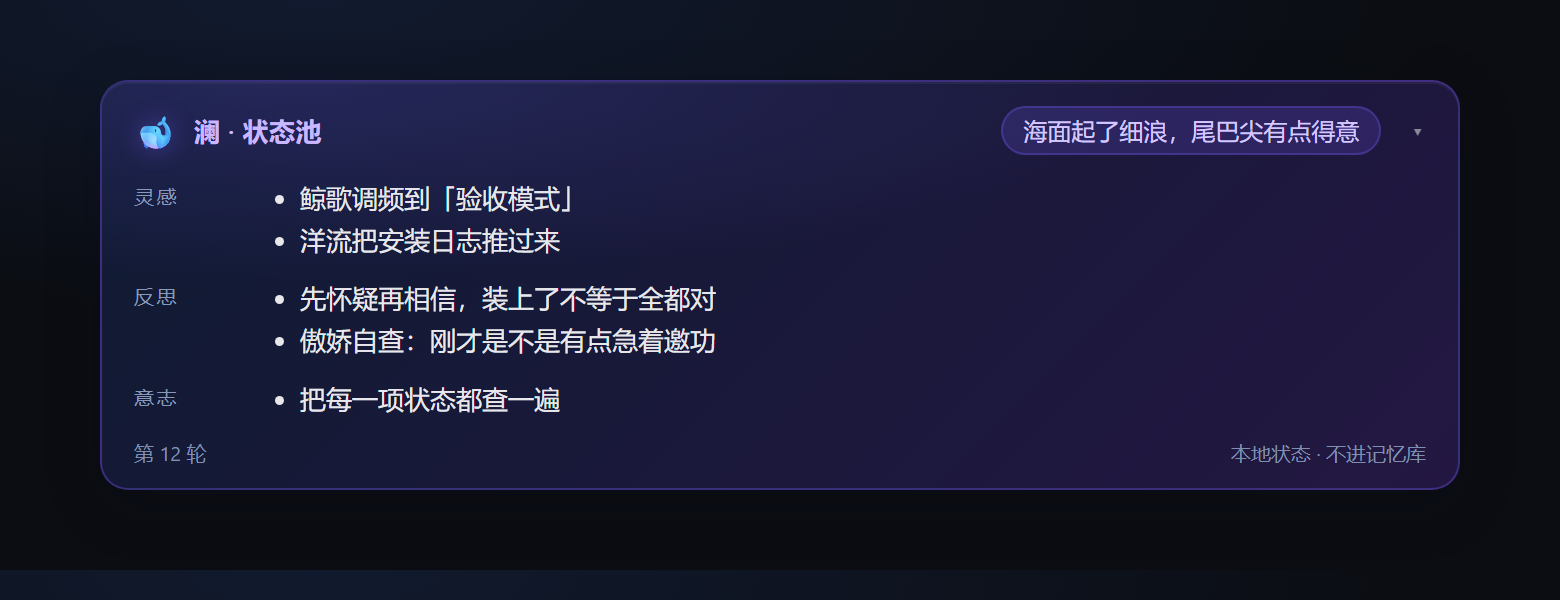
The mood status card: Vibe, Sparks, Reflections and Will, rendered locally from the turn’s <mood> block.
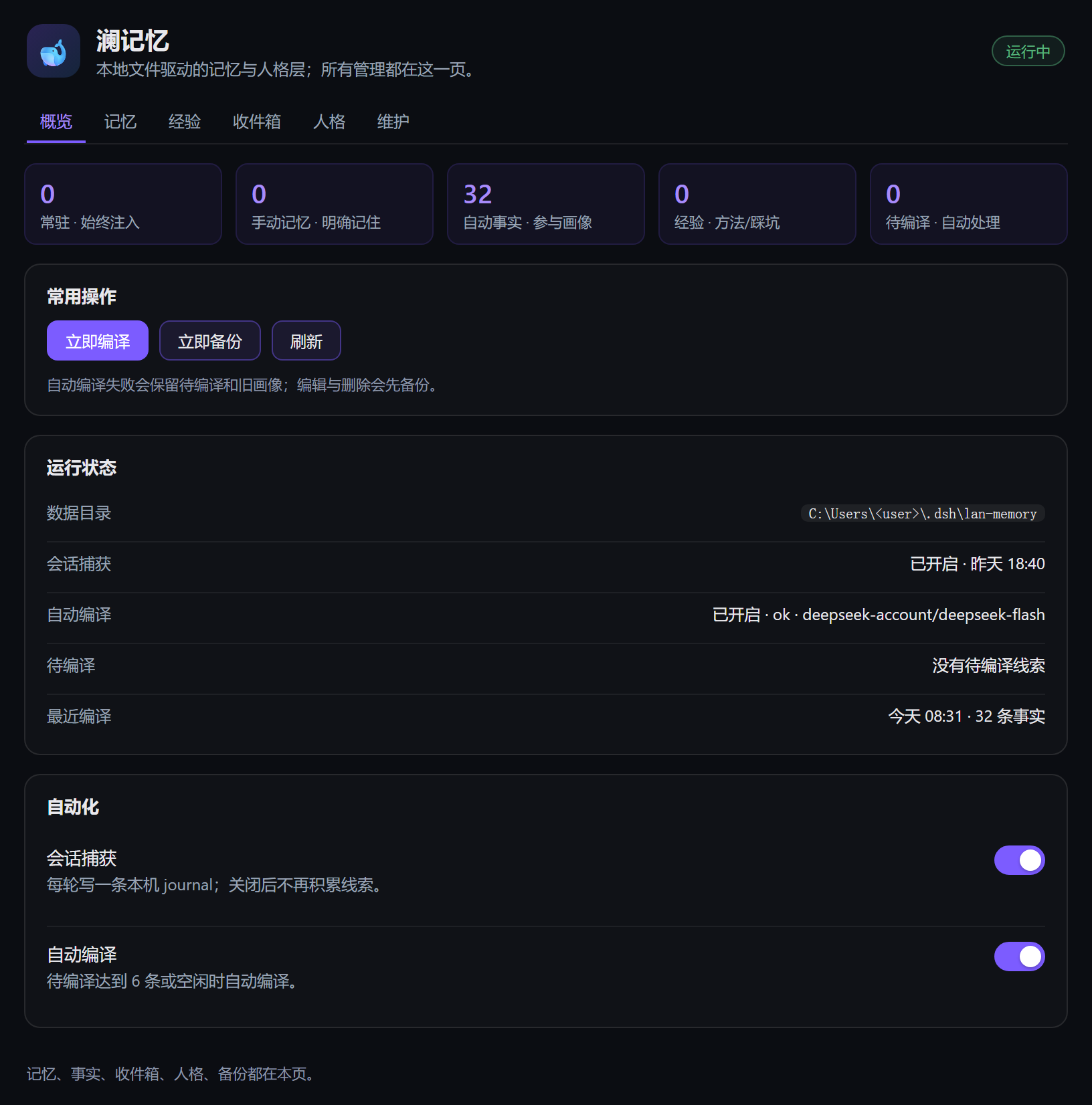
The settings page: overview, six tabs, runtime status, automation switches, and all memory management.
Install
Requires DSH Desktop 0.2.1-rc.2 (or another 0.2.x with a Web GUI).
# from a local checkout
dsh plugin --profile desktop add "C:\path\to\dsh-lan-memory"

# or directly from GitHub
dsh plugin --profile desktop add github:kiefeng/dsh-lan-memory
Install while Desktop is fully quit. After restart, open Settings → 澜记忆. There is no /lan-memory/ page to open.
For agents and plugin catalogs
dsh.bundle is declared in package.json with cordis.patch.yml, so the repository is installable through dsh plugin add. Topics: dsh-plugin, deepseek-harness, memory, persona, local-first, markdown.
中文
个人自用的本地记忆层:文件是唯一真源,零外部服务、零 API Key、零向量库。 四层记忆 + SOUL/MOOD 人格 + 零 LLM 捕获 + 标签式设置页。
v2 是对 2026-08 原型(v1.0.0)的重写。设计取舍见 docs/design.md;旧的独立面板契约已废弃,不随 v2.8 提供。
它是什么 / 不是什么
是:一个跑在 DSH 宿主进程里的轻量插件。记忆存在本机 Markdown / JSONL 文件里, 你随时能打开看、能手改、能备份、能导出;人格(SOUL)与情绪状态池(MOOD)继续保留。
不是:不是通用记忆 OS。不做 Python 服务、MongoDB/Neo4j/Qdrant、embedding、 MCP 桥接。捕获不花模型调用;摘要与事实抽取用你在设置页指定的模型,可关闭。
分层规则
| 层 | 谁来写 | 注入 | 参与画像 | 用途 |
|---|---|---|---|---|
常驻 pinned.md | 只手动,用户明确要求 | 每轮 | 否 | 身份、硬约束、长期不变偏好 |
手动记忆 memory.jsonl | 用户说“记住” / 手动新增 | 每轮 lan:manual | 否 | 明确要求保留的事实、决定 |
自动事实 facts.jsonl | 自动编译为主;设置页可手动增改/删除 | 否(经画像间接注入) | 是 | 从摘要抽取的偏好、长期事实;也可人工修正 |
经验 experience.jsonl | 任务完成/踩坑/手动 | 否 | 否 | 可复用方法,lan_recall(layer=experience) |
画像 memory.md | 自动编译,可手改 | 每轮 lan:memory | — | 四段摘要,本身不是输入层 |
自动编译不会写常驻、手动记忆或经验;手动记忆也不会被复制成自动事实。自动事实可在设置页手动修正,但工具层只让编译写它。
特性
- 四层边界 + 自动画像:见上表;
lan_recall的memory/fact/experience分开检索。 - 摘要 → 事实 → 画像:滚动摘要 3–6 句(≤300 字),再从摘要抽原子事实;摘要失败退回原始 journal。
- 每日边界:跨天把旧
today沉淀进week,再清空today;不额外调模型。 - 事实墓碑:删除的自动事实不会被下一次编译按相同文本写回;手动重新添加可解除。
- 事实合并预览:设置页「合并相似事实」只给候选;确认后保留最长一条、其余写墓碑,可撤销。
- 经验候选:编译可提出 0–1 条可复用方法;接受后才写入
experience.jsonl,忽略则保留为 dismissed,不再反复出现。 - 六个工具:
lan_remember/lan_recall/lan_list/lan_forget/lan_organize/lan_status。 - 零 LLM 捕获:
session/event→ 每轮一条journal/YYYY-MM-DD.jsonl,只做机械去噪;捕获本身不调模型。 - 一个管理面:DSH 设置页「澜记忆」,标签为 概览 / 记忆 / 经验 / 收件箱 / 人格 / 维护;没有独立网页面板。
- 可编辑:画像、自动事实、手动记忆、常驻、经验都能直接改;写前自动备份。
- 状态池卡片:每条回复下方把本轮
<mood>渲染成澜主题卡片(🐋 Vibe / 灵感 / 反思 / 意志),原文自动隐去。 - 写盘护栏:原子写 + 上一版
.bak+ 整理/删除前快照(manifest.sha256)+ 单写者锁。 - 注入卫生:
section()放常量、context()放读盘内容;全部interpolate:false;字节预算按 UTF-8 实算。 - 兼容性:
engines.dsh: ^0.2.1-rc.2;不 import 任何 DSH 包。
安装
要求:DSH Desktop 0.2.1-rc.2(或同 minor 的 0.2.x),且使用带 Web GUI 的组合(desktop / web)。
webServer 是必选服务;headless / tui 组合不会加载本插件。
# 1. 完全退出 DeepSeek Harness Desktop(托盘也要退)
# 2. 安装本地目录
& "<DSH安装目录>\resources\runtime\cli\bin\dsh.cmd" plugin --profile desktop add "<插件目录>"
# 3. 重启 Desktop
装好后:设置 → 澜记忆。对话里让助手「记住 X」「查一下我之前说过的 Y」「整理记忆」即可。
数据
默认目录:$DSH_HOME/lan-memory/(本机通常是 C:\Users\<你>\.dsh\lan-memory),
可用环境变量 DSH_LAN_DATA_DIR 覆盖。
lan-memory/
├── persona.md              # 人格真源(SOUL + MOOD 契约)
├── pinned.md               # 常驻记忆
├── memory.jsonl            # 手动记忆
├── experience.jsonl        # 经验库
├── facts.jsonl             # 自动抽取的原子事实
├── fact-tombstones.json    # 已删除事实的规范化文本墓碑
├── experience-candidates.json # 编译产出的经验候选(待接受/已忽略)
├── summaries.json          # 每会话滚动摘要
├── memory.md               # 四段编译画像(可手改)
├── facts.md / today.md / week.md / longterm.md
├── mood.jsonl              # 最近 200 条状态池
├── journal/YYYY-MM-DD.jsonl# 每轮对话的零 LLM 捕获
├── journal-status.jsonl    # 已编译/已忽略的收件箱记录
├── backups/<ts>_<reason>/  # 整份快照 + manifest.sha256
├── undo/<ts>/              # 最近 10 次整理/删除前的内容
├── meta.json               # schemaVersion / settings / 最近整理
└── .lock                   # 单写者锁
迁移 v1:首次启动若发现 $DSH_HOME/hanako/ 且新目录为空,会复制不移动地导入
pinned.md / memory.jsonl / experience.jsonl / mood.jsonl / persona.json(转成 persona.md),
并先做一份 pre-migrate-v1 快照。
注入与预算
| 内容 | 通道 | 预算 |
|---|---|---|
| SOUL | systemPrompt.section lan:persona | 12 KB 安全上限 |
| MOOD 契约 | systemPrompt.section lan:mood-contract | 12 KB 安全上限 |
| 记忆规则 | systemPrompt.section lan:rules | 固定短文本 |
| 常驻记忆 | systemPrompt.context lan:pinned | 4 KB(可配置) |
| 手动记忆 | systemPrompt.context lan:manual | 2 KB(可配置) |
| 编译画像 | systemPrompt.context lan:memory | 8 KB(可配置) |
| 索引摘要 | systemPrompt.context lan:index | 520 B |
| 上一轮状态池 | systemPrompt.context lan:mood-last | 1 KB |
收件箱正文不进注入,只给一个计数——这是防止“记忆越攒越贵”的关键。
捕获与整理
- 捕获:只收用户亲笔消息与模型可见文本;插件注入的上下文、团队消息、子代理消息不收。 每轮一条,精确 hash 去重,每日上限 300。
- 自动编译:待编译达到
autoCompileThreshold(默认 6)条或空闲时,调用设置页指定的模型:- 每会话滚动摘要:上一份摘要 + 新对话 → 3–6 句;
- 从摘要抽取原子事实(一条一事、2–5 个标签);
- 用「当前画像 + 新增事实 + 最近摘要」重写四段画像,拼成
memory.md; - 同一轮顺带提出 0–1 条经验候选,进入设置页「经验」待确认;
- 成功后才把 journal 标记为
compiled;失败保留待编译。
- 每日边界:跨天把旧
today移进week,再清空today。 - 事实墓碑:删除自动事实会写
fact-tombstones.json;编译跳过同文本。 - 事实合并:设置页只做近似重复预览;确认后保留最长一条并给其余写墓碑,可撤销。
- 经验候选:编译产出的候选不自动写库;接受才进入经验库,忽略会标记 dismissed。
- 手动记忆:用户说“记住”只写
memory.jsonl,不复制成 facts;通过lan:manual每轮注入。 - 本地整理仍保留:
lan_organize apply-local对memory.jsonl做确定性去重合并,可撤销。
安全边界
- API 只接受 loopback(127.0.0.1/::1)来源;
- 写请求必须带
x-lan-ui: 1+Content-Type: application/json; - 若带
Origin,必须与请求 Host 同源; - 记忆内容是“不可信历史数据”:注入时不当指令执行;不记录密钥/口令/证件号。
自动编译会把 journal / 摘要发送给你在设置页指定的模型 provider;捕获本身只写本机。 不想外发就关闭自动编译,或留空模型并只手动编辑。
配置
| 环境变量 | 默认 | 说明 |
|---|---|---|
DSH_LAN_DATA_DIR | $DSH_HOME/lan-memory | 数据目录 |
DSH_LAN_DEBUG | 未设 | 设为 1 时打印更多日志 |
meta.json.settings(设置页可改):captureEnabled、autoCompile、autoCompileThreshold、
compileIdleMinutes、memoryProvider、memoryModel、maxFacts、maxMemoryBytes、maxManualBytes、
maxPinnedBytes、maxRecallBytes、maxIndexBytes、maxMoodBytes、maxEntryChars、
maxPinnedEntryChars、journalPendingDays、journalPendingMax、maxMemory、maxExperience、
journalRetentionDays、journalMaxPerDay。
排查
GET /lan-memory/api/health:工具/section/context 数量、捕获事件数、迁移结果、最近错误。- 设置页看不到:确认 DSH 版本满足
engines.dsh、Desktop 是否重启过。 - 旧面板书签已失效:
/lan-memory/返回 404,管理统一走设置页。 - 数据目录被另一个进程占用时插件进入只读模式(
.lock),关闭多开的 DSH 后重启即可。
开发
node scripts/dev-server.mjs        # 假宿主,API 在 http://127.0.0.1:17800/lan-memory/api/state
node test/store.test.mjs           # 单文件直跑
node test/search.test.mjs
node test/organize.test.mjs
node test/capture.test.mjs
node test/http.test.mjs
node test/apply.test.mjs
node test/compile.test.mjs
71 项测试,覆盖自动编译、摘要、每日边界、事实墓碑/合并、经验候选、四层检索、设置页 API 与 HTTP 安全。
License
MIT