bloomtutor
li-evan/bloomtutor
Bloomtutor は、個別学習向けのオープンソース AI チューターです。ソクラテス式で適応的なレッスンにより、幅広い分野を学べます。Claude Code Skill とセルフホスト型 Web アプリを提供します。
インストール
dsh plugin --profile web add github:li-evan/bloomtutorREADME

Hire a private AI tutor for anything you want to learn.
Your AI reads how you actually learn — and teaches the next lesson just for you.
Built on Bloom's 2-Sigma research: 1-on-1 tutoring = top 2%.





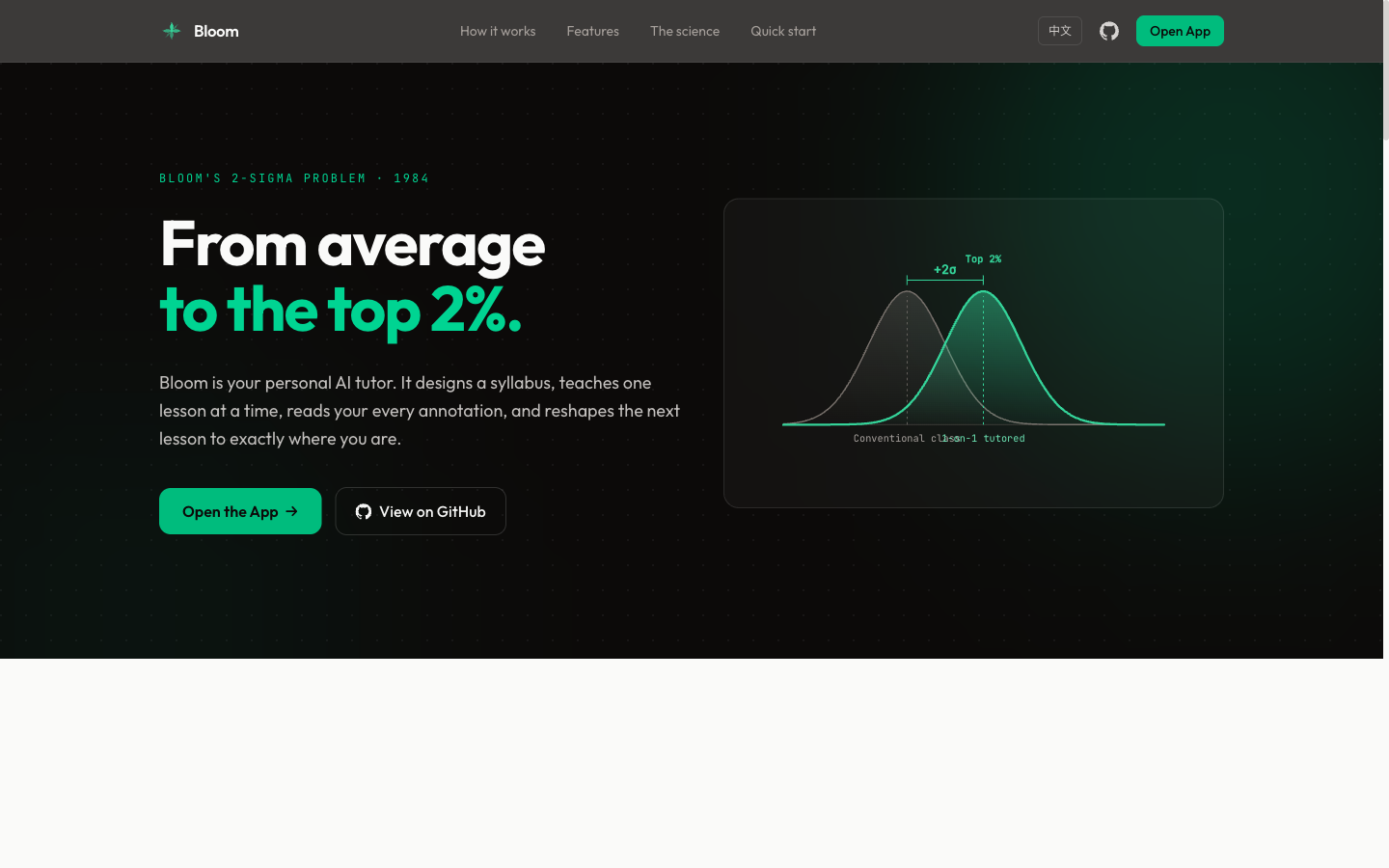
In 1984, educational psychologist Benjamin Bloom discovered that students receiving one-on-one tutoring scored 2 standard deviations (+2σ) above the classroom average — jumping to the top 2%. Bloom called this the "2 Sigma Problem": the effect is proven, but personal tutors don't scale.
Bloom solves this with AI. It generates a structured syllabus, delivers lessons one at a time, reads your annotations and feedback, then tailors the next lesson to your exact understanding level — just like a real tutor would.
Two Ways to Use
| Mode | Setup | Best for |
|---|---|---|
| CLI | Claude Code (or DeepSeek Harness) + terminal | Power users who like Markdown editors |
| Web | Browser (Next.js + FastAPI), self-hosted | Visual learners, your own materials and PDFs |
Both follow the same flow: syllabus → lesson → annotate → feedback → next lesson → evaluation → summary.
Quick Start: CLI Mode
Requires only Claude Code. No backend.
git clone https://github.com/Li-Evan/BloomTutor.git
cd BloomTutor

# Install the tutor skill locally for this clone
mkdir -p .claude/skills
cp -R skills/bloom-tutor .claude/skills/

claude
Then say: Create a new folder and help me learn [any topic]
Or install it as a plugin (bundles bloom-tutor plus the learn-* skills) — in Claude Code:
/plugin marketplace add Li-Evan/BloomTutor
/plugin install bloom@li-evan
Or use it in DeepSeek Harness: this repository is also the bloomtutor-dsh plugin, with the same skills:
dsh plugin --profile web add github:Li-Evan/BloomTutor
Details in integrations/deepseek-harness.
See GUIDE.md for the full walkthrough.
Quick Start: Web Mode
The web app is a self-hosted, single-user tutor: no accounts, no billing. You bring an API key for any OpenAI-compatible model; everything you create stays in your own database.
Prerequisites
- Python 3.11+ with uv
- Node.js 20+ with pnpm
- An API key for any OpenAI-compatible chat model (OpenAI, DeepSeek, Qwen/DashScope, Moonshot, a local Ollama, …)
Setup
git clone https://github.com/Li-Evan/BloomTutor.git
cd BloomTutor

make setup          # creates .env with a random BACKEND_JWT_SECRET, installs backend and frontend deps
# edit .env: fill in LLM_API_KEY, LLM_BASE_URL and LLM_MODEL

make dev-backend    # terminal 1: runs the database migrations, then the API on 127.0.0.1:8000
make dev-frontend   # terminal 2: the web app on http://localhost:3000
Open http://localhost:3000, click New course, and start learning.
Docker
make setup                   # or: cp .env.example .env and fill it in yourself
docker compose up -d --build # then open http://localhost:3000
Data lives in the bloom-storage volume (a SQLite database plus the images inside your materials). To use Postgres instead, set DATABASE_URL in .env.
Configuration
| Variable | What it does |
|---|---|
LLM_API_KEY, LLM_BASE_URL, LLM_MODEL | The model used for syllabi, lessons and answers |
LLM_FAST_MODEL | Optional smaller model for the knowledge map, course placement and selection translation |
PDF_READING_MODEL | Optional vision model for "PDF reading" (page images → Markdown) |
LLM_EXTRA_BODY | JSON passed as extra_body on every call, e.g. {"thinking":{"type":"disabled"}} for DeepSeek |
BACKEND_JWT_SECRET | Shared by the frontend server and the backend; the backend only accepts tokens signed with it |
DATABASE_URL | Defaults to backend/storage/bloom.sqlite3 |
LANGFUSE_* | Optional tracing of every model call to Langfuse |
Security
Bloom has no login: anyone who can open the web app is you. Keep it on localhost, or put it behind something that authenticates (a VPN, Tailscale, or a reverse proxy with basic auth) before exposing it. The backend is never published by docker compose; it only answers requests signed with BACKEND_JWT_SECRET.
Upgrading from the previous (Vite) version
The web app was rebuilt on Next.js with a new database schema. The old bloom.db is not migrated; the new app starts with an empty database in backend/storage/.
How It Works
Topic or your materials
Describe a goal (optionally upload materials) → Bloom asks a few clarifying questions
                        ↓
        Outline: what you will be able to do, in order → review / edit it
                        ↓
        Read lesson 1 → highlight and ask → write feedback → answer thought questions
                        ↓
        Click "Done reading" → the next lesson reviews your answers, answers your highlights,
        follows your feedback and moves on
                        ↓
        Repeat until every mastery item is covered ✅ → evaluation → course summary
Project files, web articles, PDF reading
Upload files / a folder / a link / PDFs → each one becomes a page (no outline)
                        ↓
        Read → highlight and ask, or ask about the whole page → mark as read, archive
                        ↓
        What you read feeds the knowledge map and next-step suggestions
Features
Ways to start a course
- Topic — describe what you want to learn; Bloom asks a few clarifying questions about your goal, then designs an outline at the depth you pick (simple / standard / deep)
- Your materials — upload PDFs, Word, PowerPoint, Excel, EPUB, Markdown or text (or a ZIP); Bloom reads everything into a knowledge pack and grounds the outline and lessons in it, with source citations
- Project files — upload files or a whole folder; each file becomes a page you can read and ask about, no outline needed
- Web articles — paste a link to import the article text and images, or use the browser clipper to save the page you are reading
- PDF reading (experimental) — a vision model turns each PDF page into reflowable Markdown with formulas, tables and figures, next to the original PDF
Learning
- Outline first — review the outline before lesson 1; edit it or tell Bloom how to change it
- Adaptive lessons — each lesson reviews your answers to the last one's questions, answers what you highlighted, and follows your feedback (shorter, more examples, slower…); the last lesson is an evaluation, then a course summary
- Highlight Q&A — select any passage (also inside PDFs) to ask; keep asking follow-ups in the same thread; mark passages without asking
- Ask this lesson — a chat about the whole lesson or file, no selection needed
- Selection translation — translate a passage into the interface language, with what it means in context and the word roots of a term
- Teaching style — presets (concise, analogy, rigorous…) or your own instructions, for every course
- Reading comfort — table of contents, reading time, text size, fonts, light / dark theme, Chinese / English interface
Seeing the whole
- Knowledge map — every course is placed on a shared tree of knowledge (a frozen snapshot of Wikipedia's Vital Articles), with the topics you actually read and neighbouring directions to explore
- Next steps — three course-ready suggestions grown from your history; save them to a wishlist or start one
- User center — activity heatmap and streaks, all your highlight notes in one place, export to Markdown
- Material folders — move, rename, edit, archive or delete files in material courses
Skills
Bloom ships a set of portable Claude Code skills in skills/ — self-contained capability packs you can copy into ~/.claude/skills/ (global) or any project's .claude/skills/ and use anywhere.
| Skill | What it does |
|---|---|
| bloom-tutor | The full interactive tutoring system as one skill — syllabus → adaptive lessons → ??? annotations → evaluation → summary. CLI mode, packaged and portable. |
| learn-deep | Default deep-dive entry — runs all five lenses below in one pass, then helps you pick a direction |
| learn-crossover | Learn a new concept by leveraging what you already know (structural analogies) |
| learn-occam | Decide whether / how deeply something is worth learning (ROI, just-enough) |
| learn-graph | Build a knowledge-graph map of a field plus a learning path |
| learn-prototype | Learn by building the crappiest working prototype, then iterating |
| learn-feynman | Verify true understanding by explaining it back |
Each folder is dependency-free: copy it into a skills directory, then just talk to Claude Code (e.g. "help me learn X", "I'm done reading"). The same folders also run in DeepSeek Harness through the bloomtutor-dsh plugin.
Tech Stack
| Layer | Technology |
|---|---|
| Backend | Python, FastAPI, SQLAlchemy 2, Alembic; SQLite by default, Postgres supported |
| Frontend | Next.js 15 (App Router), React 19, Tailwind CSS 4, Radix UI, next-intl, pdf.js |
| AI | Any OpenAI-compatible chat completions API |
| Container | Docker, docker compose |
| Font | Outfit, Public Sans, JetBrains Mono |
Commands
make setup            # create .env, install dependencies
make dev-backend      # migrations + API with hot reload (127.0.0.1:8000)
make dev-frontend     # web app dev server (localhost:3000)
make test             # backend pytest + frontend tests
make up / make down   # docker compose start / stop
Project Structure
├── GUIDE.md                # CLI usage guide
├── package.json            # makes the repo the bloomtutor-dsh DeepSeek Harness plugin (no app code)
├── .env.example            # configuration template
├── backend/
│   ├── app/                # FastAPI app: courses.py (course engine), knowledge*.py / coordinate.py (knowledge map),
│   │                       # lesson_chat.py, translate.py, recommendations.py, uploads / web_import / document_import ...
│   ├── alembic/            # database migrations (the second one imports the knowledge tree)
│   ├── data/knowledge/     # the knowledge tree release (Wikipedia Vital Articles level 5 snapshot)
│   └── tests/
├── frontend/
│   └── src/
│       ├── app/[locale]/   # pages: /learn (courses, lessons, map, next), /me (user center)
│       ├── components/     # learn/, me/, site/ (header, footer), ui/
│       └── lib/            # API clients, lesson logic
├── extension/              # browser web clipper
├── docs/ARCHITECTURE.md    # how the pieces fit together
├── example/                # pre-built topics for CLI mode
├── integrations/deepseek-harness/  # the bloomtutor-dsh plugin for DeepSeek Harness
├── site/                   # marketing website (standalone Astro static build, decoupled from the app)
└── skills/                 # portable Claude Code skills (bloom-tutor + learn-*)
The Science
| Concept | What it means |
|---|---|
| Bloom's 2 Sigma | 1-on-1 tutoring = +2σ performance over classroom |
| Mastery Learning | Don't move on until the concept is truly understood |
| Socratic Method | Ask questions, don't hand answers |
| Spaced Retrieval | Thought question reviews at lesson start reinforce memory |
| Adaptive Path | Content adjusts to individual feedback in real-time |
Star History
License
MIT. Third-party components, fonts and the knowledge-tree data keep their own licences: see THIRD_PARTY_NOTICES.md.