dsh-annotate (plugin)
modenicheng/dsh-annotate/packages/plugin
Marks made in your own Firefox or Zen window, not DSH's embedded browser, reach the session with a cropped screenshot, DOM selectors and page state, and six annotate_* tools read them; needs the dsh-marker browser extension from the same repository. Its HTTP routes have no DSH access check, so a web page open in your browser could call them.
설치
dsh plugin --profile web add github:modenicheng/dsh-annotate이 플러그인은 저장소의 packages/plugin 하위 디렉터리에 있습니다.
README
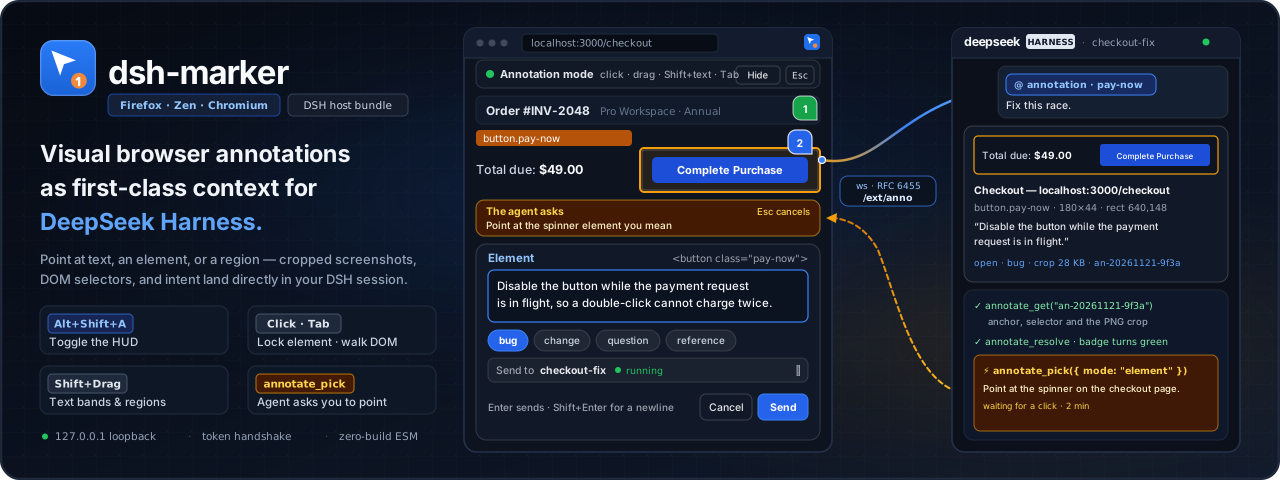
dsh-marker


Visual annotations from your everyday browser, as first-class context for DeepSeek Harness (DSH).
Point at a paragraph, a button, or a region of a page in Firefox, Zen, or a
Chromium browser, write one line of intent, and the annotation lands in the
running DSH session with a cropped screenshot, DOM selectors, and page context.
The model can also ask you to point at something (annotate_pick) when a
request is ambiguous.
Status: early development. The protocol, the host plugin, and the extension are implemented and covered by tests. The host half and the mention-to-chip delivery are verified against a live
dsh webinstance; Firefox capture and delivery are verified in a real browser, while Zen, the discovery flow, and the Desktop run still need theirs. The acceptance criteria per milestone are in docs/PLAN.md.
Install
Requirements: Node.js 22+ and DSH 0.2 or newer with the Web profile. The extension runs in Firefox 128+ or Zen; the Chromium build (Chrome, Edge, Brave, …) is installed manually from a release, as below.
Host plugin
The host plugin is an ordinary DSH bundle, published as dsh-marker:
# install into the profile you boot (add --profile <name> for another one)
dsh plugin add dsh-marker
plugin add pulls the bundle from the npm registry together with its one
runtime dependency (ws), so the machine needs the registry reachable once.
Then boot the host as usual — on the profile you installed into — and it
writes the bridge token the extension will ask for
($DSH_HOME/ext-bridge-token, created on first use).
If the bundle is installed but not active, open Plugins in the DSH Web UI
and enable dsh-marker. The same page can install a local bundle directly
(Add plugin), which is the easier route if you prefer the GUI.
Extension
Not in a store yet. The first AMO and Chrome Web Store listings are not live, so pick a manual route below.
From a GitHub release — no store, no checkout
Every published release carries both extension packages, built and checksummed by CI; nothing is built on your machine.
- Download the package for your browser from
Releases —
dsh-marker-firefox-<version>.zipordsh-marker-chromium-<version>.zip— together withchecksums.txt, verify it, and unzip it:sha256sum -c checksums.txt --ignore-missing(macOS:shasum -a 256 -c …; Windows:certutil -hashfile <file> SHA256). - Chromium (Chrome, Edge, Brave, Vivaldi, Opera, Arc): open
chrome://extensions, enable Developer mode, choose Load unpacked, and select the unzipped folder. The extension stays installed across restarts. Two costs: the browser shows a developer-mode notice, and updates are manual — download the next release and replace the folder. On Chromium, also set the keyboard shortcut by hand: openchrome://extensions/shortcuts, find Annotate the current page, and assignAlt+Shift+A(or your preferred combination). Chromium does not let extensions register or change their own commands, so without this step the in-page fallback still enters annotate mode, but the browser never grantsactiveTab— and without that grant the screenshot is skipped. - Firefox / Zen: release Firefox installs add-ons signed by AMO only. The
release zip is unsigned, so load it as a temporary add-on —
about:debugging#/runtime/this-firefox(Zen:about:debugging), Load Temporary Add-on…, the unzippedmanifest.json— and reload it after each browser restart. When a release carries a signed.xpi(CI attaches one as soon as AMO signing is configured), it installs permanently viaabout:addons→ gear menu → Install Add-on From File…. On Firefox Developer Edition, Nightly, or ESR you can instead setxpinstall.signatures.requiredtofalseinabout:configand install the zip permanently by renaming it to.xpifirst.
From source — for development
The source needs no build step — packages/extension is the extension, with no
bundler, no TypeScript and no dependency. Load packages/extension/manifest.json
as a temporary add-on (about:debugging#/runtime/this-firefox; Zen:
about:debugging).
Firefox is what has been run for real. An early build passed a basic bring-up pass in Chromium 156 — load, service worker, content script, popup, and the annotation HUD, behaving much like Firefox — but the current version has not been re-tested in a real Chromium.
What the extension reads, where it sends it and what it keeps locally is docs/privacy.md — the same page the stores link to.
First annotation
- Open the extension popup and paste the bridge token from
$DSH_HOME/ext-bridge-token(%USERPROFILE%\.dsh\ext-bridge-tokenon Windows). Leave Connection on Automatic and the address at the default127.0.0.1/3080; the extension then finds a host whose port moved by itself. - On a page press
Alt+Shift+A(the default; change it in the popup's Annotate section): select text, click an element, or drag a region, then press Enter. While an element is outlined,Tabwidens it one ancestor at a time andShift+Tabsteps back down; the click locks whatever level is outlined. The comment is optional — with an empty one the mark is sent on its own (the button reads Send mark / 只发标记). A right-click on the page leaves annotation mode (this can be turned off in the popup); inside the composer the browser's own text menu wins. - If the host cannot be found: switch to Manual and type the address — a
full URL such as
wss://anno.example.comworks, and with no scheme the extension asks the host which one to use — or use Import endpoint file… to read the address from$DSH_HOME/ext-bridge-endpoint.json. Details: docs/DISCOVERY.md.
The popup's Annotate section can also make a successful send leave the mode
(off by default) and turn the right-click exit off. Recording a shortcut
updates the browser command on Firefox, which is what keeps the screenshot's
activeTab grant working. Chromium does not let extensions write commands, so
there are two paths to the same mode: the browser command (set once in
chrome://extensions/shortcuts — see the install step above) and the in-page
matcher that the popup records for the page. Only the browser command carries
the activeTab grant, so on Chromium the browser command is the path that
produces screenshots; if you record a key that differs from the one registered
in the browser, the in-page matcher still fires, but the mark goes out without
its screenshot. Keep both on the same combination, or use Annotate this
page in the popup, which always grants activeTab. The popup follows the
browser UI language (English and
Simplified Chinese ship today). If Annotate this page reports that the
extension did not answer, the popup is newer than the extension loaded in this
browser session: click Reload in about:debugging and refresh the page.
Tools
The host registers six tools, which appear in your DSH sessions; the one you
will see most is annotate_pick, the banner asking you to point at something.
All of them operate on the annotation store and broadcast changes back to
connected browsers.
| Tool | What it does |
|---|---|
annotate_list | List annotations, default open, with status, url_filter, kind, and limit filters. Returns compact previews. |
annotate_get | Read one annotation by id (or latest): full anchor JSON plus the cropped screenshot as an image block. |
annotate_resolve | Mark an annotation resolved or wont_fix with a note the page badge shows, and optionally record files_touched. |
annotate_delete | Delete annotations outright by ids: the record, its crop, and its badge all go away. For noise that was never meant to be kept; prefer annotate_resolve when the work was actually done. |
annotate_pick | Ask the user to point at something in the browser; the call waits (5 s–15 min, default 2 min) for a selection, element, or region. |
annotate_clear | Bulk-delete annotations by status and/or before_iso. |
Security model
The bridge is local-only by design:
- No public port by default. It attaches to the DSH host webserver, which
binds to loopback (
127.0.0.1) by default. Putting that webserver behind a tunnel or reverse proxy makes the websocket reachable wherever that server is, so terminate TLS in front of it, do not log frames, and keep the port off0.0.0.0. - Token handshake. The first frame must be
hello { token, version }. The token is 32 random bytes as hex, stored in$DSH_HOME/ext-bridge-tokenwith owner-only permissions on POSIX, and compared in constant time. A client that does not authenticate within 5 seconds is disconnected, and the protocol version must match exactly. - No token, no data. Without a valid token the host closes the socket; the
only anonymous endpoint is
/ext/anno/health, which reports the protocol version, counts, and the scheme/URL a browser should use — never annotation content. - The GUI routes sit behind the host's own fence. The routes the Web Client
page reads (
/ext/anno/queue,/queue/ack,/focus,/events,/item,/image) are gated by DSH's Connection fence — Host/Origin checks that stop DNS rebinding, plus the browser session the page already holds — and fall back to thesec-fetch-site: same-originheader check on hosts without the Connection service. The token is never in them: the page is a different trust anchor from the extension. - Discovery publishes an address, not a secret. The loopback locator answers
one
GETwith the host's origin and a per-process id; it returns no token and no annotation data, and refuses aHostthat is not loopback. - Bounded input. Frames are capped at 32 MiB, records are validated against
packages/protocol/src/index.js, and the store only keeps references to screenshots that DSH's own attachment service accepts. - Local storage. Annotations live under
$DSH_HOME; nothing leaves the machine and there is no telemetry.
The practical trust boundary: anyone who can read $DSH_HOME/ext-bridge-token
or write to your profile directory can already act as you locally.
Where data lives
| Location | Contents |
|---|---|
$DSH_HOME/annotations/queue.jsonl | Append-only event log (put, patch, del, img), folded in memory at startup and compacted when it grows stale. |
| DSH attachment service | Cropped screenshots; the log stores only the attachment reference. |
$DSH_HOME/ext-bridge-token | Bridge token, generated on first use with mode 0600. |
$DSH_HOME/ext-bridge-endpoint.json | The listening origin, instanceId, profile label, and timestamps — address only, no token, written atomically on every start. |
Browser storage.local | Extension token, offline outbox, UI preferences, and the endpoint the host advertised last. Details: docs/privacy.md. |
$DSH_HOME defaults to ~/.dsh (%USERPROFILE%\.dsh on Windows). It is shared
by every profile on the machine, so one token works for whichever profile is
running — only one profile should run the bridge at a time.
Architecture
flowchart LR
  subgraph Browser["Firefox / Zen extension (MV3)"]
    CS["Content script\nanchor · hydrator · ui\ngestures: selection / element / region"]
    BG["Background (event page)\ncore · socket · outbox\ncapture · routing"]
    POP["Popup\nbridge token · address · status"]
    CS <-->|"runtime messages"| BG
    POP <-->|"storage / messages"| BG
  end

  BG <-->|"ws://127.0.0.1:PORT/ext/anno  (hello {token, version}, frames both ways)"| Bridge

  subgraph Host["DSH host (`dsh web`) — dsh-marker bundle"]
    WS["webServer\nregister · registerUpgrade"]
    Bridge["/ext/anno WebSocket bridge\n(RFC 6455 via ws)"]
    Locator["/ext/anno/locate\nloopback locator 30810-30812\n(origin + instanceId only)"]
    Health["/ext/anno/health\nprotocol version + counts\n+ wsUrl (scheme negotiation)"]
    Sessions["/ext/anno/sessions\nsession catalog (target picker)"]
    Store["AnnotationStore\nappend-only event log"]
    Tools["annotate_* tools\nlist · get · resolve · delete · pick · clear"]
    Attach["Attachment service\ncropped screenshots"]
    WS --> Bridge
    WS --> Health
    WS --> Sessions
    Bridge --> Store
    Bridge --> Attach
    Store --> Tools
  end

  BG -.->|"GET /ext/anno/locate\n(only when the port is not 3080)"| Locator

  Tools -->|"compact previews / full record + image"| Agent["Model / agent session"]
  Agent -->|"annotate_pick"| Bridge

  subgraph Storage["Where data lives"]
    Q["queue.jsonl\n($DSH_HOME/annotations)"]
    Tkn["$DSH_HOME/ext-bridge-token\n(0600, constant-time compare)"]
    Rec["$DSH_HOME/ext-bridge-endpoint.json\n(0600, address only)"]
    BSt["Browser storage.local\ntoken · offline outbox · prefs"]
  end
  Store --> Q
  Attach -.->|"stores attachment ref only"| Q
  Host --> Tkn
  Host -.-> Rec
  POP -.->|"import: address only"| Rec
  Browser --> BSt
There is no extra daemon, and on the default deployment no extra port. The
bridge is mounted on the DSH host webserver and lives exactly as long as
dsh web does. A host whose port is not 3080 also opens one small loopback
locator so a browser can find it; it answers a single address lookup and
carries no annotation data. Both sides are plain ESM JavaScript with no build
step.
Non-default deployments — Desktop's moving port, TLS, reverse proxies — are covered in docs/DEPLOYMENT.md; the discovery design and rationale are in docs/DISCOVERY.md.
Development
An isolated anno profile keeps the daily web profile untouched, and installs
the bundle from this checkout instead of the registry:
# 1. Create the isolated profile from the shipped Web template (once).
#    This initialises the profile before booting it; Ctrl+C if port 3080 is busy.
dsh --profile anno --from-default-profile web

# 2. Install the bundle from this checkout (a local directory, no registry).
dsh plugin --profile anno add /absolute/path/to/dsh-annotate/packages/plugin

# 3. Boot the profile and open the Web UI it prints.
dsh --profile anno
On Windows use the same commands in PowerShell, with a Windows path such as
D:\coding\dsh-annotate\packages\plugin.
pnpm run sync-protocol                              # copy the protocol into both consumers
node --test "packages/*/test/*.test.js"             # works in PowerShell and cmd
pnpm run check                                      # Biome + sync + syntax + tests
node scripts/smoke-ws.mjs ws://127.0.0.1:3080/ext/anno   # verify a booted bridge, no browser needed
node scripts/smoke-discovery.mjs                    # verify the record + locator of a --port 0 host
smoke-ws.mjs drives the real socket end to end (health probe, token
handshake, create → query → resolve, idempotent replay); run it after installing
the bundle and after any protocol change. smoke-discovery.mjs is its discovery
counterpart against a dsh --profile anno --port 0 host. The quoted glob is
intentional: Node expands it itself, which keeps the command identical on
Windows, macOS, and Linux. Biome is a pinned devDependency: after one
pnpm install, pnpm run check, the hooks, and the tests all run offline;
only pnpm install itself needs the registry.
The extension's _locales/ currently localizes only the manifest metadata (the
store name and description); the interface strings come from the built-in
bilingual table in src/content/ui/strings.js, not from _locales/.
The two store targets are generated from one source tree for local QA and
inspection — node scripts/build-extension.mjs writes dist/firefox and
dist/chromium. A local build is for testing only: the packages a store
receives are built by CI from the release tag
(docs/DISTRIBUTION.md §4.4), and a manual install above
downloads those same CI bytes — never a local build.
Local hooks enforce Conventional Commits and run the checks before each commit; CONTRIBUTING.md has the one-line setup and the rules.
Status and roadmap
| Phase | Scope | State |
|---|---|---|
| M0 | Protocol, repository base, CI, hooks | done |
| M1 | Host plugin, storage loop, tools | implemented, verified against a live host |
| M2 | Extension capture: gestures, overlay, crop, outbox | implemented; browser QA pending |
| M3 / M3.5–M3.8 | Re-anchoring, picks, dsh-anno: mentions, chip hover card, push delivery | implemented; browser-side pieces pending live verification |
| M4 | Developer context, session routing, multi-window | planned |
| M4.5 | Discovery: Desktop's moving port, endpoint record, loopback locator | delivered; real-browser and Desktop runs pending (M4.5c) |
| M4.6 | Send an annotation into a new session (default / existing / new workspace) | implemented; browser QA pending |
| M5 | Signing and distribution | planned |
The detailed deliverables and acceptance criteria are in docs/PLAN.md; implementation decisions and their rationale are in docs/DECISIONS.md.
Documentation
Using dsh-marker:
- docs/INTERACTION.md — interaction and capture UX
- docs/privacy.md — data handling and privacy
- docs/DEPLOYMENT.md — TLS, reverse proxies, Desktop's moving port
Design and internals:
- docs/DISCOVERY.md — discovery design and rationale
- docs/PLAN.md / docs/DECISIONS.md — roadmap, decisions
For contributors:
- CONTRIBUTING.md — commit format, hooks, generated-file rule
- docs/DISTRIBUTION.md / docs/STORE_LISTING.md — store packaging and listing
License
MIT — see LICENSE.