dsh-serial-sifarCRT
xf3193/dsh-serial-sifarcrt
Windows serial debug console in the DSH right sidebar: port settings, ANSI color logs, an in-log Linux command line, editable command buttons, keyword log search, multi-port tabs and log export.
Instalar
dsh plugin --profile web add github:xf3193/dsh-serial-sifarcrtREADME
dsh-serial-sifarCRT



A SecureCRT-style Windows serial debug console that lives in the DeepSeek Harness (DSH) right sidebar. Configure a COM port from a dialog, connect, watch hardware debug output with ANSI colors, and type Linux commands directly into the log window — with several serial ports open side by side in tabs.
中文简介见下方「中文说明」。
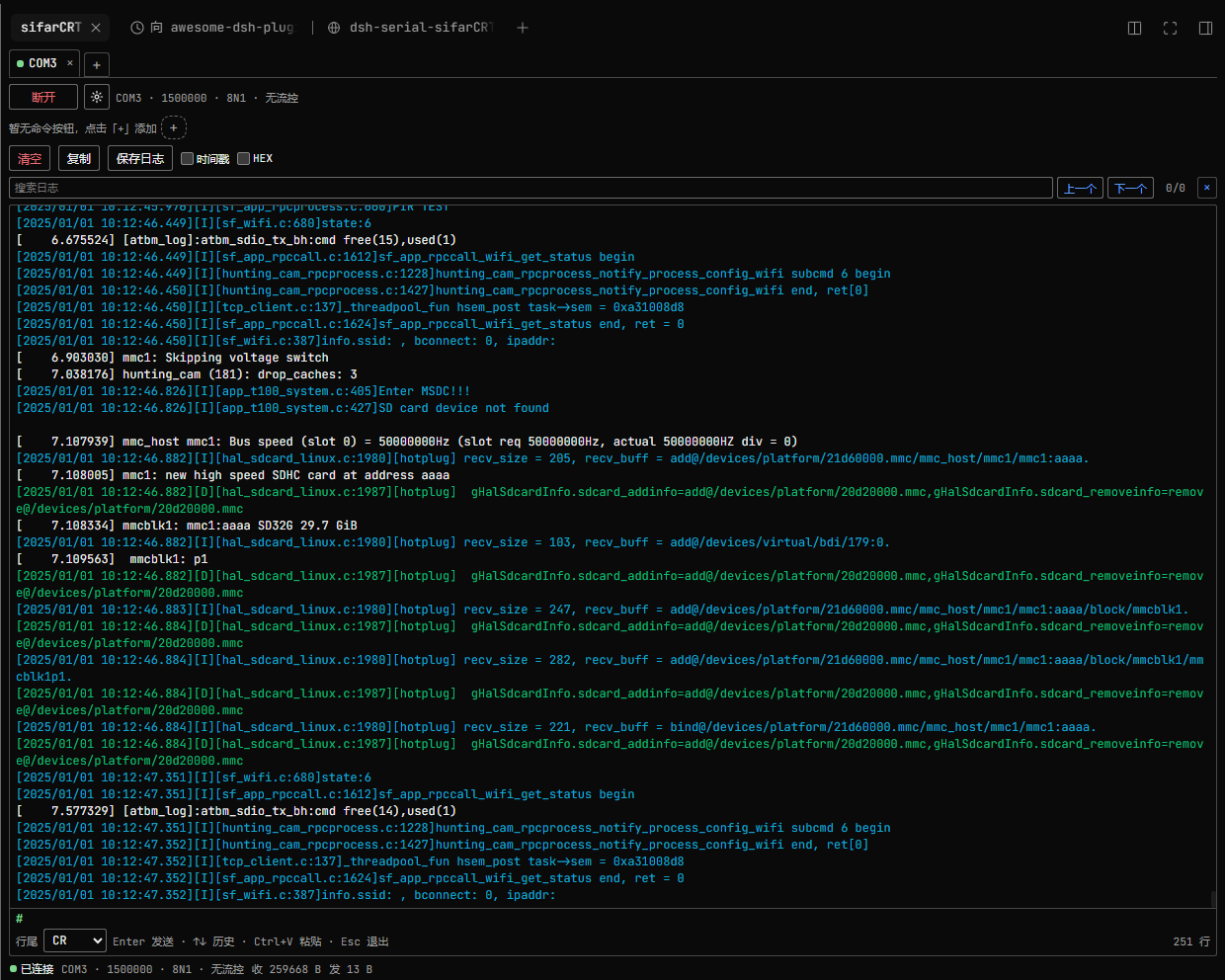
sifarCRT connected to a board: per-line ANSI colors ([I] cyan, [D] green, [E] red, plain kernel lines white), the in-log # terminal with blinking caret, command buttons, and the keyword log search row.
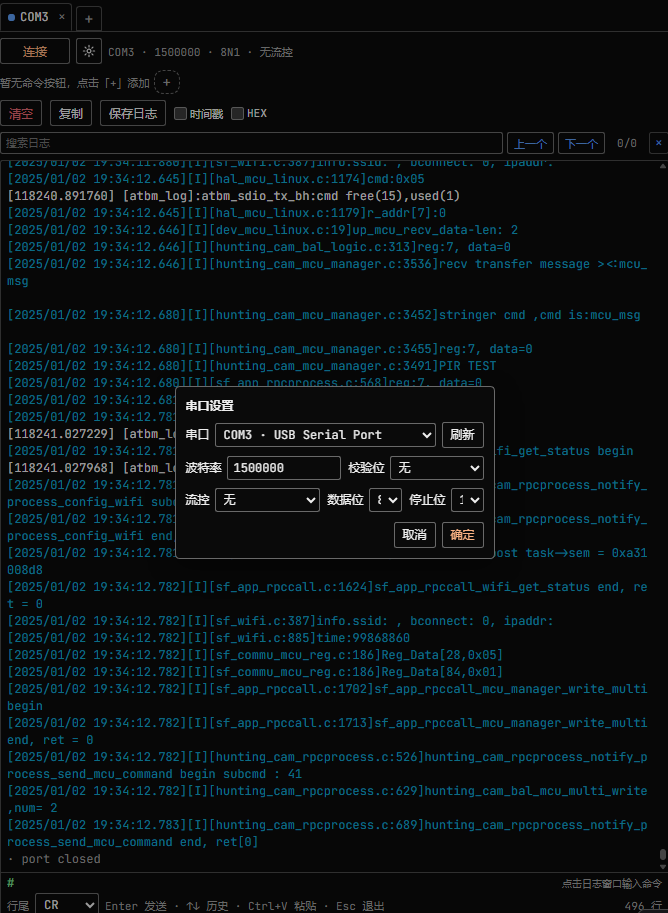
The serial settings dialog: auto-enumerated COM port with adapter description, editable baud rate, parity, flow control, data bits and stop bits.
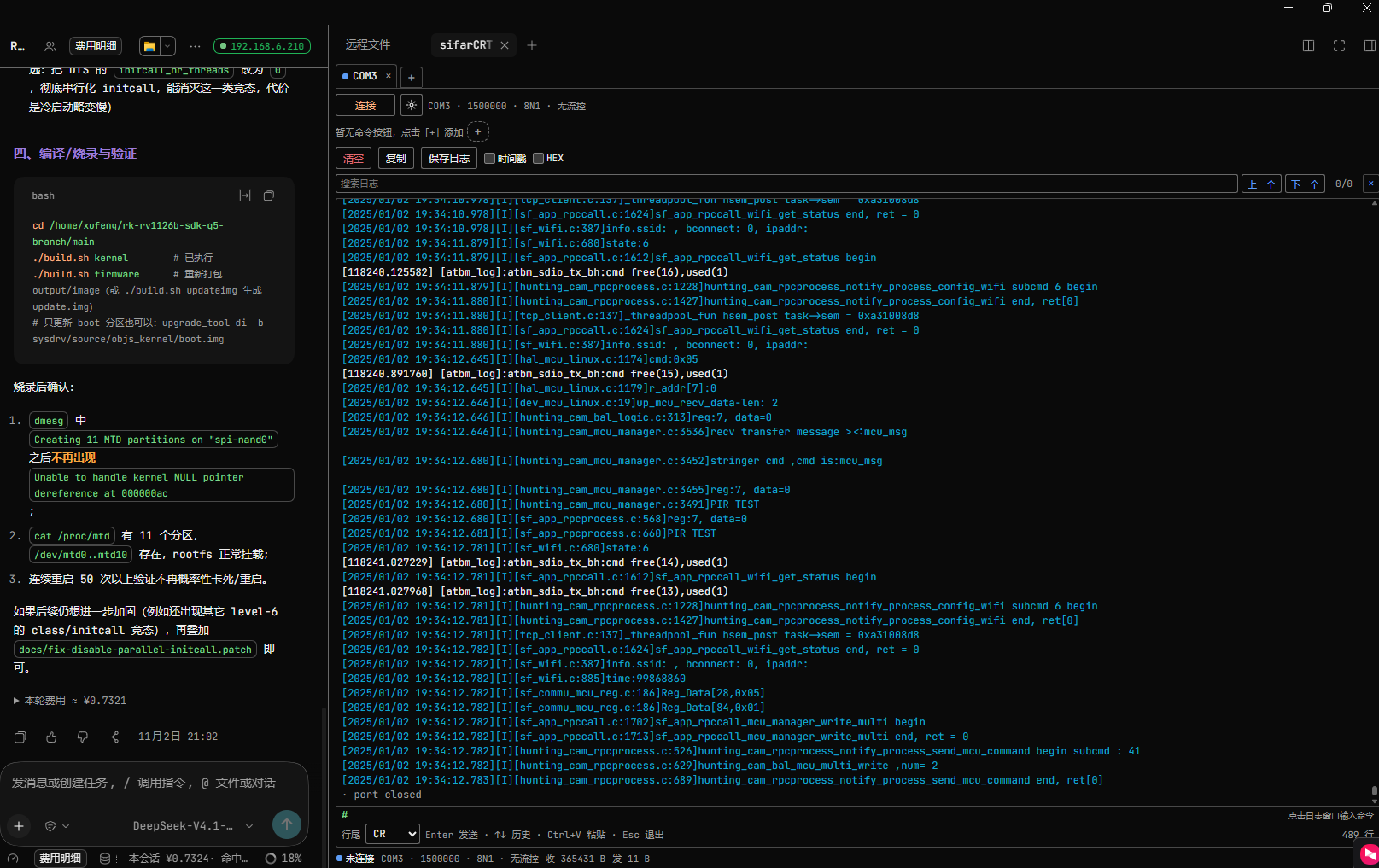
Running inside the DSH right sidebar next to the conversation, with the board log streaming in and the # command prompt ready.
Features
- Right sidebar panel — registered as a native right-sidebar tab type (
sifarCRTin the right column's guide). Opening it does not replace the built-in right-sidebar pages. - Serial settings dialog — a gear button opens one dialog with port (auto-enumerated, with adapter descriptions), baud rate (editable, presets 9600 / 115200 / 1500000, default 1500000, valid 50–1500000), parity (default None), flow control (default 无/None), data bits and stop bits. Confirm, then Connect/Disconnect from the toolbar.
- ANSI colors — Linux ANSI SGR sequences such as
ESC[0m,ESC[36;22mandESC[7mare parsed and rendered (16 / 256 / truecolor, bold, dim, italic, underline, reverse, hidden). Colors are applied per log line: the color set at the start of a line colors that line, while lines with no ANSI (kernel/plain output) use the default text color — no bleed-over into following lines. Other cursor/clear control sequences are hidden instead of shown as garbage. A streaming parser keeps state across serial chunks. - In-log Linux terminal — click the log pane and type directly: green
#prompt with a blinking caret,Entersends (an empty Enter sends a bare CR so the board prints its prompt),Backspace,↑/↓command history,Ctrl+Vpaste (multi-line paste sends line by line),Escapeto leave the keyboard.Ctrl+Csends a single0x03(ETX) to interrupt a foreground program such astop; with text selected it copies instead. - Keyword search — a search box highlights every match in the visible log (current match emphasized), with 上一个/下一个 navigation, an
n/mcounter and a clear button.Entergoes to the next match,Shift+Enterto the previous,Escapeclears; navigating centers the match and pauses auto-follow. - Log scrolling that stays out of the way — pressing the left mouse button in the log pauses auto-follow while data keeps arriving; releasing at the bottom resumes. Dragging the scrollbar up keeps the old view without jumping on new data; scrolling back to the bottom, pressing
Enter, or clicking “已暂停 · 跟随最新” resumes. - Command buttons — user-defined command chips that send a stored command with its own line ending; add, edit and delete them (double-click or right-click a chip). Kept per tab in
localStorage. - Copy / save — select text to copy, or copy the whole visible log; export the current tab as a plain-text
.logfile. Locally sent bytes are not echoed into the log — the board's own tty echo is what you see, exactly like SecureCRT. - Multiple tabs — one independent serial session per tab, several ports open at the same time; tab configuration persists across page reloads (ports are not auto-reconnected).
- Bounded logs — the Host keeps the last 4000 entries / 8 MB per session; the panel renders the last 2000.
Requirements
- Windows (uses the in-box Windows PowerShell 5.1 + .NET
System.IO.Ports; no native Node module and no compiler are needed). - DSH
^0.2.1-rc.1(the right-sidebar tab API of dsh 0.2.1+). - No package dependencies, no build step.
Install
From npm (after the package is published):
dsh plugin --profile web add dsh-serial-sifarcrt
From GitHub source (works without npm):
dsh plugin --profile web add github:xf3193/dsh-serial-sifarCRT
From a local tarball:
npm pack
dsh plugin --profile web add ./dsh-serial-sifarcrt-1.0.3.tgz
Replace web with your profile name (Desktop users: install from Settings → Plugins instead). After installation, refresh the DSH page once and open the right sidebar → sifarCRT in the guide.
Uninstall: dsh plugin --profile web remove dsh-serial-sifarcrt.
How it works
| Half | File | Responsibility |
|---|---|---|
| Host | lib/index.js | Multi-session manager, POST/GET /dsh-serial-sifarcrt/* HTTP API on ctx.webServer, bounded per-session logs |
| Host | lib/serial-helper.ps1 | One persistent Windows PowerShell child per serial session, System.IO.Ports over NDJSON stdio |
| Client | lib/client.js | Right-sidebar tab-type registration, ANSI renderer, in-log terminal, settings dialog, tabs, command chips (React, no build step) |
The full Host↔Client protocol contract is documented in docs/CONTRACT.md.
The plugin needs no network access. It reads/writes the local COM ports you select and stores tab/command/line-ending preferences in the page's localStorage. It spawns powershell.exe children that it owns and terminates with the plugin.
Security notes
- Installing any DSH plugin runs third-party code with your user permissions. This plugin only opens the serial ports you explicitly connect and does not send data anywhere.
OS-limited to Windows; the Host half will not start its serial bridge on other platforms.- The optional diagnostics endpoint writes a mount report to the OS temp directory (
dsh-serial-sifarcrt-report.json) for troubleshooting; it contains no serial data.
Development
The package ships the exact files it runs — there is no bundler:
node --check lib/index.js
node --check lib/client.js
node test/host-test.mjs   # Windows + real COM ports required
Known limitations
- One port is exclusive: a COM port already held by another program cannot be opened.
- The log is a record view: ANSI colors are honoured, but cursor movement / clear-screen sequences are ignored rather than reflowing text (progress bars may appear as several lines).
- Paused scroll keeps the rendered position; when the 2000-line render cap is hit, the oldest rendered lines are dropped.
- Windows-only by design.
中文说明
DSH 右侧栏的 Windows 串口调试台(SecureCRT 风格):
- 齿轮图标弹出串口设置(串口自动枚举、波特率可编辑默认 1500000、校验位默认 None、流控默认无、数据位/停止位),确定后连接/断开;
- 日志按 ANSI 颜色渲染,Linux
#命令行可直接在日志窗口输入(回车发送、↑↓ 历史、Ctrl+V 粘贴、Ctrl+C 中断 top 等前台程序); - 命令按钮栏可增删改;多标签页可同时开多个串口;
- 日志滚动跟随:按住鼠标暂停、拖滚动条回看旧日志不跳动、回车或滚到底部恢复;
- 支持复制与导出
.log;本地发送不重复回显(显示板端 tty 回显)。
安装:dsh plugin --profile web add dsh-serial-sifarcrt(或 github:xf3193/dsh-serial-sifarCRT),刷新页面后从右侧栏指南打开 sifarCRT。仅支持 Windows,需要 DSH 0.2.x。
License
MIT. lib/serial-helper.ps1 is adapted from floydc-sz/dsh-serial-debugger (MIT); see LICENSE for the full text and third-party notice.
Plugins relacionados
archify (deepseek-harness)
tt-a1i/archify
next-ai-draw-io (dsh-plugin)
dayuanjiang/next-ai-draw-io
WeKnora (dsh-weknora)
tencent/weknora
weknora
tencent/weknora