dsh-server-monitor
xua123/dsh-server-monitor
Server resource dashboard for DeepSeek Harness: CPU, memory, disk, network, GPU/NPU/DCU, processes and Docker for the local host and SSH servers, with global and per-session panels. Supports process termination and force kill, container start/stop/restart/delete, image deletion, multi-select batch deletion with progress, an image dependency tree, server hide/restore, and SSH config cleanup.
Instalar
dsh plugin --profile web add github:xua123/dsh-server-monitorREADME
dsh-server-monitor
A server resource monitor for DeepSeek Harness. It shows local and SSH server usage in the DSH sidebar and in a per-session tab, and includes process, Docker, image and server-management actions.
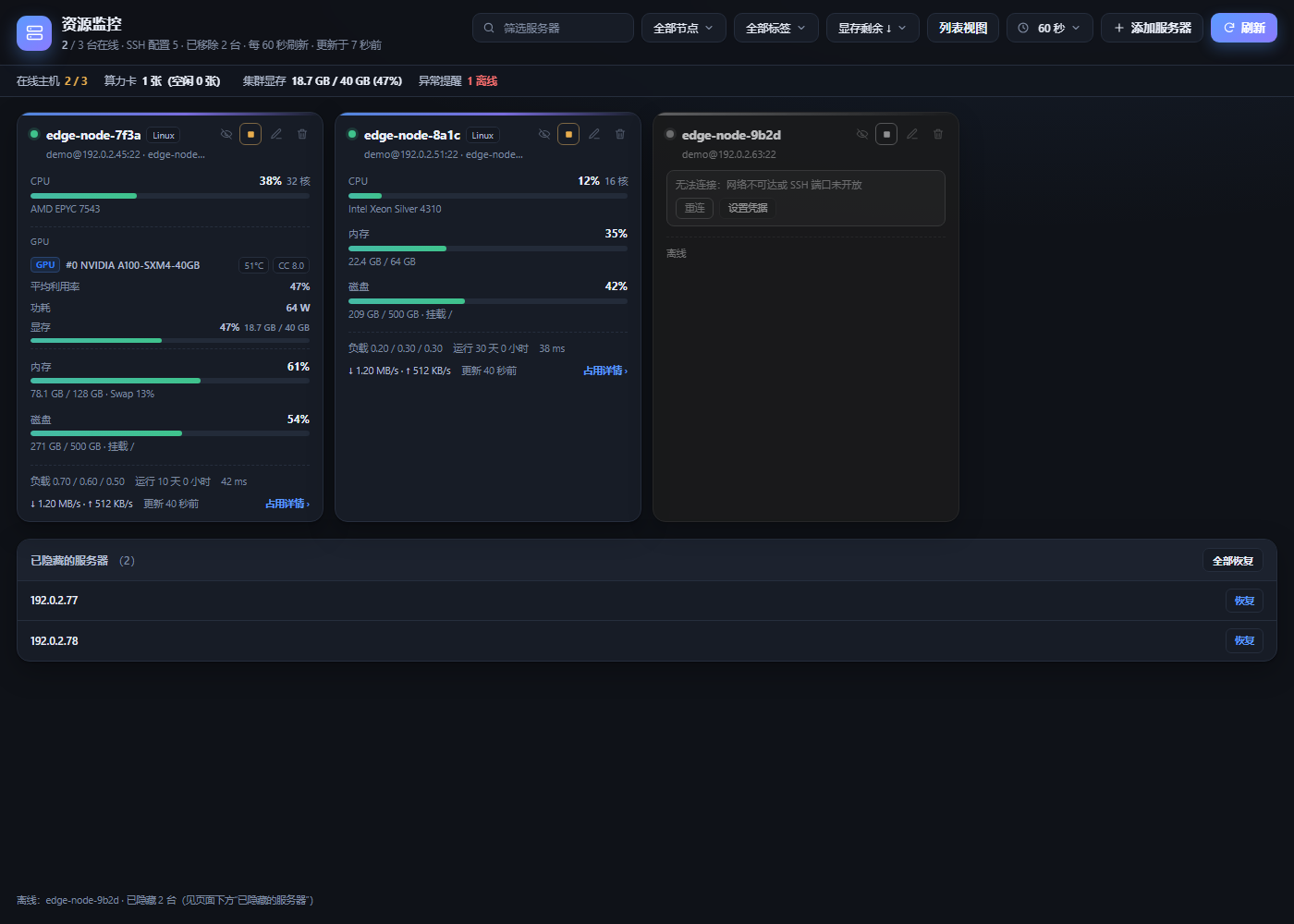
Features
- Host resources — CPU, memory, swap, disk mounts, network throughput, load average, uptime and SSH latency.
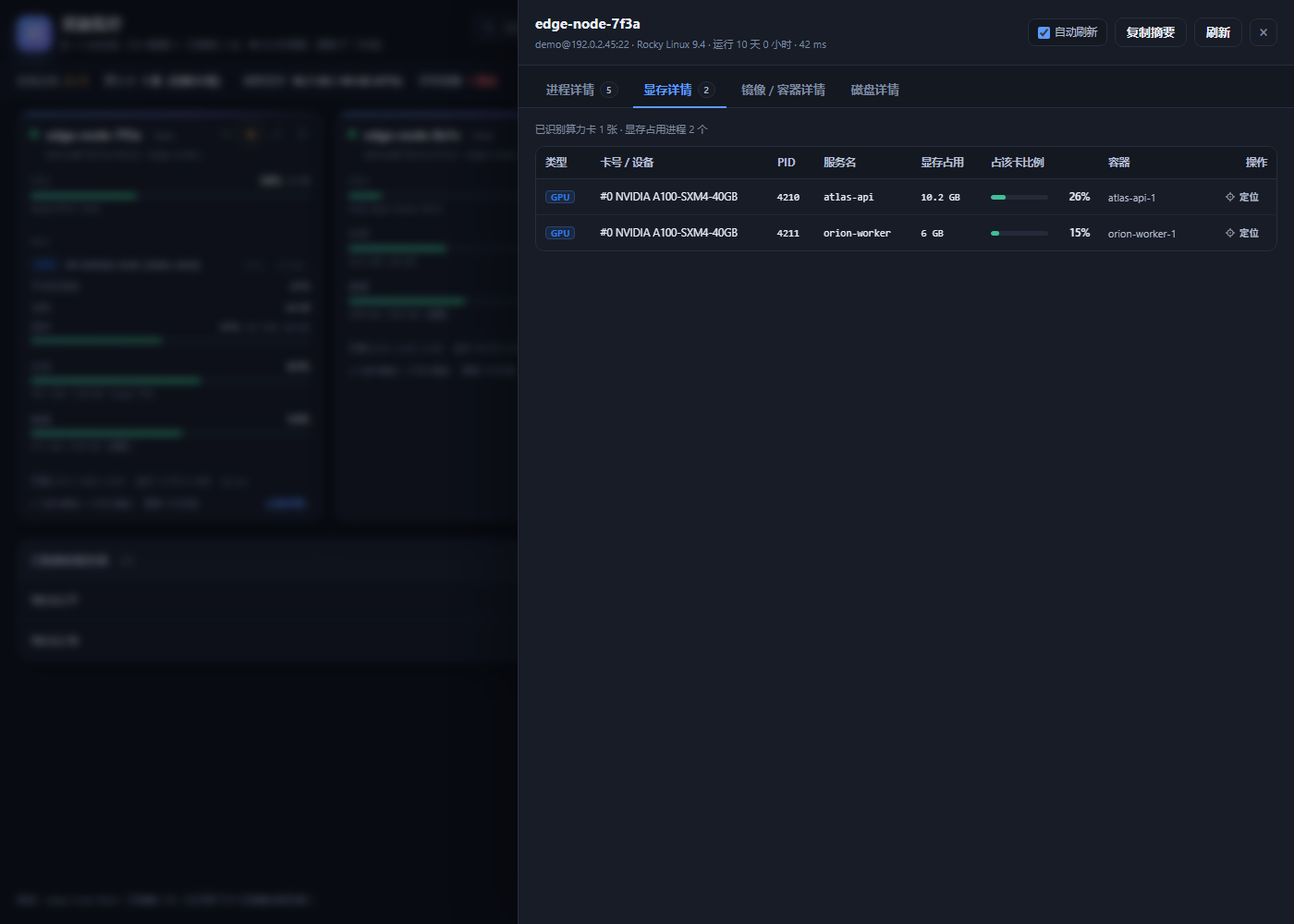
- Accelerators — per-card utilization, memory, temperature and power for NVIDIA GPU, Huawei Ascend NPU and Hygon DCU.
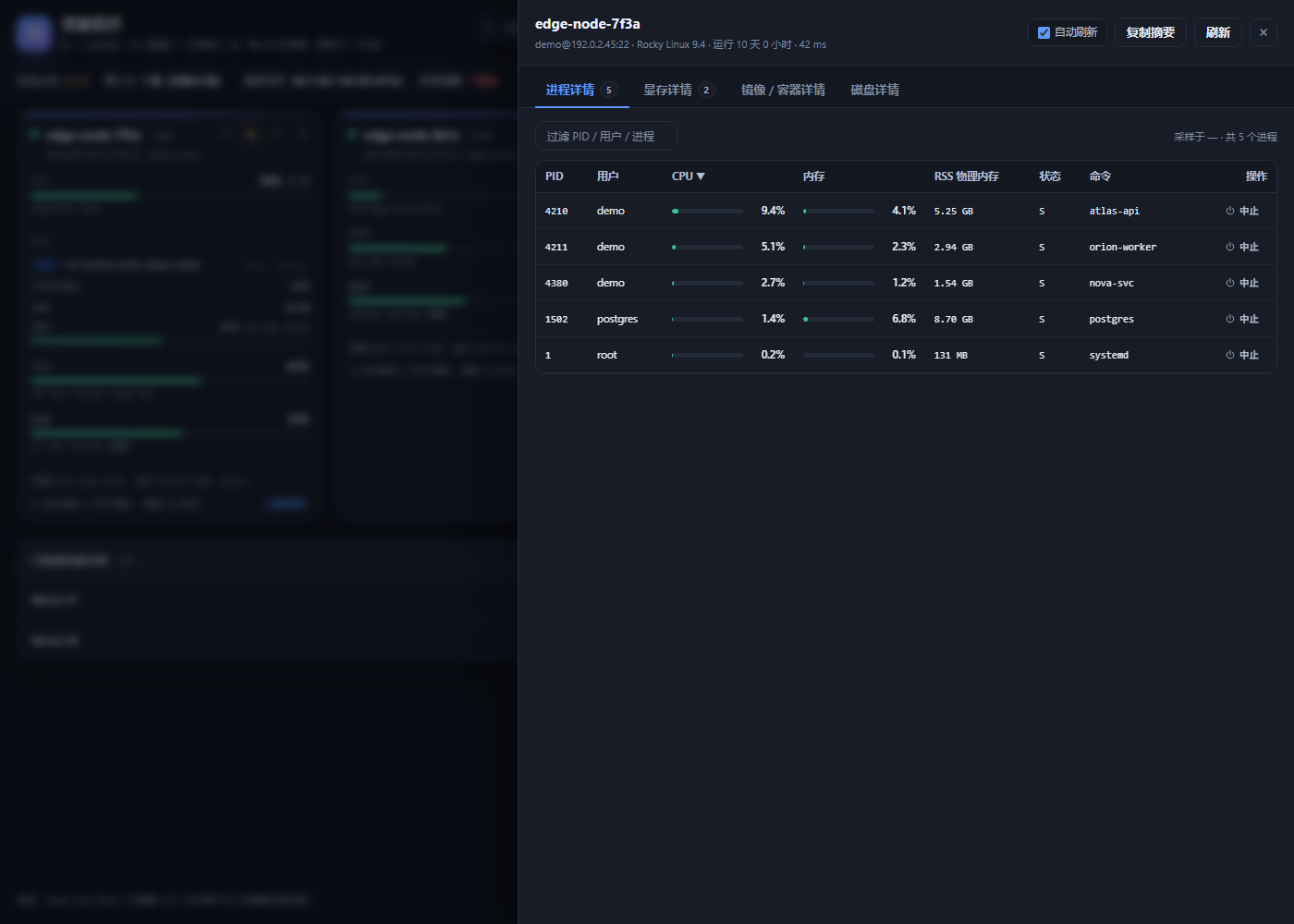
- Processes — sortable process table, process search, and confirmed
SIGTERMtermination with aSIGKILLfallback. - Deleted servers — expand the list below the dashboard to restore a server or permanently remove its Host block from the SSH config.
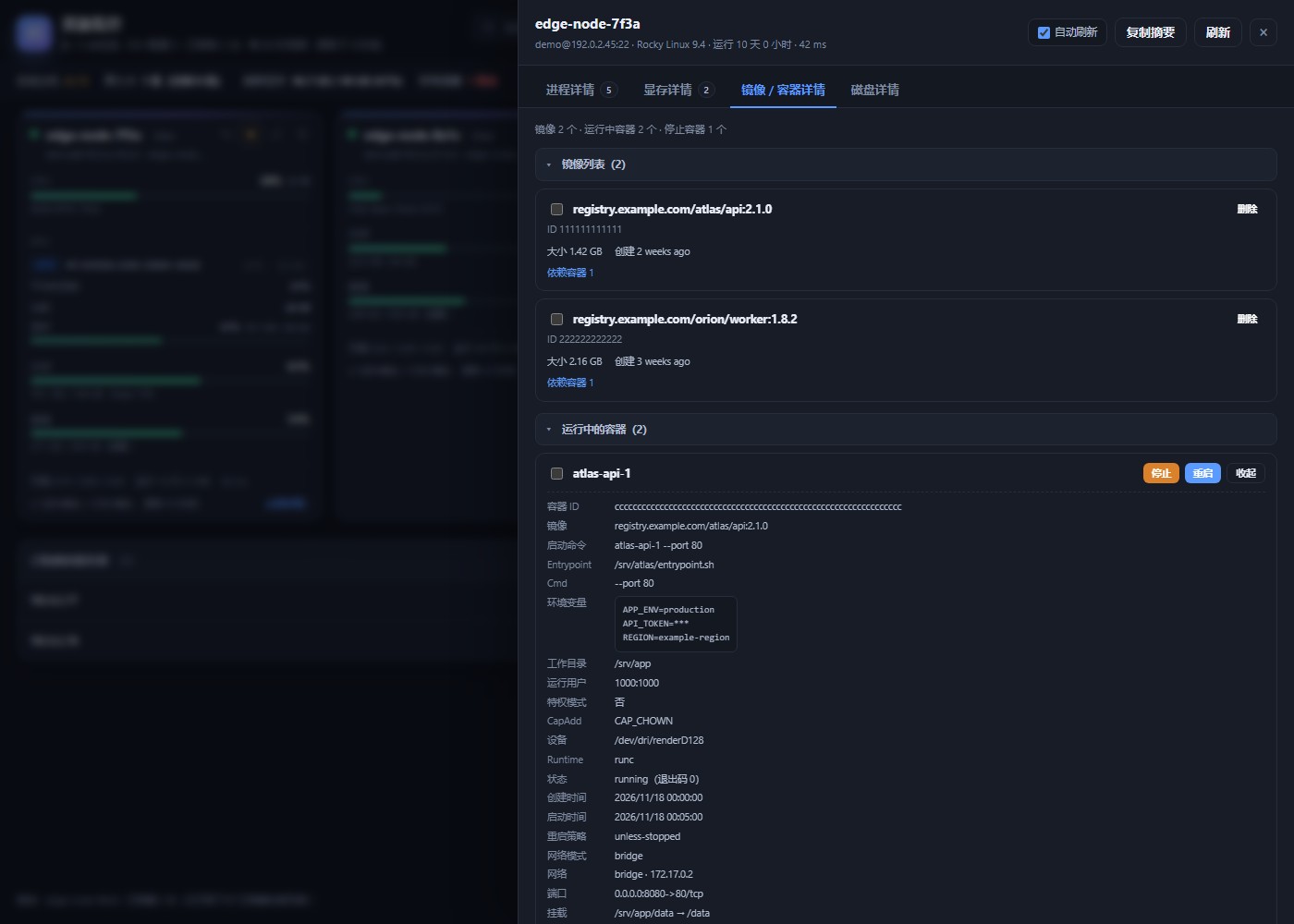
- Docker — image and container lists, start/stop/restart/delete, multi-select batch deletion with progress, startup parameters, and an image-to-container dependency tree.
- Server management — hide or restore servers, permanently remove a Host block from the SSH config, and sync newly added servers into
~/.ssh/config. - Two scopes — a global server panel and a session-scoped server tab that follows the current workspace.
- Read-only collection — resource samples use read-only commands; credentials stay on the local machine.
Install
npm
dsh plugin --profile desktop add dsh-server-monitor
GitHub
- Open Settings → Plugins → Install.
- Enter:
https://github.com/xua123/dsh-server-monitor
- Quit DSH completely, then start it again.
GitHub Release tarball
https://github.com/xua123/dsh-server-monitor/releases/download/v0.2.9/dsh-server-monitor-0.2.9.tgz
The URL is pinned to v0.2.9, so the asset name can safely contain the version.
Requirements: DSH >= 0.2.1-rc.1, Node >= 20.
Usage
Global panel
Click the server icon in the left sidebar. The panel lists:
- the local machine;
- hosts discovered from
~/.ssh/config; - hosts added manually in the panel.
It supports search, tag filters, card/list views, and sorting by remaining accelerator memory, CPU, memory or average utilization.
Session tab
Open the Resource Monitor tab in a conversation. The tab reads the session workspace and shows the matching server only. If no server can be matched, choose one from the selector in the tab header.
Operations
- Processes — abort with
SIGTERM; if the process survives, offer a confirmedSIGKILLforce-kill action. - Containers — start, stop, restart and delete; select multiple containers, then press the card's Delete button to open a batch confirmation with progress such as
1/3,2/3,3/3. - Images — delete an image; when deletion is blocked, list the containers still using it; inspect the image-to-container dependency tree.
- Servers — hide a server from the dashboard or restore it; permanently delete its Host block from the SSH config after a second confirmation. Newly added servers are appended to the SSH config with a backup.
Resource coverage
| Area | Data |
|---|---|
| CPU | usage, cores, model, 1/5/15-minute load |
| Memory | used/total, percentage, swap |
| Disk | root and mounted filesystems, used/total, busiest mount |
| Network | receive/transmit rate |
| System | hostname, OS, kernel, uptime, SSH latency |
| GPU | utilization, memory, temperature, power, compute capability |
| NPU | AICore utilization, memory, temperature, power; Ascend 310P/910B compatible |
| DCU | utilization, VRAM, temperature, power; hy-smi JSON/table compatible |
| Containers | CPU/memory limits when running inside a container |
Process details
Accelerator memory
Process and Docker operations
Process termination and Docker mutations require the page token and a confirmation dialog.
- A process can only be terminated if its PID is present in the current detail view.
SIGTERMis sent first; if the process remains, a separate Force kill (SIGKILL) action is offered.- Container start, stop, restart and delete are confirmed.
- Image deletion reports the containers that still reference the image.
- Running containers must be stopped before they can be deleted.
Container details
Security and privacy
- Resource collection uses read-only commands such as
/proc,df,nvidia-smi,npu-smiandhy-smi. - The plugin does not upload telemetry or resource data.
- Manually added passwords are stored locally in
~/.dsh/server-monitor/targets.jsonwith mode0600; use SSH keys where possible. - Host visibility, aliases and selection state are stored locally under
~/.dsh/server-monitor/. - The repository contains no server addresses, credentials, private hostnames or customer data.
Limitations
- Remote collection targets Linux; Windows is supported for the local host only.
ProxyJump/ProxyCommandare not supported yet.- DCGM exporter or Prometheus is not required.
- NPU/DCU power limits depend on the vendor tool; only actual power is shown when no limit is available.
- Session scoping depends on DSH session
cwdmetadata; use the manual selector when it cannot be resolved.
Development
npm install
npm test
npm pack
License
MIT
Plugins relacionados
deepseek-harness
deepseek-ai/deepseek-harness
dsh-market
dsh-market/dsh-market
dsh-web (dsh-plugin-manager)
zhu1090093659/dsh-web
dsh-web
zhu1090093659/dsh-web