dsh-stl-preview
439436269-ctrl/dsh-stl-preview
Opens STL meshes in the right-Sidebar document preview: binary/ASCII parsing in the browser, a WebGL viewport, and size, volume, surface-area and watertightness statistics.
Установка
dsh plugin --profile web add github:439436269-ctrl/dsh-stl-previewREADME
Renamed: the canonical package is now
dsh-preview-stl. This repository is kept as the legacy 0.1.x home.
dsh-stl-preview
Preview STL meshes inside DeepSeek Harness: the right-Sidebar document preview renders the triangles in an interactive 3D viewport and reports the numbers that matter for 3D printing — size, volume, surface area and watertightness.
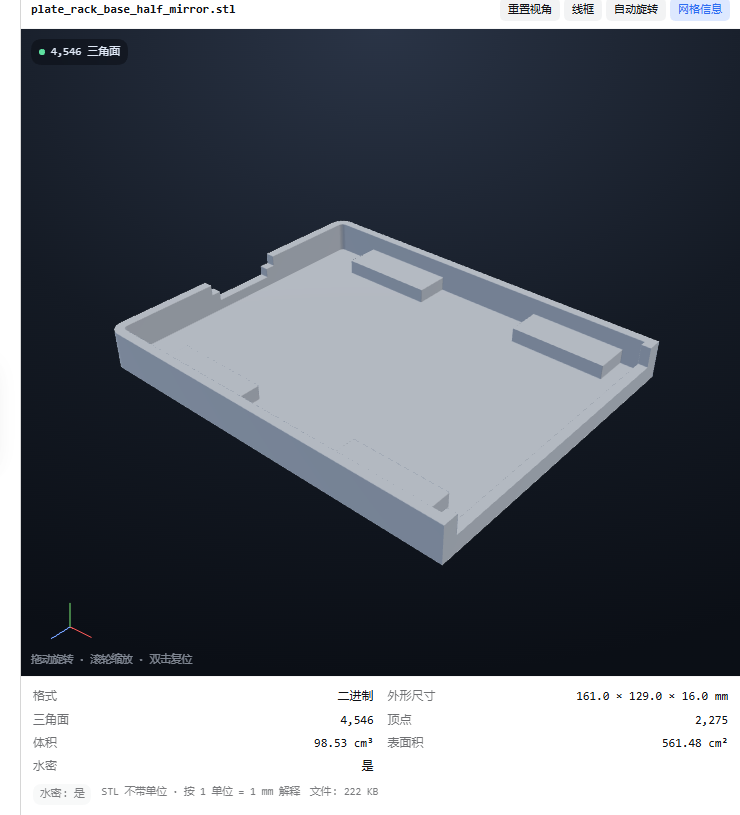
What it does
- Registers a document-preview renderer for
.stlfiles, so clicking one in Workspace files opens it in the right Sidebar. - Streams the file through an authenticated
/api/stl-previewroute and parses binary and ASCII STL in the browser — nothing is uploaded, nothing is converted on the host. - Draws the mesh with the same dependency-free WebGL viewer used by
dsh-blend-preview: orbit, pan, wheel zoom, double-click reset, wireframe, auto-rotate, contact shadow, axis triad. STL is Z-up, so the mesh is rotated into the Y-up viewport before drawing. - Reports: format (binary/ASCII + header), file size, triangle count, welded vertex count, bounding box in millimetres, volume in cm³, surface area in cm², and watertightness (boundary edges / non-manifold edges / degenerate facets), computed by welding vertices on a grid and counting edge uses.
- Handles unitless STL with a configurable
unitScale(1 = millimetres, 10 = centimetres, 25.4 = inches).
Requirements
- DeepSeek Harness 0.2.x (declared compatible with
0.2.0-rc.2and0.2.1-rc.2). - A browser/GPU with WebGL (the desktop app always has it). No Blender, no slicer, no network.
Install
dsh plugin --profile <profile> add dsh-stl-preview
The desktop profile is owned by the Electron app; install there through the plugin manager UI, or compose it manually and restart. The package ships a cordis.patch.yml, so the plugin row is added automatically.
Configuration
Settings → Plugins → STL preview (namespace stl-preview):
| Key | Default | Meaning |
|---|---|---|
enabled | true | Register the renderer and the byte route. |
routePath | /api/stl-preview | Authenticated mesh route. Must stay under /api; otherwise it falls back to the default. |
extensions | ["stl"] | Suffixes that open in the 3D preview. |
maxBytes | 536870912 | Largest STL streamed (512 MiB). |
chunkBytes | 1048576 | Bytes per ranged read on the host. |
unitScale | 1 | Millimetres per STL unit; drives size, volume and area. |
color | #c7d2e2 | Viewport colour (STL carries no materials). |
analysisMaxTriangles | 400000 | Above this, skip the watertightness pass instead of freezing the tab. |
How it works
Workspace file click
        │
        ▼
document preview body (lib/client.js)
        │  GET /api/stl-preview?path=…   (raw bytes, ctx.fs chunks)
        ▼
parseStl(bytes)         binary: 80-byte header + uint32 count + 50 B/facet
                        ASCII:  facet normal / outer loop / vertex
        │
        ├── analyzeStl: bbox, area, signed volume, vertex weld + edge map
        └── setGeometry: rotate Z-up → Y-up, upload triangles
- The route sits under
/api, so the connection service authenticates every request (Host/Origin fence + session cookie) before a byte is read. - Watertightness is skipped above
analysisMaxTriangles(the edge map is the expensive part); the panel says so. - Volume is the signed tetrahedron sum (
|Σ v0·(v1×v2)/6|), area the summed triangle areas.
Development
dev/client-body.js   client UI, STL parser and statistics (CJS factory)
dev/viewer.js        the WebGL renderer, spliced into the bundle at build time
scripts/build-client.mjs   builds lib/client.js from the two files
scripts/live-selftest.mjs  parses a real STL with the shipped bundle
scripts/e2e-browser.mjs    Playwright end-to-end against a temporary DSH host
node --test test/*.test.js
lib/client.js is generated — edit the files under dev/ and rebuild.
Notes and limits
- STL is unitless; the millimetre figures assume
unitScale(1 by default). Set 10 for a file authored in centimetres. - Very large meshes (millions of triangles) parse on the main thread and may take a moment; the watertightness pass stops at
analysisMaxTriangles. - ASCII STL with vertex colours or per-facet attributes beyond the standard grammar is not interpreted beyond positions and normals.
- Nothing is uploaded: bytes go browser ← host over the authenticated route and are parsed in the page.
Похожие плагины
dsh-web (dsh-task-board)
zhu1090093659/dsh-web
dsh-web (dsh-web-all)
zhu1090093659/dsh-web
dsh-web-ui (dsh-task-board)
zhu1090093659/dsh-web-ui
dsh-web-ui (dsh-web-ui-all)
zhu1090093659/dsh-web-ui