dsh-ember
realoiyo/dsh-ember
Composer UI for DeepSeek Harness that does two things. The reasoning-effort row in the model menu becomes a continuous slider drawn on the row itself, with the rungs read live from the model adapter so any ladder length works; each rung paints its own ember plume into a canvas behind the knob. Separately, the permission trigger renders in the theme error colour whenever full access is the active preset, including its row in the permission menu.
Установка
dsh plugin --profile web add github:realoiyo/dsh-emberREADME
dsh-ember



推理等级变成滑块,完全权限变红。 两件事,一个插件,不动任何官方组件。
Reasoning effort becomes a slider; full access turns red. Two things, one plugin, no shipped component replaced.
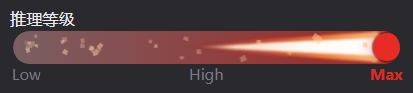
推理等级滑块 · Max 档(暗色主题)
Effort slider at the top rung · dark theme
为什么 / Why
DSH 的 composer 底部有两处可以更好用:
- 完全权限是灰色的。 「完全权限」意味着智能体能直接执行敏感操作 —— 删文件、跑命令、改系统。它和「仅可查看」用同一个颜色,视觉上没有任何区别。
- 推理等级是一串菜单项。 想从 Low 调到 High,要点开菜单、找到那一行、点它。档位越多找得越慢,而且看不出「现在在整条阶梯的哪个位置」。
这个插件把第一处变红,把第二处变成滑块。
DSH's composer has two spots that could read better:
- Full access is grey. It permits destructive operations — deleting files, running commands, touching the system — yet it looks exactly like read-only.
- Effort is a list of menu rows. Going from Low to High means opening a menu and hunting for the row. More rungs, more hunting, and no sense of where you sit on the ladder.
This plugin repaints the first and turns the second into a slider.
功能 / Features
1. 完全权限变红 / Full access in red
-
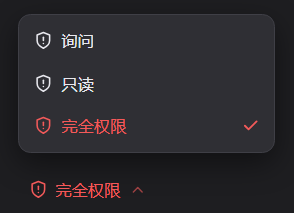
「完全权限」的文字和盾牌图标都变成主题红
-
明暗主题都红,各用 DSH 自带的危险色:亮色
#ec1313,暗色#f25a5a -
只在该预设被选中时红;切回「仅可查看」自动恢复原色
-
确认弹窗里的「启用完全权限」按钮不会被误染
-
The label and the shield glyph both take the theme's danger colour
-
Red in both themes, using DSH's own tokens:
#ec1313light,#f25a5adark -
Red only while that preset is current; switching back restores the neutral tone
-
The confirmation dialog's “Enable full access” button is deliberately left alone
2. 推理等级滑块 / Reasoning effort slider
打开模型菜单,「推理等级」那一行下面直接就是滑块 —— 不用点进去:
┌──────────────────────────────┐
│ 模型        Deepseek-V4.1…  ›│
│ 推理等级                High ›│
│ [======|===============]     │  ← 滑块,停在当前档
│ Low        **High**       Max│  ← 档名当刻度,当前档加粗
└──────────────────────────────┘
-
档位完全由上游下发决定:读模型适配器报的
efforts,不写死 -
连续拖动,不是分段按钮:滑块位置是浮点数,跟手走;拖动时只重画,松手才吸附到最近档并提交
-
1 / 2 / 3 / 4 / 6 档都验证过;只有 1 档时钉在右端并标
aria-readonly -
拖动时刻度即时高亮(热更新)
-
键盘方向键 / Home / End 同样可用
-
写入走
modelDirectories的select()—— 与官方选择器同一个服务调用 -
每档在旋钮背后画各自的余烬尾焰:档位越高,尾焰越长越热
-
Ladder length comes from the model adapter's own
efforts, never hard-coded -
Continuously draggable, not a row of segmented buttons: the position is a float that follows the pointer; dragging only repaints, and the knob snaps to the nearest rung and commits on release
-
1 / 2 / 3 / 4 / 6 rungs verified; with a single rung the knob parks at the right end and the rail is marked
aria-readonly -
The scale highlights live while dragging
-
Arrow keys, Home and End work as well
-
Writes through
modelDirectoriesselect()— the same service call the shipped picker makes -
Each rung paints its own ember plume behind the knob: higher rungs burn longer and hotter
安装 / Install
从 GitHub 装:
dsh plugin add https://github.com/REALOIYO/dsh-ember
或者先克隆到本地,再指向那个目录:
git clone https://github.com/REALOIYO/dsh-ember
dsh plugin add F:/path/to/dsh-ember
装完重启 DSH。这是纯前端插件,没有服务端逻辑。
Install from GitHub, then restart DSH. It is browser-only; there is no host-side logic.
兼容性 / Compatibility
| 项 | 要求 |
|---|---|
| DSH | 0.2.1-rc.3(在 rc.3 上开发与验证) |
| 菜单 | [role="menu"][aria-label="模型与推理等级"] |
| 依赖服务 | locale |
| 平台 | Web(桌面端与局域网访问一致) |
为什么注入 DOM,而不是用槽位
输入行里的模型选择器是 conversation.input.model,一个 single 槽位:
- 同 priority 重复注册直接抛错(
already has a registration),想接管就得整体重写那份 79KB 的ModelSelect(菜单、搜索、键盘导航、浮层定位、失败重试、toast) single槽位也不能容纳第二个 child —— child 必须在父 entry 的children表里声明,而那张表属于官方包
菜单内部没有留给第三方的缝隙,所以走唯一不碰官方的路:观察菜单,插入一个它自己没写过的元素。
Why DOM injection rather than a slot
The composer model seat is a single slot: re-registering at the same priority
throws, so taking it over means reimplementing the whole 79KB ModelSelect. A
single slot also cannot host a second child — child slots are declared by the
parent entry's children table, which belongs to the shipped package. There is
no seam inside its popup, so the only route that leaves the host untouched is to
observe the menu and insert one element it did not author.
实现要点 / How it works
红色:属性标记 + 一条 CSS
官方触发器渲染时用的是:
.trigger      { color: var(--dsw-alias-label-secondary) }   /* 灰 */
.triggerIcon  { display: inline-flex }                       /* 无 color,继承 */
triggerIcon 不写 color,盾牌 <svg> 用 currentColor 描边 —— 所以给按钮上色,盾牌跟着变。
插件用 MutationObserver 监听,当触发器同时满足「aria-label 含访问模式」和「含完全权限文案」时打上
data-dsh-full-access,再配一条规则:
[data-dsh-full-access]{ color: var(--dsw-alias-state-error-primary) !important }
[data-dsh-full-access] svg{ color: inherit !important }
--dsw-alias-state-error-primary 在主题里本来就分开放(亮色 → red-600,暗色 → red-400),
所以不用自己挑色就自动跟随明暗。预设切走时属性被移除,颜色自己回来。
判据故意从严:既要 aria-label 像触发器、又要含完全权限文案,两个条件都满足才动手 ——
官方哪天改了文案,结果是「不变红」而不是「染错按钮」。
滑块:读服务、写服务
第一步是找到菜单。用它的无障碍名匹配,不用哈希类名:
document.querySelectorAll('[role="menu"]')
  → aria-label 匹配 模型与推理等级 / Model and reasoning effort
哈希类名(如 _9r0rkG_*)每次构建都变,而 aria-label 是产品文案。
档位不是猜的,是读模型适配器报的阶梯:
directory.store.getSnapshot()
→ snapshot.groups[i].models[j].reasoning.efforts
→ [{ id: 'low', name: 'Low' }, { id: 'high', name: 'High' }, …]
current.reasoningEffort 指向当前档,数组顺序就是上游声明的顺序。这样一来
档位数与档名全都跟着上游走,上游加档不用改这个插件。
提交走 directory.select():
await directory.select(levelId);
这是官方选择器用的同一个服务调用,插件不新开写入通道,也不点任何宿主节点。
为什么要等存储确认:select() 是异步的,快照在写入后仍会短暂回报旧档位。
如果立刻采纳它,旋钮会先吸附到新档、再弹回旧档 —— 所以本地记住「我要的是哪档」,
等上游追上来(或超时)之后再认账。
为什么松手才提交:拖动过程中只重画刻度与 aria-valuetext,不写数据。
一旦在 pointermove 里提交,一次拖动会打出十几次切换。
为什么落点只算一次:滑块几何由 pct(0..1)决定,不由档位数决定。
2 档和 6 档得到的是同一条轨道、同一条尾焰,只是刻度数量不同。
只注入、不接管:官方那两行(模型 / 推理等级)原样保留,只是在推理等级下方 多了一个本插件写的块。官方菜单自己怎么渲染、怎么定位、怎么处理键盘,完全没动。
已知边界 / Known limits
- 依赖
aria-label文案判定完全权限。 官方若改文案(如「完整权限」),红色会失效但不会误染。 修正位置:lib/client.js的FULL_ACCESS_LABELS。 - 轨道宽度跟随菜单行,档名过长时相邻刻度可能靠得较近(有
title与aria-valuetext兜底)。 - 不处理 subagent 会话(
available === false),与官方选择器一致。 - 模型切换未纳入滑块 —— 用官方选择器或
/model。 - 菜单不可见时环境动画停止。 宿主用
display:none/visibility:hidden/opacity:0或直接移除节点关闭菜单时,循环都会自停,并在菜单重新可见后自行恢复。 - 动画按需降级:
prefers-reduced-motion: reduce时不隐藏 canvas(尾焰是视觉主体), 而是降低绘制本身的抖动与亮度变化。
开发 / Development
git clone https://github.com/REALOIYO/dsh-ember
cd dsh-ember
目录:
lib/index.js       loader 入口(空实现,dsh.client 声明才让宿主加载 client.js)
lib/client.js      全部前端逻辑:CSS 注入、权限染色、滑块组件
cordis.patch.yml   profile patch 层,插入一个 loader entry
docs/              探测报告与验证记录
离线验证台在 _tmp/(不在包内):用真实 DOM 复现 composer 行,
不连 DSH 即可检查红色与滑块。11 项断言 + 5 种档位长度。
许可 / License
MIT
Похожие плагины
dsh-web (dsh-task-board)
zhu1090093659/dsh-web
dsh-web (dsh-web-all)
zhu1090093659/dsh-web
dsh-web-ui (dsh-task-board)
zhu1090093659/dsh-web-ui
dsh-web-ui (dsh-web-ui-all)
zhu1090093659/dsh-web-ui