dsh-token-attention
young4ever33/dsh-token-attention
Панель управления вниманием токенов для DeepSeek Harness: учёт расхода и стоимости токенов по задачам/дням/неделям/месяцам (попадание/промах ввода, вывод, рассуждения), тарифы DeepSeek в часы пик/вне пик, распознавание типа задачи и советы, когда менять сессию, писать передачу или сжимать контекст.
Установка
dsh plugin --profile web add github:young4ever33/dsh-token-attentionREADME
dsh-token-attention — Token Check for DeepSeek Harness
English | 中文说明
Token Check is a token-attention management panel for DeepSeek Harness (DSH). It records every conversation's token usage and estimated cost by task / day / week / month, recognizes task types, and — combined with DeepSeek's peak/off-peak pricing and DSH's context mechanics — tells you when to run a task, whether to switch sessions, and whether to write a hand-off file.
It is not a money-saving tool: it never throttles or cancels requests. It presents facts and advice; you decide.
Features
- Five views in DSH Settings — Overview / Sessions / Tasks / Cost / Settings
- Per-task ledger — token consumption (input hit / miss / output / reasoning) and estimated cost, rolled up by day / week / month
- Task-type recognition & advice engine — best execution window, switch-session, hand-off, context, cost and model suggestions
- Attention KPI — attention score, hit rate, context occupancy, compaction count per session
- Peak/off-peak pricing — DeepSeek off-peak half-price windows (peak 9:00–12:00 / 14:00–18:00), estimated cost breakdown by bucket
- Multi-model breakdown — cost and hit rate per model (e.g. deepseek-v4-flash / pro / grok)
- Ledger export — Markdown / CSV download, one-click hand-off template
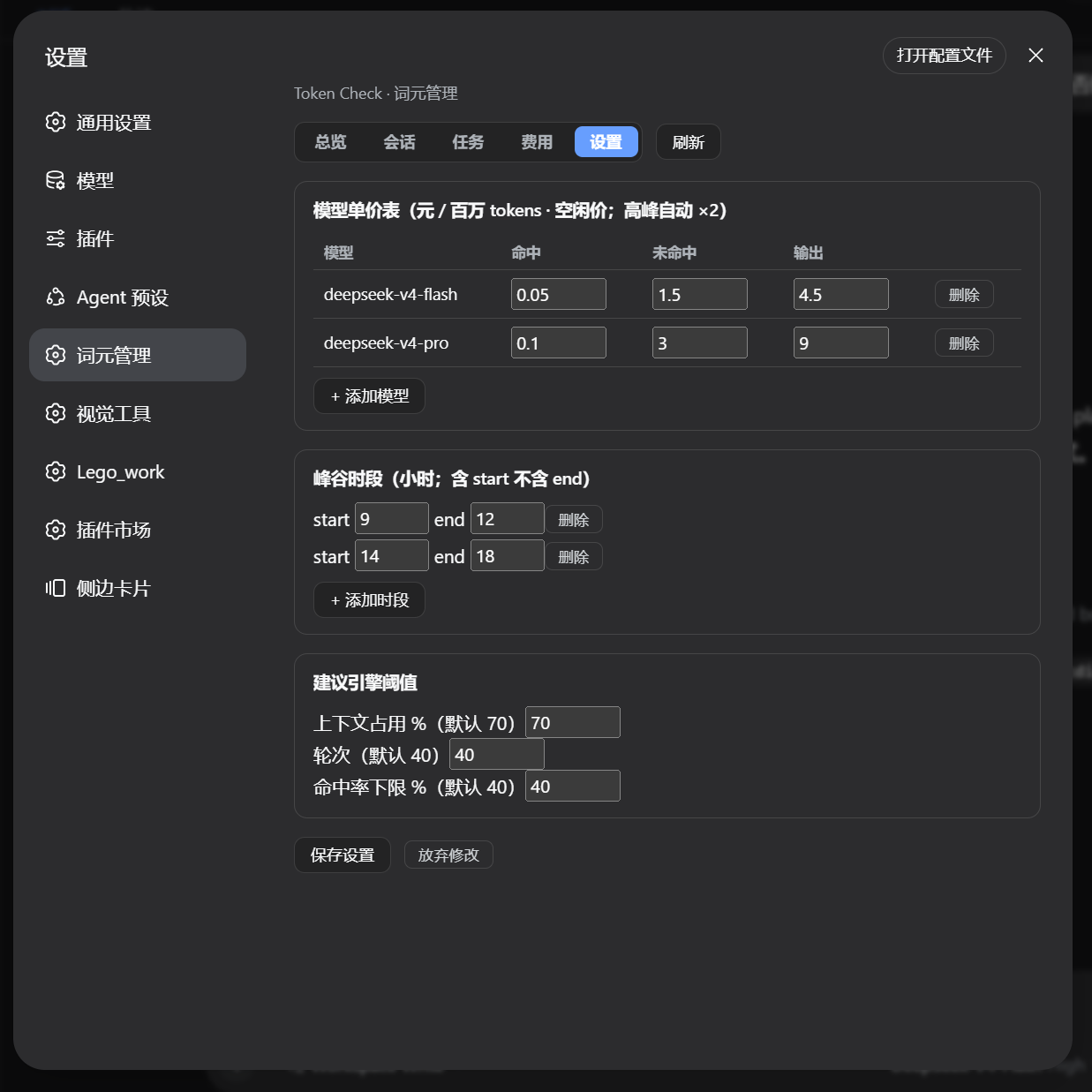
- Editable settings — pricing table, peak hours, advice thresholds; new records are priced immediately
- Zero runtime dependencies — local SQLite via
node:sqlite; no network calls
Screenshots
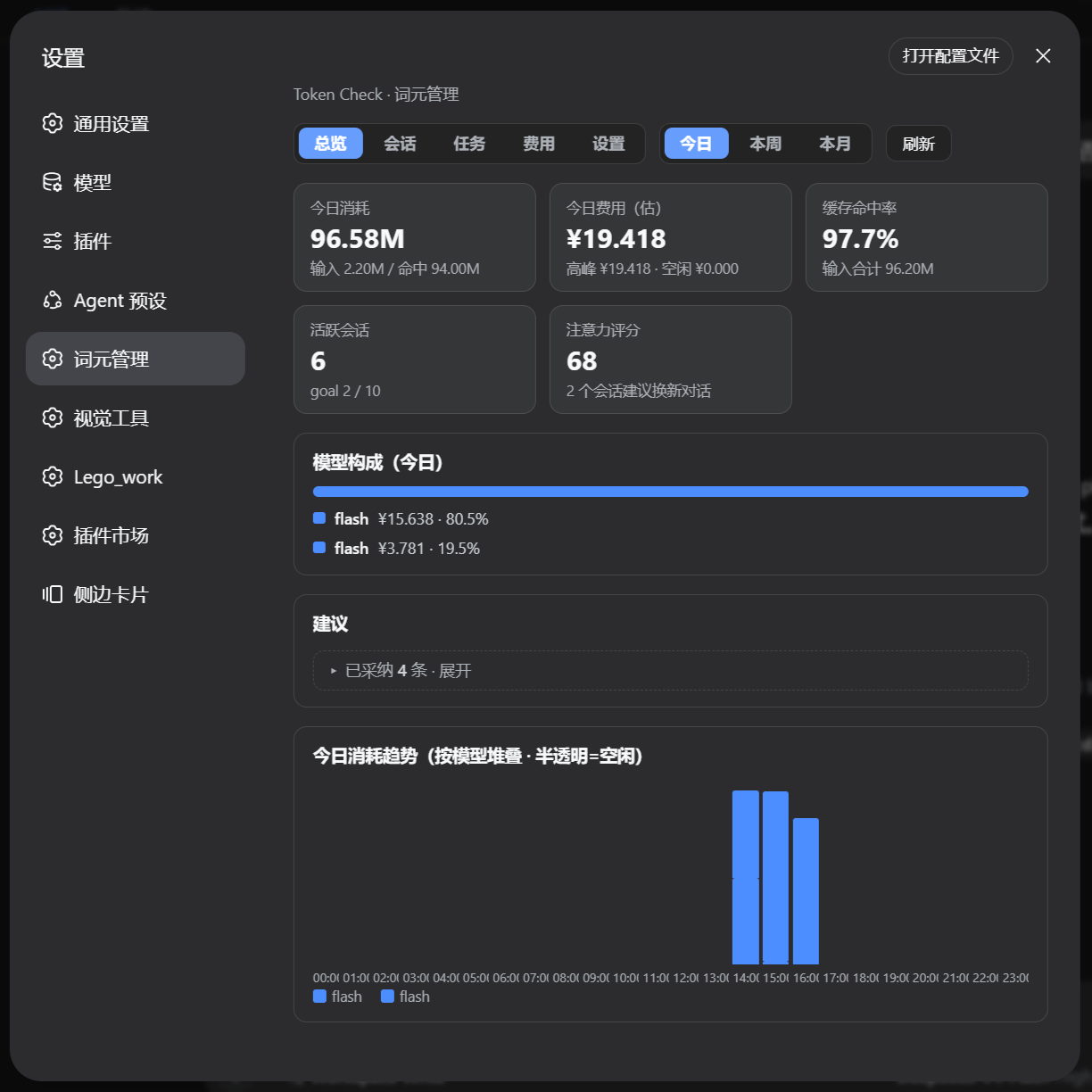
Overview — today's usage, cost, hit rate, attention score, model mix, advice card, and trend
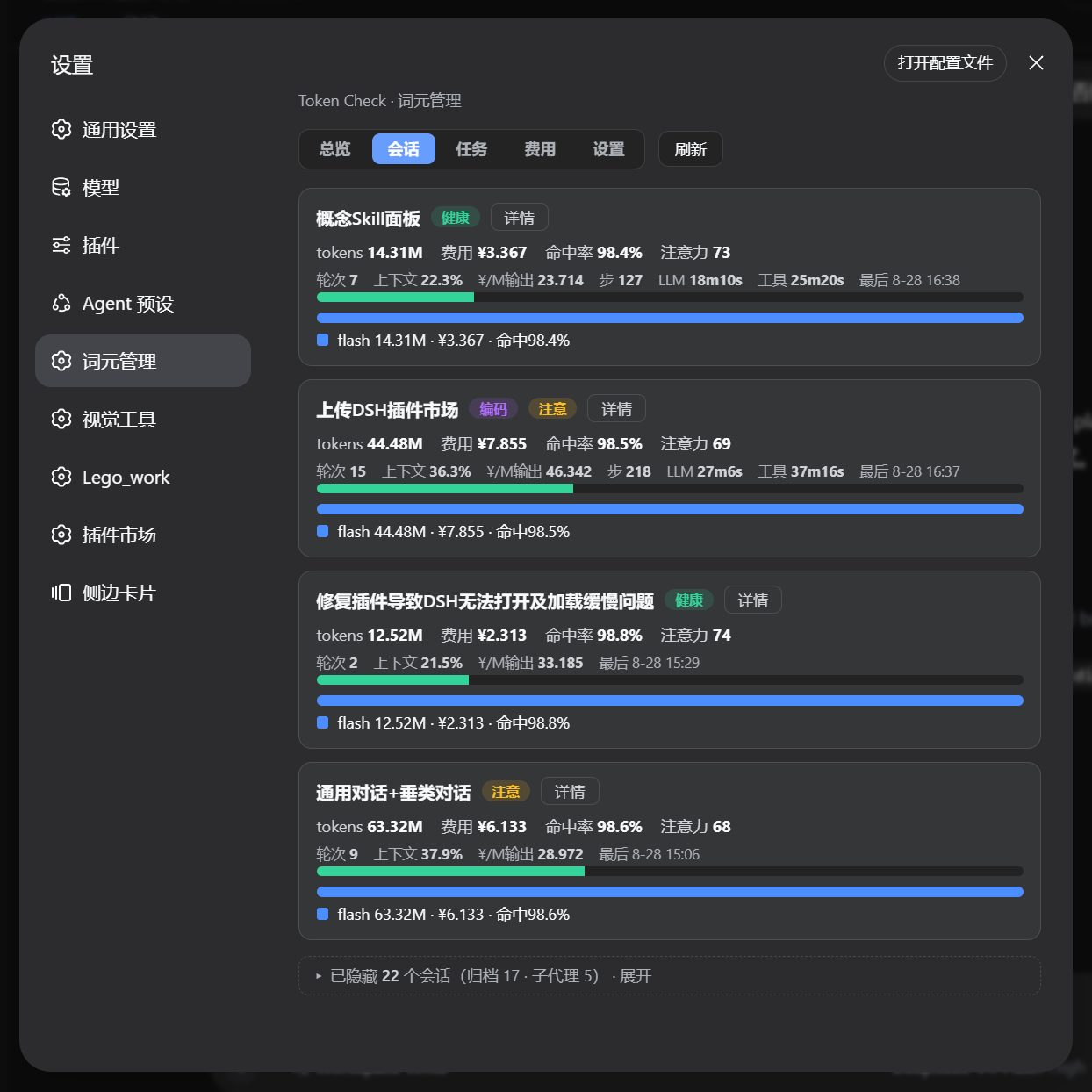
Session card — per-session model breakdown and attention metrics
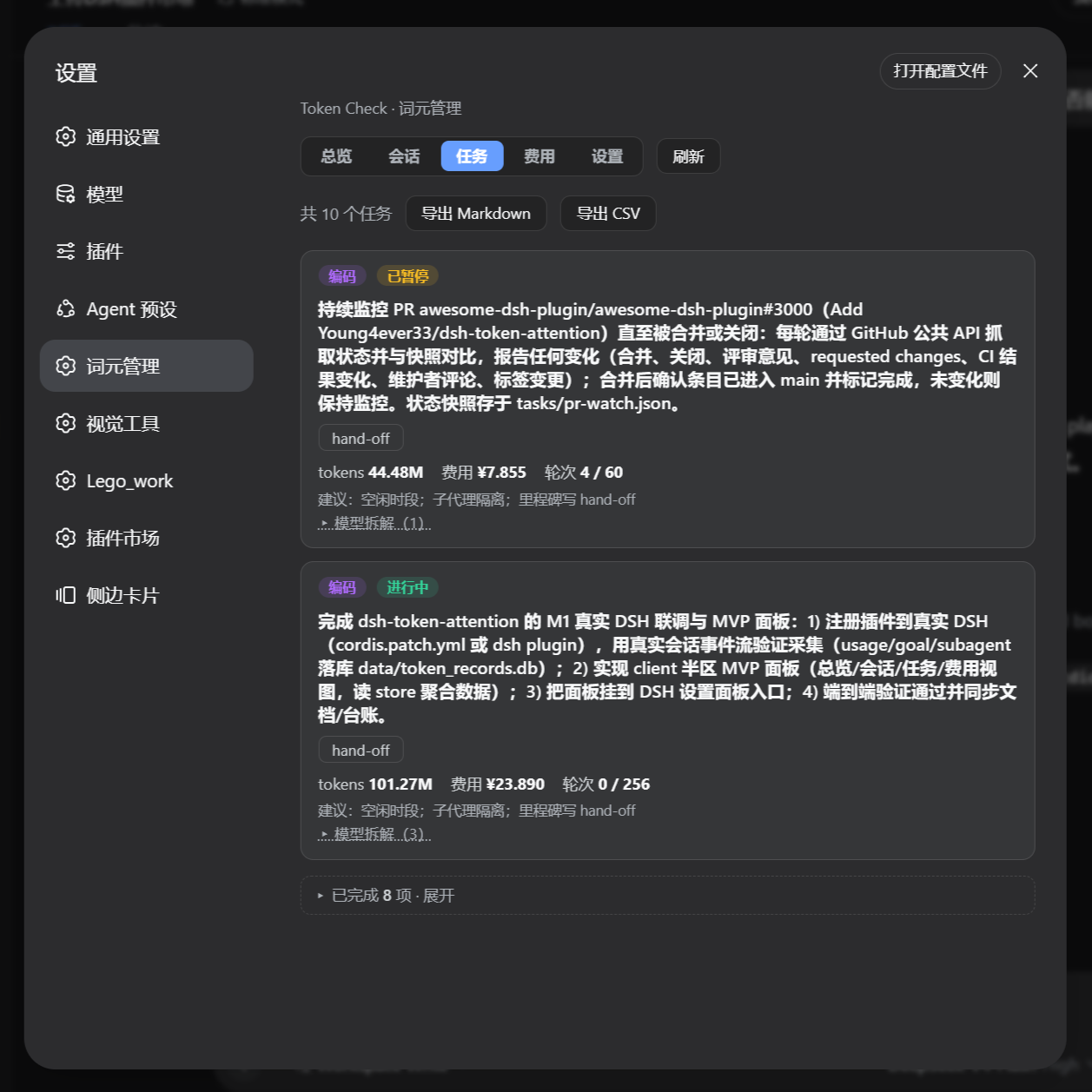
Tasks — task ledger with Markdown / CSV export
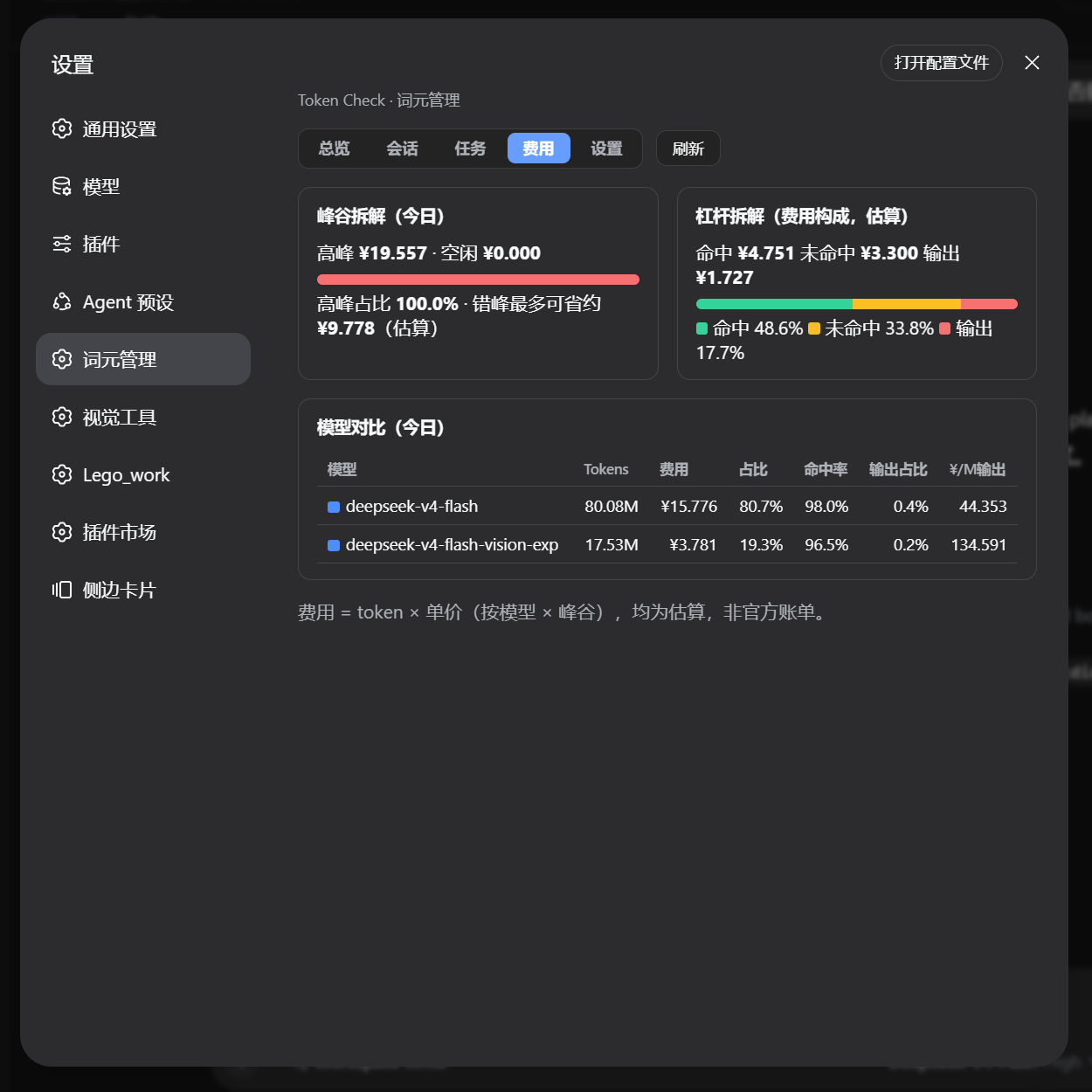
Cost — peak split, cost leverage breakdown, and model comparison
Settings — pricing table, peak hours, and advice thresholds
Install
Once published to npm:
dsh plugin --profile web add dsh-token-attention
Restart DSH, then open Settings → 词元管理 (Token Check). Data is stored at DSH_HOME/token-attention/token_records.db.
Development install (link)
npm install && npm run build
Then register the plugin in the web profile (%APPDATA%\dsh-desktop\harness\profiles\web\package.json):
{
  "dependencies": { "dsh-token-attention": "link:/path/to/dsh-token-attention" },
  "dsh": { "profile": { "bundles": ["...", "dsh-token-attention"] } }
}
Run pnpm install inside profiles\web, restart DSH, and verify:
curl http://127.0.0.1:<port>/token-attention/api/health # → {"ok":true,...}
How it works
- Collection: the node half subscribes to DSH's
session/eventstream (usage, goal, subagent, compaction, turn) and writes normalized records to SQLite; a startup backfill replays existing sessions with an idempotentlast_seqcursor. - Aggregation: hourly incremental rollups into
daily_agg, with a daily full rebuild for correction. - Official projection adapter (optional): when the base layer mounts
session-projection+token-meter+session-stats, the session card reads context occupancy fromcontextPressure.projectedTokens(compaction-reactive, official capacity) and turn/step/LLM/tool/decode stats fromsessionStats(same source as DSH's built-in stats bar); it falls back to its own computation when those units are absent — no extra dependencies. - Advice:
src/shared/advice.tsevaluates context occupancy, turns, hit rate, cost and model mix against your thresholds and suggests concrete actions.
Configuration
Settings are editable in the panel and saved to SQLite:
| Setting | Default |
|---|---|
| Model pricing (¥ / million tokens, off-peak) | flash: hit 0.05 / miss 1.5 / output 4.5 |
| Peak hours (24h, start-inclusive) | 9–12, 14–18 |
| Context-occupancy advice threshold | 70% |
| Turn-count advice threshold | 40 |
| Hit-rate advice threshold | 40% |
Development
npm run typecheck   # tsc --noEmit
npm run check       # node --check src/client/index.js
npm run build       # tsc → dist/
npm run selftest    # collection-layer self-test (idempotency / peak pricing / aggregation assertions)
npm pack            # build the publish tarball
Uninstall
Uninstall in DSH Settings → Plugins, or remove the dependency and the bundles entry from the profile's package.json. The data directory DSH_HOME\token-attention\ can be deleted manually; dispose cleans up timers and the SQLite connection.
License
MIT © 2026 Young4ever33
Похожие плагины
DeepSeek-Balance-Whale-Widget
meteornox/deepseek-balance-whale-widget
dsh-context
bowenliang123/dsh-context
dsh-cost-meter
han-1413141/dsh-cost-meter
dsh-damage-pulse
wssfk12138/dsh-damage-pulse