dsh-plan-note
0-0-user/dsh-plan-note
给 DSH 计划评审加选区批注:选中计划原文、逐条写意见,一次性把结构化反馈发回给 agent。
安装
dsh plugin --profile web add github:0-0-user/dsh-plan-noteREADME
dsh-plan-note
Inline annotations for DeepSeek Harness plan review.
Select a passage, write a comment, send one structured review — the agent stays in plan mode and revises.




Quick start · Demo · Usage · Limits · 中文

DSH's plan gate gives you two buttons: approve or ask for changes. That is too coarse for a plan with several unrelated problems — "change step three" loses the sentence it refers to.
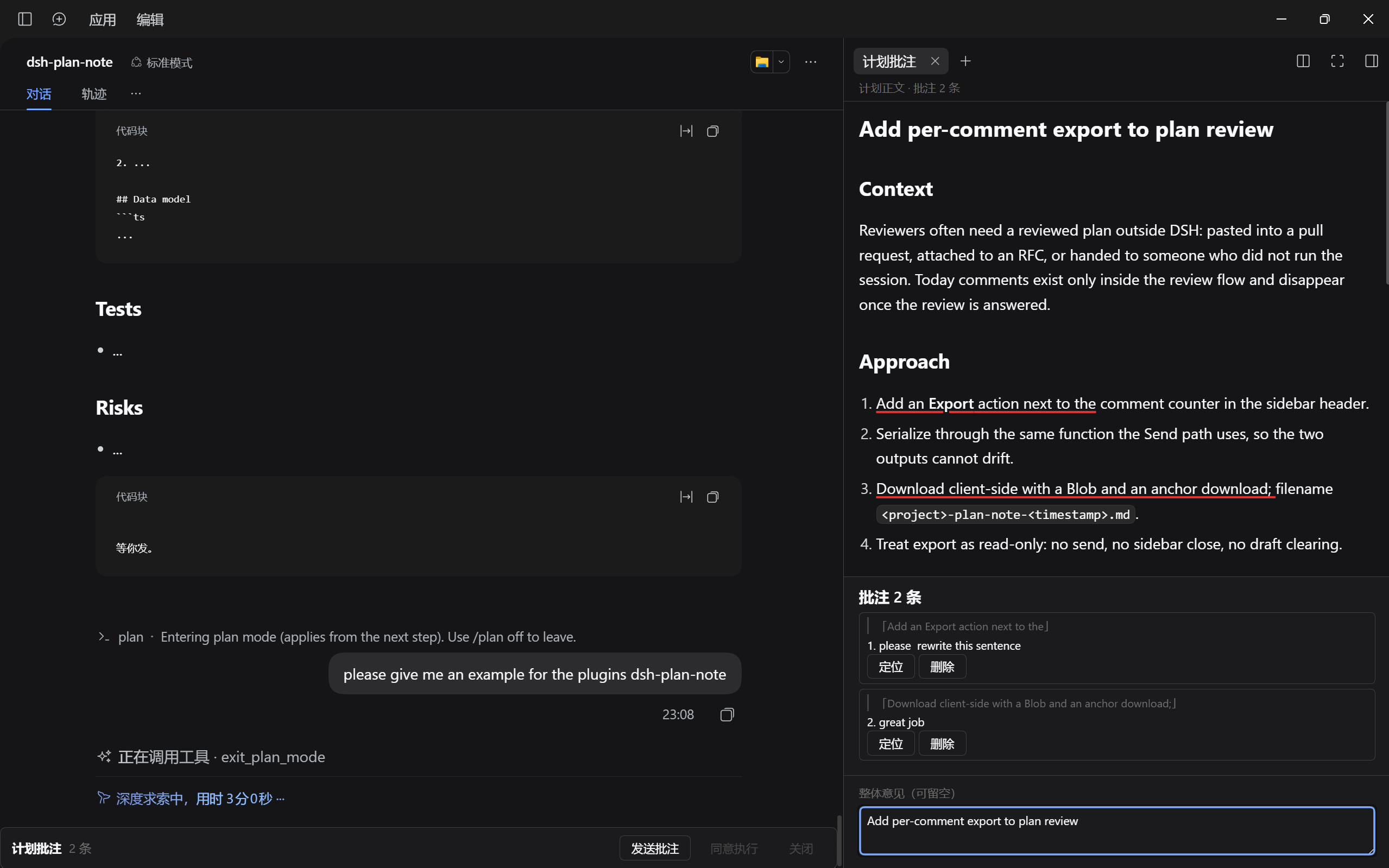
dsh-plan-note keeps every comment attached to the exact passage it talks about, then sends them back as one structured review. It is inspired by the Add comment flow in Claude Code's plan review.

1. The demo
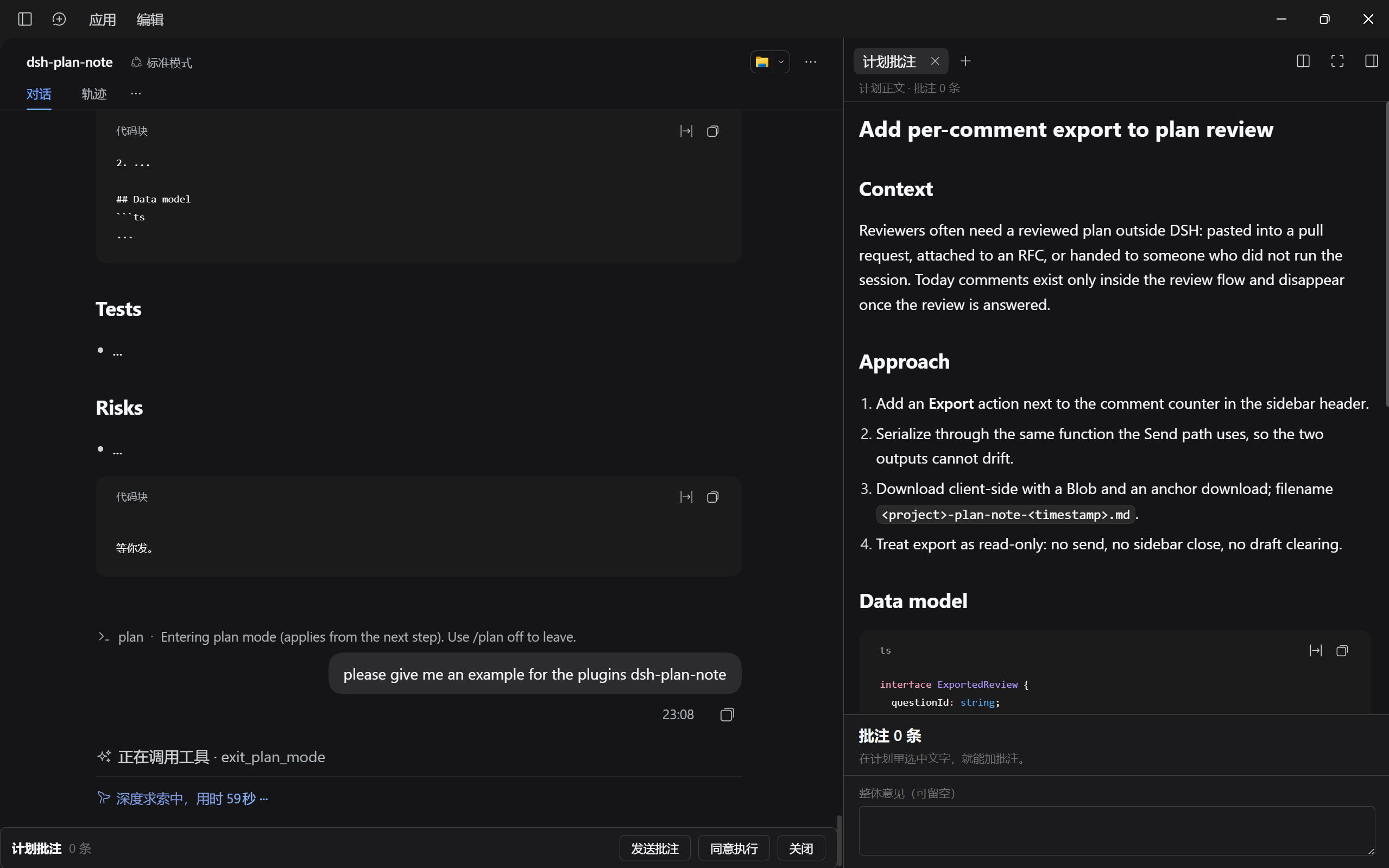
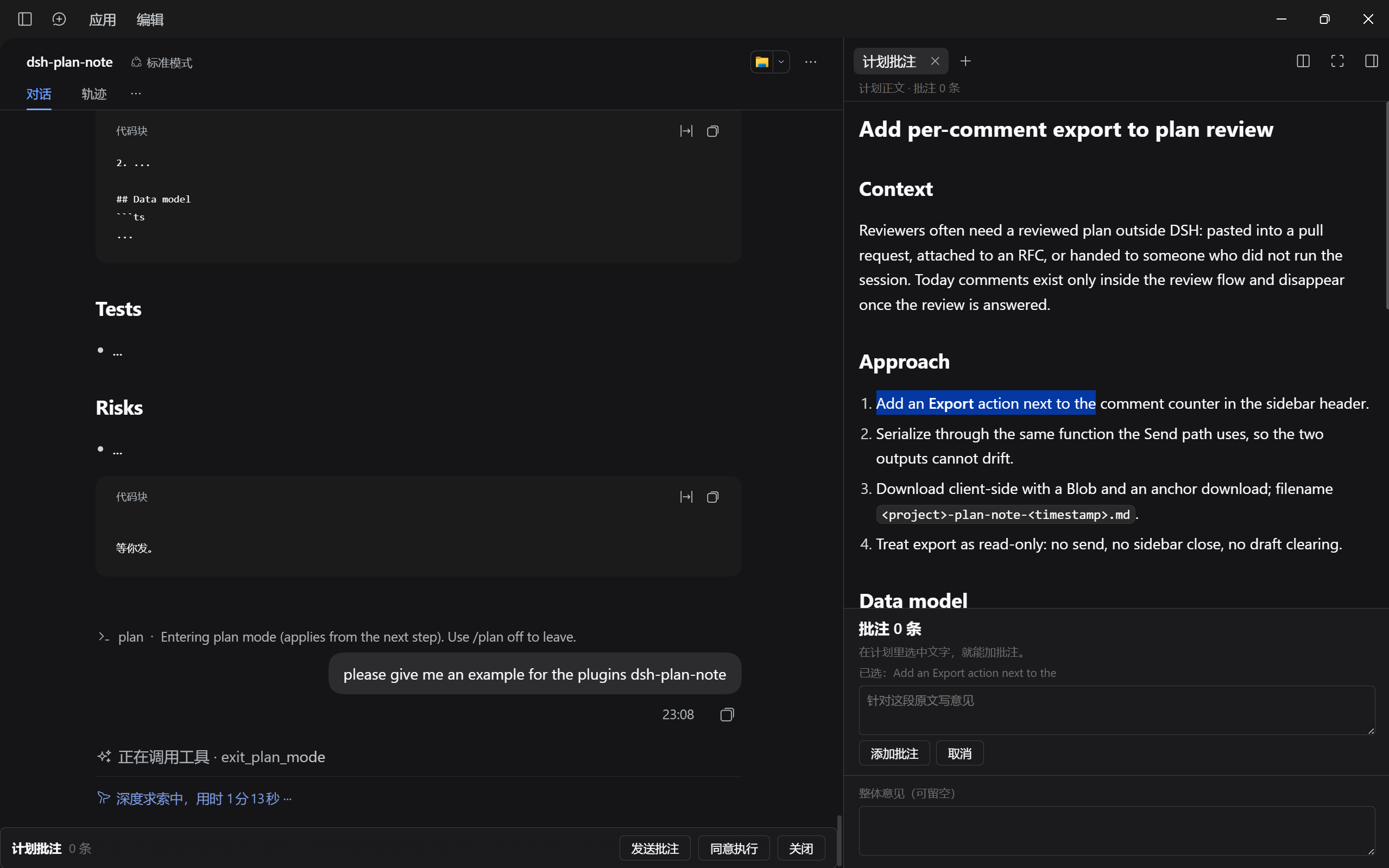
2. Selecting text
Drag over any passage of the plan; the comment box opens underneath.
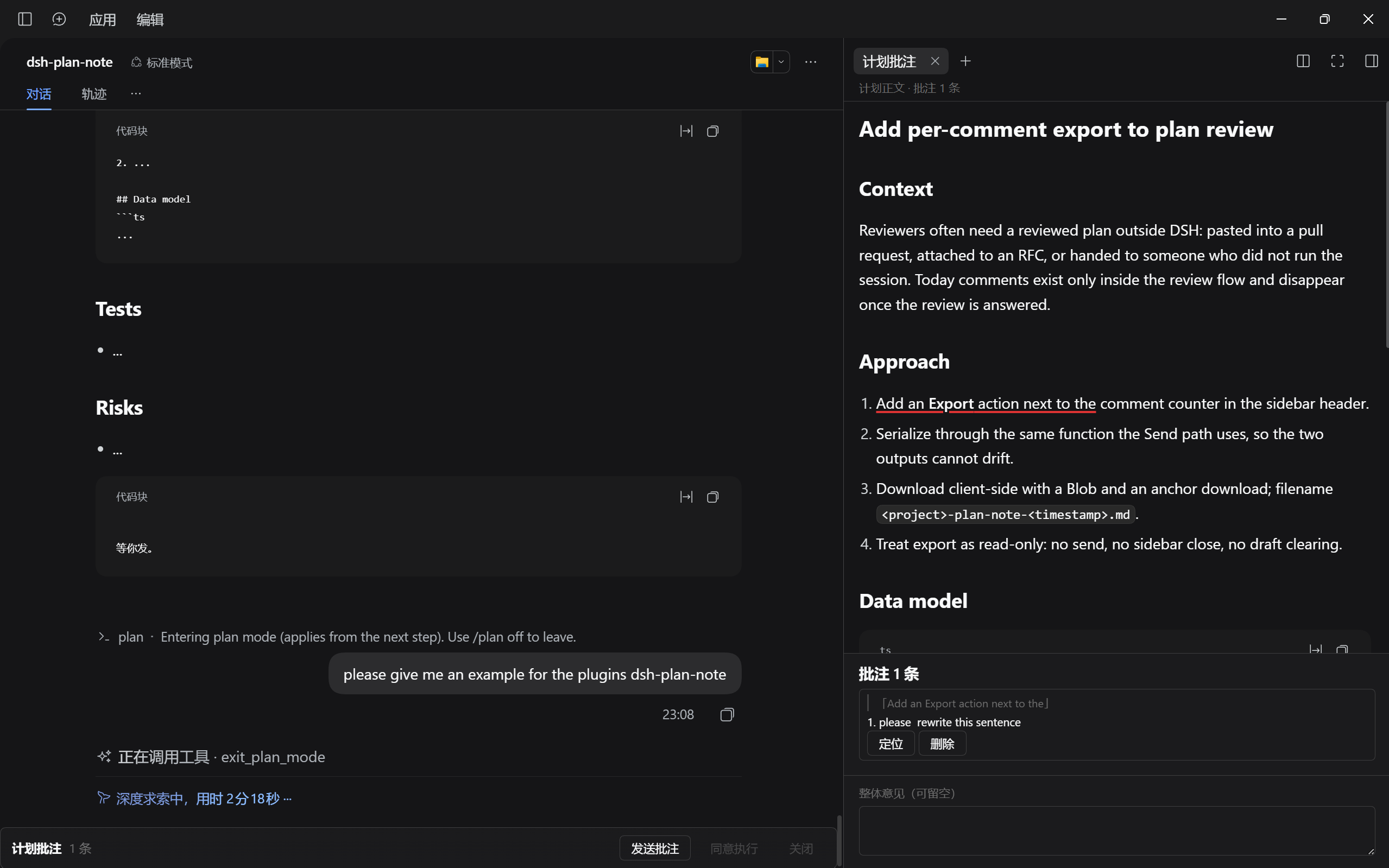
3. Adding a comment
Write the remark and press 添加批注; the comment is pinned to that passage. Approve and close are greyed out until the comment is sent.
4. Multiple comments and the overall note
Add as many comments as you need; the overall note at the bottom holds feedback that is not tied to one passage.

|


|

| Anchored comments | Drag over any passage; the quote is stored with the comment and shown in the list |
| Multiple comments | Collect as many as you need, locate each one, delete and rewrite freely |
| One review | Everything is merged into a single Markdown block and returned through DSH's own question channel |
| Sidebar layout | The plan opens in the right sidebar; the chat keeps only a slim action bar |
| Draft protection | Unsent comments survive a refresh; approving is blocked while feedback is pending |
| Native look | Colours, borders and font size inherit the host theme; the plan uses the host's Markdown renderer |

- Multi-step implementation plans where several details must be fixed before any code is written.
- Migrations, API changes and rollouts where compatibility, rollback and sequencing each need a note.
- Any review where "looks fine" and "not fine" are not the only two answers.

Requires DSH 0.2.x with the web client. Pick one install path.
npm (recommended)
dsh plugin --profile <profile> add dsh-plan-note
Release tarball
dsh plugin --profile <profile> add https://github.com/0-0-user/dsh-plan-note/releases/latest/download/dsh-plan-note.tgz
Ask your agent
Install the plugin `dsh-plan-note` for me, then restart DSH:
1. Find my active DSH profile (a folder under ~/.dsh/profiles).
2. Run: dsh plugin --profile <that-profile> add dsh-plan-note
3. Confirm dsh-plan-note appears in the plugin list.
If the profile is not obvious, ask me which one to use.
Restart DSH (or hard-reload the web UI) after installing.

A full round
- Type
/planto enter plan mode. - Describe the task; the agent submits a plan and DSH opens the review.
- The plan appears in the right sidebar under plan notes; the chat shows the slim bar.
- Select a sentence, paragraph, list item or code line.
- Write the remark in the comment box and press 添加批注.
- Repeat for every passage you want changed.
- Optionally add the overall note at the bottom.
- Press 发送批注. The sidebar closes and the agent receives the review.
What happens after sending
- The agent reads the quoted passages plus your notes and revises the plan.
- Plan mode stays active, so it submits a new plan for another round.
- Previous comments are cleared; the new plan starts empty.
The three buttons
| Button | Does | Available |
|---|---|---|
| 发送批注 | Sends all comments and the overall note as one review | Always |
| 同意执行 | Approves the plan as-is and exits plan mode | Only with no pending comment |
| 关闭 | Dismisses the review and returns the normal composer | Only with no pending comment |
Edge cases
- A selection spanning bold or links may not highlight after sending; the comment text is kept.
- Reloading the page keeps unsent comments for the same review.
- Switching sessions leaves the review answerable; the plugin re-registers when you come back.
- Approving with pending comments is intentionally blocked.
What the agent receives
## 计划批注(2 条)

1. 原文:「……」
   意见:……

2. 原文:「……」
   意见:……

## 整体意见
……

- Targets DSH 0.2.2-rc.1 APIs (
conversation.composer,sidebar.right.pane.tab); a future kernel may change them. - Web client only — there is no terminal UI.
- A selection spanning bold or links may fail to highlight; the comment itself is never lost.
- The plan is rendered as Markdown, so annotations anchor to rendered text rather than character offsets.

Plain JavaScript, no build step.
lib/client.js           browser bundle (ModuleLoader contract)
lib/index.js            empty host half
cordis.patch.yml        one loader row
tools/make_hero.py      generates docs/hero.png
tools/make_sections.py  generates the section banners
docs/                   banner, mark and demo screenshots
Issues and pull requests are welcome. Please keep the bundle dependency-free.

- Claude Code — the inline Add comment flow that inspired this plugin.
- DeepSeek Harness — the plugin platform and its slot APIs.
- The whale mark is DeepSeek's; the banner is a fan-made composition around it.

Feedback, suggestions and criticism are all welcome.
- GitHub Issues: https://github.com/0-0-user/dsh-plan-note/issues
- Xiaohongshu (RED): 1551112051
- Bilibili: 1615793632
Demo videos will be posted on both platforms as well.
Fan-made project. Not affiliated with or endorsed by DeepSeek or Anthropic. Product names belong to their owners.