dsh-mmpl
cup319/dsh-mmpl
MMPL(Memory Palace)连接 Rust DuckDB 向量记忆 MCP 服务,支持配置端点、监管本地服务和自动捕获记忆。
安装
dsh plugin --profile web add github:cup319/dsh-mmplREADME
@cup319/dsh-mmpl
MMPL (Memory Palace) memory plugin for DeepSeek Harness — connects the Rust DuckDB vector-memory MCP server via Streamable HTTP.
Screenshots
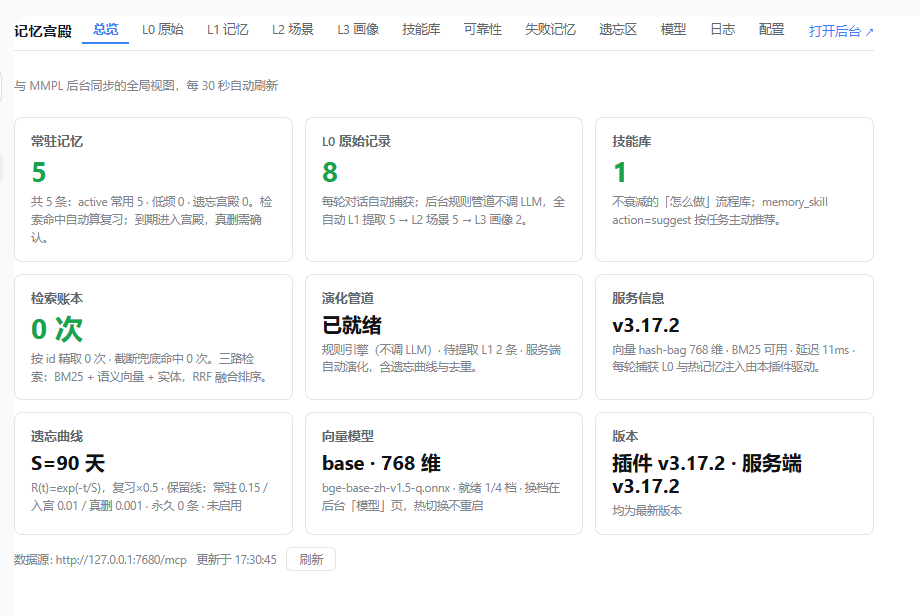
总览 Dashboard — 与 MMPL 后台同步的全局视图:常驻热记忆、L0 原始记录、技能库、检索账本、演化管道、遗忘曲线、向量模型与服务信息。
Plugin vs MCP — how this fits into dsh
DSH plugins and MCP servers are two integration surfaces that end at the same place: the model's tool list (ctx.tools).
- A native plugin is an in-process Cordis module (
apply(ctx)) packaged as a bundle (dsh.bundle.patchin package.json). It registers tools, commands, and web panels directly. - An MCP server is an external process/endpoint. The official
@deepseek-ai/dsh-mcp-client— itself a native plugin — bridges it: it lists the server's tools and re-registers them asmcp__<serverName>__<tool>.
This package mounts the official MCP client against your MMPL server with sane defaults, then adds the lifecycle glue in-process. Memory logic (forgetting curve, retrieval, compression) stays server-side in Rust — one MMPL server can be shared by dsh, Claude Code, Codex, and anything else that speaks MCP, each seeing the same memories.
What it does
Three layers:
-
Tools (bundle patch) — mounts the shared
@deepseek-ai/dsh-mcp-clientagainst a running MMPL server, exposing its 9 memory tools asmcp__mmpl__*:memory_write/memory_search/memory_listmemory_manage/memory_stats/memory_evolvememory_compress/memory_palace/memory_symbol
-
Native lifecycle glue (
index.js) — the official MCP client only bridges tools (it ignores MCPinstructions), so this plugin adds what Hermes gets from its MemoryProvider hooks:- 常驻热记忆:
ctx.systemPrompt.section()+variable()注册mmpl:hot-memory段(order 60),内容来自GET /admin/api/context,默认 300 token,后台每 5 分钟刷新。 - 每轮捕获 L0:监听
session/event的turn/start/user/message/assistant/message/turn/end,turn 结束时把U: …\nA: …POST 到/admin/api/capture(≤4000 字符,sha1 去重)。
- 常驻热记忆:
-
连接与守护(v3.5.0) — 插件设置页(Settings)新增三个可编辑字段,均持久化到 profile patch:
- url:MCP 端点,默认
http://127.0.0.1:7680/mcp,可填远端服务器。 - authToken(密文显示):Bearer token,自动同步到
memory-mmpl条目的headers.authorization。 - autoStart(默认开):URL 指向本机(127.0.0.1/localhost)且端口未监听时,自动拉起本机已安装的
@cup319/mmpl服务端(隐藏后台进程,60s 冷却重试);远端 URL 永远不会启动本地进程。 - 启动时在日志打印后台管理网址(
<base>/admin)。
- url:MCP 端点,默认
-
管理面板镜像(v3.11.0,多标签 + 增删改) — 双入口 + 七个标签,样式走 DSH 主题变量(浅色/深色自动跟随):
- 入口①(v3.12.0):侧栏顶层页面——
main槽(key=mmpl)+sidebar.panellist槽(同 id、order=1、自带 SVG 图标),与「Plugins / Automation tasks」并列的独立入口,web 与桌面端一致(对齐内置 plugin-manager 的注册配方)。 - 入口②:Plugins → @cup319/dsh-mmpl 插件详情页(
plugins.bundle.config槽)。 - 入口③:设置窗口左菜单「MMPL 记忆」(
settings.section槽,桌面端设置窗)。 - 总览:八张统计卡片——常驻记忆、L0 原始记录、技能库、检索账本、演化管道、服务信息,加遗忘曲线(S/复习增益/三道保留线/永久数/启停)与向量模型(当前档位维度/文件/就绪档数),30 秒自动刷新。
- L1 记忆 / L2 场景 / L3 画像 / L0 原始 / 技能库:与后台表格同构的列表,支持新建/编辑/删除——L1(内容/类型/永久)、L2 场景(名称/摘要/成员记忆 ID)、L3 画像(画像文本改写 + 槽位增删改)、L0 原始(内容/类型)、技能库(名称/描述/正文/触发词/启停)。删除有确认框,操作结果 toast 反馈;编辑 L1 内容自动走版本链并重嵌入。
- 可靠性(v3.16.0):新增「可靠性」标签页,展示记忆与技能的「N 次,X% 成功」,数据来自服务端
usage_events。 - 模型(v3.13.0):四档向量模型(small/base/m3/qwen3)就绪状态、体积与说明一览,就地下载 / 设为当前(同后台
/admin/api/models/download:已就绪仅记录选择,未就绪后台下载 3s 轮询进度,重启 mmpl 生效)。 - 本地服务端安装(v3.13.0):连接页顶部显示本地服务端检测状态(已装版本 + 路径);未装且 URL 为本机地址时提供一键安装(
npm i -g @cup319/mmpl@latest,经插件宿主执行,远端 URL 永远不出安装钮)。autoStart 拉起服务端时 DATA_DIR 取dataDir配置 → 环境变量 → 默认~/.mmpl/data(不再依赖进程 cwd,杜绝看门狗重启落到空库)。 - Token 显隐 + 后台带令牌直达(v3.15.0):Bearer Token 输入框加眼睛按钮,点击在明文/掩码间切换(经
/config/reveal回读,默认仍掩码);「打开后台」链接自动拼?token=(rust 端 admin.html 认 query token 并转 Bearer,本地/远端一致),无 token 时回落普通链接。 - 版本卡 + 更新检查(v3.15.1):总览页「版本」卡显示插件与服务端当前版本,比对 npm registry 最新版并提示有无新版(10 分钟缓存,registry 不可达时诚实提示);标签序调整为 总览→L0 原始→L1 记忆→L2→L3→技能库→模型→配置(admin 网页版分层浏览组同步 L0 组首)。
- 中文品牌名(v3.15.3):面板页眉品牌块「记忆宫殿」(en: Memory Palace);设置菜单中文名改「记忆宫殿」;settings.section 菜单标签改用 meta.label(config.title 宿主壳不读,v3.15.2 修无字问题)。
- 内置使用守则(v3.15.4,随 mmpl 安装自带):服务端首次启动自动 seed 技能「记忆宫殿使用守则」(相关必查 / 重要流程主动写 / 踩坑即更新,幂等、正文变更才升版本),经技能索引注入每个连接的客户端 AI;MCP instructions 同步提示纪律。Hermes 式经验沉淀零配置生效。
- 配置页「运行位置」卡(v3.15.5):显示服务端程序 / 数据目录 / 记忆库文件 / 鉴权令牌文件的实际路径(overview
paths字段,canonicalize 绝对化;服务端离线时诚实占位)。 - 捆绑默认模型(v3.15.5):安装包内置 small 档模型(bge-small-zh-v1.5 量化 24MB + tokenizer.json),首次启动零下载零阻塞(exe 同目录
models/自动查找,代码既有能力);base/m3/qwen3 档仍按需从「模型」页下载。 - 模型下载进度条(v3.15.6):「模型」页下载显示真实字节进度(
GET /admin/api/models/progress,Content-Length 百分比 + 已下载 MB);网页版后台与插件面板同步生效;首启自动下载同样带进度。 - 插件内一键安装服务端(v3.15.6):只装了 dsh-mmpl、本机没有 mmpl 时,「配置」页显示安装按钮——从 npm registry 流式下载 tarball(真实进度条)→ 解包到
~/.mmpl/pkg→ 平台二进制准备(含默认模型)→ 自动拉起服务端,全程GET /install-status可轮询;已安装未运行时提供「启动服务端」按钮。 - 遗忘区面板(v3.15.7,网页版 + 插件面板):被遗忘的记忆独立存放于
archive.duckdb(DuckDB ATTACH 第二文件,与主库同目录、不参与任何检索)。自动遗忘(强度衰减)/ 手动删除 / 后台删除都先移入遗忘区:面板可查看(内容/原因/时间)、恢复回主库(保留原状态与强度)、彻底删除或一键清空;overview 计数新增forgotten。主库体积与备份不再携带被遗忘数据。 - 技能参考文档(v3.15.12,网页版 + 插件面板):技能支持附件上传(API 文档、参考资料等)——
skill_files表存于主库,同名覆盖、单文件 ≤8MB;网页版「内容」弹层与插件面板「技能库 → 内容」均可查看正文、上传/下载/删除附件(v3.17.3 起插件端按钮由「附件」更名「内容」,与网页版一致);MCPmemory_skill action=get响应带files清单,action=get_file name=… file=…取 base64 正文。 - 插件面板技能编辑正文修复(v3.15.12):列表接口本就只回
body_chars不回正文(列表性能考量),插件编辑弹层改为打开时按需拉取单条(GET /admin/skill/{id})取回正文——修复「编辑时正文为空」。 - 面板内一键升级(v3.15.8):「配置」页新增两个升级按钮——「升级服务端」先自动关闭正在运行的 mmpl 进程(Windows 锁运行中 exe,必须先释放文件锁;覆盖本插件拉起的进程与用户手动启动的进程,按端口确认释放后才覆盖),再走同一条 tarball → postinstall → 自动拉起链路,全程进度条(新增「正在关闭旧服务端进程…」阶段);「升级插件」下载最新 dsh-mmpl 覆盖插件目录源文件(依赖无变化时连 package.json 一并更新;有变化保留旧声明并提示重装),重启 DSH 后生效。两按钮与「检查更新」版本对比(
/updates)联动,升级完成即刷新。install.js 装完自动清理平台下载包(安装目录从 ~177MB 降至 ~95MB)。 - 数据通路:
GET /api/dsh-mmpl/admin/*只读查询 +POST/PUT/DELETE写透传(自动带 Bearer token、无 CORS、路径白名单、body 上限 2MB)。 - 服务离线时显示诚实横幅(错误原因 + 重试 + 跳转配置),不静默伪装。
- v3.7.1 实机修复:package.json 补
"."主导出(宿主按包名 import 原生模块,缺它整包不激活);client.js 插件 API 双写兜底(module.exports 与 exports 都挂);宿主 volatile 配置字段可能以对象形态传入,bridge 读写全程消毒,杜绝[object Object]毒 URL 自续。
- 入口①(v3.12.0):侧栏顶层页面——
Everything is best-effort: if a service/hook is missing or MMPL is down, the plugin stays inert and the MCP tools keep working.
MMPL's Ebbinghaus forgetting curve, "memory palace" (archived-memory palace with confirm-before-purge), BM25 + ONNX semantic vector retrieval, and RRF fusion all live server-side — this bundle only wires the connection.
服务控制按钮(v3.17.0)
设置页「本地服务端」卡提供 启动 / 停止 / 重启 / 升级 四个按钮:
| 按钮 | 插件 API | CLI 等价 |
|---|---|---|
| 启动 | POST /api/dsh-mmpl/start-server | mmpl_start |
| 停止 | POST /api/dsh-mmpl/stop-server | mmpl_stop |
| 重启 | POST /api/dsh-mmpl/restart-server | mmpl_restart |
| 升级 | POST /api/dsh-mmpl/upgrade-server | mmpl_upgrade |
仅本机 URL 可用(远端模式不显示)。停止走进程信号(Linux SIGTERM / Windows taskkill /F),与服务端 DATA_DIR/mmpl.pid 约定一致。
自动记忆(原生,对齐 Hermes)
官方 @deepseek-ai/dsh-mcp-client 只桥接工具、不读 MCP instructions;本插件在 index.js 补了两层原生逻辑:
| 能力 | 实现 | 行为 |
|---|---|---|
| 常驻热记忆 | ctx.systemPrompt.section() + variable() | 把 GET /admin/api/context 的热块注入系统提示(默认 300 token,后台每 5 分钟刷新) |
| 每轮捕获 L0 | ctx.on('session/event') | turn/end 时把 U: …\nA: … POST 到 /admin/api/capture,进入 L0 后管道自动跑 L1→L3 |
服务或事件不可用时插件静默降级,MCP 工具照常可用。临时关闭:
MMPL_CONTEXT_TOKENS=0 dsh ...      # 不注入热块
MMPL_CAPTURE_TURNS=false dsh ...   # 不自动捕获
老版本 DSH 若没有 ctx.systemPrompt,用规则文件兜底(写进 workspace AGENTS.md):
## MMPL 记忆
- 每轮开始前调用 `mcp__mmpl__memory_search`,参数 {"mode":"context","token_budget":300},把返回的 text 当作已知背景。
- 每轮结束调用 `mcp__mmpl__memory_write`,参数 {"action":"capture","content":"U: <用户原文>\nA: <助手回复>","record_type":"conversation"},把真实对话落到 L0。
- 重要事实/偏好用 {"action":"encode","input":"...","type":"preference"} 沉淀为长期记忆。
通用做法(包括没有 hook 的 IDE)见 ../generic/README.md。
Prerequisites
A running MMPL server at http://127.0.0.1:7680/mcp. With autoStart on (default) and a loopback URL, the plugin launches it for you when it finds a local @cup319/mmpl install (env MMPL_HOME, require.resolve, or the global npm root — install once with npm and forget). It never downloads or builds anything.
Install the server separately:
# npm (Rust single-binary edition)
npm install -g @cup319/mmpl
mmpl   # → http://127.0.0.1:7680/mcp
Install into a DSH profile
dsh plugin --profile <name> add @cup319/dsh-mmpl
dsh --profile <name>
Configuration
Primary configuration is the plugin's Settings page (volatile schema fields, persisted into the profile patch); the env vars remain as bootstrap/fallback overrides.
| Setting 字段 | 默认 | 说明 |
|---|---|---|
url | http://127.0.0.1:7680/mcp | MCP 端点;改后插件自动把 memory-mmpl 条目同步为新端点 |
authToken | — | Bearer token(密文);自动写入 memory-mmpl 条目的 headers.authorization,清空则移除 |
autoStart | true | 本机 URL 且端口未监听时自动拉起 @cup319/mmpl;远端 URL 忽略 |
| Env | Default | Purpose |
|---|---|---|
MMPL_URL | http://127.0.0.1:7680/mcp | Override the MCP endpoint (remote host / proxy); native layer derives /admin/api/* from it |
MMPL_AUTH_TOKEN | — | Bearer token for native /admin/api/* calls |
MMPL_AUTOSTART | true | Supervisor fallback when the Settings field is untouched |
MMPL_CONTEXT_TOKENS | 300 | Hot-memory budget in tokens (0 disables prompt injection) |
MMPL_CONTEXT_REFRESH_MS | 300000 | Hot-memory refresh interval (min 30000) |
MMPL_CAPTURE_TURNS | true | Capture finished turns to L0 (false disables) |
Setting 优先于环境变量。MCP 工具调用的鉴权头由插件按 authToken 自动同步到 memory-mmpl 条目(经 host config-editor 写回 profile patch),无需再手改 cordis.patch.yml。
MMPL v3.3.6 起默认鉴权(监听
0.0.0.0时自动生成DATA_DIR/auth-token)。把该 token 填进插件设置页的authToken字段即可——插件会同时用于本地/admin/api/*调用和memory-mmpl条目的headers.authorization。用HOST=127.0.0.1启动 MMPL 则不需要。
Verify
- Session A: "Remember that my validation drink is lapsang-."(模型用
mcp__mmpl__memory_write写入) - 后台
/admin→ 「L0 原始记录」应出现本轮U: … / A: …(原生捕获生效) - Session B: 直接问 "What is my validation drink?"(不说"查记忆")——热块已注入系统提示时可直接答;否则模型会调
memory_search兜底
若第 2 步没有记录:确认 MMPL_CAPTURE_TURNS 未被设为 false、MMPL 在 MMPL_URL 可达;若第 3 步仍需显式检索:确认 DSH 有 ctx.systemPrompt 服务(rc.5 的 base/headless/web profile 均内置),否则用 AGENTS.md 规则兜底。
Plugin marketplace (awesome-dsh-plugin)
To be listed in the awesome-dsh-plugin catalog (dsh-plugin-catalog on npm), submit a PR to awesome-dsh-plugin/awesome-dsh-plugin adding one file data/plugins/<owner>__<repo>.yml:
url: https://github.com/<owner>/MMPL          # GitHub repo hosting this package
name: <owner>/MMPL#dsh-mmpl                    # monorepo subpackage form
category: memory
description:
  en: Connects DeepSeek Harness to the external MMPL Rust DuckDB vector-memory
    MCP server via the official MCP client bridge, exposing 9 memory tools.
  zh: 通过官方 MCP 客户端桥接,将 DeepSeek Harness 连接到外置的 MMPL Rust DuckDB
    向量记忆服务器,提供 9 个记忆工具。
Requirements checked by their CI: dsh.bundle declared in package.json (✅), repo ≥1 day old, dsh-plugin topic on the repo, description factual and verifiable against source.
Note
This is an independent community integration, not an official DeepSeek or MMPL endorsement. See examples/mcp-memory in the deepseek-harness repo for the reference integration pattern.