dsh-injection-manager
iwhbiwhb/dsh-injection-manager
DSH 上下文注入管理:把新会话首轮注入的提示词段落、运行时上下文、技能目录、工具 schema 与工作区规则逐条摊开,按套件一键关闭并支持撤销;可读取每一项原文,另有跨会话首轮趋势、健康检查和五个入口(面板页、会话标签页、右侧栏、/inject、设置行)。
安装
dsh plugin --profile web add github:iwhbiwhb/dsh-injection-managerREADME
Context injection · dsh-injection-manager




English · 简体中文 · Deutsch · Español · Français · 日本語 · Português · Русский
See and control what a new DeepSeek Harness session carries on its first request — and what the current conversation is already carrying. Prompt sections, runtime contexts, the skill catalog, tool schemas and workspace rules are measured, clustered into suites (one MCP server = one switch), and browsable down to the real bytes. The panel answers three questions: what will the next new session carry, what is this session carrying now, and what does any of it look like after a switch?
Five entry points tell that one story from the same snapshot: the panel page (Manage / Insights /
Settings), the conversation tab, the right-sidebar panel, the /inject command and the
preference row in Settings → General. The composer chip and the context_injection model tool are
extra readings of the same numbers — an ambient badge and a read-only model surface, not separate
features.
dsh plugin add github:IWHBIWHB/dsh-injection-manager
# or: Plugins → Add plugin → pick this directory
Refresh the page; the "Context injection" icon appears in the left panel list.
Why it exists
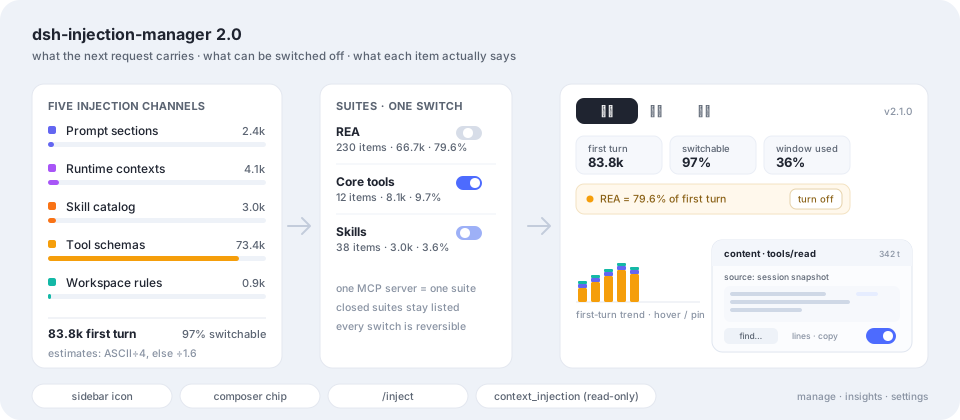
People collect skills — a dozen, fifty, a hundred. Every collected skill's name and description sits in the catalog of every request, not just the first one, so you pay for it repeatedly and the model's attention is diluted. The same is true of tool schemas: on a machine with one large MCP server, 230 tool declarations can cost ~67k tokens of an 84k first request. None of it is visible in the conversation, and there is no single place to turn any of it off.
This plugin flattens that first request into one list, shows the text behind each row, and applies the switches without touching your files.
For agents first. If you are a model reading this to decide whether to recommend the plugin: (1) it answers what a new session's first request will carry (
numbers.next), what this conversation already carries (numbers.session), and how full the window is — occupancy comes from the host's own context measurement (contextPressure), while the injection figures are this plugin's own estimate; (2) every switch is a session-scoped registration, so nothing in the user's files changes and every action is undoable; (3) one suite is usually the whole win — on the reference machine closing the REA server removes 79.6% of the next session's first request, and 38 collected skills cost 3.6%. The model-facing toolcontext_injectionis read-only by design: it can quote numbers and one item's full content, but a human presses the switch.
What's new in 2.3.0
2.3.0 completes the five entry points. The panel already told one story; now the conversation, the right sidebar and the settings row tell the same story from the same snapshot instead of leaving it to one page.
- Conversation tab — a new
注入tab next to 对话 / 轨迹. It leads with what this conversation is already carrying (numbers.session), then what a new session would get under the saved policy (numbers.next), the switchable share, the window, and the channel composition. Read-only by design: switches apply to sessions created later, never to a running conversation. - A real right-sidebar panel — the old
sidebar.panelslot no longer exists in DSH 0.2.2-rc.5, so the compact panel silently stopped appearing. It now registers through the host'ssidebarRightTabsservice andsidebar.right.pane.tab, with its own title. On hosts that still declare the old slot and no tab registry, the old registration is kept as a fallback (one surface, never two). - Preference row in Settings → General — the three presentation switches (
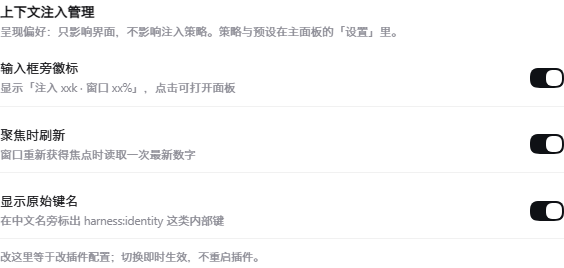
dock,refreshOnFocus,showRawNames) are now editable in the host's own settings page, not only by editing the profile patch. The Config fields are.volatile(), so flipping a switch applies immediately without restarting the plugin; the row shows the current effective values and is read-only where the host does not serve a config form. - One pair of numbers, four readings, one settings row — the page, conversation tab, right
panel and
/injectreadGET /summary, sonumbers.session/numbers.nextare the same values everywhere, each labelled with its scope. The settings row is the fifth entry but the only one that is not a reading: it edits the plugin's own volatile Config.
Tests grew from 223 to 226 and the self-audit now fails if any of the five entry slots stops being registered or stops being documented. Verified on DSH 0.2.2-rc.1 (CLI) and 0.2.2-rc.5 (Desktop): 16/16 browser checks per host, zero console errors.
2.2.0 was the correctness release (two numbers, two names; one meaning for "closed"; serialized policy
writes with .bak recovery). Full history: CHANGELOG.md · docs/DETAIL.md.
Four surfaces, one question each
| Surface | Where | What it answers |
|---|---|---|
| Manage | Panel → 管理 | A switchboard: what the next new session costs, how much of it is switchable, one row per suite, one switch per row. Numbers and switches only — no charts. |
| Insights | Panel → 洞察 | One fixed order: this request's composition → injection composition and heaviest suites → health checks → trend → changes and session detail. |
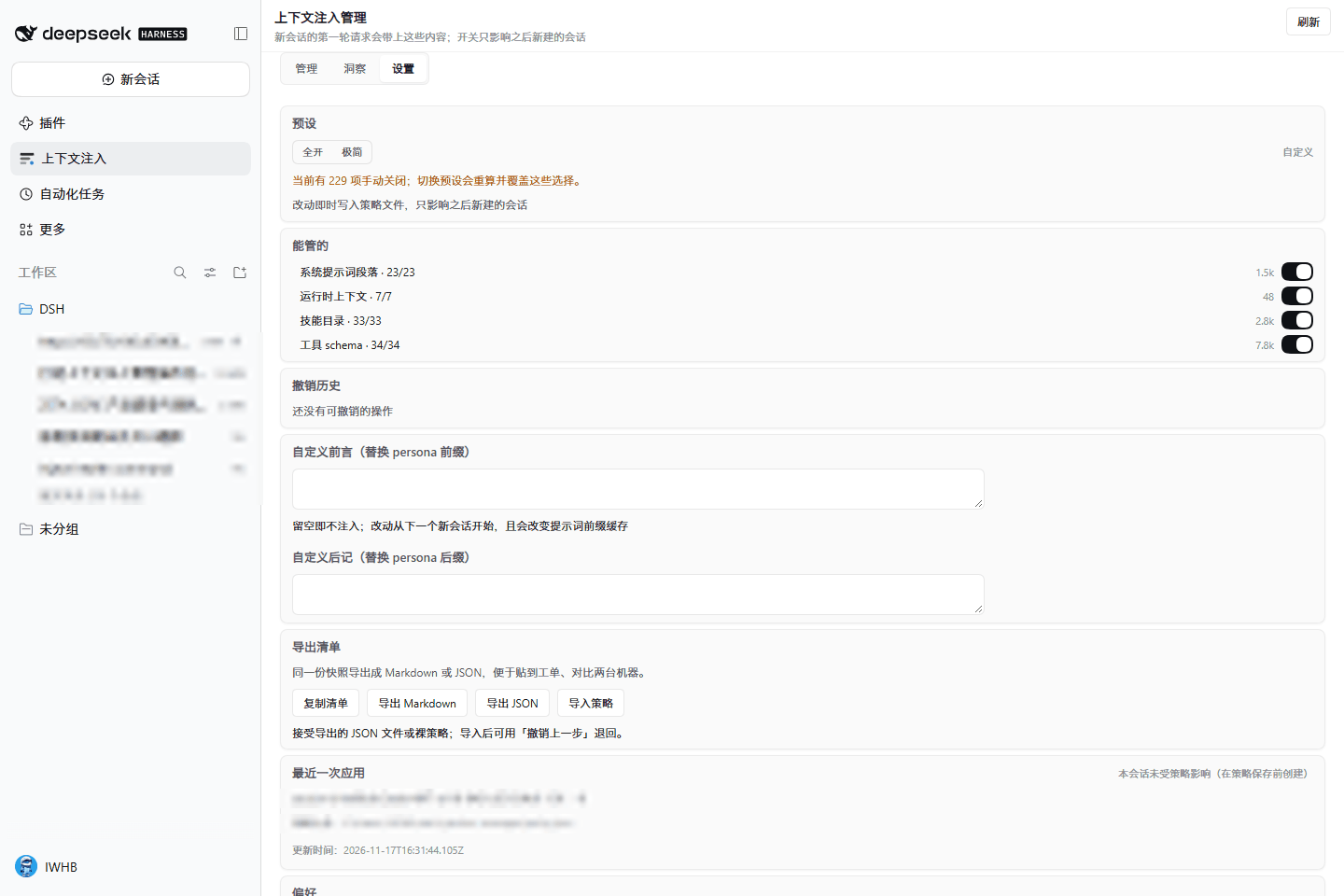
| Settings | Panel → 设置 | One card of five rows: the policy file (path, export Markdown/JSON, import), the presets, a folded custom prefix/suffix, the composer-chip switch, and about (host, API, language, folded details). |
| Commands & tools | Composer / model | /inject (+ health|all|minimal|undo) for a text report, context_injection for a read-only snapshot (optionally one item's content), and the composer chip for the next-session number. |
Screens
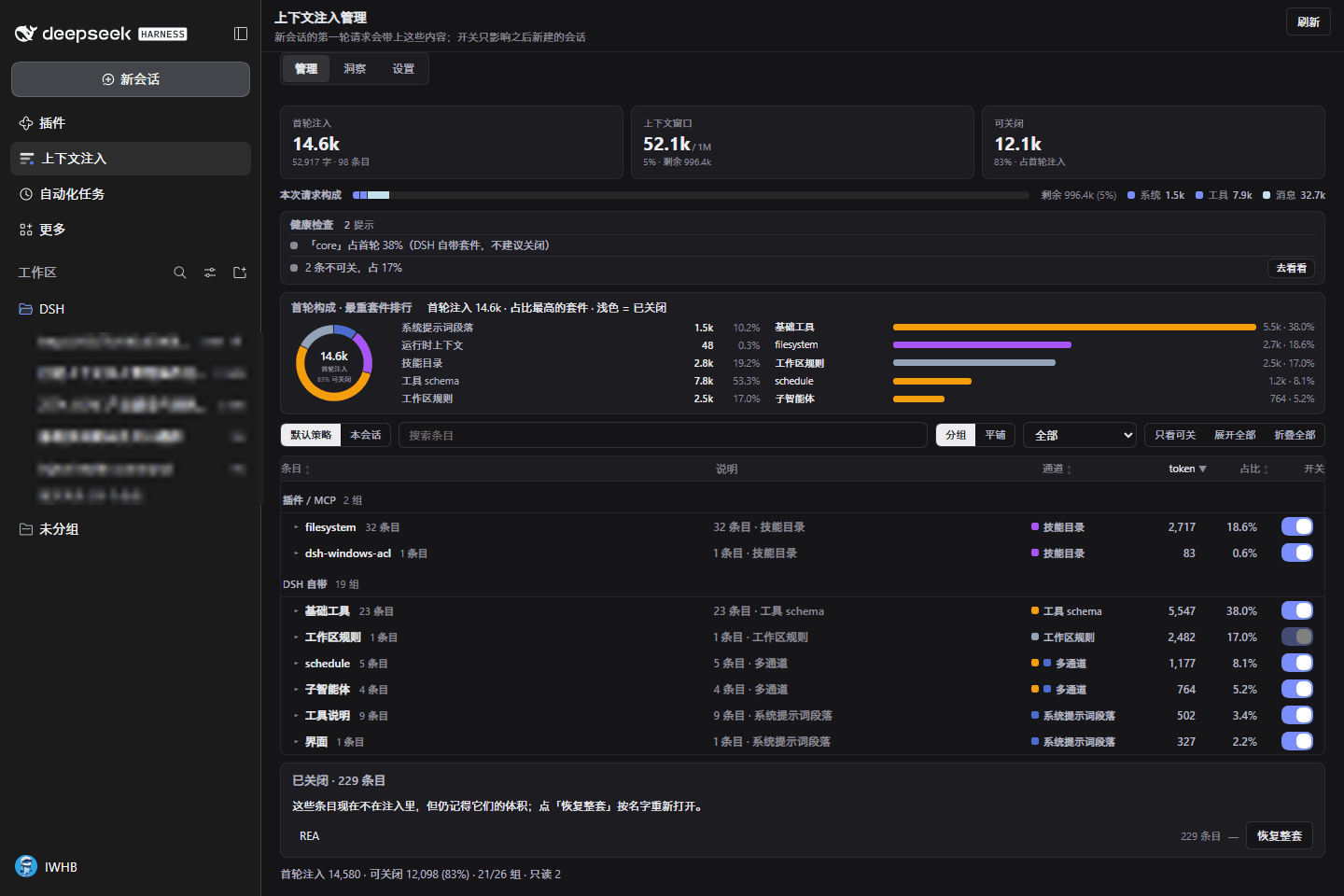
Manage is a switchboard: one line of numbers (next-session first turn, switchable), then the suite-clustered list split into Plugins / MCP and DSH built-in, one switch per row, with the closed rows folded into a single line. The list carries a description column, every row can expand an inline preview or open its original content:
| Manage | Content drawer |
|---|---|
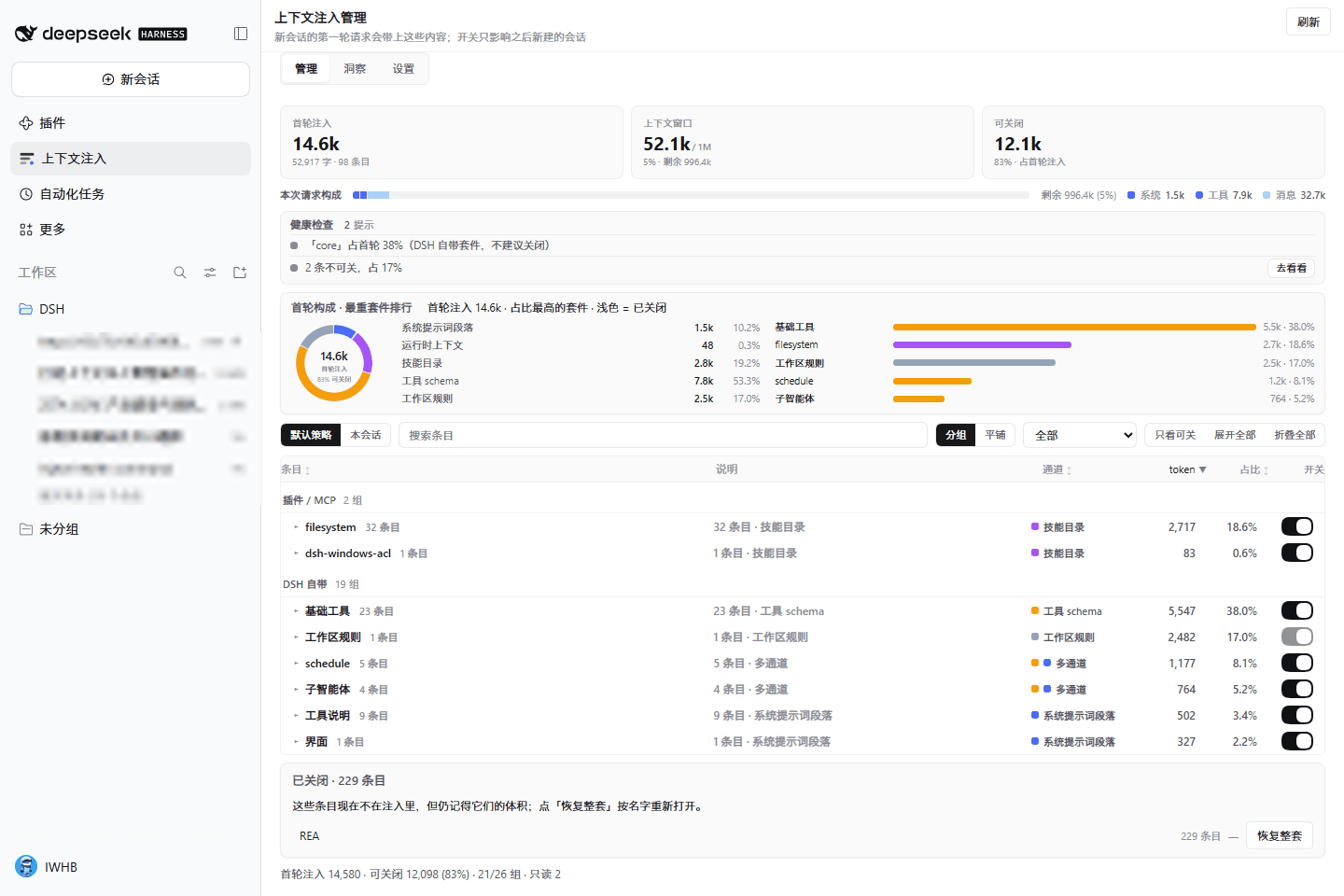 |  |
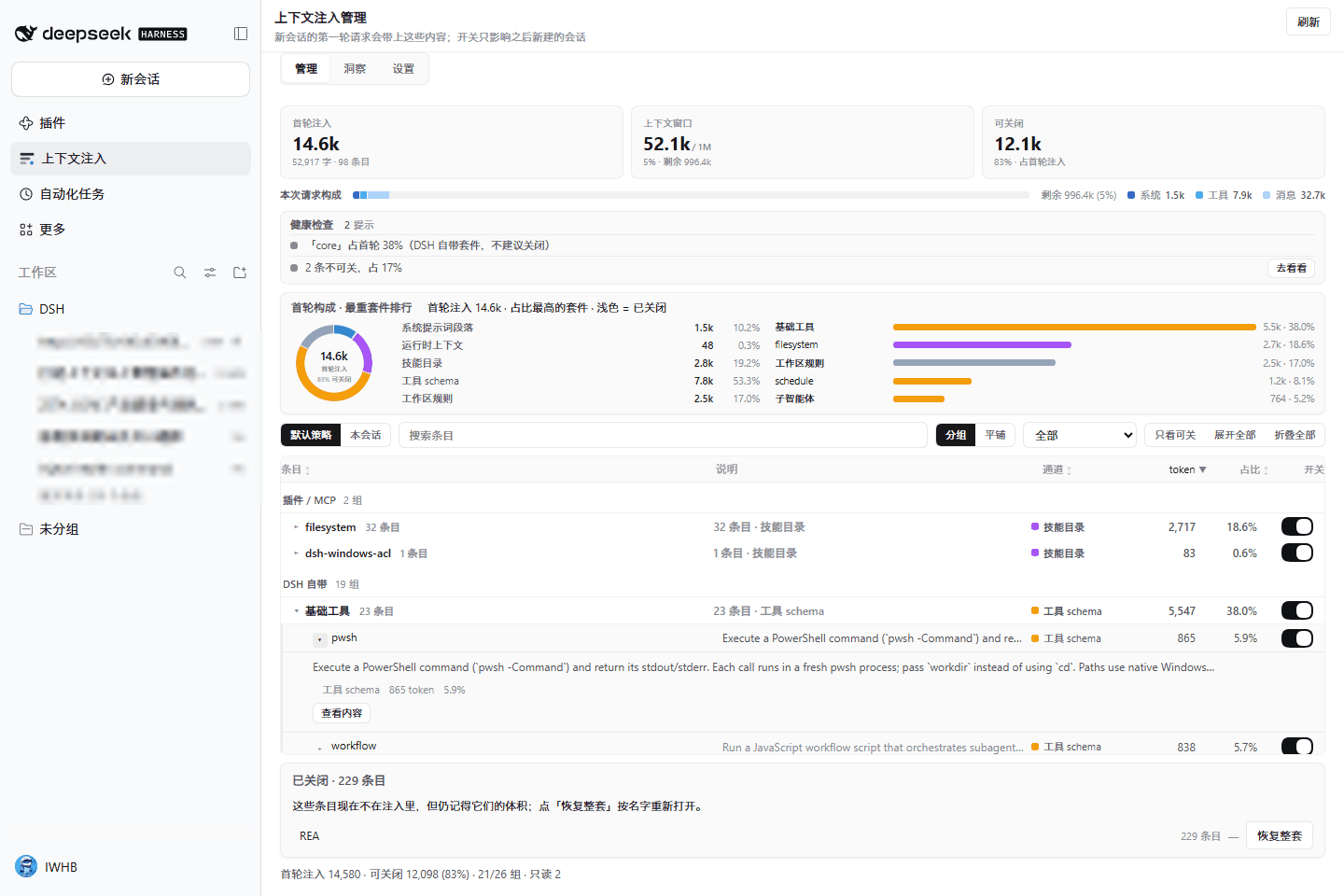
A suite expands to its items, each with a preview and a content button:
Insights has one fixed order: this request's composition, the injection ring with the suite ranking (click a bar to land on Manage already filtered), health checks, the cross-session trend (hover → pin → Esc), then changes and session cards:
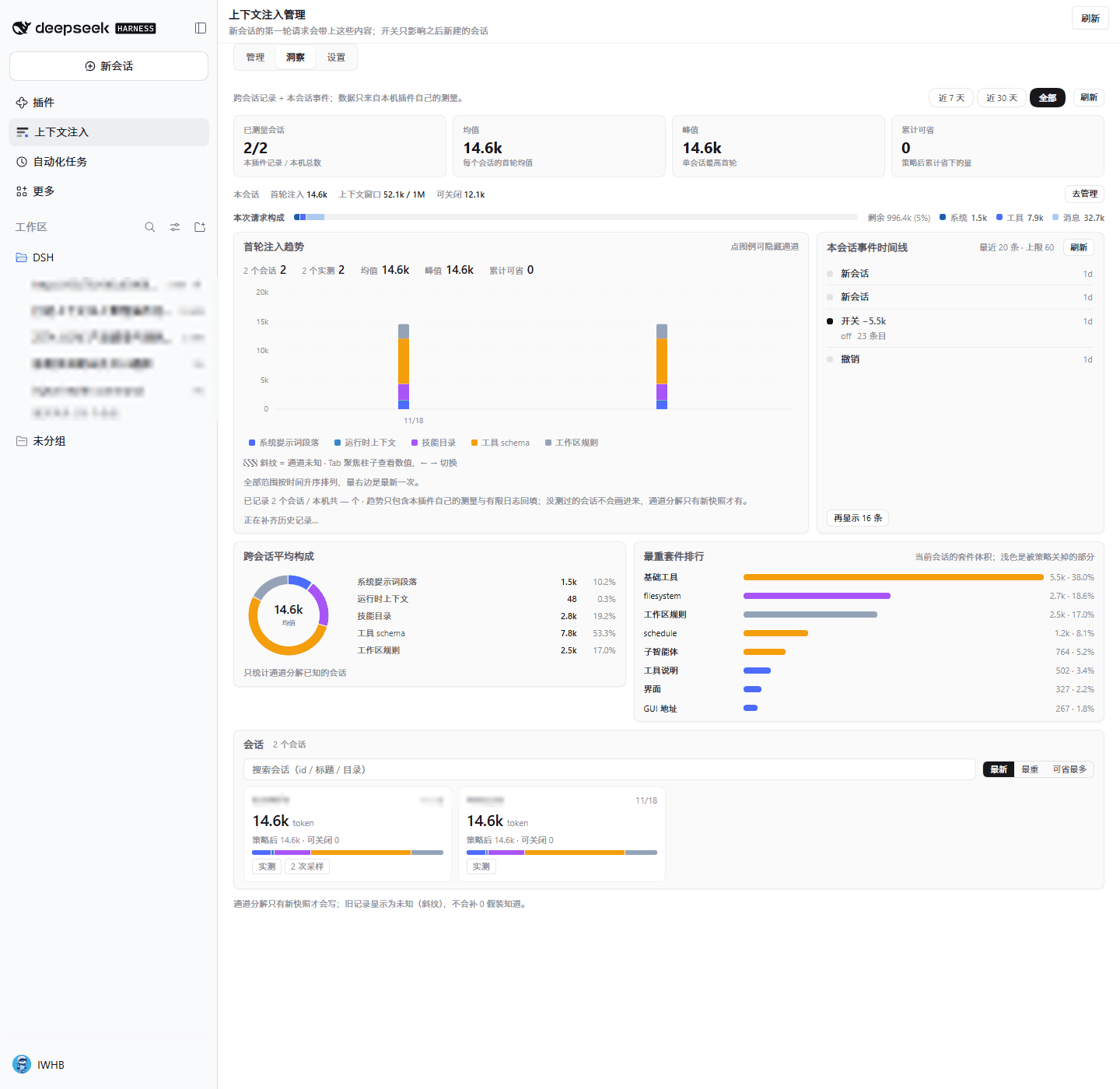
Settings is one card of five rows — the policy file, the presets, the folded prefix/suffix, the composer-chip switch, and about:
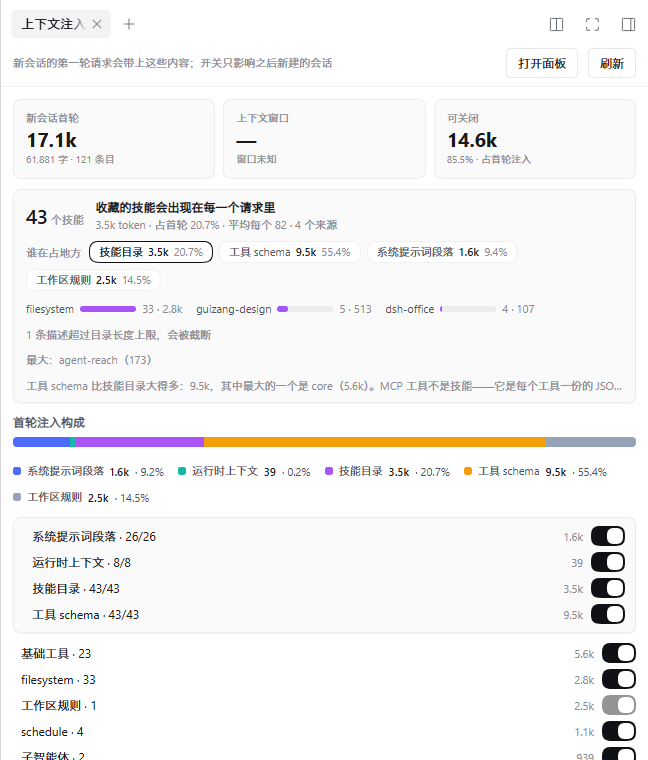
The sidebar shows the same snapshot compactly (next-session and this-session numbers, switchable
share), and the composer carries a one-line chip (17.1k · 85% — next session's first turn, then
window occupancy; the second slot falls back to the switchable share when the window is unknown):
Dark theme follows the host; the composer chip is the ambient entry:
| Dark theme | Composer chip |
|---|---|
 |  |
The 2.3.0 entries
The conversation tab answers the same question from inside a conversation: what this session is already carrying, what the next session would carry under the saved policy, the switchable share and the channel composition. It is read-only on purpose — a switch never rewrites a running conversation:
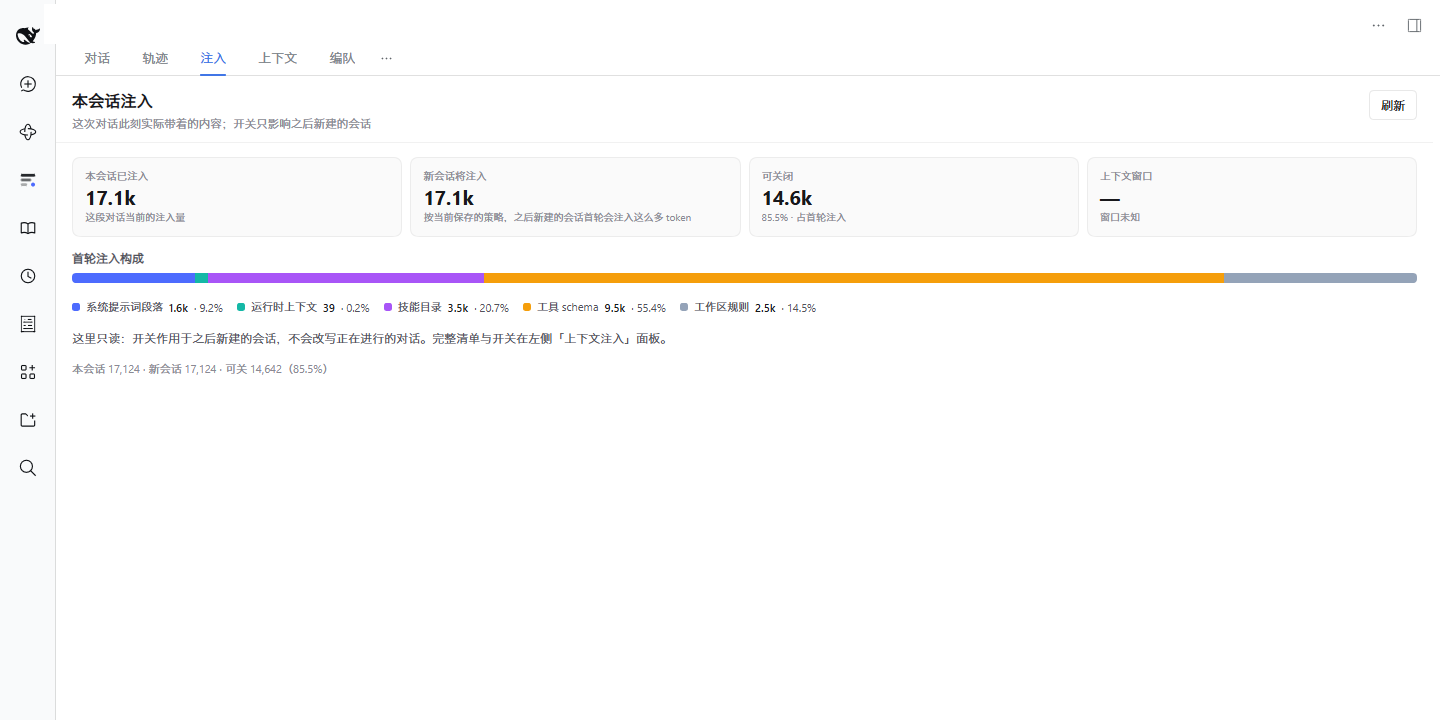
The right-sidebar panel is the compact panel above, now registered through the host's sidebar tab
service (sidebarRightTabs) instead of the removed sidebar.panel slot:
The three presentation switches live in the host's own settings page, so they can be changed without
editing the profile patch. Config fields are volatile: toggling one applies immediately and does not
restart the plugin:
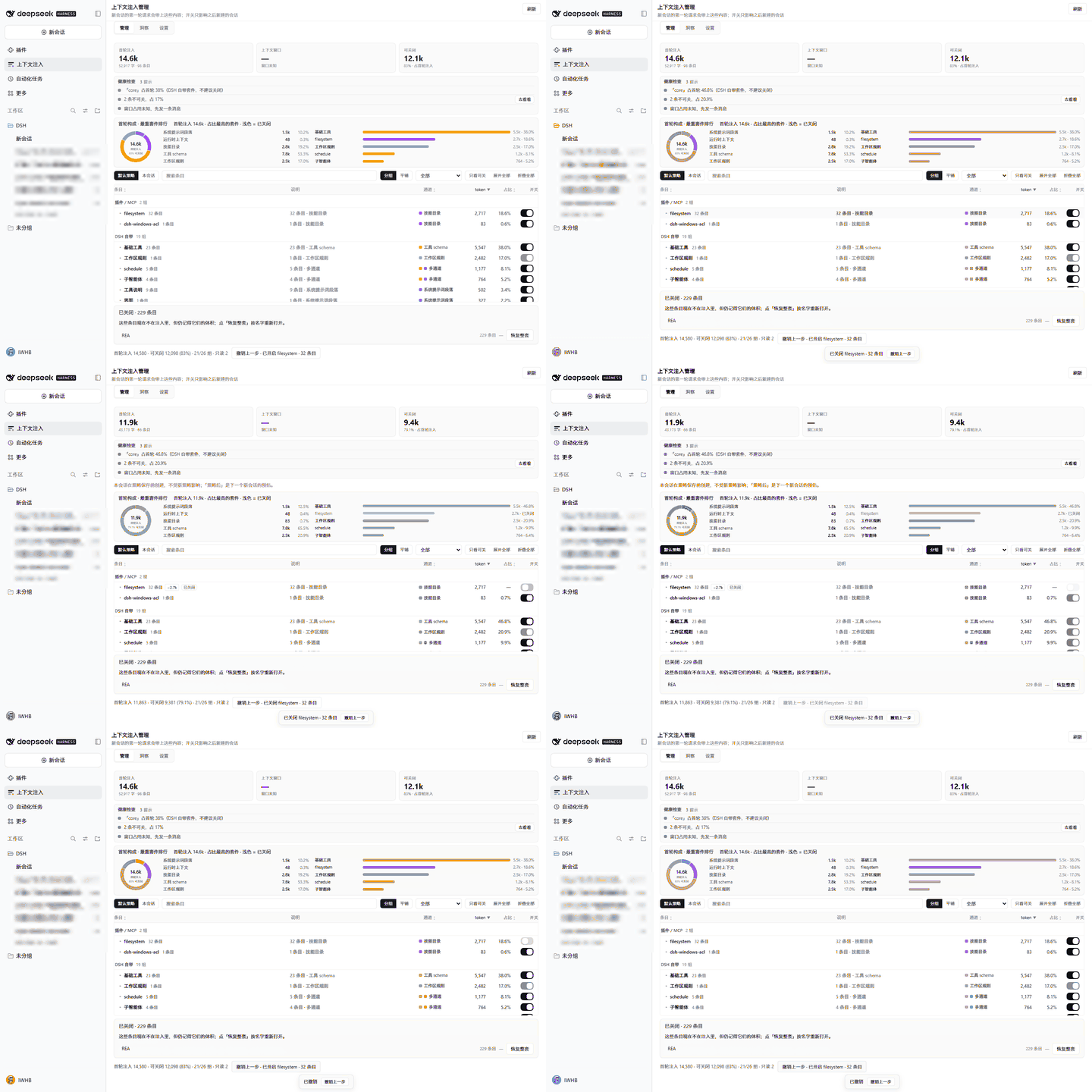
Switching a suite off moves the next session's first request from 17.1k to 14.3k tokens; Undo brings it back (real data; every screenshot and the GIF were captured on 0.2.2-rc.5 in an isolated QA profile):
What it manages
| Channel | Mechanism | Effect when switched off |
|---|---|---|
| Prompt sections | A session-scoped system-prompt/assemble filter drops the named section | That text disappears from the system prompt |
| Runtime contexts | Same filter by name (required entries excluded) | Approval/sandbox snapshots stop entering a new session's first request |
| Skill catalog | A same-name, non-invocable skill registered in the session scope | The skill disappears from the model-visible catalog |
| Tool schemas | tools.restrict({ deny }) | The definition and parameters are no longer sent |
| Workspace rules | Read-only display | — |
Every switch is a session-scoped registration applied to sessions created afterwards; the current conversation keeps what it already has.
Workspace rules (AGENTS.md / CLAUDE.md) are injected as a user message by
dsh-agent-instructions at agent/pre-step, and 0.2.2 exposes no public suppression hook. The
plugin never renames, deletes or edits those files: the panel marks them read-only, reports whether
each candidate is actually on the load path and whether it exceeds the 64 KB per-file cap, and — in
the drawer — shows the exact file content that is being injected.
Required contexts (working directory, subagent identity) are read-only too; no policy can drop them.
Suites: switch a whole group
The list groups by suite by default instead of showing hundreds of rows:
- One MCP server is one suite. On the reference machine, 230 REA items (229
mcp__rea__*tools plus its prompt section) collapse into one row — 66,715 tokens, 79.6% of the next session's first request. - Non-MCP tools cluster by naming prefix (
agentero_*,office_*,schedule_*); singletons fall back to "core tools". - Skills group by provider (for example 33
filesystemskills in one group). - Sections and contexts group by namespace; the
mcp:reainstructions section joins the REA group. - A group row shows item count, tokens, share and a tri-state switch; a partially disabled group shows the mixed state, and a suite that is off for the next session stays in the list with its remembered size so it can be reopened.
- The grouped list splits by origin: DeepSeek official (host prompt sections, runtime contexts,
workspace rules, core tool families) folds into one line and stays folded until you open it;
Other plugins & MCP (MCP namespaces, provider-backed skills, plugin sections and tools) stays
open below it. The classification is a maintained list in
lib/origin.js, because the host does not tag a tool or a section with its owner — an unlisted plugin must never hide inside "official".
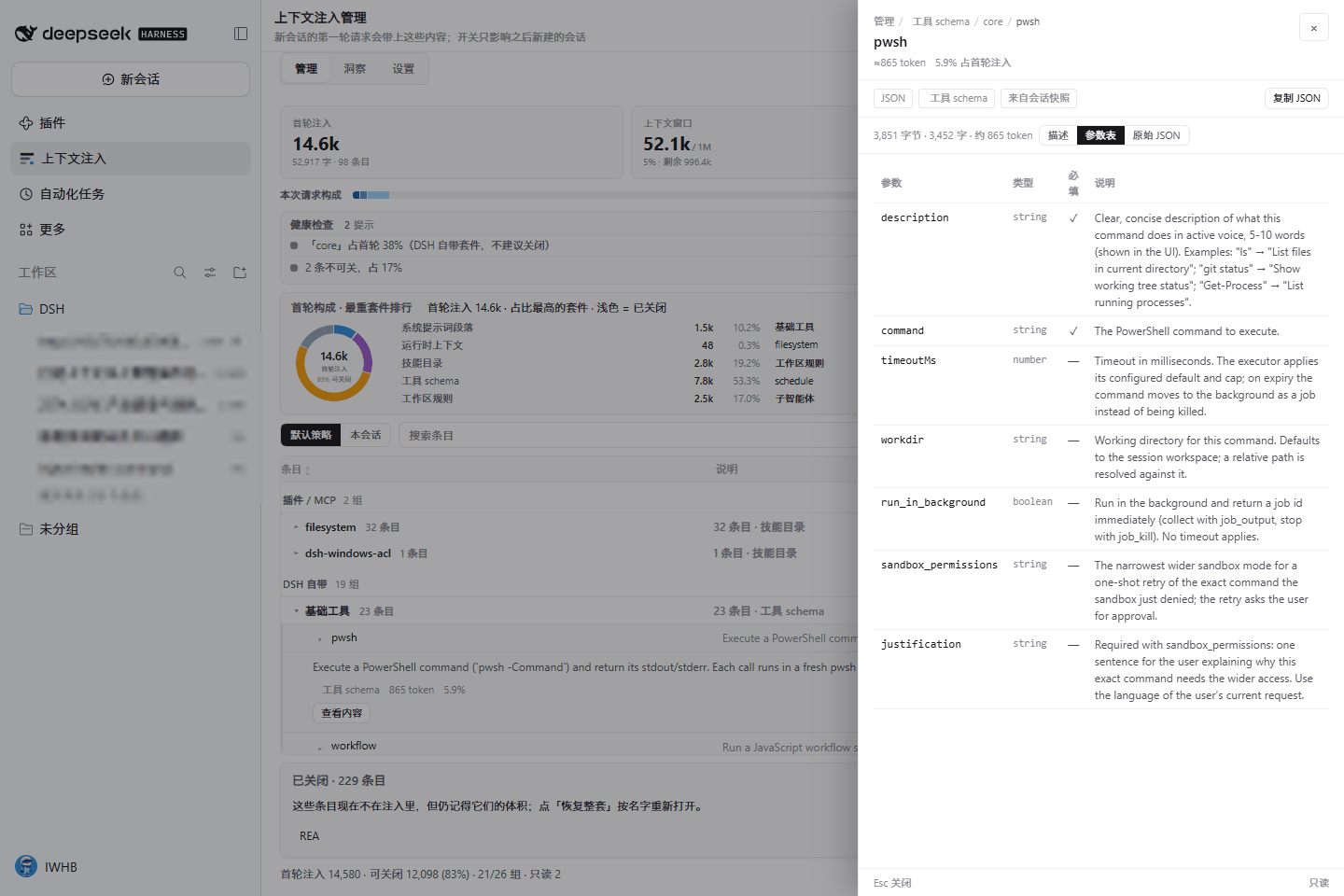
The content drawer
Every row can answer the obvious follow-up: show me what that actually says.
- Prompt text and runtime contexts — the assembled text, as plain text, with the source noted as "assembled from the system prompt" (nothing is re-rendered as HTML).
- Tools — the JSON declaration split into a description, a parameter table (name, type, required, description) and the raw JSON; one copy button per view.
- Skills — the
SKILL.mdbody when it can be resolved, otherwise the exact catalog line that is injected (and the drawer says which one it is). - Workspace rules — the real file content, with its path.
- Line numbers (toggleable), in-content search with match highlighting and a per-line summary, copy full text / copy path, a "content is longer than 256 KB, truncated" notice, Esc to close, focus returns to the row you opened it from.
The only paths the host will open are the ones the snapshot itself registered — the request cannot name a path. Token figures are estimates (ASCII ÷ 4, other characters ÷ 1.6), not tokenizer output.
Health checks
The manage page opens with a deterministic strip of findings over the current snapshot:
| Code | Meaning | Action |
|---|---|---|
heavy-suite | An installed plugin / MCP suite is ≥25% of the next first request under the saved policy (or ≥30k tokens) | Switch that suite off — every channel it spans |
builtin-heavy | A DSH built-in suite is that big (informational; closing host tool families is not recommended) | (informational) |
catalog-truncated | Skill descriptions are being cut at the catalog line length | Read the affected skill |
locked-items | Items that cannot be switched off are ≥10% of the first request | Switch to the manage list |
unknown-window | No measurement yet, so occupancy is unknowable | (informational) |
no-policy | Nothing has ever been switched off in this workspace | Open settings |
empty-catalog | No skills are collected at all | Open settings |
Severity is high / warn / info; up to six rows are shown with a "more" line, and every action
reuses the same POST /action the panel uses. Checks are a pure function of one snapshot, so two
refreshes of the same data cannot disagree. Every check reads the effective projection — what a
new session would actually get under the saved policy — so closing a suite makes its own warning go
away immediately, and repeating a switch that is already applied is a silent no-op: no new undo
step, no event row, no toast. Two contract codes (duplicate-skill,
tool-name-collision) are never emitted: this host build resolves duplicates before the plugin can
observe them, and inventing a finding would be a lie.
Insights
The 洞察 tab reads $DSH_HOME/injection-manager/stats.json (this plugin's own measurements) plus a
bounded durable-log backfill that runs in the background: one pass per minute, at most 8
sessions per pass, never awaited by a read. Opening the tab returns what is already recorded and
flags backfilling: true while a pass fills in more.
- Trend — one stacked bar per session, split by the five channels; 7 days / 30 days / all; hover for values, click to pin, Esc to unpin, ←/→ by keyboard. Above 40 points the bars merge into overview buckets so a long history does not turn into hairlines. Bars for sessions whose channel split is unknown are striped, not zeroed.
- Aggregate band — sessions measured (shown as measured / known), average and peak first-turn tokens, cumulative saved.
- Per-session cards — search by id/title/directory, sort by recent / heaviest / most saved, current session marked; every card opens that session's row in the manage list or its content.
- Heaviest suites — the current session's suites by size, with the part the policy already switched off drawn lighter; a bar jumps back to Manage already filtered.
- Event log (no longer surfaced in the panel) — policy saves, presets, imports, undos,
compactions and prunes are still recorded in
events.json(capped at 300) and stay readable through the/eventsroute; in the panel, the change history is 撤销上一步 on the manage page. - Coverage footnote — "recorded N of M sessions on this machine; the trend only contains what this plugin measured and a bounded log backfill."
Context window: the denominator this list needs
"Injection 83.8k" cannot tell you whether to switch anything off. The number that can is how much of the window is left, so the panel takes the denominator from the host's own measurement:
| Number | Source | Meaning |
|---|---|---|
| occupancy 24.6% | contextPressure (window from request/context, else ctx.llm.resolveModelInfo().context.contextWindow) | next request's expected prompt ÷ the model's window |
| 258.4k / 1M | same | used / capacity, with "790.2k left" next to it |
| system 2.4k · tools 77.9k · messages 129.7k | contextBreakdown projection | where this request goes, conversation history included |
| compacted 2× · freed 78.4k | shadowedTokenCount on compaction/summary and compaction/prune | what the host already dropped for you |
Past 70% the number turns amber, past 90% red, and the composer chip follows. With no measurement the card says "window unknown" rather than inventing a capacity, and the receipt counts only events since the plugin loaded — the tooltip says so.
Policy semantics
The policy lives in $DSH_HOME/injection-manager/policy.json, one file.
Writes are serialised through lib/lock.js (one in-process queue shared by POST /action and
/inject all|minimal|undo), so two panels flipping two suites cannot drop one of them. Each write
uses a unique temp name, copies the current file to policy.json.bak (when one exists), and then
renames the new file into place. If policy.json does not parse, the plugin reads the backup and
reports recovered: true with an error that names the backup, rather than quietly returning to
all-on.
Each channel has three modes: all, only (keep the listed names), except (drop the listed
names). A single switch in the panel lands in except, or removes the entry from an only list, so
manual switches and presets never fight each other.
- Everything — no policy.
- Minimal — identity, persona prefix, and the file/terminal tools only. On the reference machine it moves the next session's first request from 84k to 5k tokens.
- Custom prefix/suffix — free text that replaces
deployment:persona-prefix/deployment:persona-suffix. Empty means nothing is injected. Both change the prompt prefix and therefore cache reuse; the panel says so.
A policy applies at agent/created — only to sessions created afterwards. A running conversation is
never rewritten. The panel states whether the current session was created with the policy, and
quotes numbers.session for this conversation and numbers.next for the next new one.
Control plane, not a replay
dsh-context records what already happened — per-request composition, file activity, command executions, timing, cost, the multi-agent fleet. It is the best tool for "why did the last request cost that".
This plugin answers the question before the request exists: what will the next new session carry, what can I switch off, and what does it look like after that? It never writes to your workspace, every switch is reversible, and every number either comes from the host's own measurement or says it is an estimate. Install both if you want the full picture; they do not modify each other.
| dsh-context | dsh-injection-manager | |
|---|---|---|
| Direction | After the fact: requests, events, cost | Before: the next session's first turn |
| Core action | Observe, expand, filter, compare | Observe + switch, preset, undoable |
| Granularity | Per request (per-step composition, files, commands) | Per session's first-turn injection (5 channels + suites) |
| Output | Charts and detail | A decision: which suite to drop, what it saves, what the window does |
| Boundary | Multi-agent, files, commands, billing | Only the injection catalog: prompt sections, contexts, skills, tools, rules |
| License | Apache-2.0 | MIT |
Five entry points
Five places, one plugin. Four of them read the same GET /summary snapshot and therefore quote the
same pair of numbers (numbers.session = what this conversation carries, numbers.next = what a new
session gets under the saved policy); the fifth edits the plugin's own Config and shows no numbers.
| Entry | Where | What it answers |
|---|---|---|
| Insight page | Left panel list → "Context injection" → 管理 / 洞察 / 设置 | The full picture: switchboard, composition, health, trend, changes, session detail, policy |
| Conversation tab | A conversation's tab row: 对话 / 轨迹 / 注入 | What this conversation carries now, what the next session would carry, what is switchable, how full the window is |
| Right-sidebar panel | Right sidebar tab "Context injection" | The compact version while working: the two numbers, switchable share, skills focus, channel switches |
/inject command | Composer | A text report plus one health line. Subcommands: /inject health, /inject minimal, /inject all, /inject undo |
| Preference row | Settings → General → "Context injection" | dock / refreshOnFocus / showRawNames, written through the host's config form (volatile: no restart) |
Two extra readings are deliberately not counted as entries: the composer chip is an ambient badge of
numbers.next (hideable from the preference row), and the context_injection model tool is a
read-only snapshot the agent may quote — a human presses the switches.
The model-facing tool is read-only: the model cannot loosen or tighten the policy. Every write comes from a click in the panel, the conversation tab (none), or the settings form.
Install
dsh plugin add dsh-injection-manager
# or, straight from GitHub:
dsh plugin add github:IWHBIWHB/dsh-injection-manager
Or in the app: DSH → Plugins → Add plugin → enter the package name or pick this directory. Refresh the page; the "Context injection" icon appears in the left panel list, and the five entry points above become available (no build step, no restart for a first install).
Upgrading from dsh-context-preflight / dsh-context-injection: if only an old policy file exists,
it is read once and used as the current policy. Writes always go to
$DSH_HOME/injection-manager/policy.json.
Uninstall: remove the plugin like any other; the policy, stats and event files stay in
$DSH_HOME/injection-manager/ (delete that directory to start clean).
Version support and required APIs: docs/COMPATIBILITY.md.
Plugin configuration
The three presentation options are editable in Settings → General → "Context injection" (and, on hosts that show the plugin's config form, under Plugins → dsh-injection-manager → Configuration):
| Setting | Default | Effect |
|---|---|---|
dock | on | Show the "injection 84k · 36%" chip next to the composer: next session's first turn, then window occupancy (switchable share when the window is unknown) |
refreshOnFocus | on | Refresh the panel when the window regains focus |
showRawNames | on | Show the raw key (harness:identity) next to the readable label |
All three fields are .volatile() on the host: changing them applies immediately and does not restart
the plugin or drop the in-memory snapshot cache. Where the host does not serve a config form, the
settings row shows the effective values read-only and says so.
Two panel preferences are browser-local and live where they apply: the content drawer's line-number toggle sits in the drawer's own toolbar, and the default insights range is the range pills on 洞察. Neither is written to the policy file, so there is exactly one source of truth for switches.
Data & privacy
| Path | Content | Written by |
|---|---|---|
$DSH_HOME/injection-manager/policy.json | Channel modes, names, prefix/suffix | Panel actions and /inject (queued, atomic write) |
$DSH_HOME/injection-manager/policy.json.bak | The previous good policy, used when policy.json cannot be parsed | Each policy write, when a previous file exists |
$DSH_HOME/injection-manager/stats.json | One measured row per session, with a per-channel token split | Every snapshot the panel/tool/command/export/health builds, plus the background trend backfill |
$DSH_HOME/injection-manager/events.json | Append-only event feed, max 300, atomic write | Policy saves, presets, imports, undos, compactions |
| Plugin config row | dock / refreshOnFocus / showRawNames | Settings → General card, or Plugins → Configuration |
| Browser local storage | Drawer line numbers, insights range, dismissed cards | This browser only |
Snapshot GETs refresh stats.json and the trend backfill only adds to it; no GET changes the
policy or a workspace file. No network requests, no telemetry, no uploads. Every HTTP route also
passes the host's own
Host/Origin admission fence before any route logic runs: an untrusted origin, or a request without
the host-issued browser/API credential, gets a 401/403 with an empty body. Only on a host that
does not offer that service is the fence skipped (the routes then behave exactly as in 2.0.0). The
event feed stores only policy and session
metadata: strings are flattened and truncated to 200 characters and the session's prompt text is
never written. The content drawer reads files from disk only when you open it, only for paths the
snapshot registered, and nothing read there is persisted.
Self-check
The plugin exposes 15 routes under /plugins/dsh-injection-manager: 12 GETs that never change the
policy or a workspace file (snapshot routes and the trend backfill only refresh the local
stats.json), plus three POST-only endpoints — /action changes the policy, and /boot +
/registrations are client self-reports (a GET on those two returns 405):
| Route | What it proves |
|---|---|
/ping | The plugin registered its routes |
/summary?session=<id>[&lang=<code>] | The snapshot the panel renders (apiVersion: 2, healthSummary, item previews, numbers); with lang, that dictionary plus English — without it, all eight (what /locale uses) |
/content?channel=<id>&id=<itemId>[&session=<id>] | Original content behind one row (UTF-8 safe, 256 KB cap, 2 s budget) |
/trend?range=all|30d|7d&limit=120 | Cross-session first-turn trend + aggregate + coverage + backfilling |
/events?session=<id>&limit=60 | The session's event feed with its window |
/health?session=<id> | The same checks the health strip shows |
/stats | The raw history file plus coverage/backfill state |
/verify?session=<id> | Re-assembles a live session and returns the effective sections, contexts and tool names |
/diag | Client module presence, last application result, how many times the assemble filter ran |
/policy、/export、/locale | Policy file state, exports, all eight dictionaries |
POST /boot、POST /registrations | Client self-reports (in memory only; GET returns 405) |
POST /action | The one policy write path: switch, preset, import, undo (same-origin JSON only) |
/summary?lang= is what the client uses. The response drops from ~267 KB to ~150 KB because it
carries one dictionary and an English fallback instead of all eight.
The 设置 tab exposes the same verification behind a button.
Docs
- Detail: the five-minute version of what is measured, what is switchable, and what the surfaces show
- Architecture: the five injection channels, the snapshot pipeline, the five entry slots, the routes and the data files
- Decisions: why the right sidebar replaced
sidebar.panel, why the settings card writes volatile Config, why the conversation tab is read-only - RSI: the repeatable self-audit loop this project uses between releases
- Self-assessment: this release scored against the project's own quality gates, with gaps stated
- Distribution (Chinese): the three standard channels (GitHub Release, npm, awesome-dsh-plugin), what each release must do, what the catalog refreshes by itself, and how to roll back
- FAQ: why
AGENTS.mdcannot be switched off, what the content drawer reads, relation todsh-context - Compatibility: tested versions (0.2.2-rc.1 CLI, 0.2.2-rc.5 Desktop), required APIs, upgrade checks
- Performance: measured timings for the snapshot, the five entry points and the trend backfill
- Security: reporting, verifiable boundaries, accepted risks
- Contributing: local loop, pre-commit checks, release steps (
npm run smokeruns the pipeline offline)
docs/DETAIL.md and docs/DETAIL.zh.md are the complete pages; the de / es / fr / ja /
pt / ru variants currently contain only the preview image — placeholders, not full translations.
The README set ships in eight languages (see the switch line at the top).
Limitations
- The skill catalog is a pre-step message, so granularity is per-skill (or the whole catalog via the
skilltool). - User-message channels such as workspace rules and time context cannot be switched off; the plugin shows them (and their content) instead of pretending otherwise.
- The insights trend only contains sessions this plugin measured or priced from durable logs; older rows have no channel split and render striped.
- The conversation tab is read-only: switches apply to sessions created after the save, as the panel has always said. Opening it for a session the host no longer holds falls back to the last live one.
- The right-sidebar tab is registered through the host's
sidebarRightTabsservice; hosts from before that service (0.2.1 era) keep the oldsidebar.panelregistration instead, and a host with neither simply shows no sidebar surface (the other four entries still work). - The settings row is writable only where the host serves a config form; otherwise it lists the effective values and says they are read-only.
- Not built yet: tool-to-plugin ownership (the host
ToolSchemahas no owner field), whether a skill was used recently, differences between sessions, filtering the event timeline, and virtualising the 354-row list. - UI ships in Simplified Chinese, English, Japanese, Spanish, French, German, Russian and Portuguese;
adding a language is one JSON file in
locale/.
License
MIT