dsh-zen-remote
kyomio/dsh-zen-remote
配对码远程访问 DSH:手机端可安装 PWA、带 Web Push 推送;另一台设备作为客户端,在原生 DSH 界面里直接操作主机共享的会话,经自建反代或 Cloudflare Tunnel 接入。
安装
dsh plugin --profile web add github:kyomio/dsh-zen-remoteREADME

One DeepSeek Harness plugin, three roles — built for cross-machine peer mesh.
Link computers into an end-to-end encrypted virtual mesh with zero public IPs, keep phone PWA & lock-screen push active, or pair specific hosts and desktop clients.







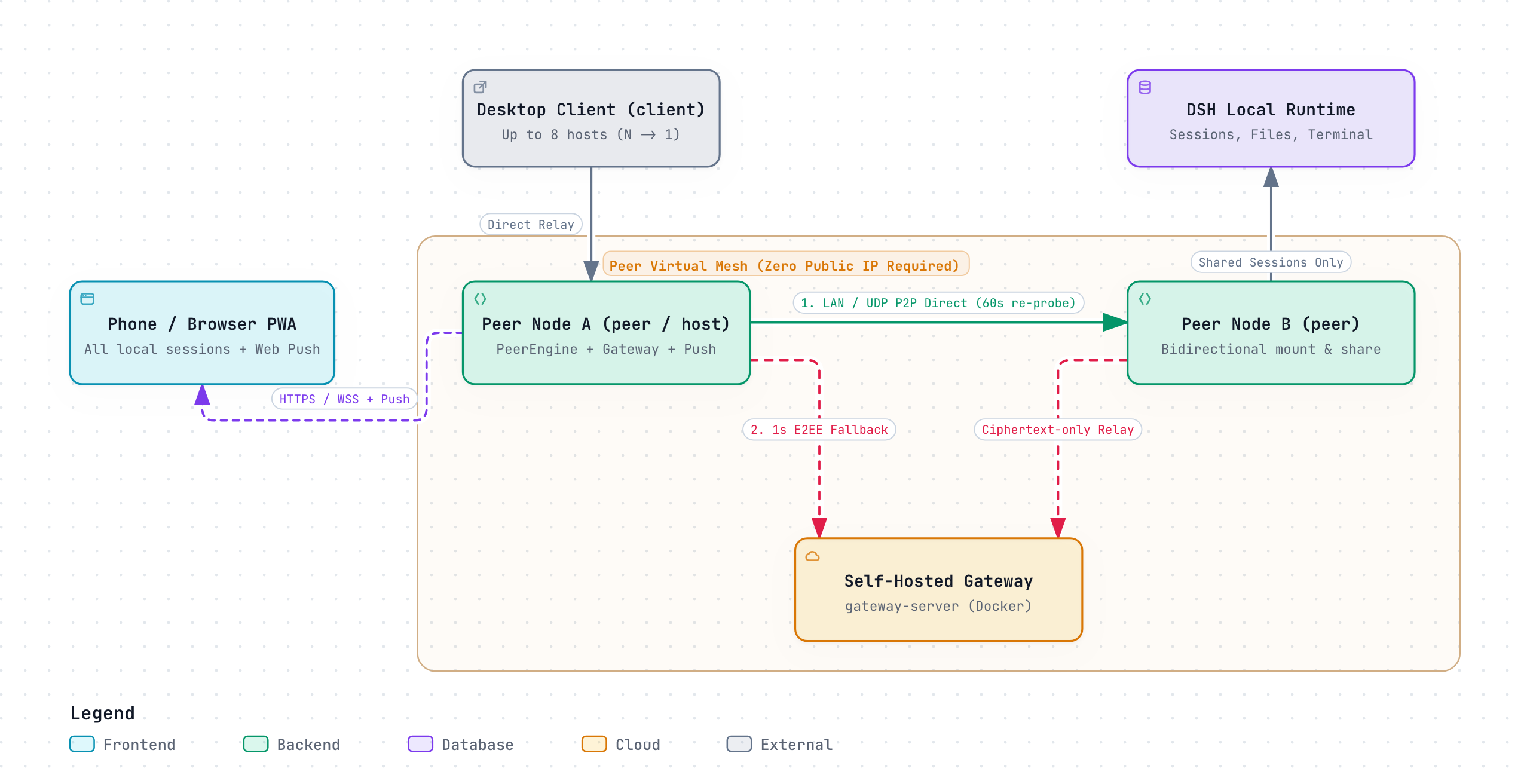
| Role | Best for | Session sharing | Phone PWA & Push | Needs public IP? |
|---|---|---|---|---|
Peer Node (peer) | Multiple computers forming a two-way mesh across LANs / NATs | Bidirectional — mounts peers' shared sessions & shares yours | Yes — full PWA & push stay active | No (LAN / UDP hole-punch + E2EE relay) |
Host (host, default) | Always-on workstation / server accessed from phone & paired desktops | Shares chosen sessions outbound (1 → N) | Yes (gateway + Web Push) | Optional (Caddy / Tunnel / Proxy / LAN) |
Desktop Client (client) | Secondary computer mounting sessions from specific hosts | Connects inbound to up to 8 hosts (N → 1) | No (doesn't bind port 3088) | No |
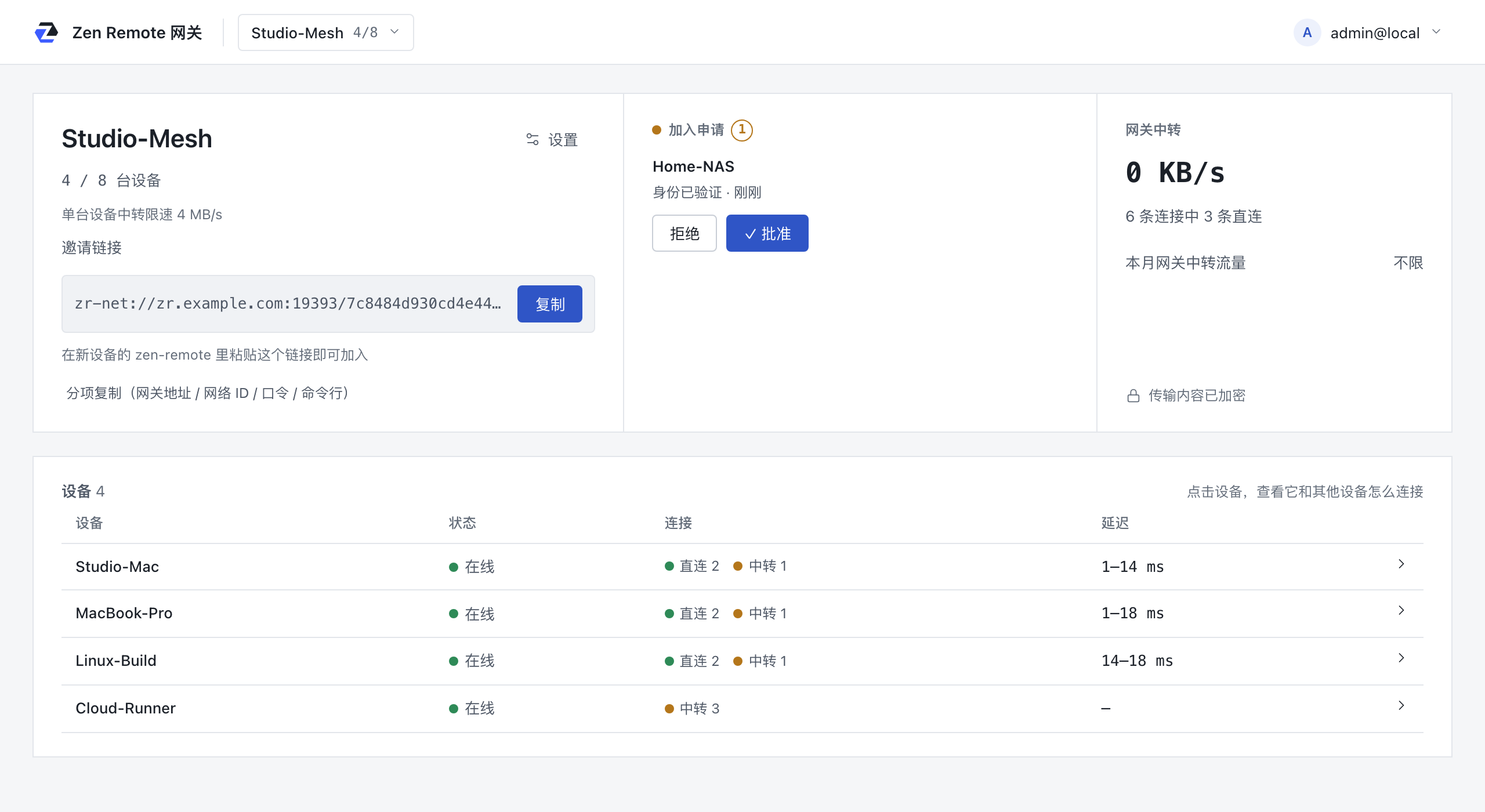
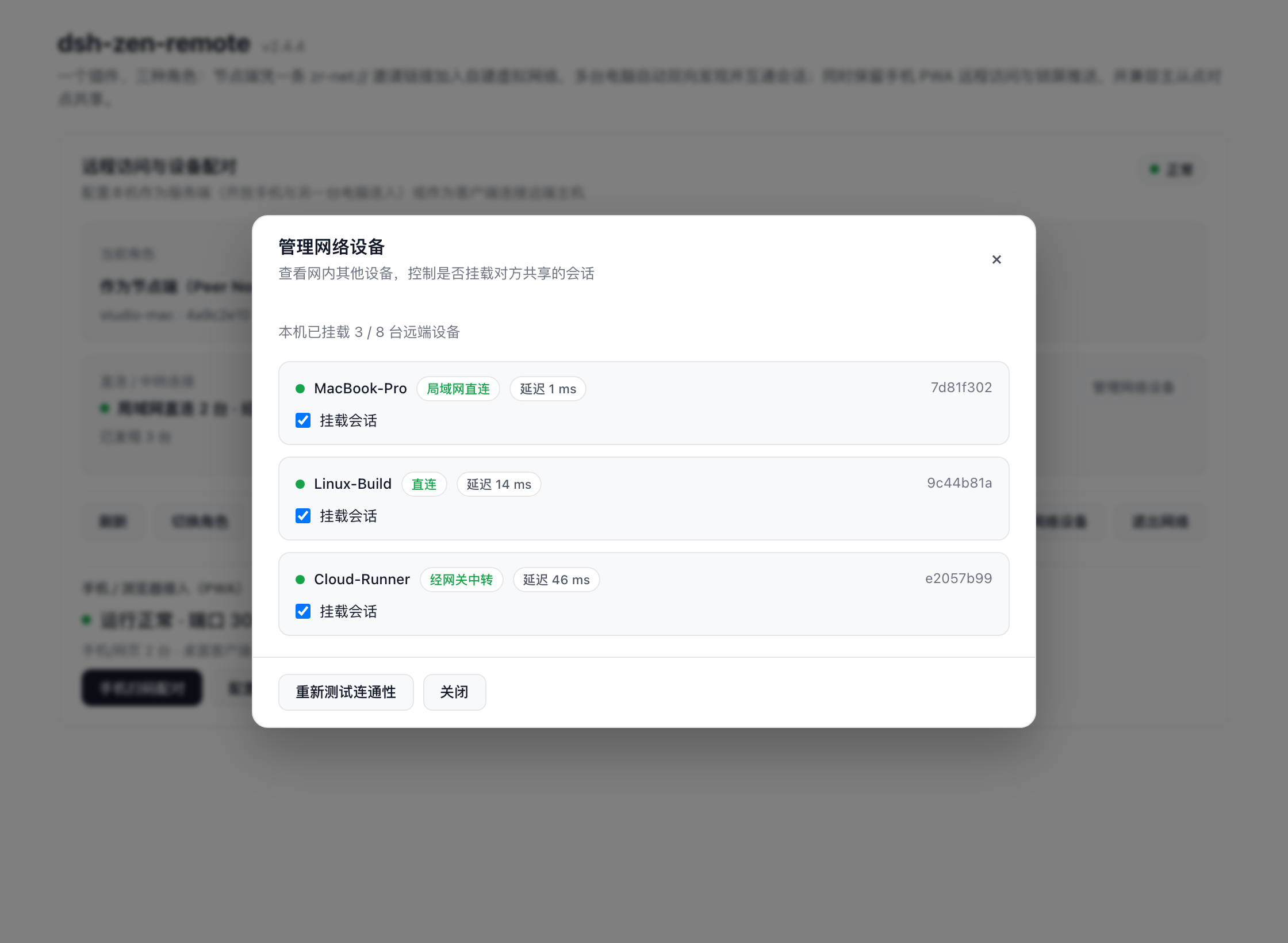
Gateway Web Console (Studio-Mesh) | Peer Network Device Manager |
|---|---|
 |  |
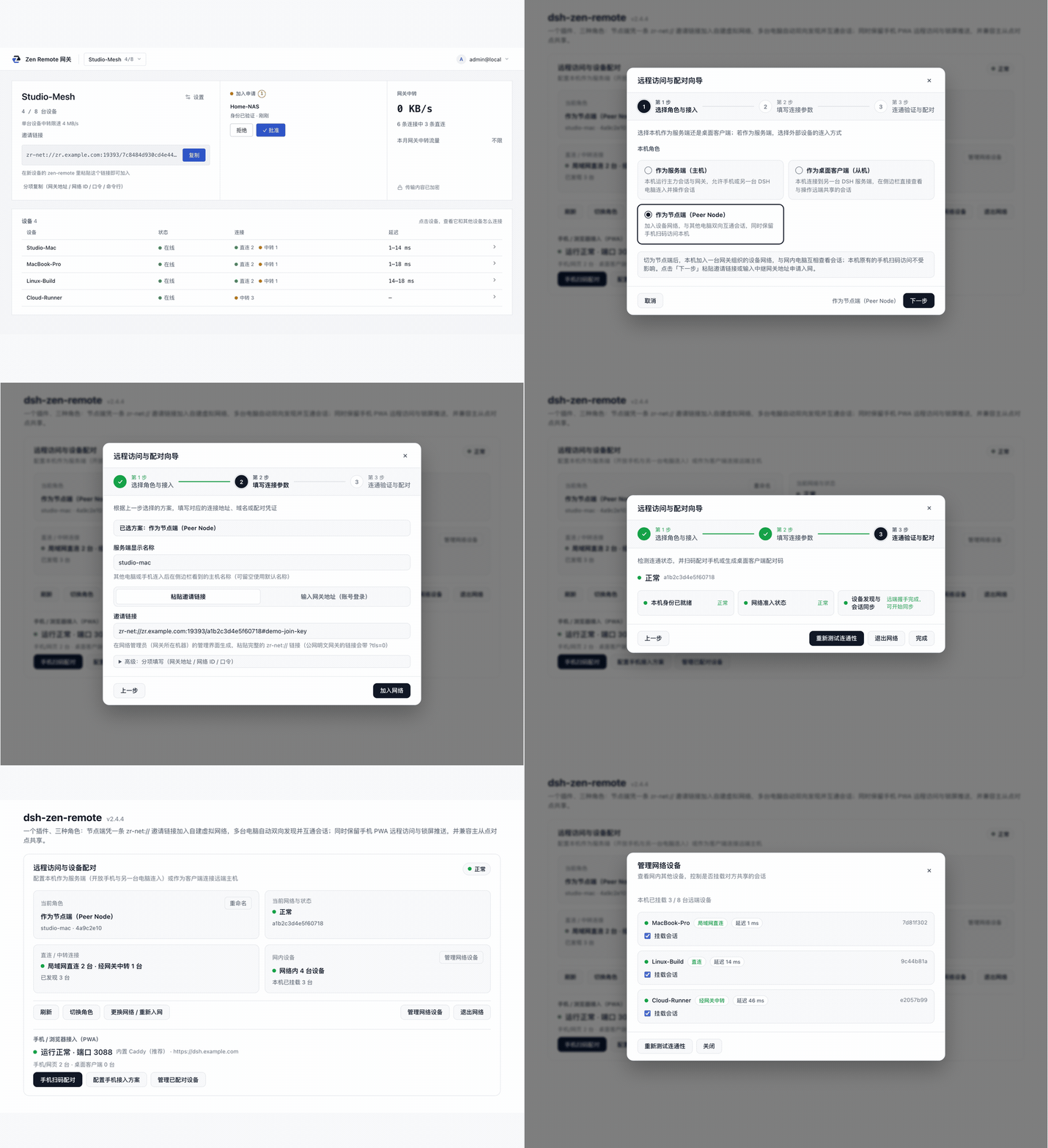
Watch Peer Mesh & Setup Walkthrough (animated demo)
| Mobile session list | Mobile session view | Session info card | Pairing page |
|---|---|---|---|
 |  |  |  |
Mobile screenshots show a 390×844 viewport in the light theme; both light and dark themes are supported across the gateway console, mobile UI, and pairing page.
Contents
- Install
- Pairing & Deployment Modes
- Cross-Device Usage, Official API Coverage & Sidebar Compatibility
- Plugin Bridge Protocol
- Mobile PWA & Lock-Screen Push
- Advanced Settings & Field Reference
- Security Model, Version Tolerance & Known Notes
1. Install
Install from the UI (Recommended, Desktop App & Web UI)
Open Plugins in the DSH sidebar → click Add plugin → enter dsh-zen-remote → click Enable now after installation completes, then restart the DSH desktop app (or dsh web).
Install from the CLI (Headless dsh web server)
dsh plugin --profile web add dsh-zen-remote
# or run the interactive CLI wizard directly (installs, starts DSH, and configures in one go):
npx dsh-zen-remote setup
dsh-zen-remote status
dsh pluginrequires--profileto name the target profile. The desktop app'sdesktopprofile is managed exclusively by the app (--profile desktopis refused on the CLI), so use the UI install above on the desktop app.
Advanced: Full CLI subcommands (peer / host / client), manual link: profile setup, upgrading & uninstall
Bundled Headless CLI (dsh-zen-remote)
The CLI communicates with the running plugin over a 0600 local IPC socket (~/.dsh/zen-remote-cli.sock); Caddy and cloudflared remain managed by the plugin process. Pass --lang zh|en to switch output language, or --yes with flags for unattended scripts.
# Peer commands (when role is peer, join a self-hosted virtual network)
npx dsh-zen-remote setup --role peer --invite "zr-net://gw.example.com/0123456789abcdef#join-key" [--yes]
dsh-zen-remote peer join "zr-net://gw.example.com/0123456789abcdef#join-key" [--name My-Mac] [--yes]
dsh-zen-remote peer status                                     # nodeId, admission state, peers, paths & RTT (--json)
dsh-zen-remote peer trust <nodeId>                             # explicitly trust a peer's new identity after a mismatch
dsh-zen-remote peer leave [--yes]                              # leave the network (phone/browser QR access stays intact)

# Host commands (when role is host)
dsh-zen-remote host device pair --device-role web              # mint a phone/browser pairing code + terminal QR (or desktop-client)
dsh-zen-remote host device list                                # list paired devices (--json supported)
dsh-zen-remote host device revoke <id|--all> [--yes]           # revoke one or all paired devices
dsh-zen-remote host ingress start --mode lan                   # configure & start ingress (caddy | cloudflared | external | lan)
dsh-zen-remote host ingress stop [--yes]                       # stop managed Caddy / Cloudflare Tunnel processes
dsh-zen-remote host ingress verify [--no-wait]                 # three-light check + mint web QR & desktop pairing codes
dsh-zen-remote host ingress snippet [--proxy nginx|caddy|lucky] # print reverse-proxy config snippets

# Client commands (when role is client, up to 8 paired hosts)
dsh-zen-remote client pair http://192.168.1.2:3088 --code 12345678 [--name My-Mac]
dsh-zen-remote client list                                     # list paired hosts (up to 8) and connection states
dsh-zen-remote client unpair <hostUrl|entryId|--all> [--yes]   # remove one or all paired hosts

# Diagnostics
dsh-zen-remote status --debug                                  # export redacted diagnostics report
Manual Profile Edit / Local Development (link:)
Add the dependency to the profile's package.json (~/.dsh/profiles/desktop for the desktop app, ~/.dsh/profiles/web for the web service) and append "dsh-zen-remote" to the dsh.profile.bundles array:
// ~/.dsh/profiles/desktop/package.json
{
  "dependencies": {
    "dsh-zen-remote": "^2.5.0"        // for local development: "link:/path/to/dsh-zen-remote"
  },
  "dsh": {
    "profile": {
      "bundles": ["dsh-zen-remote"]
    }
  }
}
cd ~/.dsh/profiles/desktop && pnpm install
# For a link: checkout, also run `npm install --omit=dev` inside the repository so the gateway subprocess resolves `web-push`.
Upgrading & Uninstall
- Upgrading with HMR on: remove
dsh-zen-remotefirst, then install the new version (dsh plugin --profile <name> remove dsh-zen-remote→add dsh-zen-remote, or Uninstall → Add in the Plugins page). - DSH 0.2.1-alpha.3+ profile reset:
dsh --profile <name> --from-default-profile <template>replaces an existing custom profile with a fresh copy; back up~/.dsh/profiles/<name>first. - Upgrading from 1.x: since 2.0.0 the composition layer is a single row (
dsh-zen-remote). Remove legacydsh-zen-remote-gateway,dsh-zen-remote-push, or manualdsh-push.mjslines fromcordis.patch.yml. Existing~/.dsh/lan-gate.config.jsonand paired devices carry over automatically. - Uninstalling: click Uninstall on the
dsh-zen-remoteplugin page and restart. To wipe pairing and share state too, delete~/.dsh/lan-gate-state.json,~/.dsh/lan-gate.config.json, and~/.dsh/zen-remote-state.json.
2. Pairing & Deployment Modes
Open Plugins → dsh-zen-remote in DSH. The Remote Access & Device Pairing overview card sits at the top of the page (or run npx dsh-zen-remote setup on a headless server).
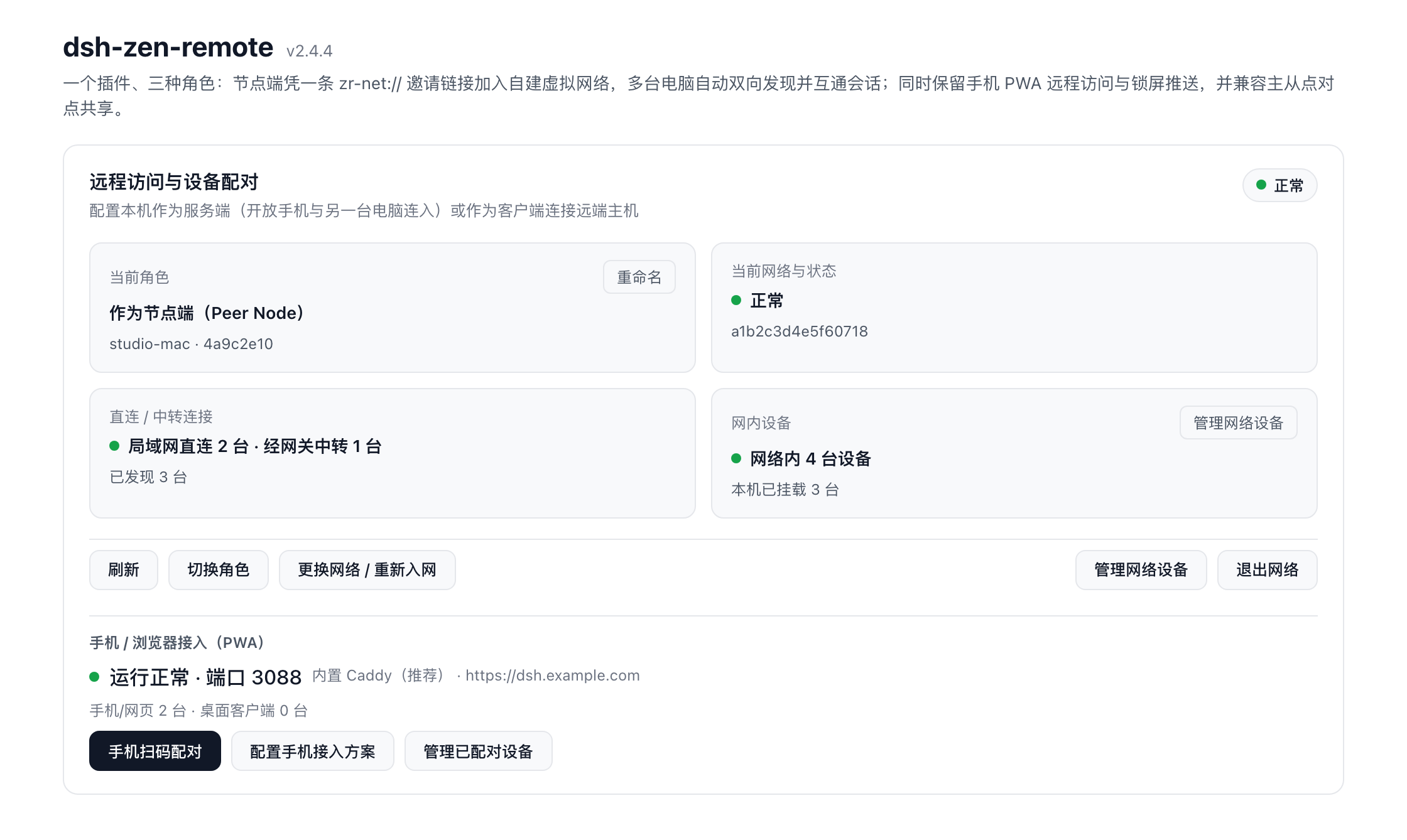
Mode A: Peer Node Virtual Mesh (peer, Recommended)
Link multiple computers across LANs, home routers, and NATs into one bidirectional mesh — zero public IPs on member computers and no per-machine pairing codes, while keeping each computer's own Phone / Browser PWA and Web Push fully active.
1. Deploy the Self-Hosted Relay Gateway (gateway-server/, Once per Team or Self)
[!IMPORTANT]
gateway-server/lives in this repository for source co-maintenance and is excluded from thedsh-zen-remotenpm package. Deploying it is only needed forpeervirtual networks (hostandclientmodes work standalone without it).
docker build -t zr-gateway ./gateway-server

docker run -d --name zr-gateway \
  --restart unless-stopped \
  -p 19393:19393/tcp \
  -p 19393:19393/udp \
  -p 19394:19394/udp \
  -e ZR_GATEWAY_PUBLIC_URL=https://zr.example.com \
  -v zr-gateway-data:/data \
  -v $(pwd)/certs:/certs \
  zr-gateway
- First boot: check
docker logs zr-gatewayfor the one-time initial password ofadmin@local, sign in athttp://<host>:19393/, create a virtual network, and copy thezr-net://…invite link. - Native TLS & full operations: supports single-port built-in HTTPS/WSS on
19393/tcp, five-state member admission (pending/authorized/paused/mismatch/revoked), dual-UDP STUN coordination (19393/udp+19394/udp), and gateway-pushed direct RTT caps (peerDirectMaxRttMs). Seegateway-server/README.md.
2. Join from DSH UI or Headless CLI
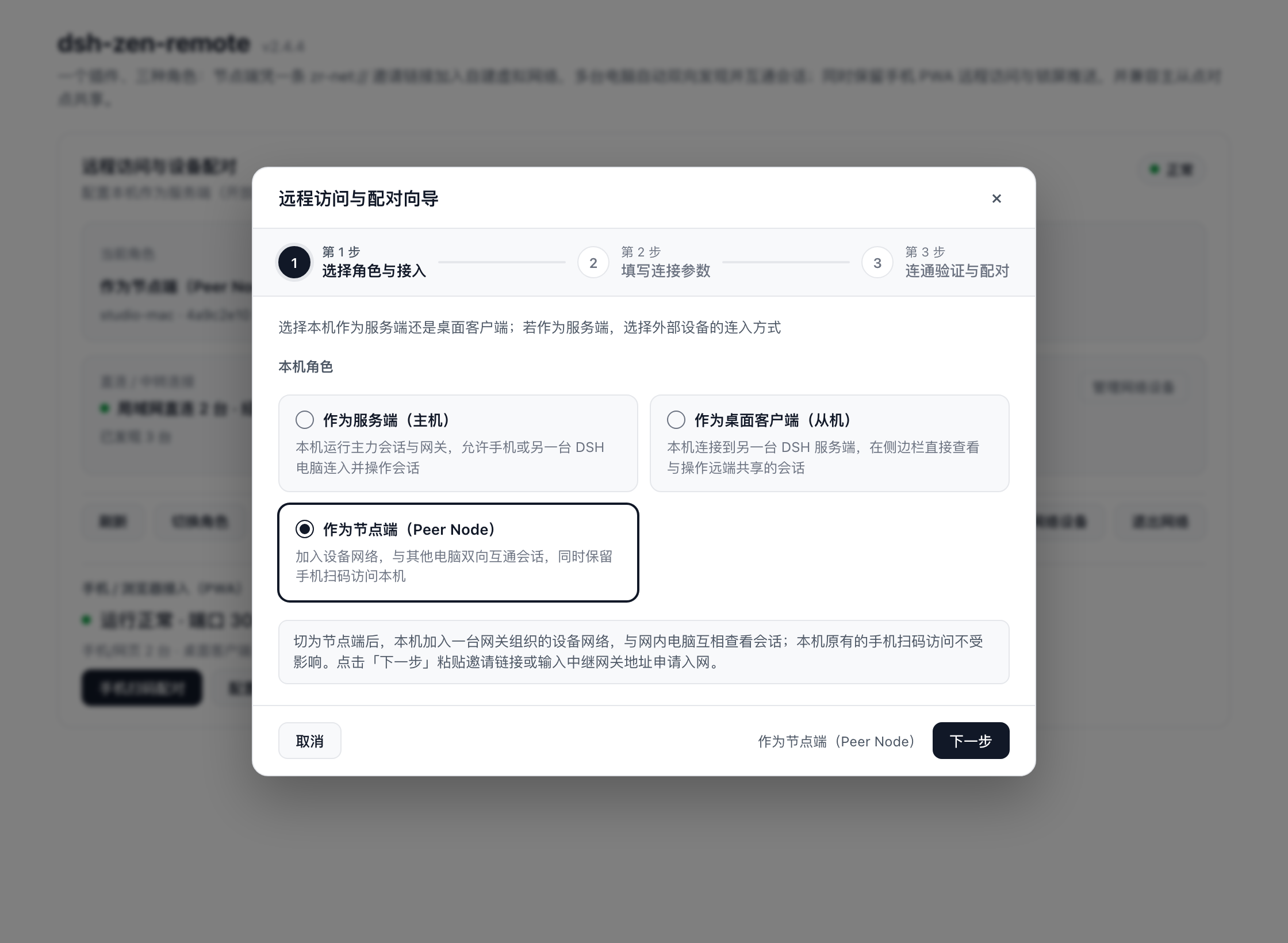
In Plugins → dsh-zen-remote → Start Setup Wizard → Step 1, select Peer Node (peer):
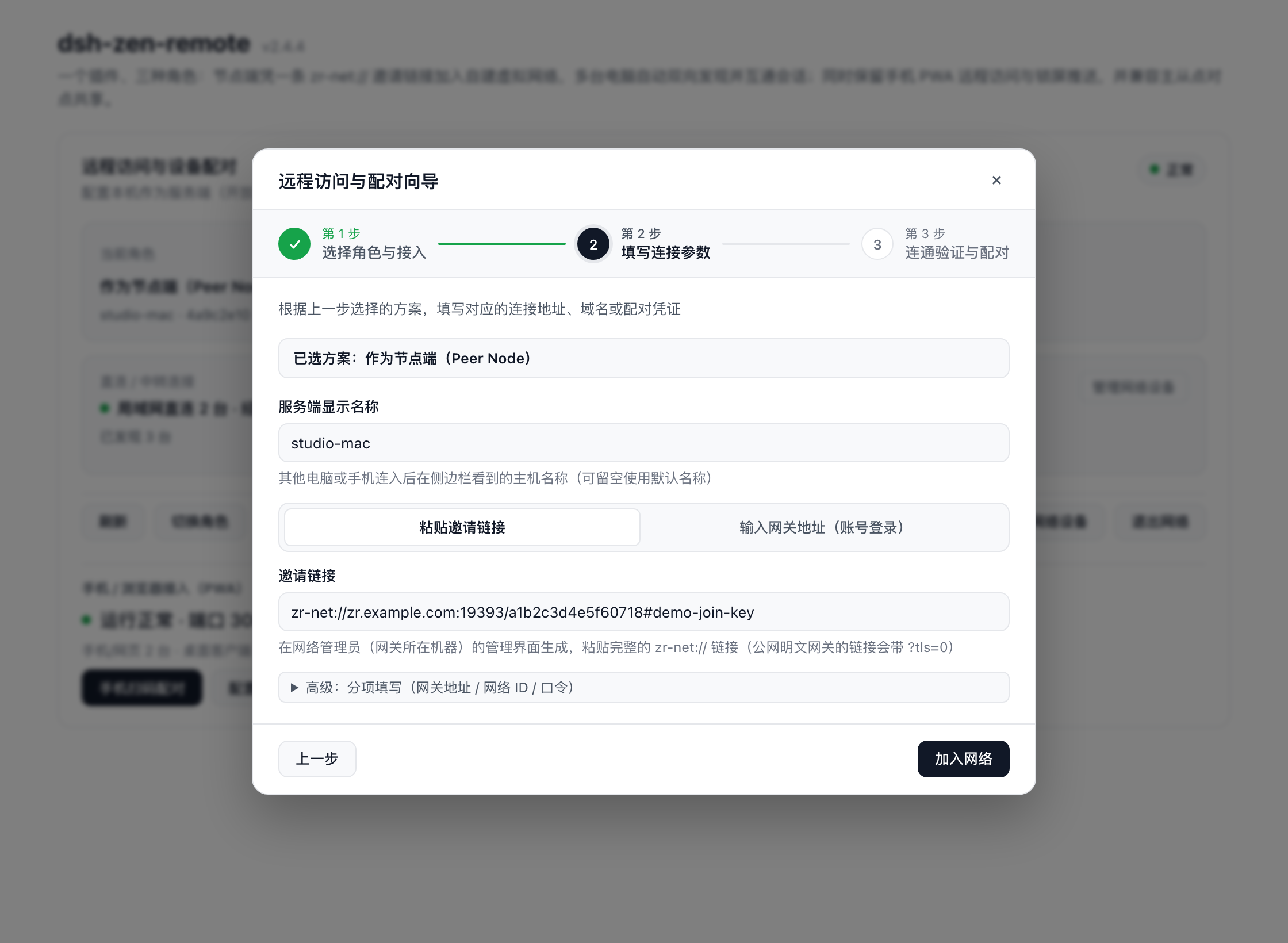
- Step 2 — Choose how to join:
- Paste Invite Link (
zr-net://…): paste the link from the gateway console (?tls=0for plaintext gateways;#join-keyis optional when manual approval is enabled; legacyzr-nets://andzr-net+insecure://links still parse). Expand Advanced split-fill to enter Gateway URL, 16-hex Network ID, and optional join passphrase separately. - Sign in with Gateway Account: enter the gateway URL, email, and password (used strictly in memory to list permitted networks — never saved to disk), pick a network, and click Sign In & Join.
- Manual Approval: if required by the network, the wizard waits in "pending approval" and activates automatically once an admin approves the device.
- Paste Invite Link (
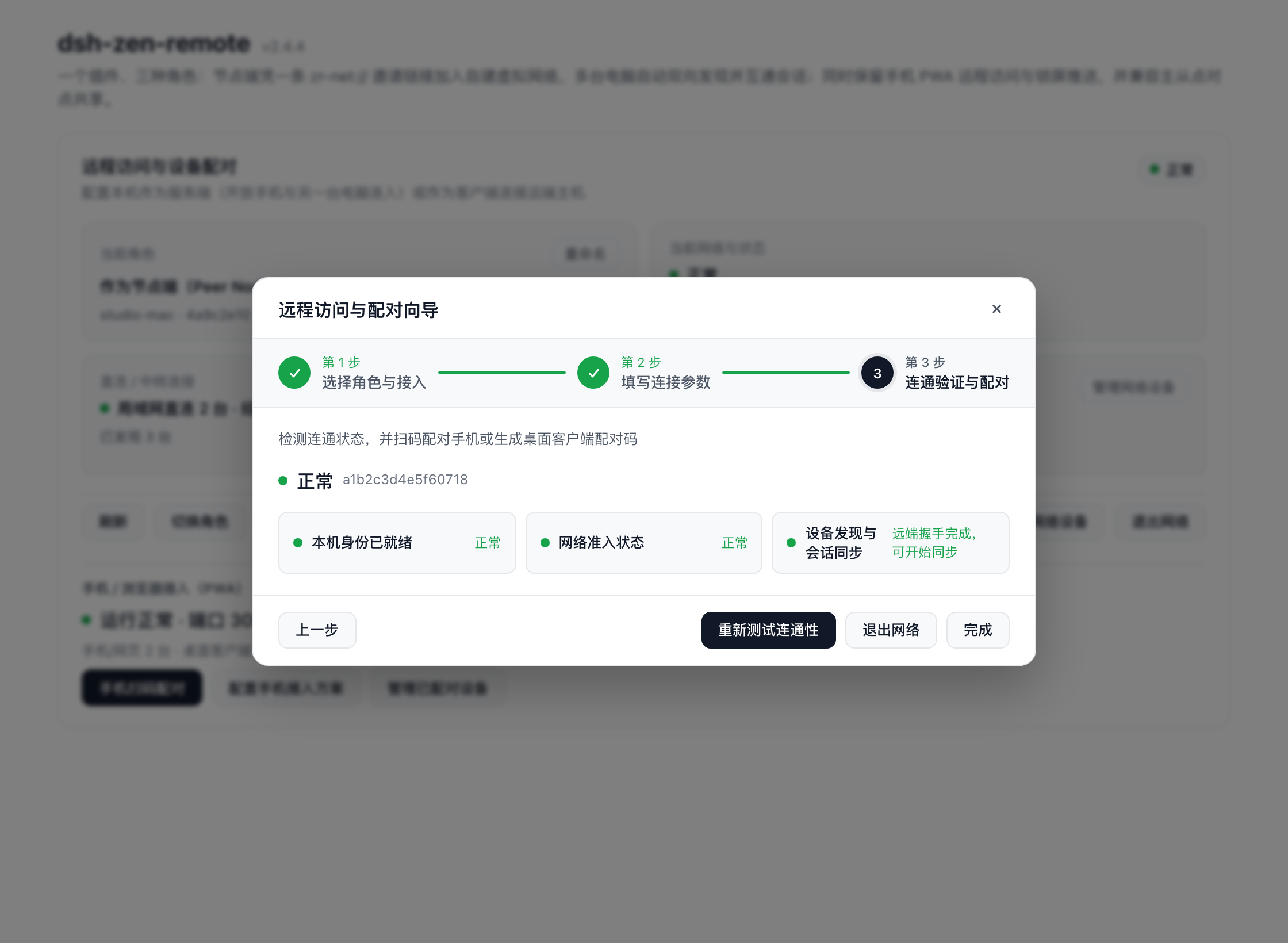
- Step 3 — Verify & Auto-Mount: once all three lights (Local identity ready, Network admission, Peer discovery & session sync) turn green, online peers' remote-enabled sessions mount automatically into your sidebar under
"Device Name · Workspace Name"— and sessions you share appear in theirs. - Day-to-Day Peer & Dual-PWA Controls:
- The overview card shows Network & Peer Interop (
Mounted X / M remote devices, liveLAN DirectvsGateway Relaycounts) alongside your Phone / Browser Access (PWA) section and Plugin Bridge toggles. - Click Manage Network Devices to inspect each peer's path (LAN Direct, P2P Direct, Gateway Relay, Offline, Identity Anomaly) and RTT (
ms), toggle Mount Sessions / Ignore per peer, trigger a Re-probe, or explicitly Trust New Identity after a local TOFUmismatchblock.
- The overview card shows Network & Peer Interop (
| Step 1: Choose Peer Node | Step 2: Paste zr-net:// Invite | Step 3: Peer Readiness Lights |
|---|---|---|
 |  |  |
# Headless server one-liner
npx dsh-zen-remote setup --role peer --invite "zr-net://gw.example.com/0123456789abcdef#join-key"
dsh-zen-remote peer status         # nodeId, admission state, peer paths & RTT (--json)
3. Transport Paths & End-to-End Blind Relay
| Priority | Path | How it works |
|---|---|---|
| 1st | LAN Direct (lan) | Direct socket on shared local subnets (excludes CGNAT 100.64.0.0/10 tunnel ranges from misdetection as LAN) |
| 2nd | UDP Hole-Punch P2P (p2p) | Coordinated via the gateway's dual UDP STUN ports (19393/udp + 19394/udp) with adaptive sliding-window ARQ |
| 3rd | E2EE Gateway Relay (relay) | 1-second seamless fallback if direct setup doesn't land (or if measured direct RTT stays above the gateway's peerDirectMaxRttMs cap); background 5s → 15s → 60s re-probe upgrades back automatically |
- Ciphertext-only relay: traffic between peers is sealed end-to-end with per-session ephemeral X25519 + AES-256-GCM bound to each machine's Ed25519 identity. The gateway only sees a 28-byte routing header and holds no decryption keys.
Mode B: Standalone Host (host, Phone PWA & Point-to-Point)
Choose Act as Server (host) in Step 1 if you only need phone/browser access or direct 1 → N pairing without running a virtual-network gateway:
| Access method | Best for | What the wizard automates |
|---|---|---|
| Managed Caddy (Recommended) | Public IP / port forwarding + domain on Cloudflare | Downloads prebuilt Caddy + caddy-dns/cloudflare, issues/renews TLS certs via DNS-01 (127.0.0.1:3088) |
| Existing Reverse Proxy | Already running Nginx, Caddy, or Lucky | Generates proxy snippets + one-click trustedProxies registration (manual guide) |
| Cloudflare Tunnel | No public IP / no port forwarding + domain on Cloudflare | Downloads cloudflared, creates/reuses tunnel, configures CNAME, and starts tunnel (127.0.0.1:3088) |
| LAN / Tailscale Direct | Same Wi-Fi / LAN or shared Tailscale network | Auto-detects LAN / Tailscale IPv4 and binds 0.0.0.0:3088 behind the built-in private-IP wall (403 public-direct-forbidden) |
In Step 3, verify connectivity and open Pair Phone / Browser (QR) to scan & install the PWA, or switch to Pair Desktop Client to mint an 8-character pairing code.
Mode C: Desktop Client (client, Connect up to 8 Hosts)
Choose Desktop Client (client) on a secondary DSH computer (or run dsh-zen-remote client pair <hostUrl> --code <8-char-code>) to mount remote-enabled sessions from specific hosts without exposing a local gateway:
- Pair up to 8 hosts by default (adjustable via
maxServers1..64orLAN_GATE_MAX_SERVERS). - Remote workspace groups merge into the sidebar in pairing order after local workspaces; duplicate host names auto-number (
Name-1,Name-2). - Model catalogs, connection badges, read-only banners, plugin bridges, and file uploads stay strictly isolated per
serverId.
3. Cross-Device Usage, Official API Coverage & Sidebar Compatibility
| Web App Device (Phone / Tablet / Browser) | Peer Node / Desktop Client (Another DSH Computer) | |
|---|---|---|
| Visible sessions | All sessions on the host | Only sessions with remote access enabled on the serving machine (enforced server-side) |
| Credential | Long-lived HttpOnly cookie | Peer: Ed25519 TOFU identity + ephemeral X25519 session key Client: Bearer device token in ~/.dsh/zen-remote-state.json |
Session Sharing Controls & Lifecycle
Remote access is toggled per session (or automatically for new sessions when autoShareNewSessions is enabled) from four places:
- Sidebar
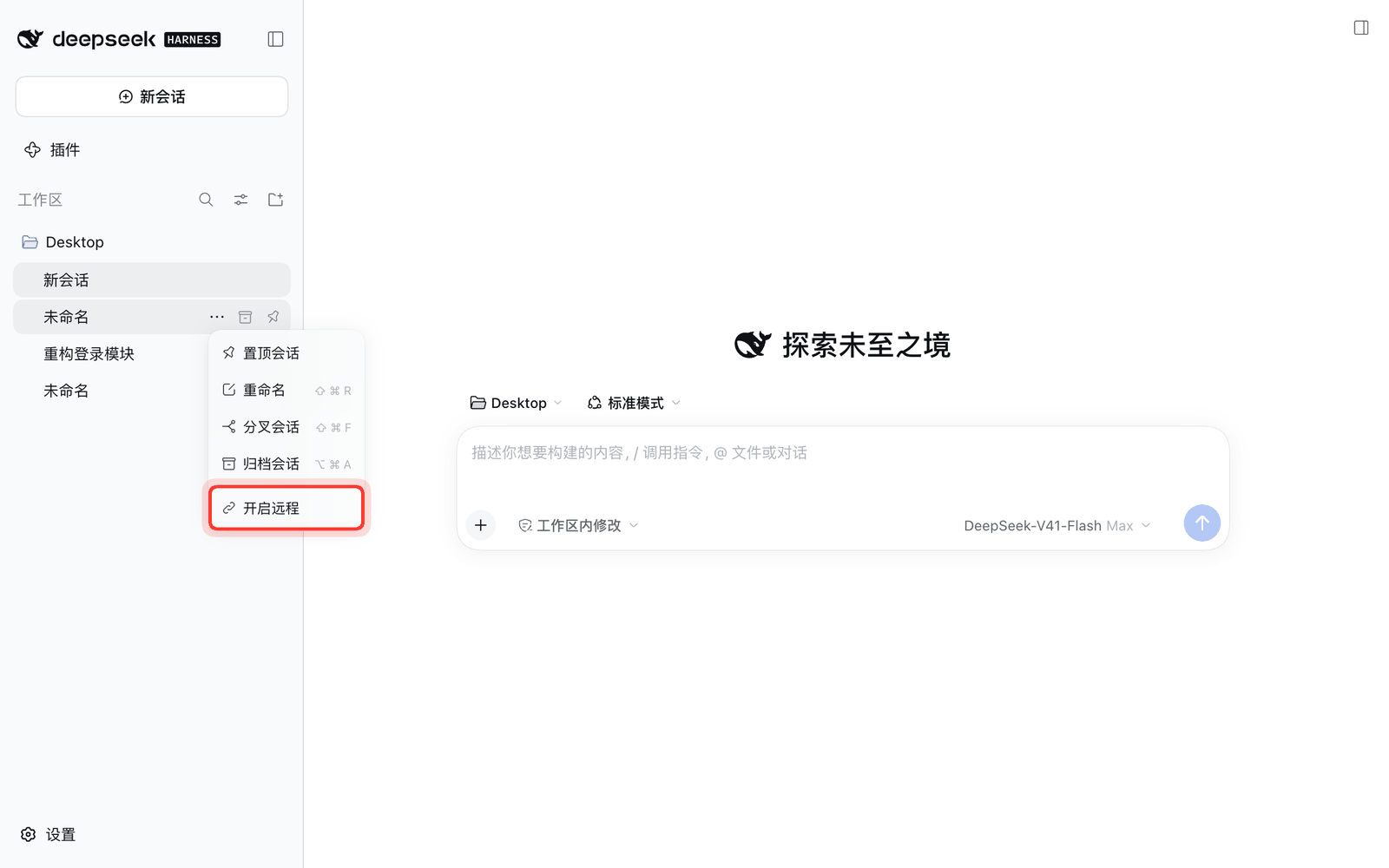
"…"menu → Enable / Disable remote - Session title bar → globe icon (shows remaining idle time on hover; green dot = active remote viewer)
- Phone session info card (
ⓘ) → Remote access toggle - Plugin settings page → shared sessions list (close individually or all at once)
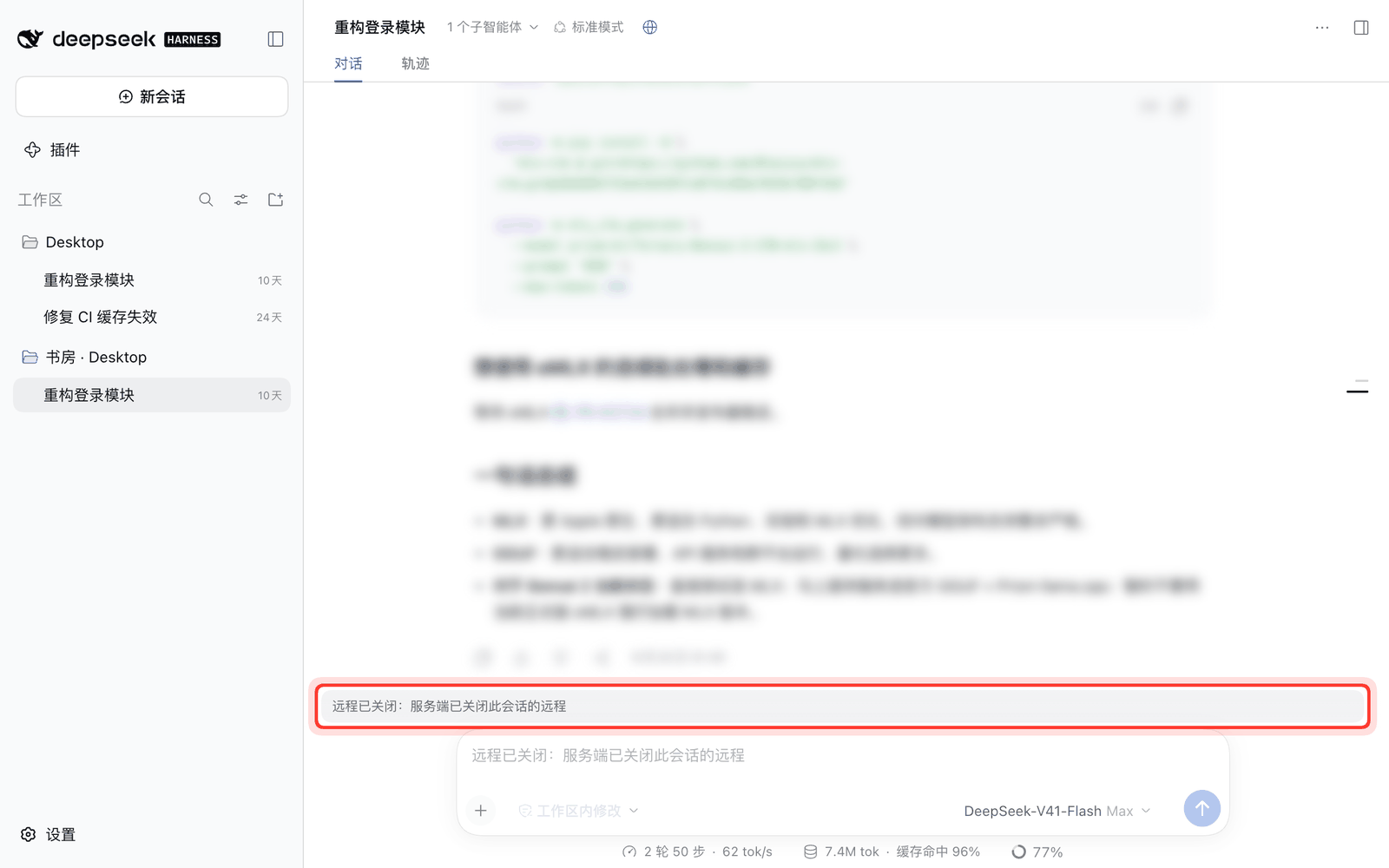
Shared sessions auto-close remote access after 48 hours (idleHours) of inactivity (running or waiting sessions never sleep). Unshared or revoked sessions disappear from remote sidebars automatically, and any currently open tab displays a "remote closed" banner until re-enabled.
| Enable from sidebar menu | Remote-closed banner |
|---|---|
 |  |
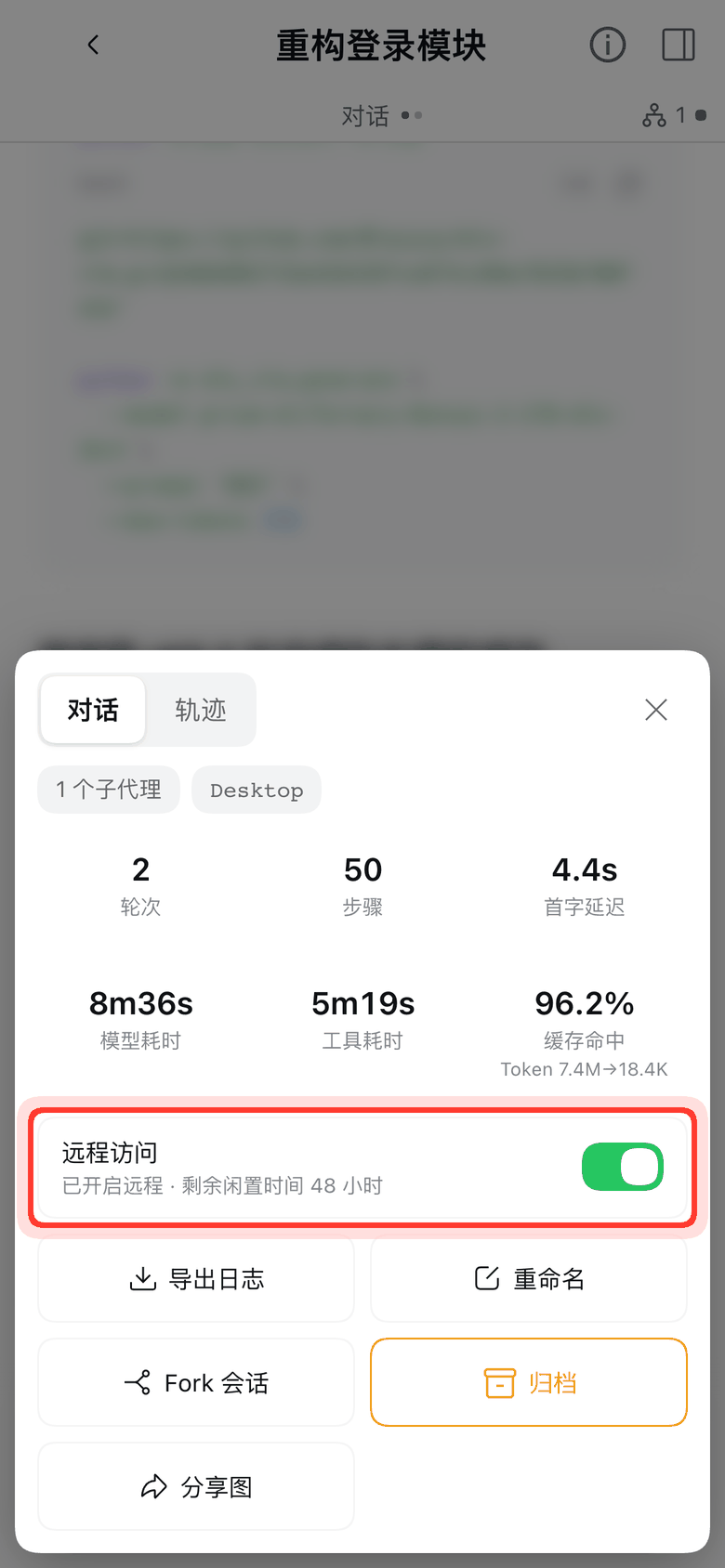
Remote access toggle inside the phone session info card (ⓘ)
Supported Official DSH Interfaces
Every remote RPC/stream/HTTP route is guarded by a strict per-method allowlist (src/relay-access.ts + src/fetch-route-intercept.ts) rather than generic parameter scanning:
| Surface | Supported Official DSH Interfaces | Isolation & Notes |
|---|---|---|
| Sessions, Queue & Subagents | session/follow, page, projections, list, control, search, create, fork, rename, selectModel, modelCatalog, prompt, cancel, updateQueue, attachment, sessionFeedback/record; subagents/prompt, interruptByUser / interruptByParent; $zr/events (approval & question forwarding); workspace/follow, pinSession, unpinSession, archiveSession, unarchiveSession, insertSessionBefore | Global streams/lists (list, search, follow, control, @ candidates) are row-filtered by the share table; dsh-session: references in prompts, queue edits, and slash commands are validated server-side; modelCatalog isolates per-server groups and clears host failures |
| Workspace Files, Diffs & Previews | workspaceFiles/list, changes, read, readBytes, stat, search; officeKit/render & officeToPdf/render (server-side LibreOffice PDF preview); HTTP /api/changes.summary, /api/changes.diff, /api/session/uploadFileBinary, /api/file (inline Markdown images/media) | Host-local OS actions (/api/session.export, /api/changes.open, /api/present.open, /api/present.host) are intentionally disabled/hidden in remote sessions |
| Server Terminal | terminal/attach (0.2.2+ full-duplex PTY), watch, environment, shells, create, write, resize, rename, close, follow, list, retain | Runs on the serving machine as its OS user; closing remote access on a session terminates its remote terminal streams immediately |
| Forge Panel (Git / PR / Worktree) (DSH 0.2.2+) | All 31 session-scoped forgePanel/* endpoints (follow, branches, diffBases, localCommits, localDiff, localText, changeRequest*, *Worktree, review*, merge, …) + global forgePanel/changeRequestStates stream | PR badge stream is filtered per workspace/session; older DSH hosts degrade gracefully without breaking core chat |
| Goals, Commands, Presets & Interactive Tools | goals/get|create|edit|complete|pause|resume|clear; commands/list|execute; agentPresets/list|read|select; sessionReferenceResolver/candidates; userQuestions/answer|attachWait; actionCards/act; toolResults/watch; agentTeams/setEnabled; pluginRecommendations/describe; job/list|follow|kill; skills/list; messageFeedback/*; schedule/list | When at least one session is shared, agentPresets exposes the serving machine's preset roster/YAML; when zero sessions are shared, agentPresets/list returns empty and read refuses |
dsh-better-sidebar Compatibility
dsh-zen-remote ships a dedicated built-in adapter (src/adapters/dsh-better-sidebar/) for dsh-better-sidebar with wire-surface digest matching, so compatible releases bridge automatically without requiring dsh-zen-remote updates on every minor patch:
- Bridged surfaces:
/sidebar/api/*(file browser, editor, Git graph/history, tasks, sidechat),/sidebar/file,/sidebar/sidechat-image,/sidebar/archive,/sidebar/upload,/sidebar/write,/sidebar/htmlpreview, plus all three WebSocket feeds (/sidebar/ws/agent-opens,/sidebar/ws/fs-watch, and frame-rewritten/sidebar/ws/sidechat). - Safety boundaries: classified as whole-machine data (requires explicit per-plugin owner consent under Plugin Bridge, default OFF); strips client-supplied
cwdserver-side so paths always resolve from the verified session; blocksopen.externalin remote sessions; keeps/sidebar/bundlelocal. - Unbridged fallback: if
dsh-better-sidebaris on an unsupported version or consent is disabled, its host-file panels return fail-closed503rather than silently reading your local machine's disk.
4. Plugin Bridge Protocol
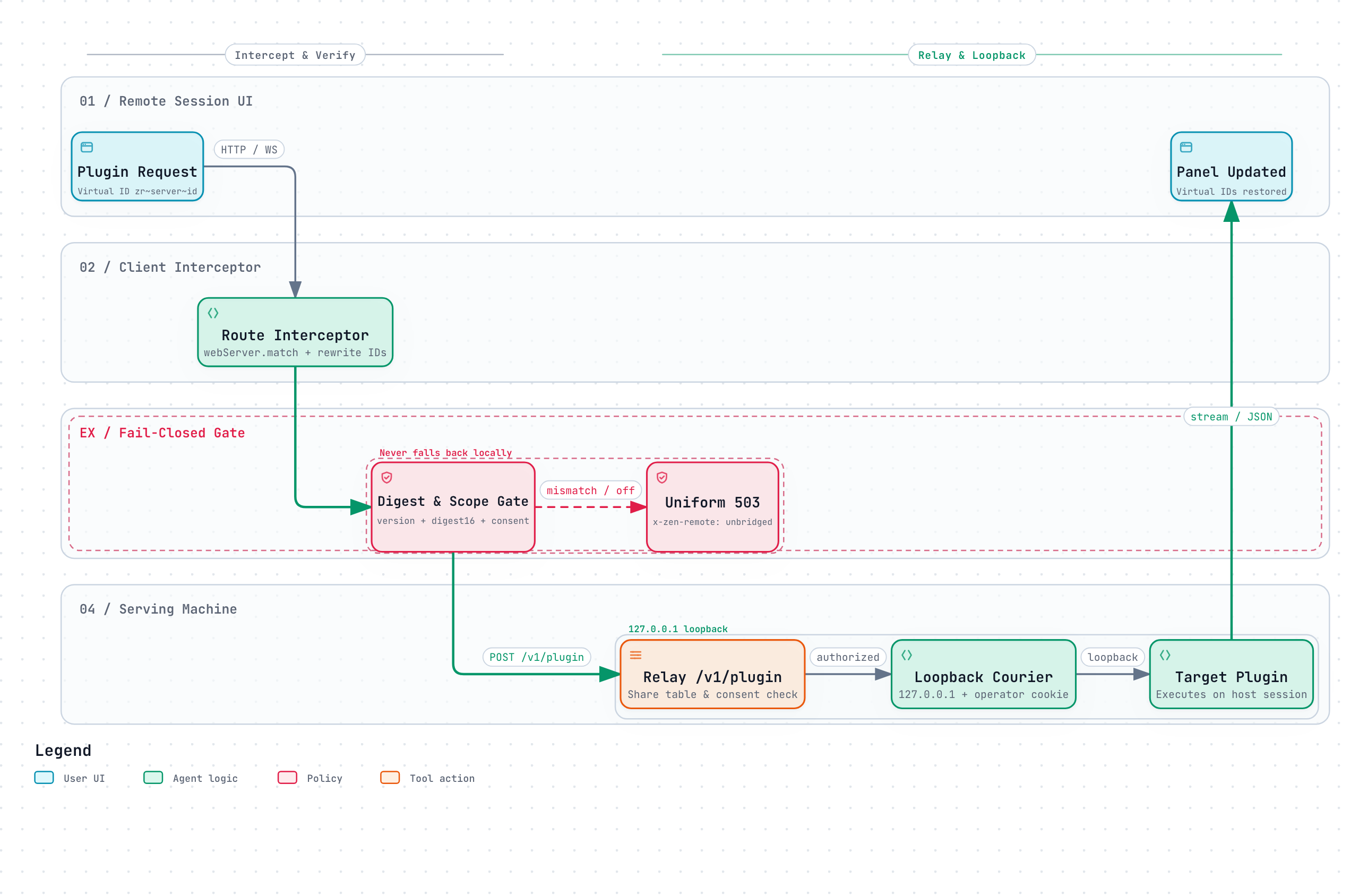
Third-party DSH plugins whose session panels query their own backend routes on DSH's webServer can work seamlessly across remote sessions via the Plugin Bridge Protocol — without taking any runtime dependency on dsh-zen-remote.
How It Works
- Two Integration Paths:
- Cooperative Declaration (Recommended for plugin authors): inject the optional
zenRemoteservice (ctx.inject(['zenRemote'], ...)) and callbridge.bridge({ plugin, version, routes })with types imported fromdsh-zen-remote. SupportsGET/HEAD/POST/PUT/PATCH/DELETE,stream,upgrade: true(WebSocket byte or JSON-frame tunneling),prefix: true,locator(query/path-segment/json-body),deny: true(block local-only routes remotely), andrewriteIds(trueor{ fields }). Whendsh-zen-remoteis not installed,injectsimply never fires. - Built-in Pluggable Adapters (
src/adapters/): maintained insidedsh-zen-remotefor existing uncooperative plugins (such asdsh-better-sidebar); cooperative declarations always take precedence over adapters.
- Cooperative Declaration (Recommended for plugin authors): inject the optional
- Handshake Digest Verification: at connect time, both machines exchange
{ plugin, version, digest16 }(a 16-hex SHA-256 of the normalized declaration). Both ends must match on plugin name, exact version, and declaration digest. - Session vs. Whole-Machine Scope:
scope: 'session'— authorized automatically per request against the share table.scope: 'server'— requires explicit host-owner consent in Settings → Plugin Bridge (default OFF).
- Fail-Closed Guarantee: any failure (
not-on-server,version-mismatch,declaration-mismatch,consent-off,route-denied,bad-query,offline, etc.) returns a uniform503(x-zen-remote: unbridged) — remote panels never fall back to local machine data.
See the full specification in Plugin Bridge Guide.
5. Mobile PWA & Lock-Screen Push
Both peer and host roles run the built-in mobile web experience and Web Push engine:
- Mobile App Shell: two-level page stack (session list home + session page with edge swipe-back and Android back-gesture support, inline boot skeleton, content-hashed asset caching), auto-discovered plugin home chips, compact mobile composer with bottom sheets & camera/file attachment uploads, and a session info card (6-tile stats with
tok/soutput speed, log export, rename, fork, archive, one-tap full-conversation PNG share image, and remote access switch). - Lock-Screen Web Push (end-to-end encrypted
aes128gcm; togglepushEnabledglobally or enablepushSessionNameto prependSession: <name>):- System-triggered (always active when
pushEnabledis on, never suppressed by debounce):- Tool waiting for approval: pushes "DSH needs your approval" after
DSH_PUSH_APPROVAL_GRACE_MS(default5sso fast auto-approvers handle it without buzzing your phone). ask_user_questionwaiting for input: pushes "DSH is waiting for your answer".
- Tool waiting for approval: pushes "DSH needs your approval" after
- Model-triggered (
push_notifytool): called by the agent when you asked to be notified on completion or when it hits a blocker requiring your decision (ordinary turn ends stay silent unlesspushTurnEndis turned on;pushSummaryappends up to 120 chars of the final reply).
- System-triggered (always active when
6. Advanced Settings & Field Reference
Day-to-day setup and device management are handled in the Remote Access & Device Pairing Wizard (or npx dsh-zen-remote setup). To fine-tune individual low-level fields, click dsh-zen-remote a second time under Included components on the plugin detail page.
Expand full configuration field reference table & environment variables
Each field resolves in order: environment variable > plugin row settings > ~/.dsh/lan-gate.config.json > default. Saving a field that requires a gateway/push restart reloads the plugin row automatically without restarting DSH.
| Field | Default | What it does |
|---|---|---|
role | host | peer joins a self-hosted virtual network while keeping serving halves (gateway, push, sharing) mounted; host runs gateway + push + sharing; client connects to paired hosts only |
serverName | computer name | Device name (≤ 40 chars): sidebar group title on a serving machine, registered name on a client (renaming on a client broadcasts one-way to paired servers) |
port | 3088 | Gateway port; retries upward (up to +20) if occupied |
host | 127.0.0.1 | Gateway bind address (127.0.0.1 for local proxy/tunnel, 0.0.0.0 for LAN/Tailscale direct) |
targetPort | (auto) | Local DSH Web UI port; leave empty to auto-discover |
rateLimit | 120 | Per-minute cap on unpaired requests per client IP |
trustedProxies | empty | Comma-separated trusted proxy IPs when the reverse proxy runs on another machine |
vapidSubject | mailto:admin@localhost | Web Push contact (must be a real mailto: or https:// URL for iOS delivery) |
lang | auto | Gateway & notification language: auto (browser Accept-Language), zh, or en |
pushEnabled | on | Master switch for session notifications; off stops automatic pushes and unregisters push_notify |
pushSessionName | off | Prepend Session: <name> to notification bodies |
pushTurnEnd | off | Also push when ordinary turns finish (approvals/questions always push) |
pushEvents | agent/turn-stopping | Comma-separated events treated as turn end when pushTurnEnd is on |
pushDebounceMs | 15000 | Minimum interval (ms) between automatic pushes |
pushSummary | off | Include up to 120 chars of the final reply in notification bodies |
pushTool | on | Register the model-callable push_notify tool |
idleHours | 48 | Idle-sleep window in hours for shared sessions; range (0, 8760] |
maxServers | 8 | Paired host limit (1..64, live read; env LAN_GATE_MAX_SERVERS outranks). In peer mode, remote mounts are bounded by min(maxPeers - 1, maxServers) |
logLevel | info | Logging threshold (info / debug / warn, live read; env LAN_GATE_LOG_LEVEL outranks) |
autoShareNewSessions | off | Automatically enable remote access on newly created sessions |
pluginBridgeConsent | {} | Whole-machine data consent map (pluginName -> boolean) for the Plugin Bridge |
serverUrl / deviceToken | empty | Legacy single-server client fields, auto-migrated into ~/.dsh/zen-remote-state.json on first start |
turnFoldDesktop | off | Enable turn-process folding on desktop widths as well as mobile |
keyboardLiftRatio / keyboardLiftMaxPx / keyboardSafetyPadPx | 0.42 / 400 / 15 | Soft-keyboard lift calibration fallback |
maxUploadBytes | 20 MB | Mobile attachment upload cap |
Legacy environment variables (outrank row settings): LAN_GATE_PORT, LAN_GATE_HOST, LAN_GATE_TARGET_PORT, LAN_GATE_RATE_LIMIT, LAN_GATE_TRUSTED_PROXIES, LAN_GATE_VAPID_SUBJECT, LAN_GATE_LANG, LAN_GATE_LOG_LEVEL, LAN_GATE_MAX_SERVERS, DSH_PUSH_ENABLED, DSH_PUSH_SESSION_NAME, DSH_PUSH_TURN_END, DSH_PUSH_EVENTS, DSH_PUSH_DEBOUNCE_MS, DSH_PUSH_SUMMARY, DSH_PUSH_TOOL, DSH_PUSH_LANG, DSH_PUSH_APPROVAL_GRACE_MS.
7. Security Model, Version Tolerance & Known Notes
- End-to-end encrypted peer mesh & TOFU identity pinning: peer-to-peer session traffic uses ephemeral X25519 + AES-256-GCM ciphers (forward-secret, bound to Ed25519 signatures); the relay gateway sees only 28-byte routing headers and holds no decryption keys. Each node derives a self-certifying
nodeIdfrom its public key and pins peers locally (pinnedPeers): even a gateway-side credential reset stays blocked (mismatch) until explicitly trusted on each peer machine. - Trusted client & strict session isolation: paired desktop clients/peers run remote terminals and file previews as the serving machine's OS user, while unshared sessions are filtered and refused at the relay layer. In LAN mode (
0.0.0.0), the gateway's private-IP wall rejects unproxied public internet IPs (403 public-direct-forbidden), and admin/wizard mutations stay loopback-only. - Version tolerance: both sides must run the same
dsh-zen-remoteversion; DSH host versions may differ (interface fingerprints are compared at handshake and degrade only mismatched panels).
In depth: Public Access & Relay Protocol · Interface Design · Plugin Bridge Guide · Self-Hosted Gateway
Expand state files, known limitations, iOS PWA notes & adapted third-party plugins
Data & state files
- The plugin reports nothing to any third party. Pairing state lives in
~/.dsh/lan-gate-state.json; the unified state file~/.dsh/zen-remote-state.json(0600) stores localserverId,sessionsshare table,serverslist, and peer state (peerIdentity,peerNetwork,pinnedPeers); managed Cloudflare tokens live in0600files under~/.dsh/zen-remote-ingress/.
Known limitations
- With multiple DSH windows open simultaneously on a client, active-session detection may occasionally dismiss a closed session early.
- Switching between different servers or recreating a workspace with the same ID requires reloading the client page once.
- "Export session" and server-local OS dialogs ("Reveal in Finder" / "Open in app") are hidden in remote sessions.
- DSH's own Settings RPCs are loopback-only by upstream design, so plugin settings must be edited on the machine running DSH rather than through a remote browser.
iOS standalone PWA notes
- iOS 26.x viewport shrinkage: home-screen PWAs may lose a status-bar height at the bottom (an iOS WebKit bug); three mitigation layers are built in, and restarting the PWA restores full height.
- iOS 26+ top progressive blur: opening from the home screen may show a system
WKScrollPocketblur across the top ~95px; entering any session and navigating back to the list clears it.
Third-party plugins with mobile & bridge adaptations
| Plugin | Adaptation summary | Version tested |
|---|---|---|
| dsh-better-sidebar | Full-screen mobile right-sidebar drawer with notch safe-area padding and swipe-back; Plugin Bridge built-in adapter with wire-surface matching | Built-in adapter |
| @nanmicoder/dsh-agent-teams | Repositions AgentTeams floating pill below session header and preserves parent session back-link | 0.1.9 |
| @ychris12138/dsh-usage-stats | Moves usage & balance entry into the mobile home chips bar | 0.2.9 |
| @opendsh/dsh-plugin-scheduled-tasks | Moves scheduled tasks entry into the mobile home chips bar | 0.2.3 |
| dsh-at-file | Deduplicates .dsh-uploads/ attachment rows on mobile | 0.6.7 |
| @ace-zone/dsh-market | Compacts marketplace modal header on mobile so the close button stays reachable | 0.1.66 |
| dsh-vision-toolkit | Works with mobile attachment uploads for image Q&A/OCR | — |
| dsh-web-ui bundle | Mobile width-constrained centered overlays for file tree / preview | — |
npm Downloads


Documentation Index
| Document | Scope |
|---|---|
| Public Access & Relay Protocol | Reverse proxy snippets, device roles & pairing, relay methods, peer virtual networking, security boundaries |
| Interface Design | Responsive breakpoints, settings & wizard components, mobile safe-area system, compatible plugins |
| Plugin Bridge Guide | Bridge declaration API, WebSocket byte/JSON-frame tunneling, fail-closed 503 contract |
| Self-Hosted Relay Gateway | Docker / Node.js deployment, native TLS, environment variables, web console & zr-net:// links |
Upstream credits
This plugin's interface layer derives from mexiaosqwq/dsh-web-mobile, and its channel layer from zylzyqzz/dsh-mobile-pwa (itself derived from Bernardxu123/dsh-mobile-gate), both MIT. The original copyright lines are preserved in LICENSE.