delivery-loop
loveowie/delivery-loop
端到端交付闭环:把已批准的规格转成任务图,由隔离的 DSH 子代理 Worker 实现,再经过验证、独立评审与验收;跨仓库看板可暂停、恢复、取消运行或调整预算。
安装
dsh plugin --profile web add github:loveowie/delivery-loopREADME
Delivery Loop




English | 简体中文
Resumable, verifiable end-to-end software delivery for DeepSeek Harness (DSH).
Status: 0.2.1, the first public release series. Pre-1.0 interfaces may change; see the changelog before upgrading.
Delivery Loop turns an approved specification into a persistent task graph, runs every task in a fresh DSH subagent, verifies the result against a code snapshot, converts test and review failures into repair tasks, and continues until acceptance passes or a human decision is required.
It is a native DSH plugin: the controller runs in the DSH Host process, workers are ctx.subagents children rather than external CLI processes, and the run state, evidence, decision log, and delivery view are first-class DSH surfaces.
Quick start
Requires DeepSeek Harness 0.2.x, Node.js 24+, and a Git repository.
- Install the bundle from the Plugins → Discover marketplace, from npm, or from source.
- Ask the agent to
Use deliver-change to deliver this change end to end…and describe the work. - Review the prepared scope and acceptance summary, then approve once.
- Follow the run in the Delivery loop board or with
delivery_status, and answer decisions as they arrive. - Export the report and confirm a finalization mode when you are ready.
Why Delivery Loop
A model that works for hours in one context drifts: it forgets approvals, trusts its own claims, and silently retries the same failure. Delivery Loop is built around five rules:
- The controller decides; workers only do. Planning, budgets, verification, review, integration, and acceptance are owned by the Host controller, not by a worker's summary.
- Evidence is bound to a snapshot. A passing command counts only for the code snapshot it ran against. Integration invalidates older evidence.
- Failures become tasks. Test failures, review findings, scope violations, and acceptance gaps create bounded repair tasks. Exhausted budgets block a run instead of looping forever.
- State is the source of truth.
run.jsonand the event log survive a Host restart; a run with no live worker owner is recovered and re-queued. - Two human gates. You approve scope and acceptance once, and you confirm a Git finalization action explicitly. Nothing is committed, pushed, or merged by default.
Features
deliver-changeskill for intake, one-time approval, and status reporting.- Ten native
delivery_*tools for starting, inspecting, waiting, answering, pausing, resuming, cancelling, exporting, and finalizing runs. - Deterministic scheduler with a task state machine, retry limits, failure fingerprints, and queue fencing.
- Fresh-context DSH subagent workers for planning, implementation, testing, debugging, review, and acceptance.
- Isolated Git worktrees and patch-based integration;
prepare-onlydelivery by default. - Snapshot-bound verification evidence, a baseline failure matrix, and a final verification matrix at the accepted snapshot.
- Independent review and acceptance, with blocking findings turned into repair tasks.
- A Web delivery board, a composer status strip, a full run view, and a runtime budget settings page.
- Vendored, hash-locked generic skills; no OpenSpec or domain skill is required for the default profile.
How it works
flowchart TD
user["Explicit end-to-end request"] --> skill["deliver-change intake<br/>goal · scope · acceptance · verification · Git · budget"]
skill --> prepared[".delivery/prepared/<draft-id>/<br/>spec.md · task-graph.json · delivery.yaml"]
prepared --> approve{"Scope and acceptance approved?"}
approve -->|"no"| skill
approve -->|"yes"| start["delivery_start<br/>acyclic graph · satisfiable requirements · full coverage"]
start --> loop["Controller loop in the DSH Host"]
loop --> tasks["Ready tasks<br/>dependency · priority · scope · worker cap"]
tasks --> pipeline["execute → verify → review → integrate"]
pipeline --> loop
loop --> accept{"Every mandatory acceptance condition<br/>has evidence at the accepted snapshot?"}
accept -->|"yes"| done["COMPLETED"]
accept -->|"needs a human"| human["WAITING_HUMAN"]
accept -->|"no"| repair["Repair task, or BLOCKED when budgets are exhausted"]
human -->|"delivery_respond"| loop
repair -->|"delivery_resume"| loop
done --> report["delivery_export_report<br/>delivery_finalize (explicit confirmation)"]
Each task moves through READY → RUNNING → VERIFYING → (REVIEWING) → INTEGRATING → DONE. A violation or failure sends the task to FIX_REQUIRED, creates a bounded repair task, and re-enters the queue. See Architecture for the components, lifecycle, recovery, and security boundaries.
The concrete worker mechanics matter for trust:
- the child runs in the task worktree with its own session, tools, and abort signal;
outputSchemais the engine'sAgentResultschema, so the controller receives a validated object;- workers are caller-delivered, so results never appear as settlement messages in your conversation;
- the controller independently rejects a review that changes the candidate snapshot.
Requirements
| Requirement | Notes |
|---|---|
| DeepSeek Harness 0.2.x | The plugin uses native ctx.tools, ctx.agents, and ctx.subagents seams. |
| Node.js 24+ | Declared by engines in package.json. |
| Git | Every target repository must be a Git worktree. |
| Container runtime (optional) | Only for the default container verification backend. trusted-host needs no runtime but is not isolation. |
No external agent CLI, gateway, or daemon is required.
Install
From the plugin marketplace
Open Plugins → Discover in DSH, search for Delivery loop, and install the bundle. Then open the Delivery loop entry in the left sidebar.
From npm
Ask the agent to install the bundle:
Install the dsh-delivery-loop bundle from npm and enable it.
The equivalent plugin_manager call uses action: install_bundle with the package name dsh-delivery-loop (and the registry the market shows). The package declares dsh.bundle.patch, so the bundle inserts its delivery-loop row automatically.
From source
git clone https://github.com/loveowie/delivery-loop.git
cd delivery-loop
npm ci
npm run build
In DSH, choose Plugins → Add plugin and select this directory, or run plugin_manager with action: install_bundle and the absolute directory.
After installing or changing client.js, refresh the DSH page. The Desktop app needs a restart when the plugin package itself changes; a browser page only needs a reload. If the view returns 401, reload the bundle so the page receives the current session credential.
Full instructions, including upgrade and uninstall, are in Installation.
First delivery
Describe the change and ask for Delivery Loop explicitly:
Use deliver-change to deliver this change end to end, and keep going until
it is verified and accepted:

<your requirement>
The skill prepares .delivery/prepared/<draft-id>/, shows the scope and acceptance summary, and waits for your approval. After you approve:
- start the run with
delivery_start(the agent does this for you); - follow it in the sidebar board, the composer strip, or with
delivery_status/delivery_watch; - answer a pending decision with
delivery_respond; - export
reports/final.mdand confirm a finalization mode when you are ready.
The complete workflow, prepared-file format, and tool reference are in Usage. A minimal portable configuration is in examples/portable.
The delivery view
The DSH bundle adds:
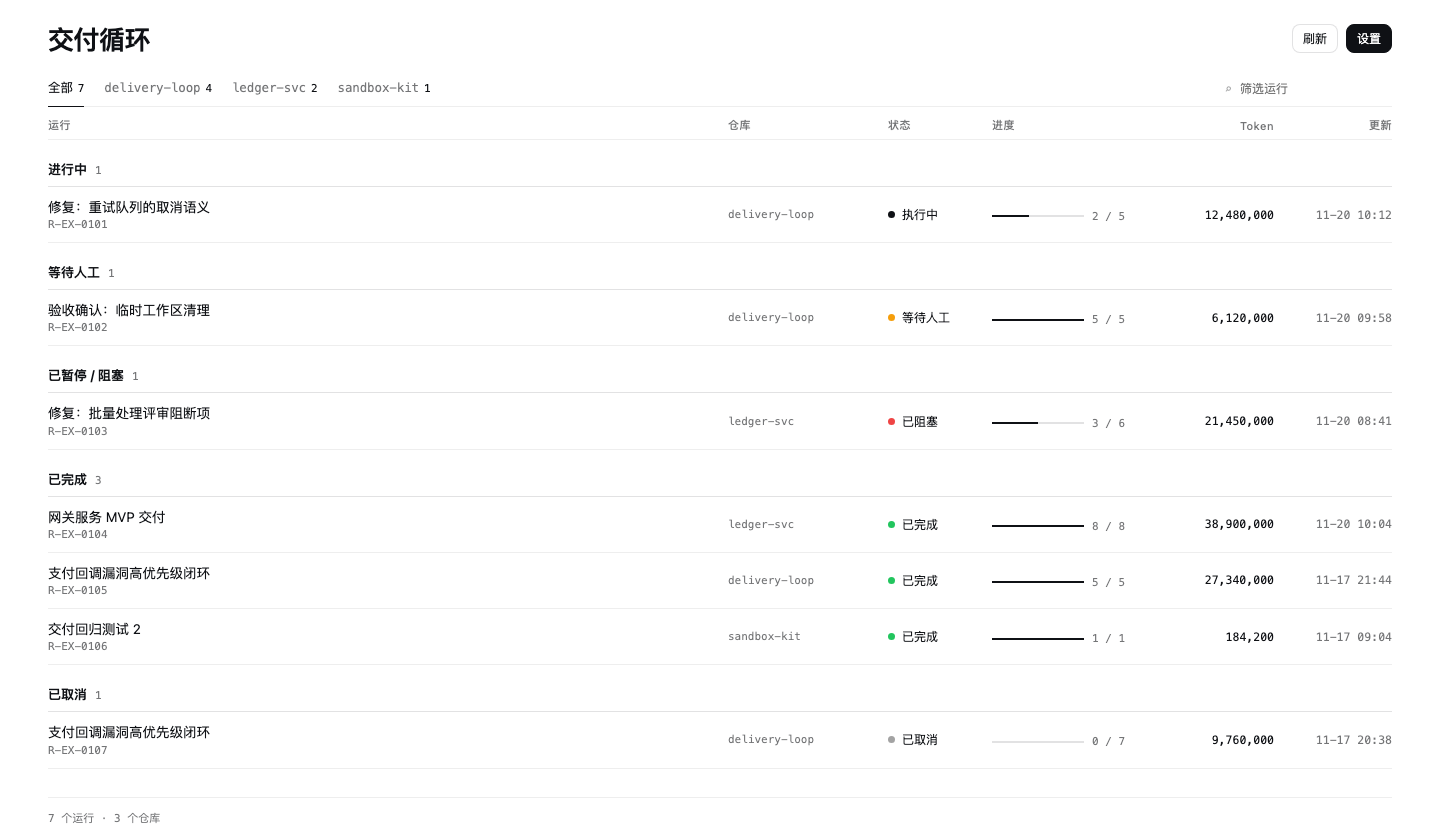
- a Delivery loop board in the left sidebar: repository filters, per-repository counts, and runs grouped by status;
- a status strip under the session composer that opens the active run;
- a full run view with Overview / Tasks / Decisions / Files / Artifacts / Events;
- a Settings page for runtime budgets (tokens, duration, attempts, progress cycles, parallel workers, worker timeout) that never edits the approved
delivery.yaml.
The view is read-only except for pause, resume, cancel, exporting a report, answering pending decisions, applying budget increases, and a mode-confirmed finalization request. Run data stays in the target repository's .delivery/ directory; the cross-run index stays in ~/.delivery-loop/runs.json.
Tools
| Tool | Purpose |
|---|---|
delivery_start | Start an approved prepared run |
delivery_status | Bounded progress, current tasks, pending decisions, recent decisions |
delivery_inspect | Full view payload: graph, requirements, acceptance, decisions, files, artifacts |
delivery_watch | Wait for progress or a terminal state |
delivery_respond | Answer one pending human decision |
delivery_pause | Stop scheduling after the current step |
delivery_resume | Resume a paused, queued, or blocked run; can raise budgets |
delivery_cancel | Abort workers and cancel unfinished tasks |
delivery_export_report | Write reports/final.md |
delivery_finalize | Apply an explicitly confirmed Git action |
Configuration
Start with a repository-level delivery.yaml:
version: 1
profile: portable

runtime:
  max_parallel_workers: 2
  max_task_attempts: 3
  max_duration_hours: 8
  max_total_tokens: 2000000

verification:
  execution:
    backend: container
    image: "your-build-image@sha256:<64 lowercase hex digits>"
  commands:
    build: ["npm run build"]
    test: ["npm test"]
    lint: ["npm run lint"]

git:
  mode: prepare-only
  worktree_isolation: true
See Configuration for every field, precedence rules, the runtime settings panel, verification backends, Git modes, and bundle configuration.
Documentation
| Document | Audience |
|---|---|
| Documentation index | Start here for reading paths and conventions |
| Installation | Users installing, upgrading, or removing the plugin |
| Usage | Users starting and operating a delivery |
| Configuration | Users writing delivery.yaml or bundle configuration |
| Architecture | Contributors and reviewers |
| Operations | Operators running deliveries day to day |
| Troubleshooting | Anyone diagnosing a failed install or run |
| Testing | Contributors and release reviewers |
| Publishing | Maintainers cutting a release |
| Design: verification isolation | Proposal, not implemented in 0.2.0 |
| Verification report | Historical release evidence |
| Contributing · Security · Changelog | Contributors |
Compatibility and limitations
Delivery Loop 0.2.x targets DeepSeek Harness 0.2.x. The package declares engines.dsh: ">=0.2.0 <0.3.0", so the plugin manager can refuse an incompatible DSH runtime instead of activating it. The plugin depends on DSH seams that may evolve; pin the plugin version you verified and read the changelog before upgrading.
Known limits, stated so they are not mistaken for guarantees:
- Local verification was performed on macOS; Windows is unverified. CI covers unit and integration tests on Ubuntu and macOS.
- Reviewer and acceptance read-only behavior is prompt-based plus an independent snapshot check, not an OS sandbox.
trusted-hostverification runs on the host with a filtered environment; it is not isolation.- The default
containerbackend is fail-closed and requires a preloaded, digest-pinned image. It never pulls implicitly. - Token usage is summed from assistant-message usage events and can be incomplete when a provider omits usage.
- The coordinator fallback used after a Host restart has not been exercised in a real restart drill.
- Rendered browser layout, light/dark appearance, focus behavior, and narrow-width layout are not covered by automated tests; refresh or restart as described in Installation.
- Artifact acceptance is limited to the produced
delivery.patch; other artifact types need a project-specific provider. - The
mergefinalization mode requires a project-specific finalizer; the generic finalizer refuses it before writing state.
Contributing
Issues and pull requests are welcome. Read CONTRIBUTING.md for the development setup, test commands, commit conventions, and documentation rules. Participation is governed by our Code of Conduct. Security reports should follow SECURITY.md, not a public issue.
License
MIT © Delivery Loop Contributors.
Vendored skill content and third-party dependencies keep their own licenses; see THIRD_PARTY_NOTICES.md and capabilities/THIRD_PARTY_LICENSES.