dsh-session-icon
masterltx/dsh-session-icon
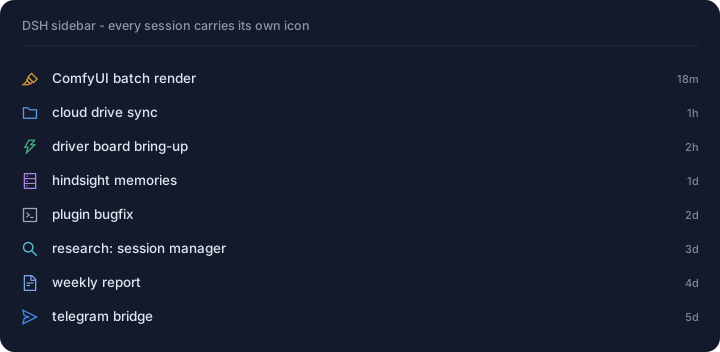
在 DSH 左侧每一条会话行前画一个图标,由会话本身决定:先按标题关键词,再读会话内容(标题、首条用户消息与工具名),再走可选的模型一次性判类,最后按工作区兜底。445 个 Ant Design outlined 图标内联离线可用,规则、颜色、关键词与行缩进都可在设置页调整。
安装
dsh plugin --profile web add github:masterltx/dsh-session-iconREADME
Session Icon · 给工作区对话增加可视化的图标
中文 · English





给 DSH 左侧每一条会话行画一个图标:先按标题关键词,再读会话内容,再让模型判,最后按工作区兜底。
为什么做这个
工作区里躺着几百条会话,全是一个模样:标题被截断、时间戳全是"3 天前"。想找回"那个改驱动板的会话"只能靠翻。
图标是最便宜的检索线索——一眼扫过去就知道哪条属于哪摊事,不用读标题。所以这个插件做的事是:读每一条会话,判断它属于哪一类,然后在行首画上对应的图标。
特性
| 四层判定 | 标题关键词 → 会话内容 → 模型判类 → 按工作区兜底,每一层失手才走下一层 |
| 445 个图标 | 阿里/蚂蚁 Ant Design outlined 全量,带搜索框和 12 个分类胶囊,离线内联无外部依赖 |
| 设置页可调 | 逐规则换图标/改色/加关键词/调顺序,行缩进 0–40px,分色开关,一键测宿主连通性 |
| 关键词挖掘 | 从没被任何规则命中的标题里挖高频短语,点一个才生效,不自动改你的配置 |
| 层级缩进 | 会话行整体右移,和工作区标题形成父子里项关系(走宿主自己的 --dsh-workspace-indent) |
| 隐私可控 | 插件本身零联网零遥测;唯一外发路径(模型判类)默认关闭、显式开启、按天限额 |
快速开始
dsh plugin --profile desktop add dsh-session-icon
重启 DSH。侧栏立刻出现图标;进 设置 → 会话图标 可以改规则、换图标、调缩进。
只改客户端时刷新页面即可;改宿主半边需要重启。
它怎么判断
四层,由便宜到贵:
| 层 | 做什么 | 需要宿主 | 默认 |
|---|---|---|---|
| ① 规则 | 标题关键词匹配(大小写不敏感) | 否 | 开 |
| ② 内容 | 拉「标题 + 首条用户消息 + 工具名」,同一套规则再匹配 | 是 | 开 |
| ③ 模型 | ctx.llm 一次性判类,返回图标 + 置信度 + 理由 | 是 | 关 |
| ④ 兜底 | 按工作区(或按会话散列)给默认图标 | 否 | 按工作区 |
出厂 8 条规则覆盖:出图、网盘/文件、硬件/驱动板、记忆、插件/代码、调研/检索、报告/评审、IM 渠道。
两条边界是宿主行为,不是 bug:会话正在跑时前置格被运行状态点占用,图标要等它空闲;折叠在「展开其余 N 个会话」里的行没渲染,展开前不参与判定。
设置页
设置 → 会话图标:
- 左栏规则列表,
↑/↓调优先级(先命中先用) - 右栏改名称、关键词、颜色、图标(445 选 1,可搜索)
- 顶部:行缩进、分色开关、兜底策略、②③开关、每日模型上限、provider/model
- 测试宿主 按钮直接报缓存条数与今日用量
工作原理
浏览器                                     宿主
├ sidebar.session.row.leading ──┐
│   (每行一次,只给 sessionId)│
├ useSessions / useWorkspaces   │        POST /api/dsh-session-icon/enrich
│   → 标题、最后活动时间        ├──────►  sessionQuery.readLog
├ 规则匹配 / 自动缓存           │           → sessionController.inspect
│                               │        摘录缓存(id:updatedAt)
└ settings.section              │        POST /classify ──► ctx.llm 一次性判类
   (规则编辑 + 挖掘 + 自检)   └──────►  每日预算 · 判定缓存 · loopback 围栏
宿主端点只读会话数据,唯一写入是自己的缓存目录 <dshHome>/dsh-session-icon/;模型调用有宿主侧每日计数(客户端传,宿主夹到 400 硬顶)。
隐私与安全
- 插件本身不联网、不上报:没有 telemetry、没有分析、没有外部请求。
- ② 读的是本机会话日志,摘录缓存落在
<dshHome>/dsh-session-icon/excerpts.json——含会话内容,可在设置页清空,卸载不会自动删。 - ③ 默认关闭。一旦开启,会把「标题 + 首条用户消息(≤600 字)+ 工具名」发给你配置的模型供应商。 这是唯一的外发路径。
- 宿主端点仅 loopback 可达:socket 必须 127/8 或 ::1,Host 必须 localhost/127.0.0.1;带
X-Forwarded-For/X-Real-IP/CF-Connecting-IP/sec-fetch-site: cross-site一律 403。
已知限制
- 会话运行中图标让位给状态点(宿主行为)。
- 折叠分组内的会话在展开前不参与判定。
- 配置存在浏览器
localStorage(dsh-session-icon:config:v1),不跨浏览器、不跨机器。 - 客户端 bundle 约 356 KiB:445 个图标路径内联,换取离线可用、零图标依赖。
开发
npm test          # 41 项离线自检:插槽契约、匹配、兜底、挖掘、摘录、预算、围栏
npm run glyphs    # 从 @ant-design/icons-svg 重新内联图标表
lib/index.js          宿主半边入口(注册四个路由)
lib/host/*.js         store / excerpt / classify / loopback / routes
lib/client.js         浏览器半边(会话行图标 + 设置页 + 445 图标)
scripts/gen-glyphs.cjs 图标表生成器(ANTD_ICONS_SVG 可覆盖图库路径)
test/selftest.cjs     41 项自检
改宿主半边要重启 DSH;改客户端刷新页面即可。
兼容性
| 项 | 范围 |
|---|---|
| DSH | >=0.2.0-rc.2 <0.3.0(实测基线 0.2.1-rc.5) |
| Node | ^22.19.0 || >=24.0.0 |
| 平台 | Web 与桌面端(用到的插槽与宿主服务两端都有) |
许可证
Apache License 2.0。内联图标路径来自 @ant-design/icons-svg(MIT),署名见 NOTICE 与 CREDITS。
Session Icon — visual icons for your DSH workspace sessions
中文 · English
Draws an icon on every DeepSeek Harness sidebar session row: keyword rules first, then the session's own content, then a one-shot model verdict, then a workspace fallback.
Why
A busy workspace holds hundreds of sessions that all look the same — truncated titles, identical "3 days ago". Icons are the cheapest retrieval cue: one glance tells you which pile a session belongs to, without reading a single title.
Features
| Four-layer decision | title keywords → session content → model verdict → workspace fallback; each layer runs only if the previous found nothing |
| 445 icons | the full Ant Design outlined set, searchable, grouped into 12 category chips, inlined and offline |
| Settings page | per-rule icon, colour, keywords and order; row indent 0–40px; tint switch; host-connectivity probe |
| Keyword mining | suggests frequent phrases from unclassified titles; nothing changes until you click it |
| Row indent | nests session rows under their workspace through the host's own --dsh-workspace-indent variable |
| Privacy by default | no network, no telemetry; the only egress path (model verdict) is off unless you turn it on, and it is budgeted per day |
Quick start
dsh plugin --profile desktop add dsh-session-icon
Restart DSH. Icons appear in the sidebar; open Settings → Session icons to edit rules, swap icons and set the indent.
Client-only changes take effect on a page refresh; host-half changes need a restart.
How it decides
| Layer | What it does | Needs the host | Default |
|---|---|---|---|
| ① rules | keyword match on the session title | no | on |
| ② content | fetch title + first user message + tool names, match the same rules again | yes | on |
| ③ model | one-shot ctx.llm verdict: icon + confidence + reason | yes | off |
| ④ fallback | default icon per workspace (or per session hash) | no | per workspace |
Shipped rules cover rendering, files, hardware, memory, code, research, reports and IM channels.
Two behaviours are the host's, not bugs: a running session shows status dots in the leading cell (the icon returns when it goes idle), and rows inside a collapsed group are not classified until expanded.
Settings
Settings → Session icons: rule list with ↑/↓ ordering, per-rule editor (name, keywords, colour, icon from 445), global row indent, tint switch, fallback strategy, content/model toggles, daily model budget, provider/model route, and a Test host button that reports cache size and today's usage.
How it works
browser                                      host
├ sidebar.session.row.leading ──┐
│   (once per row, sessionId)   │        POST /api/dsh-session-icon/enrich
├ useSessions / useWorkspaces   │           sessionQuery.readLog
│   → title, last activity      ├──────►    → sessionController.inspect
├ rules / verdict cache         │           excerpt cache (id:updatedAt)
│                               │        POST /classify ──► ctx.llm one-shot
└ settings.section              └──────►    daily budget · verdict cache · loopback fence
Host endpoints are read-only for session data; the only writes are this plugin's own caches under <dshHome>/dsh-session-icon/. Model calls are capped per day on the host (client asks, host clamps at 400).
Privacy and security
- The plugin itself makes no network requests and sends no telemetry.
- Layer ② reads the local session log; the excerpt cache at
<dshHome>/dsh-session-icon/excerpts.jsoncontains session content and can be cleared from the settings page. Uninstalling does not remove it. - Layer ③ is off by default. Enabling it sends the title, the first user message (≤600 chars) and tool names to the model provider you configure.
- Host endpoints are loopback-only: 127/8 or ::1 socket, localhost/127.0.0.1 Host header; anything carrying
X-Forwarded-For,X-Real-IP,CF-Connecting-IPorsec-fetch-site: cross-sitegets 403.
Known limitations
- A running session hides its icon behind the status dots (host behaviour).
- Sessions inside a collapsed group are not classified until expanded.
- Configuration lives in browser
localStorage(dsh-session-icon:config:v1); it does not follow you across browsers or machines. - The client bundle is ~356 KiB because 445 icon paths are inlined to stay offline and dependency-free.
Development
npm test          # 41 offline checks: slot contracts, matching, fallback, mining, excerpts, budget, fence
npm run glyphs    # re-inline the icon palette from @ant-design/icons-svg
lib/index.js            host entry (registers the four routes)
lib/host/*.js           store / excerpt / classify / loopback / routes
lib/client.js           browser half (row icons + settings page + 445 glyphs)
scripts/gen-glyphs.cjs  palette generator (ANTD_ICONS_SVG overrides the source dir)
test/selftest.cjs       41 offline checks
Compatibility
| DSH | >=0.2.0-rc.2 <0.3.0 (tested on 0.2.1-rc.5) |
| Node | ^22.19.0 || >=24.0.0 |
| Surface | web and desktop (both the slots and the host services exist on either) |
License
Apache License 2.0. The inlined icon paths come from @ant-design/icons-svg (MIT); attribution in NOTICE and CREDITS.
Contributing
Issues and pull requests are welcome — see CONTRIBUTING. Bug reports are most useful with: DSH version, which layer was wrong (rule / content / model / fallback), and the session title you expected to match.