dsh-plugins
mt-youya/dsh-plugins
DeepSeek Harness(DSH)插件合集;可一次安装合集内的全部插件,也可单独安装。
安装
dsh plugin --profile web add github:mt-youya/dsh-pluginsREADME
English | 简体中文
Cyrus Plugins · @cyrusdoyle/dsh-plugins
A plugin collection for DeepSeek Harness (DSH). Install this one bundle to get every plugin listed below; each plugin can also be installed on its own.
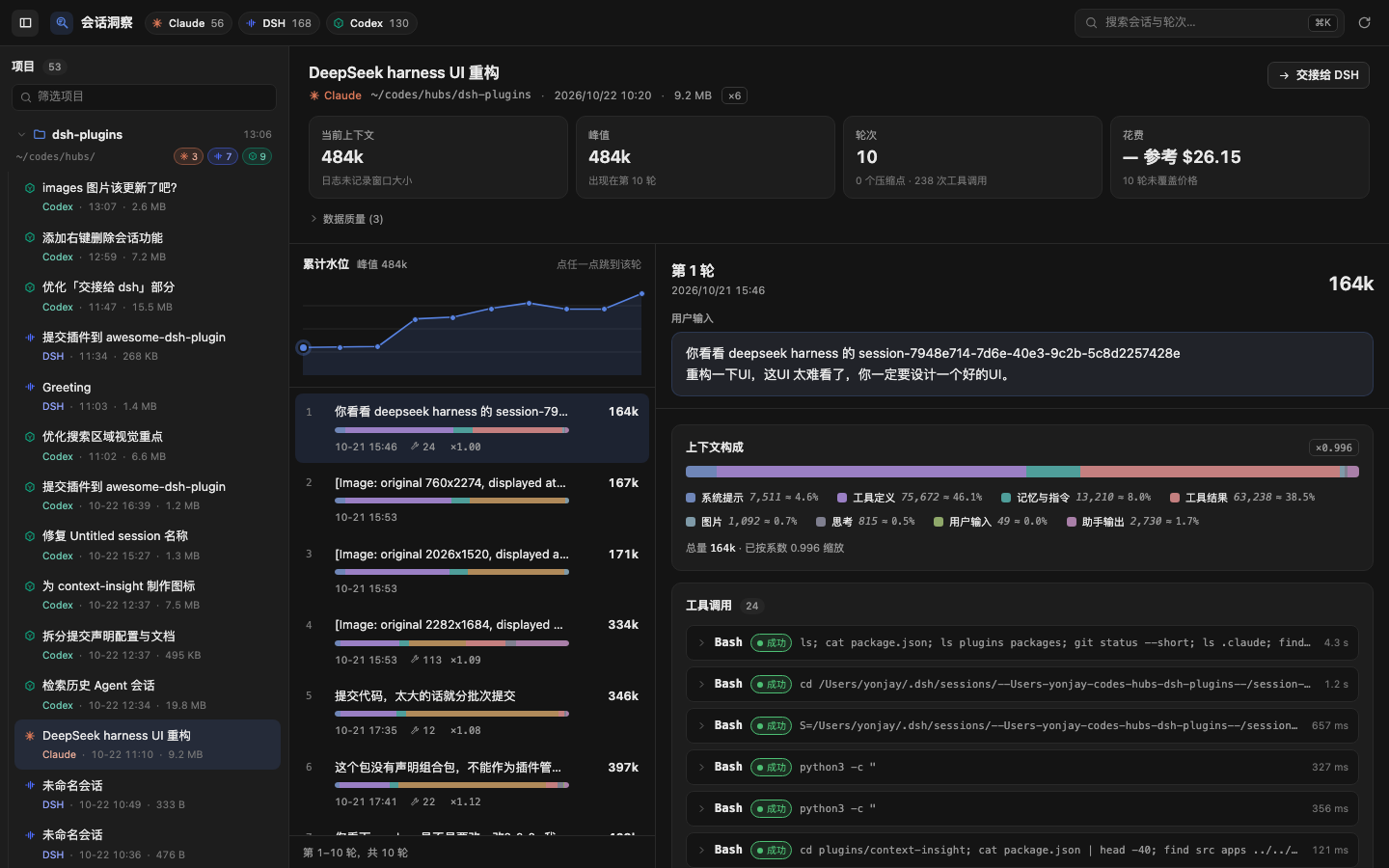
Plugins
| Plugin | npm package | What it does |
|---|---|---|
| Sessions Insight | @cyrusdoyle/dsh-sessions-insight | Opens up what each turn of a Claude Code, DSH or Codex session actually fed the model: composition, tool calls, compactions, cost. Includes confirmed session deletion. |
Install
Requires DSH 0.2.1-rc.5 or newer (see docs/adr/0002-asar-021-is-the-contract.md). First decide which profile to install into: the desktop app uses desktop, dsh web on the command line uses web. Installing into the wrong profile does not error; the plugin just never shows up.
Install the collection (recommended) to get every plugin at once; when a plugin is added to the collection later, upgrading the collection brings it in.
dsh plugin --profile desktop add @cyrusdoyle/dsh-plugins   # desktop app
dsh plugin --profile web     add @cyrusdoyle/dsh-plugins   # dsh web
Install a single plugin:
dsh plugin --profile desktop add @cyrusdoyle/dsh-sessions-insight   # desktop app
dsh plugin --profile web     add @cyrusdoyle/dsh-sessions-insight   # dsh web
Then fully quit and reopen DSH. "Cyrus Plugins" or "Sessions Insight" in the plugin manager means it worked.
Pick one of the two. The collection and the standalone plugin insert the same id into the loader tree; with both in
dsh.profile.bundles, DSH fails at boot withduplicate loader entry id. Rundsh plugin --profile <name> removeon one before switching to the other.Git installs work for the standalone plugin, not for the collection.
plugins/sessions-insight/lib/is committed, so the member can be installed straight from this repository without running build scripts — for exampledsh plugin --profile desktop add github:Mt-Youya/dsh-plugins#path:/plugins/sessions-insight, or point the plugin manager at a local checkout of that directory. The collection cannot be installed from Git: its rootdependenciesuseworkspace:^, which is only rewritten to a version number bypnpm pack/ publish. Install the collection from npm, or link this checkout as described below.
Installing from this working tree (developing the collection): the desktop plugin manager's "Add plugin" also accepts a local directory — point it at this checkout's absolute path. DSH records it as "@cyrusdoyle/dsh-plugins": "link:<that path>": a symlink into your working tree, not a copy, and nothing is built for you. The host resolves lib/index.js through that link, and lib/ is gitignored, so build it first (the collection embeds the compiled stylesheet, so the CSS step comes first):
node scripts/build-css.mjs plugins/sessions-insight && npx tsdown --minify
Then fully quit and reopen DSH. Later edits only need a rebuild and a restart — there is no need to reinstall.
Each plugin's usage, permission boundary and known limitations live in its own README.
Settings, balance and update checks
The collection embeds the same plugin source as the standalone member (ADR 0009), so its runtime behaviour is the Sessions Insight behaviour: read-only insight, the handoff, confirmed session deletion, plus a settings page and two opt-in utilities.
- Settings are saved by the Host.
/api/dsh-sessions-insight/settingsis read-only; the six switches (session overview, Skills tab, cumulative level chart, expand tools by default, balance display, automatic version checks) are written through the Host's configuration form and stored by the Host. The plugin writes no config file. - Balance and version checks are off by default. Turning one on — or pressing its button — is the only thing that makes the plugin call out. Outbound traffic is limited to two fixed HTTPS endpoints,
https://api.deepseek.com/user/balanceandhttps://registry.npmjs.org/@cyrusdoyle%2F.../latest, with no redirects, no cookies and no caller-controlled URL. - Credentials: the balance check resolves the credential reference configured for the DeepSeek official adapter (
apiKeyEnv, defaultDEEPSEEK_API_KEY), then falls back to the signed-in DeepSeek account. Custom provider references are not followed; the plugin never stores or logs the key. - The read surface never rewrites source logs. The only writes are the handoff routes —
handoff/applydelivers a brief through the officialsession.create+session.prompt,handoff/revealcreates or reuses a workspace so an existing DSH session is visible there — and confirmed session deletion./balanceadditionally accepts loopback callers only, because the Host webserver has no site-wide auth. - Requires DSH 0.2.1-rc.5+: the settings page needs the
configFormsclient service and theplugins.bundle.configslot introduced in that version.
The plugin README has the full route list, defaults and known limitations.
Repository layout
This is a pnpm monorepo. Only the collection and plugins/* are published; the rest is inlined into the plugins at build time.
| Path | Contents | Published |
|---|---|---|
/ (root) | The collection bundle: cordis.patch.yml, locale/, its own lib/ | yes, @cyrusdoyle/dsh-plugins |
plugins/sessions-insight | The Sessions Insight plugin: host half and browser half | yes, @cyrusdoyle/dsh-sessions-insight |
packages/session-contract | The unified IR, wire types and their guards | no |
packages/session-readers | Claude Code / Codex / DSH readers | no |
packages/plugin-kit | Plugin-agnostic JSON envelope and URL spelling | no |
packages/plugin-kit-host | Host-half plumbing: route table, same-origin gate, envelope, LRU | no |
packages/plugin-kit-client | Browser-half plumbing: decoding fetch, style injection, slot registration | no |
apps/preview | Local preview harness on :5178 | no |
scripts | CSS build, bundle-contract check, install script, session probes | no |
tooling | Package alias table, tsconfig base, tsdown config | no |
Dependencies point one way only: plugins/* → packages/*. The package-name-to-source mapping lives in tooling/aliases.ts, and tsconfig.json's paths mirrors it, so tests, the preview app and the build never need the internal packages built first.
Development
pnpm install
pnpm dev
The preview runs at http://localhost:5178 and reads your real local sessions; add ?theme=light or ?theme=dark to switch themes.
Run the gates before you commit:
npx tsc --noEmit && npx tsc --noEmit -p tsconfig.client.json && npx vitest run && node scripts/build-css.mjs plugins/sessions-insight && npx tsdown --minify && node scripts/check-bundle.mjs plugins/sessions-insight && node scripts/check-bundle.mjs .
CI runs the same gates and additionally fails when the committed plugins/sessions-insight/lib/ differs from a rebuild — see .github/workflows/ci.yml.
Rebuild the artifacts and check that the profile's link really points at your build (this does not install — installation happens in the DSH plugin manager):
pnpm install:plugin
Regenerate the README screenshots from the preview (headless Chrome, 1440×900; add -- --theme light for the light theme). They show the sessions on your machine, so look at them before committing:
pnpm screenshots
Optional browser checks (need a local Chrome; not part of CI):
pnpm smoke:previewmeasures the mounted panel in both themes under?probe=1.pnpm check:uidrives the session-menu interactions against a fixture server.
Publishing
Follow docs/RELEASE.md: the member and the collection share one version number and are published together, member first (ADR 0010).
Documentation
docs/RELEASE.md— publishing to npmdocs/PLAN.md— decisions and milestones (Chinese)docs/IR.md— the unified turn IR, the adapter contract (Chinese)docs/API.md— host route contract (Chinese)docs/HANDOFF.md— handoff contract (Chinese)docs/adr/— architecture decision records (Chinese)GLOSSARY.md— vocabulary (Chinese)