agent-workbench
ningl32/agent-workbench
本机优先的工作台插件,把已经跑在你机器上的 AI 编码智能体(ZCode、Claude Code、Codex、OpenCode、DSH、WorkBuddy)变成一支可观测、可问责的团队——六源只读会话观测(全文阅读器 + 派工词)、按分支/标记约定将提交与会话自动归因到任务、带证据时间轴的看板、日报/周报,另有 MCP Server、Webhook 与 IM 通知集成。零第三方运行时依赖,凭据运行时从 git config 读取、永不落盘。它的 HTTP 路由没有 DSH 的访问检查,浏览器里打开的网页可以调用它们。
安装
dsh plugin --profile web add github:ningl32/agent-workbenchREADME
Super Workbench (fde-console)



A local-first workbench plugin for DSH that turns the AI coding agents already running on your machine (ZCode, Claude Code, Codex, OpenCode, DSH, WorkBuddy…) into an observable, accountable team.
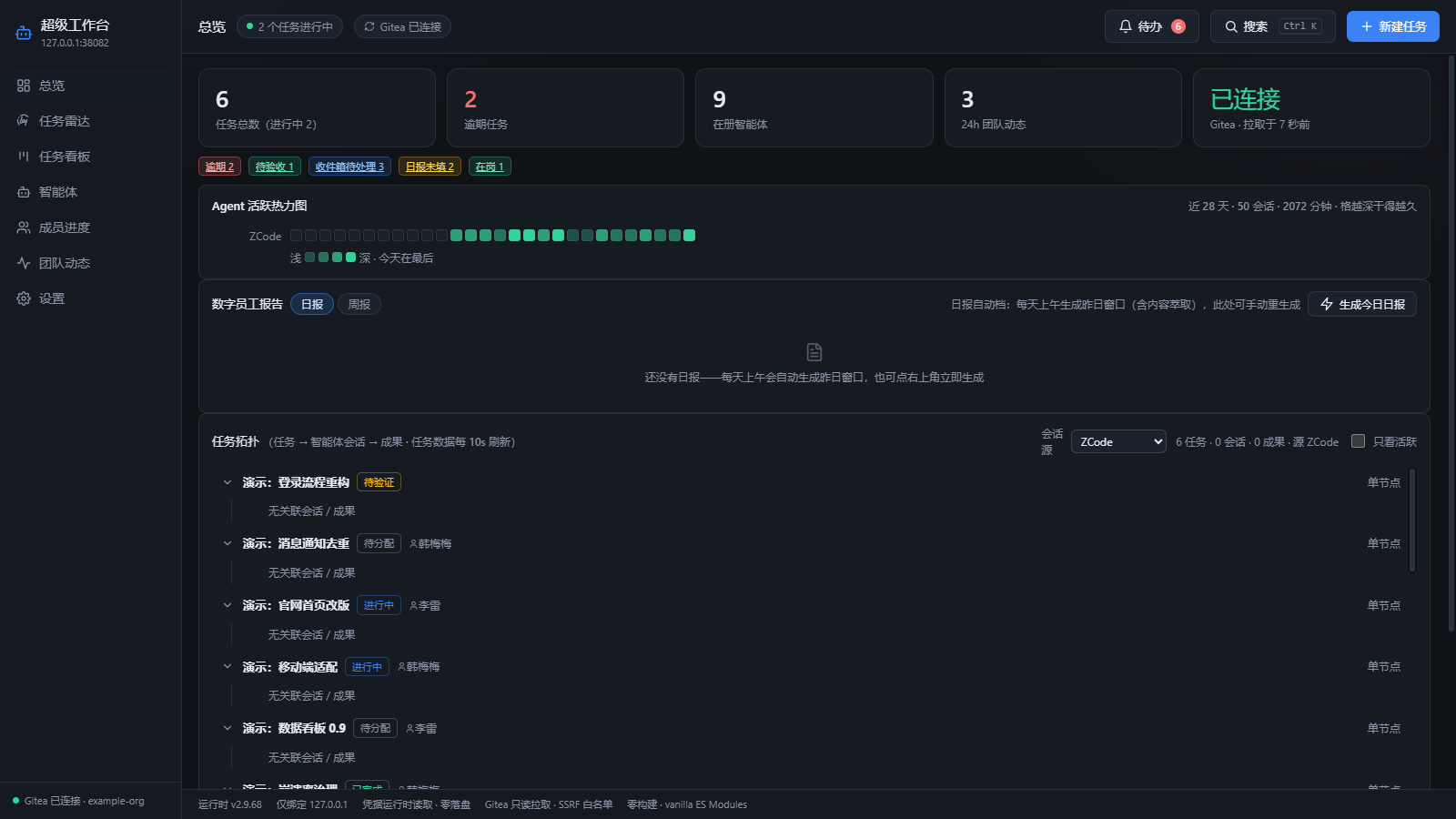
The core loop: See → Understand → Attribute → Accept.
- See — live agent activity across six local session sources (per-project feed, running-now section, 28-day heatmap)
- Understand — full transcript reader per session, plus the dispatch prompt: the original human instruction behind each session
- Attribute — commits and sessions auto-attached to tasks via a branch/markdown convention (docs/ATTRIBUTION.md), with a repo guard against cross-repo false matches
- Accept — evidence lives on the task: timeline, session evidence with one-click confirm, daily/weekly reports with Markdown export
Local-first by design: no cloud, no third-party runtime dependencies (Node built-ins only), all data in one directory you own. Agent sessions are read-only observed — the workbench never writes into your agents.
Screenshots
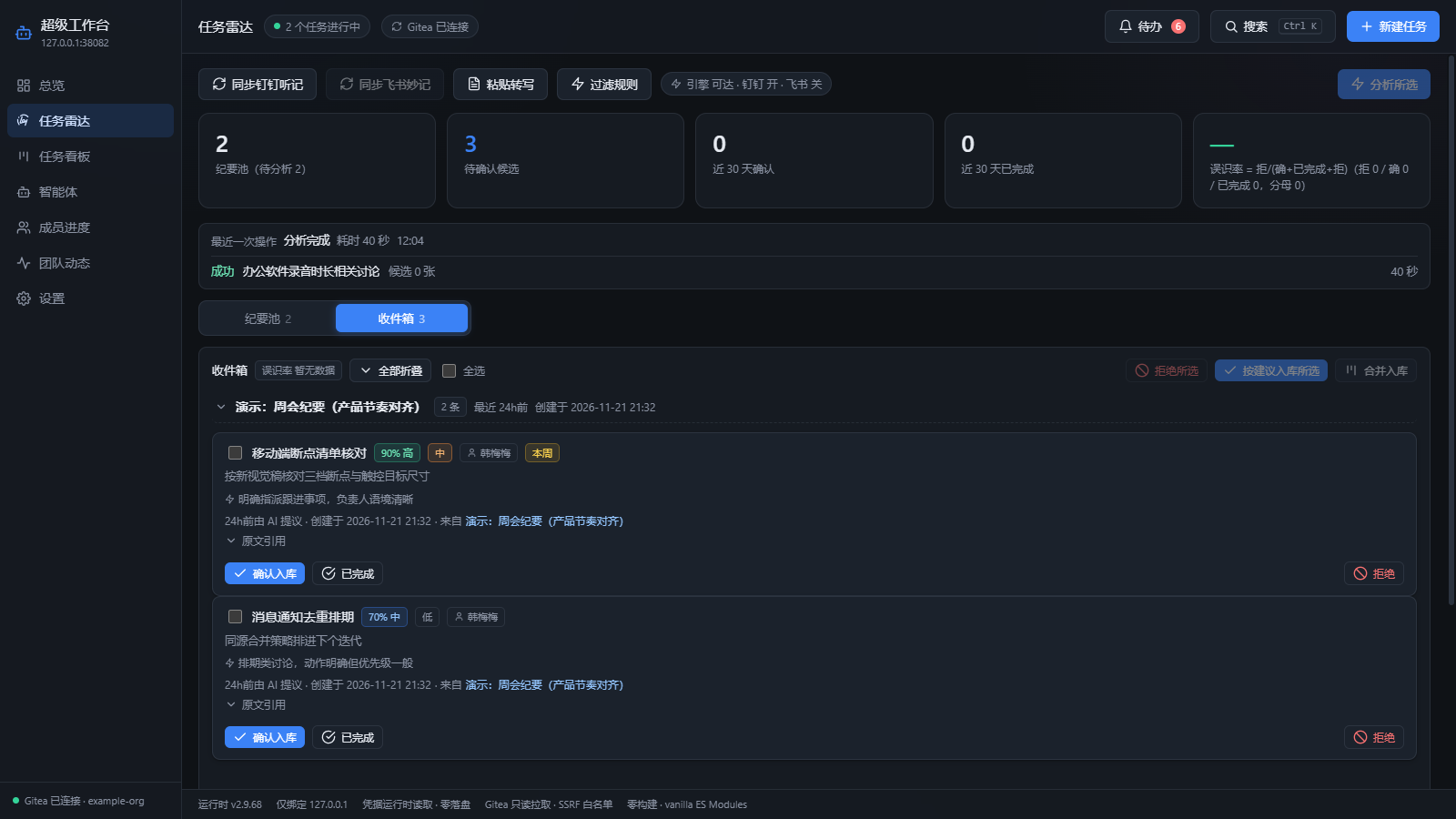
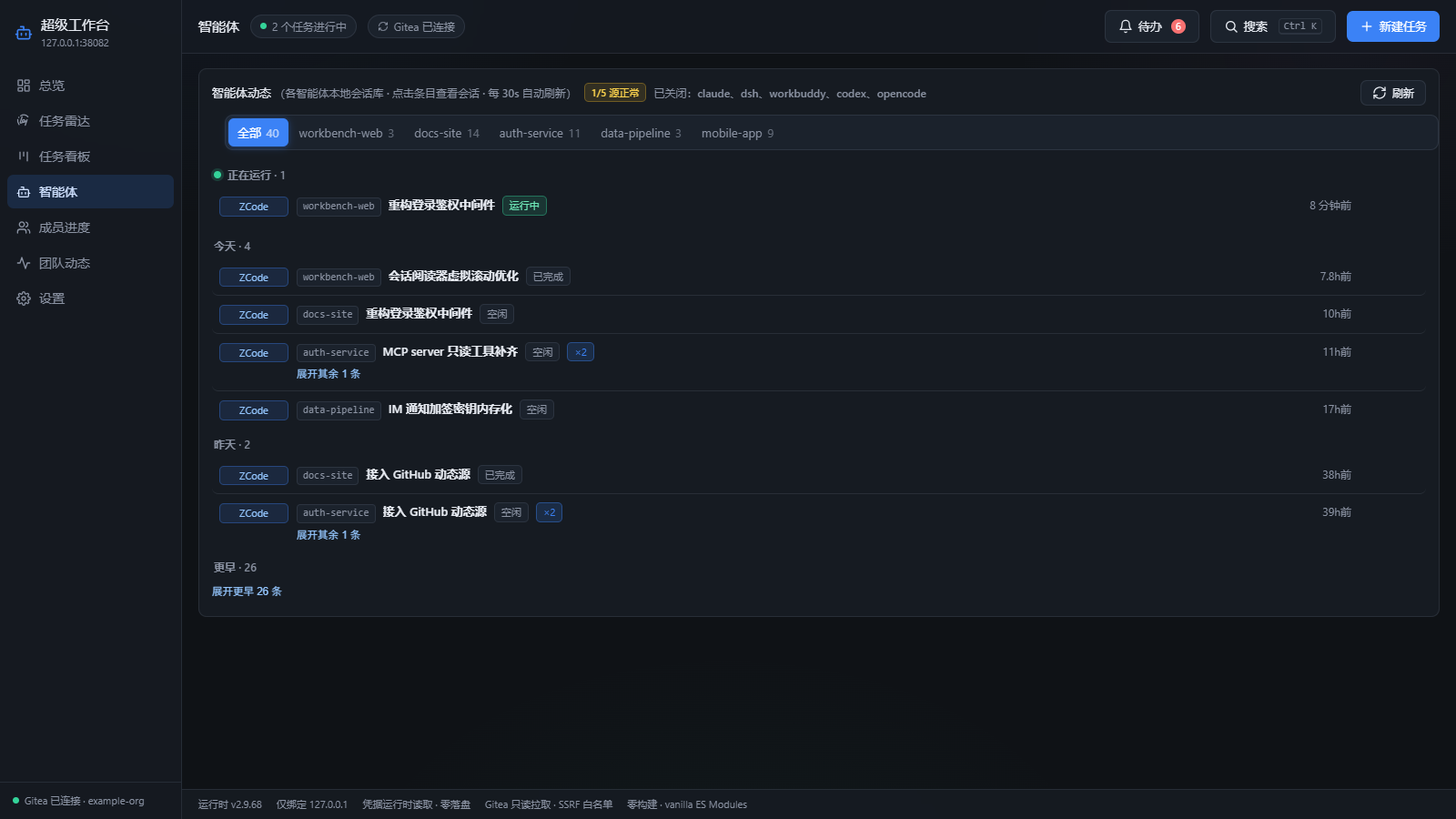
| Task Radar — meeting transcript → AI decomposition → inbox gate | Agents — six-source session feed with running-now detection |
|---|---|
 |  |
| Task Board — kanban with timeline, acceptor, overdue flags | Team Activity — multi-source commit/PR feed with task attribution |
|---|---|
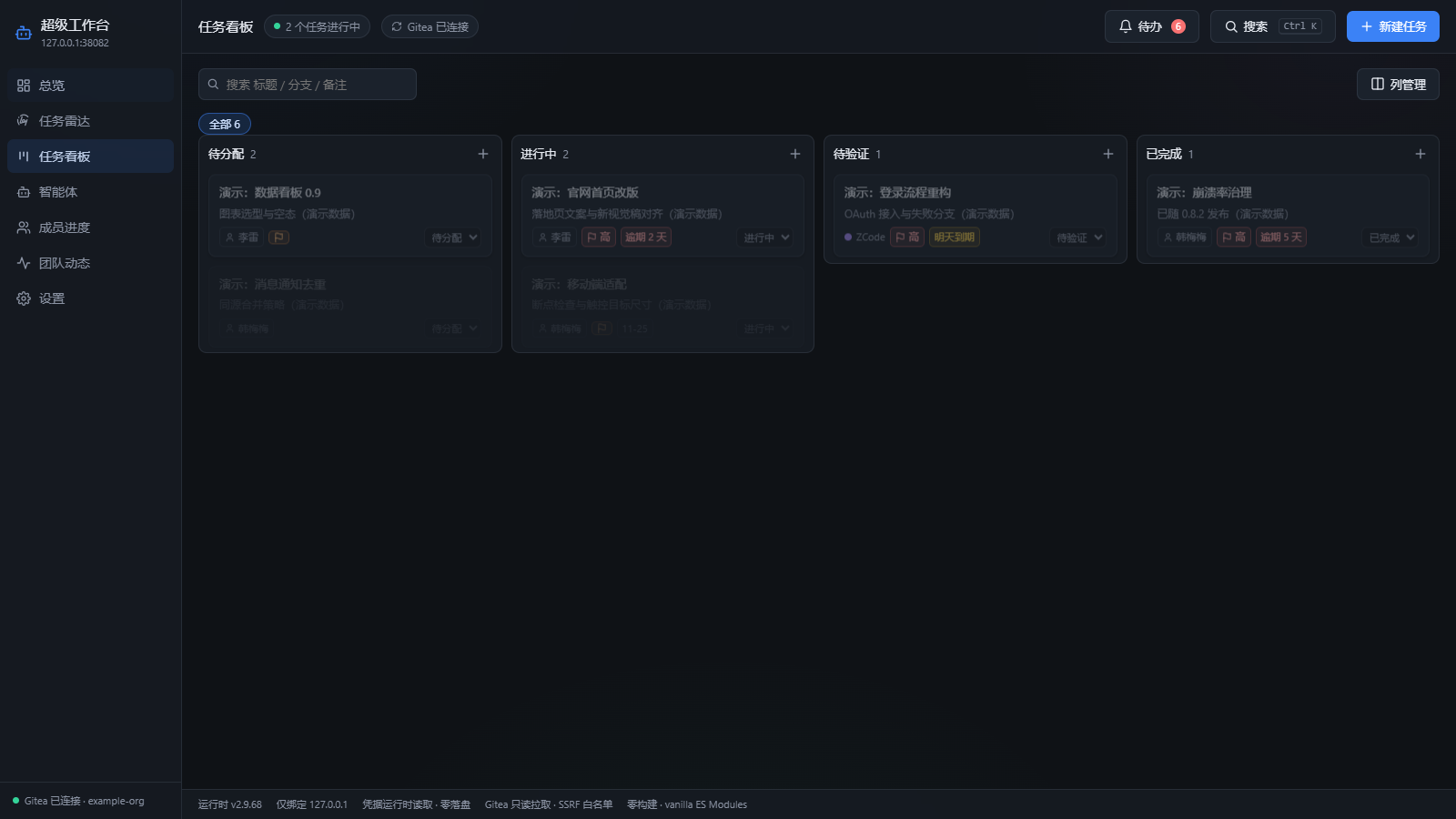 | 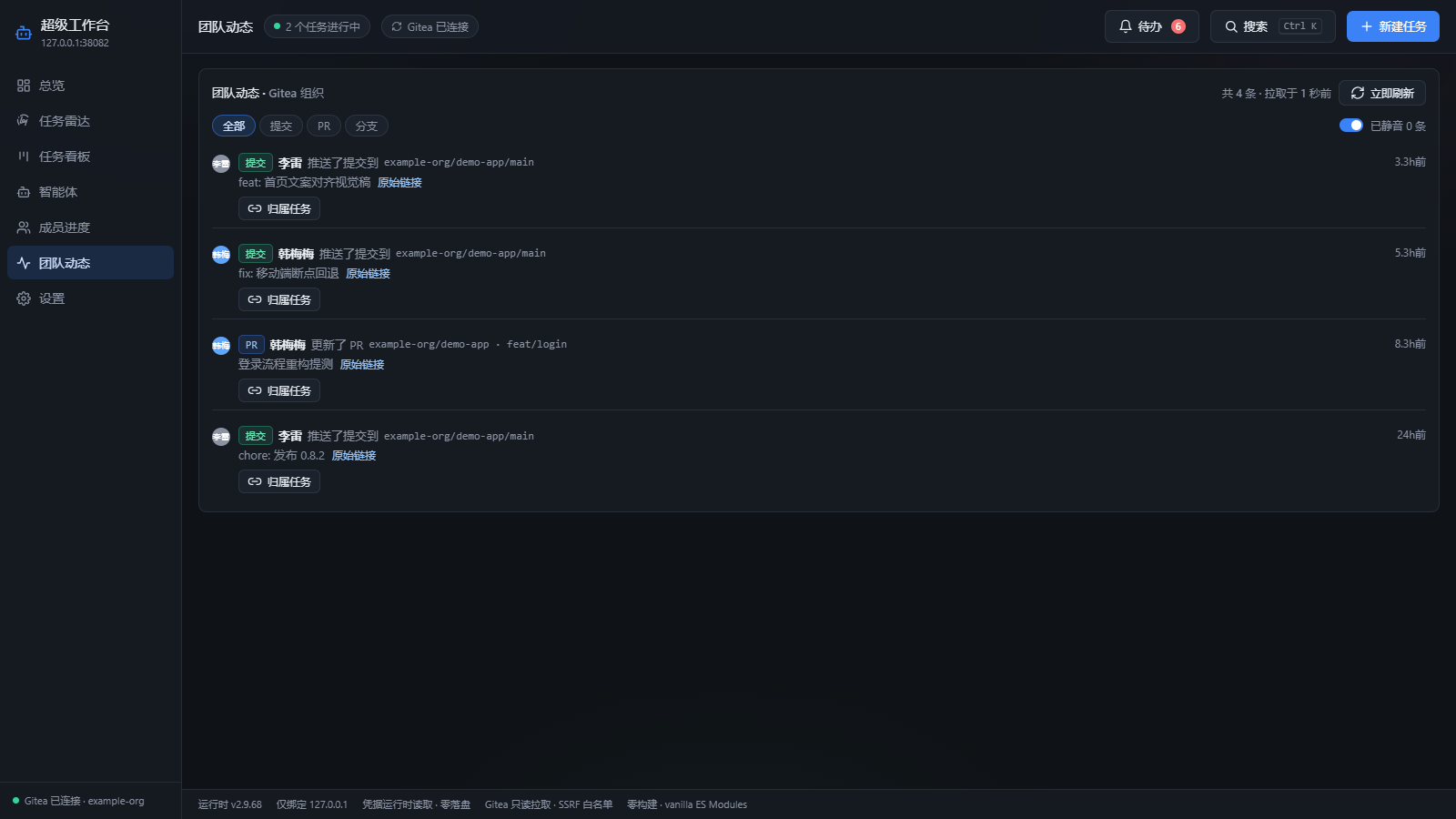 |
(screenshots show the fully synthetic demo dataset — scripts/seed-demo.js)
Features
- Research (场景调研) — interview customers, AI drafts gated by humans, validated tasks with evidence flow into the board; KB reuses delivered scenes for future engagements (SPEC-RESEARCH.md)
- Task board — kanban with timeline, acceptor sign-off, deep links, priorities, due dates, daily diary per task
- Agent observation — six-source adapters, session lists, transcript reader, running-now detection, per-project tabs
- Work search —
Ctrl+Kacross task titles, session titles, commit messages and diaries - Dispatch prompts — see the original instruction each agent session was started with
- Session evidence — suggested attachments scored per task, one-click or batch confirm
- Reports — auto-generated daily digest and weekly review, exportable as Markdown
- Heatmap & scorecards — 28-day activity grid per agent; SVG scorecard endpoints
- Integrations — MCP server (stdio) so your agents can query the board; webhook out; IM notify (Feishu/DingTalk bots); Gitea/GitHub/Gitee activity feeds
- Governance — credential never touches disk (git config runtime read), redaction on every output, SSRF allowlist for all outbound, single-instance lock with warning, backup/restore
Requirements
| OS | Windows (verified; macOS/Linux not yet tested) |
| Node.js | ≥ 22.13 (uses built-in node:sqlite) — on 22.13/22.14 the DSH session source reads plain rollouts only; zstd-compressed DSH session logs (zlib.zstd*) need ≥ 22.15 and degrade gracefully below it |
| DSH | 0.2.1-rc.2 (@deepseek-ai/dsh) |
| pnpm | on PATH (plugin install forwards to it) |
Quick start
# 1. install / update the plugin into a profile (the profile is created on first use)
dsh plugin --profile fde-dev add fde-console        # from npm — one line
#    …or from a local clone of this repo:
#    dsh plugin --profile fde-dev add <this repo path>

# 2. a fresh profile ships @deepseek-ai/dsh-base only — the web surface bundle is separate.
#    Without it the plugin loads but never activates:
#      "fde-console: pending (waiting for service: webServer)"  (port never listens)
#    Pin it to your dsh version; an unpinned add resolves an incompatible old build.
dsh plugin --profile fde-dev add @deepseek-ai/dsh-web-app@0.2.1-rc.2   # ← use `dsh --version`

# 3. start (no `dsh --profile fde-dev web` — web is a reserved alias profile)
dsh --profile fde-dev --port 38082
Open the printed URL (auth token included) → Super Workbench appears in the sidebar. Your local agents are detected automatically — zero config to see your first session.
Data lives in <DSH_HOME|~/.dsh>/fde-console/ (data/ + config). Step-by-step verification (test gate → plugin load → API round-trip → UI): docs/VERIFY.md. Full install manual: docs/DISTRIBUTION.md.
Demo dataset
Want a populated workbench before connecting anything? Seed a fully synthetic dataset (members, tasks, minutes, inbox candidates, team events — placeholder names only, zero network):
node scripts/seed-demo.js                          # seeds the default data dir (~/.dsh/fde-console/data)
node scripts/seed-demo.js --data-dir <dir> --force # custom dir / overwrite
Then start the instance and explore; delete the seeded JSON files to reset.
The seven views
| View | What it shows |
|---|---|
| Overview | stats, agent heatmap, digital-worker reports (daily/weekly), cycle metrics, morning digest, version matrix |
| Research | customer interviews → AI drafts → human gate → tasks with evidence; knowledge base reuse |
| Task Radar | meeting transcripts → AI task decomposition → inbox gate |
| Task Board | kanban: timeline, acceptor, deep links, diary, project filters |
| Agents | live activity feed across six sources + session reader |
| Members | desktop agents + human members: status, output, diary nudge |
| Team Activity | multi-source commit/PR feed with task attribution |
| Settings | sources, engine, security allowlist, one-click env check |
Attribution protocol
AI-made commits can self-attach to tasks with three conventions: branch task/<id>, marker [#<id>] in the message, or binding the task to a project directory. See docs/ATTRIBUTION.md — includes a ready-to-paste snippet for your own AGENTS.md and a commit-msg hook.
Writing your own session-source adapter (Cursor, Trae, Aider…): see docs/ADAPTERS.md.
MCP server
scripts/mcp-server.mjs exposes read-only tools (list tasks / search work / agent status) over stdio, so any MCP client can query the workbench:
{ "mcpServers": { "fde": { "command": "node", "args": ["<repo>/scripts/mcp-server.mjs"] } } }
Testing
npm test # node --test test/*.test.js — 500+ cases, zero network
Documentation
Primary documentation is in Chinese under docs/: SPEC.md (functional contract), SPEC-PLUGIN.md (DSH plugin conformance), SPEC-STORAGE.md (SQLite storage design), ATTRIBUTION.md, ADAPTERS.md, DISTRIBUTION.md.
Contributing
Read AGENTS.md before your first change — it documents the architecture invariants (zero runtime deps, no build chain, storage contracts) and the docs-as-tests discipline that the test suite enforces. npm test must be green in every commit.