dsh-work-plugin (bundle)
silverze/dsh-work-plugin/packages/bundle
给 DeepSeek Harness 会话加上工作模式:一句话目标变成可跟踪的工作任务,任务在对话结束后仍保留计划、按大小/哈希/版本索引的成果库与由宿主触发的 RRULE 定时,结果可交回飞书云文档、表格、知识库、云空间与消息。附带 work Agent 预设、右侧工作台(当前任务/成果库/定时)、14 个 work 工具、15 个飞书工具、七个工作技能,以及 macOS 13+ 与 Windows 10+ 上把屏幕上正在看的飞书会话一键引用进输入框的 chip。
安装
dsh plugin --profile web add github:silverze/dsh-work-plugin该插件位于仓库的 packages/bundle 子路径下。
README

DSH Work
Turn a stated goal into a tracked work task inside DeepSeek Harness — plan, execute, collect deliverables, schedule reruns, and share results to Feishu.



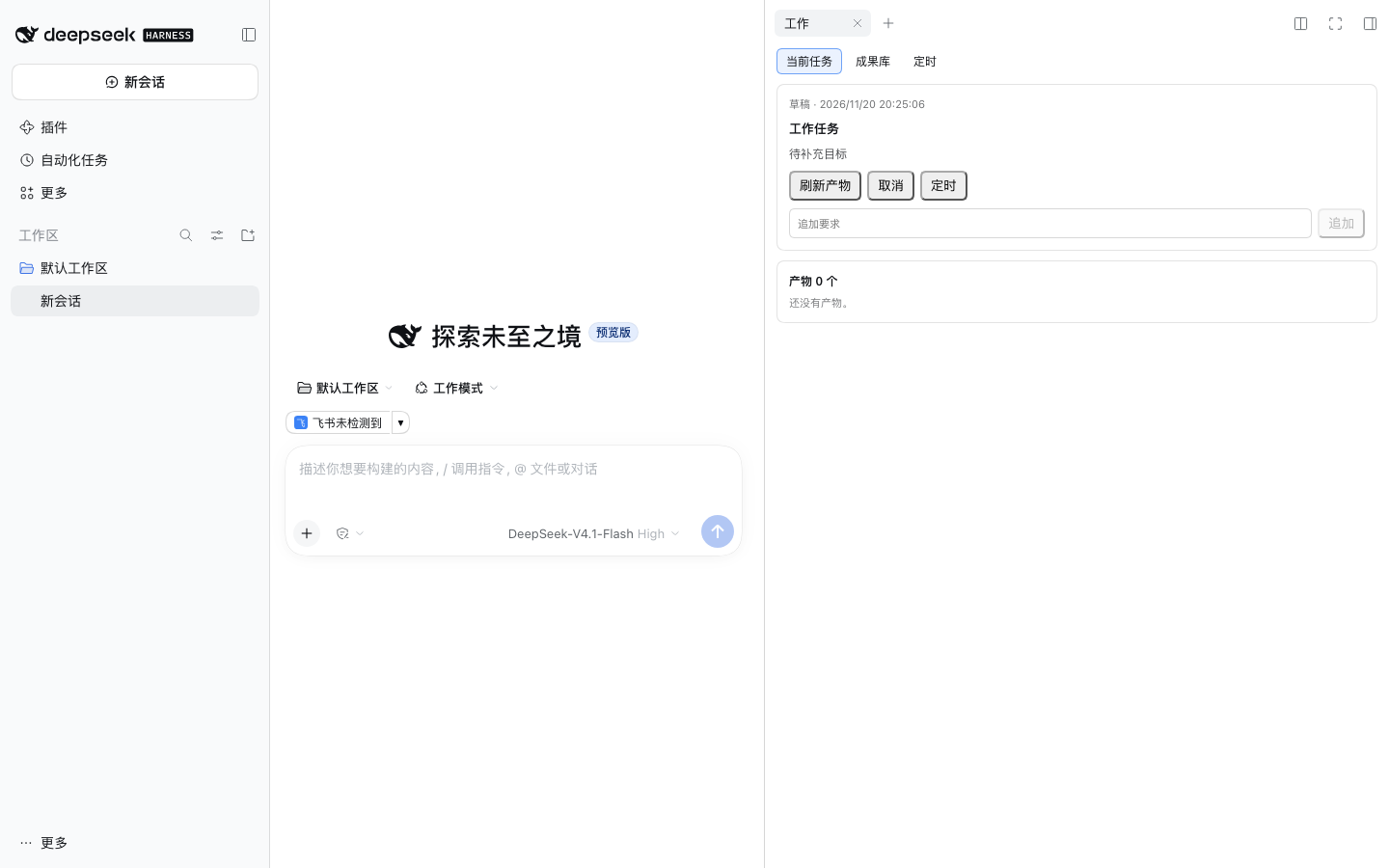
DSH Work adds a work layer to DeepSeek Harness: a session can be attached to a work task that survives the conversation, collects its own deliverables, can rerun on a schedule, and — on macOS and Windows — can quote the Feishu conversation you are looking at straight into the composer.
It is a plugin bundle, not a fork: when you turn it off, DeepSeek Harness is exactly what it was.
Why DSH Work
- Work mode is a preset. Pick it in the mode picker when starting a session and the session attaches to a tracked work task; other sessions, the default preset and your settings stay untouched.
- Deliverables outlive the chat. Every output is copied into the task's artifact library — docx, pptx, xlsx, images — openable from the panel months later.
- Recurring work runs itself. Attach a schedule (daily report, weekly summary) to a task and let the host trigger it.
- Feishu is a first-class surface. 15 model-facing Feishu tools for docs, sheets, wiki, IM and drive, including full chat history by chat name, and on macOS/Windows a composer chip that quotes the conversation currently on your screen.
Install
DeepSeek Harness Desktop (recommended)
Open Settings → Plugins, search for DSH Work, click Install, then restart the app.
CLI / headless
dsh plugin add @dsh-work-plugin/bundle
# restart DeepSeek Harness afterwards
From source
git clone https://github.com/silverze/dsh-work-plugin.git
cd dsh-work-plugin
pnpm install
pnpm build
pnpm --filter './packages/*' pack --pack-destination dist
./scripts/install-work-profile.sh work dist
The script installs the five packed tarballs into a profile named work and
registers the bundle layer. Start it with
dsh --profile work. A plain dsh plugin add ./packages/bundle is not enough:
the CLI links a single directory, so the host, client, Feishu and skills
packages the bundle depends on are never installed.
Requirements
| Requirement | Notes |
|---|---|
DeepSeek Harness >= 0.2.2-rc.2 | engines.dsh of the bundle enforces this |
Node.js >= 24 | only needed to build from source |
| macOS 13+ | required for the Feishu conversation chip and screen text tools |
| Xcode Command Line Tools | the screen helper is compiled with swiftc on first use (~25 s, then cached) |
| Screen Recording permission | macOS asks once when the chip first reads Feishu |
| Windows 10+ | same chip and screen text tools, no permission prompt. Reads the Chromium accessibility tree for exact text, and falls back to OCR when that tree is empty |
| Windows SDK (optional) | the Windows helper is compiled with the .NET Framework csc against the SDK's Windows.winmd (~0.5 s, then cached). Without it the bundled PowerShell helper takes over: same output, about 2 s slower per read |
| Feishu app credentials | only for the Feishu tools; see docs/feishu-app-setup.md |
Quick start
- Start a new session and pick 工作模式 / Work mode in the mode picker.
- Describe the outcome you want — "prepare the Q4 review deck from these three docs".
- The right panel becomes a workbench: the current task, its plan and its artifact library.
- Ask for changes in the same conversation; every output lands in the artifact library.
- Optional: schedule the task, or share an artifact to a Feishu doc with one sentence.
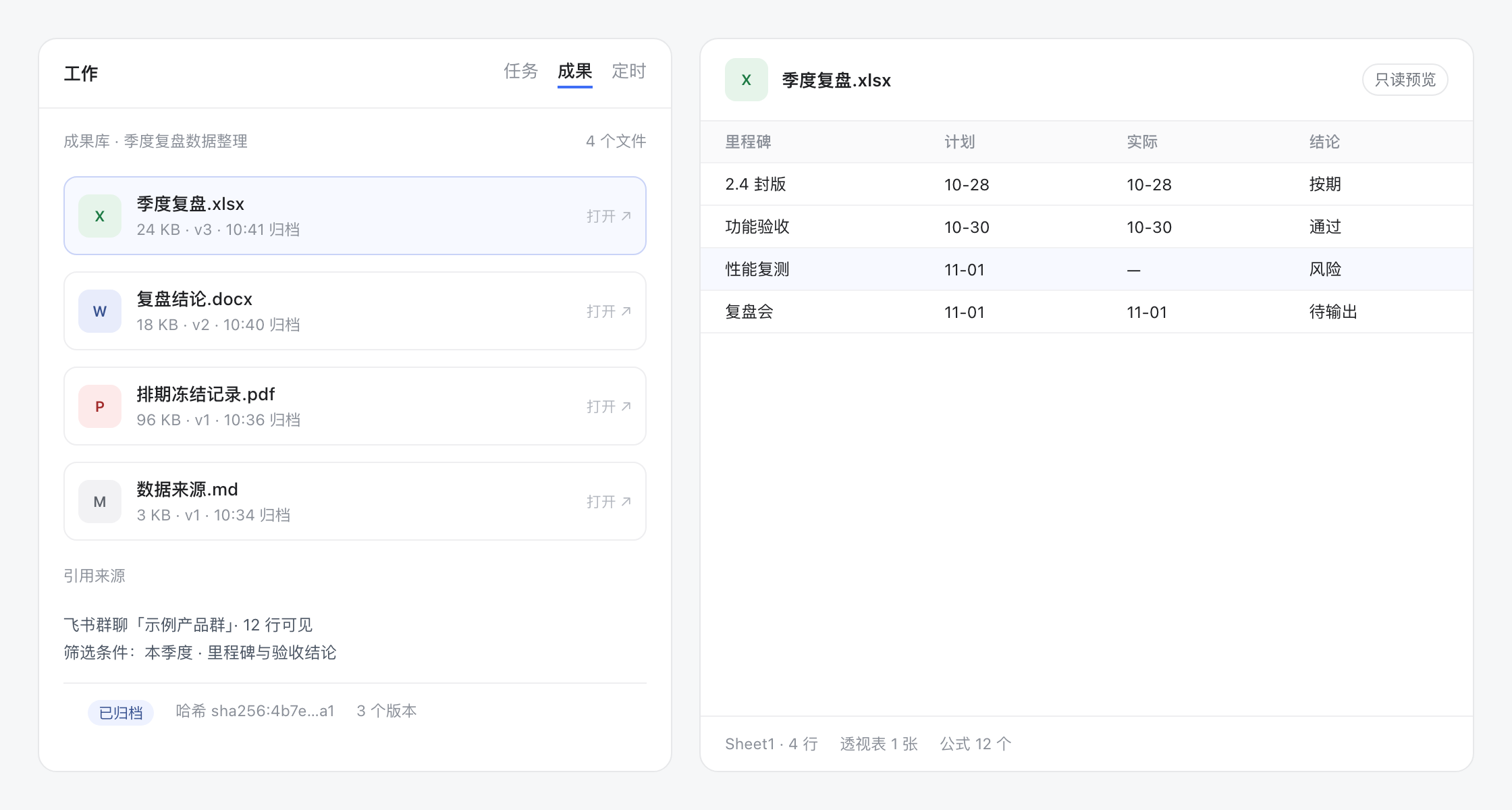
Feishu conversation context (macOS and Windows)
In a work-mode session, a chip appears above the composer with the Feishu chat you were last looking at:
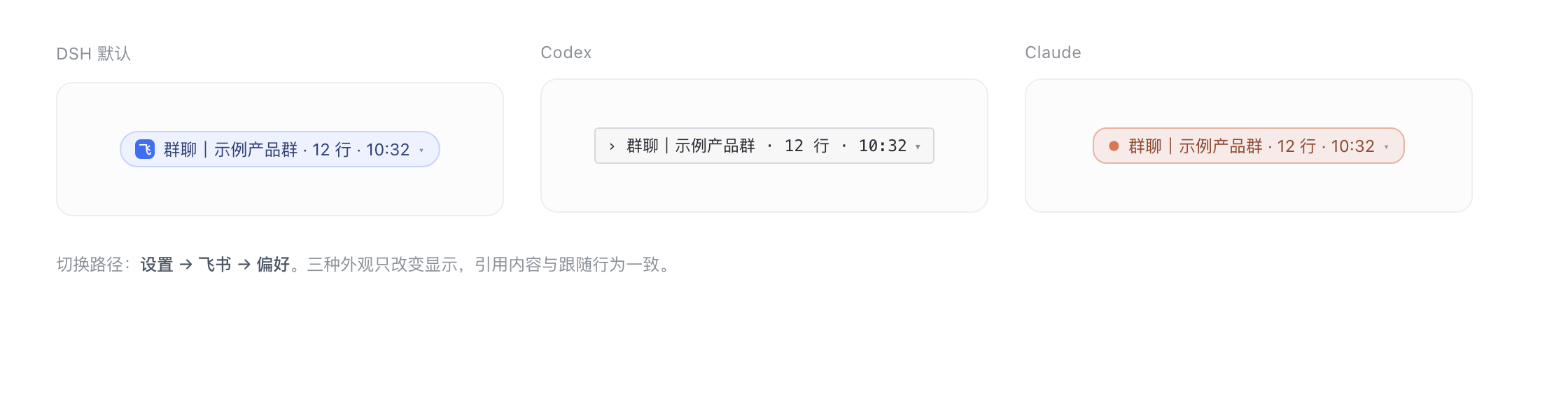
- Click the chip to insert a quoted block with the chat name, the read time and the visible messages.
- Click ▾ to pick one of the recent conversations or force a fresh read.
- The chip follows the focused conversation while Feishu is in front (about 1.2 s per read on macOS, 1.5-2 s on Windows, at most every 2.5 s).
- If the read fails — Feishu minimized, on another Space, or permission revoked — the chip keeps the last conversation, marks it 上次 / last seen, and still inserts a usable quote.
OCR runs locally. The recognized text goes to the current session only; this plugin uploads nothing. Three appearances (DSH default, Codex, Claude) are selectable in Settings → Feishu → Preferences.
What you get
Tools
| Group | Tools |
|---|---|
| Work tasks | work_task_create, work_task_list, work_task_get, work_task_prompt, work_task_cancel, work_task_schedule |
| Artifacts | work_artifact_list, work_artifact_get, work_artifact_scan |
| Screen awareness | work_frontmost_app, work_screen_text, work_feishu_screen, work_feishu_focus |
| Diagnostics | work_ping |
| Feishu | feishu_auth_start, feishu_auth_status, feishu_auth_disconnect, feishu_whoami, feishu_doc_create, feishu_doc_read, feishu_doc_append, feishu_wiki_get, feishu_sheet_read, feishu_sheet_write, feishu_sheet_append, feishu_im_send, feishu_im_history, feishu_drive_upload, feishu_share_artifact |
Skills
work-research · work-weekly-report · work-meeting-minutes · work-data-analysis · work-deck · work-doc-polish · work-screen-awareness
UI
- Work-mode chip in the composer, task status badge in the session list, task menu (export / remove).
- Right-side workbench tab: current task, artifacts, schedules.
- Settings section Feishu: credentials, connection state, and the chip appearance preference.
Settings
| Key | Default | Effect |
|---|---|---|
accessTokenEnv | FEISHU_USER_ACCESS_TOKEN | Environment variable read for a Feishu user token |
presence | true | Enables the screen/Feishu awareness tools and chip capture on the host |
presenceStyle | dsh | Chip appearance: dsh, codex or claude |
Task data lives in the DSH storage domain work, so turning the bundle off keeps your tasks, artifacts and schedules.
How it works
packages/bundle        patch + preset + locale: wires the plugin set into a profile
packages/host-work     tasks, artifacts, schedules, presence tools, screen helper
packages/host-feishu   OAuth, OpenAPI client, Feishu tools
packages/client-work   workbench panel, composer chip, settings (web client plugins)
packages/skills-work   seven bundled skills
The host reads the focused Feishu window with a small Swift helper (CGWindowList + screencapture -l + Vision OCR); the web client only renders snapshots returned by the host. Details: docs/architecture.md.
Privacy
- No telemetry, no analytics, no network calls except the Feishu OpenAPI you configure.
- OCR text stays on your machine and in the current session.
- Feishu tokens are stored in the DSH credential store, never in this repository.
- See SECURITY.md for the full data-flow description.
Compatibility
| Platform | Work tasks / artifacts / schedules | Feishu tools | Feishu chip / screen text |
|---|---|---|---|
| macOS 13+ | yes | yes | yes (Screen Recording + Xcode CLT) |
| Linux | yes | yes | no — the Host reports the missing capability and the chip stays hidden |
| Windows 10+ | yes | yes | yes (exact text from the Chromium accessibility tree; OCR fallback needs no permission either) |
Troubleshooting:
| Symptom | Fix |
|---|---|
Chip says 飞书未检测到 | Bring Feishu to the front on the same desktop/Space; the window must be on screen |
| Chip says permission missing | System Settings → Privacy & Security → Screen Recording → enable DeepSeek Harness |
| First read takes ~25 s | swiftc is compiling the helper; later reads are ~1.2 s |
ERESOLVE on install | Use DSH >= 0.2.2-rc.2 < 0.3.0; peer ranges include the pre-release line |
| Feishu tools say not connected | Run feishu_auth_start and finish the browser flow |
Development
pnpm install
pnpm build
pnpm test            # builds host/client/feishu, then node --test tests/unit/*.test.mjs
pnpm -r typecheck
pnpm check:public    # internal-identifier and secret guard
pnpm docs:check      # relative links and images
See CONTRIBUTING.md for the package layout, how to add a tool or skill, and the fixture rules.
Contributing
Issues and pull requests are welcome. Please read CONTRIBUTING.md and CODE_OF_CONDUCT.md first.
License
MIT © 2026 silverze
DSH Work is an independent community project. It is not affiliated with, endorsed by, or sponsored by DeepSeek or Feishu/Lark.