dsh-skill-console
wendaokeliu-sys/dsh-skill-console
DSH 技能控制台:在 Web GUI 浏览本地技能、一键启用/停用、删除到可恢复回收站,以及从本地目录或 GitHub 仓库导入。
安装
dsh plugin --profile web add github:wendaokeliu-sys/dsh-skill-consoleREADME
dsh-skill-console
English | 中文


A skill manager for the DeepSeek Harness web GUI. Browse every local agent skill, flip them on and off, delete into a restorable trash, and import new ones from a directory or a GitHub repository — all from Settings → Skills, without touching the filesystem by hand.
Why
dsh's skill registry is read-only by design. Providers list() and get(); nothing in the official surface writes. That is the right call for a registry, but it leaves every day-to-day operation — "turn this one off for a while", "delete the one I no longer use", "grab those skills from that repo" — as manual file shuffling in a terminal.
This plugin fills that gap using only the official SDK. No dsh source changes, no monkey-patching, no shadow state.
Features
| Browse | Every local skill, grouped by discovery source (project / custom / user / bundled / runtime), with search and an enabled-state filter |
| Enable / disable | One click. Implemented by renaming the skill's SKILL.md, so the state survives restarts and stays true to what is on disk |
| Delete | Moves into a per-root .trash — restorable, with a separate "delete forever" action |
| Load | A folder chooser right on the Skills tab: pick a directory, tick what was found in it, install |
| Import | Scan a local directory or a GitHub repository, tick what you want, install into either user root |
| Diagnose | Lists files that will never reach the catalog, and says why |
| Inspect | Renders the SKILL.md body as Markdown — headings, bold, code, tables — plus whenToUse, path, and bundled files |
Requirements
- Node
^22.19.0 || >=24.0.0 - DeepSeek Harness with the
0.1.xSDK (rc.7 or newer)
Install
From npm
Once the package is published:
dsh plugin --profile web add dsh-skill-console
Restart dsh web and open Settings → Skills.
From source
git clone https://github.com/wendaokeliu-sys/dsh-skill-console.git
cd dsh-skill-console
pnpm install
pnpm build
npm link

dsh plugin --profile web add dsh-skill-console
Drop-in (no build on the target machine)
The built package has no runtime dependencies beyond the dsh SDK your profile already carries — js-yaml is inlined at build time. So a prebuilt copy can simply be placed where dsh resolves plugins:
<dsh home>/profiles/node_modules/dsh-skill-console/
  package.json
  lib/index.js
  lib/client.js
Then add the row to your profile's cordis.patch.yml (<dsh home>/profiles/<profile>/cordis.patch.yml):
- insert:
    - id: skill-console
      name: 'dsh-skill-console'
<dsh home> is ~/.dsh on macOS and Linux, C:\Users\<you>\.dsh on Windows, or whatever DSH_HOME points at.
Note: a hand-placed directory inside
node_modulescan be removed by a laterpnpm installin that profile. Use it for trying the plugin out, not for a long-lived install.
Development
Mount the source directly, no packaging step:
dsh web --patch ./cordis.patch.yml
Usage
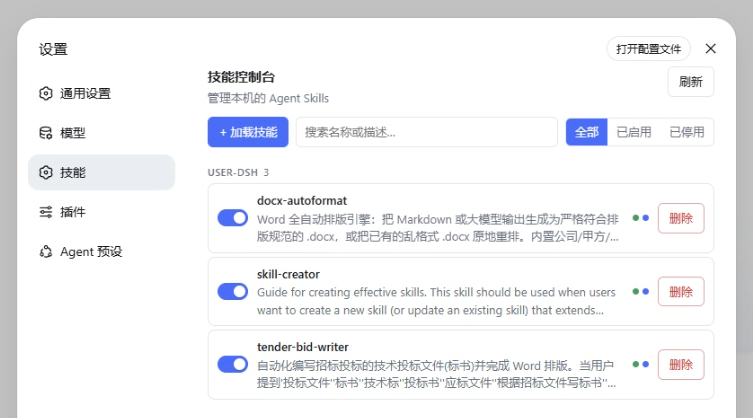
Everything lives on one page under Settings → Skills: the skill list, a Load skills button, and a search box. Nothing else is permanently on screen — the diagnostics banner and the trash section appear only when they have something in them.
The list
Skills are grouped by where they were discovered:
| Source | Root |
|---|---|
project-dsh | <project>/.dsh/skills |
project-agents | <project>/.agents/skills |
custom | whatever customSkillDirs names |
user-dsh | <dsh home>/skills |
user-agents | ~/.agents/skills |
bundled | packaged skills |
- Load skills is the single way in; it covers both a local folder and a GitHub repository.
- The switch on the left enables or disables the skill. It is greyed out for project, bundled, and runtime skills — those are read-only here (see Safety).
- Click the name to open the body,
whenToUse, absolute path, and the bundle's resource files. - Delete moves the skill to the trash after a confirmation.
- The two small dots on the right are the invocation policy: green = model-invocable, blue = user-invocable, grey = off.
- Search matches names and descriptions; the segmented control filters by enabled state.
Trash
Deleting moves a skill into the trash, and a Trash section appears under the list while anything is in it. Restore puts a skill back where it came from — and refuses rather than overwrites if a new skill has since taken that name. Delete forever is irreversible.
Load skills
One button, two sources.
Local folder opens the host's OS directory chooser. Pick a directory and everything importable inside it is listed to tick and install. On a host with no native chooser (typically a remote deployment) the same field accepts a typed absolute path.
GitHub repository accepts owner/repo, owner/repo@ref, a plain URL, or a browse URL with a subdirectory (https://github.com/owner/repo/tree/main/skills).
Either way: choose the target root, scan, tick, Import selected. Candidates already present in the target are flagged and left unticked; tick Overwrite skills with the same name to replace them anyway.
GitHub's anonymous API allows 60 requests per hour, which a large repository scan can exhaust. Set GITHUB_TOKEN (or GH_TOKEN) before starting dsh to raise the limit:
GITHUB_TOKEN=ghp_xxx dsh web
Diagnostics
When a file in a user root will never reach the catalog, a banner appears above the list saying how many and why: a missing description, a name that is not kebab-case, a SKILL.md whose frontmatter name disagrees with its directory name, an unreadable file, or a description too short for an agent to route on. No banner means nothing is wrong.
Configuration
Settings live in dsh's own settings service, under the namespace dsh-skill-console:
| Field | Default | Effect |
|---|---|---|
enabled | true | Master switch. While off the provider unmounts and the mutating routes answer 503; the catalog route stays readable |
announceToAgent | true | Adds a system-prompt section so the agent knows the plugin exists and what it can do |
allowNetworkImport | true | Whether repository imports are permitted at all |
How it works
Enable / disable without shadow state
The official filesystem provider recognizes exactly two discovery shapes: a directory bundle's <name>/SKILL.md, and a flat <name>.md. Disabling renames the file to SKILL.md.disabled — it stays exactly where it was, the provider stops seeing it, and the state naturally survives a restart. The GUI can still list a disabled skill because this plugin's own scan picks up .disabled files and flags them.
The payoff is that there is no sidecar state file. Rename something by hand, revert with git, sync the directory to another machine — the plugin always reports what is actually on disk. There is no way to end up with a config claiming a skill is enabled while the file says otherwise.
Delete
Deleting is a rename into <root>/.trash/<name>-<timestamp>. .trash is dot-prefixed, and the official provider already skips dot-prefixed entries, so trashed skills are invisible to every consumer without any extra bookkeeping. Restore reads the original path back off the trash entry's name.
Where the catalog comes from
In the dsh web app the host-level skill-filesystem row is deliberately disabled — agent presets mount their own provider into their own scope layers. A query against the empty global layer would see nothing, so this plugin registers a small read-only provider of its own into that layer, purely for the management view.
Agent sessions are unaffected: preset layers sit nearer than the global layer, so a preset's own provider wins every duplicate name outright.
Safety
- Only user-level skills are writable —
<dsh home>/skillsand~/.agents/skills. Project, bundled, and runtime skills are shown read-only, with their controls disabled. Every write resolves its target through a root check before a single syscall runs. Project skills belong to their repository and should travel with git, not be quietly rewritten by a GUI. - Routes are loopback-only. The remote address must be a loopback literal, the
Hostheader must name loopback, and cross-site requests are refused. If you binddsh webto0.0.0.0, nobody on your LAN can reach these endpoints. - Imports are bounded. Directory depth, candidate count, per-file size, and per-bundle file count all have hard caps. Pointing the importer at a huge monorepo is slow, never unbounded.
- Network imports can be turned off entirely via
allowNetworkImport.
Development
pnpm install
pnpm typecheck    # tsc --noEmit
pnpm test         # 44 tests
pnpm build        # declarations + both bundles
src/
  protocol.ts    wire types + route table, shared by both halves
  skillfs.ts     everything that touches files: scan, frontmatter, toggle, trash
  import.ts      import sources (local directory, GitHub repo) and materialization
  provider.ts    the read-only provider registered into ctx.skills' global layer
  routes.ts      the /api/skill-console route family and its request fences
  index.ts       host apply: settings, provider, routes, system prompt
  client/
    api.ts       typed client over the routes
    locales.ts   en + zh copy (the locale service enforces bilingual balance)
    index.tsx    browser apply: registers the settings.section slot
    panel/       the console page
The test suite covers frontmatter parsing against the official provider's semantics, the write fence, the full disable → delete → restore → purge lifecycle, repo-reference parsing, local import materialization, and the whole route family over a real HTTP server (including the loopback fence and the master switch).
Troubleshooting
The Skills section does not appear. Check the dsh web startup log for a skill-console error, and the browser console for a dsh-skill-console load failure. The most common cause is that the package name is not resolvable from the profile — verify <dsh home>/profiles/node_modules/dsh-skill-console exists, or that npm link succeeded.
A skill I installed is missing. Open the Diagnostics tab. If it is not listed there either, the file is probably nested too deep — discovery does not recurse, so a skill must be a direct child of a skills root.
Import fails with a 403. GitHub rate limiting. Set GITHUB_TOKEN.
Toggling says "read-only". That skill lives in a project or bundled root. Edit it where it lives, or copy it into a user root first.
Contributing
Issues and pull requests are welcome — see CONTRIBUTING.md.