StrataGate-AgentMemory
diqierjia/stratagate-agentmemory
Les conversations récentes restent vivaces. Les plus anciennes s’effacent en résumés, pas dans l’oubli. StrataGate offre à DeepSeek Harness une mémoire à six couches, à décroissance temporelle, tandis que les événements durables et les relations se déposent dans un graphe de connaissances. Apportez avec vous vos souvenirs d’autres IA — pas besoin de recommencer à zéro.
Installer
dsh plugin --profile web add github:diqierjia/stratagate-agentmemoryREADME

StrataGate
Recent conversations stay detailed. Older memories grow more concise.
StrataGate is a cross-session memory plugin for DeepSeek Harness. Recent conversations stay detailed, older conversations become concise, and original records remain available when needed. Important decisions, preferences, and plans become long-term memories for future sessions.







中文说明 · DeepSeek Harness guide · Architecture · Full evaluation
Published evaluation: on 152 questions from one LoCoMo conversation, conv-26, each answer received 10 independent evaluations. Mean judged accuracy was 80.46%, versus 63.22% for Mem0 base. See evaluation scope.
Why StrataGate?
-
Short-term memory: details fade as the conversation progresses and expand when needed.
(1) Recent history stays detailed; older history becomes concise. Each conversation block has six views, L0–L5, with different levels of detail. As more conversation accumulates, older memories gradually shift from full dialogue to key facts, short summaries, and title indexes, reducing the context occupied by history. → Layered memory
(2) Views shrink while original records remain. Complete L5 source messages and tool records are preserved. When details need checking, the agent can expand a memory to recover the original wording and context. → Layered memory

-
Long-term memory: an event timeline preserves history, while a knowledge graph organizes current state.
(1) Events record what happened. Important decisions, preferences, plans, and changes are extracted from conversations as Events. Each retains its source and distinguishes when something was mentioned from when it happened, so future sessions can retrieve and trace it. → Event cards
(2) The knowledge graph represents current state. Historical Events provide the basis for current information and relationships about people, projects, organizations, tools, and places. New Events can supplement or supersede an earlier state while historical Events and their sources remain preserved. → Current-state graph
(3) Long-term weights decay too. As conversations progress, memories that have not been adopted gradually lose weight, affecting their priority during retrieval and automatic recall. Their sources remain available for verification even after their weights decay. → Weights and adoption-based reinforcement
(4) Bring memories from other AIs. Imported content can become traceable Events and update the knowledge graph while the original imported text remains preserved. → External memory import
-
Evidence gate: check whether retrieved evidence is sufficient before answering.
A relevant search result may still be insufficient to answer the question. The agent assesses the evidence and, when needed, searches again, expands Events, or checks the original messages. If it still cannot confirm the answer, it states the uncertainty. → Evidence gate
-
Reinforce only memories actually used.
Search hits and automatic context injection do not trigger reinforcement. Only evidence recorded as actually used in the final answer increases the adoption count and resets the decay anchor. More adoptions mean slower future decay, preventing a memory from reinforcing itself merely because it is frequently retrieved. → Use-only reinforcement
Get started: → Quick start
Quick start: DeepSeek Harness
If DeepSeek Harness is already installed, add StrataGate to the profile you use:
dsh plugin --profile web add stratagate-dsh
DSH compatibility includes the complete 0.2.0 version family: all Alpha, Beta, RC, and stable releases (>=0.2.0-0 <0.2.1-0), alongside the previously supported hosts. A new 0.2.0 prerelease does not require a plugin update just to declare its version.
Restart that profile, then keep using DSH normally. StrataGate will capture completed main-agent turns, build searchable memory in the background, and expose its Memory UI under DSH Settings → StrataGate-AgentMemory.
By default, the database is stored at:
DSH_HOME/stratagate/memory.db
Removing the plugin does not delete the database. For screenshots, configuration, memory tools, and the exact automatic-capture rules, see the DeepSeek Harness plugin guide.
The command uses the web profile; replace web if you use another profile. Developers can go directly to Development and documentation.
How it works
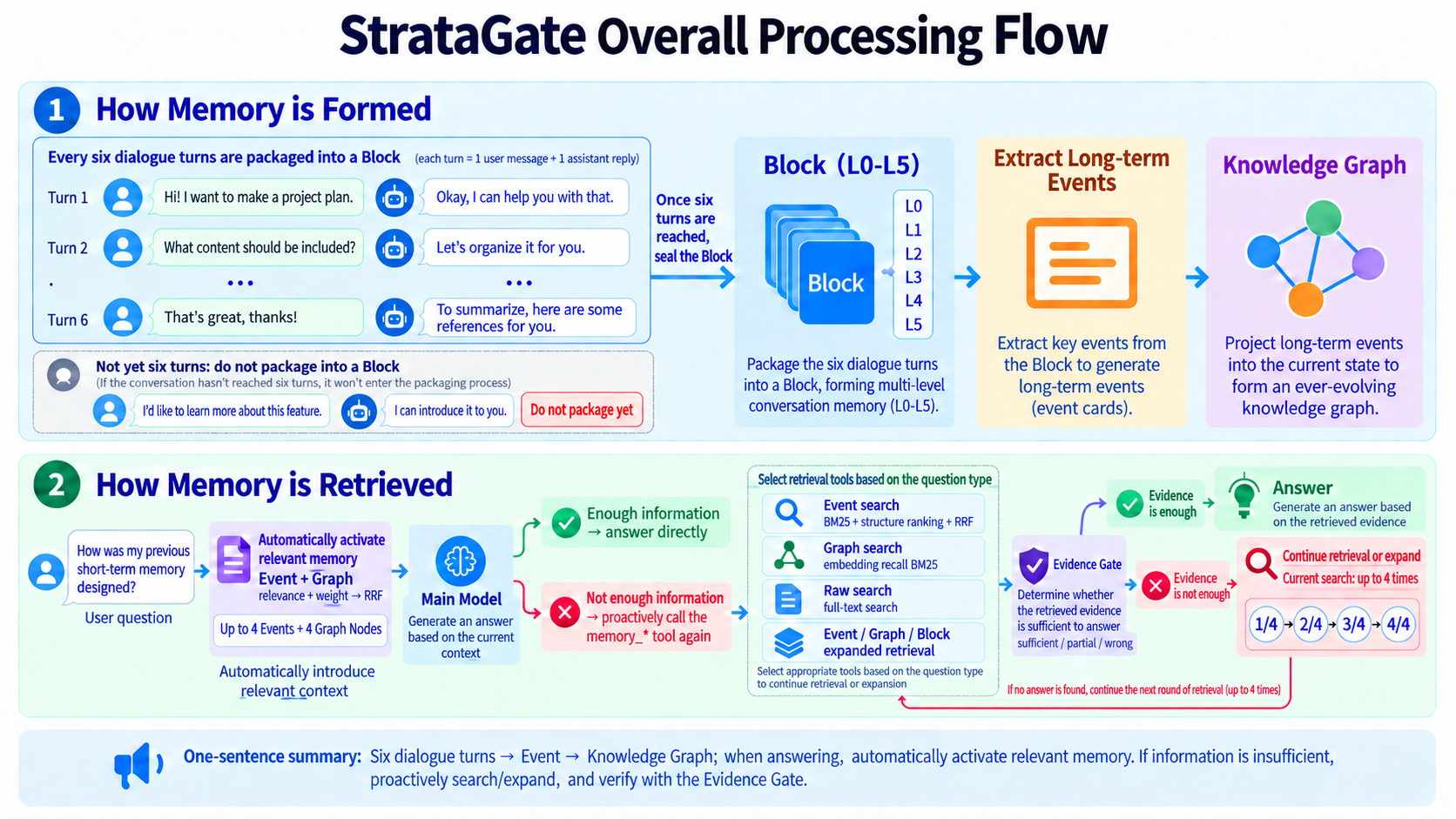
- Save conversations. Several consecutive turns form a memory Block, stored as six views ranging from an index to the original records.
- Extract lasting information. Decisions, preferences, plans, and changes become Events with time and source references. The graph builds a current-state view from these Events.
- Recall when answering. The plugin brings in a small set of relevant memories. When more information is needed, the agent searches Events, the graph, or source messages and assesses whether the evidence is enough.
- Record actual use. An Event selected as evidence for the final answer counts as a recorded use, called an “adoption” internally, and updates its long-term weight.
Automatic recall currently includes at most 4 Events and 4 graph nodes within approximately 900 tokens. Layered Blocks and unsealed turns supply the active conversation's history separately.
Core design
| Mechanism | What changes | What remains |
|---|---|---|
| Short-term simplification | Which L0–L5 view an older Block displays by default | Original L5 conversations and tool records |
| Long-term weight decay | An Event's priority in later recall | Event history and its sources |
Both follow conversation progress: short-term decay uses ready-Block distance, while long-term decay uses turn distance. Elapsed days alone do not trigger either form of decay.
1. Short-term memory: gradually condense older conversations and expand them when needed
Recent discussions usually need their full detail. Older conversations can remain in context as concise views. StrataGate stores several levels of detail for the same conversation block and gradually reduces what older Blocks display by default as more conversation accumulates.

One conversation block, six levels of detail.
The DeepSeek Harness plugin seals a Block every 6 complete turns by default. A turn consists of a user question and the assistant's complete response. The Block size is configurable; the core-library default is 12 turns. Content below the boundary remains in the current conversation.
Each fully processed Block contains these views:
| Level | Contents | Primary use |
|---|---|---|
| L0 | Title and tags | Identify a piece of history with minimal context |
| L1 | Short summary | Understand the discussion's topic |
| L2 | Key facts | Review decisions, constraints, plans, and outcomes |
| L3 | Deterministically condensed dialogue | Remove standalone fillers from a fixed allowlist; keep only the first duplicate long or code-like paragraph; retain tool names and result summaries |
| L4 | Near-verbatim dialogue without internal messages | Remove system messages; only trim outer whitespace and add role labels to user and assistant text; retain names and summaries for recognized tool records |
| L5 | Source messages and tool records | Verify provenance and specific details |
The model summarizes L0–L2. Fixed rules generate L3/L4: L3 removes standalone fillers and repeated long content, while L4 stays near-verbatim; both compact recognized tool records. Short-term decay advances with subsequent ready Blocks, not elapsed days.
Exact pruning rules, decay formula, and level thresholds
The model produces L0–L2 summaries. L3 and L4 do not use model paraphrasing; code generates them with these fixed rules:
- L4: Remove system messages. User and assistant text is preserved except for trimming outer whitespace and adding
User,Assistant, or other role labels. Recognized structured tool records retain the tool name and a result summary of at most 160 characters while omitting rawarguments,params,input, andrequestfields. Tool-role text that is not recognized as tool JSON remains unchanged. - L3: Condense further without semantic rewriting. A sentence is removed only when, after trailing punctuation is stripped, it exactly matches a fixed filler allowlist such as
ok,thanks,got it,好的,明白,收到,谢谢, or可以. After whitespace normalization and case folding, code-like paragraphs and paragraphs of at least 80 characters are deduplicated: the first copy remains verbatim, and later exact duplicates become an omission marker. Tool records use the same name-and-result-summary form as L4. - Length guard: If generated L4 would be longer than L5, L5 is used instead. If L3 would be longer than L4, L4 is used instead, preserving
L3 ≤ L4 ≤ L5.
Source records are saved first, followed by summarization and Event processing. Only a fully processed, ready Block can replace its corresponding native history and participate in decay.
As more conversation accumulates, older Blocks default to less detail.
Display changes follow exponential decay:
wblock(age) = e−λblock · age
The default decay coefficient λblock is 0.30. Code maps weight ranges to display levels. Smaller coefficients preserve detail for longer and therefore consume more context.
In this formula, age is the distance between the current display anchor and the latest ready Block in the same conversation. It measures conversation progress, not elapsed calendar days. Unsealed turns and Blocks still awaiting model processing do not advance this decay.
For a Block that starts at L5 and is never expanded again, the default schedule is:
| Additional ready Blocks | Default display level |
|---|---|
| 0–1 | L5 |
| 2 | L4 |
| 3–4 | L3 |
| 5–6 | L2 |
| 7–8 | L1 |
| 9 or more | L0 |
The figure illustrates the trend. Actual changes depend on both the decay coefficient and level thresholds; a new Block does not necessarily cause a one-level drop.
Expand again when details are needed.
Suppose an older conversation currently shows only:
Discussed the project's technical approach and near-term plans.
If the user asks why pnpm was chosen, the agent can expand key facts, condensed dialogue, or the complete source records to find the original reason.
Expansion can proceed one level at a time or jump directly to a requested level. The selected level and current Block position become the new decay anchor. As subsequent conversation accumulates, the view gradually becomes concise again.
Older conversations can therefore remain lightweight during ordinary use while retaining recoverable detail. L0–L4 are derived views of the source and never overwrite L5.
2. Long-term memory: preserve history in Events and organize current state in a knowledge graph
Short-term memory retains a discussion's context. Long-term memory extracts information worth using in future sessions. StrataGate records decisions, preferences, plans, and changes as Events, then uses those Events to organize a knowledge graph.
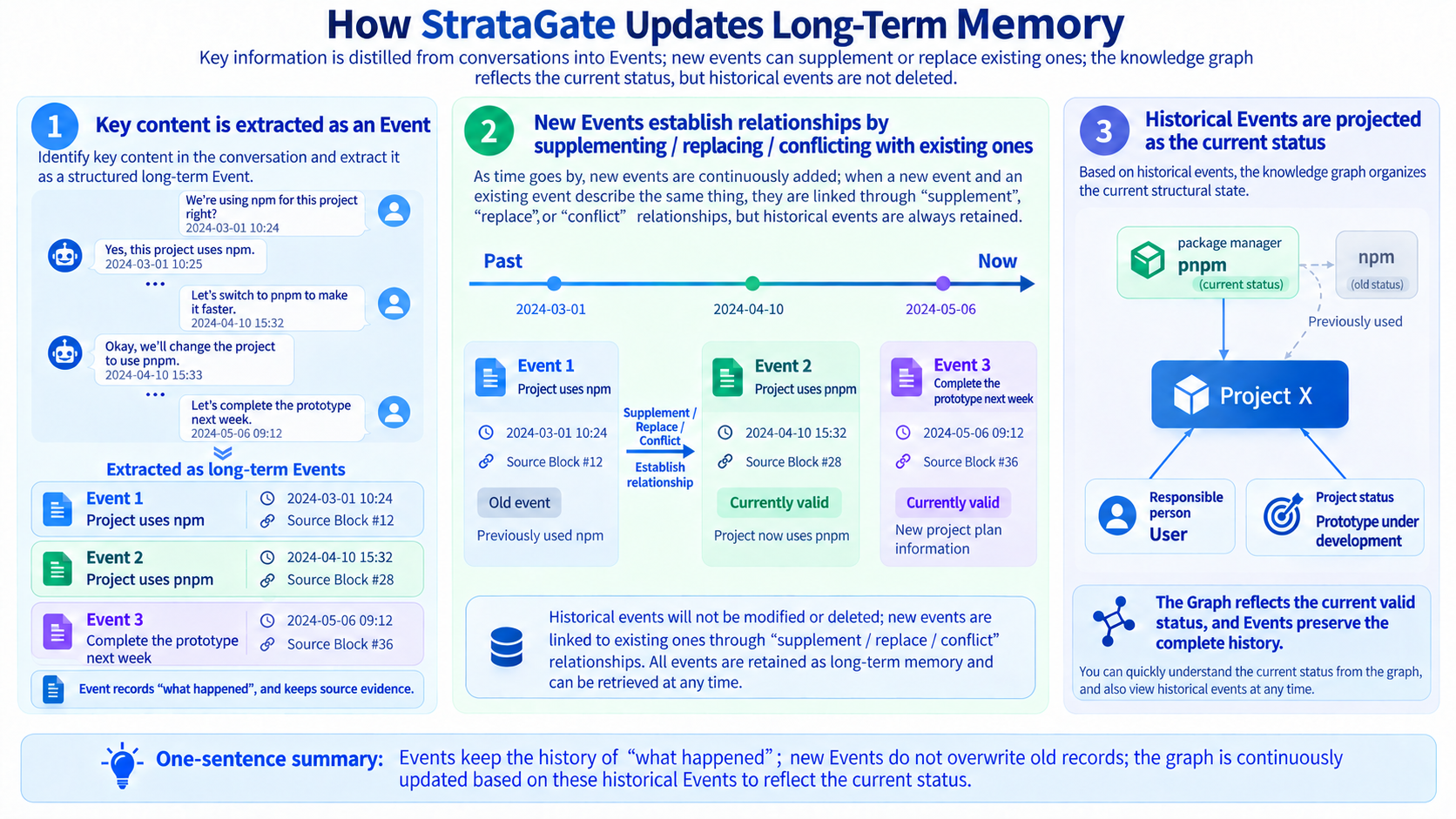
Event cards record what happened and retain their sources.
A Block can produce multiple Events or contain no information that needs long-term extraction. In addition to content, each Event retains its source Block, source messages, and whatever temporal information can be established.
Two different time axes must be distinguished:
| Time | Meaning |
|---|---|
| Mention time | When the conversation referred to the event |
| Occurrence time | When the event happened or is planned to happen |
If a user says “Finish the prototype next week” on May 6, May 6 is the mention date, while “next week” describes the planned completion time. The record should retain its planned status and cannot serve as evidence that the prototype is already complete.
When a date cannot be established, the original wording and uncertainty remain available for later source verification.
New Events update memory through additions, supersession, or conflicts.
A project discussion might contain these statements over time:
“Use npm for this project.”
“Let's switch to pnpm.”
“Finish the prototype next week.”
They play different roles:
- Switching to pnpm updates the package-manager choice; the earlier npm Event remains in history.
- Finishing the prototype next week adds a plan without changing the package-manager decision.
- If statements cannot both be true and their validity cannot yet be resolved, a conflict relationship is retained for later verification.
New Events do not overwrite the content or provenance of earlier Events. Their validity status and relationships can change as new evidence arrives. This lets the system retrieve current information while also explaining what used to be true and what changed.
The knowledge graph organizes current information and relationships from Events.
People, projects, organizations, tools, and places become nodes. Connections such as “uses,” “participates in,” and “depends on” become directed edges. Both node attributes and relationships retain their source Events.
In the example, the graph can update the project's current package manager to pnpm while preserving npm as a historical state. Later:
- a question about what the project uses can start with the current graph;
- a question about when it changed can inspect the change Event;
- a question about why it changed can expand the Event and return to the original discussion.
Graph state must be supported by its sources. “Finish the prototype next week” directly supports a plan. The figure's “prototype in development” state and owner information require additional supporting Events.
Graph updates run as independent jobs with persisted progress. A failed update can be retried separately while the committed Events and source records remain available.
3. Evidence gate: check whether retrieved results can answer the actual question
After finding relevant memories, the agent still needs to assess whether they support the answer. StrataGate uses a fixed, compact assessment structure that requires an explicit judgment of sufficiency and the next action.
| Field | What it explains |
|---|---|
verdict | Whether evidence is sufficient, partial, or mismatched |
evidence_refs | Which retrieved items support the assessment |
fit | How the evidence matches the question |
missing | What information is still missing |
next_strategy | Whether to answer, search again, or expand a memory |
For example, the user asks:
Why did we originally switch to pnpm?
The only retrieved result says:
The project switched from npm to pnpm.
That confirms a change but does not explain the reason. The agent should judge the evidence as partial and expand the Event or inspect the original conversation, rather than infer the historical reason from the tool choice alone.
The model assesses semantic sufficiency. Code validates references and protocol constraints: cited evidence must come from the selected retrieval batch, and accepting sufficient requires valid evidence references and an explicit choice to answer.
These checks make retrieval traceable and auditable, but the model can still misjudge evidence. When sufficient information is unavailable, the agent should continue searching or state that it cannot confirm the answer.
4. Reinforce only memories actually used: repeated use means slower future decay
Long-term memories also decay as conversations progress. Here, the changing quantity is an Event's weight, which participates in later recall and ranking. Unlike a short-term Block, an Event does not move through L0–L5 display levels as its weight decays.
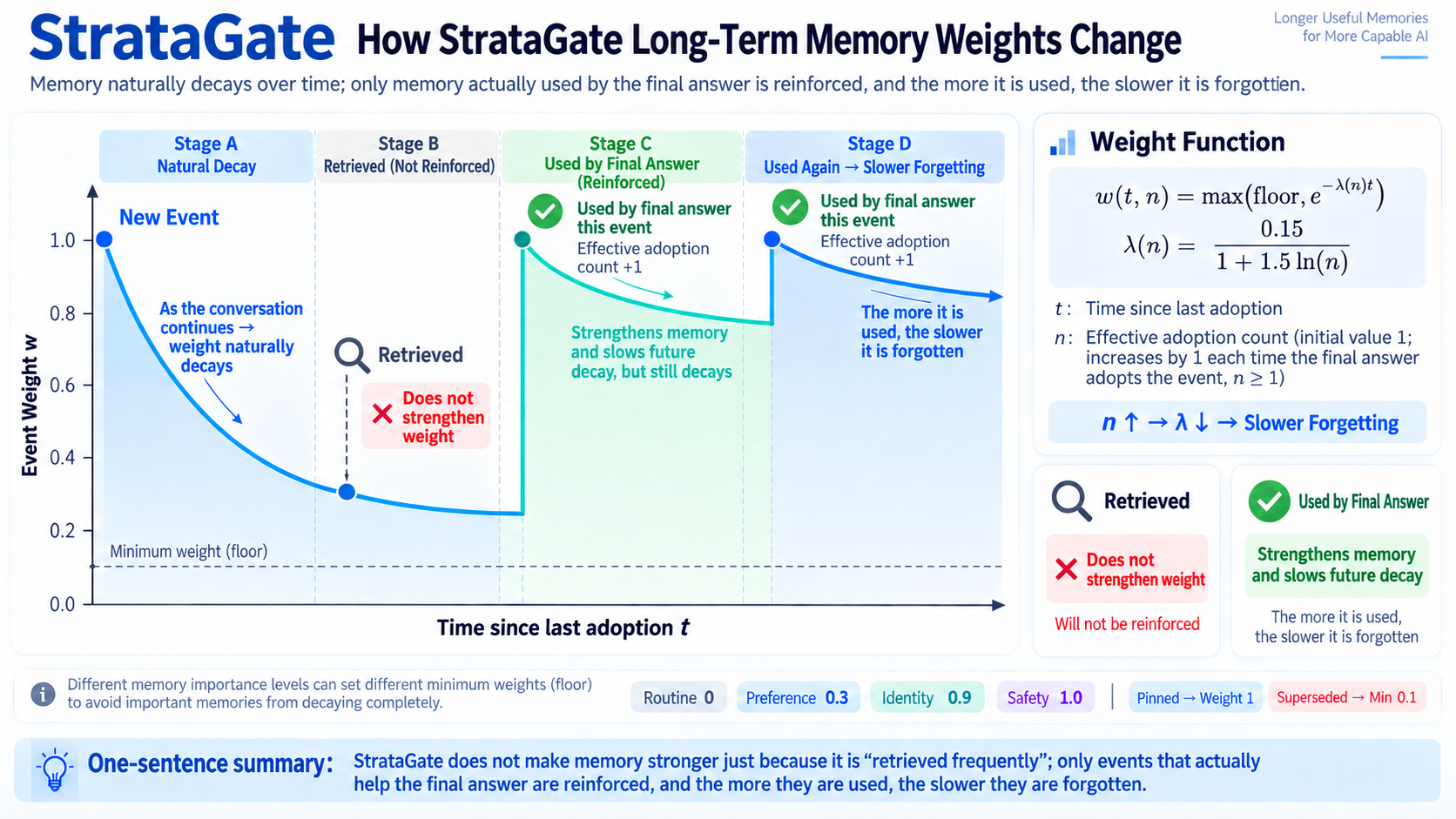
An Event not used in answers gradually loses weight as conversation turns accumulate. This can lower its recall priority while its historical record remains available.
Retrieval does not trigger reinforcement.
A search hit only establishes possible relevance. The system may record when a memory was retrieved, but retrieval does not increase its adoption count or reset its decay anchor.
Memories automatically included in context receive no reinforcement merely for being displayed. This prevents a memory from continually gaining weight just because it happened to rank highly and then appeared repeatedly.
Weights update only after recorded adoption.
After selecting evidence for the final answer, the agent submits a usage receipt. Validated Event selections increase their adoption counts and move their decay anchors to the current turn. An ordinary active Event without an additional weight cap returns to weight 1.
As the adoption count increases, the decay coefficient decreases. The Event retains more weight over the same number of subsequent turns, so memories that repeatedly help answers decay more slowly.
Adoption is based on the agent's submitted evidence selection. Code checks that the evidence belongs to the corresponding batch and has passed a sufficient assessment. Receipts prevent the same operation from being applied twice. Unused results receive no reinforcement from that selection.
Different criticality levels have different minimum weights.
| Memory category | Default minimum weight |
|---|---|
| Routine information | 0 |
| User preference | 0.3 |
| Identity information | 0.9 |
| Safety information | 1.0 |
Pinned memories have an effective weight of 1. Superseded Events normally receive a low weight cap so older states do not retain excessive priority.
These weights express a memory-management policy, not factual accuracy. Even high-weight information must be assessed against the current question, current state, and original source.
Long-term weight formula and counters
New Events have an initial weight that decays when they are not adopted.
The base Event-weight function is:
w(t,n) = max(floor, e−λ(n)t)
λ(n) = 0.15 / (1 + 1.5 ln(n))
Here:
tis the difference between the current turn and the last adoption turn; new Events start counting from creation;nis the internal adoption count, initialized to 1 and incremented for each recorded adoption;flooris the minimum weight assigned according to the memory's criticality.
Long-term decay also uses conversation turns rather than elapsed wall-clock time. Lower weight may reduce a memory's priority in later recall, but decay does not delete its historical record.
Import memory from another AI
Import a memory summary exported by another AI. StrataGate turns lasting information into Events, compares it with existing memories, and keeps the imported text for source tracing.
The DSH UI previews the import. Duplicates can be ignored; changes can add, merge, or supersede information, and unresolved differences can be marked as conflicts. Low-confidence decisions allow manual selection, and committed batches can be undone. Earlier Events and their sources remain available.
See the external-memory import guide for formats, prompts, and integration examples.
A real retrieval path
One LoCoMo question asks when Caroline gave a speech at a school:
- Event search finds the “school speech” card, but it lacks the date.
- The agent judges the evidence partial, identifies the missing date, and searches source messages.
- It finds a message dated 2023-06-09 containing “last week.”
- The message timestamp gives context for “last week,” providing enough temporal evidence to answer.
The Event helps locate the discussion, and the original message and timestamp support verification. The evidence gate requires the agent to identify the gap and keep checking.
Evaluation results and limits
The repository's published R8 comparison uses the LoCoMo conversation sample conv-26, containing 419 messages, 35 sessions, and 152 questions across categories 1–4.
Each system generated answers, and each answer received 10 independent Judge evaluations. These are repeated evaluations, not ten complete system runs.
| Metric | StrataGate | Mem0 base | Difference |
|---|---|---|---|
| Mean accuracy across 10 Judge runs | 80.46% | 63.22% | +17.24 percentage points |
| Majority-correct | 121 / 152 (79.61%) | 96 / 152 (63.16%) | +25 questions |
| Temporal | 74.86% | 34.59% | +40.27 percentage points |
| Single-hop | 89.29% | 75.14% | +14.14 percentage points |
| Multi-hop | 66.56% | 61.56% | +5.00 percentage points |
| Open-domain | 83.08% | 84.62% | -1.54 percentage points |
Both systems used the same questions, order, answer model, Judge model, evaluation prompt, parser, and evaluation count, and each rebuilt its memory. Memory extraction, retrieval implementation, embedding use, and answer context differed, so this compares two complete system configurations.
These results cover only conv-26, not the full LoCoMo dataset. They do not isolate the benefits of short-term decay, the knowledge graph, or the evidence gate. Individual contributions still require ablation experiments.
See the evaluation document for the full protocol, per-question results, and Judge variation, and the machine-readable results for summary data.
In the R8 evaluation above, 31 questions were judged incorrect by a majority of evaluators. Grouped by the observable failure stage:
| Failure stage | Questions | What it indicates |
|---|---|---|
| Incorrect direct answer without retrieval | 15 | The agent sometimes failed to recognize that historical evidence was needed |
| Evidence judged sufficient, but the final answer was incorrect | 14 | Evidence could concern a neighboring event or fail to support the complete answer |
| Evidence remained insufficient at the retrieval budget | 2 | Enough information was not found within the allotted budget |
Within this evaluation, the results point to a need to improve when retrieval starts and whether retrieved evidence actually answers the question. The evidence gate constrains references and assessment procedures, but cannot guarantee the model's semantic judgment or final answer.
See the full evaluation for R1–R8 design history, per-question analysis, and further validation.
Scope and costs
Memory can be scoped to a project, session, or globally. The graph UI supports inspecting information, relationships, and sources; collaborative editing and cross-product cloud synchronization are not its primary functions.
Layered views reduce historical context supplied when answering. Background summarization, Event extraction, and graph updates still call models, so smaller answer context does not automatically mean fewer total tokens or lower costs. Evaluate background usage especially in sessions with extensive tool records.
Public APIs, model integration, and evaluation coverage are evolving. Custom integrations should pin a version and validate their use cases. The evidence gate requires explicit support but cannot guarantee correct judgments or answers.
Development and documentation
This section is for developers. DeepSeek Harness users can follow the quick start without building the repository themselves.
The development environment requires:
- Node.js 22.19.0 or later within the 22.x series, or 24.0.0 or later;
- the declared version range is
^22.19.0 || >=24.0.0.
After checking out the repository, run these commands from its root:
npm install
npm run check
npm test
npm run build
| Resource | Contents |
|---|---|
| DeepSeek Harness guide | Installation, configuration, UI, memory tools, and recovery |
| Architecture | Layering, Events and graph, retrieval, evidence gate, weights, and storage constraints |
| External-memory import | Export format, import flow, and integration example |
| Full evaluation | Protocol, version history, failure analysis, and result scope |
| Evaluation summary data | Published results, statistics, and artifact information |
| Core-engine example | Minimal API integration example |
The core implementation is in packages/core/; the DSH adapter is in src/. See blocks.ts for layered views and weights.ts for long-term weights.
StrataGate.open() uses SQLite; StrataGate.inMemory() is for temporary runs and tests. In persistent mode, recordMemoryUse() requires a stable receiptId. Reuse it when retrying the same recorded use to prevent duplicate reinforcement. See the architecture guide.
Contributing
Contributions are welcome—whether you are fixing a bug, improving documentation, adding an integration, or exploring a better memory and retrieval strategy.
To get started, read CONTRIBUTING.md. It explains how to set up the monorepo, run checks and tests, choose a useful area to work on, and prepare a focused pull request. If you are unsure whether an idea fits the project, open an issue before investing in a large change.
Contributors
License
StrataGate is available under the MIT License.