dsh-vision-analysis
harvey-will/dsh-vision-analysis
Plugin de vision DeepSeek Harness : 8 modes d'analyse (décrire, OCR, données de graphique, revue d'interface, détection d'objets, comparaison, génération de code, débogage), toute API de vision compatible OpenAI ou Anthropic, avec un modèle de vision gratuit intégré et un basculement automatique en cas de limite de débit.
Installer
dsh plugin --profile web add github:harvey-will/dsh-vision-analysisREADME






English · 中文
中文: DeepSeek Harness 图像理解插件 · 8 种分析模式(描述 / OCR / 图表取数 / UI 评审 / 目标检测 / 对比 / 代码生成 / 端点诊断)· 兼容任意 OpenAI / Anthropic 视觉端点 · 支持本地图片、链接与截图 · 密钥掩码、隐私优先。
✨ Why DSH Vision Analysis?
Your text-only agent can finally "see" — with a free vision source built in: install the plugin, paste an image, ask. No API key, no model swap, no local-file dance.
- 🆓 Built-in FREE vision source — ships pointed at OVHcloud AI Endpoints' anonymous tier (Qwen2.5-VL-72B). Zero cost, zero key, zero config.
- 🖼️ Image bridge for text-only models — paste or send images directly in conversation; the plugin routes them to vision automatically (native multimodal routes stay untouched).
- 🔁 Rate-limit failover — when one vision model is throttled, the next in the chain answers; if everything is exhausted you get clear recovery guidance instead of a failure.
- 🧾 Structured output —
chart-dataandocrreturn machine-readable JSON (rows,lines, …) your agent can consume directly. - 8 analysis modes out of the box —
describe,ocr,ui-review,chart-data,object-detect,compare,code-gen,debug— each with a tuned instruction template. - Any vision endpoint — OpenAI
chat/completionsor Anthropicmessageswire formats. MiMo, Step, SiliconFlow, OpenRouter, Gemini (OpenAI-compat), GPT-4o, Claude, Qwen-VL, or a local Ollama / LM Studio / vLLM. - Any input — absolute local path,
http(s)URL, or base64data:URL; up to 4 images per call with built-in comparison. - Privacy-first by design — image bytes never enter the session log or reach your main model; only the vision model's text comes back. The
debugreport never reveals your API key (fully masked). - Production-grade plumbing — result caching, retry with exponential backoff, live configuration from
Settings → 插件配置. - Dependency-light — just
@deepseek-ai/schemastery+@deepseek-ai/dsh-settingsat runtime.
🖼️ Demo
Paste an image, ask a question, get a real answer — even on a text-only model. The image is routed to your configured vision endpoint and the analysis lands straight in the conversation:
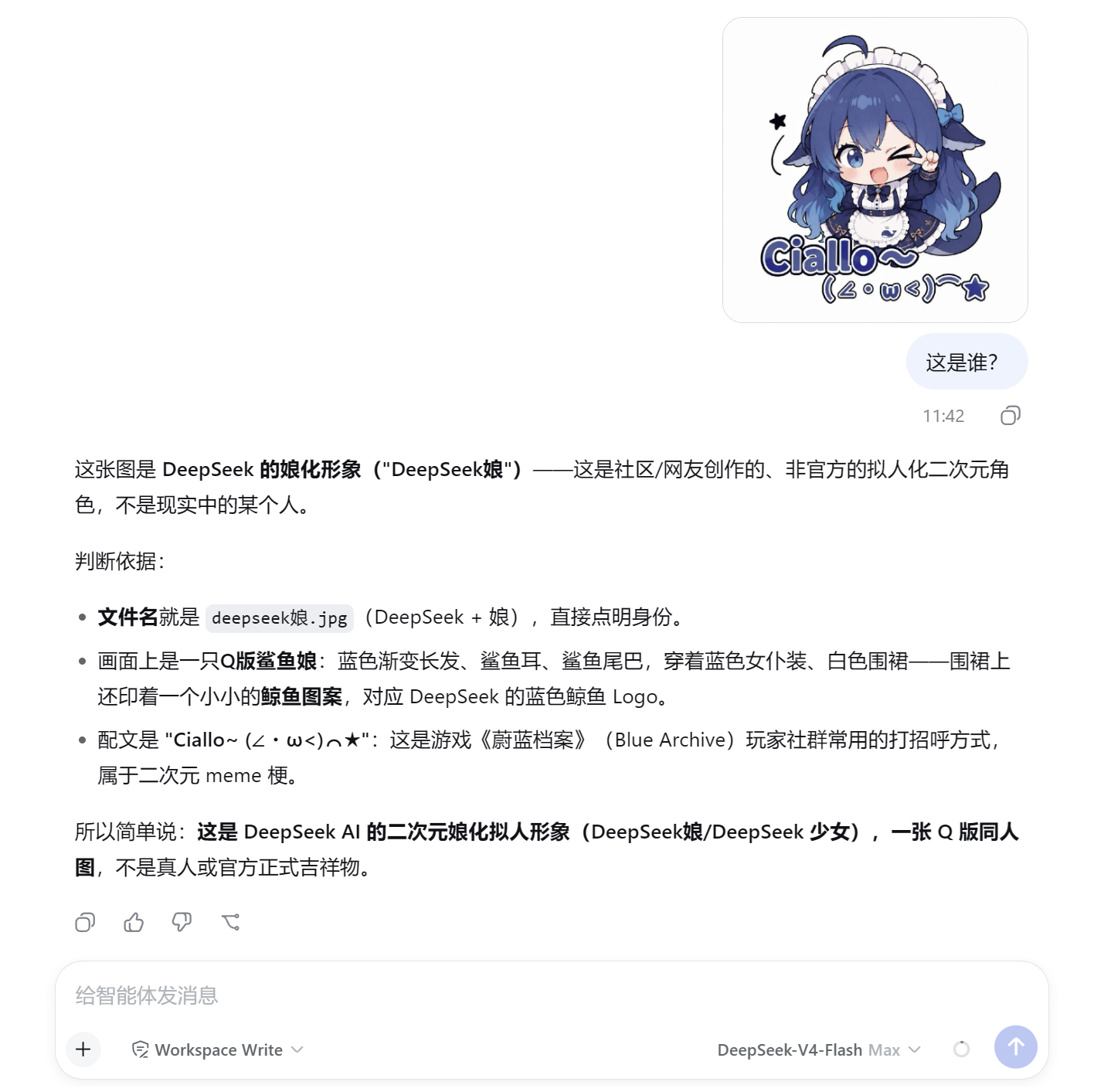
In the screenshot: a pasted image plus the question "这是谁?" — the vision endpoint identifies the DeepSeek fan-art character and walks through its reasoning, all without switching models or saving files locally.
More scenarios — real outputs from the free vision models
Three everyday capabilities, each answered by a different free vision model automatically (when one is rate limited, the plugin fails over to the next).
1. OCR — pull text out of documents and screenshots
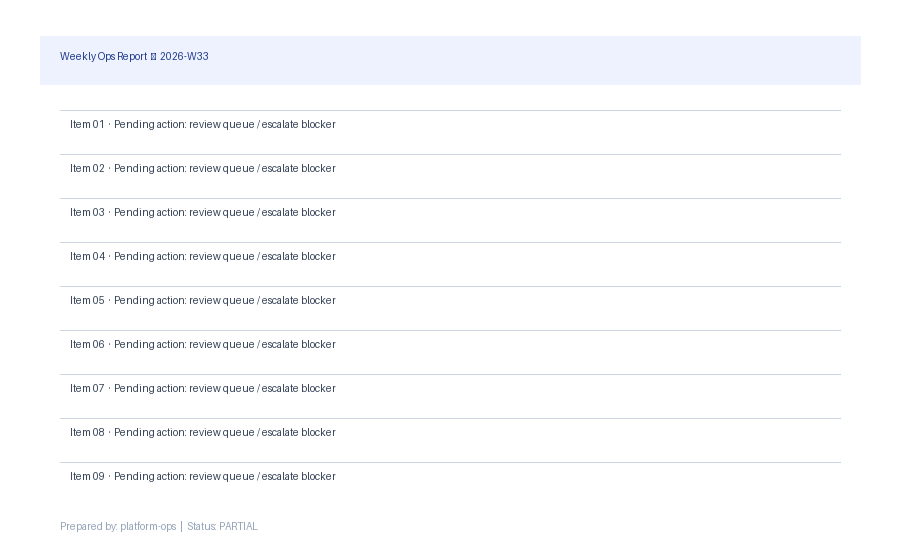
Weekly Ops Report — 2026-W33 Item 01 · Pending action: review queue / escalate blocker Item 02 · Pending action: review queue / escalate blocker … (all lines transcribed verbatim)
2. Charts → structured data your agent can use
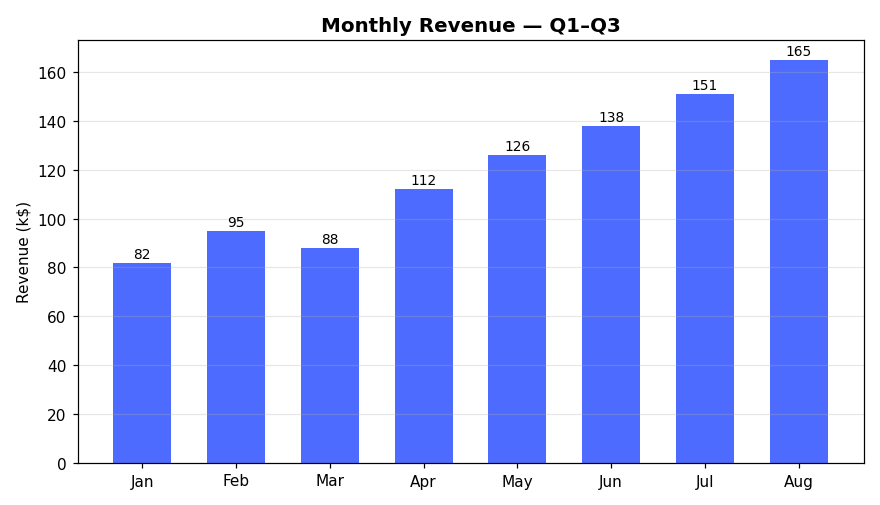
{ "title": "Monthly Revenue — Q1–Q3", "rows": [["Jan","82"],["Feb","95"],…] }
3. UI review — a designer's eye on your interface
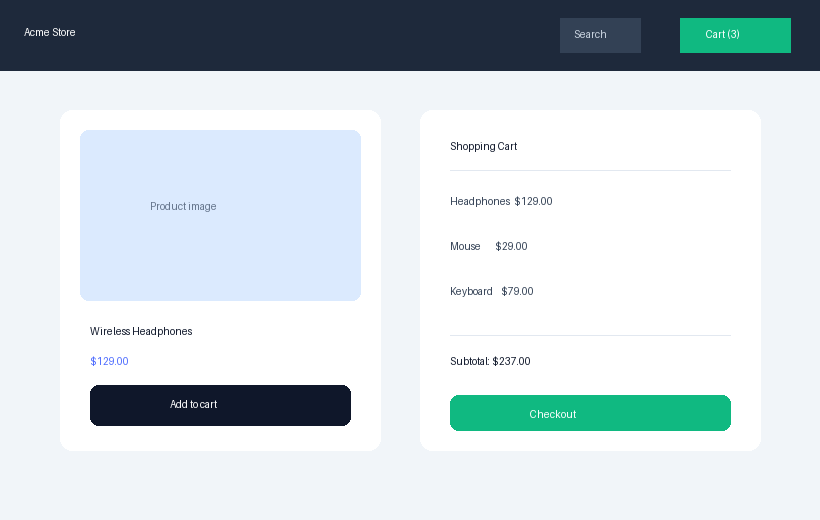
• Inconsistent button styling across "Add to cart" and "Checkout" (High) • Product name and price lack visual hierarchy (Medium) • Cart items unstructured; subtotal not visually distinct (Medium)
🚀 Quick start
# From GitHub (no npm needed)
dsh plugin --profile web add github:Harvey-Will/dsh-vision-analysis

# Or one-click from the plugin market inside the Harness
Restart the web profile and ask your agent to analyze an image by path or URL:
"Use analyze_image to OCR
/tmp/screenshot.pngand tell me what it says."
That works with zero configuration: the plugin ships pointed at a free anonymous vision endpoint (OVHcloud AI Endpoints, Qwen2.5-VL-72B) — no API key required.
Two ways to use it
1. analyze_image tool (zero config) — the agent reads a local path, an http(s) URL, or a data URL. Works immediately after install.
2. Paste images straight into the conversation (image bridge) — requires two setup steps:
- add the model to
bridgeModelsin the plugin config; - declare
imagein that model'sinputModalitiesinsettings.yaml(this is what lets the Harness admit image prompts for it).
# ① ~/.dsh/settings.yaml — under llm-deepseek.models, for each text-only model:
#    inputModalities: [text, image]
# ② plugin config:
bridgeModels: [deepseek-v4-flash]
Bring your own endpoint (optional)
config:
  apiFormat: openai          # or anthropic
  baseURL: https://api.siliconflow.cn/v1
  apiKey: your-key           # leave empty for anonymous/local endpoints
  model: Qwen/Qwen2.5-VL-72B-Instruct
  fallbackModels: [Qwen3.5-9B]   # same-endpoint alternates tried on HTTP 429
🧭 Choose the right mode
| Mode | What it does | Built-in tokens / temp |
|---|---|---|
describe | General understanding (default) | 4096 / 0.7 |
ocr | Exact text extraction | 4096 / 0.0 |
ui-review | Design review with score | 4096 / 0.5 |
chart-data | Tables + trend from charts | 4096 / 0.0 |
object-detect | Objects, people, activities | 4096 / 0.5 |
compare | Two+ images side by side | 4096 / 0.5 |
code-gen | HTML+CSS from a UI shot | 4096 / 0.3 |
debug | Endpoint connectivity report | 4096 / 0.7 |
🔧 The tool
analyze_image(image?, images?, mode?, prompt?)
image— absolute path,http(s)URL, ordata:image/...;base64,URLimages— up tomaxImages(default 2, max 4) for multi-image callsmode— one of the eight above;describeby defaultprompt— your precise instruction overrides the mode template
A targeted prompt beats a generic description:
prompt: "Extract the table as CSV">>prompt: "Describe this".
⚙️ Configuration
- id: vision-analysis
  name: dsh-vision-analysis
  config:
    apiFormat: openai          # openai | anthropic
    baseURL: https://api.siliconflow.cn/v1
    apiKey: ''                # empty → UNIVERSAL_VISION_API_KEY → local model
    model: Qwen/Qwen2.5-VL-72B-Instruct
    defaultMode: describe
    maxImages: 2              # 1-4
    maxBytes: 10485760        # per-image cap (10 MB)
    timeoutMs: 120000
    maxTokens: 4096
    temperature: 0.7
    modes:                    # per-mode overrides
      ocr:
        temperature: 0.0
All fields are editable live from Settings → 插件配置 (API key field is masked).
🔒 Security & privacy
- Your images stay private: local files are read by the tool and sent base64-embedded only to your configured endpoint; the raw bytes never enter the session log or reach the main model.
- Your key stays secret: never embedded in requests to the main model; the
debugreport only says configured / not configured — no prefix, no characters. - Prefer the environment: keep keys out of
cordis.yml— useUNIVERSAL_VISION_API_KEYor the masked secret field in Settings. - Endpoints are not sandboxed by tool approvals — only point the tool at endpoints you control, and only reference
http(s)image URLs you trust the endpoint to fetch. - Installing a plugin runs its code with your permissions — review the source before installing.
🧩 Compatibility
| Supported | |
|---|---|
| DeepSeek Harness | 0.1.0-rc.x – 0.2.0-rc.x (verified on 0.2.0-rc.1) |
| Node.js | ^22.19 || >=24 |
| Vision wire formats | OpenAI chat/completions, Anthropic messages |
| Image formats | PNG, JPEG, GIF, WebP, BMP (local / URL / data URL) |
⚠️ Community plugin — not an official DeepSeek product. The Harness API is in developer preview and may break between versions.
Built for the DeepSeek Harness community · dsh-plugin topic · awesome-dsh-plugin
Found a bug or have an idea? Open an issue — PRs welcome.
Plugins associés
dsh-web-ui (dsh-tool-describe-image)
zhu1090093659/dsh-web-ui
ipollowork
devin-axis/ipollowork
modlens
liustack/modlens
dsh-vision-router
ysr666/dsh-vision-router