deterministic-pixel-art (dsh)
chenamel/deterministic-pixel-art/integrations/dsh
Bundle di terze parti per DSH con lo Skill originale deterministic-pixel-art: pixel art JSON/PNG modificabile, rendering Python e ricolorazione di aree definite. Richiede DSH 0.2.2-rc.1 e Python 3.10+ con Pillow; compatibilità con altre versioni non confermata.
Installazione
dsh plugin --profile web add github:chenamel/deterministic-pixel-artQuesto plugin si trova nella sottodirectory integrations/dsh del repository.
README
Deterministic Pixel Art
简体中文 · MIT · Releases · AI install




Create editable pixel art with AI agents, then verify exactly what changed.
Make PNG icons, sprites, UI components and named sprite atlases from text grids, integer drawing commands or Python masks. Import existing PNGs without quantization, edit a selected region and assemble separately drawn components. Built for AI-assisted game assets and pixel UI; Minecraft styling is optional.
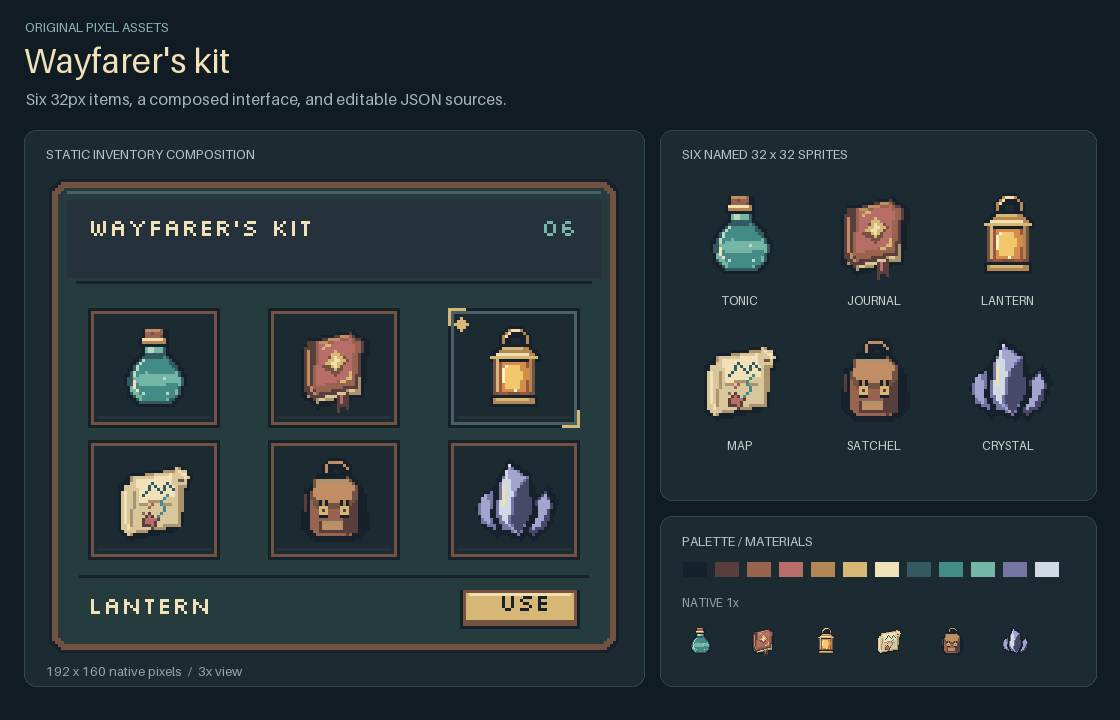
Editable travel kit · Native UI PNG · Named item atlas. Original 32×32 items and a 192×160 static UI composition, with native-size views and integer nearest-neighbor enlargements. JSON sources and the drawing script are included.
Version: v1.2.2. Download the stable Skill · What changed. This maintenance release includes optional action-icon and scene guides, a separate full-size logo kit and SkillHub packaging tools. Rendering and editing behavior remain unchanged. PNG import, named-cell replacement, exact change verification, assembly and recipes have been available since v1.2.0.
Use with an AI agent
Give an agent with terminal and file access this request:
Read https://github.com/Chenamel/deterministic-pixel-art/blob/main/INSTALL.md and install deterministic-pixel-art from the latest stable release. Check that it supports my intended task, then generate a sample PNG to verify installation.
AI installation guide: select the environment, install the self-contained Skill and run a small render. It also includes an optional npx skills shortcut for supported agents. Agents without native Skill support can run the same tools from a task-local folder.
Once installed, try: “Create six 32×32 travel items with a consistent palette and lighting, compose them into a small inventory panel, and keep the editable sources.”
For DSH, the optional third-party bundle carries this
same Skill. Use its npm instructions when dsh-skill-deterministic-pixel-art@0.1.0
is available from the official npm registry, or build and install a local .tgz.
npm installation does not require a DSH marketplace listing.
Use the Python CLI
Requires Python 3.10+ and Pillow >=10.4,<13. The requirements file pins Pillow 12.3.0 for reproducibility.
git clone https://github.com/Chenamel/deterministic-pixel-art.git
cd deterministic-pixel-art
python -m venv .venv
Activate with .\.venv\Scripts\Activate.ps1 in PowerShell, or source .venv/bin/activate on macOS/Linux, then:
python -m pip install -r requirements.txt
python src/pixel_art.py render --spec examples/gem-16.json --out output/gem.png --preview output/gem-preview.png
Expected output: a 16×16 PNG and a 128×128 nearest-neighbor preview in output/. Without Git, download and extract the checkout ZIP, then open a terminal in its top-level folder. Keep the editable spec with the PNG; existing outputs require explicit --force to overwrite.
Choose a workflow
| Task | Start here |
|---|---|
| Item set / UI composition | Six travel items, a static inventory panel and a named-item edit |
| Small grid sprite | Transparent grid, mirrored gem |
| Asymmetric sprite | 32×32 ship, pixel-art guidance |
| UI or button states | Generic panel, UI guidance, recipes |
| Existing PNG / named atlas edit | Import, replace-cell and verify |
| Image facts or review | Text inspection, review context |
| Separate chunks | Chunk contracts, four-source scene |
| Minecraft-style UI | Optional guidance |
More command examples cover scoped edits, recipes and environment recovery. The JSON v1 and Python API are available for custom generators. The browser UI demo includes actual-font and interaction checks.
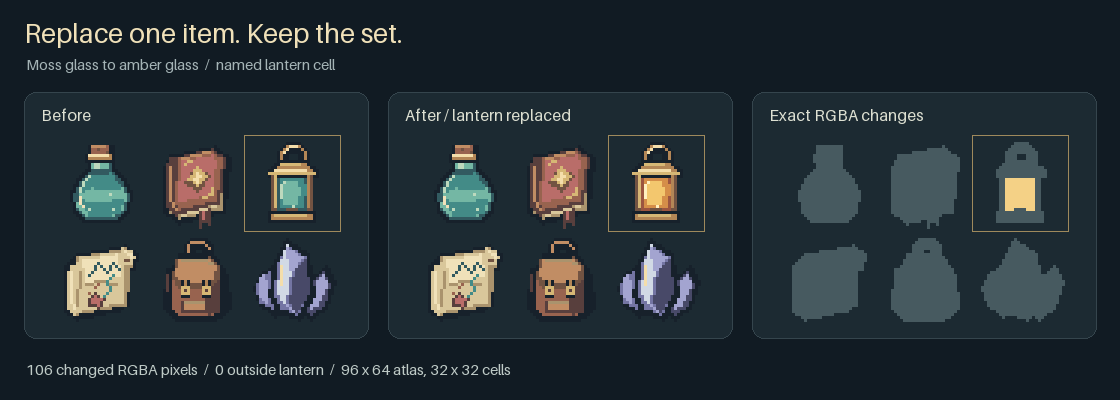
This example changes 106 RGBA pixels inside the lantern cell, zero outside. Its shape, brass frame, atlas position and the other five items stay the same. Run this named-item replacement and verification, or start with the tiny grid recolor.
Evidence and limits
- Reproducible assets: 43 reference images retain the same decoded pixels. Lossless import and scoped edits compare decoded RGBA, including hidden RGB under zero alpha.
- Tested workflows: source/package checks and Windows/Ubuntu CI cover rendering, inspection, import, editing and assembly. External agents have exercised eight task categories; original failures and incomplete records remain documented.
- Art direction stays contextual: inspect native-size assets on their intended backgrounds. Automated checks do not establish recognizability, general aesthetic gains, token savings or Minecraft game integration.
Verification details and remaining limits distinguish engineering checks, external use and visual judgment.
Help and contribute
Open an issue for a bug, installation problem or a useful missing workflow. Include the command, error, Python/Pillow versions and a small input when possible. Contribution guide.
Development
python -m pip install -r requirements-dev.txt
python -B tools/check.py
Maintain runtime code in src/, recipes in recipes/, and guidance in skill-content/. tools/package_skill.py generates the standalone Skill under skill/. Full checks create local artifacts without globally installing a Skill. Fixture provenance.
For source browsing and edits, see the source-to-Skill path map and the limited Python format gate.
License
MIT covers the code, original artwork and standalone Skill. Repository visuals use Silkscreen Regular under SIL OFL 1.1 and Fusion Pixel Font under SIL OFL 1.1. Fonts are not included in the Skill ZIP. Pillow and development-only PyYAML/Ruff are installed dependencies, not vendored files.