dsh-ds-balance
dsh-plugin-lab/dsh-ds-balance
DSH 플러그인: 사이드바 아래에 DeepSeek 계정 잔액을 표시하고 Plugins 페이지에 설정 카드를 제공합니다.
설치
dsh plugin --profile web add github:dsh-plugin-lab/dsh-ds-balanceREADME

dsh-ds-balance
DeepSeek account balance in the DSH sidebar
把 DeepSeek 账户余额放进 DSH 的左边栏




Per-version changes → Releases (one-to-one with npm versions)
A status ring is pinned to the bottom of the sidebar; clicking it shows the actual balance figures. To change settings, open the Plugins page in the sidebar and pick this plugin. The key and the account both follow the official Models page, and the endpoint is the official one — none of the three is set here.
Data and credentials
The balance is read directly from the official DeepSeek API, not estimated from usage.
- The credential is resolved through DSH's credential channel; the plugin stores no key of its own: a key never lands in a settings file.
- The UI only ever sees a head-and-tail mask (
sk-cf08d*****3b84, the same shape the DeepSeek platform console uses); the full key never crosses the wire, is never logged, and is never written to any file of this plugin. - Only
api.deepseek.comis contacted; no other traffic is proxied or forwarded. - Balance snapshots are stored per credential — changing the key starts keeping records afresh, so old figures are never mixed in.
Getting started
Prerequisites: DSH on its current RC line (specify @next when installing); Node >= 20. The only source for the compatible range is engines.dsh in package.json.
-
Install the host. Neither
latestnoralphais the line we declare, so specify the version line:npm install -g @deepseek-ai/dsh@next -
Install the plugin:
dsh plugin --profile web add dsh-ds-balance -
Start (or restart)
dsh --profile web; the balance entry appears at the bottom of the sidebar.
From source: git clone, then pnpm install && pnpm run build, then dsh plugin --profile web add "$PWD" — the same restart applies.
That pnpm install cannot be skipped: under a path install the repository supplies its own dependencies, and missing them makes the plugin show as "not running".
What it shows
Three surfaces, each with one job:
| Surface | Where | What it does |
|---|---|---|
| Status ring | Pinned to the bottom of the sidebar | See at a glance how much is left and how close you are to the warning threshold |
| Balance popover | Click to expand | See the total, the granted / topped-up split, and how many minutes old the data is |
| Settings card | This plugin's details page under Plugins | Check both ways of reading your balance, and set the currency, the warning thresholds and the refresh cadence |
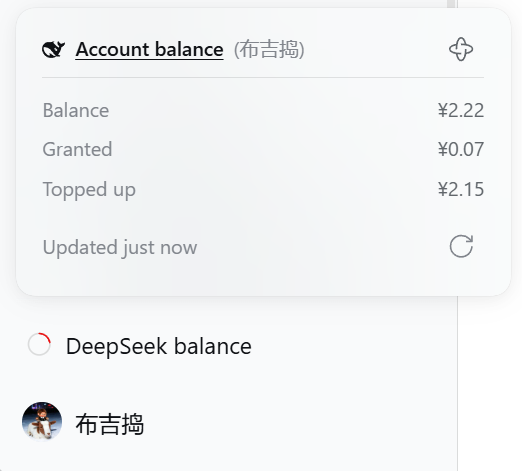
The entry is pinned to the bottom of the sidebar; clicking it opens the balance popover: the total, the granted / topped-up split, how many minutes ago the data was, and manual refresh at the bottom right.
The ring itself is "what is going on right now", five states you can tell apart at a glance:
| The ring | Meaning | What you do |
|---|---|---|
| Coloured ring + an arc | There is a balance; the colour says more or less | Read the number |
| Grey ring + a rotating gap | Fetching, no result yet | Wait |
| Grey ring + a + in the middle | Not connected to your account yet | Configure it |
| Grey, empty ring | Connected to your account, which simply has no balance | Nothing |
| Red ring + a cross in the middle | No usable number here | Check it |
What each thing is
| Thing | What it means |
|---|---|
| Arc length | The balance as a share of that currency's warning threshold, capped at a full circle |
| Colour | State only (normal / low / critical), never the amount; the critical threshold only sets the colour and takes no part in drawing the ring |
| The mark in the middle | + means not connected yet; go configure; cross means no usable number here — it could not be read, or it was read but the account cannot be used |
| Hover text | The amount when the number is trustworthy, that state's own line otherwise; collapsed and expanded say the same sentence |
| The source bracket | To the right of the popover title: which credential this number came from — a head-and-tail mask such as sk-cf08d*****3b84, or the signed-in account's name |
| Data freshness | The "how long ago" in the popover, counted from the moment the data arrived |
| Manual refresh | Cooldown applies; the cooldown restarts when the refresh finishes, and the seconds on the popover are the real ones left |
| Settings groups | Connection / Display / Thresholds / Refresh |
Configuration
The card lives on the Plugins page: sidebar Plugins → "Installed" → click the DeepSeek Balance card to step into its details page.
The configuration area is on the details page, right below the description, ready to edit:
- Connection — read-only: the two ways this plugin can read your balance, what each one is using right now, where that credential comes from, and a Test button that really calls the provider.
- Display — which currency amounts use, or let it follow the account.
- Thresholds — two lines per currency: a warning threshold and a critical threshold. Within one currency the critical value must stay below the warning value; saving is blocked otherwise.
- Refresh — the server refresh interval, the UI poll interval and the manual refresh cooldown; the defaults suit most setups.
Saving applies immediately; there is no need to restart DSH.
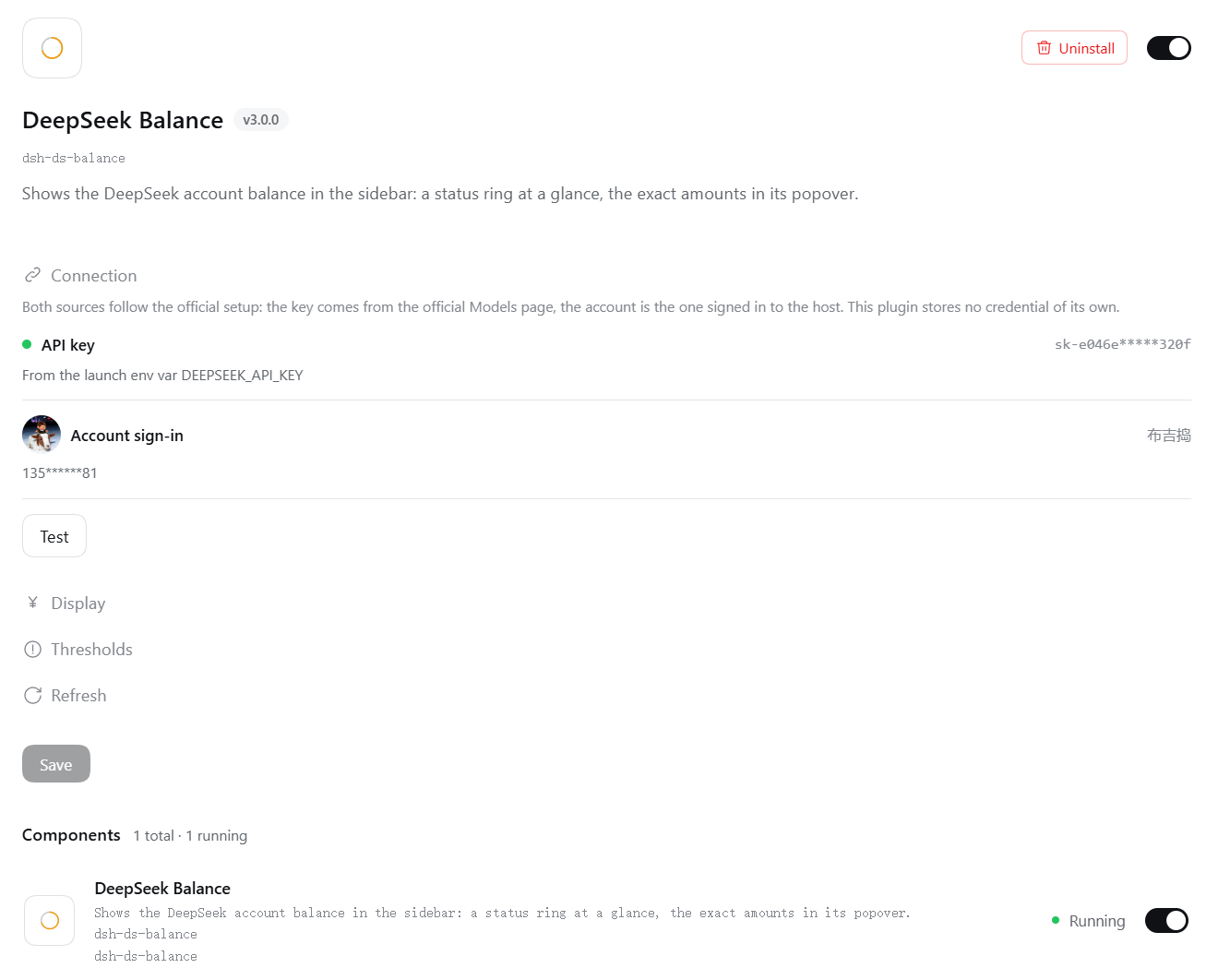
The configuration area on the details page. A group with an invalid entry expands itself.
Upgrade notes: the keys these settings are filed under changed once with a host upgrade, and old values are not migrated; after upgrading, fill the four groups in again as above. Separately, version 3.0 removed two settings: a hand-written
apiKeyand a custombaseUrlnow have no effect — the credential is the one the official Models page holds, and the endpoint is the official one. Remove them from your settings file if you had set them by hand.
Version compatibility
- Which host version is required: whatever
engines.dshin package.json declares — that range names the host lines this plugin covers, ceiling included; anything past the ceiling is not supported. If you need the settings UI, upgrade the host to the newest line:npm install -g @deepseek-ai/dsh@next. - The declaration enumerates lines explicitly: only the lines listed in
engines.dshare promised. A new line past the ceiling becomes supported only after it has been measured in the compat.yml matrix and written into the declaration; it does not follow the host automatically. Patch releases inside a listed line (prereleases included) need no declaration change. - Compatibility is measured: weekly, compat.yml runs the tests on the declared host line, plus a separate step checking the declared range still covers it; a red committed line opens a tracking issue. Verdicts and handling: Compatibility.
License
MIT.
Contributing
Bugs and requests go to the repository Issues.
Maintainer's document map → AGENTS.md.