fuli (dsh-connector)
jevonscode/fuli/packages/dsh-connector
Подключает DSH к локальной установке FULI: каждый ход получает запись задачи FULI (сохранённые предпочтения и факты проекта) как контекст; завершённый ход закрывает задачу FULI, инструменты MCP FULI подключаются. Требуется FULI 0.27.0 или новее на том же компьютере.
Установка
dsh plugin --profile web add github:jevonscode/fuliЭтот плагин находится в подкаталоге packages/dsh-connector репозитория.
README


FULI is a plugin that lets your tasks move across all your Agent clients: Claude Code, Codex, OpenCode… They share one memory, one taste and one FLA team, so you use whichever fits and switch without explaining everything again. It doesn't replace your clients or change what you set up: your models, subscriptions, sessions and settings stay as they are. FULI plugs in as its own entries only, and removing it from a client in the console, or uninstalling FULI, takes those entries out again.
English · 简体中文 · Website · Download





Automate everything that can be automated, and hand the execution to your FLAs. You make the calls and lead the way: take your FLA crew through the hard parts, or go grab a coffee and enjoy the compound interest of your own experience.
Project profiles and FLA hiring run on their own if you'd rather not think about them; your only job is to set the direction. FLAs carry context and tools across every Agent client, and both top-tier and lighter models pull their weight here.
Each task gets only the small slice it needs. Your judgment and experience keep adding up, so FULI knows you better the more you use it. That is the compound interest. Little by little, what your AI makes starts to carry your taste.
What FULI does
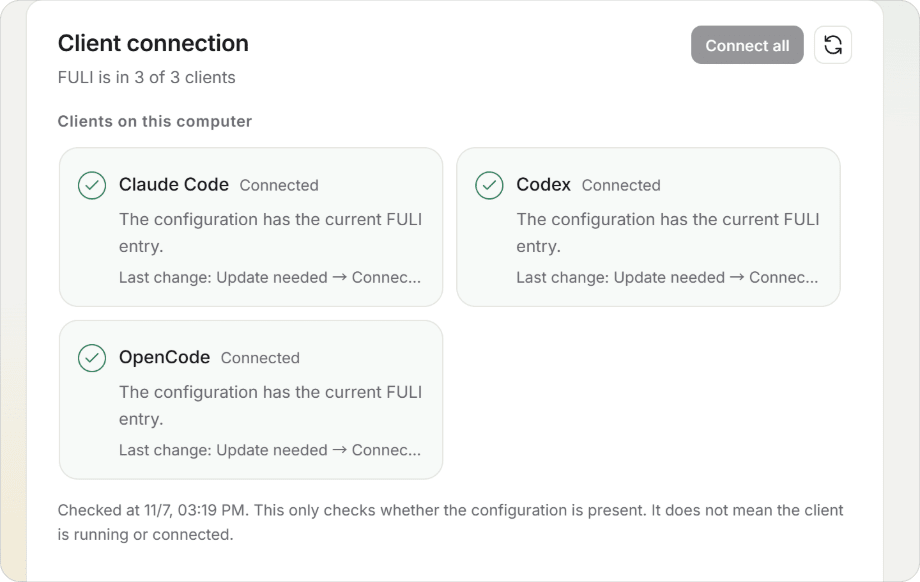
One memory for every clientConnect Claude Code, Codex, OpenCode, Cursor, DeepSeek Harness and more with one click. A rule you stated in one of them is there in the others. |
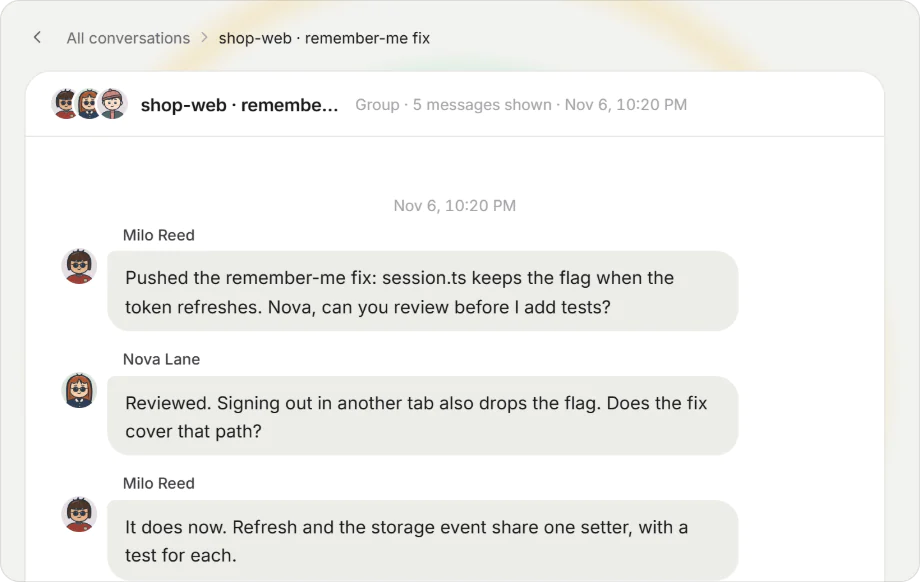
A team of FLAs, talking at a roundtableEach project gets a lead Agent (an FLA) with a name, a job and its own working memory; several FLAs form a group when the work needs it. They review, test and hand work over to each other in the roundtable, and you can read every turn. |
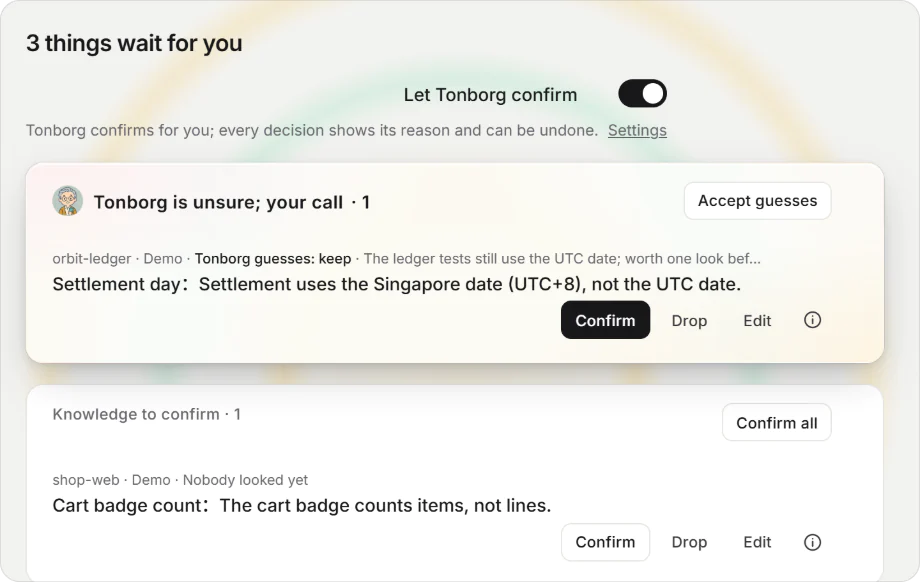
New knowledge waits for a yes. Switch on Tonborg and it confirms everyday items by your preferences, asks you when it is unsure, writes down each reason, and learns from a thumbs up or down.
|
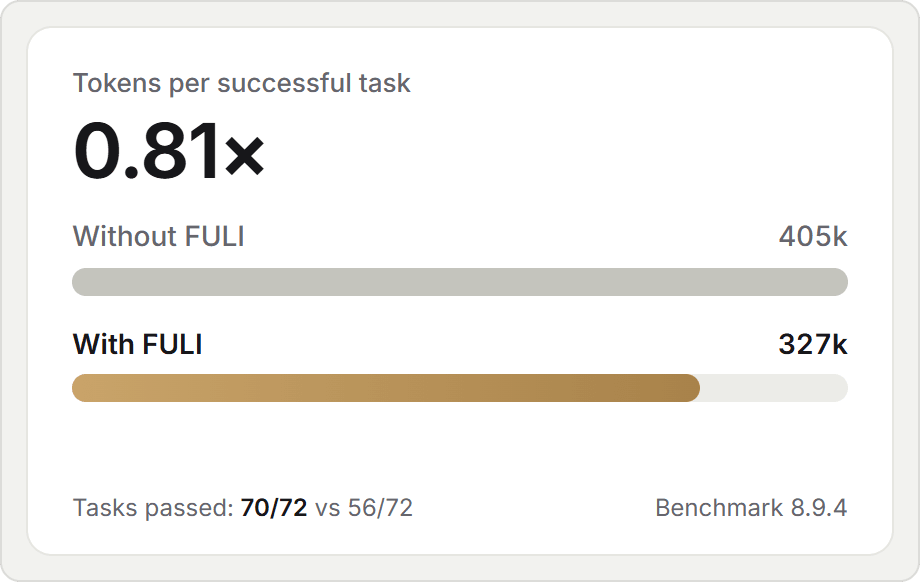
Fewer tokens per finished taskMeasured on 0.25.0: a successful task with FULI takes 0.81× the tokens of the same task without it, and 70 of 72 tasks pass. The saving comes from facts that live in your words, not in the code. |
Four FLAs come built in:
 Jefa is your project manager. |
 Bole hires FLAs and staffs each project. |
 Tonborg confirms for you and recommends clients and models. |
 Astro takes conversations that belong to no project yet. |
How it works
flowchart LR
    U[You] -->|ask inside a project| A[Agent client]
    A -->|task starts| F[FULI on your computer]
    F -->|preferences and a small recall| A
    A -->|look up more if needed| F
    A -->|write back what is reusable| F
A task starts with the preferences in effect and a few related facts. The Agent looks up the rest when it needs it, and at the end writes back only what the next task can reuse.
Install
FULI runs a small service and a console on your own computer.
Desktop client (recommended). Download from the latest release:
| System | File |
|---|---|
| Windows | FULI-Setup-<version>.exe. No terminal and no administrator rights. |
| macOS (Apple silicon, 13.5 or later) | fuli-macos-arm64-<version>.dmg. Drag FULI onto Applications. |
On first launch FULI finds the AI clients on this computer and connects each with one click. The installers are not signed yet, so each system holds FULI back once; Install and run shows the two clicks that let it through.
Servers, VMs and the cloud. Without a desktop, and on Intel Macs and Linux, install with npm (Node.js 24.12 or later):
npm install --global fuli-context
fuli setup
fuli open
fuli setup shows its plan and changes nothing until you confirm.
The console
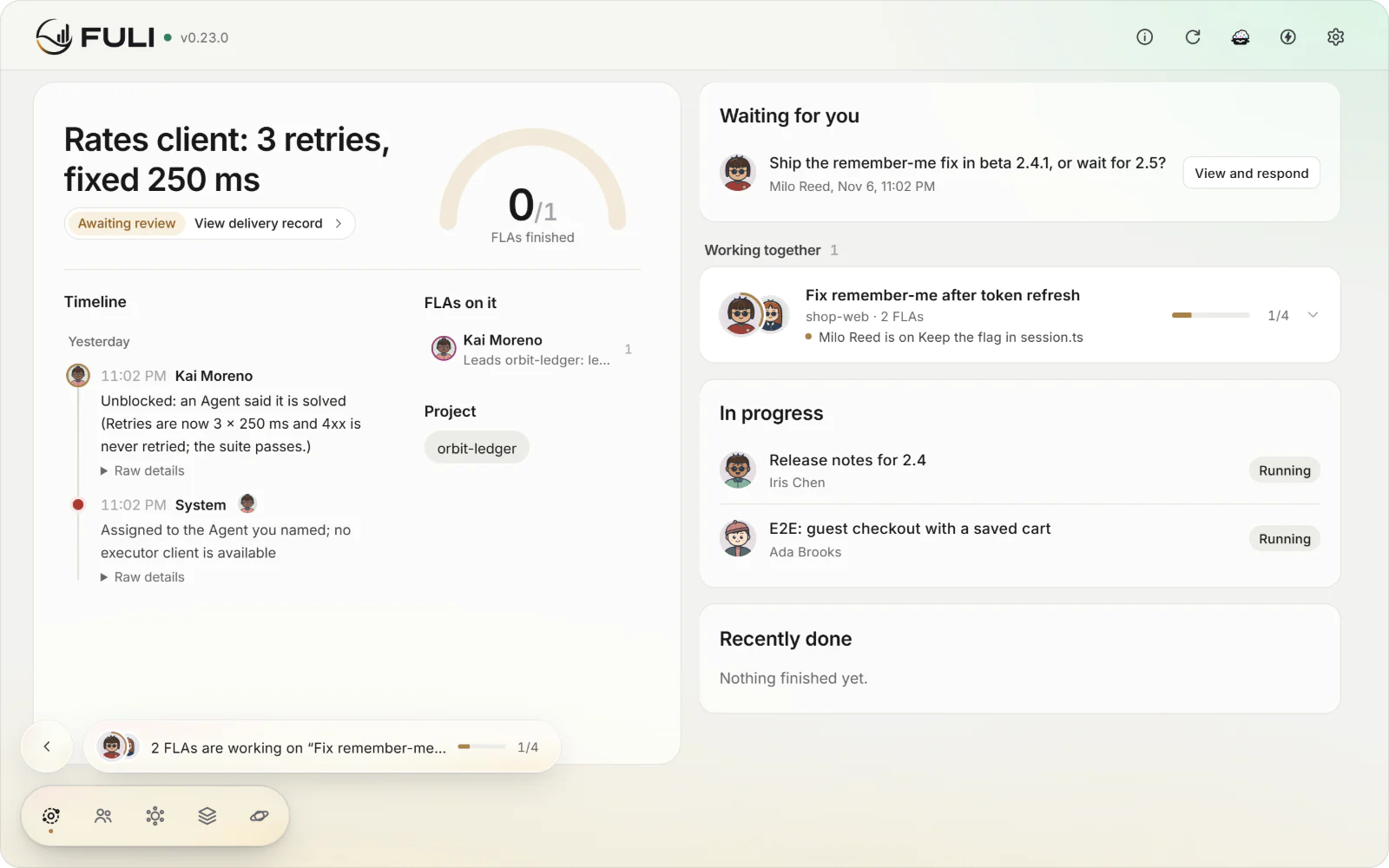
The console opens on what matters now: questions waiting for you, the FLAs at work and what they
finished. Everything runs on 127.0.0.1; there is no account and no sign-in.
FAQ
Where is my data?
On your computer. Your personal graph and conversation records stay local. External knowledge (Notion, Lark, MCP or RAG sources) is read-only: FULI never writes back.
Which clients work with FULI?
Claude Code, Codex, OpenCode, Cursor, DeepSeek Harness, Claude Desktop, Gemini CLI, Qwen Code, Kiro
and Antigravity connect from the console (Settings › Clients) with one click. Other MCP clients run
fuli connect for a standard configuration. What each client supports, such as capturing
conversations, is in Connect a client.
How do I call one of my FLAs?
Start a message with #FLA and its name. In Claude Code, OpenCode and Cursor you can also type
/fla and pick one from the menu; in the Codex app, type /prompts:fla. Turn the menu off in Settings › Clients.
How does FULI save tokens?
A session starts with only the preferences in effect and a few related facts; the Agent looks up the rest when it needs it. Facts that only you know, such as a sandbox URL you mentioned once, come back later without a search through the code. The numbers are in the benchmark (section 8.9.4).
Do the built-in FLAs cost extra?
By default the built-in FLAs work inside your client's session. Only when you connect a model for them do they use their own model, so nothing spends money behind your back.
Do I need to connect a model?
No. Without one, FULI finds knowledge by its words, retrieval terms and relations. To find it by meaning, open Models and usage and choose Built-in models on Semantic search: FULI downloads a small model (GTE Small 中文 is recommended) and runs it on this computer. It needs no endpoint and no key, and your knowledge stays on the computer.
How does FULI get to know a project I already have?
On the project's page, click Organise and pick one of your connected AI clients. Astro reads the project with that client's own model and fills in what is missing. You can add where the existing material is: folders, files or links. When several projects share a preference, it asks whether that preference should apply everywhere.
How do I take FULI out of a client?
In the console, open Settings › Clients and choose Remove for that client. fuli uninstall and the
Windows uninstaller do the same for every connected client. FULI takes out only its own entries
(the MCP server, hooks, Skills and its permission lines), backs up each file first, and keeps a
Skill you edited yourself. Your FULI data stays until you delete it. On macOS, remove the clients
in the console before you move FULI.app to the Trash: the Trash alone leaves those entries in place.
I installed FULI with npm before. Is it installed twice now?
The program is, your data is not: both use the same data folder. When the desktop client starts, it runs the one FULI
service and points your connected clients at itself. The console then offers to remove the npm copy with one click;
until it is removed, a bare fl in a terminal is still the npm version.
Details
Who decides what FULI keeps?
You do: AI looks things up and does the work, and humans retain final authority. Each task ends
with one check that keeps only reusable knowledge. A preference an Agent guessed counts once you,
or  Tonborg within the autonomy you set, confirm it. Older answers stay in the history with their
source and reason.
Learn more
| Topic | Read |
|---|---|
| Install details, CLI commands, ports | Install and run |
| Principles and what is stored where | How FULI works |
| Connecting each client | Connect a client |
| Skills, hooks and MCP tools | Agent integrations |
| Notion, Lark and other knowledge bases | External knowledge |
| Tonborg and autonomy | Judgment and autonomy |
| The roundtable | Roundtable |
| What is proven so far | Capabilities and limits · Measured report |
| Running the source | Develop and verify · Contributing |
The FULI mark and wordmarks come from the FULI 复利 brand system; see brand/README.md.
Licensed under Apache-2.0.