dsh-task-dag
leemancheung/dsh-task-dag
由投影驱动的会话子代理与持久工作流实时 DAG:状态与节点导航、深层链路确定性布局、适应/平移画布,以及当前会话内节点拖动重排。
安装
dsh plugin --profile web add github:leemancheung/dsh-task-dagREADME
dsh-task-dag
A live orchestration topology for DeepSeek Harness Web.
Inspect delegated Sessions, Agent Teams task dependencies and communication, and durable Workflow runs.




English · 中文
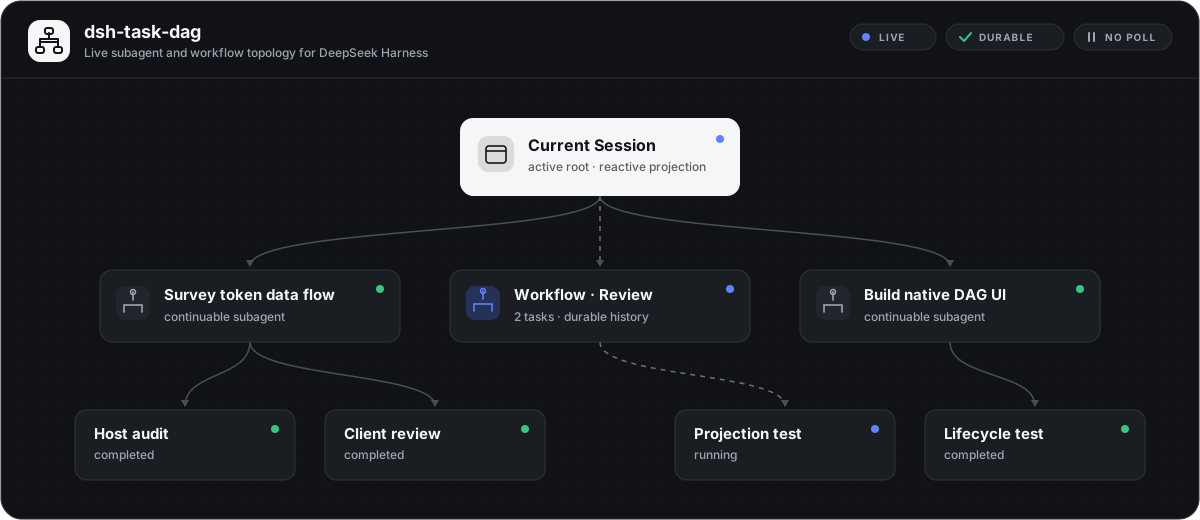
At a glance
dsh-task-dag turns DSH's existing Client projections into three focused graph views. It keeps no parallel orchestration database and sends no polling requests: Session, Team, and Workflow state is rebuilt from the projections DSH already owns.
| View | What it shows |
|---|---|
| Overview | Current Session, ordinary delegated subagents, Team members and tasks, Agent communication, and Workflow runs. |
| Agent Teams | Team Lead and teammates, task assignment, the real shared-task blockedBy DAG, and an optional communication overlay. |
| Workflow | Durable Workflow run, phase grouping, and started member Sessions. Phase edges are presentation grouping, not script dependency edges. |
Additional behavior:
- Agent communication: directed channels aggregate message count and queued delivery state. Select a channel to inspect the latest 100 message records with quiet/wakeup and delivery metadata; only text blocks are previewed, while other block types are counted.
- Agent runtime metrics: hover or keyboard-focus a teammate, subagent, or Workflow member to see the latest request Provider, model, concrete DSH effective reasoning-effort ID when one was durably recorded, its recorded source, and whole-Session cumulative input, output, cache, turn, and step totals. An effort materialized by DSH from Adapter defaults is labeled
Adapter default; otherwise a recorded effort is labeledRequest configwithout claiming whether it came from a preset, plugin, middleware, user choice, or an older Adapter. When the request omitted effort, the actual field remainsNot recorded; an exact public model default may appear on a separate reference row and is never presented as proof of that historical call. GPT-5.6 Terra's OpenAI API model-page reference ismedium; the UI explicitly says this is not a record of the request. - Direct navigation: selectable teammate, subagent, and Workflow member nodes open the real Session when it remains visible in the Session list.
- Workflow definition preview: select a Workflow run node to inspect the exact JavaScript orchestration body, definition summary, usage guidance, and declared phase metadata from its matching
workflowtool call. The native code block can copy the full script; runtimeargsare deliberately not projected. - Canvas control: fit the whole topology, pan the original-size canvas, or drag nodes while connected edges update.
- Per-view layout: manual positions survive view switches and reopening the panel for the current Session. Switching Sessions, refreshing the page, or restarting DSH restores deterministic automatic layout.
- Native presentation: the panel uses DSH semantic theme tokens, accessible status labels, edge line styles, responsive communication details, and reduced-motion behavior.
- Lifecycle safety: Team projection, locale, styles, and Slot UI are all owned by the Cordis plugin lifecycle.
Live screenshot
Captured from a running DSH Web Session with labels anonymized. The panel, controls, layout, and graph presentation are the actual linked plugin UI.
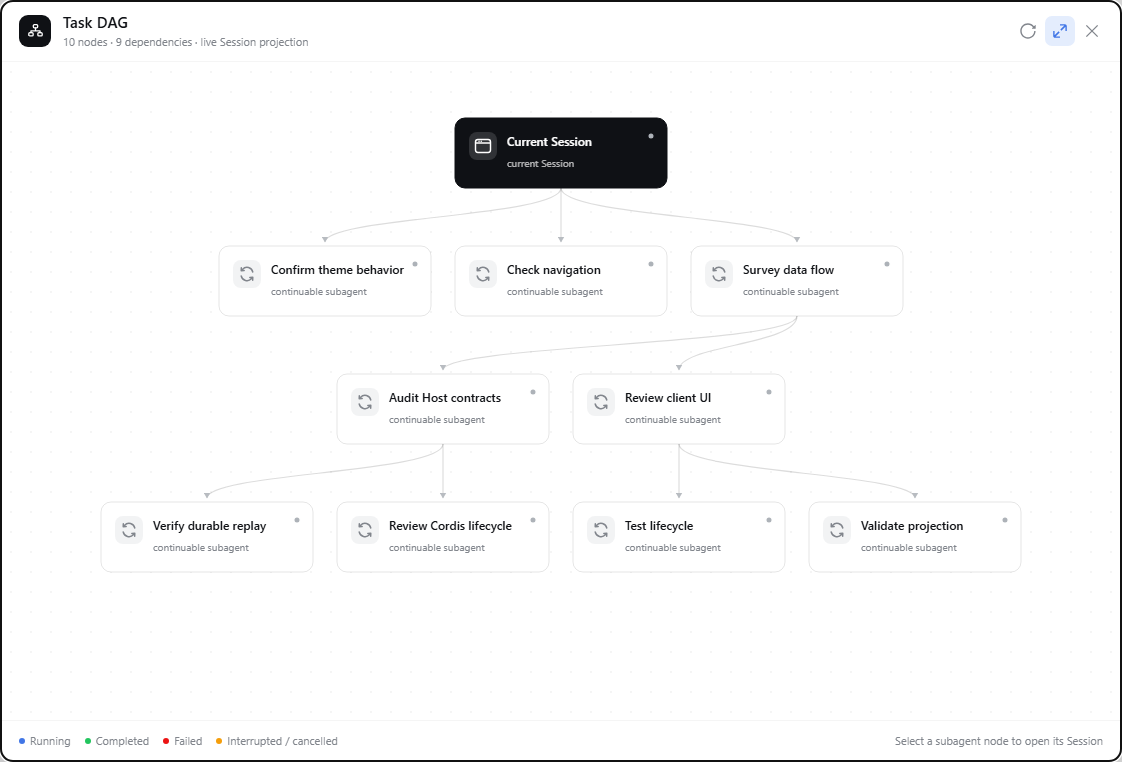
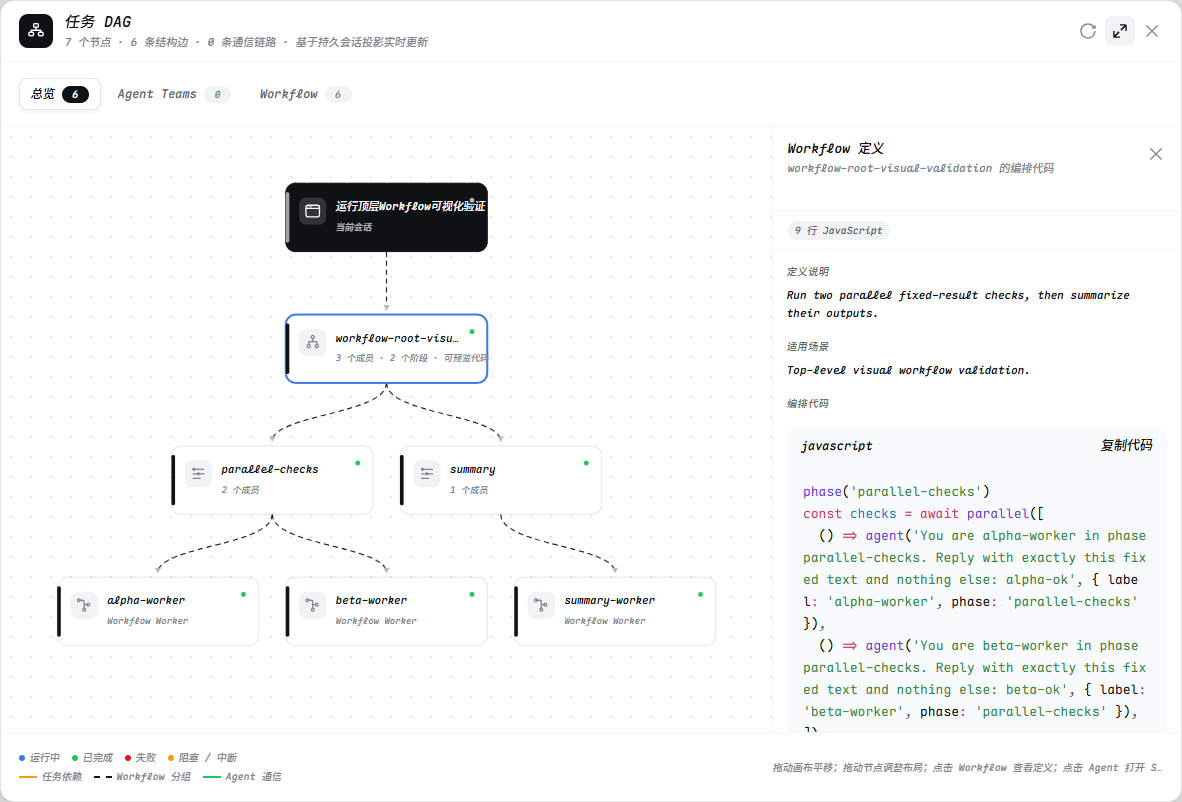
Select a Workflow run to open the v1.4.0 definition inspector beside the live topology:
Verified live scenarios
The v1.4.0 UI has been exercised in real DSH Web Sessions in addition to the model and jsdom checks:
| Scenario | Real runtime activity | Observed graph behavior |
|---|---|---|
| Agent Teams | A Team Lead created two active teammates, four durable tasks spanning completed, active, and blocked states, a real blockedBy dependency, and three directed communication channels. | The Agent Teams view rendered member, assignment, and dependency edges; queued and delivered channel states remained distinct; selecting a channel opened its quiet/wakeup message timeline. |
| Workflow | A top-level Session invoked workflow to run workflow-root-visual-validation: parallel-checks started alpha-worker and beta-worker, then summary started summary-worker. | The Workflow view rendered one run, two phase groups, and three member Sessions as 7 total nodes and 6 structural edges. It updated from summary running to the complete outcome without a refresh; selecting the run recovered and copied the real 9-line orchestration script. |
The Workflow fixture returned alpha-ok, beta-ok, and summary-ok; the browser console reported zero errors during both checks. The Session-header badge counts related topology nodes and excludes the current Session, while the dialog total includes that root. A badge of 6 therefore corresponds to 7 nodes in the open Workflow graph.
To reproduce the Workflow check, create a new top-level Session, invoke the workflow tool from that Session, then open Task DAG → Workflow in the same Session. If Workflow is invoked inside a subagent, open that child Session first; the parent graph correctly shows the child as delegated work rather than adopting its internal Workflow run.
dsh-task-dag visualizes Agent Teams records but does not install or create the Agent Teams runtime. At the time of this release, Agent Teams is an upstream experimental capability and is not mounted by every stock DSH Web profile. The Host composition must emit the supported Team events before the Agent Teams view can contain data.
Install
The 1.5.1 source is interface-compatible with DSH 0.1.2-rc.1 and uses that release's Session Controller, UI Renderer, and uiConversation.events registry. The verified scope is recorded in docs/compatibility-0.1.2-rc.1.md. Missing provider, model, or reasoning-effort values remain visibly missing rather than being replaced with defaults.
dsh plugin --profile web add github:LeemanCheung/dsh-task-dag
Restart the current DSH Web process once after the first installation, then refresh the page. The Task DAG action appears in the Session header.
The source version is 1.5.1; its release tag has not been published. For a pinned installation, use this existing commit:
dsh plugin --profile web add github:LeemanCheung/dsh-task-dag#8fe407f525823091523cd31bc940342feb83b7d1
Using the graph
| Action | Result |
|---|---|
| Select Task DAG | Opens the current Session's graph and refreshes observed subagent catalogs. |
| Choose Overview, Agent Teams, or Workflow | Changes topology without losing the current page's manual layout for the other views. |
| Toggle the message icon | Shows or hides Agent communication without changing task layout. |
| Select a communication edge | Opens its directed message timeline. Enter and Space work from the focused edge. |
| Select a Workflow run node | Opens its read-only definition inspector with metadata, declared phases, full JavaScript body, and copy control. Enter and Space are supported. |
| Select an Agent node | Opens its Session when it is available in the Session list. Enter and Space are supported. |
| Drag empty canvas / drag a node | Pans the original-size canvas or rearranges one node while edges stay synchronized. |
| Toggle fit mode | Switches between the whole-graph overview and the original scrollable canvas. |
| Refresh | Refreshes subagent catalogs; Team and Workflow nodes remain projection-driven. |
Press Escape or select close | Closes the panel and restores focus to the trigger. |
The dialog does not trap focus and does not provide keyboard dragging for the panel, canvas, or nodes.
Architecture
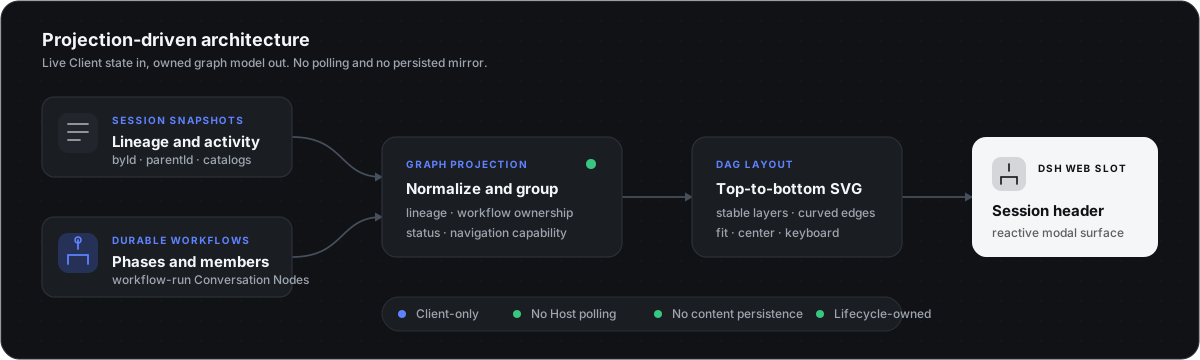
The plugin combines six durable projections and Client-facing sources:
- The Host-side
taskDagAgentMetricsSession projection folds only the latestrequest/headerProvider, model, concrete effective reasoning-effort ID, and theadapterDefaults.reasoningEffortsource marker. DSH'stokenUsageandsessionStatsprojections provide whole-log cumulative values. SessionListState.byIdandparentIdprovide ordinary subagent lineage.SessionListState.subagentsByParentprovides labels, modes, activity, and catalog health.- Durable Agent Teams events provide members, shared tasks, queued messages, and delivery acknowledgements.
workflow-runConversation Nodes provide Workflow runs, phase groups, members, and outcomes.- Matching
tool-callConversation Nodes provide the already-visible rawworkflowinput. The plugin parses only its script and definition metadata, then associates it with the nearest same-name run in event order.
A package-owned hidden Conversation Node Definition projects each supported Team v1 event into a small snapshot node. The graph model folds the latest task/member state, matches message delivery acknowledgements, aggregates directed communication channels, constructs explicit multi-parent edges, and applies a deterministic non-recursive topological layout. The UI renders the result in conversation.session.header.actions.
There is no model prompt contribution, model tool, Host RPC endpoint, network request, polling loop, or second persistence layer.
Projection boundaries
- Agent Teams writes the task board and message journal into the Team Lead Session. A teammate Session cannot read that log across Sessions, so its Team view links back to the visible parent Session instead of adding a cross-Session Host RPC.
- Runtime metrics come from registered whole-log projections. Token values are cumulative. Provider, model, and reasoning effort are the latest values in DSH's normalized request header; they are not reasoning-token counts or raw Provider wire parameters.
Adapter defaultis shown only when the durable header records that marker.src/reasoning-defaults.jscontains source-attributed public references for exact routes, but those references never replace a missing request value or service response. blockedByis the only edge presented as a real Team task dependency. Communication can be bidirectional and cyclic, so it is an overlay and never participates in DAG layering.- Persisted Workflow phases are progress groups. They do not reveal the complete internal
parallel()orpipeline()control flow and are not labeled as execution dependencies. - Definition preview requires the matching
workflowtool-call head to remain in the current Session window. If compaction or truncation removes it, the durable run topology remains visible and the inspector explains that the definition is unavailable; the plugin never guesses or reconstructs missing code. - Ordinary lineage must trace to the current Session through
origin: "subagent". Orphans, missing-parent chains, and lineage cycles are ignored. Malformed dependency cycles receive a deterministic fallback layer rather than blocking rendering. - The same Session may appear in Team and Workflow contexts because those nodes communicate different ownership semantics; all appearances navigate to the same Session ID.
Security and permissions
This is a read-only visualization plugin. The Host half folds only Provider, model, reasoning effort, and its source from request/header into a small Session projection; the Client may add a clearly separated reference from the audited static Provider-default table. The plugin does not read workspace files, execute commands, open network connections, register model tools, or persist new Session content or credentials. Message previews and Workflow code come only from records already visible in the current Session, and appear on demand after the user selects a communication channel or Workflow run. Runtime Workflow args, system prompts, and tool schemas are excluded from the metrics projection.
See SECURITY.md for the reporting policy and complete trust boundaries. Private vulnerability reporting is enabled for the repository.
Development
The runtime package declares Node.js 20+. For development and the pinned jsdom test stack, use Node.js 20.19+, 22.13+, or 24+; CI currently runs Node.js 22.
npm install
npm run check
The check pipeline validates all source syntax; tests request-config, Adapter-default, separated public-default references, unrecorded, legacy, and contradictory reasoning evidence, Team event projection, task and communication folding, Workflow definition extraction and run matching, Workflow grouping, arbitrary DAG layout, deep lineages, and cyclic fallback; rebuilds the Host and browser artifacts; then runs jsdom interaction coverage for three views, pointer and keyboard Agent metrics, focus-after-scroll, narrow viewports, non-navigable Agent nodes, communication timeline, Workflow code inspector, canvas controls, per-view node positions, and Session navigation. CI rejects drift in both committed Host and browser output.
These are pure-model and jsdom checks rather than a complete DSH Web E2E environment. Before release, the linked package is additionally verified against the running Web profile in a real browser.
scripts/build.mjs copies src/index.js and src/reasoning-defaults.js into the Host lib/ entries, then embeds the same reasoning-default resolver plus src/team-projection.js, src/workflow-definition.js, src/graph-model.js, src/client.js, and src/style.css into committed lib/client.js. Do not edit generated files directly.
Troubleshooting
| Symptom | Check |
|---|---|
| Task DAG is missing | Confirm this is the Web profile, restart dsh web, and refresh the page. |
| Team view is empty in a teammate Session | Open the Team Lead/parent Session; the shared task and message journal lives there. |
| Team view is empty in the Team Lead Session | Confirm the Host profile mounts an Agent Teams provider and has emitted supported Team events; this visualization plugin does not create Teams. |
| Workflow view is empty | Open the exact Session that invoked workflow. A parent Session does not project a child Session's internal Workflow run. |
| A Workflow definition is unavailable | The durable run survived but its matching tool-call head is outside the current Session window. Open an untrimmed source Session when available; missing code is never reconstructed. |
| A node cannot open | Only Sessions that remain visible in DSH's Session list are navigable. |
| Child status or labels look stale | Select Refresh to refresh observed subagent catalogs. |
Remove
dsh plugin --profile web remove dsh-task-dag
License
MIT © LeemanCheung